

Practical PowerShell Processes with SQL Change Automation
This article uses the PowerShell cmdlets of SQL Change Automation (SCA), formerly DLM-Automation, to take the source code of a database from a directory, validate it, document it and then create a NuGet package of it. Up to this point, the script uses a very similar approach to that described in SQL Change Automation with PowerShell Scripts and Deploying Multiple Databases from Source Control using SQL Change Automation.
In these previous articles, we simply placed the validated database source and the documentation into a NuGet package and used the Sync-DatabaseSchema to synchronize the schema of a target database with the validated source and saved the migration script that was generated to the same directory in which we stored the NuGet package.
This article now takes forward the story of the NuGet package. I show how to:
- Extract the documentation from the NuGet package, and install it in a website.
- Perform code analysis of the validated source, using the command-line version of SQL Code Guard, and display a report that lists all the problems in the code, and their locations, as an HTML page.
- Use the NuGet package as a Source, to produce a migration script, and then use it to upgrade a target database to the same version as the one defined by the NuGet package.
- Save the migration script, and a browser-based report of what has changed on the target machine.
This article, along with the previous two, are designed to make it easy to put together a script for special purposes. For a full explanation of some of the more utilitarian parts of the script, please refer to the previous articles.
Working with NuGet
Before we start, a word about NuGet. A NuGet package is a single ZIP file, with the .nupkg extension, the contents of which must follow certain conventions. A NuGet package generally contains compiled code (DLLs) as well as other files related to that code. It also holds a descriptive XML manifest (a .nupsec file), for information such as the package ID (the database name in this case) , version number (e.g. 1.0.1) and author.
For security reasons, NuGet packages must be signed, and a signed package must be immutable, including the manifest. So, while it's easy to read the contents of an existing NuGet package, you can't change those contents without invalidating the package signatures.
SCA uses the NuGet format for storing the source code, or metadata, of a database, as a 'SCA artefact'. This allows database developers to have the choice of hosting versions of database code, either privately in the cloud, for workflow systems such as Visual Studio Team Services, or on a private network, or on a package server. It allows packages to be made available only to a specific group of consumers.
Although zip files can be encrypted with AES-256 encryption, the NuGet convention has no common standard for doing so. This prevents any sort of sensitive data being stored in a NuGet package and means that great care is needed in publishing a NuGet package to make sure that the database code is not distributed beyond those needing access to it.
Currently, SCA can add the documentation of a database to the NuGet package, but no more than that. As the documentation is about the database code, this makes sense. After all, it is designed to be just a database metadata package. If you need more than that, it is probably better to create a second NuGet artifact file for such things as data, scheduled SQL Agent tasks, SSIS projects, PowerShell scripts, R packages and so on. Since a NuGet package is just a ZIP file, with a .nupkg extension, it is very easy to create one. The simplest approach would be to create the folder structure on your local file system, then create the .nuspec file directly from that structure, using wildcard specifications. Nuget.exe's pack command then automatically adds all files from the nuspec file, other than folders that begin with a dot. This means that you don't have to specify in the manifest all the files that you want to include in the package, so you can liberally add all the files that are needed.
Defining the Task
In this demonstration, we will use the good old NorthWind database, the source of which is in a directory.
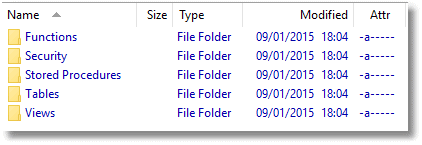
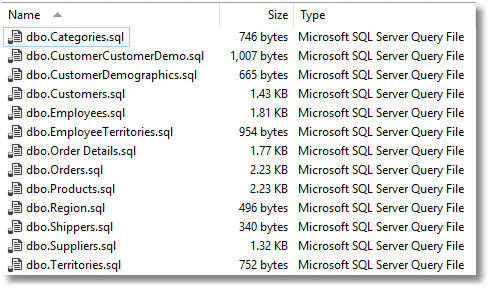
In this case, all objects are stored separately in their own file. Tables, for example …
We create an empty version of the NorthWind database, on a target server, and then we set the PowerShell script going…
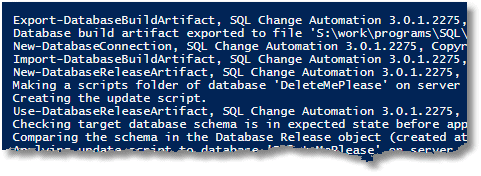
…and if all goes well, we get the NorthWind database documentation:
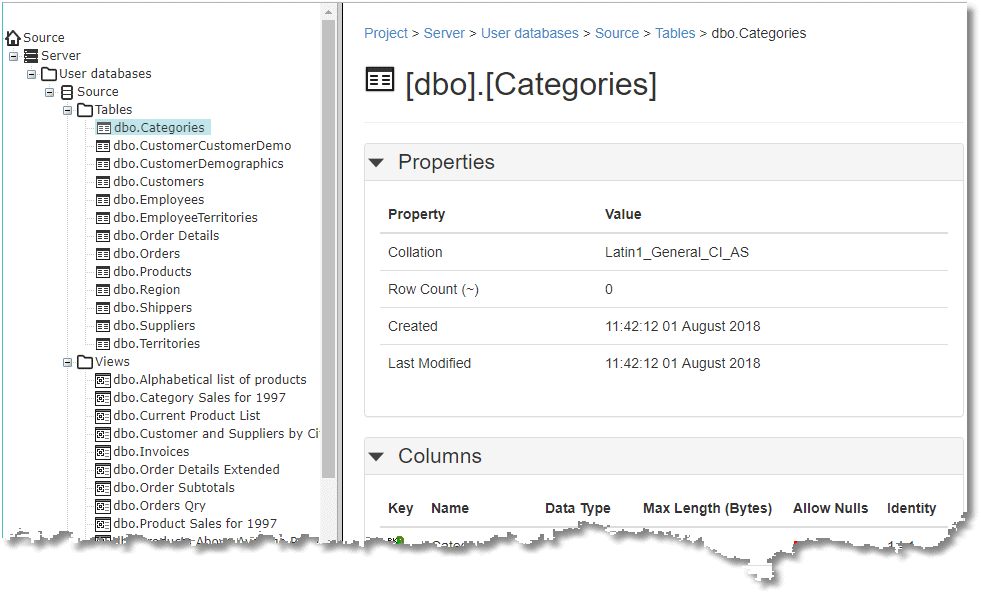
We also get a list and details of all the code smells that need fixing at some point:
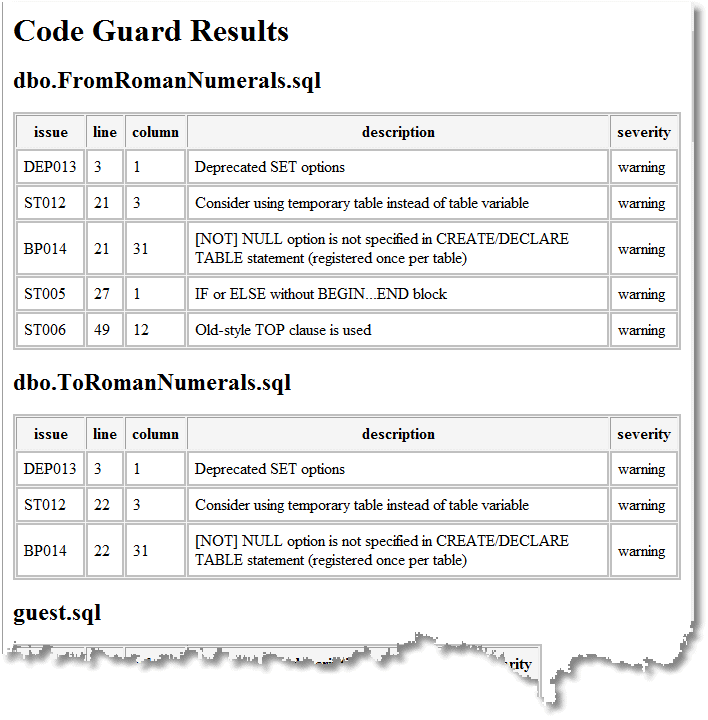
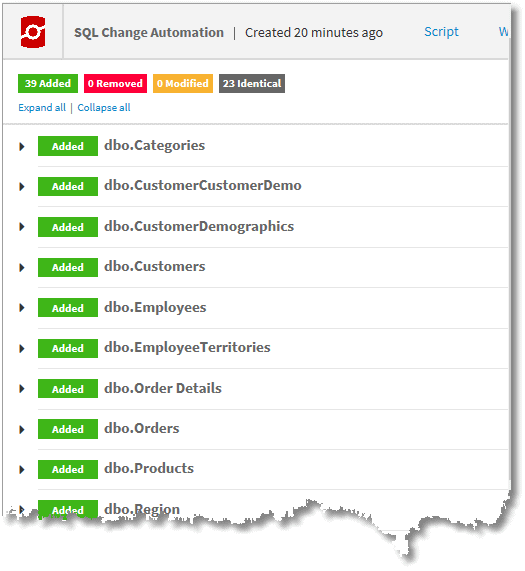
We get a browser-based report of what has changed on the target machine (everything in this case as it is a blank database):
And we get a text version of the build script:

Less visible as an end-product is a NuGet package that can be used subsequently with SCA PowerShell cmdlets to deploy ('Publish') the database as many times as required.
The PowerShell
The PowerShell script is well documented, so I'm going to present it without too much elaboration. It uses a Hashtable, $config, to store the configuration data. This gives us some versatility, especially when updating many target databases, as we can iterate through the hashtable. It also separates the data from the process.
We need some variables to create the config hashtable, but this is just for convenience. You have quite a lot of choices in how you deal with such things as databases and file locations since you can alter them at the level of the hashtable or the initial variables that are used in its construction. Every site has its own naming conventions.
|
1
2
3
4
5
6
7
8
9
10
11
12
13
14
15
16
17
18
19
20
21
22
23
24
25
26
27
28
29
30
31
32
33
34
35
36
37
38
39
40
41
42
43
44
45
46
47
48
49
50
51
52
53
54
55
56
57
58
59
60
61
62
63
64
65
66
67
68
69
70
71
72
73
74
75
76
77
78
79
80
81
82
83
84
85
86
87
88
89
90
91
92
93
94
95
96
97
98
99
100
101
102
103
104
105
106
107
108
109
110
111
112
113
114
115
116
117
118
119
120
121
122
123
124
125
126
127
128
129
130
131
132
133
134
135
136
137
138
139
140
141
142
143
144
145
146
147
148
149
150
151
152
153
154
155
156
157
158
159
160
161
162
163
164
165
166
167
168
169
170
171
172
173
174
175
176
177
178
179
180
181
182
183
184
185
186
187
188
189
190
191
192
193
194
195
196
197
198
199
200
201
202
203
204
205
206
207
208
209
210
211
212
213
214
215
216
217
218
219
220
221
222
223
224
225
226
227
228
229
230
231
232
233
234
235
236
237
238
239
240
241
242
243
244
245
246
247
248
249
250
251
252
253
254
255
256
257
258
259
260
261
262
263
264
265
266
267
268
269
270
271
272
273
274
275
276
277
278
279
280
281
282
283
284
285
286
287
288
289
290
291
292
293
294
295
296
297
298
299
300
301
302
303
304
305
306
307
308
309
310
311
312
313
314
315
316
317
318
319
320
321
322
323
324
325
326
327
328
329
330
331
332
333
|
<# if you are using codeguard you need this alias #>
Set-Alias CodeGuard "$(${ENV:ProgramFiles(x86`)})\SQLCodeGuard\SqlCodeGuard30.Cmd.exe"
<# this script takes the database build script in the $WorkDirectory and
checks it by building a database from it. It then documents it, creates a nuget
package and writes the documentation to the local website. It then runs CodeGuard
to list out all the code smells, and creates an HTML version of this that it places
in a local website. It then tests the NuGet package by deploying it to a Target server
and reporting on the changes it needed to make in a local website. #>
# $WorkDirectory must have a subdirectory with the name of the project,
# which itself has a subdirectory called 'Source' containing the source code
# so if $WorkDirectory was "$($env:HOMEPATH)\SQL\Databases"
# the project might be in "$($env:HOMEPATH)\SQL\Databases\AdventureWorks"
# the source might be in "$($env:HOMEPATH)\SQL\Databases\AdventureWorks\source"
$env
$WorkDirectory = 'ThisNeedsToBeFilledIn' #Fill this in please
# e.g. "$($env:HOMEPATH)\SQL\Databases"
$WebPath = 'L:\sql' # the network share with the development website
$WorkProjectName = 'MyProject' # the name of the project- Fill this in please
$TargetDatabase ='MyTargetDatabase' # the name of the database to update
$version='1.0.0' #the version number - Fill this in please
# you can, of course override all these settings to taste but dont write anything into the
# source code directory even as a subdirectory, because it gets treated as source code!
$config = @{
# The SQL Change Automation project (in source control directory) to validate, test and deploy
'Project' = "$($WorkDirectory)\$($WorkProjectName)\Source";
# The directory to store the NuGet Package in.
'BuildArtifact' = "$($WorkDirectory)\$($WorkProjectName)\BuildArtifacts";
# The directory to extract the NuGet Package from.
'Extract' = "$($WorkDirectory)\$($WorkProjectName)\extract";
# The directory store spcific deployment materials.
'DeployDirectory' = "$($WorkDirectory)\$($WorkProjectName)\$($TargetDatabase)";
# The directory for the documentation site.
'WebDirectory' = "$($WebPath)\$($WorkProjectName)\$($version)";
# The directory for the CodeGuard results.
'WebCGDirectory' = "$($WebPath)\$($WorkProjectName)\$($version)\cg";
# The directory for the CodeGuard results.
'WebDeployDirectory' = "$($WebPath)\$($WorkProjectName)\$($version)\$($TargetDatabase)";
# The directory to store the log in.
'LogDirectory' = "$($WorkDirectory)\$($WorkProjectName)\Logs";
'PackageId' = "$WorkProjectName";
# the version in the Nuget Package
'PackageVersion' = $version;
'Databases' = @{
'Temporary' = #the temporary database. note that if the user is blank, we assume windows auth
@{
'ServerInstance' = 'YourServerName'; 'Database' = 'master'; 'Username' = ''; 'SQLCompareOptions' = '';
}
'Target' = #the database with the current data. If the user is blank, we assume windows auth
@{
'ServerInstance' = 'YourTargetServerName'; 'Database' = "$($TargetDatabase)"; 'Username' = ''; 'SQLCompareOptions' = '';
}
}
}
# and some handy constants. Do not delete. It doesn't go well
$MS = 'Microsoft.SQLServer'
$My = "$MS.Management.Smo"
$errors = 0 #keep a count of the errors we encounter
$TheLogFile = "$($config.LogDirectory)\logfile.txt"
$Errors = @() # we use just one global error handler and just check for zero entries
<# we import the modules that are required. We use sqlServer just for authentication #>
Import-Module SqlChangeAutomation -ErrorAction silentlycontinue -ErrorVariable +Errors
Import-Module sqlserver -DisableNameChecking -ErrorAction silentlycontinue -ErrorVariable +Errors
# if you get a spurious error here, then treat it as a warning and reset $Errors = @()
if ($Errors.count -eq 0) #otherwise drop through to the end
{
<# #>
#check and if necessary create all directories specified by the config that need to be there
@("$($config.LogDirectory)", "$($config.Extract)","$($config.DeployDirectory)",
"$($config.BuildArtifact)","$($config.WebDirectory)",
"$($config.WebCGDirectory)","$($config.WebDeployDirectory)"
) | foreach{
# If necessary, create the directory for the Artifact
if (-not (Test-Path -PathType Container $_ -ErrorAction SilentlyContinue -ErrorVariable +Errors))
{
# we create the directory if it doesn't already exist
$null = New-Item `
-ItemType Directory `
-Force -Path $_ `
-ErrorAction SilentlyContinue `
-ErrorVariable +Errors;
}
}
# now we check that directories that need to be there really are.
@("$($config.Project)") | Foreach{
if (-not (Test-Path -PathType Container $_))
{
$Errors += "The project file directory for $($config.'PackageId'),'$($_)' isn't there"
}
}
Remove-Item $config.Extract -Recurse -Force # this needs to start by being empty
}
<# #>
if ($Errors.count -eq 0)
{ <# here we make a connection and test it to make sure it works. We need to use the
sqlserver module in order to get the password if necessary. #>
$config.Databases.GetEnumerator() | foreach{
$ConnectionErrors = @() # to store any connection errors in
$Database = $_
$db = $Database.Value;
$conn = new-object "$MS.Management.Common.ServerConnection"
$conn.ServerInstance = $db.ServerInstance
if ($db.username -ieq '')
{
# Crikey, this is easy, windows Passwords. Dont you love 'em?
$conn.LoginSecure = $true;
}
else
{
<# This is more elaborate a process than you might expect because we can't assume that we can use Windows authentication, because of Azure, remote servers outside the domain, and other such complications. We can't ever keep passwords for SQL Server authentication as part of the static script data. At this stage, we ask for passwords if they aren't known, and otherwise store them as secure strings on file in the user area, protected by the workstation security.
#>
#create a connection object to manage credentials
$conn = new-object "$MS.Management.Common.ServerConnection"
$conn.ServerInstance = $db.ServerInstance
$encryptedPasswordFile = "$env:USERPROFILE\$($db.Username)-$($db.ServerInstance).txt"
# test to see if we know about the password un a secure string stored in the user area
if (Test-Path -path $encryptedPasswordFile -PathType leaf)
{
#has already got this set for this login so fetch it
$encrypted = Get-Content $encryptedPasswordFile | ConvertTo-SecureString
$Credentials = New-Object System.Management.Automation.PsCredential($db.Username, $encrypted)
}
else #then we have to ask the user for it
{
#hasn't got this set for this login
$Credentials = get-credential -Credential $SourceLogin
$Credentials.Password | ConvertFrom-SecureString |
Set-Content "$env:USERPROFILE\$SourceLogin-$SourceServerName.txt"
}
$conn.LoginSecure = $false;
$conn.Login = $Credentials.UserName;
$conn.SecurePassword = $Credentials.Password;
}
$db.ServerConnection = $conn;
}
}
if ($Errors.count -eq 0) #if there were errors, then it gives up at this stage and reports the errors.
{
# we now check whether we can build this without errors
$tempServerConnectionString = $config.Databases.Temporary.ServerConnection.ConnectionString
# Validate the SQL Change Automation project and import it inot a ScriptsFolder object
try
{
$validatedProject = Invoke-DatabaseBuild $config.Project `
-TemporaryDatabaseServer $tempServerConnectionString `
-SQLCompareOptions $config.Databases.Temporary.SQLCompareOptions 3>> $TheLogFile
}
catch #could not get the -ErrorAction silentlycontinue -ErrorVariable ConnectionErrors to work
{
$Errors += "$($Database.Name;) of $($config.'PackageId') couldn't be validated because $($_.Exception.Message)"
}
}
if ($Errors.count -eq 0) #if there were errors, then it gives up at this stage and reports the errors.
{
$NuGetSource ="$($config.BuildArtifact)\$($config.PackageId).$($config.PackageVersion).nupkg"
#this section documents the database and passes the results into the NuGet package
#it produces documentation and the nuget package
if ($validatedProject.GetType().Name -ne 'ScriptsFolder')
{
$Errors += "$($config.PackageId) could not be verified."
}
else
{
#get the SchemaDocumentation object that we can then add to the nuget package
$documentation = $validatedProject |
New-DatabaseDocumentation `
-TemporaryDatabaseServer $tempServerConnectionString
if ($documentation.GetType().Name -ne 'SchemaDocumentation')
{
$Errors += "$($config.PackageId) could not be documented."
}
else
{
$buildArtifact = $validatedProject |
New-DatabaseBuildArtifact `
-PackageId $config.PackageId `
-PackageVersion $config.PackageVersion `
-Documentation $documentation
if ($buildArtifact.GetType().Name -ne 'SocBuildArtifact')
{
$Errors += "$($config.PackageId) build Artifact could not be created."
}
}
if (Test-Path `
-PathType Leaf $NuGetSource `
-ErrorAction SilentlyContinue `
-ErrorVariable +Errors)
{
Remove-Item $NuGetSource -Force
}
try
{
$buildArtifact | Export-DatabaseBuildArtifact `
-Path "$($config.BuildArtifact)" `
-force 3>> $TheLogFile
}
catch #could not get the -ErrorAction silentlycontinue -ErrorVariable ConnectionErrors to work
{
$Errors += "$($config.BuildArtifact) couldn't be exported because $($_.Exception.Message)"
} <# here we extract the contents of the NuGet package into a directory and copy the contents of the website to the directory used by the development webserver #>
if ($Errors.count -gt 0) {break;} <# if there was an error then quit #>
<# Now we unzip the NuGet package so we can inspect the contents, and deploy the documentation to the website #>
Add-Type -assembly "system.io.compression.filesystem"
[io.compression.zipfile]::ExtractToDirectory(
$NuGetSource,
"$($config.Extract)"
)
<# now we copy the database documentation #>
Copy-Item -Path "$($config.Extract)\db\docs" -Recurse -Force -Destination $config.WebDirectory -Container -ErrorAction SilentlyContinue -ErrorVariable +Errors
}
}
if ($Errors.count -eq 0) #if there were errors, then it gives up at this stage and reports the errors.
{<# We now run SQL Codeguard #>
$params = @(
"/source:`"$($config.Project)`"", #The path to file or folder with /scripts (*.sql) to analyze
"/outfile:`"$($config.Extract)\cg\CodeAnalysis.xml`"", #The file name in which to store the analysis xml report
'/exclude:BP007;DEP004;ST001', #A semicolon separated list of rule codes to exclude
'/include:all'#A semicolon separated list of rule codes to include
)
<# we create a special directory in the extracted contents of the NuGet file to save the XML report #>
if (-not (Test-Path `
-PathType Container "$($config.Extract)\cg\" `
-ErrorAction SilentlyContinue `
-ErrorVariable +Errors))
{
# we create the directory if it doesn't already exist
$null = New-Item `
-ItemType Directory `
-Force -Path "$($config.Extract)\cg\" `
-ErrorAction SilentlyContinue `
-ErrorVariable +Errors;
}
<# we run Codeguard on the original script directory #>
$result=codeguard @params
$result|foreach { if ( $_ -like '*error*') {$errors += $_ }}
if ($Errors.Count -eq 0)
{ <# now translate the report to HTML #>
$XSLTFile="$($env:Temp)\DeleteMe.xslt"
$CodeGuardReport="$($config.Extract)\cg\CodeAnalysis.xml"
$HTMLReportFile="$($config.WebCgDirectory)\index.html"
<# the contents of the XSLT file #>
@"
<xsl:stylesheet xmlns:xsl="http://www.w3.org/1999/XSL/Transform" version="1.0">
<xsl:template match="/">
<html>
<head>
<title>Code Guard Results for $($WorkProjectName)</title>
<style type="text/css">
table {
border: thin solid silver;
padding: 5px;
background-color: #f5f5f5;
}
td {
padding: padding:2px 5px 2px 5px;
border: thin solid silver;
background-color: white;
}
</style>
</head>
<body bgcolor="#ffffff">
<h1>Code Guard Results for $($WorkProjectName)</h1>
<xsl:apply-templates/>
</body>
</html>
</xsl:template>
<xsl:template match="file">
<h2><xsl:value-of select="@name"/></h2>
<table>
<tr><th>issue</th>
<th>line</th>
<th>column</th>
<th>description</th>
<th>severity</th>
</tr>
<xsl:for-each select="issue">
<tr>
<td><xsl:value-of select="@code"/></td>
<td><xsl:value-of select="@line"/></td>
<td><xsl:value-of select="@column"/></td>
<td><xsl:value-of select="@text"/></td>
<td><xsl:value-of select="@severity"/></td>
</tr>
</xsl:for-each>
</table>
</xsl:template>
</xsl:stylesheet>
"@ > $XSLTFile
$xslt_settings = New-Object System.Xml.Xsl.XsltSettings;
$XmlUrlResolver = New-Object System.Xml.XmlUrlResolver;
$xslt_settings.EnableScript = 1;
$xslt = New-Object System.Xml.Xsl.XslCompiledTransform;
$xslt = New-Object System.Xml.Xsl.XslCompiledTransform;
$xslt.Load($XSLTFile,$xslt_settings,$XmlUrlResolver);
$xslt.Transform($CodeGuardReport, $HTMLReportFile);
# get-content -Path $HTMLReportFile
}
}
if ($Errors.count -eq 0) #if there were errors, then it gives up at this stage and reports the errors.
{ <# now we do a test deployment just to be absolutely sure #>
$db = $config.dATABASES.Target
#We get the password on the fly for the Cmdlet that creates the SCA connection object for each database
if ($db.Username -eq '')
{
$db.Connection =
New-DatabaseConnection -ServerInstance $db.ServerInstance -Database $db.Database
}
else
{
$db.Connection =
New-DatabaseConnection `
-ServerInstance $db.ServerInstance -Database $db.Database `
-Username $db.ServerConnection.Login -Password $db.ServerConnection.Password;
}
#now we can test that the credentials get to the server
$build = Import-DatabaseBuildArtifact $NuGetSource
$update = New-DatabaseReleaseArtifact -Source $build -Target $db.Connection
Use-DatabaseReleaseArtifact $update -DeployTo $db.Connection
<# we now save the report and the SQL Script #>
$update.ReportHTML> "$($config.WebDeployDirectory)\index.html"
$update.UpdateSql > "$($config.DeployDirectory)\build.sql"
}
$errors | foreach{
"$((Get-Date).ToString()) - the build process for $($config.PackageId) was aborted because $($_)">>$TheLogFile;
}
$errors | foreach{
write-error "$((Get-Date).ToString()) - the build process for $($config.PackageId) was aborted because $($_)";
}
|
So, that is it. Remember, that this is just for demonstrating the PowerShell processes and not everything is done to production standards.
Note that the system is versatile. For example, where the change, or migration, script needs to be checked and amended, before being executed on the target database, you would need to get signoff for the change script in $update.UpdateSql before the Use-DatabaseReleaseArtifact cmdlet is executed. It is likely that every server would have a different change script, depending on the metadata, so this would have to be done on every target of a deployment that needed a signoff.
Extracting the documentation without unzipping
There is one interesting aspect I didn't include in the script. The $documentation object that is output by the New-DatabaseDocumentation cmdlet contains the documentation so, if you can publish the documentation at this stage, then as an alternative to unzipping the NuGet file you can do this to get documentation out to the website:
|
1
2
3
4
5
6
7
8
9
10
11
12
13
14
|
$where="pathToDirectory" #fill this in of course.
$documentation.Files.GetEnumerator() |
foreach{
if (-not (Test-Path -PathType Container (Split-Path -Path "$($where)\$($_.Key)") -ErrorAction SilentlyContinue -ErrorVariable +Errors))
{
# we create the directory if it doesn't already exist
$null = New-Item `
-ItemType Directory `
-Force -Path (Split-Path -Path "$($where)\$($_.Key)") `
-ErrorAction SilentlyContinue `
-ErrorVariable +Errors;
}
[System.Text.Encoding]::ASCII.GetString($_.Value)>"$($where)\$($_.Key)"
}
|
Conclusion
The use of a NuGet file merely as a read-only container of files comes as a slight shock to the seasoned database developer, especially when one is used to all the wonders of Chocolatey. However, it makes sense to have this for the database metadata and its documentation, especially when the database is a full participant in an application development process, using applications such as TFS, and deploying to cloud and remote servers.
However, the seasoned database developer will still be wondering about all the extras such as scheduled jobs, alerts and ETL. In SCA culture, this is kept very separate because there is no common way of handling them. To show how to create separate NuGet packages for extra bits will be a topic for a future article.
This document contains proprietary information and is protected by copyright law.
Copyright © 2026 Red Gate Software Limited. All rights reserved
Tools in this post
You may also like

Article
Handling Tricky Data Migrations during State-based Database Deployments
This article demonstrates how to use a 'state' approach to database source control, when the nature of the database changes cause you to hit difficulties with migrating existing data. These difficulties happen when the differences are such that it is impossible for any automated script to make the changes whilst preserving existing data.
Article
Sometimes the tool just fits - using SQL Change Automation and Octopus Deploy for Data Change Control
From a business risk perspective, data change can be just as significant as code or schema change. Sometimes even more so; an incorrect static (or reference, or master) data change can drive your software’s behaviour more dangerously askew than pretty much any bug can. Imagine treating a retail customer for an investment fund as a corporate by mistake, or vice versa (a potential regulatory breach). Or booking the repatriation trades in the wrong currency (and not finding out until they settle, and hit the wrong cash balance). And what are your web customers going to do when the ‘choose credit card type’ drop-down is empty?
Article
Deploying Multiple Databases from Source Control using SQL Change Automation
How to automatically build multiple test databases, from source control, and then fill them with standard test data sets, using SQL Change Automation, BCP and some PowerShell magic.
Article
Documenting your Database with SQL Change Automation
Phil Factor uses SQL Change Automation and PowerShell to verify that the source code for the current database version builds successfully and, if so, to generate web-based database documentation using SQL Doc.
Article
SQL Code Analysis from a PowerShell Deployment Script
This article shows how to define SQL code analysis rules using SQL Prompt and them run them automatically from a PowerShell script, displaying the detected code issues in a handy HTML report.
Article
Designing an automated database deployment process: case study
In my previous article, How to design an automated database deployment process, I wrote about the steps companies and organizations should take to introduce automation to their database deployments. In this article, I’m going talk about the challenges I faced when I embarked on my own automation journey. Prior to joining Octopus Deploy, I was the lead developer on a pilot team that automated database deployments and reduced the time required from two to four hours per deployment down to ten minutes. Why automate? One of the DBAs in the company summed it up best when they said, “Our database deployment
Loading comments...