






Generating test data in JSON files using SQL Data Generator
SQL Data Generator is adept at filling SQL Server databases with 'spoof' data, for use during development and testing activities. However, what if instead of a SQL Server database full of fake data, you need a JSON file? Perhaps you need to run some tests in MongoDB, or Azure Cosmos DB. Maybe you need a sample data file to test a new web service.
The solution in this article builds a SQL Server database, fills it with sample data using SQL Data Generator, extracts the data into a JSON data file, using FOR JSON, and then drops the database. In other words, we just add an extra phase on top of producing a version of your database filled with fake data, and because we are scripting the whole process using PowerShell, this extra processing is of no consequence.
Filling the Customers SQL Server database
We need to start by creating a database that provides the relational version of the metadata and data we need. We'll use the same sample Customers database that we've used throughout our series of SQL Data Generator "how-to" articles, but with an added CreditCard table.
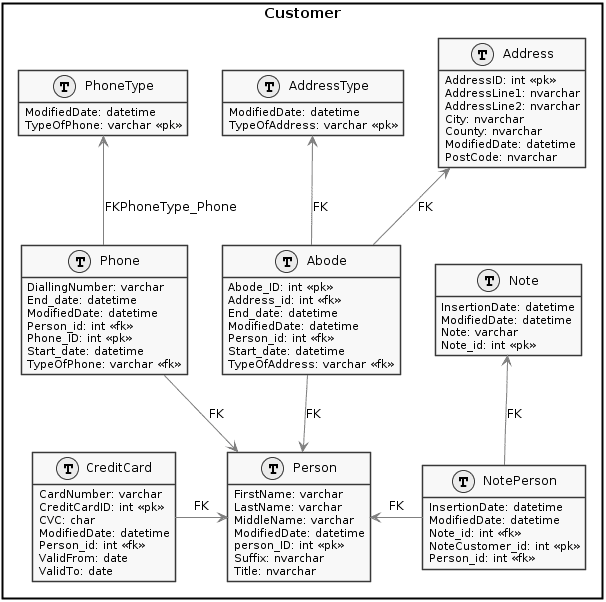
Figure 1
Of course, we wouldn't normally want to hold the credit cards like this, and then pass the data around to JSON. Certainly, doing it this way might give a passing hacker some momentary but unnecessary excitement.
Other than that, though, this is a standard design for a NAD database; it records changes in address so that you track the address at any time. This design accounts for the fact that several people can share the same address, and one person can have several addresses (invoice address, work, home, and so on.). We've also allowed notes to be applied to several people, so that we can attach arbitrary information to them.
So, we create and test a build script for this database, and once we have it producing a viable database, fill it with data using a SQL Data Generator project file. Unfortunately, I can't provide my copy of the SQL Generator project file as it has my credentials in it, but I've written articles that show you how to generate data, adapt the data format to suit your needs using regular expressions and python, as well as to automate data generation for development and test databases using PowerShell.
When you've fine-tuned the SQL Data Generator output to your heart's content, you are ready to generate the JSON
Converting the data to JSON
First, you need a good idea of the format in which you want the JSON data. As an example, I'll use this common format of names and addresses (styled using the JSON Formatter and Validator):
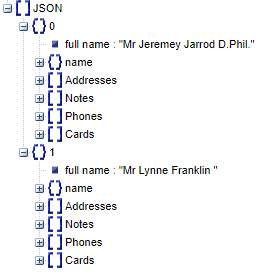
Figure 2
We'll use the query in Listing 1 to convert our relational NAD data into a JSON string of this format, using the FOR JSON function. This technique represents the easiest way of representing JSON nested objects, though it isn't the fastest way of doing it because it relies on correlated subqueries. However, it is fast enough for our purposes.
|
1
2
3
4
5
6
7
8
9
10
11
12
13
14
15
16
17
18
19
20
21
22
23
24
25
26
27
28
29
30
31
32
33
34
35
36
37
38
39
40
41
42
|
USE Customers;
DECLARE @MyJSON NVARCHAR(MAX);
SELECT @MyJSON =
(
SELECT Coalesce(Title + ' ', '') + FirstName + ' ' + Coalesce(MiddleName + ' ', '')
+ Coalesce(Suffix, '') AS [full name],
Title AS [name.title],FirstName AS [name.First name],MiddleName AS [name.middle name],LastName AS [name.Last Name],Suffix AS [name.suffix],
(
SELECT TypeOfAddress AS [type],
Coalesce(AddressLine1 + ' ', '') + ' ' + Coalesce(AddressLine2 + ' ', '') + ', ' + City + ', '
+ County + ' ' + PostCode AS [Full Address], Start_date AS [dates.moved in], End_date AS [dates.moved out]
FROM Customer.Abode AS A
INNER JOIN Customer.Address AS A2
ON A2.AddressID = A.Address_id
WHERE A.Person_id = Person.person_ID
FOR JSON PATH
) AS Addresses,
(SELECT N.Note AS [text], N.InsertionDate AS [date]
FROM Customer.Note AS N
INNER JOIN Customer.NotePerson AS NP
ON N.Note_id = NP.Note_id
WHERE NP.Person_id = Person.person_ID
FOR JSON PATH
) AS Notes,
(SELECT TypeOfPhone, DiallingNumber, Start_date AS [dates.from], End_date AS [dates.to]
FROM Customer.Phone AS P
INNER JOIN Customer.Person AS pp
ON pp.person_ID = P.Phone_ID
WHERE pp.person_ID = Person.person_ID
FOR JSON PATH
) AS Phones,
(SELECT CardNumber, ValidFrom, ValidTo, CVC
FROM Customer.CreditCard AS CC
INNER JOIN Customer.Person AS ppc
ON ppc.person_ID = CC.Person_id
WHERE ppc.person_ID = Person.person_ID
FOR JSON PATH
) AS Cards
FROM Customer.Person
FOR JSON path
);
SELECT @MyJSON;
|
Listing 1
If you previously ran your SDG project to fill the database with sample data, then execute Listing 1, and you'll see that it will produce JSON records in the following format.
|
1
2
3
4
5
6
7
8
9
10
11
12
13
14
15
16
17
18
19
20
21
22
23
24
25
26
27
28
29
30
31
32
33
34
35
36
37
38
39
40
41
42
43
44
45
46
47
48
49
50
51
52
53
54
55
56
|
[
{
"full name": "Mr Jeremey Jarrod D.Phil.",
"name": {
"title": "Mr",
"First name": "Jeremey",
"middle name": "Jarrod",
"Last Name": "Nolan",
"suffix": "D.Phil."
},
"Addresses": [
{
"type": "Work",
"Full Address": "91 New Close Tarbert , Newcastle upon Tyne, Merseyside DL79 9SX",
"dates": {
"moved in": "2004-10-27T08:33:06.320"
}
}
],
"Notes": [
{
"text": "Sir, I just wanted to let you know that I am very satisfied with your service, showing good style and correct terminology.",
"date": "2012-02-16T08:36:16.070"
}
],
"Phones": [
{
"TypeOfPhone": "Office",
"DiallingNumber": "44544",
"dates": {
"from": "2010-02-24T05:42:50.430"
}
}
],
"Cards": [
{
"CardNumber": "371555023929064",
"ValidFrom": "2017-07-14",
"ValidTo": "2016-11-18",
"CVC": "243"
},
{
"CardNumber": "4774444451642157",
"ValidFrom": "2017-03-15",
"ValidTo": "2018-11-06",
"CVC": "654"
},
{
"CardNumber": "372237411022765",
"ValidFrom": "2014-01-21",
"ValidTo": "2018-06-08",
"CVC": "970"
}
]
}/* and so on */
]
|
The PowerShell Routine
Now we have everything in place, and just need to automate the process of creating the JSON file, using PowerShell. The script will drop the database then create a new version 'on the fly', using the name that you provide. It will then run the latest database object creation script, then call SQL Data Generator to stock it with data, using the SDG project file. After it has queried the database and saved the JSON file that resulted, it removes the database from the SQL Server instance. Of course, if you require data in both relational and JSON formats, this is easy to change.
This ExportToJSON script is designed to cope with both Windows Authentication and SQL Server authentication. To do this, I use a credentials object which I can use not only to authenticate my access to SQL Server SMO, but also to pass those credentials to another application, such as to SQL Compare or to BCP, or to access a resource on Azure.
|
1
2
3
4
5
6
7
8
9
10
11
12
13
14
15
16
17
18
19
20
21
22
23
24
25
26
27
28
29
30
31
32
33
34
35
36
37
38
39
40
41
42
43
44
45
46
47
48
49
50
51
52
53
54
55
56
57
58
59
60
61
62
63
64
65
66
67
68
69
70
71
72
73
74
75
76
77
78
79
80
81
82
83
84
85
86
87
88
89
90
91
92
93
94
95
96
97
98
99
100
101
102
103
104
105
106
107
108
109
110
111
112
113
114
115
116
117
118
119
120
121
122
123
124
125
126
127
128
129
130
131
132
133
134
135
136
|
# Firstly, we create the aliases to make the execution of command-line programs easier.
Set-Alias SQLDataGenerator 'C:\Program Files (x86)\Red Gate\SQL Data Generator 3\SQLDataGenerator.exe' -Scope Script
<# Now we specify the names of the various files, where to get files, and where to put them. #>
$directory='C:\MyScriptsDirectory' # Your working directory
$SQLServer = 'MyServer'
$BuildScript='CustomersDatabase.SQL' # name of the build script
$TempDatabase = 'Customers'
$Login=''
$MySQLDataGeneratorFile="MyGithubDirectory/Customers.sqlgen"
$MyJSONFile="$directory\$TempDatabase.json"
$FileType='';
Trap {
# Handle the error
$err = $_.Exception
write-host $err.Message
while( $err.InnerException ) {
$err = $err.InnerException
write-host $err.Message
};
# End the script.
break
}
#Load SMO assemblies
Import-Module sqlps -DisableNameChecking #load the SQLPS functionality
set-psdebug -strict
$ErrorActionPreference = "stop" #
# and some handy constants
$MS='Microsoft.SQLServer'
$My="$MS.Management.Smo"
# If necessary, create the working directory
if (-not (Test-Path -PathType Container $directory))
{
# we create the directory if it doesn't already exist
New-Item -ItemType Directory -Force -Path $directory;
}
#create a connection object as we can reuse this for all the operations
$mySrvConn = new-object "$MS.Management.Common.ServerConnection"
$mySrvConn.ServerInstance = $SQLServer
# is this Windows Authentication of UserID/Password credentials?
if ($Login -ne '')
{
$Credentials = get-credential -Credential $Login
$mySrvConn.LoginSecure = $false
$mySrvConn.Login = $Credentials.UserName
$mySrvConn.SecurePassword = $Credentials.Password
}
# now log into the server and get the server object
$My="$MS.Management.Smo" #
$s = new-object ("$My.Server") $mySrvConn
if ($s.Version -eq $null ){Throw "Can't find the instance $SQLServer"}
if ($s.Version.Major -lt 13) {Throw "$SQLServer at $($s.Version) doesn't support JSON"}
#We read in the build script
if (-not (Test-Path -PathType Leaf "$directory\$BuildScript"))
{
Throw "Can't find the SQL Build script $($directory)\$($BuildScript)"
}
$SQL=[IO.File]::ReadAllText("$directory\$BuildScript")
#if the database exists kill it
If (@($s.Databases | % { $_.Name }) -contains $TempDatabase)
{$s.KillDatabase($TempDatabase) }
$db = New-Object ("$My.Database") ($s, $TempDatabase)
$db.Create()
$handler = [System.Data.SqlClient.SqlInfoMessageEventHandler] {param($sender, $event) Write-Host $event.Message};
$s.ConnectionContext.add_InfoMessage($handler);
$result=$db.ExecuteNonQuery("$SQL") #execute the SQL
$s.ConnectionContext.remove_InfoMessage($handler);
if ($Login -ne '')
{
sqldatagenerator /project:$MySQLDataGeneratorFile /Server:$SQLServer /database:$TempDatabase /username:$($mySrvConn.Login) /password:$($mySrvConn.password)
}
Else
{
sqldatagenerator /project:$MySQLDataGeneratorFile /Server:$SQLServer /database:$TempDatabase
}
$SQL=@'
DECLARE @MyJSON NVARCHAR(MAX);
SELECT @MyJSON =
(
SELECT Coalesce(Title + ' ', '') + FirstName + ' ' + Coalesce(MiddleName + ' ', '')
+ Coalesce(Suffix, '') AS [full name],
Title AS [name.title],FirstName AS [name.First name],MiddleName AS [name.middle name],LastName AS [name.Last Name],Suffix AS [name.suffix],
(
SELECT TypeOfAddress AS [type],
Coalesce(AddressLine1 + ' ', '') + ' ' + Coalesce(AddressLine2 + ' ', '') + ', ' + City + ', '
+ County + ' ' + PostCode AS [Full Address], Start_date AS [dates.moved in], End_date AS [dates.moved out]
FROM Customer.Abode AS A
INNER JOIN Customer.Address AS A2
ON A2.AddressID = A.Address_id
WHERE A.Person_id = Person.person_ID
FOR JSON PATH
) AS Addresses,
(SELECT N.Note AS [text], N.InsertionDate AS [date]
FROM Customer.Note AS N
INNER JOIN Customer.NotePerson AS NP
ON N.Note_id = NP.Note_id
WHERE NP.Person_id = Person.person_ID
FOR JSON PATH
) AS Notes,
(SELECT TypeOfPhone, DiallingNumber, Start_date AS [dates.from],End_date AS [dates.to]
FROM Customer.Phone AS P
INNER JOIN Customer.Person AS pp
ON pp.person_ID = P.Phone_ID
WHERE pp.person_ID = Person.person_ID
FOR JSON PATH
) AS Phones,
(SELECT CardNumber, ValidFrom, ValidTo, CVC
FROM Customer.CreditCard AS CC
INNER JOIN Customer.Person AS ppc
ON ppc.person_ID = CC.Person_id
WHERE ppc.person_ID = Person.person_ID
FOR JSON PATH
) AS Cards
FROM Customer.Person
FOR JSON path
);
SELECT @MyJSON;
'@
#execute this script, using the existing connection
$sqlConnection = new-object System.Data.SqlClient.SqlConnection($mySrvConn.connectionString)
$conn = new-object Microsoft.SqlServer.Management.Common.ServerConnection($sqlConnection)
#$cmd=New-Object System.Data.SqlClient.SqlCommand($sql,$Conn)
$conn.ExecuteScalar("USE $tempDatabase")
$conn.ExecuteScalar($sql) | Out-File $MyJSONFile
#clear up by deleting the database
If (@($s.Databases | % { $_.Name }) -contains $TempDatabase)
{$s.KillDatabase($TempDatabase) }
|
Listing 2
So, there we have it; as much random anonymized JSON data as you are likely to need for your testing. I've included all the scripts with the article, so that you can try this out.
This document contains proprietary information and is protected by copyright law.
Copyright © 2026 Red Gate Software Limited. All rights reserved
Tools in this post
You may also like

Article
SQL Source Control v7 Enhancements
Stephanie Herr summarizes what's new in SQL Source Control v7, including support for Git hooks, Git repositories hosted on Azure DevOps, and pre- and post-deployment scripts.

Article
The Changing Role of SQL Server Monitoring
Grant Fritchey explains how a modern monitoring tool must adapt, as our SQL Server databases grow in number and size, and migrate onto new cloud-based, containerized or virtual machine-based SQL Servers.

Article
How to generate realistic text data using SQL Data Generator
To get the best results, you need to provide SQL Data Generator with some hints on how the data ought to look. Phil Factor nudges it towards realistic text data.
Article
Using the Redgate Monitor Estate Pages
Kathi Kellenberger introduces the new Estate monitoring pages in Redgate Monitor 9, and explains how they will help DBAs monitor and safeguard the security, stability and availability of all servers in their care.
Article
How to Automatically Fill your SQL Server Test Databases with Dummy Data
A PowerShell script to automatically populate a SQL Server database with dummy data, for database development and testing work.
Article
Generating realistic dates using SQL Data Generator and Python
How to generate more realistic dates, in your SQL Server test data.
Loading comments...