






New Redgate Flyway GitHub Actions: Faster setup, safer deployments
If your team uses GitHub Actions to ship application code, you've probably wished your database changes could move through the same pipeline just as smoothly. Today, that's easier than ever. We've launched verified Redgate Flyway GitHub Actions on the GitHub Marketplace, giving you a simple, reliable way to integrate database deployments into your existing GitHub workflows.
What's available
There are currently six actions available. They are designed to work together for however you decide to deploy your changes:
| State-based deployments | Migrations-based deployments | |
| Step 1 – Install and authorize the Flyway CLI | setup-flyway | |
| Step 2 – Validate and review changes * | state/prepare | migrations/checks |
| Step 3 – Deploy with confidence – one final drift check before running the deployment | state/deploy | migrations/deploy |
| Optional – Undo – Undo the last migration script by default; more options are available | migrations/undo | |
* Step 2 is where Flyway Enterprise's power really shines by building in safety checks before before anything touches production. By default, it will run pre-deployment checks to ensure changes meet best practice standards, any custom policies you’ve defined, check for drift on the target environment, and report on the changes that will be deployed
Why this matters
Getting Flyway running in a CI/CD pipeline has always been possible, but it involved writing shell scripts to invoke the CLI, managing your own installation steps, and figuring out the right way to pass secrets securely. These actions take care of all of that for you.
More importantly, they're verified by GitHub – so you can trust that they come from Redgate and are maintained and tested as part of our own CI process.
Two main workflows
Automated deployment (for pre-production environments)
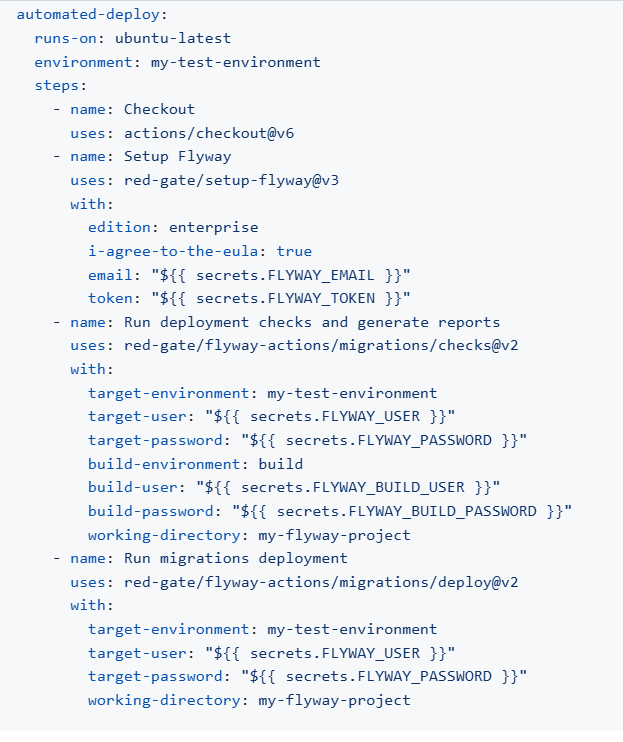
The simplest approach runs the checks and deploys in a single job. When a push lands on main, Flyway runs pre-deployment checks and then deploys the pending migrations as long as all the checks pass.
This is great for continuously deploying to pre-production environments that do not impact your users or your production systems if something goes wrong. This can be used to build a database for automated testing purposes.
Automated deployment with manual approval (for when you want a human in the loop)
One pattern we see a lot, especially with teams deploying to production environments, is splitting checks and deployment into separate jobs with a required reviewer approval in between. This gives your DBA or lead engineer a chance to review the change report before the deployment actually runs on your target. The change report provides a high level overview of the number of objects that will be added, modified, or deleted in this release. They can drill down into the details and see the exact changes that will be made to each object in a side-by-side diff.
Reviewers can also drill into any details about the policies checked and see the drift report. They also can review the full deployment script that will be executed on the target.
You set this up using two GitHub environments: a production-read-only environment for the checks job (which only needs read access to your database), and a production-write environment for the deployment job with Required reviewers enabled. The deployment will pause until someone approves it.
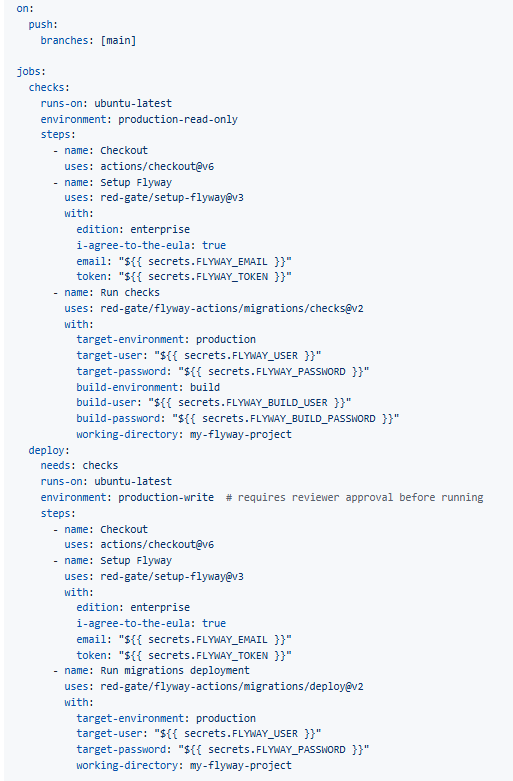
This pattern is particularly useful for teams with change management requirements – reviewers can inspect the Flyway check report before approving, and you have a full audit trail in GitHub showing who approved the deployment, what the changes were, and when it was approved.
Keeping secrets safe
Your database credentials and Flyway license tokens should always live in GitHub secrets and never hardcoded in workflow files. Store them under Settings > Secrets and variables > Actions at the repository or organization level. For production databases specifically, using environment-level secrets (under Settings > Environments) lets you scope credentials to that environment and enforce protection rules like required reviewers and branch restrictions.
Referenced secrets are automatically redacted from workflow output, so they won't appear in your logs.
Getting started
You can find the actions on the GitHub Marketplace.
If you're already using Flyway and want to see how these fit into your workflow, or if you have questions about setting up environments or integrating the checks step, we'd love to hear from you. You can leave a comment below, email our development team, or sign up for a 30-minute Zoom session with the team.
This document contains proprietary information and is protected by copyright law.
Copyright © 2026 Red Gate Software Limited. All rights reserved
Tools in this post
You may also like

Blog
Announcing the Flyway Docker provisioner, now in Preview in Flyway Enterprise

Blog
Oracle Schema Existence Checks are Now in Preview in Flyway Enterprise

Blog
Loading comments...