
Security and compliance
Ensure data security and compliance with monitoring and change traceability
Ensure data security and compliance with monitoring and change traceability
Monitor and understand your databases with full visibility into performance and change
Build, test, and deploy database changes with confidence
Simplify and speed up database development workflows
Prepare reliable data foundations for AI initiatives
Simplify and secure database modernization across platforms
Control costs and boost efficiency in database operations
Simplify and speed up cloud database transformation
Database versioning means that each alteration to the database metadata (schema) results in a new 'state' that is assigned a unique version number, or a unique version name.
A database versioning system will ensure that a version number is attached to a database, every time a new version is created. It will provide the means of reliably creating a database at any version, for example by updating it to that version from a previous version, by running a versioned migration script. It will also track which migration scripts have already been applied to target database and apply only those scripts not yet applied.
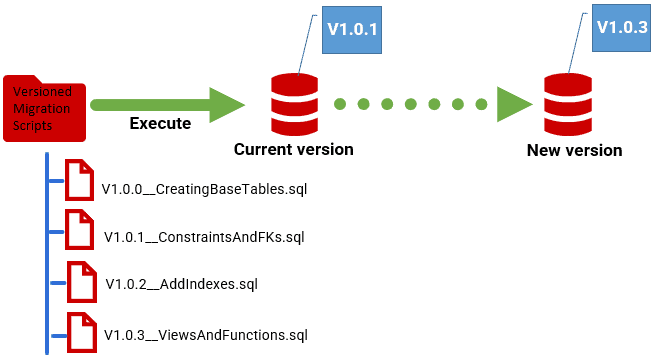
Database versioning brings control to team-based database development. Used in conjunction with a version control system and related processes such as database drift detection, it will allow the team to design a system where there is never any doubt as to the exact version of any copy of the database, and where all changes are verified, tested and inspected frequently, for every new version. This will help avoid many of the errors that can creep into database delivery and that can often result in failed deployments, and the need for rollbacks or hotfixes.
By being certain of the version of a database both before and after we update it and having a fully tested script that is clearly intended to migrate the database from the current version to the new version, we have a much higher chance of a clean release process and an error-free deployment.
The first step towards a managed deployment process can be to establish a database version number for the production system and then all subsequent release candidates. This can be coupled with a means to detect drift i.e., to verify that a release candidate is in the correct 'state' for its reported version (by comparing to a reference version in source control).
With this system in place, the team can be a lot more confident that the version they deliver contains only what they tested, inspected, and signed off for release. It will help prevent the 'uncontrolled changes' that are the primary cause of security problems and deployment failures, if undetected.
Versioning a database will also allow the team to coordinate application releases with the database changes that support them, and to avoid compatibility, or 'version mismatch' problems that lead to breaking changes. With a version numbering system in place (see the Requirements section below), a database can report its version number so that the application is notified and can deal with any breaking changes.
With a database versioning mechanism 'bedded in' for release candidates, and proving its value, you can extend it fully into the development process, where it will help reduce testing mistakes and delays, as well as improve developer productivity.
In team-based development, processes such as testing may need to be done in parallel using a test cell with several copies of the database. If the database is a 'moving target', it becomes very hard for the team to be sure that what they are testing is exactly what needs to be released. Weeks of work may have to be abandoned if it turns out that the version that was tested wasn't the release candidate.
With a version applied to every development, test, and pre-production copy of the database, and a system in place for drift checks, there can be certainty about what is being tested. Similarly, if the SQL scripts that you use to modify a database, whether they are migration scripts or synchronization scripts, are designed specifically to go from one known version to another, you need fewer of them, and they are likely to be better tested.
The development team will be able to reproduce any database version quickly and consistently. With automation, this system will extend to support the safe management of versions even in complex branch-based development, designed to maximize development productivity and allow continuous delivery.
Before you implement a database versioning system, you'll need to decide on a 'standard' version numbering system that is consistent across applications and database. You'll also need to establish where you'll store the versioning information, and how users and applications will be able to find out the current database version.
The most common practice to use a semantic version number. Each component in a sematic version has a meaning, indicating the nature of the change, such as whether it is a major or breaking change, a minor new version, or a bugfix.
For example, Microsoft supplies a version class in its .NET library that, in its basic form, uses semantic version number consisting of major, minor, build and revision parts. For example, v1.2.1.15 means major version 1, minor version 2, build 1, revision 15. You may see simpler, 3-part numbers in use such as major.minor.revision, but equally the Microsoft standard can go up to 5 parts, splitting revision into MinorRevision or MajorRevision.
With this system in place, and the convention that the database will increment the 'major' component of the version for every interface-breaking change, an application can perform intelligent version-checks, looking for a change in the 'major' number of the version, when it connects to a database.
Note: For databases that support several applications, non-breaking changes are achieved only by having a definition of the database objects that are accessed by the application, and strict versioning of both the database/application interface and the application.
Whichever versioning numbering system you use, the versions must be easily accessible to users (see the next section) and applications and allow for versions to be ordered consistently and compared reliably. Since the Microsoft class is a .NET library, for example, it can be used in PowerShell scripts, so sorting and ordering or versions is easy.
How should the version be attached to a database? Unfortunately, most database systems don't have a standard way of applying versions to databases. In SQL Server, you can store the versions in an extended property, or in PostgreSQL you can use comments.
However, the only way of applying a version to a database that can be guaranteed to work across a whole range of different relational database systems is to use a function, view or table that returns the version. The safest option for cross-database compatibility will be to store the version number in a table, alongside other version information, such as when the version was created, who created it, and so on. This is the option that Flyway uses.
A possible difficulty to consider, when storing the version in a table, is access rights. Applications and users with only 'guest' permissions, and no access to base tables, still need an easy way to find the version of a database. If you're working in SQL Server you might choose, for example, to query the 'version table' and then add or update an extended property with the latest version number. Another option, and one that will work on several RDBMSs, is to create a view holding just the latest version number, stored in a schema that allows 'guest' access.
A frustrating problem for the database developer is that none of the major cross-RDBMS IDEs have a consistent way of handling version numbers in databases, mainly because of the lack of a standard. Flyway, by contrast, supports database versioning comprehensively across a large range of RDBMSs.
Flyway Desktop is a GUI-based database development tool that, in the Enterprise Edition, will auto-generate these versioned migration scripts according to your chosen version numbering system. If you're using Community or Teams you will need to produce the scripts manually or using other tools. The Flyway database migration engine is a command line tool that allows you to automate the way you deploy database changes, while maintaining strict control of database versions. It migrates a database one version to another by running the series of versioned migrations scripts.
When the migration is applied to a database, the new version number is 'stamped' into a special table, called the schema history table, in the database.
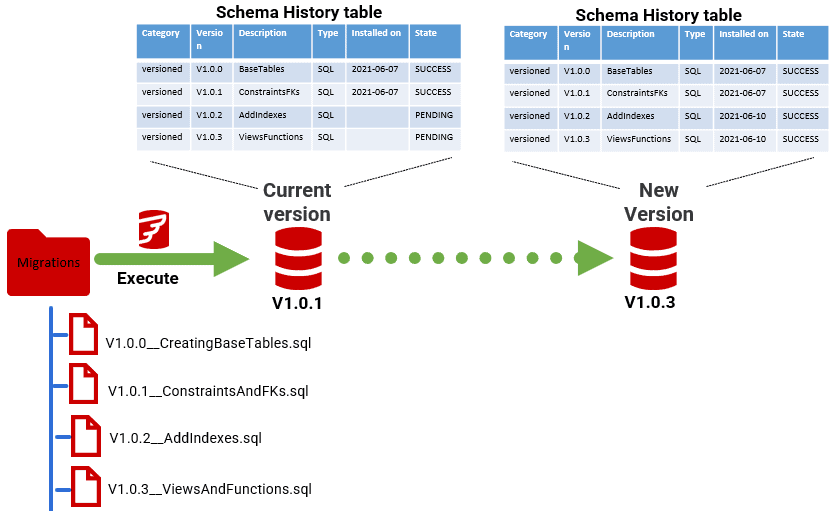
Every migration script has the target version number in its file name, along with a description. In this example, there are four migration scripts for V1.01 to V1.0.3 (using the major.minor.revision semantic versioning system discussed earlier). The current version of the database is recorded as V1.0.1 in the schema history table, meaning that the V1.0.0 and V1.0.1 scripts are already applied. Having verified that these scripts haven't been changed since they were applied, Flyway will then automatically run V1.0.2 and V1.03 script to take the database to the latest version.
Having established your requirements for database versioning, as discussed above, the remainder of this track suggests a possible path to introducing database versioning (Flyway versioned migrations), alongside source control, into your development and deployment processes, using Flyway.
A lack of control over database versions is most keenly felt in a high failure rate for deployments, so a logical first step (Level 1) is to impose better control over the process, by versioning the production database and all subsequent releases. A successful update of a production database is much more likely when both the new and current versions are precisely known and therefore well-tested and thoroughly checked by the team.
Once the versing system is embedded and refined for the release process, it can be pushed down into the development process, in levels 2 and 3.
This document contains proprietary information and is protected by copyright law.
Copyright © 2026 Red Gate Software Limited. All rights reserved




