



Indexes are supposed to make SQL Server faster – so why do so many databases end up slower, bloated, and harder to maintain when they have more of them? It usually comes down to misapplied indexes rather than missing ones. There may be too many that are too wide, tuned with settings that don’t fit the workload, or built on assumptions that stopped being true years ago.
This guide walks through the most common SQL Server index tuning mistakes seen in production environments, such as over-indexing, oversized INCLUDE lists, unnecessary fill factor settings, misuse of SORT_IN_TEMPDB, over-aggressive index maintenance – and the myth that heaps are a shortcut to speed. Features real examples.
Before we jump in, some background.
What are indexes?
Indexes are a fundamental component of performance in any relational database – yet are often the target of misinformation, mistakes, and anti-patterns. And, since performance goes hand-in-hand with expense, indexing has a direct impact on how much a database server will cost, regardless of whether it’s hosted on-premises or in the cloud.
What are the different SQL Server index types?
There are many SQL Server index types, each supporting a different use-case and workload pattern. The following is a (very) brief overview of each.
For more information on syntax, features, and usage, consult Microsoft’s documentation. And of course, many of these have been covered here on Simple Talk over the years, but what follows is up-to-date as of July 2026.
Clustered index
A clustered index provides the base sorting and storage pattern for a table or view. It’s often the same as the primary key, though not always.
There can only be one clustered index per object. Ideal clustered indexes are unique, unchanging, ever-increasing, as narrow as possible, and match common query patterns on a table.
You may also be interested in…
Non-clustered indexes
Non-clustered indexes are secondary indexes that allow for additional ways to sort, search, and manipulate data in a table beyond what the clustered index provides.
Each entry in a non-clustered index references the clustered index for requested columns not in the index. There can be many non-clustered indexes on a table and they can be of different index types, as well (XML, columnstore, spatial, etc…)
Memory-optimized indexes
Memory-optimized indexes reside in-memory rather than on the same storage as the index’s database. There are a variety of index types that can be created in-memory, but all are geared towards busy OLTP workloads with high concurrency.
Because they consume memory, their storage and maintenance costs are higher than standard disk/storage-based indexes.
Columnstore indexes
Columnstore indexes are highly compressed indexes that are optimized for analytic data. They can be viewed as the “opposite” of memory-optimized indexes in terms of usage.
Logs, reports, data warehouses, and other common online analytical processing (OLAP) data are ideal targets for these indexes. Columnstore indexes can speed up many analytic query workloads, but will slow down when updates and trickle-inserts are needed.
Unique indexes
A rowstore clustered or non-clustered index can be defined as UNIQUE. These indexes will enforce uniqueness on the sorting columns of the index, allowing the index to improve performance while also ensuring that an important alternate key cannot be duplicated.
For more information on these, check out my columnstore series here.
Filtered indexes
A non-clustered index can have a filter applied. This is a highly specific and targeted index type that is intended to assist query workloads where the filter predicates are predictable, well-known, and well-established.
As a result, the index can be built upon a subset of data in a table, reducing size and maintenance cost and improving read speeds.
XML, spatial, JSON, and full-text indexes
These are specialty index types that are typically not used often.
If a database stores XML or spatial data that is searched often, then XML or spatial indexes may be helpful for those workloads. On the other hand, Full-text indexes are built for string-searching – used to manage workloads where large text data needs to be searched in ways that other index types cannot support.
While there are no native JSON indexes as of the time of writing (2026), standard non-clustered indexes can be used on JSON-typed columns or JSON-derived computed columns to assist with those workloads.
It’s important to note that, when architecting new data structures, there’s value in considering whether XML, JSON, or large text should be stored in a relational database in the first place. The answer may very well be “yes”, but a relational database is not the ideal place for large/complex text data.
Therefore, consider carefully where the perfect place is for this data, before building out tables, columns, and indexes.
General architecture guidance
Click here for Microsoft’s own documentation on overall indexing best practices. While in no way a complete guide, it provides many well-maintained references and examples on different index types and their usage.
Index traps, anti-patterns, and common indexing mistakes in SQL Server
With the overview and best practices out of the way, we can dive into where developers and database professionals allow their indexing to quickly go ‘off the rails’.
I have personally seen each of these scenarios in many production environments on more occasions than I can count. Therefore, I would be hesitant to consider any of this “common knowledge”.
There are now also the added challenges of AI usage to consider. When AI inadvertently picks up mistakes or inaccurate information posted online, for example, that false “knowledge” can quickly spread.
Over-indexing in SQL Server
Indexes improve database performance by increasing the speed of reading data by providing more direct paths to the requested data.
The cost is that SQL Server insert, update, and delete statements consume more resources, since they need to write to each of those new indexes as well as to the table and its existing indexes.
One of the most common indexing mistakes is to continuously add indexes whenever slow queries are identified.
Sometimes I look at a table and see this:
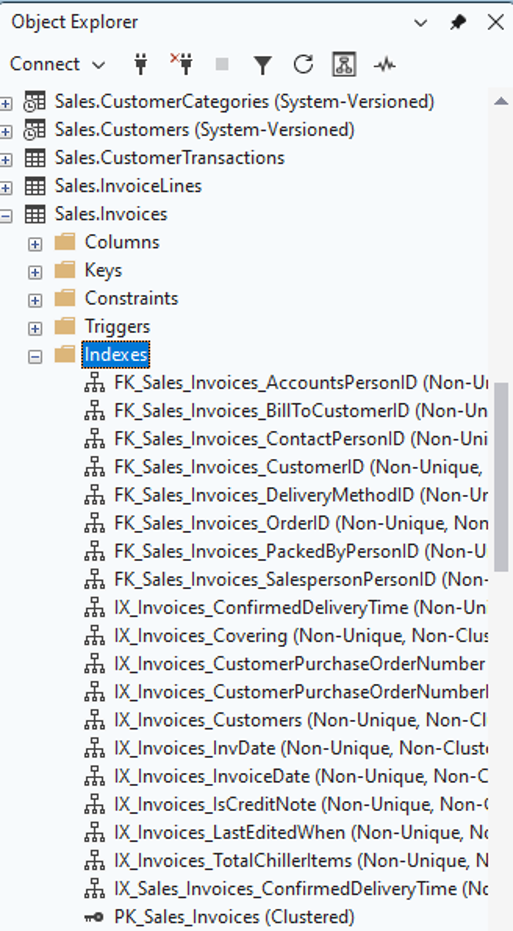
20 total indexes on a table is a LOT! I’m immediately suspicious when I see this. Are all of these indexes really used? Maybe – but probably not. Are there duplicated or overlapping indexes? On a table with 25 columns, it’s very likely!
When I check the table storage properties, an unsettling fact is observed:
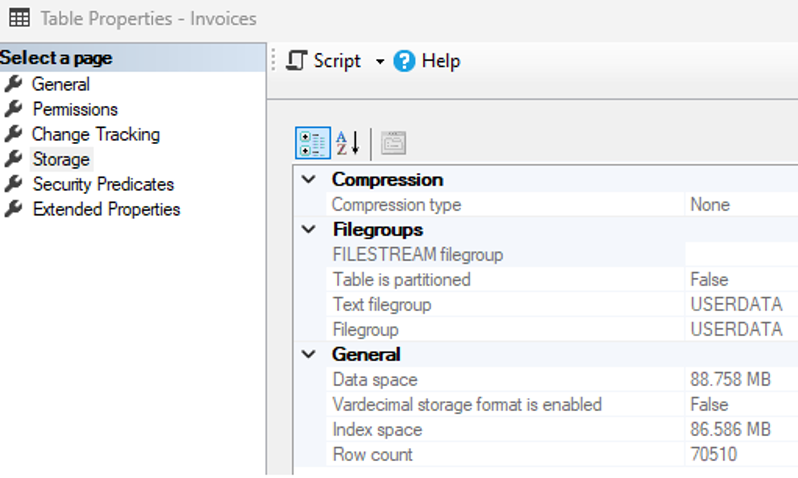
The table contains almost as much index space as data space. In other words: indexes on the table have doubled its size!
How to prevent over-indexing in SQL Server
It’s easy to index queries as they arise, and continue to regularly add indexes to solve latency problems. SQL Server Management Studio will sometimes suggest an index – and accepting that recommendation seems like an easy solution:
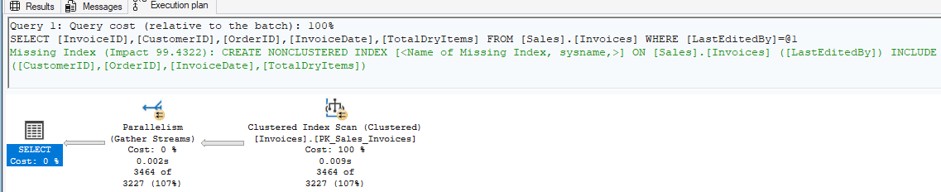
Before adding any index, it’s critical to determine its impact.
Ask yourself:
- How often will the index be used?
- What performance improvement is observed with the index in-place?
- Does a similar index exist already?
Turning clustered index scans into seeks may feel good, but quantifying the value is important. Remember that a page is 8kb and is the minimum unit of data read from storage. Does an index prevent reading an extra billion pages, or just three?
There are no mysteries here – all of these questions and challenges can be quantified and understood fully. To understand how often existing indexes are used, built-in views can be queried.
You may also be interested in…
This article, which provides some in-depth analysis on the views mentioned here.
The contents of these views are reset when SQL Server is restarted, so there is a need for a bit of long-term tracking. However, the data itself is simple and measures user seeks, scans, lookups, and updates over time.
What about underused indexes?
Note that underused indexes are worth considering for adjustment as well. If an index has one billion updates and only a single scan in the past year, it would be a sensible step to drop the index as its cost (one billion updates) is far higher than its usage (one scan).
In addition, indexes with many scans but few/no seeks can be seen as ineffective. Is the index actually helping, or could a revised version be far more effective?
There’s no hard-and-fast rule as to how many indexes are too many on a table but, as the number rises, it’s up to us to become more critical of each addition. Confirm each new index’s value before adding more – and never assume that every existing index is necessary!
After all, workloads change over time, and an index that was critical ten years ago may be completely unused today.
Fast, reliable and consistent SQL Server development…
Excessively wide indexes
Many recommended indexes have a long list of INCLUDE columns. Whereas the initial column list in an index definition determines the order in which columns are sorted and filtered by, INCLUDE columns are stored in the index solely to be available to the query after filtering is complete.
Most indexes, however, do not require any include columns at all.
This is because the addition of an index to sort and filter on often provides enough of a performance boost. Consider the following query that is run periodically to determine which orders were delivered on a given date:
|
1 2 3 4 5 6 7 8 |
SELECT OrderID, CustomerID, PickedByPersonID, BackorderOrderID, OrderDate FROM Sales.Orders WHERE ExpectedDeliveryDate = '4/14/2016'; |
Without an index, the entire Orders table is scanned, which is not ideal. The following are the results of STATISTICS IO for this clustered index scan:

692 logical reads is our baseline. If this query is executed often, users are likely to feel some pain from scanning the table over and over again! As an interesting aside, 692 8kb pages is equal to about 5.4MB – the full size of the data space for the table:
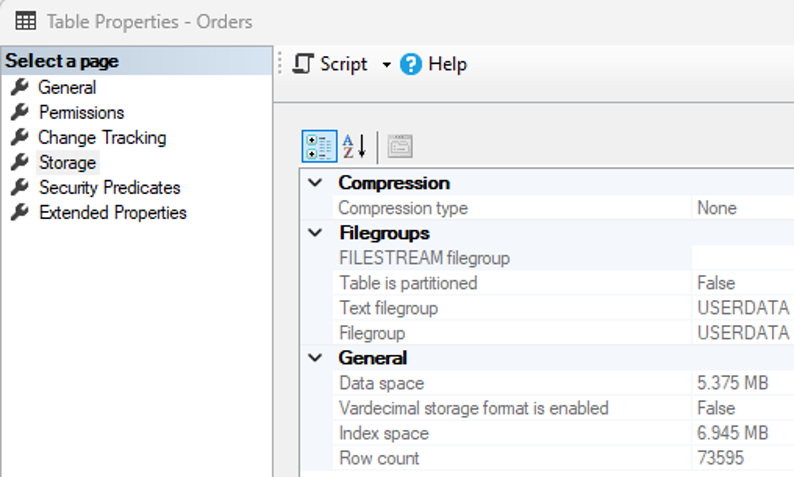
The recommended index from SSMS looks like this:
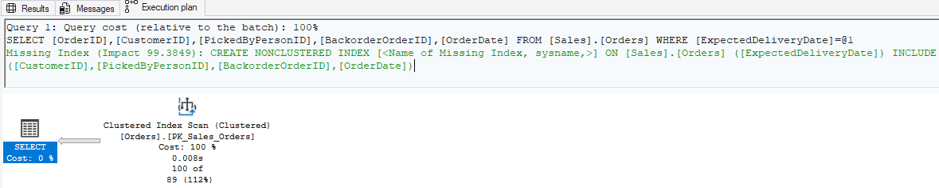
The green text above shows that the suggested index sorts on ExpectedDeliveryDate, which makes perfect sense for the query we are optimizing. The Clustered Index Scan is not desirable, and an index on the filter column will resolve that into an index seek.
The suggested INCLUDE column list, though, has every other column in the query! That is a non-trivial amount of extra storage, but is it needed?
How to determine if we need this much storage
As a best practice, always test the simplest index version first, before adding in the extra columns:
|
1 2 |
CREATE NONCLUSTERED INDEX IX_Orders_ExpectedDeliveryDate ON Sales.Orders (ExpectedDeliveryDate); |
If it’s not obvious, be sure to rename the index to something meaningful and not the default “[<Name of Missing Index, sysname,>]”. Yes, you can give an index that name and yes, doing so will incur ridicule for years to come 😊
The resulting Execution plan and STATISTICS IO shows the following:
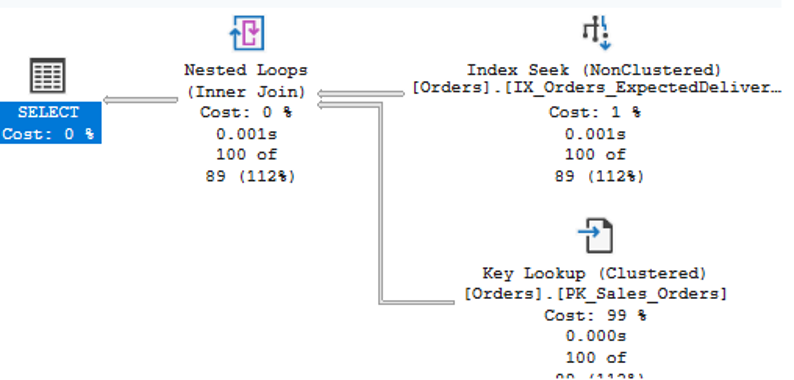

The query now uses an index seek and incurs less than half of the reads, which is definitely an improvement. The question now is whether the performance impact on the end-user is sufficient, or if more speed is needed. This is the critical question to ask!
After all, our interest in database, query, and server optimization is noble – but the true test of a query’s performance is if the user is happy.
Most of the time, turning that scan into a seek will provide an adequate performance boost, so won’t require further action. But when should the INCLUDE columns be added?
When the INCLUDE columns should be added
The most common answer here is when a query runs VERY often. How often depends on the application and its details, but if I see thousands or millions of times an hour or more, I’d at least investigate further.
When a single critical query runs disproportionately often and is responsible for an outsize portion of resource consumption, query duration, or user angst, then the additional columns can make sense:
|
1 2 3 |
CREATE NONCLUSTERED INDEX IX_Orders_Covering ON Sales.Orders (ExpectedDeliveryDate) INCLUDE (CustomerID, PickedByPersonID, BackorderOrderID, OrderDate); |
Note that this index increases the columns stored from a single date (3 bytes per entry) to two dates and three integers (18 bytes per entry). This is a rough comparison as indexes have additional overhead, but it provides a reasonable reference for what additional columns will cost. The execution plan and IO are now as follows:
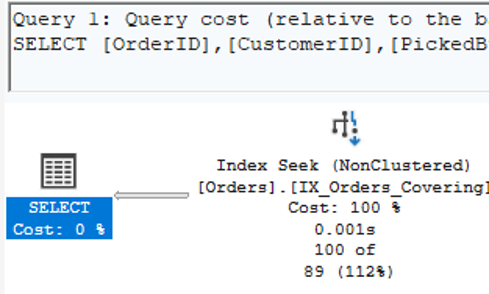

As expected, the execution plan is simply an index seek. There’s no key lookup required, and IO is down to just 2 reads. The cost for that performance boost? The index size is increased by a factor of 6x. In turn, this increases the amount of data and the frequency it needs to be updated, since more columns are now impacted.
Alternately, if a write against a table changes values of columns that are not a part of an index, the index will not need to be updated.
Ultimately, the determination of how thorough an index should be comes down to the balance between user experience and ensuring that computing resources are not wasted.
Those resources snowball fast: storage, memory, backup space, IO, network bandwidth, and contention (locking/blocking/waits) against the table. Having a good balance ensures that tables can scale effectively, especially as they grow larger over time.
Fill factor for no reason
When creating or rebuilding a standard b-tree clustered or non-clustered index, a fill factor can be specified.
This is nothing new – the ability to add a fill factor has been around since SQL Server 7.0, and its usage has been improved over the years.
The Microsoft documentation provides very straightforward guidance on how to use fill factor in SQL Server.
The docs and I fully agree that fill factor is an advanced option for scenarios where you really know your SQL Server table/index, and want to tweak it for optimal performance and efficiency.
When SQL Server attempts to write to a leaf-level page that is full, a page split occurs. Page splits cause a new leaf-level page to be created and populated with about half of the data from the source page, after which the new values are written.
Page splits take time and resources, which can slow down write operations. Resulting log writes take time – and the writes can cause fragmentation via the newly created free space on the source and destination pages, and their location on storage.
That’s where fill factor comes in, leaving free space at the leaf-level of a b-tree index to allow for future growth. If an index tends to be written evenly across most values, the extra free space will be used first, before resorting to a page split.
The upside is also the downside: fill factor pre-allocates space, meaning that there are more pages in the index, which results in more memory used, more IO, and more time needed to read those pages for use via queries.
What applied fill factor looks like at different percentages
Here’s a simple visualization of a page with 90% fill factor applied:
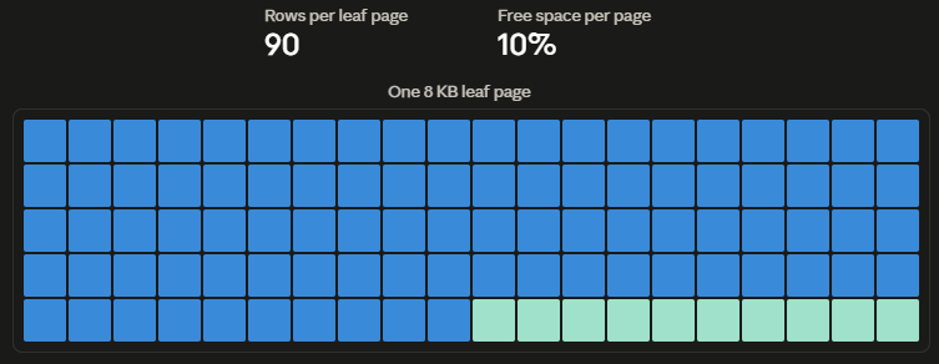
The light-blue area in the bottom-right is empty space and will be used if/when values are written to this particular leaf page.
Where fill factor goes awry is when it becomes an oddball habit. This is a feature that should be applied on a case-by-case basis but, as is often the case with a solution that works only once, they can become habitual and get applied all the time. Because, hey – if it worked once, it will always work, right?! Right?
To test the space needed to apply a fill factor, consider the following index rebuild operation against the WideWorldImporters database:
|
1 2 3 |
ALTER INDEX ALL ON Sales.Invoices REBUILD WITH (FILLFACTOR = 100); |
This rebuilds all 10 indexes on the Sales.Invoices table with no fill factor defined. Therefore, each leaf-level page will be filled with values, with no free space intentionally reserved for future DML (data manipulation language) operations. The following is a summary of storage for Sales.Invoices, taken from the table properties:
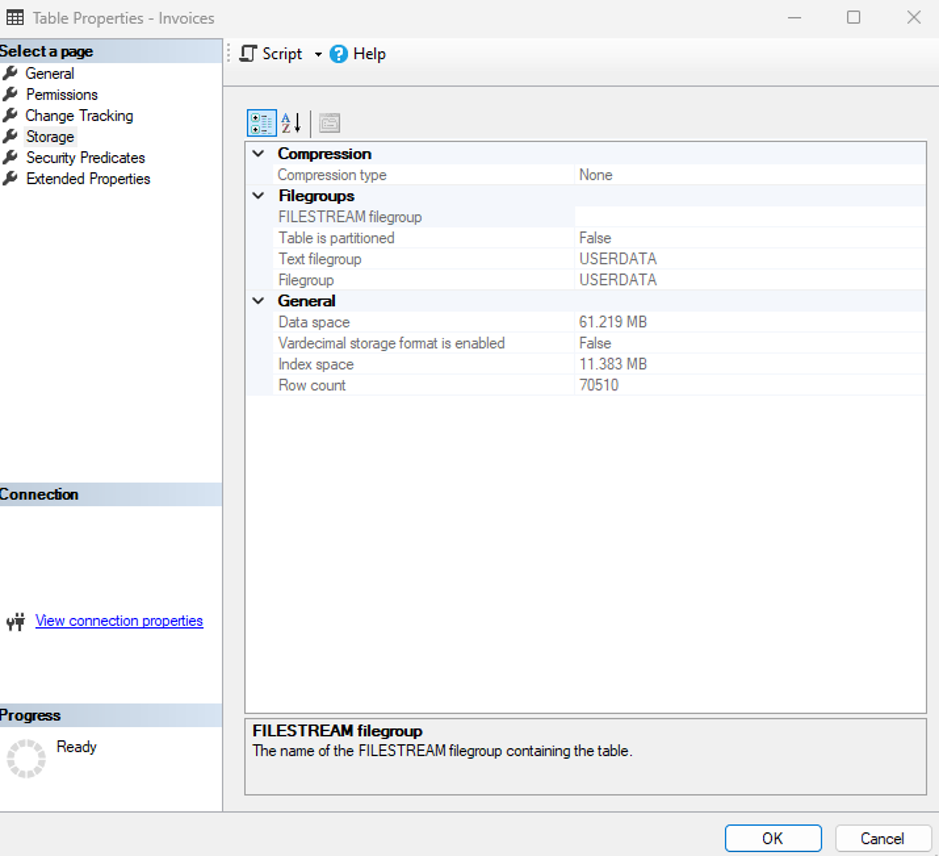
The following T-SQL will now be run, rebuilding all indexes against the same table but using a fill-factor of 75%:
|
1 2 3 |
ALTER INDEX ALL ON Sales.Invoices REBUILD WITH (FILLFACTOR = 75); |
Checking up on the table storage properties now shows the following usage:
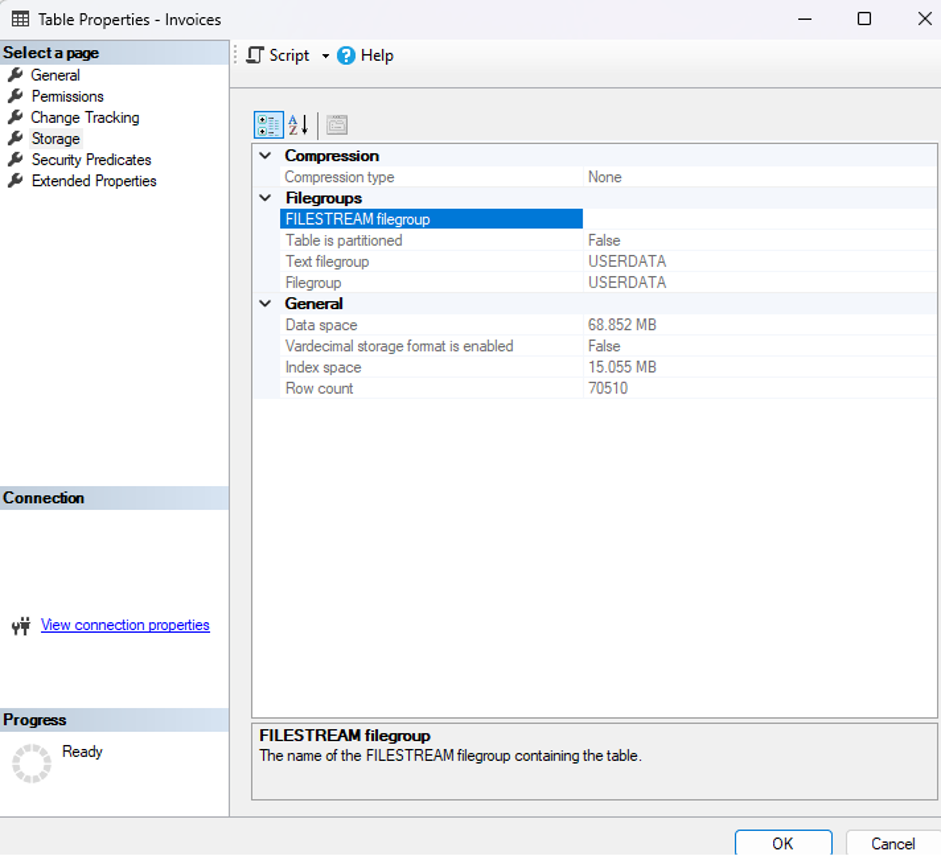
Note that the data and index space has increased. The amount of the increase is not by 25% as predicted – it varies based on how the table is written. Since only leaf-level pages are affected, the overall increase is about 15%.
Also note that, if PAD_INDEX is set to ON, extra space will be allocated to the intermediate pages in the index, further increasing the amount of allocated space.
In summary: general guidelines for fill factor in SQL Server
- fill factor in SQL Server represents an edge-case that should be used only when needed.
- There is no benefit to defining fill factor to ever-increasing indexes, such as identity columns. Consider
OPTIMIZE_FOR_SEQENTIAL_KEYinstead. - Even indexes that fragment easily may not use all of the free space from added fill factor equally. Be sure to test before concluding that fill factor is beneficial.
- fill factor is intended to solve a problem: page splits. Solving a problem that does not exist is rarely worthwhile.
- If fill factor is used, revisit it periodically to determine whether it’s still needed, and if the current fill factor percentage is too high or low.
Overly-complicated indexing in SQL Server
Before digging in, take a moment to scroll through the official Microsoft documentation for the CREATE INDEX T-SQL statement. It’ll take at least several cups of coffee to make it through there without eyes slowly glazing over 😊
To summarize that documentation: indexing in SQL Server can be very, very complicated – but also quite simple! The choice of how to implement indexing is up to us. In general, the simplest solutions are more resource-efficient, easier to maintain, and easier to document and understand.
Despite that, as technologists, we are tweakers at heart. Optimization comes naturally, and it’s easy to become embroiled in an internal debate over how to build something that is 100% ‘the best’.
Architecting efficient database objects is a virtue – and one I will always preach about – but there is value in following best practices and not making assumptions that may prove to be wrong later!
Creating indexes up front with extensive detail attached may feel optimal at the time. However, it’s actually placing limitations on the database engine and the index that ultimately makes it less flexible and useful in the long-run.
Subscribe to the Simple Talk newsletter
The SQL Server indexing conventions that make little (or no) sense
The following are conventions used in SQL Server indexes that make little sense unless data usage patterns necessitate them.
SORT_IN_TEMPDB
When used, SORT_IN_TEMPDB moves the sorting of index data into TempDB rather than the user database. This can be beneficial for large indexes or when we want to minimize database log growth.
It may also be faster if TempDB is stored on separate/faster storage.
On the flip side, it adds usage to a shared database. Servers that already have TempDB bottlenecks will not benefit from additional workload against the shared database. This is doubly so if the database server hosts many databases and TempDB has to contend with shared workloads from hundreds of sources.
SORT_IN_TEMPDB improvements hedge on TempDB being configured correctly. For example, if TempDB and the user databases share the same storage, there will be little to no obvious performance benefits. Fortunately, lots of great articles have been written about how to configure TempDB.
TempDB can be a powerful option to improve index build performance and reduce resource consumption – or it can be a complete waste of resources. Don’t make assumptions about which it will be! Prove it out before making changes to this setting.
Unnecessary SQL Server index maintenance
For many years, index maintenance was dogma. All indexes should regularly be checked for fragmentation and rebuilds/reorgs run against them based on those results. Token numbers were thrown around for the thresholds to determine what to do (5%? 15%? 30%? Sound familiar?).
SQL Server index maintenance: the key concepts
Before discussing index maintenance in SQL Server, it’s important to understand a few of the key concepts first.
Page density
This indicates how full or empty pages are in an index. More empty pages mean more wasted space, unless this is an intentional (and effective) implementation of FILL_FACTOR.
Fragmentation
If the logical ordering of values/rows in an index does not match the physical ordering of pages in the index, then that constitutes fragmentation. A range lookup in a heavily fragmented index will need to read more pages to retrieve all values needed to satisfy a query. The larger the range, the more pronounced this will be.
Rowstore vs columnstore
These are very different index types. Index maintenance is completely different for each and treating both as the same will result in wasted resources. If working in the columnstore world, consult our series on columnstore. It focuses solely on analytic data, so provides a better story around maintenance.
Storage
The type of storage underlying data files will help determine the impact of fragmentation and index maintenance. Know thine storage! Is it optimized for sequential operations? Then fragmentation and its subsequent random input/output (IO) will be more expensive. Does the storage automatically de-dupe, cache, or have other cool features that impact index performance? These questions are between you and your storage 😊
Databases in the cloud
If a database resides in Azure or another cloud vendor, consult their documentation to determine how IO works there. For example, when using Azure SQL Database and SQL Managed Instance, there are very different guidelines than for on-premises databases. Read those docs carefully as they make a strong case for not performing aggressive index maintenance!
Index reorganization
Index reorganzation is always an online operation and works to physically reorder and compact leaf-level pages of an index to whatever the fill factor setting is set to. This is generally an inexpensive, fast operation, and does not block other operations as it runs.
You may also be interested in…
Index rebuild
The index rebuild operation in SQL Server drops the existing index and creates a brand-new, pristine one from scratch. This can be an ONLINE operation in Enterprise (or Enterprise Developer) edition – otherwise it is offline. A rebuild will take as long as an index build would take, which for a larger table can be a long time. If a rebuild is offline, it’ll ‘lock’ the object and block queries from accessing it. This translates to “Downtime!”. Therefore, offline index rebuilds are only appropriate during maintenance windows, or on database copies where such operations are tolerated.
Partitioning
If a table is partitioned, index maintenance can be performed on one partition while leaving the rest alone. This is one of the BIG benefits of partitioning. When working with partitioned tables, be sure to take advantage of partition-by-partition maintenance patterns.
SQL Server index maintenance is a trade-off
And it’s a trade-off of two things:
- An index with less fragmentation.
- The time, resources, and disruption required for index maintenance.
The impact of SQL Server index maintenance increases as fragmentation increases. Running a reorg on an index with 10% fragmentation may seem like an easy task, for example, but is very unlikely to have a tangible impact on query performance.
Similarly, some tables are naturally write-intensive and will always have high fragmentation. Tables with aggressive updates, retention, or queue-like properties will naturally become fragmented quickly. For those tables, maintenance against them will often be a treadmill of brief improvement followed by speedy fragmentation.
Lastly, the data platform used will greatly impact strategy. Storage architecture, cloud vs. on-prem, transactional vs. analytic data, and current application performance.
In summary: SQL Server index maintenance
- To improve SQL Server index maintenance strategy, focus more on page density – this has a more universal impact on performance and storage that can be easily measured.
- Do not perform index maintenance all the time. The goal is to reduce wasted space when wasted space becomes a problem. It should ONLY run when needed – not as a matter of habit.
- Low page density equals wasted storage and memory. This can be costly, especially in Azure. If a large index has 50% wasted space, then some sort of maintenance is warranted. Try the reorg first and see what the results are like. If the wasted space is still big, then resort to the rebuild. Have a strategy that is fact-based and easily quantifiable!
- Omit servers, databases, objects, and partitions where maintenance is not needed. For example, a QA server where databases are regularly restored from another source does not require index maintenance. Those restores will blow away any work done and replace it with whatever the source database has.
- Similarly, vendor databases that manage their own storage may not benefit from your interference.
- Lastly, if a large table is partitioned or part of a partitioned view, consider whether all partitions require maintenance, or only the most recent ones.
- To summarize: only perform maintenance on objects that benefit from it. Omit the rest.
The key takeaway here? You want to do as little index maintenance as possible, and only when necessary.
Like any tool, it should be used for its intended purpose and only when relevant and needed. All other uses are a waste of resources that may create headaches for you and the applications you support.
Using heaps in SQL Server
A SQL Server heap is an unordered pile of data held together by pointers from the index allocation map. Its lack of inherent order results in inefficiencies including wasted space, contention, inefficient compression, and poor write performance (to name just a few).
Using heaps is strictly an advanced feature. It’s something we do when we have extensive knowledge of a system and its behavior, and we test to confirm that its usage makes sense. Microsoft acknowledges this (eventually) in their official documentation.
Despite being an edge-case, database professionals and developers are always very keen on trying to outsmart SQL Server and make decisions that they believe are better/faster/more optimal.
Before digging into details, it’s worth emphasizing that SQL Server heaps are exceptions. They are edge-cases and should not be used by default. Heaps will typically perform worse than tables with clustered indexes. Much of what is written about heaps on the internet is false, misleading, or taken out of context.
The remainder of this article will answer the question as to “Why?”
You may also be interested in…
SQL Server heaps explained
This is a simplified yet helpful image to what a SQL Server heap looks like:
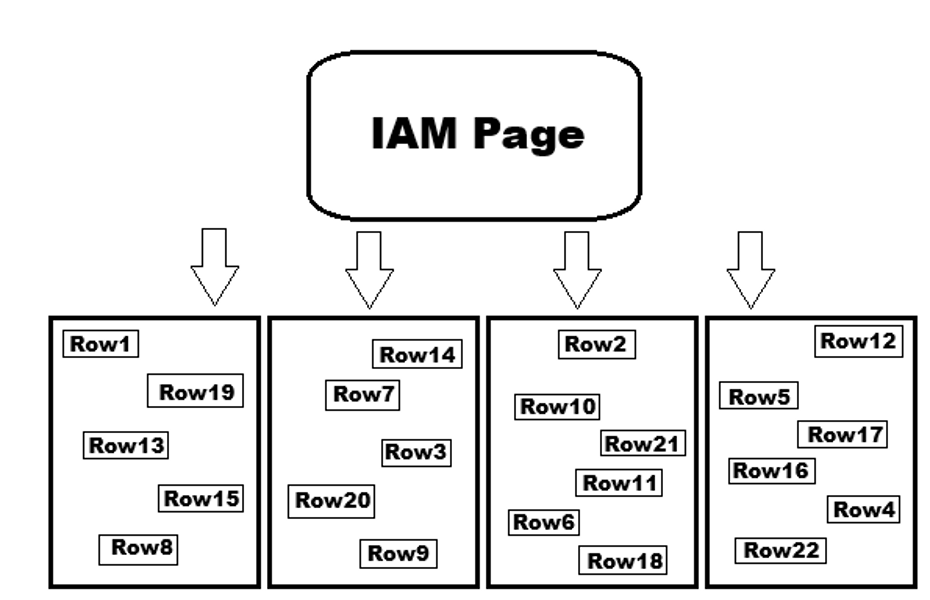
Does it look a bit chaotic? Yes, yes it does! The result of this chaos is that any ordered reads or writes against it will be inefficient. Even with added non-clustered indexes, the overhead to read data from a heap is high. In fact, the only potentially efficient operation against that heap is to read it all at once. And, even within that specific type of IO, the scenarios where it outperforms a clustered index are quite limited (more on this later.)
Adding to this inefficiency is that – to identify any row uniquely – heaps need to use RIDs (row identifiers) instead of the organized b-tree structure used by clustered indexes. Row identifiers are 8-byte data structures comprised of a file number, page number, and slot.
For a heap, they’re the most efficient way to locate a row – but it still involves a pseudo-invisible 8-byte key that adds overhead to each row in the heap. On the other hand, a clustered index looks quite different.
What does a clustered index in SQL Server look like?
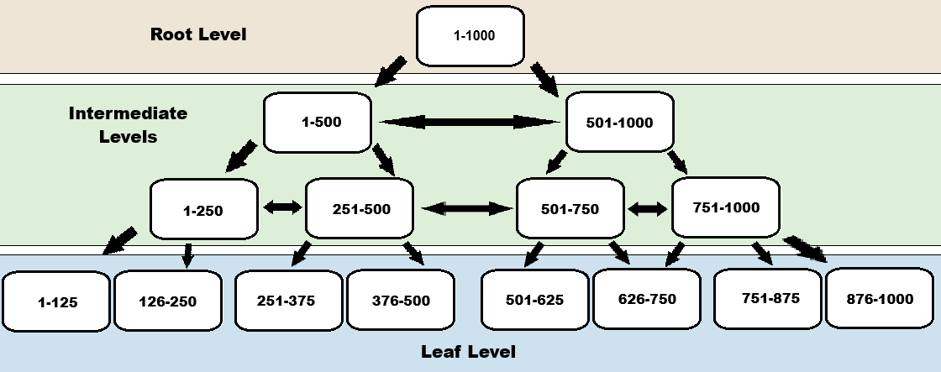
This hypothetical index tracks integers from 1-1000 and shows how the rows are evenly distributed across a b-tree. In a busy OLTP (online transaction processing) system, things will not look quite so pristine, but this is a good approximation for how it would look.
The ability to follow pointers between levels and nodes is the power of a b-tree index. A doubly linked list is used to connect pages within each level, assisting with large range-lookups and sequential reads.
You may also be interested in…
For point or small range lookups, the ability to quickly locate values by traversing a b-tree makes it a very efficient way to store typical transactional data. Whereas the RID provides an 8-byte key for each row in a heap, the clustered index key size is based directly on the clustered index columns.
If the clustered index is on an integer, which is fairly typical, the key size is 4 bytes. Since all non-clustered indexes reference the clustered index key (or RID), a wider key will increase overall index size, storage used, and memory used.
Already, heaps are not sounding terribly desirable – but wait, there’s more! A challenge with heaps occurs when a row grows in size and no longer fits on a page. When a column is adjusted from NULL to NOT NULL – or a narrow value is updated to a wider value – the row will be moved to a new page (with more space) if it doesn’t fit on the existing 8kb page.
Forwarding pointer and forwarding fetch
When this occurs, however, the row is not moved in its entirety. Instead, a forwarding pointer is inserted in the row’s old location that tells the database engine where to find the moved row. It’s similar to when you change your address: if a letter is sent to your old address, it (should!) be forwarded to your new one.
Of course, this initially makes delivery slower, but you’ll at least get your mail. Note that there is overhead involved in moving row data and writing the forwarding pointer. The IO needed to make those changes is not trivial. A database that incurs a lot of forwarding pointers will suffer from increased IO, memory usage and latency as the pointers are written and referenced.
A forwarding fetch is what happens when SQL Server reads a row that was moved via a forwarding pointer. Instead of reading the row, it needs to follow the pointer to the new location and then be able to read the row’s data. Write-heavy heaps will tend to experience a lot of forwarding fetches.
What they do to the heap
These can greatly slow down reads, as more pages than necessary are read for each operation. 8 kilobyte reads add up quickly as a table becomes larger and is queried more often. Without frequent index rebuilds, forwarding pointers can accumulate quickly, resulting in higher IO, more memory usage, and more query latency.
The following is an example of the heap from earlier, but with some forwarding pointers added in. It wouldn’t take many write operations to cause what you’ll see here – and forwarding fetch operations are not uncommon in busy heaps:
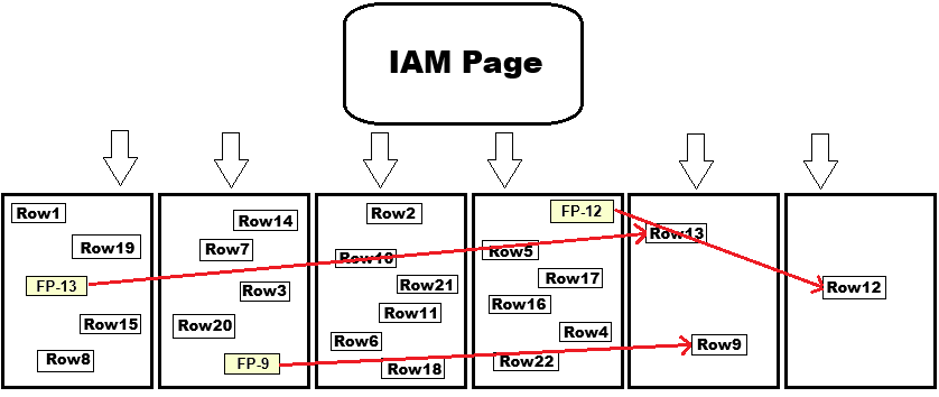
In this scenario, three rows were updated in ways that increased their fixed-width storage to the point where they no longer fit on their current pages. The contents of each row were copied to new pages, and the pointers left in place on the old pages that tell SQL Server where to find the row data.
This is a prime reason why heaps become fragmented faster than clustered indexes when update operations are involved. As you can see, the image is messy – and it only comprises six pages! Imagine a heap with thousands or millions of pages and all of the arrows I’d need to draw to represent its collection of forwarding pointers.
On second thought, let’s not.
What about non-clustered indexes on a heap?
A natural thought now is to ask about the impact of non-clustered indexes on a heap. Can they resolve any of the slowness associated with reading and writing so much data? In short, no.
An initial disadvantage is that the RID is 8-bytes, so each non-clustered index must include the RID as a part of its structure.
As a result, non-clustered indexes on a heap typically take up more space than if they were on a clustered index.
In addition to wasted space, if a query uses a non-clustered index and needs to retrieve additional columns from the heap, a RID lookup is performed. This is like a key lookup, but against the heap. So, all of the downsides of reading from a heap that were covered above, now apply!
RID lookups can be avoided if a non-clustered index against a heap can fully cover a critical query. That is, as long as the reads are reasonably fast.
It is, however, an expensive workaround – so it’s easy to argue that a clustered index is better than a heap with non-clustered indexes.
The challenge of contention
Another big challenge with heaps is contention. Because they are often read in their entirety, the most common lock taken on a heap is a table lock. This means that reads and writes of the heap will typically lock the entire thing.
If non-clustered indexes exist on the heap and there are no RID lookups, then locks can be isolated to that index. If a heap is partitioned (yes, you can do that if you are feeling creative and/or abusive), it’s possible to isolate locks to a partition (or set of partitions) instead of the whole thing.
For all other queries, though, the heap will be read in its entirety. If it’s queried often as part of a busy OLTP application, there will be significant locking and deadlocks will be more common.
How to fix a SQL Server heap
You may think that page compressing a heap would be a great way to help alleviate some of the pain points discussed here. While it sounds good in theory, many limitations are placed on the application of page compression that, while documented, are not obvious at first.
To summarize the documentation: page compression is not used for most typical write operations unless it’s part of a bulk insert or index rebuild operation. Row compression works as expected, but doesn’t provide any help with any of the challenges posed so far in this discussion of heaps.
The only true way to resolve heap fragmentation and forwarding pointers is by a full rebuild of the heap. Therefore, maintaining a heap means that index maintenance against it will be needed more often than on a clustered index. Rebuilds are not cheap and require memory, CPU, log space, time, and will take the heap offline unless using Enterprise Edition.
It’s an expensive fix and, as was discussed earlier in this article, our goal of index maintenance is to perform it as infrequently as possible.
When should I use a heap in SQL Server?
After a long discussion of why heaps are generally lousy architectural choices and provide poor performance, is there even a legit reason to use them? Heaps are edge cases that may be useful only in rare, special circumstances.
A heap can outperform a clustered index on tables where updates are rare, and full table scans are the desired operation. Staging and ETL (extract, transform, load) tables are potential candidates for heaps. If a staging table is bulk-inserted, it can benefit from page compression, which may tip the balance in favor of using a heap.
Another scenario a heap can perform well in is when a potential clustered index key is very, very wide. A Row Identifier is 8 bytes but, if a natural clustered index key is much wider than that, the heap may end up being more space efficient.
This only remains true, however, if usage patterns also align with efficient heap usage. When I see very wide clustered index keys, I typically question why this is the case, asking:
- Can a narrower key be chosen?
- Would a surrogate key such as an identity be preferable?
Temporary tables
Temporary tables are often created as heaps, despite these tables (or table variables) mostly following the same rules as permanent tables.
However, if written too heavily and repeatedly, they can become the source of serious performance degradation. That’s why, if a temporary table has query patterns that make it a poor candidate for a heap, it’s worth adjusting it to use a clustered index instead.
Changing query patterns
One thing that is consistent in the world of software development is change. Architecting a database that addresses a very specific use case will be fragile. If that use case changes and query patterns no longer follow those initial assumptions, performance challenges arise.
Applications are updated with new code all the time, impacting how a database is queried. If a heap is used to store application data under a set of correct assumptions and those assumptions are slowly unraveled over time, for example, that decision becomes invalidated.
Part of building data structures is ensuring that they can scale over time. Scalability often is seen as addressing future data size, but future application needs are just as important. To some extent, we cannot know all future application needs, so building flexible databases allows wiggle room for when things inevitably change.
Similarly, an application that relies heavily on a complex covering index on a table will hit performance issues if the queries using that index are changed. Even a single column adjustment may derail index usage, turning seeks into key lookups, or seeks into full-table scans.
Therefore, it’s important to understand app usage and how it changes over time. Building tables based on best practices ensures a lesser chance that future changes render those tables broken or obsolete.
Conclusion
Despite indexes being the central component of query performance in any database, it’s quite easy to architect tables with built-in technical debt. This article discussed many of the common indexing mistakes and why they cause frequent headaches for developers and database professionals.
The key to performance is to follow best practices. There are right and wrong ways to build and index tables. These rules apply 99% of the time and should be seen as the defaults that we always start with.
If edge cases arise in the future, adjustments can be made to accommodate them. As smart as we wish to believe we are, trying to outsmart the query optimizer on a regular basis will end in failure.
When I run into edge cases, my first inclination is to find a way to remove it and turn it into a more typical query pattern. This reduces code complexity, improves maintainability, and will improve long-term performance.
Even with all this knowledge at hand, always thoroughly test data architecture choices up-front. Never assume that a given indexing pattern or decision will always work – or even work just once. Test it out and prove it.
Just how applications are tested for performance and bugs, databases should also be tested with the same level of rigor. This testing ensures that only the correct decisions are made, and edge cases can be identified if any exist.
I hope this article was eye-opening – or at least caused some cringing as familiar mistakes were brought back to the surface of our memories! Have you run into other common indexing mistakes that continue to challenge your database performance and sanity? Feel free to share in the comments below. I love hearing other people’s stories as much as telling my own!
Write accurate SQL faster in SSMS with SQL Prompt AI
FAQs: Index tuning mistakes in SQL Server (and how to fix them)
1. What is index tuning in SQL Server?
Index tuning is the process of adding, adjusting, or removing indexes so queries run efficiently without wasting storage, memory, or write performance. It balances read speed against the overhead every index adds to inserts, updates, and deletes.
2. How many indexes on a table is too many?
There’s no fixed number, but 15–20+ indexes on one table is a red flag. Check sys.dm_db_index_usage_stats to see which indexes are actually used before assuming they’re all necessary — unused or overlapping indexes just add write overhead.
3. Do I need INCLUDE columns on every index?
No. Most indexes perform well with just the key columns. Add INCLUDE columns only when a specific, high-frequency query needs a fully covering index — test the simple version first and add columns only if the performance gain justifies the extra storage and write cost.
4. Should I set a fill factor on my indexes?
Only if you’ve confirmed page splits are actually hurting performance. Fill factor pre-allocates free space to reduce page splits, but it also increases index size, memory use, and IO. Applying it as a default habit usually wastes resources rather than saving them.
5. Are heaps (tables without a clustered index) good for performance?
Rarely. Heaps typically perform worse than clustered indexes due to forwarding pointers, RID lookups, and table-level locking. They’re only worth considering for edge cases like staging/ETL tables with rare updates or unusually wide clustered index candidates.
6. How often should index maintenance (rebuilds/reorgs) run?
Only when needed — not on a fixed schedule. Focus on page density and fragmentation levels, and skip maintenance on objects that don’t benefit from it (e.g., QA databases restored from another source, or vendor-managed tables).
This document contains proprietary information and is protected by copyright law.
Copyright © 2026 Red Gate Software Limited. All rights reserved






Load comments