



SQL Server is one of the most mature database platforms in the world, but that doesn’t mean it’s finished. With T-SQL now spanning Fabric, Azure SQL Database, Synapse, and SQL Managed Instance, the gap between what the language can do and what developers wish it could do is more visible than ever.
From clunky flat-file imports to licensing models that require a legal degree to navigate, there are real pain points that slow down data engineers and DBAs daily. This is Ed Pollack’s frank, opinionated look at five meaningful improvements that would make SQL Server and T-SQL genuinely better – not just for power users, but for anyone building on Microsoft’s data platform in 2026.
It’s mid-2026, and Microsoft SQL Server is an exceptionally mature database product. Even more important today is that T-SQL is becoming a multi-platform language – used in Fabric, Azure SQL Database, Synapse, SQL Managed Instance, and a variety of other applications.
While each variant of T-SQL and each database platform is different in its implementation and details, there remain features that I continue to wish for – and request – on a regular basis.
This article contains my thoughts on what is missing, what can be improved, and why. These are ultimately my opinions and will differ from others who have pondered this before me, and those who may do so in the future. As a T-SQL junkie, these hopes and dreams skew towards the T-SQL surface area.
Hopefully, when we look back on this in a few years, checkmarks can be placed next to some of these requests!
Before we begin: a quick note on compatibility
SQL Server and T-SQL are large and ever-evolving platforms. Microsoft is thorough in documenting compatibility with different products, as well as with ANSI standards. If you’re interested in learning more about these details, grab a (large) cup of coffee and check out their docs here.
Because of this, T-SQL supports a whole lot of different syntaxes, providing many different ways to solve most problems. There are also many features that are deprecated or maintained solely for backwards-compatibility. When choosing a solution, there’s value in picking one that’s currently supported (and will be so for the foreseeable future.)
Now, onto the list!
Wish #1: Import from compressed file formats
Moving data around for analytics, reporting, or machine learning/AI can be a hassle. This sort of analytic data can get quite large and the file formats I want to store it in are the ones that are as small and efficient as possible. Compression is key here, so CSV and Excel are not the formats I really want to deal with.
There’s no need for bells and whistles: data will be written to files once, moved around, and then imported into SQL Server. Any downstream operations will benefit from smaller file sizes. Additionally, less computing resources will be needed overall to manage these files. This is especially true if files are to be copied, moved, archived, or ingested by multiple systems.
Compatibility with other systems
For maximum compatibility with other systems – such as Synapse, Fabric, or other data warehouses/data lakes – the Apache Parquet file format is ideal. There are other highly compressed file formats out there that provide different optimizations and more features – the likes of Iceberg, ORC, Delta Lake, or Avro – but these are designed to support transactional write operations. Also, parquet files can be converted easily into Delta Lake or other formats if needed.
You may also be interested in:
While this article I wrote last year was a fun experiment, it was a workaround, and I’d love a native integration into OPENROWSET or bcp to be available natively in SQL Server. Azure has supported parquet files for quite a while now, so why not SQL Server?
I’d love to be able to execute code like this:
|
1 2 3 4 |
SELECT * FROM OPENROWSET(BULK N'D:\MyDataFiles\CritcalSalesData_06_03_2026.parquet', FORMAT = 'PARQUET') AS PARQUETDATA; |
As a big bonus, parquet files already contain metadata about column and row structure. There is no need for format files, field terminators, code pages, and other minutia that occupy us when dealing with CSV or other plain text formats. Parquet includes details on data types, values, NULLability, row counts, and more!
What does this mean when importing parquet files? The benefits explained
This means that, when importing parquet files, many of the nightmares we’ve experienced in the past are avoided. This includes:
- What data type is each column?
- Is it an
INTor a string?DATEorDATETIME?
- Is it an
- What are the length, scale, and precision for each column?
- Is that a
VARCHAR(50)orVARCHAR(100)?DECIMAL(8,2), orDECIMAL(10,4)?
- Is that a
- Will column values containing delimiters such as commas or apostrophes break my import?
- My 100 column format file needs updating…
- Can a column be
NULL?
This is the year 2026. Why does importing data sometimes feel like I am physically adjusting jumpers on an old hard drive? A descriptive metadata-driven file-format like parquet solves so many of the pain points that data engineers feel every day. The effort to implement this in SQL Server would not be immense.
Wish #2: Arrays
Arrays are an ANSI SQL standard data structure, familiar to software developers and anyone that has ever spent enough time in the mathematical world. At a high level, an array is a data type that can contain numbered elements.
For example, a few simple examples of array creation in C# would look like this:
int[] Top10CustomerIdList = new int[10];
This code creates an array that will contain 10 integers. Once created, they can be given values:
Top10CustomerIdList[0] = 561;
Top10CustomerIdList[1] = 17;
Top10CustomerIdList[2] = 280;
Arrays can be multi-dimensional and thereby support far more involved mathematical and computational problems:
int[,] CubeStats = {{17, 5, 16},{-5, 2, 19},{7, 0, 58}};
The value at a given position in a two-dimensional array can be returned easily enough:
Console.WriteLine(CubeStats[0, 1]);
This would return the value at 0 (the first triplet) and 1 (the second value contained within), which would be the number 5.
You may also be interested in:
The current state of arrays in databases
PostgreSQL has arrays implemented natively, usable in scalar or table-based operations. For example, a table can contain an array as one of its columns:
|
1 2 3 4 |
CREATE TABLE OrderSummary ( OrderId INTEGER SERIAL PRIMARY KEY, OrderDate DATE, OrderLabels VARCHAR(50) ARRAY[3]); |
From here, any row within the table may have its OrderLabels column inserted to or adjusted for any of its three possible elements:
|
1 2 3 4 5 6 7 8 |
INSERT INTO OrderSummary VALUES ( '6/3/2026', '{"Priority", "Gold", "Special"}'); UPDATE OrderSummary SET OrderLabels[1] = 'Silver' WHERE OrderId = 1; |
While SQL Server does not support arrays, it’s not too difficult to fake them using tables, sequences, delimited strings, JSON, XML, or some other trickery. Vectors can also be used to store array-like data, so long as the contents are numeric data types. These solutions work, but are never quite the same, either in terms of usability or performance.
My biggest complaint about the array replacements in SQL Server is that they are either prone to bad data, perform poorly, or both. JSON, XML, and delimited lists are often used in place of arrays – especially multi-dimensional ones. Their weakness is that the actual data structures are not a native list of values, but a blob of text that also contains the values we want.
Their primary purposes are different, too. JSON is the perfect solution to transmit an unstructured document between apps without the need to deconstruct or reconstruct it first. A delimited list makes the most sense when its original source is also a delimited list.
Why arrays should be added to SQL Server
What are my top reasons for wanting arrays in SQL Server?
- Native support for sets of objects in any number of dimensions.
- The ability to natively index an array-object to improve performance.
- The database engine automatically parses element data types/sizes to ensure they fit correctly into the array.
- More effective for structured data than a blob of text.
Note that Azure SQL Database and SQL Server 2025+ support the VECTOR data type. While there are similarities between arrays and vectors, they are not the same. Arrays are built for general support of element lists for any data types, whereas vectors are specialized for storing AI embeddings and managing the strictly numeric data for sematic search models.
Arrays take a bit of getting used to. Those who are not already familiar with how they work might find them awkward, but I sincerely hope they make their way to the Microsoft data platform in the future. They provide better, easier solutions to many common problems.
Wish #3: OVERLAPS
This predicate can be used when evaluating dates and times – returning TRUE if two time ranges overlap with each other, and FALSE if they do not. It’s a use-case that I find I need to evaluate more often than a younger version of me may have anticipated!
For example, imagine that there was an outage of a software provider from 7:15-7:30 on June 3, 2026, and I wanted to find all API calls that have any overlap in execution start/end with the outage time. The basic syntax in PostgreSQL would look like this:
|
1 2 3 4 |
SELECT * FROM APICalls WHERE (StartTime, EndTime) OVERLAPS ('6/3/2026 07:15:00', '6/3/2026 07:30:00'); |
Now compare that to the code required to get the same result in SQL Server:
|
1 2 3 4 5 6 7 |
SELECT * FROM APICalls WHERE (StartTime <= '6/3/2026 07:15:00' AND EndTime >= '6/3/2026 07:30:00') OR (StartTime >= '6/3/2026 07:15:00' AND EndTime <= '6/3/2026 07:30:00') OR (StartTime <= '6/3/2026 07:15:00' AND EndTime >= '6/3/2026 07:15:00') OR (StartTime <= '6/3/2026 07:30:00' AND EndTime >= '6/3/2026 07:30:00'); |
This code handles four distinct scenarios:
- The API call began before the outage and ended after the outage was over
- The API call began during the outage and ended before the outage was over
- The API call began before the outage and ended after the outage began
- The API call began during the outage and ended after the outage was over
While there are a variety of different ways to code this, the versions without OVERLAPS are far more elaborate. More importantly, coding to cover all overlapping scenarios is mentally taxing – and where most mistakes creep in.
Even when working with date tables to assist in performing complex date math, I’d rather have a built-in function that does exactly what I want, than need to cobble it together from a loosely-visualized graphic in my mind.
Wish #4: Simplify licensing of SQL Server
This is a SQL-Server-specific wish: please make licensing simpler! In Azure, things have a monthly cost that can be quantified and estimated based on hardware and software needs. For SQL Server outside of Azure SQL Database, however, licensing is complicated by the fact that there are many, many licensing models available.
Why is that a problem?
As organizations grow, the number can get large quickly. The job of licensing SQL Server therefore becomes mission critical. Some of the most common questions asked include:
- Which licensing model should we use? Per-core? CAL? Something else?
- What is Software Assurance and how does it work?
- Does a subscription model make sense?
- Should licensing be determined by the virtual or physical host?
- When is it OK to use SQL Server Developer Edition?
- How do HA/DR copies work? Are they licensed differently?
- Enterprise or Standard – which is the correct one to use?
- Can Azure Arc help?
- What is License Mobility?
- Do I need to hire a legal or technical contractor to deal with this for me?
That’s a LOT of complexity – and it’s only the tip of the iceberg! This leads to frequent licensing mistakes when organizations can easily pay far too much for their SQL Servers. Some companies under-license and are left in an awkward position when they are audited.
Protect your data. Demonstrate compliance.
For more information on current licensing methodology from Microsoft, these docs provide some quality reading, assuming you have some leftover coffee from earlier on-hand!
It seems like each time Microsoft makes changes to its licensing, the result is more confusion. Therefore, a HUGE wish I have is to see licensing simplified. It should be no more complex than spinning up an Azure SQL Database. For example, I can jump right into Azure and get an estimate on what a database will cost per month, just like this:
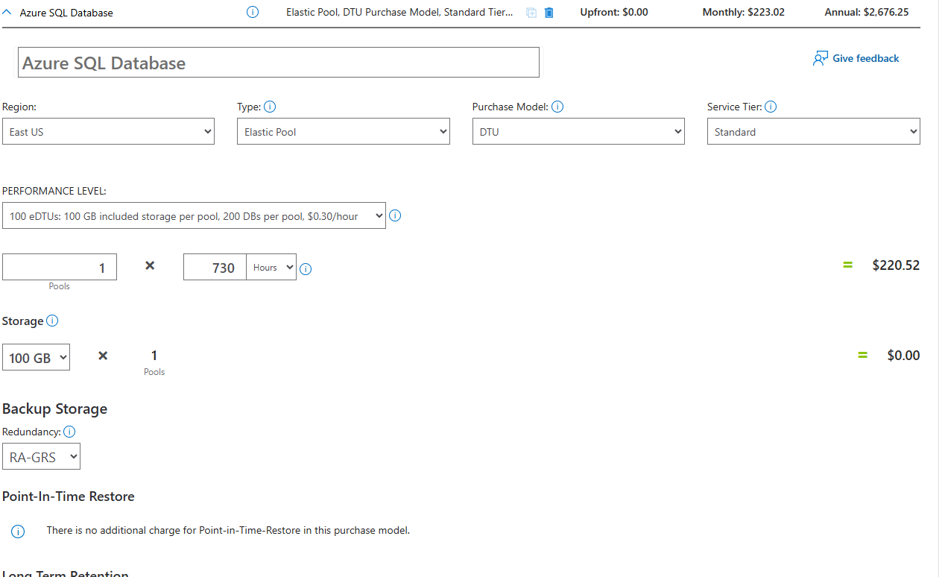
Sure, I may not like the resulting price, but it’s clear as I adjust the various levers and knobs in this calculator what the cost will look like.
Wish #5: Cloud Blob Storage for everything
As a best practice, relational/transactional data should reside in a relational/transactional database. Files should reside in file systems. In the ancient past, file systems implied hard drives attached to servers that were given drive letters. Those drives were monitored and managed not only so that space didn’t run out, but to maintain high availability (as much as the system allowed) throughout.
The latter part of that description was where scalability and maintainability would become challenging. Drives fill up. Disks fail. Things breaking is a part of the world of hardware. It can’t be avoided. All hardware eventually fails – that’s a general accepted truth in computing.
Cloud storage fixed that. No longer do we need to carefully manage the nitty-gritty of storage ourselves – why not let Microsoft, Amazon, Google, and other cloud vendors deal with it for us?!
Cloud storage in SQL Server 2025 improved the situation
SQL Server 2025 brought with it the ability to back up a database to Azure Blob Storage and Amazon s3. This was a huge improvement as those storage targets are cheap and made for large files. Once there, backup files can be used, copied, moved, and managed in all the ways that files in a filesystem can be managed, with all of the maintainability benefits offered by cloud storage vendors.
This was a good start – but what would be great would be for those cloud storage technologies to be able to be used for more database operations involving files. Here are my top requests.
Cloud storage improvements I’d like to see in SQL Server
- Filestream-like storage to a cloud URL
- Log Shipping can use cloud-stored backup files for all of its needs
- Mirror backups automatically to secondary URLs
- Format files for
bcp/Bulk Insert can reside in a cloud URL - Import and Export files from SQL Server via a cloud URL
- Anywhere else we interact with files via SQL
If a database is already hosted in the cloud, then these requests become simple ones. “Let me connect to that storage right over there instead of this storage, PLEASE!”
Picture a scenario when I want to do something like this:
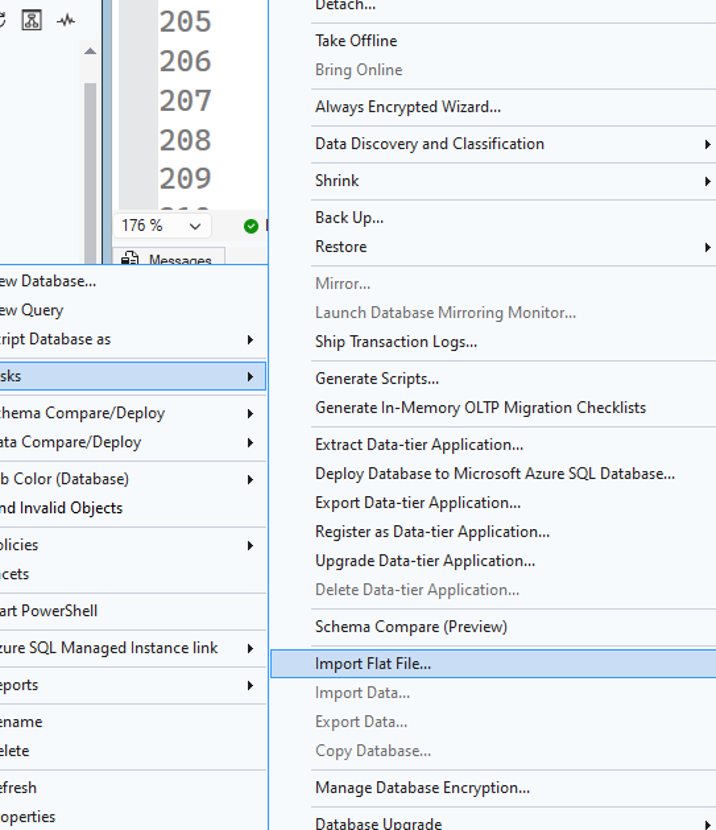
My expectation is that I can load a file from any reasonable location available to this server:
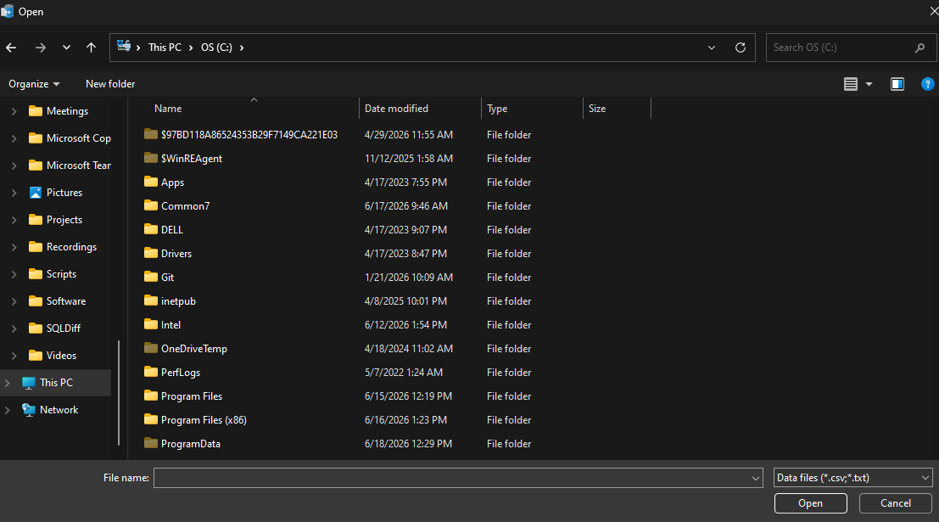
Unfortunately, my choices include locally attached drives. For maintainability’s sake, it would be far better for files, scripts, and other related content to be centralized in a single easily-accessible, secure cloud location. Hopefully, the trend started in Azure SQL Database – and then in SQL Server – continues, and storage targets become seen as a more unified surface area that includes URLs, Blob storage, and other commonly-used cloud solutions.
SQL Server has come a long way, but there’s still work to be done
SQL Server and T-SQL have come a long way. The gap between where the platform is and where it could be, however, is still real – and felt daily by developers and data engineers.
Native Parquet support would eliminate decades-worth of flat-file frustration in a single feature. Arrays would give developers a proper, performant alternative to the JSON and XML workarounds that have been patched into workflows for years. OVERLAPS would turn four-condition date logic into one readable line. Simpler licensing would remove a source of risk and confusion that no technical team should have to carry. And broader cloud storage integration would bring SQL Server’s file handling in line with the cloud-first world most teams already live in.
Several of these requests already exist in competing platforms or adjacent Microsoft products. Let’s hope that, if I were to revisit this list in a few years, most of it has earned a checkmark.
What would you like to see added to SQL Server? Do you agree or disagree with any of my points? Let me know in the comments below!
Fast, reliable and consistent SQL Server development…
This document contains proprietary information and is protected by copyright law.
Copyright © 2026 Red Gate Software Limited. All rights reserved






Load comments