






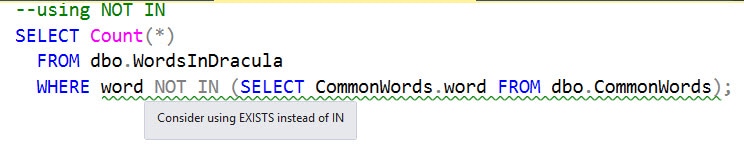
Consider using [NOT] EXISTS instead of [NOT] IN with a subquery (PE019)
It used to be that the EXISTS logical operator was faster than IN, when comparing data sets using a subquery. For example, in cases where the query had to perform a certain task, but only if the subquery returned any rows, then when evaluating WHERE [NOT] EXISTS (subquery), the database engine could quit searching as soon as it had found just one row, whereas WHERE [NOT] IN (subquery) would always collect all the results from the sub-query, before further processing.
However, the query optimizer now treats EXISTS and IN the same way, whenever it can, so you're unlikely to see any significant performance differences. Nevertheless, you need to be cautious when using the NOT IN operator if the subquery's source data contains NULL values. If so, you should consider using a NOT EXISTS operator instead of NOT IN, or recast the statement as a left outer join.
A recommendation to prefer use of [NOT] EXISTS over [NOT] IN is included as a code analysis rule in SQL Prompt (PE019).
Which performs better: EXISTS or IN….?
There are many ways of working out the differences between two data sets, but two of the most common are to use either the EXISTS or the IN logical operator. Imagine that we have two simple tables, one with all the common words in the English language (CommonWords), and the other with a list of all the words in Bram Stoker's 'Dracula' (WordsInDracula). The TestExistsAndIn download includes the script to create these two tables and populate each one from its associated text file. It is useful, generally, to have tables like these in your sandbox server, for running tests while doing development work, though the book you use is your choice!
How many words occur in Dracula that aren't common words? Assuming there are no NULL values in the CommonWords.Word column (more on this later), then the following queries will return the same result (1555 words), and have the same execution plan, which uses a Merge Join (Right Anti Semi Join) between the two tables.
|
1
2
3
4
5
6
7
8
9
10
11
|
--using NOT IN
SELECT Count(*)
FROM dbo.WordsInDracula
WHERE word NOT IN (SELECT CommonWords.word FROM dbo.CommonWords);
--Using NOT EXISTS
SELECT Count(*)
FROM dbo.WordsInDracula
WHERE NOT EXISTS
(SELECT * FROM dbo.CommonWords
WHERE CommonWords.word = WordsInDracula.word);
|
Listing 1
In short, the SQL Server optimizer treats either query in the same way, and they will perform the same too.
…or ANY, EXCEPT, INNER JOIN, OUTER JOIN or INTERSECT…?
What about all the other possible techniques, though, such as using ANY, EXCEPT, INNER JOIN, OUTER JOIN or INTERSECT? Listing 2 shows seven further alternatives that I could think of easily, though there will be others.
|
1
2
3
4
5
6
7
8
9
10
11
12
13
14
15
16
17
18
19
20
21
22
23
24
25
26
27
28
29
30
31
32
33
34
35
36
37
38
39
40
41
42
43
44
45
46
47
48
49
50
51
52
53
54
55
56
57
58
59
60
61
|
--using ANY
SELECT Count(*)
FROM dbo.WordsInDracula
WHERE NOT(WordsInDracula.word = ANY
(SELECT word
FROM commonwords )) ;
--Right anti semi merge join
--using EXCEPT
SELECT Count(*)
FROM
(
SELECT word
FROM dbo.WordsInDracula
EXCEPT
SELECT word
FROM dbo.CommonWords
) AS JustTheUncommonOnes;
--Right anti semi merge join
--using LEFT OUTER JOIN
SELECT Count(*)
FROM dbo.WordsInDracula
LEFT OUTER JOIN dbo.CommonWords
ON CommonWords.word = WordsinDracula.word
WHERE CommonWords.word IS NULL;
--right outer merge join
--using FULL OUTER JOIN
SELECT Count(*)
FROM dbo.WordsInDracula
full OUTER JOIN dbo.CommonWords
ON CommonWords.word = WordsinDracula.word
WHERE CommonWords.word IS NULL;
--Full outer join implemented as a merge join.
--using intersect to get the difference
SELECT (SELECT Count(*) FROM WordsInDracula)-Count(*)
FROM
(
SELECT word
FROM dbo.WordsInDracula
intersect
SELECT word
FROM dbo.CommonWords
) AS JustTheUncommonOnes;
--inner merge join
--using FULL OUTER JOIN syntax to get the difference
SELECT Count(*)-(SELECT Count(*) FROM CommonWords)
FROM dbo.WordsInDracula
full OUTER JOIN dbo.CommonWords
ON CommonWords.word = WordsinDracula.word
--full outer merge join
--using INNER JOIN syntax to get the difference
SELECT (SELECT Count(*) FROM WordsinDracula)-Count(*)
FROM dbo.WordsInDracula
INNER JOIN dbo.CommonWords
ON CommonWords.word = WordsinDracula.word
--inner merge join
|
Listing 2
The Test Harness
All nine queries give the same results, but does any one approach perform better? Let's put them all in a simple test harness to see how long each version takes! Again, the code download file includes the test harness code, and all nine queries.
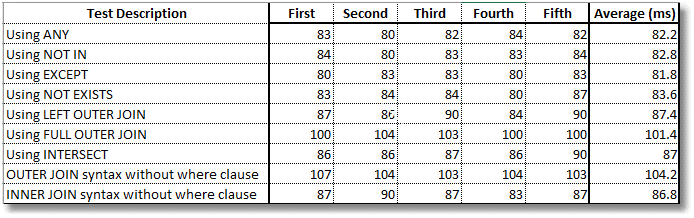
As the results show, although the queries look rather different, it's generally just 'syntactic sugar' to the optimizer. However elegant your SQL, the optimizer merely shrugs and comes up with an efficient plan to execute it. In fact, the first four all use the exact same 'right anti semi merge join' execution plan, and all take the same amount of time.
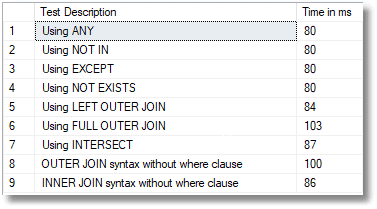
We'll check for variation by running the test several times. The INTERSECT and INNER JOIN queries both used an inner merge join, and were close. The two FULL OUTER JOIN queries were a bit slower, but it was a close race.
The pitfall of NOT IN
There is a certain unreality in comparing sets with null values in them, but if it happens in the heat of everyday database reporting, things can go very wrong. If you have a NULL value in the result of the subquery, or expression, that is passed to the IN logical operator, it will give a reasonable response, and the same as the equivalent EXISTS. However, NOT IN behaves very differently.
Listing 3 demonstrates the problem. We insert three common and three uncommon words into a @someWord table variable, and we want to know the number of common words that aren't in our table variable.
|
1
2
3
4
5
6
7
8
9
10
11
12
13
14
15
16
17
18
19
20
21
22
23
24
25
26
27
28
29
30
31
32
33
34
35
36
37
38
39
40
41
42
43
44
45
46
47
48
49
50
51
52
53
54
55
56
57
|
SET NOCOUNT ON;
DECLARE @someWord TABLE
(
word NVARCHAR(35) NULL
);
INSERT INTO @someWord
(
word
)
--three common words
SELECT TOP 3
word
FROM dbo.commonwords
ORDER BY word DESC;
-- three uncommon words
INSERT INTO @someWord
(
word
)
VALUES
('flibberty'),
('jibberty'),
('flob');
SELECT [NOT EXISTS without NULL] = COUNT(*)
FROM commonwords AS MyWords
WHERE NOT EXISTS
(
SELECT word FROM @someWord AS s WHERE s.word LIKE MyWords.word
);
SELECT [NOT IN without NULL] = COUNT(*)
FROM commonwords AS MyWords
WHERE word NOT IN (
SELECT word FROM @someWord
);
--Insert a NULL value
INSERT INTO @someWord
(
word
)
VALUES
(NULL);
SELECT [NOT EXISTS with NULL] = COUNT(*)
FROM commonwords AS MyWords
WHERE NOT EXISTS
(
SELECT word FROM @someWord AS s WHERE s.word LIKE MyWords.word
);
SELECT [NOT IN with NULL] = COUNT(*)
FROM commonwords AS MyWords
WHERE word NOT IN (
SELECT word FROM @someWord
);
|
Listing 3.
The NOT IN query, before we inserted a NULL into @someword, and both the NOT EXISTS queries, all tell us correctly that 60385 words are not in our table variable, because three are, and there are 60388 common words in all. However, if the subquery can return a NULL, then NOT IN returns no rows at all.
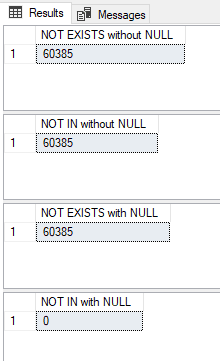
NULL really means 'unknown' rather than nothing, which is why any expression that compare to a NULL value returns NULL, or unknown.
Logically, SQL Server evaluates the subquery, replaces it with the list of values it returns, and then evaluates the [NOT] IN condition. For the IN variant of our query, this does not cause a problem because it resolves to the following:
|
1
2
3
|
WHERE word = 'flibberty' OR word = 'jibberty' OR word = 'flob'
OR word = 'zygotes' OR word = 'zygote' OR word = 'zydeco'
OR word = NULL;
|
This returns 3 rows, for the matches on the 'z…' words. The sting comes with NOT IN, which resolves to the following:
|
1
2
3
|
WHERE word <> 'flibberty' AND word <> 'jibberty'AND word <> 'flob'
AND word <> 'zygotes' AND word <> 'zygote' AND word <> 'zydeco'
AND word <> NULL;
|
The AND condition with a comparison to NULL evaluates as 'unknown' , and so the expression will always return zero rows. This isn't a bug; it is by design. You can argue that a NULL shouldn't be allowed in the any column where you want to use a NOT IN expression, but in our real working lives, these things can creep into table sources. It is worth being cautious. So, use the EXISTS variant, or one of the others, or always remember to include a WHERE clause in the IN condition to eliminate the NULLs.
This document contains proprietary information and is protected by copyright law.
Copyright © 2026 Red Gate Software Limited. All rights reserved
Downloads
Tools in this post
You may also like

Article
Quick SQL Prompt tip – script objects as ALTER in two clicks
Working in a large database can be difficult at times. While many of us might learn the meanings and definitions of most objects, it’s easy to forget the exact ways in which some objects work, or what the behavior is in certain calls. This is one place where having tools that assist you like SQL Prompt can make you a much more efficient developer. Let’s say I run into a query like this one: There’s a good naming convention here, but am I sure of exactly how the function works? Can a parameter change things? Is this a scalar function that

Live training session
New features added to SQL Prompt
Our development team have been busy adding new features and functionality to make SQL Prompt even more awesome. In this 30-minute training session Redgate Solutions Engineer, David Ong, will be joined by Terry Malone and Owen Standage from our SQL Prompt Dev Team to look at each of the new features and how they work, including a few exclusives for SQL Toolbelt Essentials’ subscription users. Command Palette: Find and execute SQL Prompt and SSMS functionality, and search for database objects, via a single keyboard shortcut. Redgate Platform: Share formatting styles and snippets with your team. Bulk actions: Apply bulk formatting, bulk
Article
Changing SET options in a Procedure or Trigger leads to Recompilation (PE012)
Phil Factor delves into SQL Prompt's performance rule, PE012, which will advise you if it detects the use of the SET statements within a stored procedure or trigger, which might cause unnecessary recompilations, though the issue extends to other types of batches.
Article
The Sins of SELECT * (BP005)
If Prompt warns you of use of the asterisk, or 'star' (*), in SELECT statements, consider replacing it with an explicit column list. It will prevent unnecessary network load and query performance problems, and avoid problems if the column order changes, when inserting into a table.
Article
SQL Productivity with SQL Prompt
There is an old joke that upgrading to the latest SQL Server is wasted on some DBAs, because they will still stick mainly to what worked in SQL Server 2005. This type of DBA is becoming rare, in my experience, but there is still some truth in the idea that many of us don’t get the ‘full power’ from our SQL Server tools. We work with them as they come, ‘out of the box’, and use only a fraction of their features. The time to explore ‘new stuff’, at least as much as we’d like to, remains elusive. SQL Prompt is a
Article
How to implement a T-SQL code formatting standard using SQL Prompt
To what extent should a team attempt to impose a uniform SQL coding format? It can sometimes seem like a futile task. All programmers have a preferred formatting style, to which they profess an unwavering attachment. Check the code of ten programmers, though, and you will likely discover at least 15 different formats, since few developers are particularly consistent in applying their preferred style. Just a note – if you’ve upgraded to SQL Prompt v8, Louis has updated this blog post to reflect the upgraded formatting features. Find out more about how the brand new formatting engine lets you set styles –
Loading comments...