

SQL Prompt code analysis: avoiding the old-style TOP clause (ST006)
The syntax of the TOP clause insists on a bracketed, or parenthesized, expression as its first argument, so that TOP 34 should, strictly speaking be TOP (34), although if you are just supplying a numeric constant, such as 34, as an argument then either style will work. Early incarnations of TOP could use only a constant value, so the parentheses weren't necessary, and the old, bracket-less style is still supported so that code written in previous versions of SQL Server will still work.
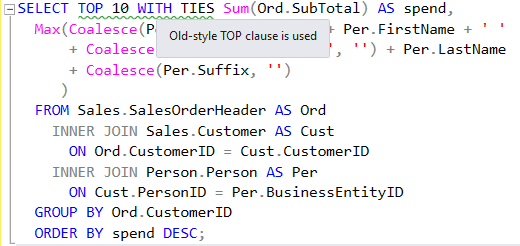
However, TOP has come a long way since then, and now supports use of an expression, such as (@Rows*2), or a subquery. In these cases, the brackets are necessary. They are also required when TOP is used in INSERT, UPDATE, MERGE, and DELETE statements, so it is a habit worth adopting everywhere. SQL Prompt will raise one of its 'code style violation' warnings (ST006) when it spots use of the old-style syntax.
TOP examples
Imagine we want the top ten best performing customers at AdventureWorks.
|
1
2
3
4
5
6
7
8
9
10
11
12
|
SELECT TOP 10 WITH TIES Sum(Ord.SubTotal) AS spend,
Max(Coalesce(Per.Title + ' ', '') + Per.FirstName + ' '
+ Coalesce(Per.MiddleName + ' ', '') + Per.LastName
+ Coalesce(Per.Suffix, '')
)
FROM Sales.SalesOrderHeader AS Ord
INNER JOIN Sales.Customer AS Cust
ON Ord.CustomerID = Cust.CustomerID
INNER JOIN Person.Person AS Per
ON Cust.PersonID = Per.BusinessEntityID
GROUP BY Ord.CustomerID
ORDER BY spend DESC;
|
Listing 1: TOP 10 WITH TIES
This old-style TOP 10 WITH TIES syntax will run quite happily, even though strictly we should be using (10).
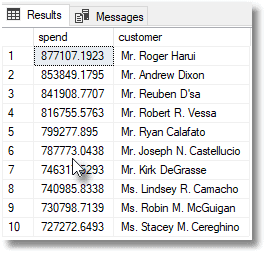
However, if you are using a constant scalar subquery, the top 0.1% of all customers in this example, then the parentheses are required.
|
1
2
3
4
5
6
7
8
9
10
11
12
13
|
SELECT TOP (SELECT Count(*)/1000 FROM Sales.Customer)
Sum(Ord.SubTotal) AS spend,
Max(Coalesce(Per.Title + ' ', '') + Per.FirstName + ' '
+ Coalesce(Per.MiddleName + ' ', '') + Per.LastName
+ Coalesce(Per.Suffix, '')
)
FROM Sales.SalesOrderHeader AS Ord
INNER JOIN Sales.Customer AS Cust
ON Ord.CustomerID = Cust.CustomerID
INNER JOIN Person.Person AS Per
ON Cust.PersonID = Per.BusinessEntityID
GROUP BY Ord.CustomerID
ORDER BY spend DESC
|
Listing 2: TOP 0.1% of customers
Using OFFSET and FETCH NEXT as an alternative
If you don't like being nagged about doing brackets you can happily use OFFSET and FETCH NEXT instead, which don't require them, although it's a bit more long-winded.
|
1
2
3
4
5
6
7
8
9
10
11
12
13
14
|
SELECT Sum(Ord.SubTotal) AS spend,
Max(Coalesce(Per.Title + ' ', '') + Per.FirstName + ' '
+ Coalesce(Per.MiddleName + ' ', '') + Per.LastName
+ Coalesce(Per.Suffix, '')
)
FROM Sales.SalesOrderHeader AS Ord
INNER JOIN Sales.Customer AS Cust
ON Ord.CustomerID = Cust.CustomerID
INNER JOIN Person.Person AS Per
ON Cust.PersonID = Per.BusinessEntityID
GROUP BY Ord.CustomerID
ORDER BY spend DESC
OFFSET 0 ROWS
FETCH NEXT 10 ROWS ONLY;
|
Listing 3: Using OFFESET and FETCH NEXT
You can't do ties, but you can specify a variable, parameter, or even constant scalar subquery as an argument to the OFFSET and FETCH NEXT, and you don't need brackets unless you use a subquery.
|
1
2
3
4
5
6
7
8
9
10
11
12
13
14
|
SELECT Sum(Ord.SubTotal) AS spend,
Max(Coalesce(Per.Title + ' ', '') + Per.FirstName + ' '
+ Coalesce(Per.MiddleName + ' ', '') + Per.LastName
+ Coalesce(Per.Suffix, '')
)
FROM Sales.SalesOrderHeader AS Ord
INNER JOIN Sales.Customer AS Cust
ON Ord.CustomerID = Cust.CustomerID
INNER JOIN Person.Person AS Per
ON Cust.PersonID = Per.BusinessEntityID
GROUP BY Ord.CustomerID
ORDER BY spend DESC
OFFSET 0 ROWS
FETCH NEXT (SELECT Count(*)/1000 FROM Sales.Customer) ROWS ONLY;
|
Listing 4: Using FETCH NEXT with a subquery
Conclusions
There are worse sins in SQL that leaving out brackets in the parameter to a TOP statement. Strangely, I've always felt a bit uncomfortable about leaving them out because it is useful to be reminded of the power of the TOP clause nowadays. It is a long way from the old days of having to temporarily set the ROWCOUNT to the number of rows you wanted returned!
This document contains proprietary information and is protected by copyright law.
Copyright © 2026 Red Gate Software Limited. All rights reserved
Tools in this post
You may also like

Article
Insert Statement Without Column List (BP004)
Many production databases have failed embarrassingly as a result of
INSERTcode that omits a column list, usually in mysterious ways and often without generating errors. Phil Factor demonstrates the problem, and advocates a 'defense-in-depth' approach to writing SQL, in order to avoid it.Article
The SQL Prompt Functionality Finder
You have SQL Prompt, but are you aware of all the things it can do and how to get it to do it? Phil Factor provides a handy table to make it obvious.
Article
Problems Caused by Use of the SQL_VARIANT Datatype
Phil Factor illustrates the 'quirks' of the SQL_VARIANT datatype and why it's best to investigate when SQL Prompt alerts you to its use. It is only safe to store data as a SQL_VARIANT, if you explicitly convert it to its true type before you use it.
Article
What's new in SQL Prompt 9.5: SSMS 18 and VS 2019 support, improved suggestions and more
Faris Hilmi presents the highlights of the latest SQL Prompt 9.5 release, including SSMS 18 and VS 2019 support, schema filtering for code completion suggestions, new code analysis auto-fixes and more.
Article
SQL Prompt Code Analysis: Avoid using the ISNUMERIC Function (E1029)
Avoid using the
IsNumeric()function, because it can often lead to data type conversion errors, when importing data. On SQL Server 2012 or later, use theTry_Convert()orTry_Cast()function instead. On earlier SQL Server versions, the only way to avoid it is by usingLIKEexpressions.
Webinar
Six ways to unlock efficiency in your SQL Server database development featuring SQL Prompt and more
According to a recent IDC report, by 2026, more than 90% of organizations worldwide will feel the pain of the IT skills crisis, amounting to some $5.5 trillion in losses caused by product delays, impaired competitiveness, and loss of business. Consequently, teams are grappling with heavier workloads and experiencing decreased satisfaction among both customers and employees. One method for tackling a mounting workload, without relying on recruiting extra staff, is to unlock efficiencies throughout the database development cycle. Join us to discover six practical ways for boosting productivity using Redgate tools including SQL Prompt and SQL Toolbelt Essentials. As a
Loading comments...