



In this article, learn how PostgreSQL powers data science workflows, including query execution, performance optimization, indexing, data retrieval, and more.
There’s a part of the data science stack that rarely gets discussed. Not because it’s unimportant, but because it’s already been decided long before you arrive. Somewhere upstream, engineers chose a relational database. In many cases, they chose PostgreSQL. And, since it often becomes a ‘background’ system, it’s very easy to underestimate its impact.
It’s seen as just a place to pull data from before the “real work” begins in Python. It sits beneath notebooks, pipelines, and dashboards, rarely drawing attention unless anything breaks. That perception, however, is misleading. Yes, PostgreSQL stores data. Yet it also decides how that data is accessed, how it’s shaped, and in many cases, how it’s computed.
PostgreSQL is not designed to optimize for shortcuts. It prioritizes correctness: validating data strictly, enforcing constraints, and adhering closely to SQL standards – even when doing so introduces additional overhead. That can make it appear slower in trivial cases, but it’s precisely this design that allows it to behave predictably under load.
The dual-purpose backbone of PostgreSQL
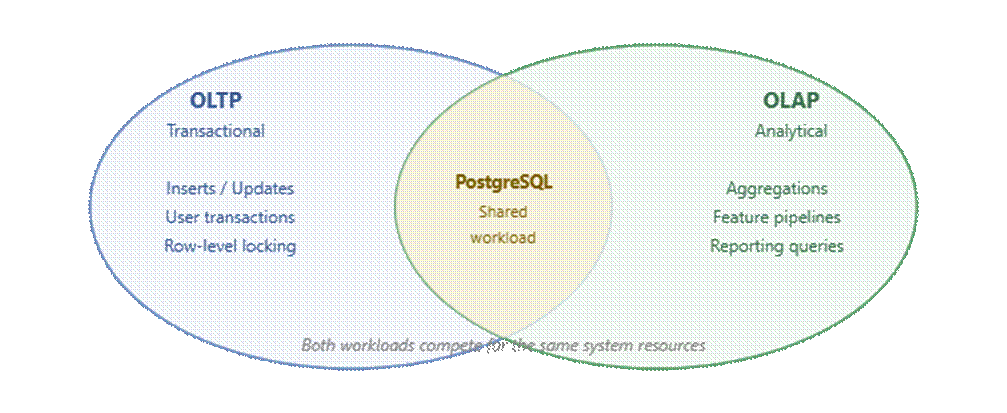
PostgreSQL occupies a unique position in the data ecosystem because it supports both transactional (OLTP) and analytical (OLAP) workloads within the same system. This hybrid capability (HTAP) means that the same database handling user transactions is also responsible for reporting, feature generation, and analytical queries.
That dual role introduces constraints, since analytical queries compete with production workloads instead of running in isolation. A poorly written aggregation or join can impact application latency just as much as inefficient transactional logic. It’s exactly why indexing strategy and execution planning are crucial to responsible system design.
The data scientist’s entry point
Many workflows still begin with comma-separated values (CSV) exports. While convenient during early experimentation, this approach introduces long-term problems. Data becomes stale, transformation logic is lost outside version control, and reproducibility depends on manual steps that are difficult to track.
Explaining the PostgreSQL direct query mandate
Direct querying of PostgreSQL changes this dynamic substantially: the SQL query becomes a reproducible, executable definition of how data is constructed rather than just a retrieval mechanism. Data scientists operate on the source of truth, retrieving exactly the required subset of data, exactly when needed.
In production environments, this extends to feature generation pipelines, dashboards, and inference systems. They all depend on live queries so, at that point, the database is no longer upstream of the system – it’s actively participating in computation.
The risk of breakage at scale
A script that works well with ten thousand rows can completely fail with one hundred million, simply as queries that used to return results quickly start to slow down as the planner selects inefficient paths. Python processes can run out of memory after retrieving more data than they can handle. Connections build up until the database simply can’t take on any more.
Large results accumulate the network, making data transfer the main expense. None of these problems show up early – they are, in fact, often found (too) late. Hence, recognizing how these failures occur is the first step to preventing them.
Simple Talk is brought to you by Redgate Software
Python drivers & execution, explained
Python interacts with PostgreSQL through a small set of well-established drivers, each operating at a different level of abstraction. Psycopg2 offers stability and direct control, Psycopg3 introduces improved type handling and async capabilities, and SQLAlchemy provides abstraction and connection pooling.
The choice reflects workload characteristics. Batch pipelines prioritize simplicity and determinism, while high-concurrency systems benefit from asynchronous execution and pooling.
The execution lifecycle
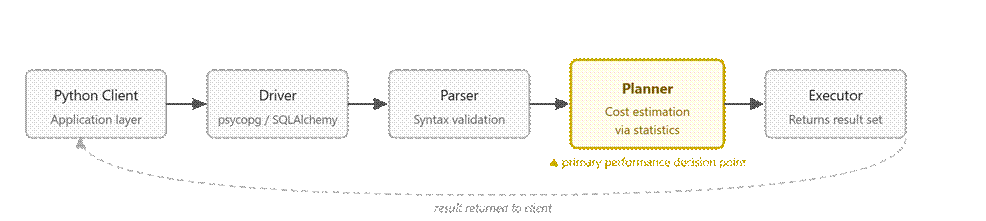
Regardless of the driver, execution follows the same path once a query is issued. Calling cursor.execute() triggers a multi-stage process inside PostgreSQL.
The database parses the SQL, the planner selects an execution strategy, and the executor runs that plan while streaming results back to the client. The planning phase is where PostgreSQL decides how to run the query, whether to use an index, and in what order operations should occur.
The planner is the critical piece, as its decisions depend on how accurately it can estimate data distribution. If statistics are outdated, the planner may choose inefficient strategies such as scanning entire tables instead of using indexes, or selecting the wrong join algorithm.
Hence, the same query can behave differently across environments, depending on how accurate the planner’s assumptions are.
Parameterized queries in PostgreSQL – what are they?
Constructing SQL queries through string interpolation introduces both security risks and performance inefficiencies. Parameterized queries prevent SQL injection and allow PostgreSQL to reuse execution plans. For high-frequency queries, this saves real latency.
Efficient retrieval patterns (streaming vs. loading) – which is best?
As datasets grow, retrieval strategy becomes critical. Client-side cursors that load entire result sets into memory quickly become infeasible. Server-side cursors enable streaming, allowing rows to be processed incrementally.
This shift changes how pipelines are designed. Instead of loading data and then processing it, systems operate on streams of results. Memory usage becomes predictable and pipelines can handle datasets that exceed available resources. This pattern is particularly useful in ETL (extract, transform, load) pipelines and long-running analytical jobs.
How to avoid the ‘notebook trap’
Many pipelines start life inside a notebook. Data is loaded into memory, transformed using Python, and iterated on quickly. This works well for small datasets but introduces inefficiencies at scale.
The most common issue is over-fetching. Queries such as SELECT * retrieve entire tables, shifting filtering and aggregation into Python. This not only increases memory usage but also bypasses the database’s optimized execution engine.
Production-grade query design
Scaling requires shifting relevant computation back into SQL. The database has access to indexes, optimized join strategies, and buffered I/O (input/output). Queries should be written to return only the necessary data, already transformed and aggregated.
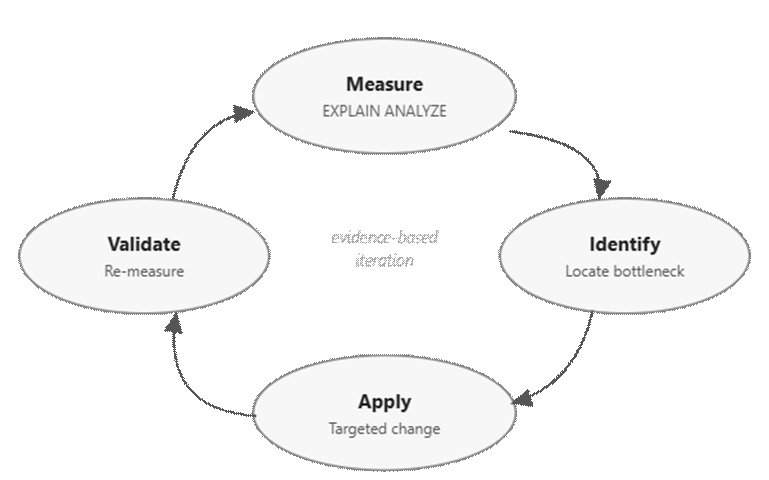
More importantly, performance must be approached systematically. Bottlenecks can’t be reliably predicted – they must be measured – and fixing one bottleneck often reveals another. Plus, assumptions about performance frequently prove incorrect under load.
Effective systems follow a disciplined approach:
- Measure current performance
- Identify the bottleneck
- Apply a targeted change
- Measure again
Query performance optimization in PostgreSQL
When queries slow down, PostgreSQL’s execution plan is the primary diagnostic tool. EXPLAIN reveals the planner’s expectations, while EXPLAIN ANALYZE shows what actually happens during execution.
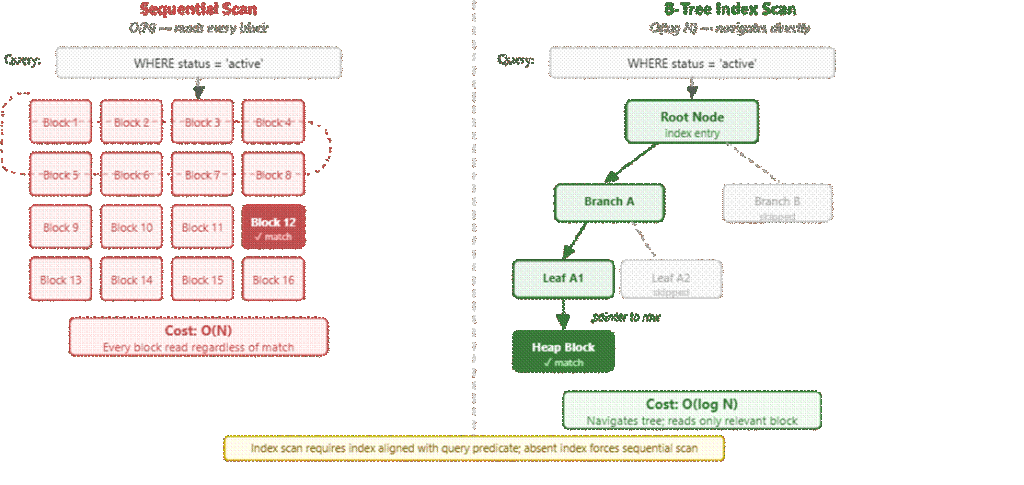
Query performance is heavily influenced by how PostgreSQL executes joins and scans. Sequential scans read entire tables and are efficient only for small datasets. Index scans reduce the search space but depend on appropriate indexing.
Join strategies introduce another layer of complexity. Nested loop joins can perform well for small datasets but degrade rapidly with large inputs. Hash joins are efficient but require sufficient memory. Merge joins depend on sorted data and can be optimal in specific scenarios. When the planner selects the wrong strategy (often due to inaccurate statistics), performance can degrade dramatically.
Get started with PostgreSQL – free book download
Optimization strategies (indexing, views, partitioning)
Indexing remains a primary optimization tool, but it is not one-size-fits-all. By reducing the amount of data that needs to be scanned, indexes significantly speed up retrieval operations.
B-Tree indexes handle most equality and range queries, while GIN indexes are suited to multi-valued data such as JSONB or arrays. BRIN indexes trade precision for size and are particularly effective on large, naturally ordered datasets like time-series logs. The effectiveness of an index depends on how closely it matches the access pattern of the query.
Materialized views provide a way to precompute expensive queries, while partitioning limits the amount of data scanned during execution by splitting a table. Aggregations over long histories, cohort analysis, and derived metrics often fall into this category. Together, these strategies shift workloads from runtime computation to precomputed or scoped operations.
MVCC and VACUUM in PostgreSQL – what are they?
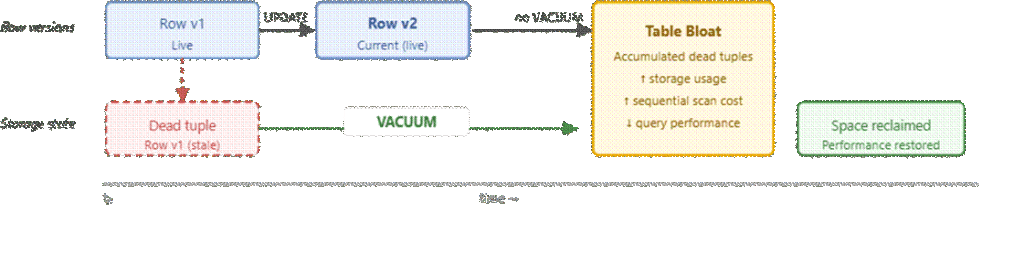
PostgreSQL uses Multi-Version Concurrency Control (MVCC), so updates create new row versions instead of overwriting existing ones. This allows for concurrent reads and writes without locking.
Over time, these old versions accumulate as dead tuples and must be cleaned up by VACUUM. If not, tables and indexes bloat, leading to slower queries. Autovacuum handles this automatically, but long-running transactions can block cleanup, causing gradual performance degradation.
At scale, performance isn’t just about efficient queries, it’s about maintaining the system so it stays efficient over time.
Advanced feature engineering in SQL
Window functions – what are they?
Window functions provide context-aware computations such as rolling averages and lag-based features. Although highly effective, they come at a cost. These operations often require sorting or partitioning data, which can consume significant memory and may spill to disk if not properly configured.
By performing these computations directly in SQL, data scientists can avoid unnecessary data movement and leverage PostgreSQL’s execution engine.
Explaining Common Table Expressions (CTEs)
CTEs improve readability by breaking queries into logical steps. This allows complex transformations to be articulated and maintained effortlessly. By breaking down the process, debugging becomes simpler, and the query becomes readable and easily extendable.
Analytical aggregations, explained
PostgreSQL also supports advanced aggregation techniques that go beyond simple grouping. Features like conditional aggregation and multi-level grouping enable complex summaries to be computed in a single query. This reduces redundant scans and improves efficiency, particularly for reporting and feature pipelines.
Infrastructure and connection management in PostgreSQL
PostgreSQL uses a process-based architecture where each connection consumes system resources. At scale, excessive connections can lead to memory pressure and degraded performance. The failure mode is subtle. Queries begin to queue, new connections are refused, and the system appears to hang – or fail – intermittently.
How connection pooling works in PostgreSQL
Connection pooling mitigates this by reusing existing connections. Instead of creating a new connection for each request, a pool of connections is maintained and shared across the application. Tools like PgBouncer handle this at the infrastructure level, while libraries like SQLAlchemy manage it within the application. In both cases, the goal is to stabilize resource usage and avoid spikes that the database cannot absorb.
Extensibility and data types in PostgreSQL, explained
PostgreSQL’s extensibility allows it to handle diverse data types and workloads. JSONB supports semi-structured data, while extensions like PostGIS enable spatial analysis. These features allow the database to adapt to evolving requirements without introducing additional systems.
In summary: it’s not about what tools are used – it’s how they’re used
At small scale, working with PostgreSQL from Python feels straightforward. Most things just work, and performance isn’t something you think about much. As things grow, however, that changes. Decisions that didn’t matter before start having a visible impact on how queries are written, how data is fetched, and how the database is maintained in the background.
The difference between fragile pipelines and reliable systems is sometimes not the tools used, but how they’re used. PostgreSQL is an execution engine with its own constraints and capabilities, so it’s important to understand its internals and design around them.
Put simply, that’s what enables data science workflows to move from experimentation to production without breaking under load.
FAQs: How data scientists work with PostgreSQL from Python (and how to write queries that don’t break at scale)
1. What role does PostgreSQL play in data science?
It stores, processes, and shapes data – acting as both a database and execution engine.
2. Why is PostgreSQL often overlooked?
It runs in the background, so it’s mistaken for just a data source.
3. Can PostgreSQL handle both OLTP and OLAP?
Yes, it supports both transactional and analytical workloads (HTAP).
4. Why avoid CSV-based workflows?
They create stale, non-reproducible data – unlike direct SQL queries.
5. How does PostgreSQL execute queries?
It parses, plans, and executes queries, with the planner driving performance.
6. Why do queries fail at scale?
Poor query design, outdated stats, and large data volumes cause slowdowns.
7. What are parameterized queries?
Secure, reusable queries that improve performance and prevent SQL injection.
8. Streaming vs loading data – what’s better?
Streaming is more scalable since it avoids loading all data into memory.
9. What is the 'notebook trap'?
Over-fetching data and doing heavy processing in Python instead of SQL.
10. How do you optimize PostgreSQL queries?
Use EXPLAIN ANALYZE, indexes, and iterative performance tuning.
11. Why is indexing important?
Indexes reduce scan time and speed up data retrieval.
12. What is MVCC and VACUUM?
MVCC enables concurrency. VACUUM cleans up old data to maintain performance.
13. Why use connection pooling?
It prevents resource overload from too many database connections.
14. What enables PostgreSQL scalability?
Efficient queries, proper indexing, and continuous performance monitoring.
Move fast. Govern at scale.
This document contains proprietary information and is protected by copyright law.
Copyright © 2026 Red Gate Software Limited. All rights reserved



Load comments