




So you’ve been tasked with deploying a Generative AI, RAG (retrieval-augmented generation), or Agentic AI application. Have you thought about how to secure your most sensitive structured data – as well as your vectorized unstructured data?
The good news is, it’s relatively simple to implement complex security policies through the latest release of Oracle Database 26ai Deep Data Security (DeepSec).
In this guide, part one of my Oracle 26ai Deep Data Security (DeepSec) series, I’ll show you how – and will explain everything you need to know along the way.
Welcome to a security nightmare
Imagine this scenario. You’re the only Oracle DBA on a team of seasoned application developers, and you’ve just received a new mandate from the Chief of Police. Passed down from the new Mayor, the mandate involves implementing an AI-enabled chatbot that’ll access public and private information about crimes committed within the City.
The Chief wants to make it simpler for authorized personnel – such as district commanders, detectives, cops on the beat, criminologists, reporters, etc – to review data on crimes dating back to 2001. The Chief also knows that there is sensitive data within the current database that not everyone should see.
So, he needs you to guarantee one thing: only law enforcement personnel with proper permissions and clearances should see that information.
How do you achieve this level of privacy?
The basic ERD (entity relationship diagram) below shows how crime data is organized within the CPD schema. The callouts illustrate the complexity of the data security policies you’ll need to implement to ensure each user only sees the data they’re permitted to see.
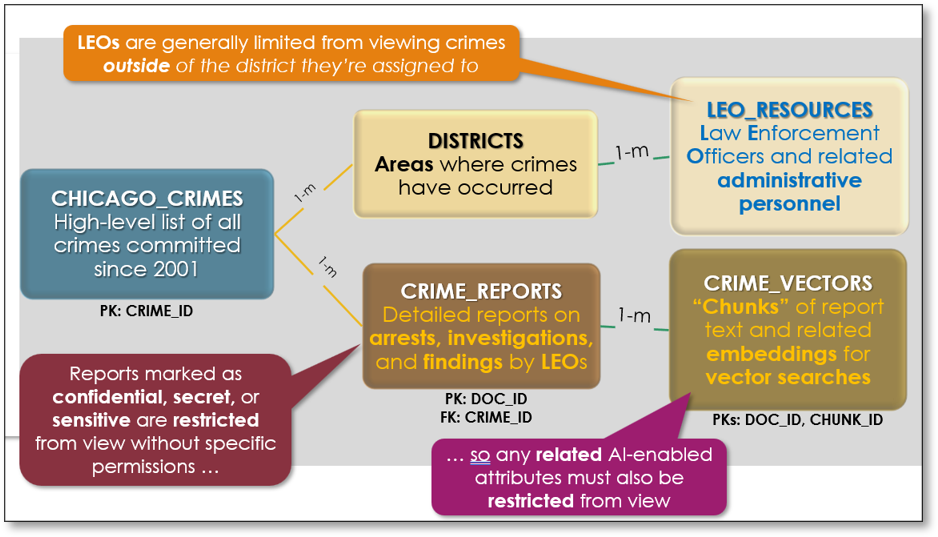
Implementing data security requirements already looks a bit tricky, even with only five database objects. Now imagine how difficult it would be to build a comprehensive security strategy with only a series of database views that restrict viewing of specific rows within some tables for each user, based on which police district(s) they’re currently assigned to.
All while simultaneously hiding content of specific columns within other tables, of course.
Another crucial requirement is the ability to immediately reassign security privileges whenever a law enforcement officer (LEO) needs to urgently view data.
Perhaps they’ve been assigned to investigating crimes in one or more police district, or they’re restricted from viewing crime data that’s been marked as sensitive, secret, or confidential. They now need access to the data, and fast.
What about when it all goes wrong?
We’ve all watched enough police procedurals to know what happens when it goes wrong for a LEO. Let’s say, for example, they’re suddenly under investigation for bribery. The immediate result? They need to be blocked – urgently – from seeing internal affair reports on their potentially illicit activity.
What about a copper whose close friend has been accused of domestic violence? Perhaps the friend wants to find out what particulars their victim has reported? Worse still, maybe even find out in which shelter the victim now resides?
In all of these cases, the implications of poor security administration are potentially devasting. Fortunately, you’re reading this article, so the answer is simple. You must implement Oracle 26ai Deep Data Security (DeepSec).
Why data security is a complex web of limiting access
I first began investigating Oracle database security features a few years ago, during a stint as DBA for an Oracle Database 19c project. The DBA team I advised needed to implement a sure-fire method to limit users from viewing or changing data they shouldn’t.
The team had already attempted to implement Virtual Private Database (VPD), but with limited success. They’d rolled back their efforts after extreme frustration, and with good reason. Their complex data security requirements spanned dozens of tables, views, and materialized views across multiple schemas.
After some research, I helped them prototype a new security model using Real Application Security (RAS), VPD’s successor.
We also needed to tackle unexpected issues to implement RAS. We needed it to enforce row-level and column-level security within several robust and complex Application Express (APEX) applications. It didn’t help that, at the time, reliable documentation on how to integrate RAS with APEX was lacking.
Protect your data. Demonstrate compliance.
That wasn’t all…
There was one final wrinkle – my client’s user base, which also included several “power users”. These users typically used either SQL*Plus or SQL Developer to access their production database directly. They would then extract data in read-only mode for their own data warehouses or analytics. This meant we had to configure these power users as external RAS users.
Further, my client didn’t have the funding (or expertise) to set up an identity management system like Microsoft Active Directory (AD) or Oracle Identity Access Management (IAM). We therefore had to rebuild the security control mechanisms that were stored within their central database.
Last year I wrote about how RAS would be deployed in this scenario for the CPD schema within an Oracle 26ai database. I followed it up by explaining how RAS worked in concert with an AI chatbot deployed through Oracle APEX to limit end users from viewing outside their range of privileges.
That’s a good counterpoint to what I’ll be showing in this article, as well as future entries in the series. I suggest having a look at them before reading on.
How to implement Oracle DeepSec
The good news is, if you’re working with APEX 24.2 and Oracle Database 26ai, DeepSec is easy to implement. It’s also perfect for limiting access to data at both the row and column level with APEX applications.
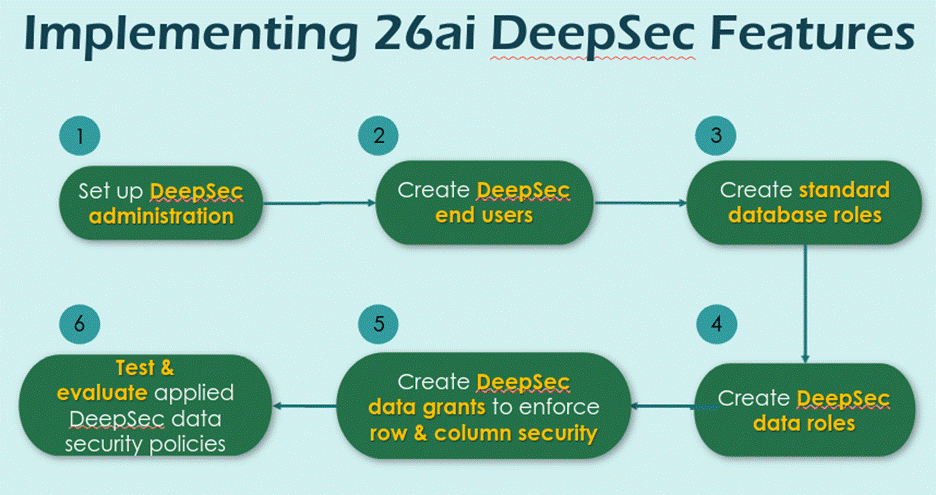
Let’s focus on a typical workflow (below) to implement Oracle DeepSec. I’ll run through the whole process step-by-step, in detail.
Prerequisites and assumptions before getting started
The rest of this article assumes the following prerequisite steps have already been completed:
- A 26ai Autonomous Database (ADB) has already been created. It must be patched to version 23.26.2 to enable DeepSec features.
- The CPD schema has already been created, populated with data, and all constraints and indexes have been applied. You can review the scripts to create and populate the CPD schema from this Github repository.
How to set Oracle DeepSec user limits (step 1)
First, create a new table (called it DEEPSEC_SECURED_USERS) within the CPD schema.
This is to hold specific security permissions and other information about each application user:
|
1 2 3 4 5 6 7 8 9 10 11 12 13 14 15 |
DROP TABLE IF EXISTS cpd.deepsec_secured_users PURGE; CREATE TABLE IF NOT EXISTS cpd.deepsec_secured_users( rsu_username VARCHAR2(25) NOT NULL ,rsu_keytype VARCHAR2(12) NOT NULL ,rsu_keyvalue VARCHAR2(12) NOT NULL ,rsu_comment VARCHAR2(128) ); ALTER TABLE cpd.deepsec_secured_users ADD CONSTRAINT deepsec_secured_users_pk PRIMARY KEY (rsu_username, rsu_keytype, rsu_keyvalue) USING INDEX ( CREATE UNIQUE INDEX cpd.deepsec_secured_users_pk_idx ON cpd.deepsec_secured_users (rsu_username, rsu_keytype, rsu_keyvalue) ); |
You’ll need to populate this control table with data for each user, like what I did below:
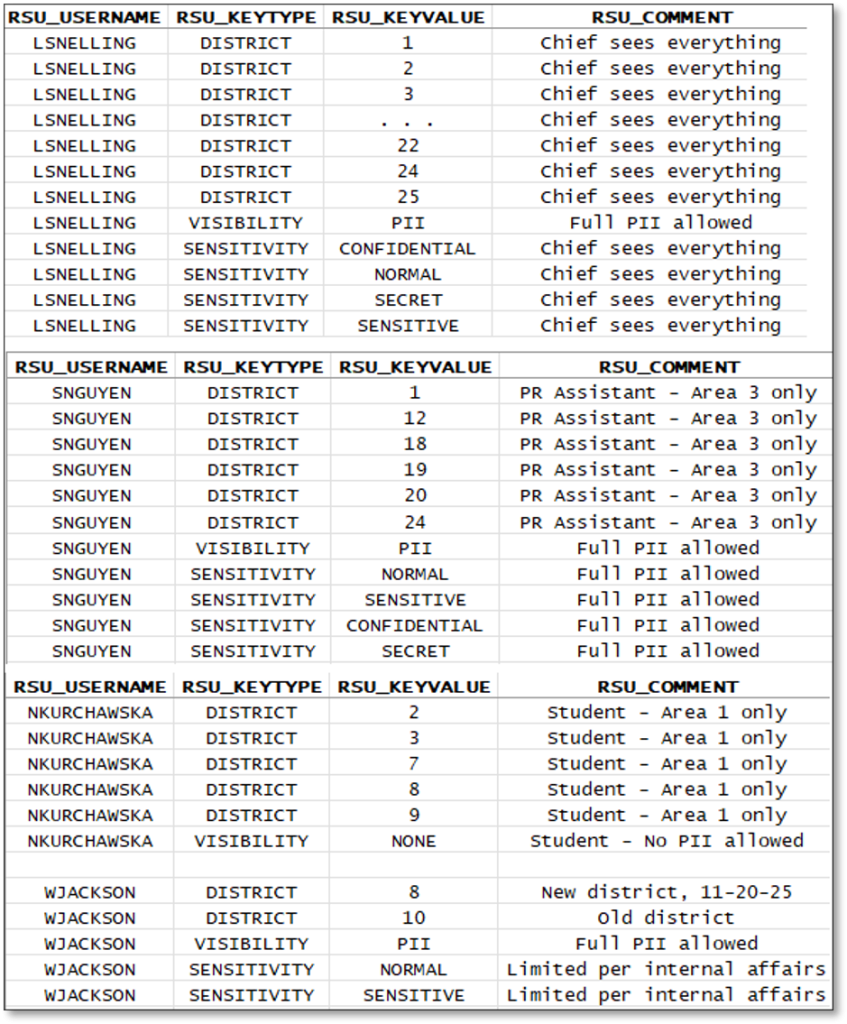
- In this example,
LSNELLINGis the current Chief of Police. They have access to data from all CPD Districts, permission to view data in all columns, and permission to view rows at all four security levels. - Meanwhile, research assistant
SNGUYENonly has access to data in a few districts – but can see report information at all four security levels. - User
WJACKSONhas extremely limited permissions as they’ve recently been reassigned to a new district due to ongoing Internal Affairs investigations. - Finally,
NKURCHAWSKAis a student research assistant so has very limited privileges for just a few districts. They also can’t view any detailed report information.
Now, it’s on to creating Oracle DeepSec end users.
How to create Oracle DeepSec end users (step 2)
Since I’m working on an OCI-based 26ai autonomous database, for this example I’ll use the ADMIN account as my Oracle DeepSec administrator account. However, if you want to further isolate security administration to another user, you could also create a separate account – say, SECADM for my example.
On how to create Oracle DeepSec end users, you must firstly create DeepSec user accounts for each of them using the CREATE END USER command. Here’s how that works with my four example users:
|
1 2 3 4 |
CREATE END USER "LSNELLING" IDENTIFIED BY "S3c-re_P5w0rd"; CREATE END USER "NKURCHAWSKA" IDENTIFIED BY "S3c-re_P5w0rd"; CREATE END USER "SNGUYEN" IDENTIFIED BY "S3c-re_P5w0rd"; CREATE END USER "WJACKSON IDENTIFIED BY "S3c-re_P5w0rd"; |
It’s important to note these are not regular database user accounts – they are specific to DeepSec security only. You use these DeepSec user accounts to connect to your database. It’s the same whether you’re using SQLcl, SQL*Plus, SQLDeveloper, or another database application written in APEX, Python, or Java.
How to create database roles in Oracle DeepSec (step 3)
To grant Oracle DeepSec access to specific tables within a schema, you need to create database roles that grant the required system privileges and different levels of access to database objects.
For my example, I created the following three database roles within the CPD schema:
|
1 2 3 4 5 6 7 8 9 10 11 12 13 14 15 16 17 18 19 20 |
-- Create a standard database role allowing CREATE SESSION access only CREATE ROLE adb_connect; GRANT CREATE SESSION TO adb_connect; -- Create a standard database role for read-only access to fact tables CREATE ROLE cpd_readonly; GRANT adb_connect TO cpd_readonly; GRANT SELECT ON cpd.cpd_districts TO cpd_readonly; GRANT SELECT ON cpd.iucr_codes TO cpd_readonly; GRANT SELECT ON cpd.leo_resources TO cpd_readonly; GRANT SELECT ON cpd.ods_secured_users TO cpd_readonly; -- Create a standard database role for full DML access to fact tables CREATE ROLE cpd_fulldml; GRANT adb_connect TO cpd_fulldml; GRANT cpd_readonly TO cpd_fulldml; GRANT INSERT, UPDATE, DELETE ON cpd.cpd_districts TO cpd_fulldml; GRANT INSERT, UPDATE, DELETE ON cpd.iucr_codes TO cpd_fulldml; GRANT INSERT, UPDATE, DELETE ON cpd.leo_resources TO cpd_fulldml; GRANT INSERT, UPDATE, DELETE ON cpd.ods_secured_users TO cpd_fulldml; |
- Role
ADB_CONNECTjust grantsCREATE SESSIONpermissions. - Role
CPD_READONLYgrants read-only access to the CPD schema’s reference tables. - And role
CPD_FULLDMLgrants additional DML (data manipulation language) access to those same reference tables.
How to create data roles in Oracle DeepSec (step 4)
To enable Oracle DeepSec end user accounts to access database objects, you must create individual DeepSec data roles and grant them the required access.
For my example, I granted them access via the traditional database roles I just created:
|
1 2 3 4 5 6 7 8 9 10 11 |
DROP DATA ROLE cpd_dwro_role; CREATE DATA ROLE cpd_dwro_role; GRANT cpd_readonly TO cpd_dwro_role; DROP DATA ROLE cpd_full_role; CREATE DATA ROLE cpd_full_role; GRANT cpd_fulldml TO cpd_full_role; GRANT DATA ROLE cpd_dwro_role TO cpd_full_role; GRANT DATA ROLE cpd_dwro_role TO nkurchawska, snguyen, wjackson; GRANT DATA ROLE cpd_full_role TO lsnelling; |
- DeepSec data role
CPD_DWRO_ROLEenables read-only access via database roleCPD_READONLY. - DeepSec data role
CPD_FULL_ROLEenables DML access via database roleCPD_FULLDML. It also receives read access via a grant toCPD_DWRO_ROLE.
I then granted each DeepSec end user account the desired security permissions. End users NKURCHAWSKA, SNGUYEN, and WJACKSON receive just read-only capabilities but, since they’re the Chief of Police, end user LSNELLING receives full DML privileges.
How to create Oracle DeepSec data grants that limit data access (step 5)
It’s now time to create your very first Oracle DeepSec objects. For my example, I’ll be creating three dynamic roles that I’ll later use to assign privileges to DeepSec users as they log into the APEX application.
The CHICAGO_CRIMES table
In my example, the GRANT below enforces restrictions on rows within my table CHICAGO_CRIMES, based on which district(s) a user is allowed to access:
|
1 2 3 4 5 6 7 8 9 10 11 |
DROP DATA GRANT IF EXISTS cpd.limit_chicago_crimes_viewing_based_on_district; CREATE OR REPLACE DATA GRANT cpd.limit_chicago_crimes_viewing_based_on_district AS SELECT ON cpd.chicago_crimes WHERE district IN ( SELECT TO_NUMBER(rsu_keyvalue) FROM cpd.ods_secured_users WHERE rsu_keytype = 'DISTRICT' AND rsu_username = ORA_END_USER_CONTEXT.username) TO cpd_dwro_role; |
This is an excellent example of the powerful simplicity of Oracle DeepSec’s data security policies.
- Since no specific column names are mentioned in that first
SELECTstatement, all columns in theCHICAGO_CRIMEStable will be viewable by any DeepSec end user that’s been granted theCPD_DWRO_ROLEDeepSec security role. - After a database connection is established, the DeepSec object
ORA_END_USER_CONTEXT’s username attribute contains the end user name. - The
WHEREclause limits the corresponding DeepSec end user granted theCPD_DWRO_ROLEto only viewing rows with a matching value forDISTRICT(found in theODS_SECURED_USERStable for each end user.)
The CHICAGO_REPORTS table
In a similar fashion, I can build and apply a DATA GRANT for the CRIME_REPORTS table that limits access to rows with a matching value for the SENSITIVITY column, as found in ODS_SECURED_USERS for the connected DeepSec end user below:
|
1 2 3 4 5 6 7 8 9 10 11 12 |
DROP DATA GRANT IF EXISTS cpd.limit_crime_reports_viewing_based_on_sensitivity; CREATE OR REPLACE DATA GRANT cpd.limit_crime_reports_viewing_based_on_sensitivity AS SELECT ON cpd.crime_reports WHERE sensitivity IN ( SELECT rsu_keyvalue FROM cpd.ods_secured_users WHERE rsu_keytype = 'SENSITIVITY' AND rsu_username = ORA_END_USER_CONTEXT.username) AND crime_id IN (SELECT crime_id FROM cpd.chicago_crimes) TO cpd_dwro_role; |
An important note on this data grant (the restriction linking CRIME_ID from CRIME_REPORTS to its parent table)
Since the prior data grant against CHICAGO_CRIMES will limit an end user to viewing rows in specific districts, that additional clause ensures only related rows in CRIME_REPORTS will be viewable based on the foreign key constraint on CRIME_ID.
The CHICAGO_VECTORS table
The last DATA GRANT enforces restrictions on the CRIME_VECTORS table in my example:
|
1 2 3 4 5 6 7 8 9 10 11 12 |
DROP DATA GRANT IF EXISTS cpd.limit_crime_vector_viewing; CREATE OR REPLACE DATA GRANT cpd.limit_crime_vector_viewing AS SELECT ON cpd.crime_vectors WHERE ( SELECT rsu_keyvalue FROM cpd.ods_secured_users WHERE rsu_keytype = 'VISIBILITY' AND rsu_username = ORA_END_USER_CONTEXT.username) = 'PII' AND doc_id IN (SELECT doc_id FROM cpd.crime_reports) TO cpd_dwro_role; |
This limits access to rows within the table, based on whether the end user has a value of PII (personally-identifiying information) for the VISIBILITY column as found in ODS_SECURED_USERS.
Move fast. Govern at scale.
How to test Oracle DeepSec data grants (step 6)
You can ensure your security polices are configured properly by running some simple SQL queries against tables with Oracle DeepSec DATA GRANT‘s in place.
In my example, since the CPD_DWRO_ROLE role has already been granted to the Oracle DeepSec end users I’ve created, any restrictions and limitations I’ve enabled will take immediate effect.
How to prove the restrictions work as intended (test query #1)
The test query below, for my example, is relatively simple:
|
1 2 3 4 5 6 7 8 9 10 11 12 13 14 15 16 17 18 19 20 21 22 |
COL district FORMAT 9999 HEADING "District" COL sensitivity FORMAT A12 HEADING "Sensitivity" COL crmcnt FORMAT 99999 HEADING "Crime|Count" COL doclen FORMAT 999,999,999 HEADING "Document|Sizes" COL emblen FORMAT 999,999,999 HEADING "Embedding|Sizes" TTITLE LEFT "Crime Vector Chunks + Embeddings Within District + Sensitivity" SELECT CC.district , CR.sensitivity , COUNT(CC.crime_id) AS crmcnt , SUM(LENGTH(CR.crime_document)) AS doclen , SUM(LENGTH(CV.embeddings)) AS emblen FROM cpd.chicago_crimes CC ,cpd.crime_reports CR ,cpd.crime_vectors CV WHERE CC.crime_id = CR.crime_id AND CV.doc_id = CR.doc_id GROUP BY CC.district, CR.sensitivity ORDER BY 1,2; |
It joins together my CHICAGO_CRIMES, CRIME_REPORTS, and CRIME_VECTORS tables, retrieving information from all three to prove that the Oracle DeepSec limitations are working properly.
I can now use this query to demonstrate that the restrictions I put in place for my four end users actually work as they should (based on the DeepSec data grants I’ve built so far.)
Here’s what’s returned when I log into my database as one of my DeepSec END USERs – LSNELLING – and run this query:
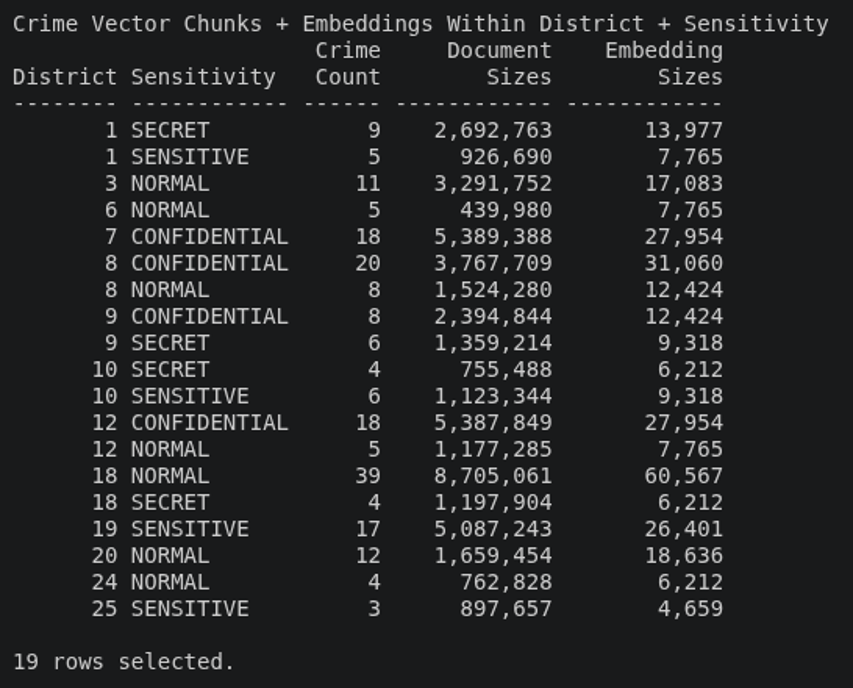
LSNELLING.This end user can see information from every row in the database because they’re the owner of the data. They can see all districts, all sensitivity levels, and any information in the document embeddings.
When end user SNGUYEN connects and runs this same query, however, they see something quite different:
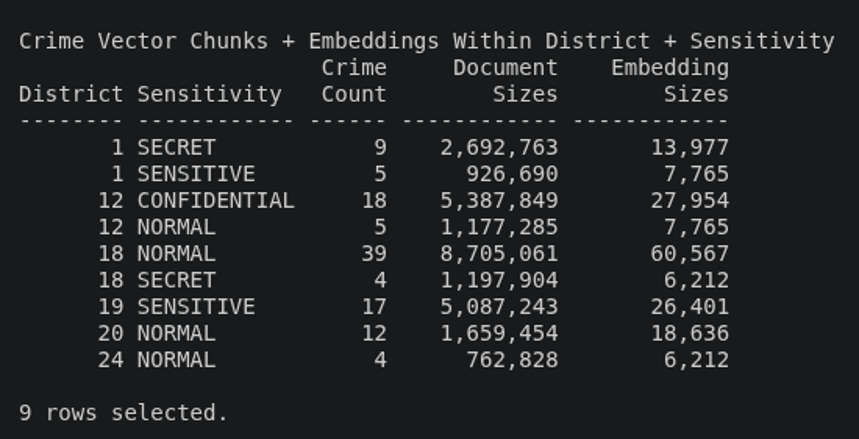
SNGUYEN.This is because they can only see information for the districts and sensitivity levels they’re permitted to see.
End user WJACKSON sees a completely different result as well:
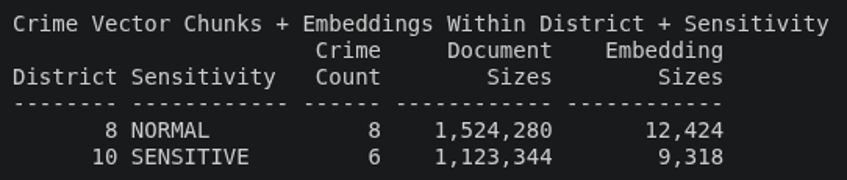
WJACKSON.WJACKSON can only see information for districts 8 and 10. This is because, if you remember, they’ve been transferred between the two districts due to an ongoing Internal Affairs investigation.
Note, also, that their sensitivity levels were adjusted to limit their viewing of reports deemed CONFIDENTIAL or SECRET.
Finally, when end user NKURCHAWSKA connects and runs this same query, the results are dramatically different than those of the other users:
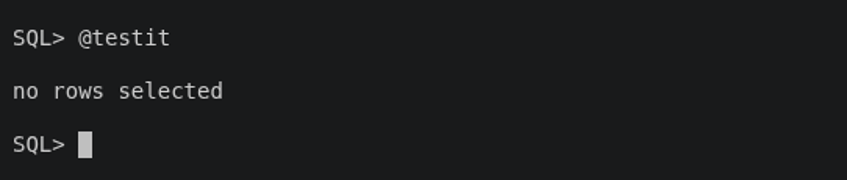
NKURCHAWSKA.This user doesn’t have permission to access any data in the CRIME_VECTORS table, as defined in the LIMIT_CRIME_VECTOR_VIEWING DeepSec data grant. So, because my test query links data from all three tables, there are literally no results to return. A NULL set is returned as a result.
How to simulate AI chatbot search results (test query #2)
I’m not quite ready to deploy an AI chatbot yet – that’s for the next article in this series – so I built a simple query to leverage the existing embeddings within the CRIME_VECTORS table:
|
1 2 3 4 5 6 7 8 9 10 11 12 13 14 15 16 17 18 19 20 21 22 23 24 25 26 27 |
COL district FORMAT 9999 HEADING "District" COL sensitivity FORMAT A12 HEADING "Sensitivity" COL doc_id FORMAT 9999999 HEADING "Doc ID" COL chunk_id FORMAT 999 HEADING "Chk|ID" COL distance FORMAT 99.999999 HEADING "Vector|Distance” COL doc_chunk FORMAT A60 HEADING "Document Chunk" WRAP TTITLE CENTER "VECTOR_DISTANCE Evaluations For Mention of CORRUPTION" WITH embeddings_found AS ( SELECT VECTOR_EMBEDDING( ADMIN.MINILML12V2 USING 'corruption' AS DATA) AS embedding FROM DUAL) SELECT CC.district , CR.sensitivity , CV.doc_id , CV.chunk_id , VECTOR_DISTANCE(CV.embeddings, EF.embedding, COSINE) AS distance , CV.doc_chunk FROM cpd.chicago_crimes CC JOIN cpd.crime_reports CR ON CR.crime_id = CC.crime_id JOIN cpd.crime_vectors CV ON CV.doc_id = CR.doc_id CROSS JOIN embeddings_found EF ORDER BY VECTOR_DISTANCE(CV.embeddings, EF.embedding, COSINE) FETCH APPROXIMATE FIRST 3 ROWS ONLY WITH TARGET ACCURACY 95; |
- I’ve once again joined the
CHICAGO_CRIMES,CRIME_REPORTS, andCRIME_VECTORStables together, this time by using aCROSS JOIN(Cartesian) operation to retrieve from theCRIME_VECTORS.EMBEDDINGScolumn. - The query then uses the
VECTOR_DISTANCEfunction to compare the cosine distance between the requested search token – in this case, what the AI LLM (large language model) determines is relevant to the concept of corruption. - Finally, the
FETCH APPROXIMATEclause instructs the query to look for relevant results with a confidence level of 95%, returning only the top three results within what’s returned.
Don’t miss this useful trick
For my example, I need to grant permissions to the LLM I used to create the corresponding embeddings for the document chunks. This is to allow it to connect to my database and access those embeddings within CRIME_VECTORS.
To do this: GRANT SELECT ON MINING MODEL ADMIN.MINILML12V2 TO adb_connect;
What do the DeepSec users see?
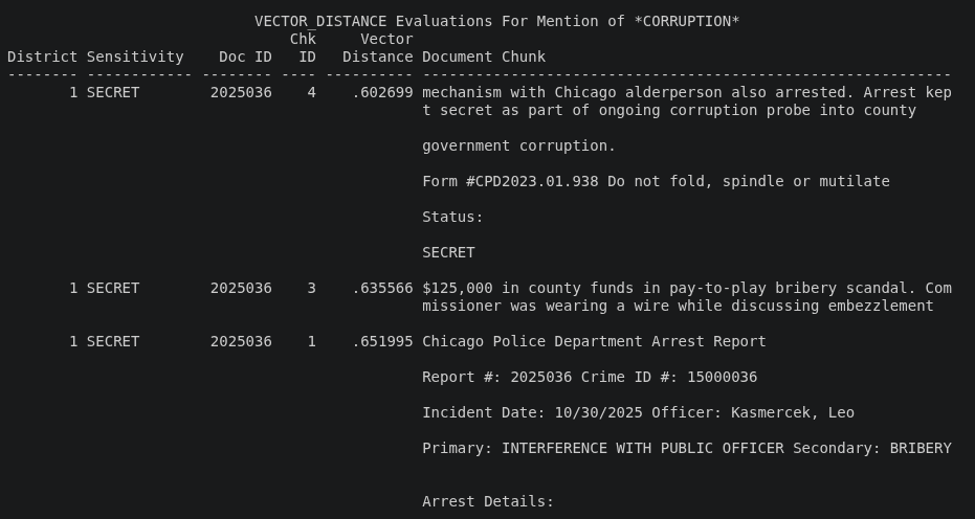
One of my DeepSec example users, LSNELLING, sees these results:
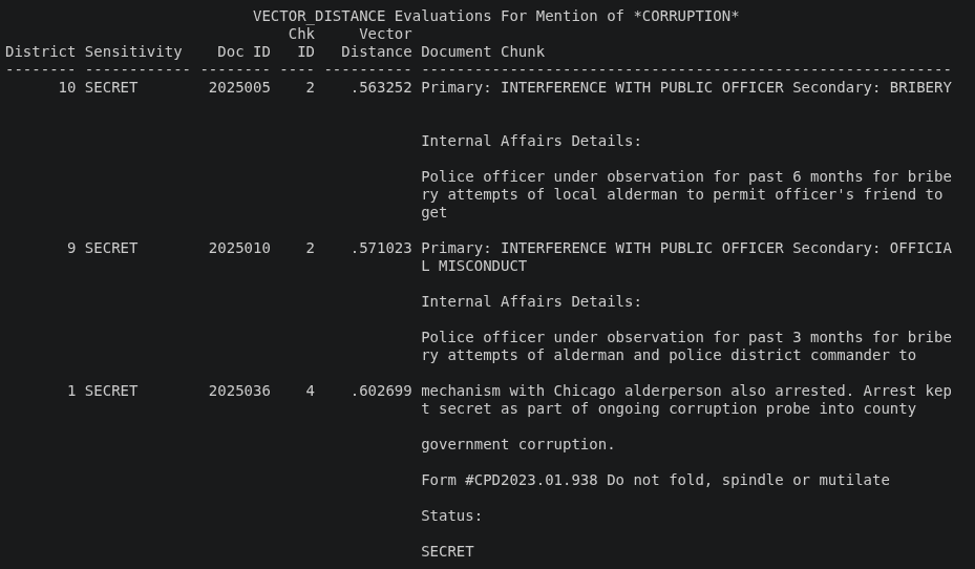
LSNELLING.Here, the top three document chunks returned are classified as SECRET, so the Chief of Police has a considerably wider view of corrupt activity within his jurisdiction (including some LEOs and even alderpersons!)
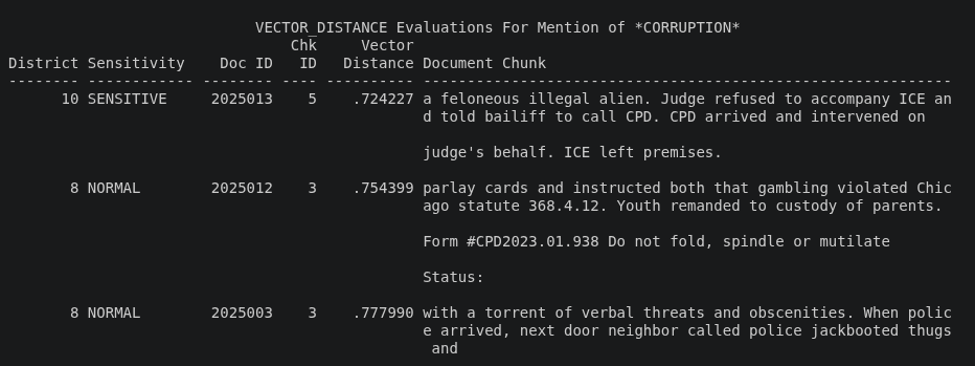
End user SNGUYEN, on the other hand, has a more limited view at a district level – receiving this set of results instead:
SNGUYEN.The vector distance scores are also higher here than of those for LSNELLING, indicating lower relevance to the context being searched.
Differing further are the results for WJACKSON, who has even narrower permissions for both district and sensitivity levels:
WJACKSON.Lastly, what would user NKURCHAWSKA see? Well, since they don’t have permission to access CRIME_VECTORS, the embeddings are also inaccessible to the simulated chatbot interaction. And – just as I demonstrated for the first test query – no results are returned.
Next steps: implementing DeepSec in Oracle 26ai database applications (and how to do so)
If you’re thinking this has been a lot to absorb, you’re correct! The good news is, DeepSec is dramatically easier to implement than any of its Oracle Database predecessors. Better still, it’s more powerful.
In Part 2 of the series, I’ll explain how to implement Oracle DeepSec security constraints to limit access to sensitive information across a schema.
To do so, I’ll continue with my Chicago Police Department example schema in a sample database application. It’ll include how to deploy and use single sign-on (SSO) credentials to manage end user access.
Simple Talk is brought to you by Redgate Software
FAQs: How to implement Oracle DeepSec in Oracle Database 26ai
1. What is Oracle DeepSec in Oracle Database 26ai?
DeepSec (Deep Data Security) is a security framework in Oracle Database 26ai that lets administrators enforce row-level and column-level access controls across structured tables and vectorized data using DeepSec end users, data roles, and data grants.
2. How is DeepSec different from VPD or RAS?
DeepSec is designed to be significantly easier to configure than Virtual Private Database (VPD) or Real Application Security (RAS), especially for complex, multi-table security policies, while still supporting granular row- and column-level restrictions.
3. What are the main components needed to set up DeepSec?
A typical DeepSec setup includes a control table for user permissions, DeepSec end user accounts, standard database roles for object-level privileges, DeepSec data roles, and data grants that define row-filtering logic.
4. Can DeepSec restrict access to vector embeddings used by AI chatbots?
Yes. DeepSec data grants can limit which users or applications can query specific rows in a vector table (such as one holding document embeddings), which controls what an AI chatbot or LLM-powered search can retrieve on a user’s behalf.
5. What Oracle version and patch level are required for DeepSec?
This document contains proprietary information and is protected by copyright law.
Copyright © 2026 Red Gate Software Limited. All rights reserved


Load comments