


TL;DR: SQL Server Row-Level Security (RLS) is a feature that filters rows in a table based on who’s running the query. Two users running the exact same SELECT against the same table can see completely different results — without needing different views, stored procedures, or application logic to enforce it. RLS applies to every query path (direct table access, views, functions, exports) and, critically, it applies even to highly privileged users like sysadmin and db_owner.
RLS is implemented with two objects: an inline table-valued function that returns 1 for rows the current user may see (the predicate), and a security policy that binds that function to a table as a filter predicate (for reads) and optionally a block predicate (for writes).
The performance rule is simple: keep the predicate function a single inline expression over an indexed column – SESSION_CONTEXT or USER_NAME() compared to a column – and the optimizer folds it into the plan like any WHERE clause; put a join, a subquery or a scalar function in it and every query on the table pays.
This guide – the first part of a six-part deep dive series into RLS – builds a working example, tests it, and covers hierarchies and the common use cases.
Introduction to SQL Server Row-Level Security
SQL Server Row-Level Security (RLS) is a method for securing specific, row based, data in tables with a user-defined key (i.e., Country, Business Unit, Company, etc.) in addition to the standard methods of securing at the object, schema, or database level. The primary purpose of RLS is for identical queries to return results specific to the user.
This additional functionality and added security is the tradeoff for incurring the overhead and complexity of RLS. RLS applies to base tables and impacts all queries accessing the data in those tables, no matter the method. This includes direct access, views, functions, stored procedures, data extracts or any other method.
It also limits access to that data for all users, including the sa account, members of the server role sysadmin, and members of the database role db_owner. This aspect of RLS makes it a potentially important tool for sensitive and audited data and is in contrast to access normally provided by sysadmin / dbo roles.
Where does Row-Level Security sit among other security measures?
RLS is part of a layered approach to security. It is applied in addition to all of the standard authorization layers and the enhanced layers, such as encryption and dynamic data masking. This means that users still need to have a valid login to the server, access to the database, access to the table, in addition to access to the desired rows via RLS. Granting a user access to the rows via the access predicate (discussed later) does not give the user access to the data if standard authorization is not granted.
This also means that basic security is still in effect when RLS is defined on a table. As a single layer in the security design of a database, standard diligence must be used when designing security, even when RLS is employed. It is not a substitute for other security structures but rather an addition to security to meet specific business needs.
RLS is not a prescriptive security layer. It is a framework to determine which groups of users should receive particular rows of data and each database application uses that framework to define security for their specific business needs. Since it is a framework which can be implemented in many different ways, it needs to be carefully designed and tested. This is very similar to programming SQL objects and relies on a deep understanding of the requirements to implement correctly. The advantage of RLS versus customized access structures is that the framework is standard and tested. Regular updates from Microsoft will address any potential issues and it is covered by documentation.
How Row-Level Security works: predicate functions and security policies
Row-level security is implemented at a table level, not a server, database or even schema level. It is designed and implemented for each table. Although it would be confusing and harder to manage, RLS could be designed differently for each table. Each table is allowed a single method for applying RLS. The method can be modified if it is found to be incorrect or not meeting requirements, but it is not possible to secure a table with more than 1 access predicate.
If multiple columns or lookups are needed for securing a table, those methods need to be combined into a single method when applied to the table. For example, if a SalesOrder table needs to be limited by the country and the manager for the order, both lookups are included in the access predicate instead of layering two different predicates. This makes sense from a performance perspective and it also makes maintenance easier.
Since RLS is defined at a table level, it is possible (and common) to have some tables with RLS and others without. New tables do not automatically have RLS defined when they are created. Since database programming is involved for each table, the default is that new tables are only covered by standard authorization. Care must be taken when adding new tables with sensitive data. If using DevOps and automated deployment, it is best to check in the table definition and the RLS definition at the same time for tables with sensitive data. Even if not using automated deployments, be sure RLS is on the table before data is added.
Accelerate and simplify database development with Redgate
Why Row-Level Security testing is crucial
Some of the benefits listed above, the non-prescriptive design and custom nature of row level security, create opportunities to introduce errors in code. This makes testing RLS a requirement to ensure it is working as intended.
Initial unit testing done by developers should catch basic issues. These include bad joins such as Cartesian joins or incorrect logic inadvertently blocking access. Formal test cases should verify that data matches the AC, including scenarios with NULL columns when they are allowed. The data developer or architect needs to be involved with the initial test cases to ensure they don’t have gaps and to provide methods for adding or removing access via RLS for the test team.
Test scenarios should include the production environment and regular regression tests. Depending on the RLS design, it may be necessary to use a service account with access and configured for RLS to test certain scenarios.
Each query to a table covered by RLS involves an additional query or lookup of some type in the access predicate. Depending on the exact design, this can have performance implications. Testing should cover nonfunctional requirements (NFR) related to performance and performance differences with RLS enabled and disabled.
Query tuning can be done via standard methods, including indexes and improving query logic based on best practices and the query plan. Since the normal use case for RLS is a data warehouse rather than a transactional system, denormalization can also dramatically improve performance. This comes back to the importance of design and testing.
The benefits of combining Row-Level Security with a reporting tool
When RLS is combined with a reporting tool it becomes even more powerful and useful. From a business perspective, it saves a tremendous amount of time by reducing the number and complexity of reports. It has the advantage of being built into the SQL query engine, which helps with performance but also means that base functionality is heavily tested by Microsoft. It is also difficult to bypass, even for administrators and developers. The edge case scenarios where security can be bypassed are fully auditable.
A simple illustration of Row-Level Security: what it looks like on paper
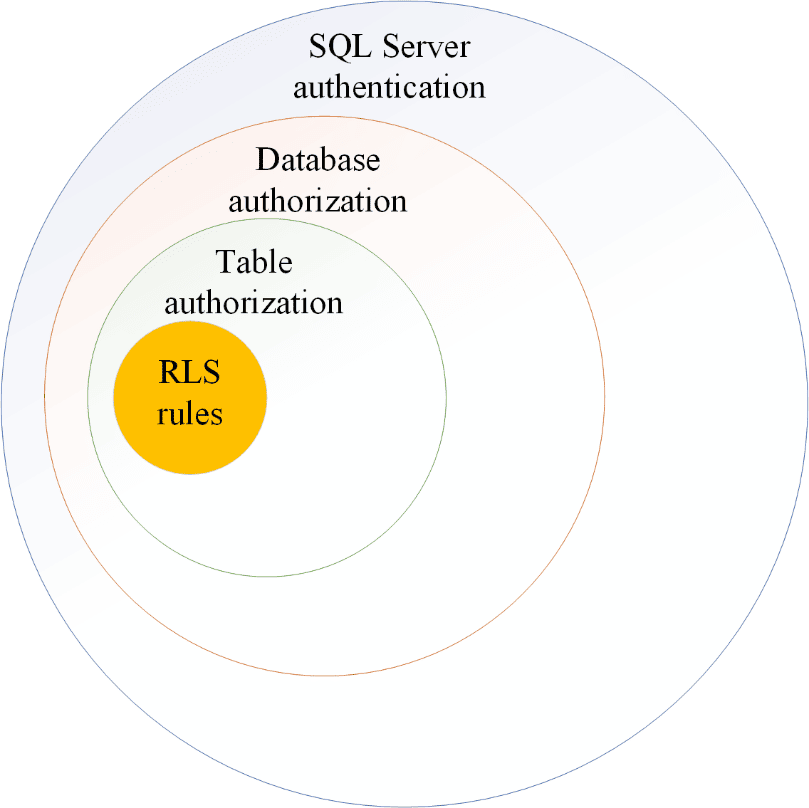
First, a user must be authenticated and able to access the SQL Server instance or the Azure database. There are multiple methods to authenticate to SQL Server and any of them work with RLS.
Next, the user must be mapped to a database and be authorized to access that database. A user could be authorized to access all databases on a server or multiple databases in Azure. After database authorization, a user must also be authorized to access the table protected by RLS. If they aren’t authorized to access the table the RLS won’t apply. They will get an error message at this level.
Next, after they are able to access the table, the RLS rules are applied. At this point, a subset of the rows will generally be returned, but it is also possible that all rows or no rows will return. If they have access to the table, but don’t meet any of the RLS rules, an error won’t be thrown, but they will not receive rows. The dataset would be empty in this scenario.
Row-Level Security hierarchy explained
Sample code
Some actual code makes the setup clearer. RLS is fairly easy to implement. The complicated part is extracting the business requirements and making sure everything performs as needed. RLS is comprised of a table-valued-function, an access predicate, that returns a 1 for each row that meets the security requirements and a security policy that links the access predicate to the table being secured.
The following example is presented in the WideWorldImporters sample database and it shows a few useful techniques.
Access predicate
|
1 2 3 4 5 6 7 8 9 10 11 12 13 14 15 16 17 18 19 |
CREATE FUNCTION [Application].[DetermineCustomerAccess](@CityID int) RETURNS TABLE WITH SCHEMABINDING AS RETURN (SELECT 1 AS AccessResult WHERE IS_ROLEMEMBER(N'db_owner') <> 0 OR IS_ROLEMEMBER((SELECT sp.SalesTerritory FROM [Application].Cities AS c INNER JOIN [Application].StateProvinces AS sp ON c.StateProvinceID = sp.StateProvinceID WHERE c.CityID = @CityID) + N' Sales') <> 0 OR (ORIGINAL_LOGIN() = N'Website' AND EXISTS (SELECT 1 FROM [Application].Cities AS c INNER JOIN [Application].StateProvinces AS sp ON c.StateProvinceID = sp.StateProvinceID WHERE c.CityID = @CityID AND sp.SalesTerritory = SESSION_CONTEXT(N'SalesTerritory')))); GO |
The above example shows that the function is part of the Application schema. This gives a clue that the table getting secured is likely also in that schema. I would recommend putting the RLS objects in a separate schema for the sake of security. They don’t need to be actively accessible to end users, so there is no good reason to expose them.
This example also shows how multiple options can be used to expose data to end users. The first section looks for users without the db_owner role, that also match the CityID for a user defined database role.
|
1 2 3 4 5 |
IS_ROLEMEMBER((SELECT sp.SalesTerritory FROM [Application].Cities AS c INNER JOIN [Application].StateProvinces AS sp ON c.StateProvinceID = sp.StateProvinceID WHERE c.CityID = @CityID) + N' Sales') <> 0 |
The second option for getting access is for the “Website” user. This allows different access for users coming in through that service account. The SESSION_CONTEXT must be set by the application, then it matches to the SalesTerritory in the lookup.
|
1 |
sp.SalesTerritory = SESSION_CONTEXT(N'SalesTerritory') |
Access predicates aren’t limited to these methods. Any type of lookup can be used. As I will state many times in this series, RLS is non-prescriptive and depends on the business rules. As the developer or architect of the solution, you just need to be sure the business rules are defined in the access predicates and that they perform within the limits of the non-functional requirements (NFR). The rest is up to you. When possible, you will want to follow enterprise standards and keep your solution as simple as possible.
Security policy
The security policy is used to tie the access predicate to the table you want to secure with RLS. It also defines the column used by the access predicate. The following is the associated security policy in the WideWorldImporters sample.
|
1 2 3 4 5 |
CREATE SECURITY POLICY [Application].[FilterCustomersBySalesTerritoryRole] ADD FILTER PREDICATE [Application].[DetermineCustomerAccess]([DeliveryCityID]) ON [Sales].[Customers], ADD BLOCK PREDICATE [Application].[DetermineCustomerAccess]([DeliveryCityID]) ON [Sales].[Customers] AFTER UPDATE WITH (STATE = ON, SCHEMABINDING = ON) GO |
Key things to note in the security policy start with the FILTER PREDICATE and the BLOCK PREDICATE. Note that they reference the table being secured. The FILTER applies to SELECT statements and the BLOCK applies to UPDATE, INSERT, DELETE statements.
Another key item is the parameter specification. This is the (DeliveryCityID) on the Sales.Customers table. This is the actual column in the table being secured. It must be a physical column in the table and the datatype must match the parameter in the Access Predicate. It makes things easier to follow if the names correspond, but it isn’t a requirement.
Lastly, note that the STATE = ON. This is what enables or disables the security policy. It is possible to disable the security policy with the following:
|
1 2 |
ALTER SECURITY POLICY application.FilterCustomersBySalesTerritoryRole WITH (STATE = OFF) |
This will be discussed more in the section on RLS attacks, but it is sufficient to know for now that the policy must be on for it to secure data.
This example shows how the access predicate and the security policy work together to create, define and enforce RLS in a database. There are many ways to define an access predicate and each is valid as long as they meet the business requirements.
Use cases of Row-Level Security in SQL Server
Warehouse / Self-Service Data / Data Democratization
Data warehouses are a prime candidate for RLS when users have direct access to the system and they aren’t authorized to see all data. This allows users to run stored procedures, access views, create their own queries, and access data in any way while still keeping data segregated. This is much easier to test and validate than custom solutions to limit data.
If your organization is looking at self-service data or data democratization, this also may fit the usage pattern and requirements. These terms have reached the level of buzz words and I approach projects like this with caution since they don’t imply an actual solution and the problem statement can be very nebulous. But the usual interpretation is that the business is trying to move faster than IT and need data to get their job done. RLS can help put some guide rails on the data provided and improve security in these scenarios.
Reporting
Reporting is another viable use case for RLS. If the reporting engine is running on SQL Server and allows pass-through queries, it will work. If the report engine caches data and is responsible for security, it may not honor RLS and should be evaluated carefully before making architectural decisions. Since this requires direct table access, it is generally not recommended for transactional systems
The advantage to using RLS for reporting is decreasing the number and complexity of reports, sometimes dramatically. Previous solutions that required custom scripts or multiple reports can now be simplified. RLS allows each user to see only their data. This also flows to aggregations, function usage, joins and any other use of the data. Another advantage to using RLS is users can directly access the database and have the same access. Data democratization and self-service reports are becoming common goals of organizations. This is facilitated by securing data at the database level rather than at the application layer.
Essentially any application that supports single sign on (SSO) should work with RLS. In practice, this can be difficult to actually implement and you will want to validate it works before committing to a specific solution if it does not explicitly mention working with RLS in SQL. Power BI is a good example of this. On-prem SQL instances that are accessed via a Power BI gateway are now supported with SSO and RLS. This allows RLS defined on the database to pass-through to Power BI so it doesn’t have to be duplicated. This is relatively new functionality and requires additional configuration, so be sure to build a quick proof of concept if you are trying something new. Power BI accessing an Azure SQL Database don’t need the gateway, it just needs to use pass-through authentication.
Multi-Tenant Application
It is possible to use RLS for multi-tenant applications, but there are easier solutions, especially with cloud computing. RLS requires an extra layer of testing, especially query performance and security validation. Sometimes it is just easier to create a new database for an organization rather than risking any possible gaps in coverage.
Another complication with multi-tenant solutions is backups. If one of the organizations in a multi-organization database needs to restore data it becomes more difficult than restoring in a single-tenant database. System versioned temporal tables (history tables), external restore solutions or custom scripts can be used to restore data. But it isn’t as straight-forward as a full restore.
Maintenance also needs to be carefully scheduled in all database systems to ensure it doesn’t impact the supported applications. This is especially true and more complicated with multi-tenant solutions. Maintenance can be even more complicated if RLS needs to be temporarily disabled for some specific maintenance tasks. In these instances, it is a good practice to put the database into restricted user mode.
Application Security
Using RLS for application security is slightly different from multi-tenant applications and warehouse solutions. Using RLS inside an organization can be a simple way to segregate data based on authorized security. Since users pass through an API layer, they don’t have direct access to the data and it is a safe and easy way to implement a layer of security on the data.
Additional security will still need to be implemented on the application and for page or sub-page level access, but it can simplify the data layer. Using the SESSION_CONTEXT() is an easy way to use RLS in an application even with an API layer and a service account.
Summary
RLS is a flexible, non-prescriptive framework for limiting the rows presented to end users based on implementation specific rules. It can be very useful for reporting solutions, data warehouses, and applications as an additional layer of security. Since it is implemented in the database engine, it has all of the standard testing and rigor associated with SQL Server, giving it a significant advantage over most home-grown solutions.
The rest of the series explores setting up RLS, alternatives to RLS, security concerns with RLS, and administrative items for RLS. As mentioned in the preface, this series has a significant focus on security. Each article calls out security items in addition to the specific topic discussed.
Protect your data. Demonstrate compliance.
FAQs: Introducing Row-Level Security (RLS) in SQL Server
1. How do you implement Row-Level Security in SQL Server without hurting query performance?
Write the predicate as an inline table-valued function with a single, simple expression – comparing a column to SESSION_CONTEXT(‘TenantId’) or USER_NAME() – on an indexed column, and bind it with a security policy. The optimizer then treats it like a WHERE clause and uses the index. Avoid joins, subqueries and scalar functions inside the predicate, and test with execution plans on realistic data volumes before going live.
2. What is the difference between a filter predicate and a block predicate?
A filter predicate silently removes rows the user cannot see from SELECT, UPDATE and DELETE; a block predicate raises an error on INSERT, UPDATE or DELETE that would create or affect rows outside the user’s allowed set. Most implementations need both: filter for reads, block so a user cannot insert rows they could not then see.
This document contains proprietary information and is protected by copyright law.
Copyright © 2026 Red Gate Software Limited. All rights reserved





Load comments