

PostgreSQL replication is one of the most powerful tools available for keeping your database resilient, redundant, and performant, but it’s only effective when it’s stable. Replication lag, network bottlenecks, and long-running transactions can each quietly erode the reliability your applications depend on.
This guide breaks down how replication works in PostgreSQL, what threatens its stability, and the practical steps you can take to keep everything running smoothly – from tuning postgresql.conf, to handling table bloat and DDL changes safely on large, active databases.
If you’re an avid user of any database management system (DBMS), you likely know about replication within them – or at least, the basics for your system of choice. Replication isn’t a silver bullet – each DBMS does it differently – and this article is focused on replication in PostgreSQL. More specifically, how to ensure replication stability in PostgreSQL.
It’s important to first understand the basics: what is replication, and how does it work in PostgreSQL?
How does replication work in PostgreSQL?
Replication in PostgreSQL is the process of keeping one PostgreSQL-based database server in sync with another. And, just like in other DBMS’ like MySQL, replication in PostgreSQL has elements unique to itself.
For example, if you run two database servers and replicate data, any changes to the data on the primary server are recorded in a transaction log – also known as a write-ahead log (WAL).
Further, PostgreSQL has several replication types available. The most popular are streaming (physical) replication, logical replication, and WAL file shipping, as explained below.
- Physical replication aims to copy your entire database by acting on write-ahead log (WAL) records.
- Logical replication aims to replicate changes to data (anything that’s affected by CRUD SQL queries) rather than act on WAL records.
- WAL file shipping is an older EDB replication technique aiming to copy archived WAL files from one server to another. This PostgreSQL replication technique is simple but quite outdated.
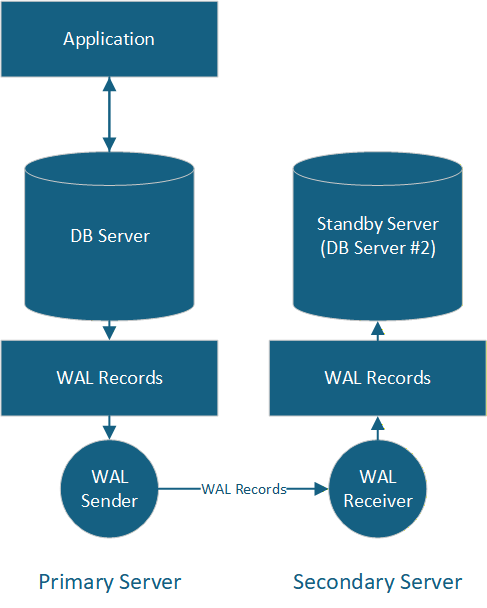
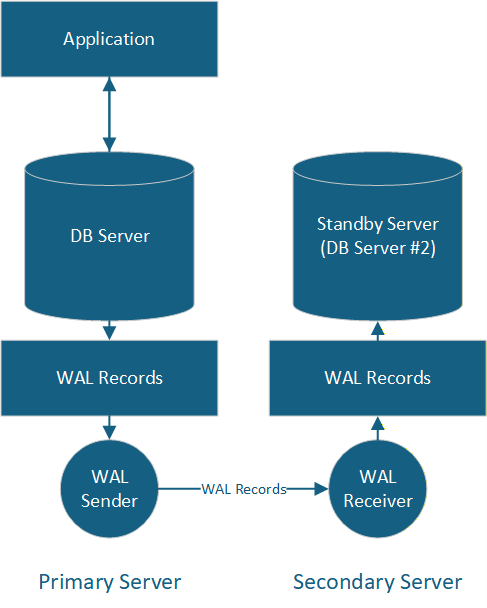
Above is a basic illustration of streaming (or ‘standby’) replication in PostgreSQL, where secondary read-only database servers continuously copy data from the primary database server. Such a replication method is used to ensure data redundancy, allows developers to offload read-based queries, and acts as a backup should the primary server go AWOL.
Essentially, since WAL records in the standby server are constantly fetched and updated to mirror the state of the primary server, if something happens to the main server powering your application, the secondary server will step up and take over.
How to achieve data stability with replication
Just as there are many methods to replicate data, there are multiple goals replication helps us achieve, and data stability is one of them. To keep data stable, replication needs to be stable as well. For many developers, replication is only as good as the stability it provides.
Since replication is the cornerstone of so many business-critical applications, it relies heavily on limited to continuous communication between the primary and replica servers, up-to-date hardware, and stable workloads (to name a few).
If they’re not up to par, the risk of problems like replication lag, consumption of disk space, and improper failover mechanisms increases substantially. Let’s take a closer look at these.
Get started with PostgreSQL – free book download
What hinders replication stability in PostgreSQL?
In PostgreSQL, replication stability can be negatively impacted by replication lag, network bottlenecks, and VACUUM-based bottlenecks. Let’s have a look at each in more detail.
Replication lag
What is replication lag?
Replication lag is the delay that occurs when data changes in one part of a database or application take time to be displayed in other parts.
How do you fix/prevent replication lag?
Balance the infrastructure behind your database, tune your database to make good use of the infrastructure that you do have, and use application-level routing to avoid overwhelming your database.
Network bottlenecks
What are network bottlenecks?
Network bottlenecks happen when the amount of data being replicated exceeds the capacity of the network. This creates a ‘choke point’ and causes data to ‘drop’ (or lag behind), resulting in further issues.
How do you fix/prevent network bottlenecks?
Use proper hardware, remove bandwidth limits on your network (if any), reduce data sent in transit (compress if possible), and optimize tasks related to your network.
VACUUM-based bottlenecks
What are VACUUM-based bottlenecks?
These occur when cleanup operations performed by the VACUUM maintenance operation in PostgreSQL stall, lag, or otherwise overwhelm your database.
How do you fix/prevent VACUUM-based bottlenecks?
Tweak the postgresql.conf file: look into delay thresholds (max_standby_archive_delay and max_standby_streaming_delay) to control how long replicas wait before canceling conflicting SELECT queries.
Also, defer cleanup operations using vacuum_defer_cleanup_age to specify cleanup only after a specified number of transactions have completed, scale the replica server by upgrading its hardware or splitting load, and consider configuring parameters on the primary server to act on disk I/O where necessary.
What else is a challenge for developers?
Of course, replication isn’t the only issue developers need to think about in today’s world. Applying DDL changes safely on large, highly active databases without disrupting production traffic may be problematic, and too many concurrent connections may exhaust server resources. Additionally, transactions waiting on locks may cause slow queries and reduced throughput.
Developers are also challenged by table and index bloat, long-running transactions, inefficient query plans, and maintaining bigger datasets.
As such, replication stability may not only be hindered by replication lag and bottlenecks, but also the other things you do that have an impact on your database as a whole. Some of these include:
Table and index bloat
Bloat is a byproduct of how PostgreSQL handles operations like UPDATES and DELETES using multi-version concurrency control (MVCC), because deleted or updated rows are not deleted. Instead, they‘re only marked as ‘deleted’ or ‘updated’ in table or index pages.
Use extensions like pgstattuple to detect bloat in PostgreSQL. It’s also beneficial to understand the root causes of bloat: dead tuples, frequent updates to data, and free space fragmentation. These can be avoided through adequate maintenance of your PostgreSQL database.
Long-running transactions
Long-running transactions stem from poorly-written queries or data that is incorrectly optimized for your use case. To keep yourself up to speed on optimizing transactions and the like, refer to the official PostgreSQL documentation.
Inefficient query plans
It’s crucial to understand what the query planner chose, and why. Give it better information to act on, or better access paths. Start with the basics of ANALYZE, EXPLAIN, and adding indexes where applicable. Also look for sequential scans on large tables, huge differences between actual rows and estimated rows, and expensive sort operations. As a general rule, try to prevent anything that accesses more data than it should.
If necessary, rewrite your queries. For example, the SELECT * (instead of SELECT) column may be doing more harm than it should. And, assess carefully: do you really need these JOINs?
Maintaining larger datasets
Firstly, ensure the tables bearing lots of rows are partitioned and properly indexed. Indexes should also be used by your queries. Also avoid using lots of unnecessary data types – something PostgreSQL is known for – because, ultimately, your data and use case needs to be specific to actually make good use of them!
Instead, opt for classless inter-domain routing (cidr) when storing IP addresses. You may also have to switch to VARCHAR when migrating because no such data type exists in other systems.
Keep your primary use case in mind. If you‘re running a search engine, for example, it‘s wise to index columns after the WHERE clause. And even if you‘ve done that, keep in mind that other query types will slow down.
Finally, monitor and tune autovacuum, since many large installations require more aggressive autovacuum settings than the defaults.
Safely applying DDL changes on big data
Even if your operation is fast, understand that PostgreSQL may briefly lock access to CRUD queries. Keep in mind that on older versions of PostgreSQL, some ALTER TABLE statements will trigger a table rewrite, but others won’t. ADD COLUMN may be safe – add NOT NULL DEFAULT ‘Value’ and you may trigger a rewrite.
Consider performing operations (e.g. adding columns to tables) gradually: add a column, backfill existing rows gradually, then add an index if necessary.
Finally, employ CREATE|DROP INDEX CONCURRENTLY instead of building or removing indexes in a vanilla way, and backfill lots of data in batches using the LIMIT clause where necessary.
Transactions waiting on locks
Identify waiting/blocking queries. Keep transactions brief, and avoid user activity when they‘re running. Act on (update, etc.) data in smaller batches than usual. Set lock timeouts by using SET lock_timeout. Finally, use appropriate isolation levels when necessary.
Summary: why you should fix these PostgreSQL issues
Fix (or better still, prevent) these issues, and your PostgreSQL will thank you – not only when replicating your data, but also in other everyday operations.
Your database is the backbone of the operations behind your application – so it’s crucial to know how to efficiently manage table and index bloat, deal with long-running transactions, and maintain large datasets. Not only for the present, but for the future of your database, too.
Simple Talk is brought to you by Redgate Software
FAQs: How to ensure replication stability in PostgreSQL
1. What is replication lag in PostgreSQL and how do you fix it?
Replication lag is the delay between a change being made on the primary server and that change appearing on a replica. It’s typically caused by insufficient infrastructure, unoptimised queries, or overwhelming write volumes. You can reduce it by balancing your database infrastructure, tuning your configuration, and using application-level routing to distribute load more evenly.
2. What are the main types of replication in PostgreSQL?
PostgreSQL supports three primary replication methods: streaming (physical) replication, which copies WAL records continuously to keep replicas in sync; logical replication, which replicates individual data changes from CRUD operations; and WAL file shipping, an older method that copies archived WAL files between servers. Streaming replication is the most widely used in modern setups.
3. How does VACUUM affect replication stability in PostgreSQL?
The VACUUM process can stall or overwhelm replicas if it’s not properly configured, particularly when cleanup operations conflict with active SELECT queries on standby servers. To manage this, adjust max_standby_streaming_delay and max_standby_archive_delay in postgresql.conf, and use vacuum_defer_cleanup_age to delay cleanup until a set number of transactions have completed.
4. How do you safely apply DDL changes on a large PostgreSQL database without downtime?
Apply changes incrementally: add a column first, then backfill existing rows in batches, then add any required indexes. Use CREATE INDEX CONCURRENTLY and DROP INDEX CONCURRENTLY to avoid locking tables, and use the LIMIT clause when backfilling large datasets. Be aware that some ALTER TABLE operations can trigger a full table rewrite on older PostgreSQL versions.
5. What causes table bloat in PostgreSQL and how do you prevent it?
Table bloat is a side effect of PostgreSQL’s multi-version concurrency control (MVCC) system: when rows are updated or deleted, the old versions aren’t immediately removed – they’re marked as dead tuples. Over time, this inflates table and index size. You can detect bloat using the pgstattuple extension and reduce it through regular VACUUM runs, avoiding unnecessary large updates, and tuning autovacuum settings – especially on high-write or large-table databases.
This document contains proprietary information and is protected by copyright law.
Copyright © 2026 Red Gate Software Limited. All rights reserved





Load comments