






Redgate Flyway’s Product Updates – May 2026
GitHub Actions yaml templates in Flyway Desktop
In your Flyway Desktop project, use the GHA Workflow on the Automate deployment page to get a yaml file that can be used as a starting point for your pipeline as code. This has all the steps to:
- Check out the latest version from the repository
- Install and authenticate Flyway
- Check your code policies, create a change report, and check for drift
- Deploy to the target environment
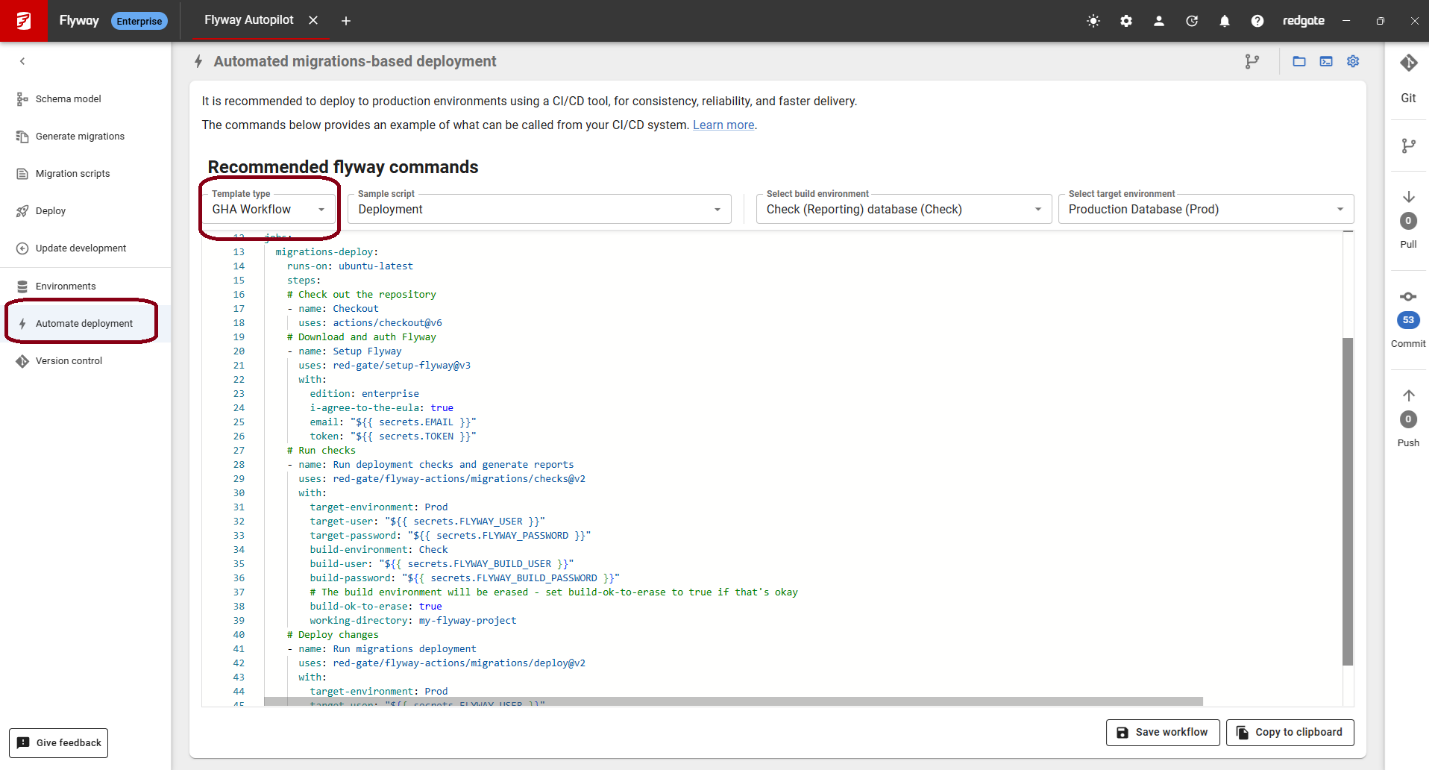
This is a sample yaml file to get you started. You’ll need to enter your email and personal access token (PAT), and database credentials as secrets in GitHub to keep them secure and have the pipeline work. Look for anything starting with “${{” to see the different secret variables that need to be set.
Improved authentication options
Flyway Enterprise integrates with existing Secret Management systems to keep your database credentials secure. We’ve provided integrations for HashiCorp Vault, Google Cloud Secret Manager, and Dapr for a while. We have now added support for the Azure Key Vault Secrets Manager.
We have also updated our documentation and have better support for Kerberos for SQL Server and Oracle, and using an Oracle OCI Wallet for Oracle credentials. For the OCI wallet, we currently support Flyway Desktop on Windows machines with the Oracle Instant Client installed.
Coming soon
- Set up filters in Flyway Desktop for PostgreSQL and MySQL projects. Filtering objects for these databases is currently possible by editing the project file directly. A GUI for SQL Server and Oracle databases.
- Easier configuration for Code Policies in Flyway Desktop.
- Scripting out object existence checks for Oracle databases when generating versioned and undo migration scripts. This is already available for SQL Server.
- Scripting out existence checks for SQL Server static data.
Feedback
As always, we’d love to hear your feedback on these features. Please email us any comments or questions, or sign up for a 30 min Zoom call with the development team.
Tools in this post
You may also like

Blog
Why even the best teams struggle with cloud migrations

Blog
The quiet problem underneath modern software delivery: database change at scale
Blog
Loading comments...