





When we want to use AI-based comparisons of text, via vector search in SQL Server, we need to first generate embeddings for the text. An embedding is a numeric representation of meaning, usually represented by vectors. In this article, I’ll show you how to use Ollama to host a server locally that can be used to generate embeddings.
This is the first article in Greg Low’s series ‘AI text embeddings in SQL Server: everything you need to know’.
What are embeddings?
Instead of working directly with text, images, or other rich content, an embedding represents that content as a set of numbers that capture semantic relationships learned by a model. This lets systems work with meaning in a mathematical way rather than relying on concepts like text matching.
Embeddings are the output of trained text-based AI models. One possibly surprising concept is that they’re used for similarity, as opposed to facts – and for relative closeness instead of exact matches.
SQL Server is not designed to host or execute those models. This isn’t a limitation; it is a design choice. While it would be possible to run code within SQL Server to generate embeddings, it just wouldn’t be a good idea.
Note that SQL Server can already run machine learning models directly, and use the PREDICT statement to make predictions. We don’t want to be doing that with the language models we need for embeddings, though.
Where do we host embedding models?
There are two common ways that systems access embedding models: cloud-hosted services and locally-hosted services.
Cloud-hosted embedding services are provided by vendors such as OpenAI and similar platforms. In this model, text is sent to a remote API over the network, and embeddings are returned as a service.
These offerings are typically easy to start with, scale well, and are continuously updated by the provider. However, they introduce external dependencies and ongoing usage costs. They also increase the risk of data leaving your environment.
Locally hosted embedding services run models within your own infrastructure. Tools such as Ollama make it possible to run embedding models on a local machine or server and expose them via a local API.
This approach provides greater control over data, avoids external network calls, and can reduce ongoing costs. At the same time, it shifts responsibility for performance, availability, updates, and resource management onto your team.
SQL Server doesn’t care which choice you make. It has no interest in where embeddings were generated: it only cares about having the required number of dimensions each time you retrieve a vector.
Fast, reliable and consistent SQL Server development…
How to install Ollama
Ollama is easy to install. You download it from the official website and, once installed, it (as of 2026) opens a chat window, as you can see below. For anyone who’s ever used ChatGPT, it’s quite familiar:
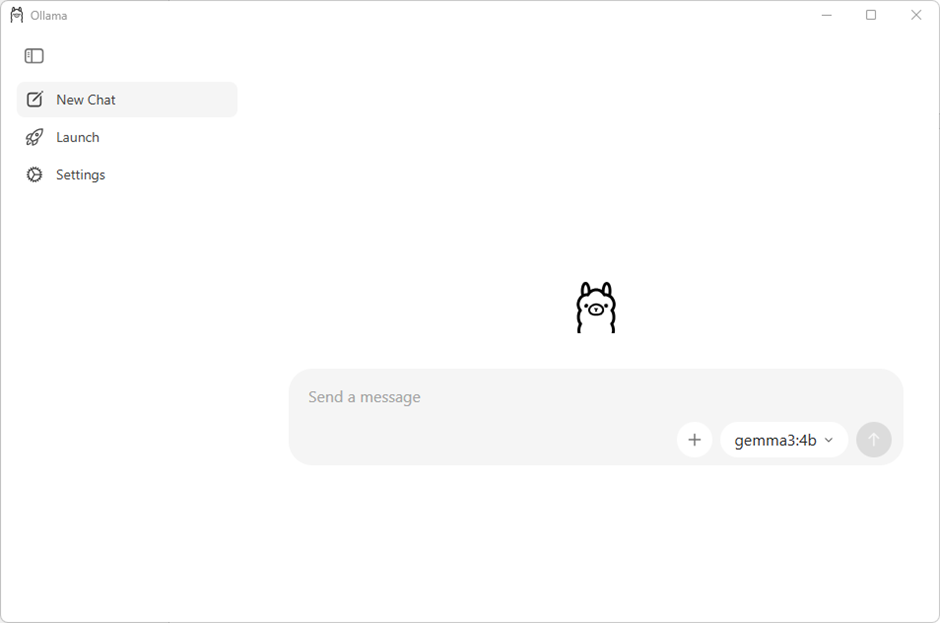
On the right-hand-side, you can choose the model that you want to query. Ollama can automatically download and run different models but, for SQL Server use, we want to use Ollama programmatically instead.
How to use Ollama programmatically
We can use Ollama programmatically either by using a command line interface (CLI), or by making REST-based calls to the service.
For testing with SQL Server, what I like to do is:
- Stop the Ollama application and configure it so it doesn’t start automatically;
- Open a command line window, and execute Ollama commands directly;
- Start Ollama by executing
ollama serve.
Doing it this way offers you the advantage of being able to see the actions Ollama takes. They’ll scroll past in the command line window.
Executing ollama help shows you the available commands:
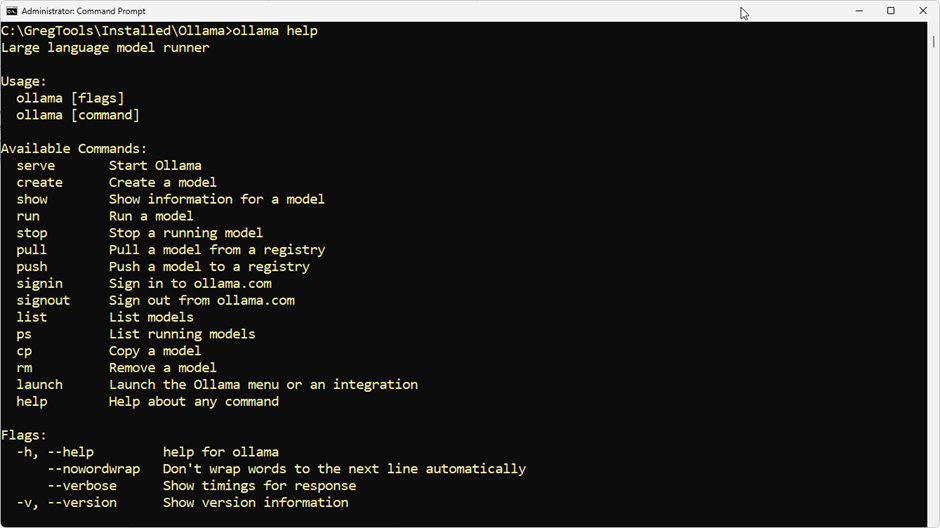
The important commands for us to use are list, pull, run, and stop.
If I execute ollama list on my system, it returns this:
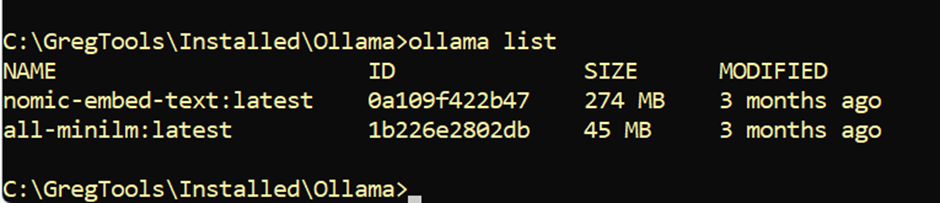
That’s showing the two text models I currently have downloaded. You can have multiple versions of the same model. In this case, it’s indicating :latest on the end of the model’s name. The pull command, meanwhile, is used to pull down a model that you don’t have.
I can test a model by executing the run command:

I’ve said ollama run all-minilm:latest "How much stock do we have?". This lets me calculate embeddings interactively. Note that a vector is returned.
I can then stop the model running by using the stop command:
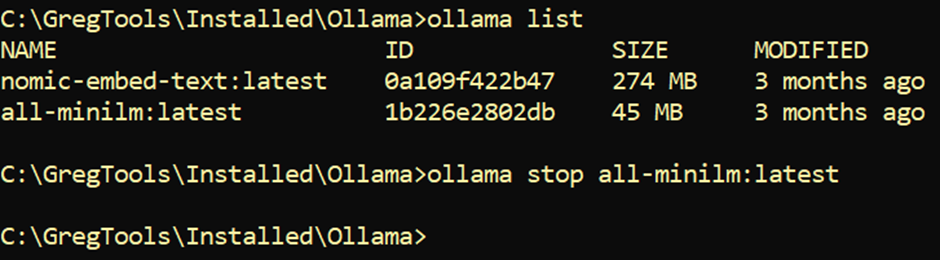
For use with SQL Server, I could either let Ollama run automatically or run the server interactively. I can start the service by executing ollama serve. You’ll get an error if a model is already running.
Once I start the server, I’ll see a lot of configuration information, including the port it’s listening on:

How to add a proxy in Ollama
This is an http address (not https), which is a problem since SQL Server refuses to make REST calls using just http. So, to get around this roadblock, for local hosting I add a proxy.
My preferred proxy is a tool called Caddy. The wonderful thing about Caddy is that you don’t even need to install it. You just download the appropriate executable and run it. All you need to do is provide a configuration file.
So, I create a file called Caddyfile and then execute Caddy with the following command:
caddy_windows_amd64.exe run --config Caddyfile
The contents of my Caddyfile are as follows:
|
1 2 3 4 5 6 7 8 |
{ auto_https disable_redirects } https://localhost:8443 { tls internal reverse_proxy 127.0.0.1:11434 } |
If you don’t include the option to disable redirects, you’ll likely get errors on your standard ports. And the rest of the file just says that https://localhost:8443 will be mapped to 127.0.0.1:11434, which is the address Ollama was listening on.
Summary and next steps
At this point, we’ve done two important things. We’ve installed Ollama and seen it working with a suitable text model. And we’ve installed a proxy server called Caddy so that SQL Server is happy to call Ollama when needed.
In the next article in this series, I’ll show you how to configure and use these services from the SQL Server end.
Simple Talk is brought to you by Redgate Software
FAQs: How to host an AI text embeddings model for SQL Server using Ollama
1. What is an embedding?
An embedding is a numeric vector that represents the meaning of text. It lets systems compare content by semantic similarity rather than exact matching.
2. Can SQL Server generate embeddings itself?
No. SQL Server isn’t designed to host language models. Embeddings should be generated by an external service like Ollama or a cloud provider, then passed to SQL Server as vectors.
3. Why use Ollama instead of a cloud embedding service?
Ollama runs models locally, giving you greater control over your data, no external API costs, and no risk of data leaving your environment, in exchange for managing performance and updates yourself.
4. Why does Ollama need a proxy for SQL Server?
Ollama exposes its API over HTTP, but SQL Server only makes REST calls over HTTPS. A reverse proxy like Caddy listens on HTTPS and forwards requests to Ollama’s local endpoint at 127.0.0.1:11434.
This document contains proprietary information and is protected by copyright law.
Copyright © 2026 Red Gate Software Limited. All rights reserved




Load comments