

|
1 2 3 4 5 |
UPDATE AdventureWorks2016.Person.Person SET title=dbo.FakedStringFrom(@TitleMarkov), firstName=dbo.FakedStringFrom(@FirstnameMarkov), MiddleName=dbo.FakedStringFrom(@MiddlenameMarkov), LastName=dbo.FakedStringFrom(@LastnameMarkov) |
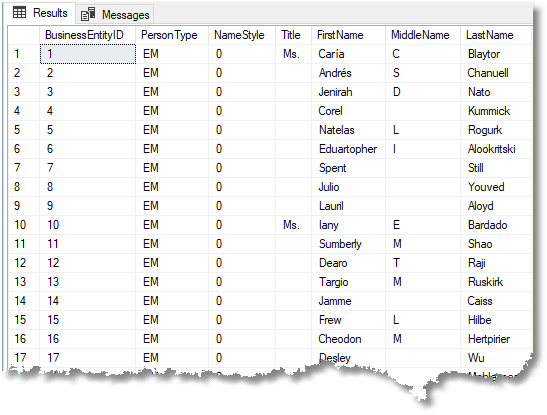 Before you get over-excited, it took twenty-eight seconds to do the 20,000 rows of the task. You’d do much faster with prepared tables of obfuscated words, or word collections in files used by a third-party tool, but it is a start.
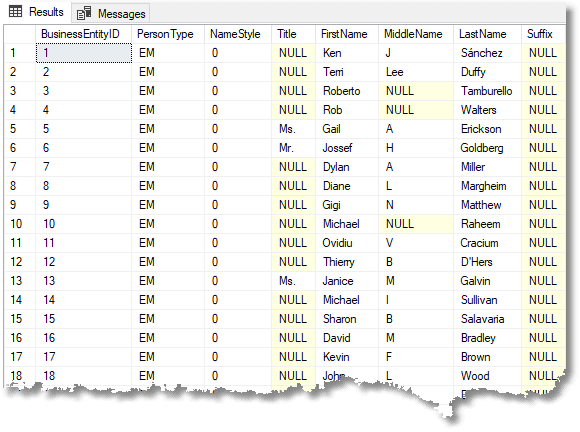
Here was the same data before we pseudonymized it.
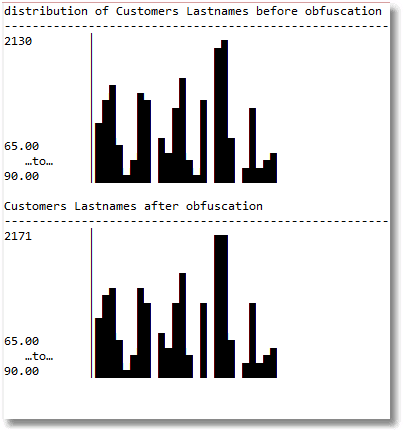
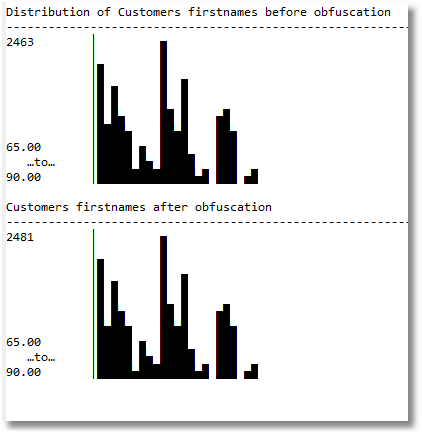
 We check the distributions of the data before and after we make the changes, to make sure we haven’t altered it. Let’s first check on the distributions of customers’ lastnames before and after running our process.
 And we can do the same with firstnames just to make sure we are matching the existing distributions
 We are taking a slow-but-steady approach. We rewrite our code from the previous blog post that assembles the string; it now uses a view to get its random numbers, and we’ll speed it up slightly by putting a bit more intelligence into the markov table. We then put it in a slow User-defined Scalar function. We want a scalar function that isn’t schema verified and is not considered to be deterministic. The reason for this is that it has to be executed every row despite having the same parameter.
There are many ways to store the information permanently in a Markov table but we’ll be using Table-valued parameters for our function. I’ll show how they are generated from the original information in AdventureWorks, but they could be so easily fetched from a table of markov entries with each markov set identified by a name. This could be delivered to you by the production DBA so that you wouldn’t need any access to the production server.
|
1 2 3 4 5 6 7 8 9 10 11 12 13 14 15 16 17 18 19 20 21 22 23 24 25 26 27 28 29 30 31 32 33 34 35 36 37 38 39 40 41 42 43 44 45 46 47 48 49 50 51 52 53 54 55 56 57 58 59 60 61 62 63 64 65 66 67 68 69 70 71 72 73 74 75 76 77 78 79 80 81 82 83 84 85 86 87 88 89 90 91 92 93 94 95 96 97 98 99 100 101 102 103 104 105 106 107 108 109 110 111 112 113 114 115 116 117 118 119 120 121 122 123 124 125 126 127 128 129 130 131 132 133 134 135 136 137 138 139 140 141 142 143 144 145 146 147 148 149 150 151 152 153 154 155 156 157 158 159 160 161 162 163 164 165 166 167 168 169 170 171 172 |
/* drop anything that uses the two types we need to create */ IF Object_Id('dbo.MarkovTableFrom', 'IF') IS NOT NULL DROP FUNCTION dbo.MarkovTableFrom; GO IF EXISTS(SELECT Object_Id('dbo.FakedStringFrom')) DROP FUNCTION dbo.FakedStringFrom GO /* create the two types we will use as table-valued parameters */ IF EXISTS (SELECT * FROM sys.types WHERE types.name LIKE 'StringValue') DROP type StringValue /* Create a table type to store strings in. */ CREATE TYPE StringValue AS TABLE (String NVARCHAR(50) NOT null); GO IF EXISTS (SELECT * FROM sys.types WHERE types.name LIKE 'Markov') DROP type dbo.Markov GO /* Create a table type to store Markov data in. */ /* Object: UserDefinedTableType dbo.Markov */ CREATE TYPE dbo.Markov AS TABLE ( trigraph NCHAR(3) NOT NULL, iteration TINYINT NOT NULL, frequency INT NOT NULL, totalInSet INT NOT NULL, runningTotal INT NOT NULL, TheOrder INT NOT NULL, Choices INT NOT NULL, TheEND BIT NOT NULL, PRIMARY KEY CLUSTERED (iteration ASC, trigraph ASC) WITH (IGNORE_DUP_KEY = OFF) ); GO /* Create a view to sneak into a function. Random numbers are detected and they are not allowed. */ DROP VIEW [dbo].[SingleRandomNumber] GO CREATE VIEW [dbo].[SingleRandomNumber] AS SELECT RAND() as RandomNumber GO IF Object_Id('MarkovTableFrom') IS NOT NULL DROP function MarkovTableFrom GO CREATE FUNCTION MarkovTableFrom /** Summary: > in our table, we will take every three-character trigraph in the word sequence and calculate the frequency with which it appears in the collection passed to the routine. This is simple to do with a GROUP BY clause. The quickest way I've found of doing this is by a cross-join with a number table (I've used a VALUE table here to reduce dependencies). The result is then fed to a window expression that calculates the running total of the frequencies. You'll need this to generate the right distribution of three-character triads within the list of sample words This version of the Markov table has extra fields, more than is strictly necessary, in order to make it easier to do set-based operations using it. Author: Phil Factor Date: 10/07/2018 Database: PhilFactor Examples: - Select trigraph, iteration, frequency, runningTotal, theOrder, choices, TheEnd from dbo.MarkovTableFrom(@MyStringValues) Returns: > A Markov Table **/ (@SampleStrings StringValue READONLY) RETURNS TABLE --WITH ENCRYPTION|SCHEMABINDING, .. AS RETURN -- (trigraph, iteration, frequency ,runningTotal, theOrder, choices, TheEnd) ( With MarkovBasics AS ( SELECT Frequencies.trigraph, Frequencies.Iteration, Frequencies.frequency, Sum(Frequencies.frequency) OVER (PARTITION BY Frequencies.Iteration,Left(trigraph,2) ORDER BY Frequencies.frequency,trigraph) AS RunningTotal, ROW_NUMBER() OVER(PARTITION BY Substring(trigraph,1,2),iteration ORDER BY (SELECT 1)) AS TheOrder, 0 AS choices, CASE WHEN Left(trigraph,2) LIKE '%|%' THEN 1 ELSE 0 END AS TheEnd, Sum(Frequencies.frequency) OVER (PARTITION BY Frequencies.Iteration,Left(trigraph,2) ORDER BY (SELECT 1)) AS totalInSet FROM ( SELECT Substring(' ' + Coalesce(String, '') + '|', f.iteration, 3) AS trigraph, f.iteration, Count(*) AS frequency FROM @SampleStrings AS p CROSS JOIN (VALUES(1),(2),(3),(4),(5),(6),(7),(8),(9),(10), (11),(12),(13),(14),(15),(16),(17),(18),(19),(20), (21),(22),(23),(24),(25),(26),(27),(28),(29),(30), (31),(32),(33),(34),(35),(36),(37),(38),(39),(40) ) f(iteration) WHERE Substring(' ' + Coalesce(String, '') + '|', f.iteration, 3) <> '' GROUP BY Substring(' ' + Coalesce(String, '') + '|', f.iteration, 3), f.iteration ) AS Frequencies(trigraph, Iteration, frequency) ) SELECT trigraph, f.iteration , frequency , runningTotal, totalInSet, theOrder,f.choices,TheEnd FROM MarkovBasics INNER JOIN ( --we add in the number of choices at any point and give each choice an id 1..n SELECT Count(*) AS choices, Substring(trigraph,1,2) AS leading ,iteration FROM MarkovBasics GROUP BY Substring(trigraph,1,2),iteration )f(choices, leading,iteration) on f.iteration=MarkovBasics.iteration AND f.leading=Substring(MarkovBasics.trigraph,1,2) ) go IF EXISTS(SELECT Object_Id('dbo.FakedStringFrom')) DROP FUNCTION dbo.FakedStringFrom GO CREATE FUNCTION dbo.FakedStringFrom /** Summary: > This function builds a string by random numbers from a Markov table passed to it via a TVP. Each time it is called, it gives a different string, and in this algorithm, the first three characters of each string are provided will fit the distribution of the words used to create the markov table. The following characters are chosen with equal probability just to increase the 'noise' of the word (you can tweak this) Author: Phil Factor Date: 10/07/2018 Database: PhilFactor Examples: - SELECT dbo.FakedStringFrom(@CountryMarkov) FROM AdventureWorks2016.Person.Person AS P; Returns: > A string **/ (@MarkovTable AS Markov readonly) RETURNS nvarchar(50) --WITH ENCRYPTION|SCHEMABINDING, ... AS BEGIN DECLARE @RowCount INT, @ii INT, @NewWord VARCHAR(50) = ' ', @done INT=1 DECLARE @EntireRange INT --for matching the sample distribution = (SELECT Sum(frequency) FROM @MarkovTable WHERE iteration = 3), @Random FLOAT = (SELECT TOP 1 randomnumber FROM SingleRandomNumber); DECLARE @MaxLength INT = 50; --now we can use markov chains to assemble the word SELECT @ii = 1, @RowCount = 1,@done=0; WHILE ((@ii < @MaxLength) AND (@RowCount > 0)) BEGIN --we can make our choice based on its distribution but --it tends to reproduce more of the real data and less made up SELECT @NewWord = @NewWord + Right(M.trigraph, 1) FROM @MarkovTable M WHERE iteration = @ii AND M.trigraph LIKE Right(@NewWord, 2) + '_' AND (@Random * M.totalInSet) BETWEEN (runningTotal- frequency) AND runningTotal; SELECT @random= randomnumber FROM SingleRandomNumber; SELECT @RowCount = @@RowCount, @ii = @ii + 1; END; return Replace(LTrim(@NewWord), '|', ''); END GO |
|
1 2 3 4 5 6 7 8 9 10 11 12 13 14 15 16 17 18 19 20 21 22 23 24 25 26 27 28 29 30 31 32 33 34 35 36 37 38 39 40 41 42 43 44 45 46 47 |
/* Now, to test things out lets get some markov tables as TVPs. Firstly, lets get the firstnames from Adventureworks Person.Person.FirstName */ DECLARE @firstnameStrings StringValue,@FirstnameMarkov Markov; INSERT INTO @firstnameStrings (String) SELECT P.FirstName FROM AdventureWorks2016.Person.Person AS P; INSERT INTO @FirstnameMarkov (trigraph, iteration, frequency, totalInSet, runningTotal, TheOrder, Choices, TheEND) SELECT trigraph, iteration, frequency, totalInSet, runningTotal, theOrder, choices,TheEnd FROM dbo.MarkovTableFrom(@firstnameStrings); /* Now, lets get the Last Names from Adventureworks Person.Person.LastName */ DECLARE @LastNameStrings StringValue,@LastNameMarkov Markov; INSERT INTO @LastNameStrings(String) SELECT P.LastName FROM AdventureWorks2016.Person.Person AS P INSERT INTO @LastNameMarkov (trigraph, iteration, frequency, totalInSet, runningTotal, TheOrder, Choices, TheEND) SELECT trigraph, iteration, frequency, totalInSet, runningTotal, theOrder, choices,TheEnd FROM MarkovTableFrom(@LastNameStrings); /* OK, lets get the Middle Names from Adventureworks Person.Person.MiddleName */ DECLARE @MiddleNameStrings StringValue,@MiddleNameMarkov Markov; INSERT INTO @MiddleNameStrings(String) SELECT Coalesce(P.MiddleName,'') FROM AdventureWorks2016.Person.Person AS P INSERT INTO @MiddleNameMarkov (trigraph, iteration, frequency, totalInSet, runningTotal, TheOrder, Choices, TheEND) SELECT trigraph, iteration, frequency, totalInSet, runningTotal, theOrder, choices,TheEnd FROM MarkovTableFrom(@MiddleNameStrings); /* Lastly, we'll get the Titles from Adventureworks Person.Person.Title */ DECLARE @TitleStrings StringValue,@TitleMarkov Markov; INSERT INTO @TitleStrings(String) SELECT Coalesce(P.Title,'') FROM AdventureWorks2016.Person.Person AS P INSERT INTO @TitleMarkov (trigraph, iteration, frequency, totalInSet, runningTotal, TheOrder, Choices, TheEND) SELECT trigraph, iteration, frequency, totalInSet, runningTotal, theOrder, choices,TheEnd FROM MarkovTableFrom(@TitleStrings); SELECT dbo.FakedStringFrom(@FirstnameMarkov) AS Firstname, dbo.FakedStringFrom(@MiddlenameMarkov) AS Middlename, dbo.FakedStringFrom(@LastnameMarkov) AS lastname FROM AdventureWorks2016.Person.Person AS P |
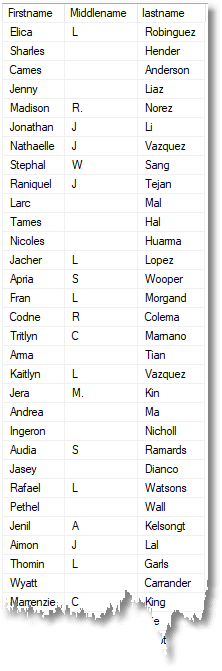 Although this is fun, we need to move on to do more. You will want to try out what we’ve done on that modification date in AdventureWorks. If you do, you will see that it will produce dates that are legal, but our algorithm won’t produce the correct distribution. Even if we change the dbo.FakedStringFrom function to choose all the characters according to their statistical distribution it will fail to work convincingly with small samples. It needs a rather different technique. We’ll talk about that in the next blog in this series.
FAQs
1. How do I mask production data for SQL Server test environments?
The standard workflow: (1) identify columns containing PII or sensitive data (names, emails, phone numbers, addresses, national IDs, card numbers, dates of birth, salaries); (2) choose a masking technique per column based on what downstream testing needs – substitution from lookup tables for names, pattern-preserving randomisation for emails and phones, locality-preserving transformation for addresses, plausible-offset randomisation for dates and amounts; (3) apply transformations in a copy of the production database (never directly in production); (4) verify referential integrity survives – if a customer appears in orders, the masked customer should still join correctly to its orders. For large-scale masking, consider dedicated tools like Redgate Data Masker that automate the workflow.
2. What is the difference between data masking, anonymisation, and spoofing?
The terms overlap substantially. ‘Data masking’ is the most common industry term, particularly in compliance contexts (PCI DSS, HIPAA, GDPR) – it implies replacing sensitive values with non-sensitive substitutes while preserving structure. ‘Anonymisation’ is a stronger term used in privacy regulation; legally it means making re-identification impossible – a high bar that static masking often doesn’t meet if attackers have access to outside information. ‘Obfuscation’ is broader and includes any transformation that makes data harder to interpret. ‘Spoofing’ (the term this article uses) emphasises making the fake data look convincingly real. For regulatory compliance, use ‘masking’ or ‘pseudonymisation’; for casual developer discussion, the terms are effectively interchangeable.
3. How do I mask data while preserving referential integrity in SQL Server?
Three approaches: (1) Deterministic masking – use a repeatable function (hash, lookup keyed by original value) so the same original value always produces the same masked value. This preserves joins automatically because matching IDs in parent and child tables remain matching after masking. (2) Staged masking with key preservation – mask only non-key columns; foreign key columns retain their original values. Appropriate when the keys themselves aren’t sensitive. (3) Coordinated renumbering – when keys are sensitive (national IDs used as keys), maintain a mapping table old_value → new_value, apply the mapping consistently across all tables referencing that value. Deterministic masking with a secret salt is the most common production pattern.
4. What is Redgate Data Masker for SQL Server?
Redgate Data Masker is a commercial tool (part of the SQL Toolbelt) that automates data masking workflows for SQL Server databases. It provides a library of masking rules (name substitution, credit card masking, phone number masking, locality-preserving address transformation), handles referential integrity across foreign keys automatically, and supports scheduled masking of database copies for non-production environments. For environments where data masking is a regular compliance activity, dedicated tooling like Data Masker is more practical than custom T-SQL scripts. For small-scale or one-off masking, the manual techniques in this article are sufficient.
This document contains proprietary information and is protected by copyright law.
Copyright © 2026 Red Gate Software Limited. All rights reserved







Load comments