



This article explores how MySQL and PostgreSQL handle XML data differently, including storage behavior, validation, XML querying, indexing strategies, standards support, and the practical challenges developers may encounter when working with XML-heavy systems.
XML (Extensible Markup Language) may no longer dominate modern web APIs the way it once did, but it still plays a critical role in many enterprise systems. Financial institutions, publishing platforms, healthcare systems, government agencies, and large legacy applications continue to rely heavily on XML for structured data exchange and long-term interoperability.
XML also remains deeply embedded in technologies such as SOAP-based APIs, enterprise messaging systems, configuration files, and document-centric workflows where strict structure and validation are essential. This is largely because, unlike lightweight formats such as JSON, XML was designed to handle complex hierarchical documents, namespaces, schemas, and mixed content.
XML support in MySQL and PostgreSQL
For database systems, however, supporting XML involves more than simply storing text in a column. Databases may differ significantly in how they validate, query, index, and optimize XML documents. This is where MySQL and PostgreSQL begin to diverge in philosophy and implementation.
PostgreSQL treats XML as a first-class structured data type with built-in validation and XML-aware functionality, while MySQL primarily treats XML as TEXT (TINYTEXT, MEDIUMTEXT, TEXT, and LONGTEXT), combined with a small set of XML utility functions.
Although both databases can store XML documents, the differences in architecture, standards compliance, querying capabilities, and indexing strategies can have significant implications for application design, performance, and database migrations.
XML support in MySQL
In MySQL, XML support is not designed as a core database feature. Unlike data types such as INT, VARCHAR, or JSON, MySQL doesn’t provide a native XML data type or an internal storage model that understands XML structure. Instead, XML data is treated as unstructured text.
This means XML documents are typically stored in columns with a Character Large Object (CLOB), hence the TEXT family (TINYTEXT, TEXT, MEDIUMTEXT, and LONGTEXT).
What does this design choice mean?
Since XML is stored as plain text, MySQL doesn’t internally parse, validate, or enforce XML rules.
For example:
- It doesn’t check whether tags are properly nested
- It doesn’t enforce a schema (like XSD validation)
- It doesn’t guarantee that the XML is well-formed before storage
- It doesn’t understand relationships between nodes in the XML structure
As a result, any structural awareness of XML must be handled by the application layer or through SQL functions that interpret the text at runtime.
Instead of native XML handling, MySQL provides a small set of functions that work by treating XML as a string and extracting patterns using XPath-like expressions.
Common functions include:
ExtractValue()
This function lets you pull a value from an XML string by pointing to a specific node using an XPath-like expression. Think of it as: “Find this tag inside the XML and return its content.”
However, it doesn’t fully implement the XPath standard, and only supports a limited subset for basic querying.
Syntax:
|
1 |
ExtractValue(xml_string, xpath_expression) |
xml_string → your XML stored in a column or literal string
xpath_expression → path to the element you want
Let’s try out some examples to see how this works in MySQL.
MySQL schema comparison for faster, safer deployments
Basic extraction
Sample XML data:
|
1 2 3 4 |
<user> <name>Aisha</name> <age>8</age> </user> |
Query using the ExtractValue() function:
|
1 2 3 4 |
SELECT ExtractValue( '<user><name>Aisha</name><age>8</age></user>', '/user/name' ); |
Result:
|
1 |
Aisha |
MySQL scans the XML string. It tries to match the XPath /user/name and returns the text inside the matched tag.
Extract from a column
Since MySQL doesn’t directly support the XML data type, you typically store XML like this:
|
1 2 3 4 |
CREATE TABLE users ( id INT PRIMARY KEY, profile_xml TEXT ); |
|
1 2 3 4 5 6 7 8 9 10 11 12 13 14 |
INSERT INTO users (id, profile_xml) VALUES ( 1, '<user><name>Aisha</name><age>8</age><country>Nigeria</country></user>' ), ( 2, '<user><name>John</name><age>5</age><country>UK</country></user>' ), ( 3, '<user><name>Fatima</name><age>2</age><country>Kenya</country></user>' ); |
Since XML is stored as a string, you must ensure that all XML is inside quotes and there are no unescaped quotes inside the xml. If your XML contains single quotes ‘, you must escape them or use double quotes inside XML attributes. For example:
|
1 2 3 4 5 |
INSERT INTO users (id, profile_xml) VALUES ( 4, '<user><name>O\'Neil</name><age>30</age></user>' ); |
Now, let’s extract the ages of each user using the ExtractValue() function:
|
1 2 |
SELECT ExtractValue(profile_xml, '/user/age') AS 'Extracted Value' FROM users; |
Result in MySQL:
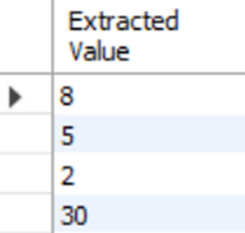
There are important behavior details to look out for, such as:
i. It returns only text: If a node contains nested elements, only text values are returned, not the full structure.
ii. Limited XPath support: You can use simple paths like:
/user/name
/user/address/city
But, advanced XPath features (filters, axes, etc.) are not fully supported.
iii. First match wins: If multiple nodes match, only the first result is returned.
The UpdateXML() function
The UpdateXML() function allows you to replace part of an XML string and return a new modified version. Think of it as:“Find this node and swap its content with something new.”
Syntax:
|
1 |
UpdateXML(xml_string, xpath_expression, new_value) |
xml_string (original XML)
xpath_expression (the node to replace)
new_value (the replacement content)
Let’s see how this works in MySQL:
|
1 2 3 4 5 |
SELECT UpdateXML( '<user><name>Aisha</name><age>8</age></user>', '/user/age', '<age>9</age>' ); |
MySQL’s result:
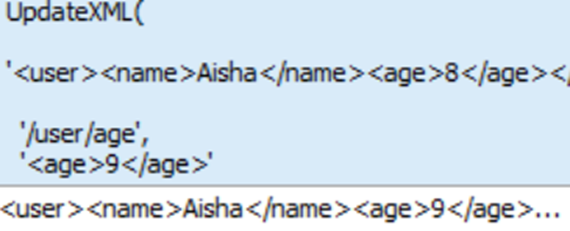
UpdateXML() does NOT modify the column in place. It only returns a new XML string with the change applied.
So, to properly store the result, you must use the UPDATE statement:
|
1 2 3 |
UPDATE users SET profile_xml = UpdateXML(profile_xml, '/user/age', '<age>9</age>') WHERE id=1; |
If you try to extract the value, you will notice the age changed from 8 to 9:
|
1 2 |
SELECT ExtractValue(profile_xml, '/user/age') AS 'Extracted Value' FROM users; |
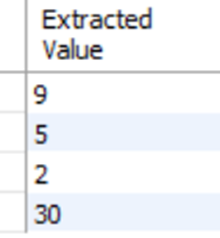
XML support in MySQL: the quick verdict
The XML approach supported by MySQL may seem flexible, provided that it stores your XML data. However, a downside to this is you can accidentally produce invalid XML, and MySQL will not stop you.
XML support in PostgreSQL
PostgreSQL treats XML as a standard data type rather than a simple storage convenience. XML in PostgreSQL is not just a text – it’s a validated XML object with built-in rules and support for standardized XML processing.
This design makes PostgreSQL much closer to formal XML standards and significantly more consistent for applications that rely on structured documents.
With its native XML support, this means you can create a table like this:
|
1 2 3 4 |
CREATE TABLE users ( id SERIAL PRIMARY KEY, profile XML ) |
PostgreSQL treats the column as XML data. It checks the data when you insert it, and only saves it if the XML is properly structured. If the XML is broken or not well-formed, PostgreSQL simply rejects it instead of storing it.
Inserting correct and incorrect XML data into PostgreSQL – what happens?
When you insert correct XML data:
|
1 2 3 4 |
INSERT INTO users (profile) VALUES ( '<user><name>Aisha</name><age>28</age></user>' ); |
Inserting incorrect XML data:
|
1 2 |
INSERT INTO users (profile) VALUES ('<user><name>Aisha</user>'); |
PostgreSQL will throw an ‘invalid XML content’ error:

Whenever XML data is inserted into an XML column, PostgreSQL checks whether the content is a valid XML string. This includes checking for proper opening and closing tags, correct nesting of elements, valid namespace structure, document root rules, and general XML syntax correctness. PostgreSQL also provides validation helper functions such as:
xml_is_well_formed()xml_is_well_formed_document()xml_is_well_formed_content()
Let’s see an example to check if a string is a valid XML or not using one of the built-in helper functions.
Correct XML data:
|
1 |
SELECT xml_is_well_formed('<user><name>Aisha</name></user>'); |
Result:
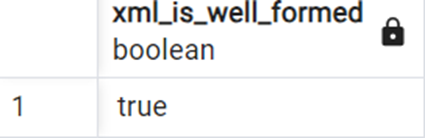
Incorrect XML data:
|
1 |
SELECT xml_is_well_formed('<user><name>Aisha</user>'); |
Result:
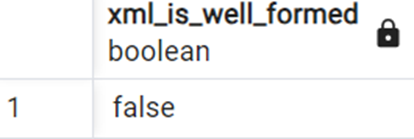
PostgreSQL’s XML implementation is heavily influenced by the SQL/XML specification, which is the ISO standard for integrating XML into relational database systems. Instead of treating XML as ordinary text with helper functions, PostgreSQL provides a structured and standards-oriented environment for creating, storing, validating, and querying XML data.
This standards-based approach affects both the design of the XML data type and the behavior of XML functions throughout the database system.
Get started with PostgreSQL – free book download
The xmlparse() XML function
One of the core XML functions is xmlparse(), which converts character data into a true XML value:
|
1 |
SELECT xmlparse(document '<user><name>Aisha</name></user>'); |
Here, the keyword document tells PostgreSQL that the input must follow XML document rules, including having a single root element.
PostgreSQL immediately parses the XML and checks whether the structure is valid before accepting it. If the XML is malformed, an error is raised instead of silently storing bad data.
PostgreSQL also supports content mode:
|
1 |
SELECT xmlparse(content '<name>Aisha</name><age>8</age>'); |
This allows XML fragments instead of requiring one root node.
The xmlserialize() XML function
This converts an XML value back into a textual representation. Unlike simple casting, xmlserialize() clearly expresses the intention of transforming structured XML into output text.
PostgreSQL also supports optional formatting controls such as indentation for cleaner human-readable output:
|
1 2 3 4 |
SELECT xmlserialize( document xmlparse(document '<user><name>Aisha</name></user>') AS text ); |
How to generate XML with PostgreSQL XML constructors
A major strength of PostgreSQL’s XML system is that it can dynamically generate XML directly from SQL queries and relational data.
Instead of manually building XML strings through concatenation, PostgreSQL provides dedicated XML construction functions.
The xmlelement() function
xmlelement() creates XML elements programmatically:
|
1 2 3 4 5 |
SELECT xmlelement( name user, xmlelement(name name, 'Aisha'), xmlelement(name age, 8) ); |
Result:

This is much safer and cleaner than manually concatenating strings because PostgreSQL automatically escapes invalid XML characters when needed.
You can also add attributes using xmlattributes:
|
1 2 3 4 5 |
SELECT xmlelement( name user, xmlattributes(1 AS id), xmlelement(name name, 'Aisha') ); |
Result:
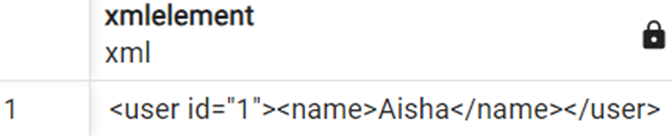
This allows relational data to be transformed into structured XML documents directly within SQL.
The xmlforest() function
xmlforest() creates multiple XML elements at once:
|
1 2 3 4 5 |
SELECT xmlforest( 'Aisha' AS name, 8 AS age, 'Nigeria' AS country ); |
Result:

This function is useful when converting table columns into XML fragments.
The xmlconcat() function
xmlconcat() combines multiple XML values into one larger XML fragment:
|
1 2 3 4 |
SELECT xmlconcat( xmlelement(name first, 'Aisha'), xmlelement(name second, 'Fatima') ); |
Result:
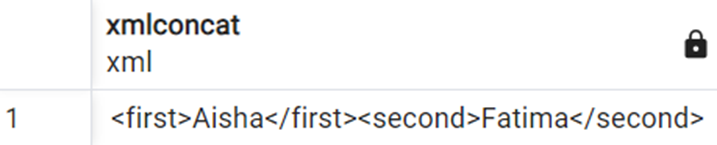
This makes it easier to assemble larger XML structures from smaller reusable components.
The xmlagg() function
xmlagg() is an aggregate XML function used across multiple rows.
Suppose a table contains:
| id | name |
| 1 | Aisha |
| 2 | Fatima |
| 3 | John |
|
1 2 3 4 5 6 7 8 9 |
CREATE TABLE user_names ( id SERIAL PRIMARY KEY, name TEXT ); INSERT INTO user_names (name) VALUES ('Aisha'), ('Fatima'), ('John'); |
You can generate XML from all rows:
|
1 2 3 4 |
SELECT xmlagg( xmlelement(name user, name) ) FROM user_names; |
Result:

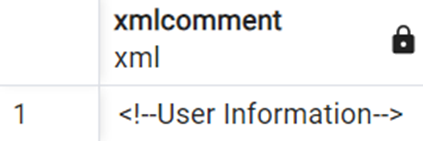
The xmlcomment function
This function creates xml comments:
|
1 |
SELECT xmlcomment('User Information'); |
Result:
The xmlpi function
This function creates xml processing instructions:
|
1 |
SELECT xmlpi(name php, 'echo "Hello";'); |
Result:
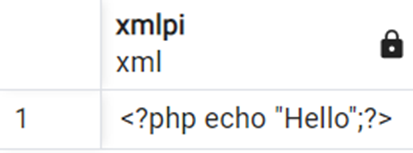
Processing instructions are rarely used in modern applications but remain part of formal XML standards support.
XPath querying and XML navigation in PostgreSQL
PostgreSQL includes powerful XPath support through functions such as:
xpath()xpath_exists()xmlexists()
These functions allow structured navigation inside XML documents instead of simple string searching.
The xpath() function
xpath() retrieves XML nodes matching an XPath expression:
|
1 2 3 4 |
SELECT xpath( '/user/name/text()', '<user><name>Aisha</name><age>8</age></user>' ); |
Result:
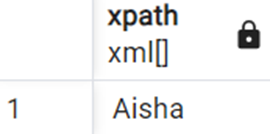
Unlike MySQL’s older XML functions, PostgreSQL returns structured XML node arrays instead of plain string replacements.
PostgreSQL’s XPath functions can also work with XML namespaces:
|
1 2 3 4 5 |
SELECT xpath( '/my:user/my:name/text()', '<my:user xmlns:my="http://example.com"><my:name>Aisha</my:name></my:user>', ARRAY[ARRAY['my', 'http://example.com']] ); |
Result:
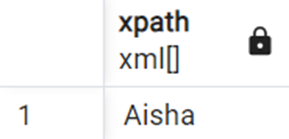
This is important for enterprise XML systems that rely heavily on namespaces.
The xpath_exists() function
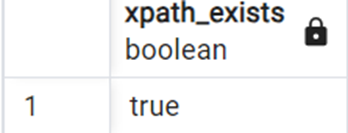
Instead of returning matching nodes, xpath_exists() simply checks whether a match exists:
|
1 2 3 4 |
SELECT xpath_exists( '/user/age[text()="8"]', '<user><name>Aisha</name><age>8</age></user>' ); |
Result:
The xmlexists function
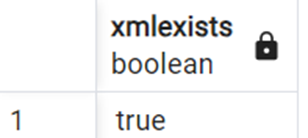
xmlexists works similarly but follows SQL/XML predicate syntax:
|
1 2 3 4 |
SELECT xmlexists( '/user/name[text()="Aisha"]' PASSING BY VALUE '<user><name>Aisha</name></user>' ); |
Result:
The xmltable function
One of PostgreSQL’s most advanced XML capabilities is the xmltable function. This function transforms XML data into relational table rows and columns.
This is a major architectural feature because it bridges hierarchical XML structures with relational SQL queries.
|
1 2 3 4 5 6 7 8 9 10 11 12 13 |
SELECT * FROM XMLTABLE( '/users/user' PASSING xmlparse(document ' <users> <user><name>Aisha</name><age>8</age></user> <user><name>Fatima</name><age>2</age></user> </users> ') COLUMNS name text PATH 'name', age int PATH 'age' ); |
Result:
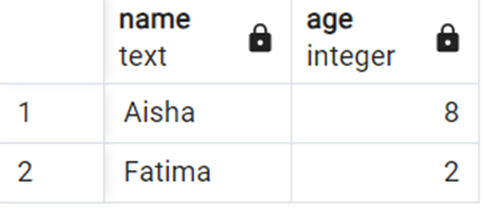
xmltable allows PostgreSQL to treat XML as queryable structured data, transform XML into relational form, integrate XML documents into SQL workflows, and combine XML and relational querying together. This is far beyond simple text processing.
In summary: XML vs. JSON
Over the last decade, JSON has become the dominant format for modern web applications and APIs. Lightweight REST APIs, JavaScript-heavy frontend frameworks, and mobile applications helped accelerate JSON adoption across the software industry.
One major reason for this shift is simplicity. JSON is easier to read, requires less markup, and maps naturally to objects used in programming languages such as JavaScript and Python. It also produces smaller payload sizes, which improves performance in web and mobile applications.
As modern API development evolved toward RESTful architectures, JSON quickly became the preferred format for frontend-to-backend communication, mobile applications, microservices, cloud-native systems, and real-time web applications.
How this industry shift influenced database systems
This industry shift also influenced database systems. Both MySQL and PostgreSQL invested heavily in JSON functionality, indexing, and optimization features over the years. However, XML remains extremely important in many enterprise environments.
Unlike JSON, XML was designed for complex document structures and standardized data exchange. It supports features that are still critical in many industries, including namespaces, schemas and strict validation, mixed content handling, document-centric workflows, and highly structured hierarchical data.
These capabilities make XML especially valuable in financial systems, healthcare platforms, publishing systems, SOAP-based enterprise integrations, and government data exchange systems
For example, enterprise systems often require strict schema enforcement and validation rules to ensure data consistency across multiple organizations. XML was built with these requirements in mind.
XML also handles mixed content more naturally than JSON. Documents containing both structured data and human-readable text, such as publishing or legal documents, are often easier to represent in XML.
As a result, XML has not disappeared. Instead, it has become more specialized. JSON dominates modern web development, while XML continues to power many enterprise and standards-driven systems.
The key takeaway
One of the most common surprises during migrations from MySQL to PostgreSQL is the discovery of malformed XML already stored in production systems.
Because MySQL typically stores XML as plain text without automatic validation, invalid XML documents may remain undetected for years. Once those same documents are migrated into PostgreSQL’s native XML type, PostgreSQL immediately begins enforcing well-formed XML rules, causing previously accepted data to fail during inserts or imports.
As a result, XML migrations often require validating existing XML documents before migration and cleaning malformed XML data.
This highlights a major architectural difference between the two systems: MySQL focuses on flexible text storage, while PostgreSQL prioritizes structured XML validation and data integrity.
Hopefully, this article has helped you to understand these differences in more detail. Let me know your thoughts in the comments below!
Simple Talk is brought to you by Redgate Software
FAQs: The XML data type in MySQL and PostgreSQL
1. Does MySQL have a native XML data type?
No. MySQL stores XML as plain text using the TEXT family of column types (TINYTEXT, TEXT, MEDIUMTEXT, LONGTEXT). It doesn’t validate or parse XML automatically, meaning malformed XML can be stored without errors.
2. Does PostgreSQL support XML natively?
Yes. PostgreSQL has a native XML data type that validates content on insert and rejects malformed XML. It also follows the SQL/XML ISO standard for structured XML processing.
3. What is the main difference between XML support in MySQL and PostgreSQL?
MySQL stores XML as unstructured text without enforcing XML rules, while PostgreSQL treats XML as a validated data type with built-in functions for parsing, querying, and generating XML.
4. Can you query XML data in MySQL?
Yes, but with limitations. MySQL provides ExtractValue() and UpdateXML() using a limited subset of XPath. Advanced features like filters and namespaces are not fully supported, and only the first matching node is returned.
5. What issues can occur when migrating XML data from MySQL to PostgreSQL?
The most common issue is malformed XML. Because MySQL doesn’t validate XML, invalid documents can sit in production for years. PostgreSQL rejects malformed XML during migration, so data must be validated and cleaned before transfer.
This document contains proprietary information and is protected by copyright law.
Copyright © 2026 Red Gate Software Limited. All rights reserved






Load comments