



SQL Server transactions can produce results that seem wrong even when the code looks correct. Perhaps it’s a row count that doesn’t match, a query that waits when it shouldn’t, or an audit record that vanishes after a rollback. This article works through five such problems as hands-on tasks, each with a setup script, an explanation of why it happens, and a solution.
The problems (and their solutions) covered in this guide:
A query blocks while a long-running transaction is still inserting rows
A transaction reads different values for the same row twice
A transaction gets a different row count without inserting or deleting anything itself
A rolled-back transaction wipes out the audit record with it
I encourage you to try identifying and solving the problem yourself, before reading my solution. Also, please note: each task should be tested independently and, before starting a new task, run the setup script associated with it.
The problems (and their solutions)
Without further ado, let’s move onto the problems – and, most importantly, the solutions I recommend for each.
The problem: a query blocks while a long-running transaction is still inserting rows
Suppose we have a table named TestTable with the following structure:
|
1 2 3 4 5 6 7 8 9 10 11 12 13 14 15 |
IF DB_ID(N'TestDB') IS NULL EXEC('CREATE DATABASE TestDB'); GO USE TestDB GO DROP TABLE IF EXISTS TestTable; GO -- Create TestTable CREATE TABLE TestTable ( ID INT IDENTITY(1,1), Value INT ) |
We are inserting a large amount of data into TestTable using the query below:
|
1 2 3 4 5 6 7 8 9 10 11 12 13 14 15 16 17 18 19 20 21 22 23 24 25 26 27 28 29 30 31 32 33 34 35 36 37 38 39 40 41 |
USE TestDB GO BEGIN TRY BEGIN TRANSACTION -- Insert data into TestTable -- The value 500000 is used to facilitate the testing process. -- Please choose this value carefully for your server to avoid overloading it. DECLARE @i INT = 1 WHILE (@i <= 500000) BEGIN INSERT INTO TestTable(Value) VALUES(@i) SET @i = @i + 1 END COMMIT END TRY BEGIN CATCH IF @@TRANCOUNT > 0 ROLLBACK SELECT ERROR_MESSAGE(); END CATCH |
As the transaction runs for a long time, we want to periodically check how many rows have been inserted into the table so far.
So, we open another query window, and run the SELECT COUNT(*) FROM TestTable query.
This query waits until the first query finishes and then returns the result:
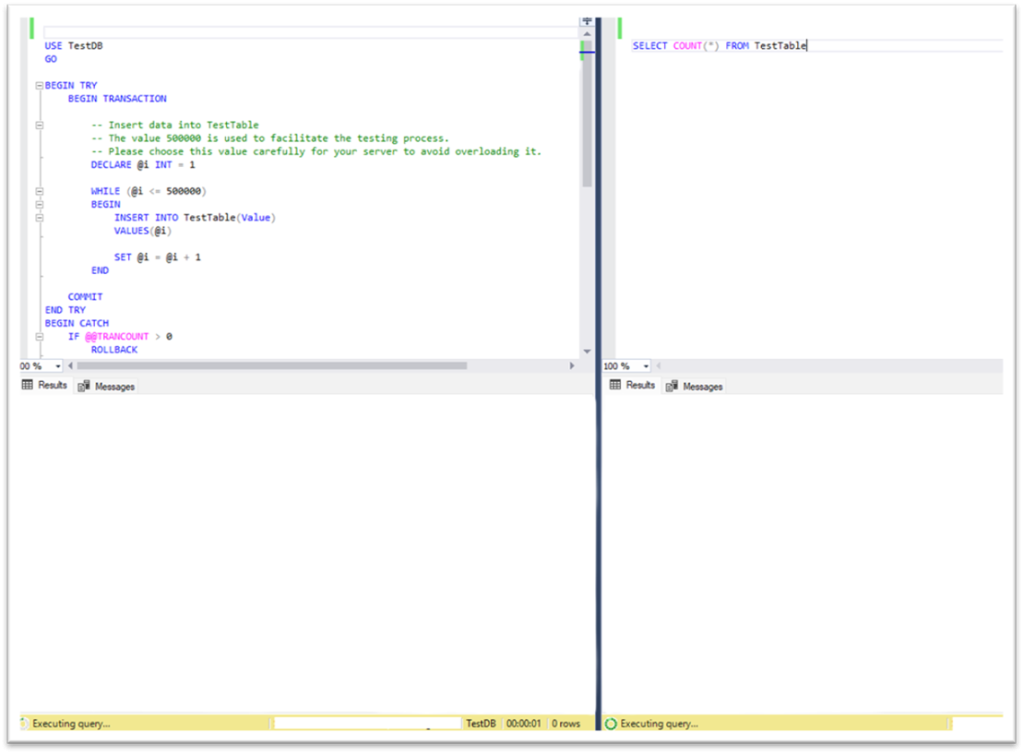
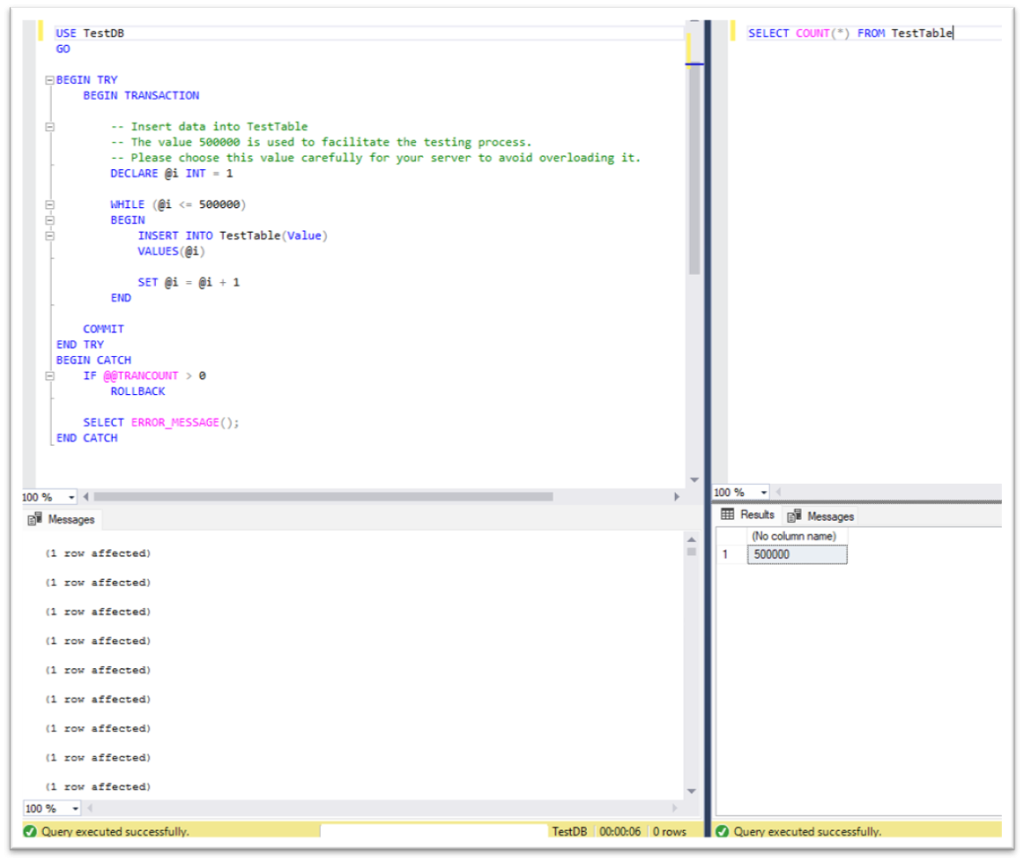
How can we rewrite the query to check the number of rows inserted so far without waiting for the transaction to complete? Let’s find out.
The solution: read uncommitted data with NOLOCK or READ UNCOMMITTED (how-to guide)
The reason the second query waits for the first transaction to complete before returning the result is that it uses the READ COMMITTED transaction isolation level by default (this example assumes the database is using the default locking behavior for the READ COMMITTED isolation level).
This isolation level prevents dirty reads.
In simple terms, showing the row count while rows are still being inserted into the table may not be accurate because the transaction has yet to be completed (so can still be rolled back.)
However, since we want to check the number of inserted rows at a specific moment, we can allow dirty reads – bearing in mind that the result may include rows that can be rolled back later on.
To do this, in the second query, we can use the WITH (NOLOCK) table hint (Solution 1), or set the transaction isolation level for the session to READ UNCOMMITTED (Solution 2):
|
1 2 3 |
-- Solution 1: Read uncommitted data without waiting for the transaction to complete SELECT COUNT(*) FROM TestTable WITH (NOLOCK) |
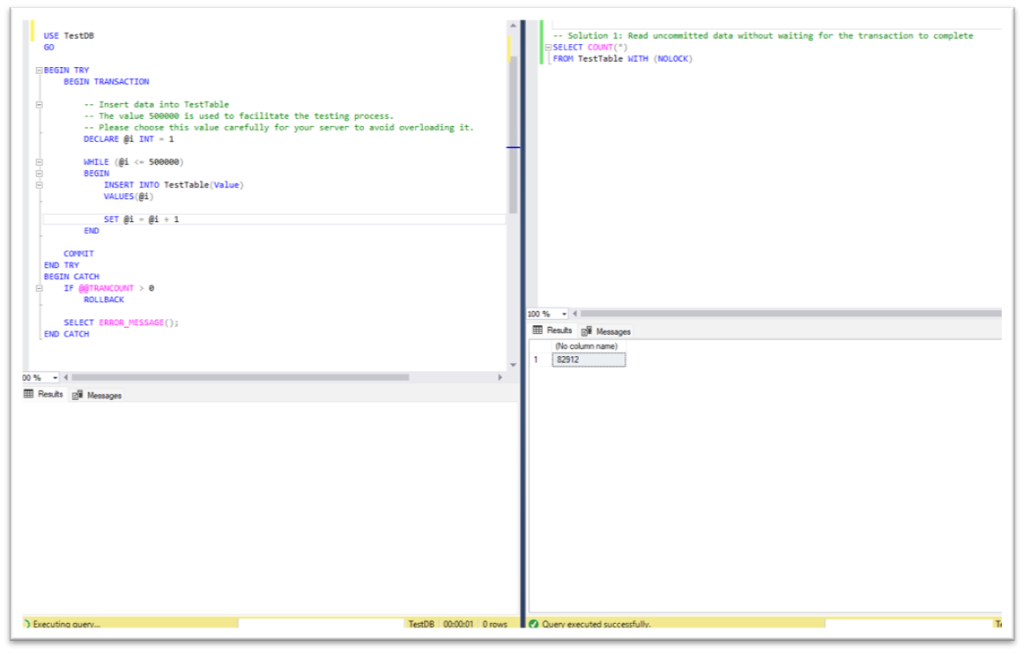
|
1 2 3 4 5 6 7 8 |
-- Solution 2: Set the isolation level to read uncommitted data SET TRANSACTION ISOLATION LEVEL READ UNCOMMITTED SELECT COUNT(*) FROM TestTable -- Optional: reset the isolation level back to the default SET TRANSACTION ISOLATION LEVEL READ COMMITTED |
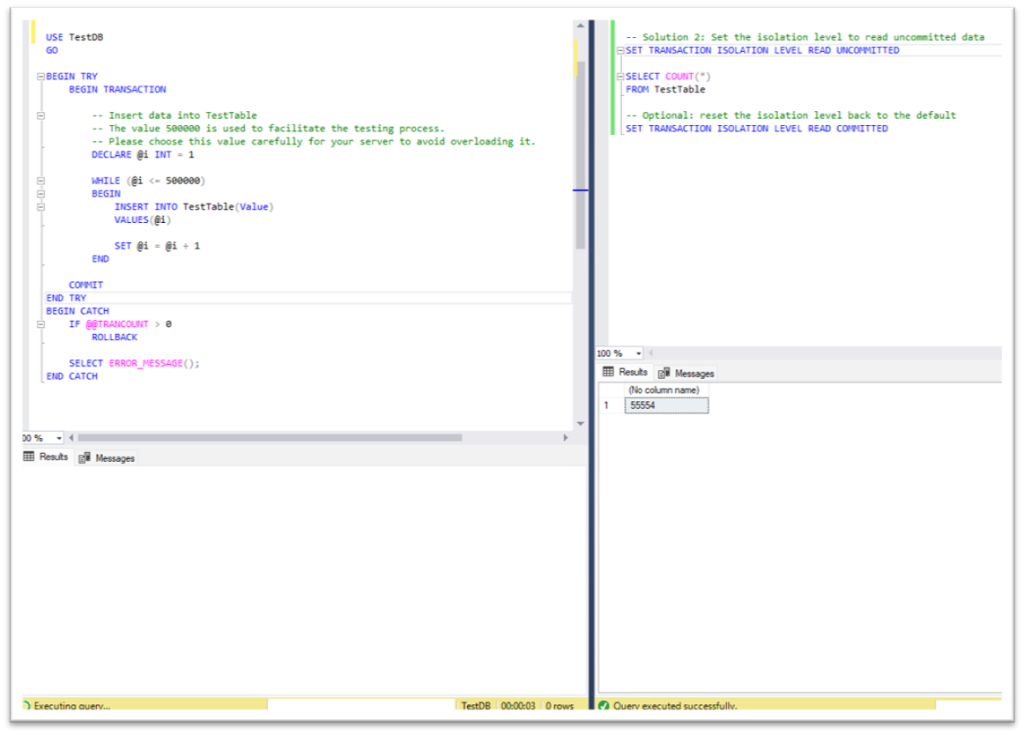
It’s worth mentioning that NOLOCK can also produce inaccurate results due to concurrent data modifications, such as missing or reading the same rows multiple times.
The problem: a transaction reads different values for the same row twice
Suppose we have TestTable with the following structure:
|
1 2 3 4 5 6 7 8 9 10 11 12 13 14 15 16 17 18 19 20 21 22 23 24 25 26 27 28 |
IF DB_ID(N'TestDB') IS NULL EXEC('CREATE DATABASE TestDB'); GO USE TestDB GO DROP TABLE IF EXISTS TestTable; GO -- Create TestTable CREATE TABLE TestTable ( ID INT PRIMARY KEY, FirstName VARCHAR(40) NOT NULL, LastName VARCHAR(40) NOT NULL, Email VARCHAR(254) NOT NULL ) -- Create a unique index on the Email column CREATE UNIQUE INDEX UIX_TestTable_Email ON TestTable(Email) -- Insert sample data into TestTable INSERT INTO TestTable(ID, FirstName, LastName, Email) VALUES (1, 'FirstName1', 'LastName1', 'user1@example.com'), (2, 'FirstName2', 'LastName2', 'user2@example.com'), (3, 'FirstName3', 'LastName3', 'user3@example.com'); |
We are running the following transaction, which has many other statements between “Statement 1” and “Statement 2”.
In this example, we are using WAITFOR DELAY instead of these statements to simplify the demonstration:
|
1 2 3 4 5 6 7 8 9 10 11 12 13 14 15 16 17 18 19 20 21 22 |
USE TestDB GO -- Query 1 DECLARE @fname VARCHAR(40), @lname VARCHAR(40), @email VARCHAR(254) = 'user2@example.com' BEGIN TRANSACTION; -- Statement 1: Get the first name by email SET @fname = (SELECT FirstName FROM TestTable WHERE Email = @email) -- Simulate other statements running between Statement 1 and Statement 2 WAITFOR DELAY '00:00:05' -- Statement 2: Get the last name by email SET @lname = (SELECT LastName FROM TestTable WHERE Email = @email) COMMIT SELECT @fname + ' ' + @lname AS FullName |
After “Statement 1” finishes and before “Statement 2” starts, “Query 2” is executed in another query window:
|
1 2 3 4 5 6 7 8 9 10 11 |
USE TestDB GO -- Query 2 UPDATE TestTable SET Email = 'user4@example.com' WHERE Email = 'user2@example.com' UPDATE TestTable SET Email = 'user2@example.com' WHERE Email = 'user3@example.com' |
When “Query 1” finishes, we can see that the result of the last SELECT statement is confusing as there’s no person with the full name returned by the query:
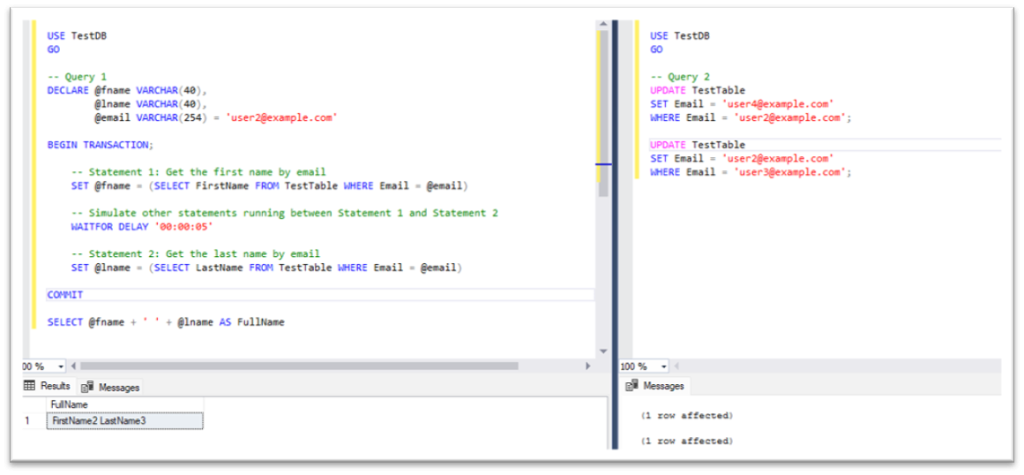
However, the final SELECT statement needs to return the full name of an existing person.
How can we modify “Query 1” to make it work correctly without changing “Statement 1” and “Statement 2”, which must assign the first and last names of the same person to the variables, respectively?
Let’s find out.
The solution: use REPEATABLE READ to prevent non-repeatable reads (how-to)
The issue happens because the default READ COMMITTED isolation level protects each individual statement from reading uncommitted data.
It does not, however, guarantee that two separate SELECT statements inside the same transaction will read the same version of the data.
In this example, after “Statement 1” reads the first name for user2@example.com, another query can update the email values before “Statement 2” reads the last name. This results in both “Statement 1” and “Statement 2” being able to read data from different rows.
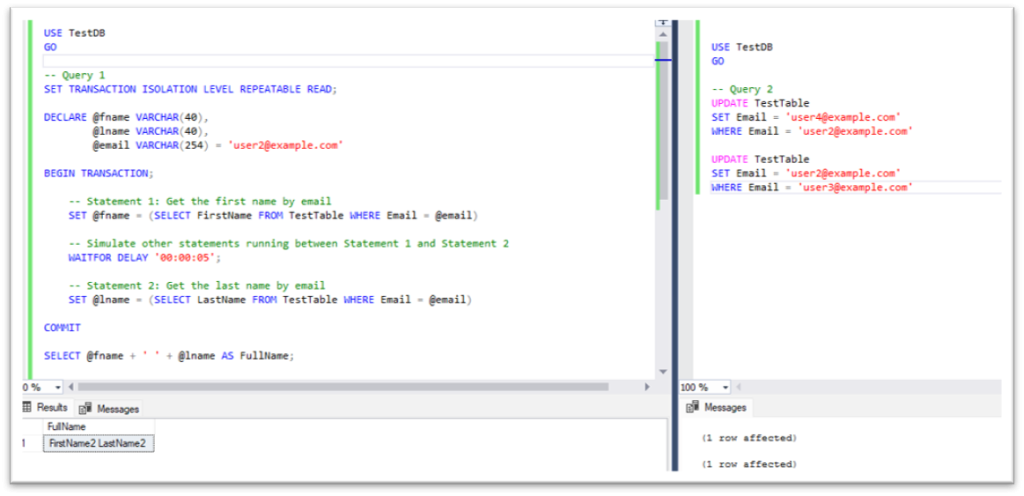
To solve this problem, we can use the REPEATABLE READ isolation level. It keeps shared locks on the rows read by the transaction until the transaction is actually complete, so another query can’t update the rows between “Statement 1” and “Statement 2”.
As a result, the first name and last name will be read from the same person.
Before testing the solution, recreate TestTable using the original setup script:
|
1 2 3 4 5 6 7 8 9 10 11 12 13 14 15 16 17 18 19 20 21 22 23 24 25 26 27 |
USE TestDB GO -- Query 1 SET TRANSACTION ISOLATION LEVEL REPEATABLE READ; DECLARE @fname VARCHAR(40), @lname VARCHAR(40), @email VARCHAR(254) = 'user2@example.com' BEGIN TRANSACTION; -- Statement 1: Get the first name by email SET @fname = (SELECT FirstName FROM TestTable WHERE Email = @email) -- Simulate other statements running between Statement 1 and Statement 2 WAITFOR DELAY '00:00:05' -- Statement 2: Get the last name by email SET @lname = (SELECT LastName FROM TestTable WHERE Email = @email) COMMIT SELECT @fname + ' ' + @lname AS FullName; -- Optional: reset the isolation level back to the default SET TRANSACTION ISOLATION LEVEL READ COMMITTED |
Fast, reliable and consistent SQL Server development…
The problem: a transaction gets a different row count without inserting or deleting anything itself
Let’s consider a table named TestTable with the following structure:
|
1 2 3 4 5 6 7 8 9 10 11 12 13 14 15 16 17 18 19 20 21 |
IF DB_ID(N'TestDB') IS NULL EXEC('CREATE DATABASE TestDB'); GO USE TestDB GO DROP TABLE IF EXISTS TestTable; GO -- Create TestTable CREATE TABLE TestTable ( ID INT PRIMARY KEY, Value INT ) -- Insert sample data into TestTable INSERT INTO TestTable(ID, Value) VALUES (1, 10), (3, 30), (5, 50); |
We are running the following transaction, which has many other statements between “Statement 1” and “Statement 2”. We use WAITFOR DELAY instead of these statements to simplify the demonstration:
|
1 2 3 4 5 6 7 8 9 10 11 12 13 14 15 16 17 |
USE TestDB GO -- Query 1 BEGIN TRANSACTION -- Statement 1: Get the current row count SELECT COUNT(*) AS CountOfRows FROM TestTable -- Simulate other statements running between Statement 1 and Statement 2 WAITFOR DELAY '00:00:05' -- Statement 2: Get the current row count again SELECT COUNT(*) AS CountOfRows FROM TestTable COMMIT |
After “Statement 1” finishes and before “Statement 2” starts, “Query 2” is executed in another query window:
|
1 2 3 4 5 6 7 8 |
USE TestDB GO -- Query 2 -- Insert new rows into TestTable from another session INSERT INTO TestTable(ID, Value) VALUES (2, 20), (4, 40), (6, 60); |
When “Query 1” finishes, we can see that different row counts are returned for TestTable at the beginning and at the end of our transaction (although we didn’t add or remove any rows in the current transaction):
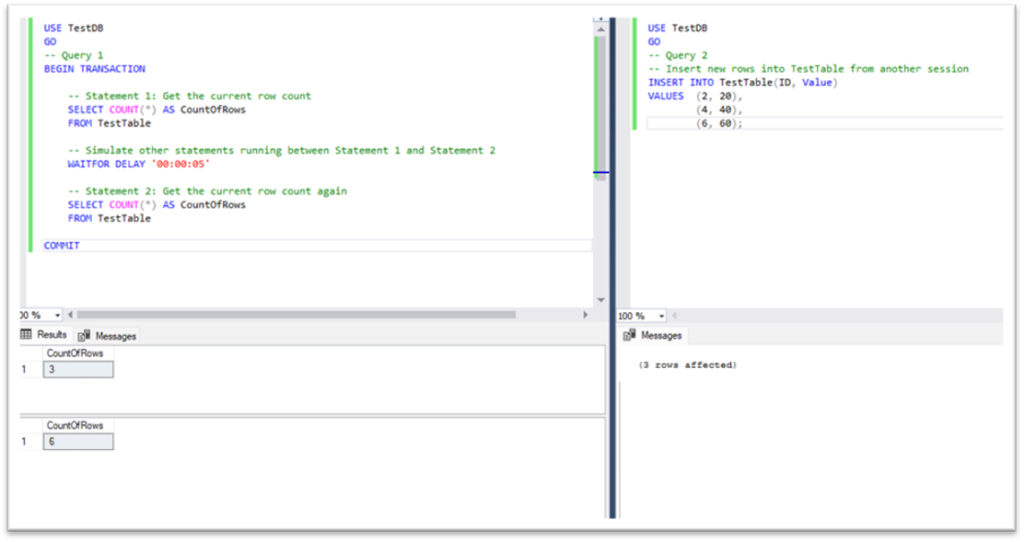
However, we need to get the same row count for TestTable even when we don’t add or delete rows in the current transaction.
How, then, can we modify “Query 1” to make it work correctly? After all, “Statement 1” and “Statement 2” must return the same result if the row count hasn’t changed inside the current transaction.
Here’s how to ensure that happens.
The solution: use SERIALIZABLE to prevent phantom reads (how-to)
The issue happens because, under the default READ COMMITTED isolation level, “Statement 1” and “Statement 2” are executed separately and another session can insert new rows between them.
As a result, the row count can be different at the beginning and at the end of the same transaction.
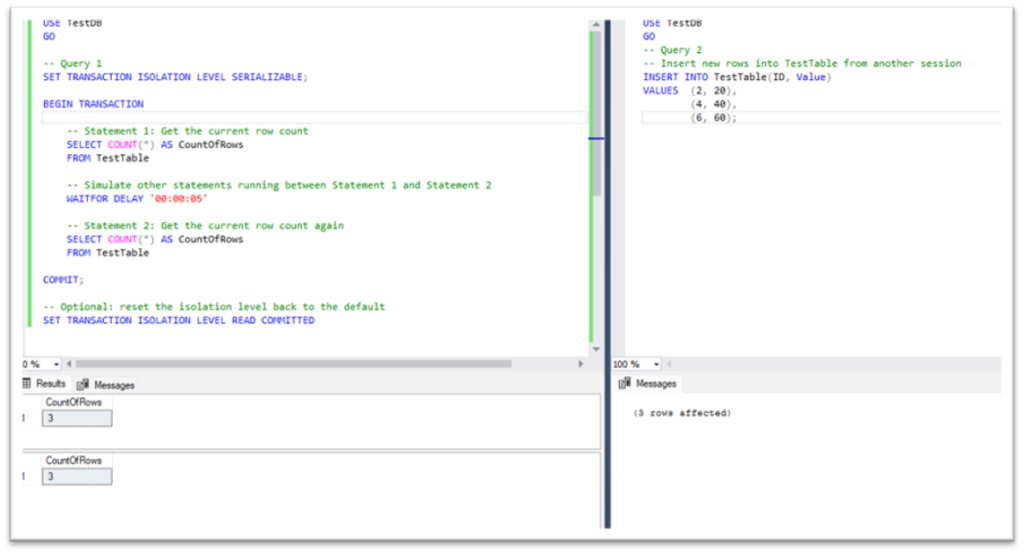
To avoid this, we can use the SERIALIZABLE isolation level. This prevents SQL Server from allowing another transaction to insert new rows into the range read by the current transaction until it’s complete – meaning “Statement 1” and “Statement 2” will return the same row count.
Before testing the solution, recreate TestTable using the original setup script:
|
1 2 3 4 5 6 7 8 9 10 11 12 13 14 15 16 17 18 19 20 21 22 23 |
USE TestDB GO -- Query 1 SET TRANSACTION ISOLATION LEVEL SERIALIZABLE; BEGIN TRANSACTION -- Statement 1: Get the current row count SELECT COUNT(*) AS CountOfRows FROM TestTable -- Simulate other statements running between Statement 1 and Statement 2 WAITFOR DELAY '00:00:05' -- Statement 2: Get the current row count again SELECT COUNT(*) AS CountOfRows FROM TestTable COMMIT; -- Optional: reset the isolation level back to the default SET TRANSACTION ISOLATION LEVEL READ COMMITTED |
The problem: a rolled-back transaction wipes out the audit record with it
We need to audit user logins in the system. We have a LoginAudit table to store information about user logins:
|
1 2 3 4 5 6 7 8 9 10 11 12 13 14 15 16 17 18 19 20 21 22 23 24 25 26 27 28 29 30 31 32 33 34 35 36 |
IF DB_ID(N'TestDB') IS NULL EXEC('CREATE DATABASE TestDB'); GO USE TestDB GO -- Drop tables if they already exist DROP TABLE IF EXISTS LoginAudit DROP TABLE IF EXISTS UserData GO -- Create UserData table CREATE TABLE UserData ( ID INT PRIMARY KEY, LoginName VARCHAR(254) NOT NULL, PassHash BINARY(64) NOT NULL ) -- Create a unique index on the LoginName column CREATE UNIQUE INDEX UIX_UserData_LoginName ON UserData(LoginName) -- Insert sample user data INSERT INTO UserData(ID, LoginName, PassHash) VALUES (1, 'user1@example.com', HASHBYTES('SHA2_512', 'abc123')) -- Create LoginAudit table CREATE TABLE LoginAudit ( LoginName VARCHAR(254), ActionType VARCHAR(10), Result VARCHAR(7), ActionDate DATETIME DEFAULT GETDATE() ) |
User authentication occurs within a transaction, which may be rolled back:
|
1 2 3 4 5 6 7 8 9 10 11 12 13 14 15 16 17 18 19 20 21 22 23 24 25 26 27 28 29 30 31 32 33 34 35 36 37 38 39 40 41 42 43 44 45 46 47 |
-- Log in and audit DECLARE @LoginName VARCHAR(254) = 'user1@example.com', @pass VARCHAR(50) = 'abc123', @Result VARCHAR(10) IF OBJECT_ID('tempdb..#tmpAudit') IS NOT NULL DROP TABLE #tmpAudit -- Create a temporary table to store audit information CREATE TABLE #tmpAudit ( LoginName VARCHAR(254), ActionType VARCHAR(10), Result VARCHAR(7) ) BEGIN TRANSACTION -- Check user credentials IF EXISTS ( SELECT ID FROM UserData WHERE LoginName = @LoginName AND PassHash = HASHBYTES('SHA2_512', @pass) ) SET @Result = 'Success' ELSE SET @Result = 'Fail' -- Insert audit information into the temporary table INSERT INTO #tmpAudit(LoginName, ActionType, Result) VALUES(@LoginName, 'Log In', @Result) -- For simplicity, we manually roll back the transaction here to simulate a case where something went wrong. ROLLBACK -- Insert audit information into LoginAudit table INSERT INTO LoginAudit(LoginName, ActionType, Result) SELECT LoginName, ActionType, Result FROM #tmpAudit SELECT @Result AS Result SELECT * FROM LoginAudit |
When the transaction is rolled back, we can see that there are no audit records for this login:
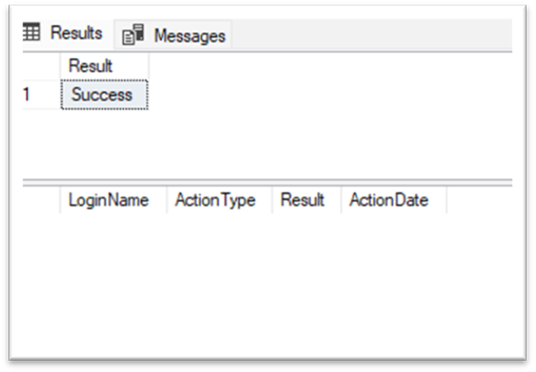
So, how can we modify the code above to record user login information even when the transaction is rolled back? Let’s find out.
The solution: use a table variable to survive a rollback (and how to do it)
We can use a table variable instead of a temporary table inside the transaction to store audit information. This is because ROLLBACK TRANSACTION does not erase changes made to table variables.
After the transaction is rolled back, we can still insert the audit information from the table variable into the LoginAudit table:
|
1 2 3 4 5 6 7 8 9 10 11 12 13 14 15 16 17 18 19 20 21 22 23 24 25 26 27 28 29 30 31 32 33 34 35 36 37 38 39 40 41 42 |
-- Log in and audit DECLARE @LoginName VARCHAR(254) = 'user1@example.com', @pass VARCHAR(50) = 'abc123', @Result VARCHAR(10) -- Declare a table variable to store audit information DECLARE @tbvAudit AS TABLE ( LoginName VARCHAR(254), ActionType VARCHAR(10), Result VARCHAR(7) ) BEGIN TRANSACTION -- Check user credentials IF EXISTS ( SELECT ID FROM UserData WHERE LoginName = @LoginName AND PassHash = HASHBYTES('SHA2_512', @pass) ) SET @Result = 'Success' ELSE SET @Result = 'Fail' -- Insert audit information into the table variable INSERT INTO @tbvAudit(LoginName, ActionType, Result) VALUES(@LoginName, 'Log In', @Result) -- For simplicity, we manually roll back the transaction here to simulate a case where something went wrong. ROLLBACK -- Insert audit information into LoginAudit table INSERT INTO LoginAudit(LoginName, ActionType, Result) SELECT LoginName, ActionType, Result FROM @tbvAudit SELECT @Result AS Result SELECT * FROM LoginAudit |
We can now see the result in the LoginAudit table:
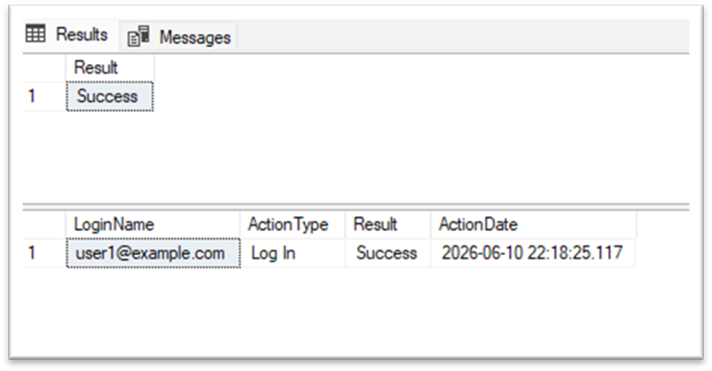
Please note that this example is simplified for demonstration purposes. In real systems, the password verification logic, authentication and audit logging should be designed carefully based on security and compliance requirements.
The problem: a nested rollback undoes more than it should
In the previous task, we used a table variable to keep audit information after rollback. Now, let’s consider another case where we work with permanent tables inside the transaction and need to roll back only part of the work.
Suppose we have both the LoginAudit and UserLogin tables:
|
1 2 3 4 5 6 7 8 9 10 11 12 13 14 15 16 17 18 19 20 21 22 23 24 25 26 27 28 |
IF DB_ID(N'TestDB') IS NULL EXEC('CREATE DATABASE TestDB'); GO USE TestDB GO -- Drop tables if they already exist DROP TABLE IF EXISTS UserLogin DROP TABLE IF EXISTS LoginAudit GO -- Create LoginAudit table CREATE TABLE LoginAudit ( LoginName VARCHAR(254), ActionType VARCHAR(10), Result VARCHAR(7), ActionDate DATETIME DEFAULT GETDATE() ) -- Create UserLogin table CREATE TABLE UserLogin ( ID INT IDENTITY(1,1) PRIMARY KEY, LoginName VARCHAR(254), LoginDate DATETIME DEFAULT GETDATE() ) |
We need to insert login audit information into LoginAudit first, and then insert login information into UserLogin.
If something goes wrong during the insert into UserLogin, we need to roll back that insert only, but still also need to keep the audit record in LoginAudit.
A developer wrote the following code using a nested transaction, expecting that the ROLLBACK within it would only roll back the insert into UserLogin:
|
1 2 3 4 5 6 7 8 9 10 11 12 13 14 15 16 17 18 19 20 21 22 23 24 25 26 27 28 29 30 31 32 33 34 35 36 37 |
-- Log in and audit DECLARE @LoginName VARCHAR(254) = 'user1@example.com', @SomethingWentWrong BIT = 1 BEGIN TRANSACTION -- Statement 1: Insert audit information INSERT INTO LoginAudit(LoginName, ActionType, Result) VALUES(@LoginName, 'Log In', 'Fail') -- Nested transaction BEGIN TRANSACTION -- Statement 2: Insert login information INSERT INTO UserLogin(LoginName) VALUES(@LoginName) -- For simplicity, we use this variable to simulate a case -- where something went wrong while inserting login information. IF @SomethingWentWrong = 1 BEGIN ROLLBACK END ELSE BEGIN -- Commit the nested transaction COMMIT -- Commit the outer transaction COMMIT END SELECT * FROM LoginAudit SELECT * FROM UserLogin |
However, when ROLLBACK TRANSACTION is executed, the whole transaction is rolled back – and the audit record isn’t saved either:
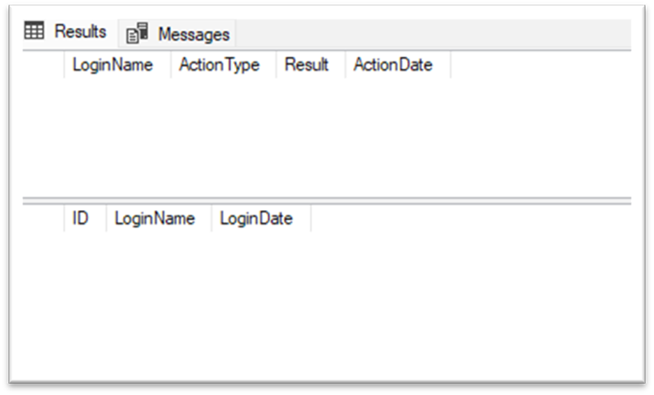
So, how can we modify the code to only roll back the insert into UserLogin and, at the same time, keep the audit record in LoginAudit? Let’s find out.
The solution: use SAVE TRANSACTION to roll back to a savepoint (and how to do so)
The issue happens because ROLLBACK TRANSACTION inside a nested transaction does not just roll back the inner transaction – in SQL Server, it rolls back the outer transaction as well.
The only exception is if a savepoint is specified in the ROLLBACK statement. And, since in our case both the insert into LoginAudit and the insert into UserLogin are rolled back, we can use the savepoint as our solution.
After inserting the audit information into LoginAudit, we can create a savepoint by using SAVE TRANSACTION.
Then, if something goes wrong while inserting into UserLogin, we can roll back to that savepoint only, and commit the remaining part of the transaction:
|
1 2 3 4 5 6 7 8 9 10 11 12 13 14 15 16 17 18 19 20 21 22 23 24 25 26 27 28 29 30 31 32 |
-- Log in and audit DECLARE @LoginName VARCHAR(254) = 'user1@example.com', @SomethingWentWrong BIT = 1 BEGIN TRANSACTION -- Statement 1: Insert audit information INSERT INTO LoginAudit(LoginName, ActionType, Result) VALUES(@LoginName, 'Log In', 'Fail') -- Create a savepoint after inserting audit information SAVE TRANSACTION AuditInserted -- Statement 2: Insert login information INSERT INTO UserLogin(LoginName) VALUES(@LoginName) -- For simplicity, we use this variable to simulate a case -- where something went wrong while inserting login information. IF @SomethingWentWrong = 1 BEGIN -- Roll back only the work done after the savepoint ROLLBACK TRANSACTION AuditInserted END COMMIT SELECT * FROM LoginAudit SELECT * FROM UserLogin |
As a result, the insert into UserLogin will be rolled back, but the audit record in LoginAudit will be saved:
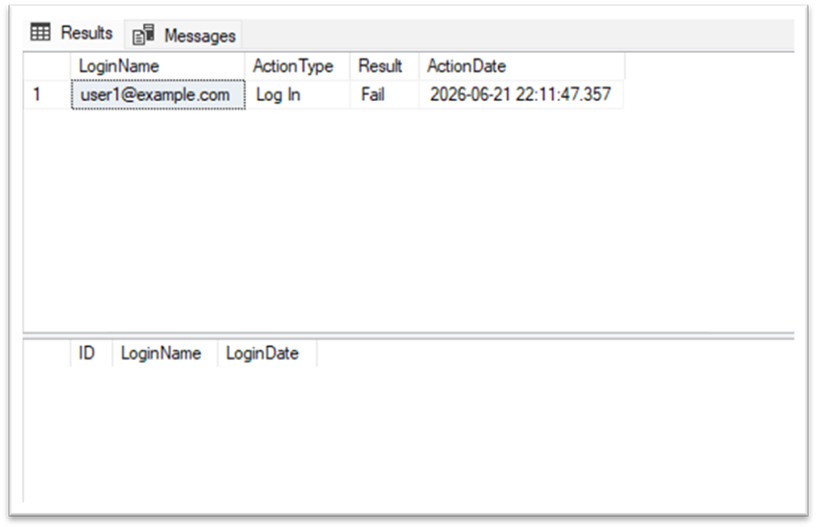
It’s worth noting that in real-world scenarios, some errors can leave a transaction in an uncommittable state, and rolling back to a savepoint becomes impossible.
Also be aware that, for simplicity, this example only demonstrates a failed operation.
Conclusion
Working with transactions can be tricky, and writing transaction-heavy SQL code requires a fundamental understanding of transaction management nuances, isolation levels, rollback mechanisms, and more.
In this article, I’ve shed some light on a handful of common mistakes in transaction management (and offered potential solutions to them) – but there are many others. In general, a deep understanding of the theory is strongly recommended.
Subscribe to the Simple Talk newsletter
FAQs
1. Why does NOLOCK return inaccurate results in SQL Server?
NOLOCK (or READ UNCOMMITTED) reads uncommitted data that could still be rolled back, and can also produce inaccurate counts from concurrent modifications — missing rows or reading the same row multiple times. It’s a trade-off for avoiding waits, not a free performance win.
2. Does ROLLBACK undo changes made to a table variable in SQL Server?
No — the article demonstrates this directly: ROLLBACK erases changes to a temp table but not to a table variable, which is why a table variable can be used to preserve audit information even when the surrounding transaction is rolled back.
3. Does ROLLBACK inside a nested transaction only undo the inner transaction in SQL Server?
No. A plain ROLLBACK inside a nested transaction rolls back the entire outer transaction too. The only way to undo just part of the work is SAVE TRANSACTION to create a named savepoint, then ROLLBACK TRANSACTION <savepoint_name> to roll back to just that point.
Useful resources to help develop your understanding of transactions
- SET TRANSACTION ISOLATION LEVEL (Transact-SQL) – SQL Server | Microsoft Learn
- Table Hints (Transact-SQL) – SQL Server | Microsoft Learn
- table (Transact-SQL) – SQL Server | Microsoft Learn
- DECLARE @local_variable (Transact-SQL) – SQL Server | Microsoft Learn
- SAVE TRANSACTION (Transact-SQL) – SQL Server | Microsoft Learn
- Transaction Locking and Row Versioning Guide – SQL Server | Microsoft Learn
This document contains proprietary information and is protected by copyright law.
Copyright © 2026 Red Gate Software Limited. All rights reserved

Load comments