


The big difference between MySQL and MariaDB largely revolves around database storage engines and anything related to them. In this article, I’ll walk you through some of the key differences between storage engines in MySQL and MariaDB, explain which is best for your use case, and detail how to change your database’s storage engine if necessary.
Most of you will do just fine with InnoDB on either of the database management systems – however, those of you who are building something more wild and exotic might want to look specifically into MariaDB.
Neither MySQL or MariaDB are anything new. In fact, they are the default database management systems for many of us – allowing us to build applications upon our databases, and manage our data.
MySQL is known for being a reliable, fast, and easy-to-use relational database management system – one that still powers a good portion of the software we all build today. MariaDB, on the other hand, is known for is its support for various storage engines, each optimized for different kinds of workloads and use cases.
It‘s hard to become a ‘power user’ of either system without an understanding of their individual fundamentals and features, and how they work. So, that’s what we’re going to explore today. We’ll take a look at the key differences between MySQL and MariaDB, how they work in relation to storage engines, and which one may be best for your use case.
But first – why even care about which database engine(s) we use in the first place? (If you are an experienced DBA, you may wish to skip this part.)
The importance of choosing the right database system (with the right storage engine)
Database engines serve a distinct purpose, of course – and the storage engine within it will determine how data is stored, indexed, and managed internally.
That means that, while the SQL queries you write should remain unchanged, the underlying storage engine behind your database of choice will drastically affect its performance, crash recovery, locking mechanisms, transaction support, and more.
As is the case with many database management systems (DBMS’), both MySQL and MariaDB allow us to choose the most suitable storage engine for our specific use case. This, among other things, gives us fine-grained control over the design of our databases, and the tables and data within.
Now, let’s begin the comparison between MySQL and MariaDB.
What database engines does MySQL support?
MySQL unfortunately doesn’t support a huge number of storage engines. However, it does offer some flexibility in terms of what we can choose from:
| Storage engine | About the storage engine | When to use the storage engine |
| InnoDB | The main storage engine supported by MySQL. Key features include ACID compliance, row-level locking, support for foreign key operations, and more. | Use InnoDB for most general-purpose use cases. It’s built to balance performance and reliability. |
| MEMORY (HEAP) | Used to store data in memory. | Use the MEMORY storage engine to store data in memory. |
| CSV | Stores data as simple Microsoft Excel files. Easy to integrate with external tooling. | Use CSV whenever your data comes in a CSV format. Keep in mind that it doesn‘t support indexing, and performance is slow. |
| NDB (MySQL Cluster) | NDB is a storage engine that comes with high reliability and fault tolerance. It acts as an in-memory distributed database. | Use NDB for distributed high-availability systems. |
| ARCHIVE | A storage engine used to store data that is no longer relevant. | Use ARCHIVE to store data that is obsolete now, but may be of interest in future. |
| MyISAM | An obsolete storage engine that previously allowed users to store data while leaving little footprint on the disk. However – no ACID support. | Obsolete – not to be used. |
So, when using MySQL, you do have some choices. Yes, they are quite limited, but for most general use cases they will do just fine. If you‘re after something exotic, though, that’s where MariaDB comes in.
MySQL schema comparison for faster, safer deployments
What database engines does MariaDB support?
The key storage engines supported by MariaDB are as follows:
(The storage engines only available in MariaDB (not MySQL) are in bold.)
| Storage Engine | About | When to Use? |
| InnoDB | The main storage engine supported by MySQL, MariaDB & co. Key features include ACID compliance, row-level locking, support for foreign key operations, and more. | Use InnoDB for most general-purpose use cases. It’s built to balance performance and reliability. |
| ARCHIVE | A storage engine designed to store huge amounts of data that needs to be archived. | Use ARCHIVE whenever you have a significant amount of data that needs to be archived, but not permanently deleted. The data will use very little footprint on the disk. |
| ARIA | Designed to be a replacement for MyISAM. Best used with temporary tables. | To be used as a more reliable replacement for MyISAM. |
| BLACKHOLE | A storage engine that acts as a ‘black hole’ – all data it accepts simply dissapears into the abyss. | Use it for testing your database’s features. |
| ColumnStore | Turns MariaDB into a columnar database, featuring a column-based locking level. | Best used for analytics and big data applications. |
| Spider | Spider is a storage engine with built-in sharding features. | Use Spider when you need to access data in one MariaDB server from another MariaDB server. |
| S3 | S3 is a storage engine allowing you to access data in an Amazon S3 server. | Use this storage engine when you need cheap, scalable storage of data inside an Amazon S3 server. |
| MEMORY | A storage engine to handle data in memory. | Use MEMORY when handling data exclusively in memory. If/when your server shuts down, your data will disappear. |
| MyISAM | Obsolete storage engine. Designed to take up very little space on the disk. No ACID support. | Don‘t use under any circumstances (aside from demo usage or similar.) |
The following drawing shows when to use certain storage engines supported by MariaDB:
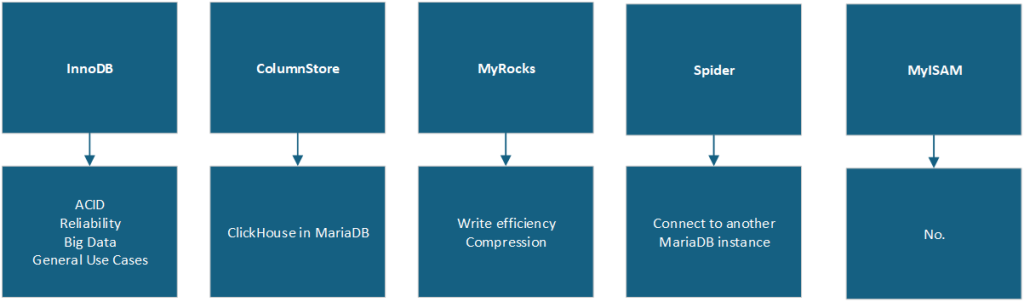
As you can see, then, MariaDB can assist you and your use cases in a variety of ways. Just avoid using the obsolete MyISAM.
Why does MariaDB support so many database engines?
One of the biggest differences between MySQL and MariaDB is the latter’s support for so many storage engines. This is a deliberate design choice, enabling as many developers and DBAs as possible to use the system for a variety of use cases. Simply put: the more storage engines, the more workloads and needs that are covered.
This is important because not all applications behave the same way – so not one single storage engine can excel at all tasks simultaneously.
For example:
- InnoDB excels at ACID support, providing reliability and transaction support when necessary.
- MyRocks offers write efficiency and data compression when necessary.
- ColumnStore is the perfect choice for analytical workloads.
- S3 will help if your data is rarely queried, kept for compliance or other reasons, and may be too large to store efficiently on the disk.
Direct comparison of the storage engines supported by MySQL and MariaDB, respectively
As established, one of the biggest differences between MySQL and MariaDB is their respective support of storage engines. When comparing them directly side-by-side, the split is even more obvious:
| Storage Engine | MySQL vs MariaDB |
| InnoDB | The main storage engine in both MySQL and MariaDB. |
| Spider | Only supported in MariaDB. |
| ColumnStore | Only supported in MariaDB. |
| BLACKHOLE | Supported in both MariaDB and MySQL. |
| MyRocks | Only supported in MariaDB. |
| ARCHIVE | Supported in both MariaDB and MySQL. |
| ARIA | Only supported in MariaDB. |
| S3 | Only supported in MariaDB. |
| Sequence | Only supported in MariaDB. |
And, more specifically, the advantages of the many more storage engines in MariaDB are:
- Your application can support numeric sequences with Sequence, Amazon S3 data with S3, or act just like columnar databases do if you decide to use ColumnStore instead.
- They enable high write efficiency and compression through engines like MyRocks.
- There are better alternatives to legacy engines via storage engines like Aria.
- They support distributed architectures and sharding with Spider.
- Finally, there’s the ability to query external data sources using engines like CONNECT (however, this is now deprecated).
In summary: if your use case necessitates something akin to numeric sequences or column-based storage, you might want to look specifically into MariaDB instead of MySQL.
Should I just change my storage engine instead?
Regardless of whether you use MySQL or MariaDB, choose your storage engine carefully. It can be changed by using an option within the command-line interface (CLI), through the configuration, or with a query (see below).
In many cases, though, it‘s best to leave your storage engine as it is. This will help to prevent potential issues with your application (and your database!) in the future.
On the other hand, if you‘re facing issues (or just want to try a new storage engine within MySQL or MariaDB), you have options:
- You can change the storage engine within your database by running a SQL query like the following:
ALTER DATABASE [dbname] ENGINE = [engine name];
- You can change the storage engine within your database by issuing an option through the CLI, such as:
mysql -uroot [options] --default-storage-engine=enginename
- You can change the storage engine within your database through
my.cnf, by fiddling with thedefault-storage-engineoption as follows:default-storage-engine=InnoDB
This sets the global default storage engine in MySQL to InnoDB.
What if I’ve chosen the wrong storage option?
Choosing the right storage option is crucial. If you don’t, you increase the chance of you – or your clients – suffering with slow performance or other noticeable hiccups. However, if you do slip up, it’s not impossible to reverse your decision – and if you don’t have millions (or billions) of rows within your database to start with, you’ll be fine.
Simple Talk is brought to you by Redgate Software
FAQs: The big difference between MySQL and MariaDB
1. What is the main difference between MySQL and MariaDB?
The biggest difference between MySQL and MariaDB is storage engine support. MariaDB supports a significantly wider range of storage engines, including Spider, ColumnStore, MyRocks, Aria, S3, and Sequence, while MySQL offers a more limited selection focused on InnoDB, MEMORY, CSV, NDB, ARCHIVE, and the obsolete MyISAM.
2. Which storage engine should I use by default in MySQL or MariaDB?
InnoDB is the recommended default for most general-purpose use cases in both MySQL and MariaDB. It offers ACID compliance, row-level locking, foreign key support, and a strong balance of performance and reliability.
3. When should I choose MariaDB over MySQL?
Choose MariaDB if your use case requires specialized storage engines such as columnar storage (ColumnStore), sharding (Spider), high write efficiency (MyRocks), Amazon S3 integration, or numeric sequences. For standard general-purpose workloads, either system works well with InnoDB.
4. How do I change the storage engine in MySQL or MariaDB?
You can change the storage engine in three ways: run the SQL query ALTER DATABASE [dbname] ENGINE = [engine name];, pass the --default-storage-engine=enginename option via the CLI, or edit the default-storage-engine setting in your my.cnf configuration file.
5. Why does the choice of storage engine matter?
While your SQL queries remain the same, the storage engine determines how data is stored, indexed, locked, and recovered. This directly affects performance, crash recovery, transaction support, and scalability of your database.
This document contains proprietary information and is protected by copyright law.
Copyright © 2026 Red Gate Software Limited. All rights reserved






Load comments