



String splitting in T-SQL has historically been inefficient and limited. While STRING_SPLIT improved things, its constraints remained – until now, that is. SQL Server 2025 introduced the REGEXP_SPLIT_TO_TABLE function, offering a more flexible solution for complex scenarios. In this article, Greg Low explains how it works.
I’ve worked with T-SQL for many decades and, for the longest time, there were two features that everybody seemed to want. The first was a TRIM function, so we didn’t have to keep writing LTRIM and RTRIM together. Nobody seemed to understand why that didn’t exist. The second feature people wanted? A way to split strings efficiently.
The issue with splitting strings in T-SQL
Using T-SQL it’s quite easy to build a table-valued function that can step through a string, character-by-character, and (based on a delimiter) output the delimited strings. The problem is that the performance of these functions is appalling.
When XML support appeared in SQL Server 2005, there were many attempts to create more efficient string-splitting functions. For many strings, these work quite well, but do have a few oddities that you need to cope with. Plus, most have limitations on the strings that you can split.
Ultimately, what was really needed was an efficient and native built-in function.
Introducing STRING_SPLIT – what is it, and how does it work?
Finally, in SQL Server 2016 (and database compatibility level 130), the T-SQL STRING_SPLIT function was added, to much rejoicing. Well, that was until we all tried using it! There were several issues:
- We often wanted to work with empty strings as delimiters, because we wanted to output all the characters in the string.
- We also often wanted to work with delimiters that involved multiple characters. I know that I did a lot of work with data that was delimited by two pipe characters ( || ).
The function required a delimiter of data type nchar(1) or char(1) – i.e. it had to be one character.
Fast, reliable and consistent SQL Server development…
Explaining the Ordinal parameter – what it is and how it works
Microsoft heard us about the ordering issue. In SQL Server 2022, an optional enable_ordinal parameter was added to the STRING_SPLIT function.
When this was set to a value of 1 instead of just outputting a value column, an additional ordinal column was provided. This told you the position of each of the delimited strings. For example:
|
1 2 3 4 5 |
DECLARE @ValueToSplit nvarchar(max) = N'the quick brown fox jumped over the lazy dog'; SELECT * FROM STRING_SPLIT(@ValueToSplit, N' ', 1); |
The output of this is as follows:
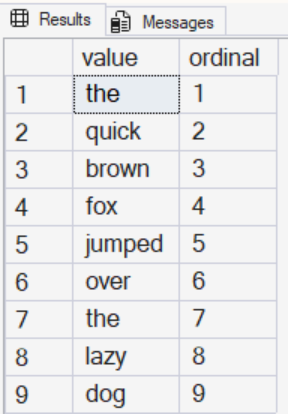
If I wanted the values to be output in the order that they appeared in the string, I could just add:
|
1 |
ORDER BY [ordinal]; |
However, the single character delimiter issue remained…
While that was a great addition, we still had the issue with the delimiters. Note that when I run either of these queries…
|
1 2 3 4 5 6 7 8 9 10 11 12 13 14 |
DECLARE @ValueToSplit nvarchar(max) = N'the quick brown fox jumped over the lazy dog'; SELECT * FROM STRING_SPLIT(@ValueToSplit, N'', 1); GO DECLARE @ValueToSplit nvarchar(max) = N'the||quick||brown||fox||jumped||over||the||lazy||dog '; SELECT * FROM STRING_SPLIT(@ValueToSplit, N'||', 1); GO |
…I get this error:
Msg 214, Level 16, State 11, Line 48
Procedure expects parameter 'separator' of type 'nchar(1)/nvarchar(1)'.
That’s where REGEXP_SPLIT_TO_TABLE saves the day…
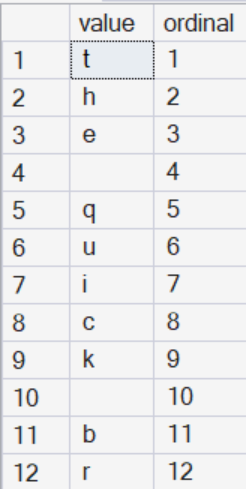
SQL Server 2025 introduced a set of regular expression-related functions and one of them finally lets us fix the situation. The T-SQL REGEXP_SPLIT_TO_TABLE function lets us split a string and define the delimiter in a very flexible way. Note the following example of working with an empty string delimiter to retrieve all the characters:
|
1 2 3 4 5 |
DECLARE @ValueToSplit nvarchar(4000) = N'the quick brown fox jumped over the lazy dog'; SELECT * FROM REGEXP_SPLIT_TO_TABLE(@ValueToSplit, N''); |
That function returns the following (only a few rows shown):
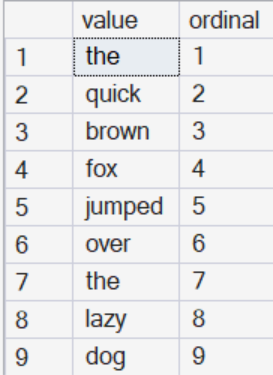
And here is an example of a multi-character delimiter:
|
1 2 3 4 5 6 7 |
DECLARE @ValueToSplit nvarchar(4000) = N'the||quick||brown||fox||jumped||over||the||lazy||dog '; SELECT * FROM REGEXP_SPLIT_TO_TABLE(@ValueToSplit, N'\|\|'); GO |
That now returns:
Note that in both cases, I changed the declared string value to nvarchar(4000). The function does not yet support nvarchar(max) or varchar(max) for input data types.
You may also be interested in:
SQL Server Regular Expression Performance and Guidelines
Explaining the flag parameter in the REGEXP_SPLIT_TO_TABLE function – what it is and how it works
The REGEXP_SPLIT_TO_TABLE function has an optional third parameter. It’s particularly important for case-sensitivity, since it doesn’t follow the case-sensitivity rules for the collation you’re working with. Specifically, it’s case-sensitive even if you are working with a case-insensitive collation for your database.
You can add the following flags:
| Flag | Description | Default Value |
| i | Case-insensitive | false |
| m | Multi-line mode | false |
| s | Allows . (period) to match a new line (\n) | false |
| c | Case-sensitive | true |
Multi-line mode is particularly interesting. Without it, the beginning and end of the text are used to delimit the string. When enabled, however, the standard $ and ^ characters that work elsewhere with regular expressions can also be used.
The verdict
With the addition of REGEXP_SPLIT_TO_TABLE, we’re now much, much closer to having workable built-in string splitting.
Performance-wise, you’ll still be better using STRING_SPLIT for situations where it is capable, but for situations that it doesn’t support, REGEXP_SPLIT_TO_TABLE should fix most issues. I’ve seen some discussions saying we might be able to use new JSON functions as a workaround, but I’ve been happy enough with the performance so far.
The only remaining issue for me is that I often need to work with nvarchar(max) and varchar(max) strings. I hope that gets addressed in a future version.
Simple Talk is brought to you by Redgate Software
FAQs: How to use REGEXP_SPLIT_TO_TABLE in SQL Server
1. What is STRING_SPLIT in SQL Server?
STRING_SPLIT is a built-in T-SQL function introduced in SQL Server 2016 that splits a string into rows based on a single-character delimiter.
2. What limitations does STRING_SPLIT have?
STRING_SPLIT only supports single-character delimiters, doesn’t guarantee output order (without enable_ordinal), and cannot handle empty string delimiters.
3. What is the enable_ordinal parameter?
Added in SQL Server 2022, enable_ordinal returns an extra column showing the position of each split value, allowing you to order results correctly.
4. What is REGEXP_SPLIT_TO_TABLE?
REGEXP_SPLIT_TO_TABLE is a SQL Server 2025 function that uses regular expressions to split strings, enabling multi-character and flexible delimiters.
5. When should I use REGEXP_SPLIT_TO_TABLE instead of STRING_SPLIT?
Use REGEXP_SPLIT_TO_TABLE when you need multi-character delimiters, regex patterns, or more flexible splitting that STRING_SPLIT cannot handle.
6. Does REGEXP_SPLIT_TO_TABLE support nvarchar(max)?
No, currently it only supports nvarchar(4000) and varchar(4000), not max-length string types.
7. Is STRING_SPLIT or REGEXP_SPLIT_TO_TABLE faster?
This document contains proprietary information and is protected by copyright law.
Copyright © 2026 Red Gate Software Limited. All rights reserved






Load comments