


AT TIME ZONE in SQL Server 2016+ can do this. Not all data platforms have this available, though. Moreover, there is a huge benefit to understanding the nitty-gritty of how time zones are defined and how they work, even when tools are available to do the work for us.
The following is an example of how AT TIME ZONE can be used to quickly convert a point in time from on time zone to another:
|
1 2 3 4 5 6 7 8 9 |
SELECT CAST('3/1/2022 12:00:00' AS DATETIME2(0)) AT TIME ZONE 'Eastern Standard Time' AS source_time, CAST('3/1/2022 12:00:00' AS DATETIME2(0)) AT TIME ZONE 'Eastern Standard Time' AT TIME ZONE 'Central European Standard Time' AS target_time, CAST('3/1/2022 12:00:00' AS DATETIME2(0)) AT TIME ZONE 'Eastern Standard Time' AT TIME ZONE 'UTC' AS utc_time; |
DATETIME2, or this syntax will fail. The results are as follows:
 The results show the source time appended with the correct offset from UTC (-5 hours), the same time adjusted to Central European Time (+1 from UTC) and lastly the same time converted to UTC (with the expected offset of zero).
If
AT TIME ZONE is available to you, consider using it as it is a relatively simple syntax that can help manage TIMEZONEOFFSET dates/times efficiently, without the need for extensive date math.
AT TIME ZONE does have some limitations, however. For example, a date from the 1800’s would still have modern daylight savings rules applied, even though daylight savings did not exist back then.
A Note on Changing Rules
And noted in the 1800’s example, daylight savings rules change. For example, in the United States, the period for daylight savings was lengthened by 5 weeks in 2007. Other countries have made similar changes over the years, with some abolishing the semi-annual time changes altogether. For the purpose of this article, and to avoid it getting far too complex, current rules will be honored in the examples, but the value of having T-SQL code that I will demonstrate is to allow you to be able to implement scenarios where the standard methods will not work. If you have a need to accurately convert across boundaries when daylight savings rules (or any time zone rules for that matter) have changed, then add those breakpoints into your code as needed. These events are rare enough that they may not impact your code, and they are well-documented enough to be able to adjust for them effectively. The simplest way to do this would be a versioned table that maintains time zone attributes and has a valid from/valid through date that indicates when each set of rules is applicable to a given time zone. Then any process that needs this data can consult the appropriate rules based on the date, filtering using the valid from/valid to dates.Ideal Solutions to Time Zone Challenges
Understanding how time zones and daylight savings operate is invaluable to solving complex problems that arise when working with localized data. To some extent, avoiding these challenges altogether is next-to-impossible, but there are a wide variety of best practices that can minimize their impact and reduce the effort needed to resolve them.Set Server Time to UTC
Having multiple moving targets can make working with data even more challenging. Data ultimately will reference two sets of time zones: The application data time zone and the server time zone. Having application and database servers set to UTC means that they have zero bias and never shift due to daylight savings. This greatly simplifies both code and database maintenance. The most common problem that occurs when a database server is set to use a local time zone is when daylight savings shifts twice a year. What happens to SQL Server Agent Jobs when you spring forward and lose an hour from 02:00 to 03:00? The answer is that THEY NEVER RUN! For unsuspecting developers and administrators, this can be a nightmare. Imagine backups being skipped for a day. Or maybe a daily analytics job never crunches its data for an important dashboard. When daylight savings reverts to standard time, jobs scheduled during that hour to OCCUR TWICE (!) For some tasks, this may be acceptable, but a reporting task that creates data every hour may end up with duplicates. Similarly, any jobs that create files, backups, or tabular data will get an extra round of that data when this happens. Any application that relies on SQL Server Agent or scheduled tasks that are scheduled using local server time will incur unexpected behavior when daylight savings shifts. The effort to mitigate this risk can be surprisingly complex to the point where some administrators simply avoid scheduling and all tasks during the daylight savings changeover time period (specified by standard_hour and daylight_hour). Similarly, a job that should run at midnight UTC will need to be adjusted alongside daylight savings changes if the server it resides on uses a non-UTC time zone. Otherwise, a job that runs at 8pm EST will become a job that runs at 01:00:00 UTC instead of 00:00:00 UTC when Eastern falls back to standard time. If application and database servers can be set to UTC, then these problems disappear for good.Store Date/Time data in UTC or DATETIMEOFFSET
When storing dates and times, the default often chosen when an application is new is the default local time zone. Over the years, this has resulted in many applications that use Eastern US or Pacific US time as the default format for storing this data. This seems convenient until an application grows to encompass many locales and inevitably becomes international, spanning dozens of countries and time zones. Now, conversions are needed to ensure that users see the correct time for where they live and internal processes can convert times correctly to enable meaningful data analytics. Similarly, a software development team may be scattered around many different time zones, adding more complexity into how dates/times are worked with. Storing all dates and times in UTC ensures that no complex conversions are needed. This is simple and straightforward and if the database server is also set to UTC, then there is no discrepancy betweenSYSDATETIME() and SYSUTCDATETIME(). For some data points, such as log data, analytics, row versioning, or other internal processes, storing them in UTC is ideal for consistency and ease of use.
If data is directly correlated to a user or location that is time-sensitive, then storing that data using a DATETIMEOFFSET data type is ideal. DATETIMEOFFSET is a data type that stores a time along with its UTC offset. This provides the best of both worlds: the ability to quickly retrieve data points normalized to UTC (or some other time zone) and the ability to know what a local time is. Sometimes there is a need to understand what happens at certain times of day using local times, rather than UTC times. For example, analyzing how order processing occurs at a busy time of day is a common problem. Busy in London will occur at a different time of day than in Melbourne.
Do Not Make Assumptions
There are dozens of time zones defined around the world and they do not all operate the same way. Do not assume that the dates/times in your application will always behave like a specific time zone. Not only do different time zones behave differently from each other, but rules as to how time zones work can change over time. Time zones should be seen as a property of the user experience. Time zones in of themselves are artificial constructs that help us navigate the day with more ease so that 12:00 is considered mid-day and is during a lighter part of the day, regardless of where you live. Computers do not care about time zones. Nor does data. Flying to Tokyo from New York does not cause you to travel forwards in time by crossing lots of time zones. Therefore, treat time zones as if they are a user preference. If a user lives in Madrid, then they would experience the Central European time zone (UTC+2), but data stored about them may not need to know this. It could be UTC orDATETIMEOFFSET, if needed. Similarly, storing data in multiple time zones in a table is liable to result in confusion. Ideally, a column that represents a time should not require being stored repeatedly in many time zones. Those conversions should ideally happen in the presentation layer of an application and not in the database.
The Components of a Time Zone
Each time zone has built-in components that describe how it works. To understand how to convert between time zones, it is necessary to understand the components that comprise a time zone. These attributes can be roughly broken into two categories:- How does this time zone compare to UTC?
- If this time zone uses daylight savings, how and when are adjustments made?
Bias
This is the default difference between a time zone and UTC, typically given in minutes. It can be positive or negative. The number indicates the number of minutes that needs to be added to a local time to convert it into UTC during standard (non-daylight savings) times. For example, a bias of zero indicates UTC/GMT. Eastern Standard time has a bias of 300, which indicates that 300 minutes need to be added to an Eastern Standard time (5 hours) to convert it to UTC during non-daylight savings times of the year. If daylight savings is in effect, then only 240 minutes would need to be added to the local time, though additional parameters related to daylight savings should be used to arrive at this number, since not all time zones behave the same way.Start of Standard Time
For time zones with daylight savings, these numbers determine when during the year time is shifted from daylight savings back to standard time (aka: Fall Back). Along with the description will be the domain of values as they will be used in the code I will present.- Standard Month: The month of the year that time is shifted to standard time from daylight savings time. This is an integer from 1 (January) to 12 (December). Zero is typically used to denote time zones without daylight savings.
- Standard Day: The day of the month after which time can shift back to standard time from daylight savings. The day that daylight savings reverts is the first instance of the Standard Day of Week after the Standard Day. More on this below. This is an integer from 1-31. Zero is typically used to denote time zones without daylight savings.
- Standard Day of Week: This is the day of the week that time shifts from daylight savings to standard time. This is an integer from 0 (Sunday) to 6 (Saturday) and has no meaning if this time zone does not have daylight savings.
- Standard Hour: This is the hour of the day that time is shifted from daylight savings to standard time. This is an integer from 0 to 23 and has no meaning if this time zone does not have daylight savings.
- Standard Bias: If there is any additional adjustment (in minutes) required to account for standard time, then it is provided here. Typically, this is zero and is not used in time zone calculations. For the purposes of this article, standard bias will not be used. Consider this a placeholder for hypothetical modifications introduced by future laws/changes, but as of the writing of this article is not used anywhere on Earth.
Start of Daylight Saving Time
On the flip side, the following values provide the information needed to determine when and how to shift from standard time to daylight savings time. Time zones that do not use daylight savings are not impacted by these numbers.- Daylight Month: The month of the year that time is shifted to daylight savings time from standard time. This is an integer from 1 (January) to 12 (December). Zero is typically used to denote time zones without daylight savings.
- Daylight Day: The day of the month after which time can shift from standard to daylight savings. The day that daylight savings occurs is the first instance of the Daylight Day of Week after the Daylight Day. This is an integer from 1-31. Zero is typically used to denote time zones without daylight savings.
- Daylight Day of Week: This is the day of the week that time shifts from standard to daylight savings time. This is an integer from 0 (Sunday) to 6 (Saturday) and has no meaning if this time zone does not have daylight savings.
- Daylight Hour: This is the hour of the day that time is shifted from standard to daylight savings time. This is an integer from 0 to 23 and has no meaning if this time zone does not have daylight savings.
- Daylight Bias: This is the adjustment, in minutes, that occurs when time shifts from standard to daylight savings. This number can be positive or negative, but is usually negative and represents the minutes that are added to the local time zone bias to reach the daylight savings time. A time zone with a bias of 300 and a daylight bias of -60 indicates that when standard time shifts to daylight savings time, the local bias shifts to 240. In other words, this time zone “springs forward” an hour, as is often said colloquially.
Example of Daylight Savings
Consider a time zone with the following parameters (this happens to be Pacific Standard Time):- Bias: 480 minutes (UTC-8)
- Standard Month: 11 (November)
- Standard Day: 1
- Standard Day of Week: 0 (Sunday)
- Standard Hour: 2
- Daylight Month: 3 (March)
- Daylight Day: 7
- Daylight Day of Week: 0 (Sunday)
- Daylight Hour: 2
- Daylight Bias: -60 minutes
The Time Zone Challenge
Without daylight savings time, converting between time zones would simply be a matter of adjusting the bias between two time zones. For example, adjusting from a time zone with a bias of 300 to a time zone with a bias of 180 would only require that 120 minutes be subtracted from its bias. Practically speaking, reducing a time zone’s bias equates to adding minutes to a time whereas increasing the bias subtracts minutes from the time. Daylight savings adds a wrinkle into this equation. The time on December 1st and the time on July 1st within a single time zone may each be subject to a different bias due to daylight savings. As a result, converting between time zones requires knowing whether each time zone honors daylight savings and if either (or both) do, then what are the details of when those time shifts occur. For example, in the Central European time zone (UTC+1/bias of -60 minutes), daylight savings adds an hour on the first Sunday on or after March 5th. Therefore, 09:00 on March 1st is UTC+1, but 09:00 on April 1st is UTC+2. While those times are sampled in the same physical location, they essentially belong to different time zones. If data from this time zone is stored in UTC and converted back to the local time zone at a later time using the standard bias of -60, the result would be 09:00 on March 1st and 10:00 on April 1st. Storing times asDATETIMEOFFSET resolves this issue in its entirety and is the recommended solution. Most date/time values in most databases are not stored with the UTC offset inline, though, and are subject to a data sampling error across daylight savings boundaries. DATETIMEOFFSET allows both the time and time zone to be defined all at once. This leaves no ambiguity with regards to precisely what time it was and its relationship to UTC and other time zones.
Therefore, the challenge that we are set to tackle here is to be able to use the attributes of time zones to retroactively convert one time into another and account for daylight savings in the process. Using the information discussed thus far, this process will be encapsulated into a scalar function that can handle the work for us.
Using T-SQL to Automate Time Zone Calculations
A better solution to the time zone problem is a function that can be passed the parameters for each time zone and can then crunch the resulting time using what we have discussed thus far in this article. The details for each time zone can be stored in table to make for more reusable code and reduce the need to hard-code time zone attributes whenever this is needed. Generally speaking, a table that contains a wide variety of attributes and dimensions for all time zones can be useful for many other purposes as well. The value in codifying time zone details and then referencing only standard time zone names or abbreviations is that it greatly reduces the chances for typos or mistakes. This provides similar functionality to a calendar table in that regard. If one of the time zones is UTC, then zeroes can be passed in for all of that time zone’s parameters, which can simplify this function if one side of the equation happens to always be UTC. Similarly, if the daylight bias is always -60, which is likely, then it can be omitted as well. The function below has a variety of defaults to help simplify calls to it when various attributes are irrelevant, not needed, or not specified.|
1 2 3 4 5 6 7 8 9 10 11 12 13 14 15 16 17 18 19 20 21 22 23 24 25 26 27 28 29 30 31 32 33 34 35 36 37 38 39 40 41 42 43 44 45 46 47 48 49 50 51 52 53 54 55 56 57 58 59 60 61 62 63 64 65 66 67 68 69 70 71 72 73 74 75 76 77 78 79 80 81 82 83 84 85 86 87 88 89 90 91 92 93 94 95 96 97 98 99 100 101 102 103 104 105 106 107 108 109 110 111 112 113 114 115 116 117 118 119 120 121 122 123 124 125 126 127 128 129 130 131 132 133 134 135 136 137 138 139 140 141 142 143 144 145 146 147 148 149 150 151 152 153 154 155 156 157 158 159 160 161 162 163 164 165 166 |
CREATE FUNCTION dbo.fnConvertBetweenTimeZones ( @source_datetime DATETIME2(3),-- The date/time that will be --converted to the target time zone. @source_bias AS SMALLINT = 0, -- Defaults to UTC @source_standard_month AS TINYINT = 0, -- Defaults to UTC @source_standard_day AS TINYINT = 0, -- Defaults to UTC @source_standard_day_of_week AS TINYINT = 0, -- Defaults to UTC @source_standard_hour AS TINYINT = 0, -- Defaults to UTC -- Source_ parameters default to UTC/no daylight savings @source_daylight_month AS TINYINT = 0, @source_daylight_day AS TINYINT = 0, @source_daylight_day_of_week AS TINYINT = 0, @source_daylight_hour AS TINYINT = 0, -- Defaults to -60 (1 hour) if used @source_daylight_bias AS SMALLINT = -60, -- Target_ parameters default to UTC @target_bias AS SMALLINT, @target_standard_month AS TINYINT = 0, @target_standard_day AS TINYINT = 0, @target_standard_day_of_week AS TINYINT = 0, @target_standard_hour AS TINYINT = 0, @target_daylight_month AS TINYINT = 0, @target_daylight_day AS TINYINT = 0, @target_daylight_day_of_week AS TINYINT = 0, @target_daylight_hour AS TINYINT = 0, @target_daylight_bias AS SMALLINT = -60) RETURNS DATETIME2(3) AS BEGIN DECLARE @target_datetime DATETIME2(3); DECLARE @difference_in_minutes SMALLINT; -- Calculate base difference between time zones. SELECT @difference_in_minutes = @source_bias - @target_bias; -- Determine if source time was affected by daylight savings IF @source_daylight_month <> 0 BEGIN DECLARE @source_daylight_start DATETIME2(3); DECLARE @source_daylight_end DATETIME2(3); -- Calculate when daylight savings starts SELECT @source_daylight_start = DATEFROMPARTS(DATEPART(YEAR, @source_datetime), @source_daylight_month, @source_daylight_day); WHILE DATEPART(DW, @source_daylight_start) - 1 <> @source_daylight_day_of_week BEGIN SELECT @source_daylight_start = DATEADD(DAY, 1, @source_daylight_start); END -- Calculate when daylight savings ends SELECT @source_daylight_end = DATEFROMPARTS(DATEPART(YEAR, @source_datetime), @source_standard_month, @source_standard_day); WHILE DATEPART(DW, @source_daylight_end) - 1 <> @source_standard_day_of_week BEGIN SELECT @source_daylight_end = DATEADD(DAY, 1, @source_daylight_end); END -- Add the daylight savings modifier, if needed IF @source_daylight_start < @source_daylight_end -- Typically Northern hemisphere BEGIN IF @source_datetime >= DATETIMEFROMPARTS(DATEPART(YEAR, @source_daylight_start), @source_daylight_month, DATEPART(DAY, @source_daylight_start), @source_daylight_hour, 0, 0, 0) AND @source_datetime < DATETIMEFROMPARTS(DATEPART(YEAR, @source_daylight_end), @source_standard_month, DATEPART(DAY, @source_daylight_end), @source_standard_hour, 0, 0, 0) BEGIN SELECT @difference_in_minutes = @difference_in_minutes + @source_daylight_bias; END END IF @source_daylight_start > @source_daylight_end -- Typically Southern hemisphere BEGIN IF @source_datetime >= DATETIMEFROMPARTS(DATEPART(YEAR, @source_daylight_start), @source_daylight_month, DATEPART(DAY, @source_daylight_start), @source_daylight_hour, 0, 0, 0) OR @source_datetime < DATETIMEFROMPARTS(DATEPART(YEAR, @source_daylight_end), @source_standard_month, DATEPART(DAY, @source_daylight_end), @source_standard_hour, 0, 0, 0) BEGIN SELECT @difference_in_minutes = @difference_in_minutes + @source_daylight_bias; END END END -- Determine if the target time was affected by daylight savings IF @target_daylight_month <> 0 BEGIN DECLARE @target_daylight_start DATETIME2(3); DECLARE @target_daylight_end DATETIME2(3); -- Calculate when daylight savings starts SELECT @target_daylight_start = DATEFROMPARTS(DATEPART(YEAR, @source_datetime), @target_daylight_month, @target_daylight_day); WHILE DATEPART(DW, @target_daylight_start) - 1 <> @target_daylight_day_of_week BEGIN SELECT @target_daylight_start = DATEADD(DAY, 1, @target_daylight_start); END -- Calculate when daylight savings ends SELECT @target_daylight_end = DATEFROMPARTS(DATEPART(YEAR, @source_datetime), @target_standard_month, @target_standard_day); WHILE DATEPART(DW, @target_daylight_end) - 1 <> @target_standard_day_of_week BEGIN SELECT @target_daylight_end = DATEADD(DAY, 1, @target_daylight_end); END -- Add the daylight savings modifier, if needed IF @target_daylight_start < @target_daylight_end -- Typically Northern hemisphere BEGIN IF @source_datetime >= DATETIMEFROMPARTS(DATEPART(YEAR, @target_daylight_start), @target_daylight_month, DATEPART(DAY, @target_daylight_start), @target_daylight_hour, 0, 0, 0) AND @source_datetime < DATETIMEFROMPARTS(DATEPART(YEAR, @target_daylight_end), @target_standard_month, DATEPART(DAY, @target_daylight_end), @target_standard_hour, 0, 0, 0) BEGIN SELECT @difference_in_minutes = @difference_in_minutes - @target_daylight_bias; END END IF @target_daylight_start > @target_daylight_end -- Typically Southern hemisphere BEGIN IF @source_datetime >= DATETIMEFROMPARTS(DATEPART(YEAR, @target_daylight_start), @target_daylight_month, DATEPART(DAY, @target_daylight_start), @target_daylight_hour, 0, 0, 0) OR @source_datetime < DATETIMEFROMPARTS(DATEPART(YEAR, @target_daylight_end), @target_standard_month, DATEPART(DAY, @target_daylight_end), @target_standard_hour, 0, 0, 0) BEGIN SELECT @difference_in_minutes = @difference_in_minutes - @target_daylight_bias; END END END SELECT @target_datetime = DATEADD(MINUTE, @difference_in_minutes, @source_datetime); RETURN @target_datetime; END; |
- Determine the difference between time zones due to the difference in bias.
- If the source time zone observes daylight savings, then:
- Determine when daylight savings begins for the source time zone.
- Determine when daylight savings ends for the source time zone.
- For time zones where the daylight savings month is before the standard month, apply the daylight bias, if needed. This is typically for time zones in the Northern hemisphere.
- For time zones where the daylight savings month is after the standard month, apply the daylight bias, if needed. This is typically for time zones in the Southern hemisphere.
- If the target time zone observes daylight savings, then:
- Determine when daylight savings begins for the target time zone.
- Determine when daylight savings ends for the target time zone.
- For time zones where the daylight savings month is before the standard month, apply the daylight bias, if needed. This is typically for time zones in the Northern hemisphere.
- For time zones where the daylight savings month is after the standard month, apply the daylight bias, if needed. This is typically for time zones in the Southern hemisphere.
- Apply the calculated difference in minutes to the target datetime and return it.
|
1 2 3 |
SELECT dbo.fnConvertBetweenTimeZones('3/1/2022 12:00:00', 300, 11, 1, 0, 2, 3, 2, 0, 0, -60, -60, 10, 5, 0, 3, 3, 5, 0, 0, -60) AS target_time; |
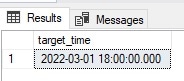 The results show that six hours were added to the source datetime. Since neither time zone was observing daylight savings, the time shift required only adding up the difference in biases and applying it to the date/time. In this case, 300 minutes from the source plus 60 additional minutes from the target, or 360 minutes (6 hours).
To test a scenario where one time zone is in daylight savings while the other is not, the following example can be used:
|
1 2 3 |
SELECT dbo.fnConvertBetweenTimeZones('6/1/2022 12:00:00', 300, 11, 1, 0, 2, 3, 2, 0, 0, -60, 0, 0, 0, 0, 0, 0, 0, 0, 0, 0) AS target_time; |
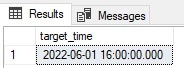 The bias for Eastern Time is 300 minutes, but is offset by -60 due to daylight savings, resulting in a bias of -240 minutes. This equates to UTC-4 and therefore to convert to UTC requires adding 4 hours to the source datetime, resulting in a conversion from 12:00 to 16:00 on the same date.
We can apply the dummy test case of converting a time from the same time zones to each other:
|
1 2 3 |
SELECT dbo.fnConvertBetweenTimeZones('7/1/2022 12:00:00', 480, 11, 1, 0, 2, 3, 2, 0, 0, -60, 480, 11, 1, 0, 2, 3, 2, 0, 0, -60) AS target_time; |
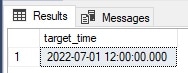 No surprise here, but this does provide a good QA test case to ensure that things are working the way they are expected to.
A common application of a function like this would be to apply it to a set of data from a table, rather than a hard-coded scalar value. The following query against
WideWorldImporters converts the LastEditedWhen DATETIME2 column from Central time to UTC:
|
1 2 3 4 5 6 7 8 9 |
SELECT Orders.OrderID, Orders.LastEditedWhen, dbo.fnConvertBetweenTimeZones(Orders.LastEditedWhen, 360, 11, 1, 0, 2, 3, 2, 0, 0, -60, 0, 0, 0, 0, 0, 0, 0, 0, 0, 0) AS edited_time_from_CST_to_UTC FROM WideWorldImporters.Sales.Orders WHERE Orders.LastEditedWhen BETWEEN '3/2/2013' AND '4/4/2013' ORDER BY Orders.LastEditedWhen, Orders.OrderID; |
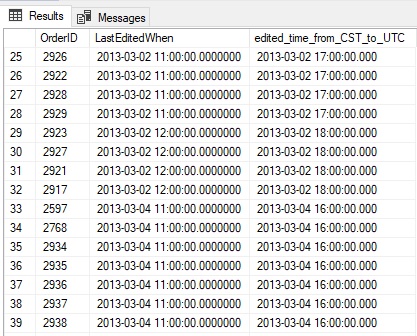 Note that the offset from Central US time to UTC changes from 6 hours to 5 hours after daylight savings goes into effect. The additional daylight bias of -60 minutes is added to the overall bias for Central time (360 minutes/6 hours) resulting in a new bias of 300 minutes (5 hours).
If time zone data is stored in a permanent reference table, then that table can be joined into the query to allow for a more dynamic approach based on the source/target time zones, removing most of the hard-coded literals and replacing them with column references within the time zone table.
What Else Can This be Used for?
The knowledge of how times work can be greatly helpful when working with code that does not already manage dates and times perfectly. Legacy code, T-SQL from older SQL Server versions, or code that needs to work across different data platforms may not be managed so easily. The metadata that describes time zones can be used on its own as a reference tool to understand when and how daylight savings changes occur. They can also be used to gauge the time difference between two locations. The need to do this effectively arises often, even in systems where time zones are handled relatively well. While the idea of regularly changing clocks to manage daylight savings has been losing appeal over the years, it is likely to remain in effect in many locales for years to come. If changes are made to remove it in a time zone or country, knowing how to adjust for future dates can allow applications to effectively prepare for future change, even before software updates are issued throughout the many tools and services we rely on to build, maintain, and host them.Conclusion
Understanding how time zones and daylight savings works will make working with localized data much easier. If an application can be architected to minimize the need to convert between time zones, then doing so will avoid a wide variety of challenges and problems in the future. If an application cannot avoid this due to legacy data structures or code, then formalize how to convert between time zones and use the knowledge of how to represent time zones using their various attributes to provide the most reliable processes possible for managing multiple time zones. The code in this article may not be needed in all scenarios, but will provide insight into the complexities of time zone conversions, especially with historical data. Use it as a way to better encapsulate metadata about time zones into a single source-of-truth and then build code that works with time zone data to be as re-usable as possible. This will improve code quality, reduce errors, and make an application more maintainable in the long run!FAQs
1. How do I convert between time zones in SQL Server using AT TIME ZONE?
Use AT TIME ZONE with the name of the target zone. For a DATETIME2 value, applying AT TIME ZONE ‘Eastern Standard Time’ interprets the value as being in Eastern time and returns a DATETIMEOFFSET. Applying AT TIME ZONE again converts that DATETIMEOFFSET to another zone. Example: SELECT CAST(‘2024-03-15 12:00’ AS DATETIME2) AT TIME ZONE ‘Eastern Standard Time’ AT TIME ZONE ‘UTC’ returns the Eastern time as UTC. AT TIME ZONE requires SQL Server 2016 or later; the zone names come from the Windows time zone registry (stored in sys.time_zone_info). For pre-2016 SQL Server, use a custom T-SQL function – the article provides a complete implementation.
2. What is the difference between DATETIMEOFFSET and DATETIME in SQL Server?
DATETIME stores only the date and time with no time zone information – all DATETIME values are interpreted in the server’s local time (or whatever the application assumed when storing them). DATETIMEOFFSET stores the date, time, AND the UTC offset as a single value – ‘2024-03-15 12:00:00 -05:00’ is a valid DATETIMEOFFSET indicating noon in a zone that’s 5 hours behind UTC. DATETIMEOFFSET is the correct type for applications that serve users in multiple time zones – it removes ambiguity from every stored timestamp. Use DATETIMEOFFSET for any new schema where time zone matters; use DATETIME2 with a server-level UTC convention when you want less storage and are confident all values share a common zone.
3. How does SQL Server handle daylight saving time changes?
SQL Server’s AT TIME ZONE function looks up the target zone’s daylight saving rules from the Windows time zone data and applies them correctly for the specific timestamp being converted – including historical timestamps predating current rules. The Windows time zone data includes the historical daylight-saving transitions (for example, the US Energy Policy Act of 2005 changed daylight saving from the first Sunday in April through the last Sunday in October to the second Sunday in March through the first Sunday in November, starting in 2007), so correctly converting a 2005 timestamp vs a 2010 timestamp from ‘Eastern Standard Time’ to UTC produces different offsets. For older SQL Server versions or cross-platform code, the article’s custom T-SQL function implements the same logic explicitly.
4. Should I store dates in UTC or local time in SQL Server?
Store in UTC (using DATETIME2) or as DATETIMEOFFSET with the original offset preserved – not in server-local DATETIME. UTC storage is the canonical best practice because it removes every ambiguity: no daylight saving transitions, no server-move issues, no cross-region comparison errors. Apply time zone conversions at display time using AT TIME ZONE. DATETIMEOFFSET storage is valuable when the original local time matters for business reasons (for example, ‘the customer placed this order at 9am their local time’) – DATETIMEOFFSET preserves both the absolute UTC moment and the original local interpretation. The worst option is server-local DATETIME, which silently breaks when the server moves regions, when daylight saving transitions occur, or when users in different zones access the same data.
This document contains proprietary information and is protected by copyright law.
Copyright © 2026 Red Gate Software Limited. All rights reserved






Load comments