


IsNumeric(), the unloved system function.
The system function IsNumeric() is so unloved that I feel compelled to say something in its’ defence. It is more or less giving you the correct answer, but to a different question to the one that you’re asking, and what it tells you isn’t very helpful. IsNumeric() is actually answering the question ‘Can this string be converted or ‘cast’ to a numeric datatype by SQL Server?’ It is pretty good at getting this answer right but it doesn’t tell you which datatype. It also isn’t interested in such things as overflow. This problem of IsNumeric() was solved in SQL Server 2012. There was no way of morphing IsNumeric() intro something more valuable, so Try_Cast(), Try_Parse(), and Try_Convert() were introduced. The introduction of these system functions really solve the problem, unless you are still on earlier versions than SQL Server 2012. I’ll show how to do the same thing in previous versions of SQL Server, and demonstrates one or two tricks you can do with these functions.So how bad is IsNumeric()?
To answer this question we first need some test data, a table full of strings that might, or might not, be numbers|
1 2 3 |
CREATE TABLE #testData(Number nVARCHAR(30)) INSERT INTO #testData(number) values (N' '),(N''),('2^2'),(N' 5105'),(N' |
|
1 2 3 4 5 6 7 |
SELECT ''''+Number+'''' AS TheString, COALESCE( CASE WHEN TRY_CONVERT(INT,Number) IS NOT NULL THEN 'integer' END, CASE WHEN TRY_CONVERT(NUMERIC(14,4),Number) IS NOT NULL THEN 'numeric' END, CASE WHEN TRY_CONVERT(FLOAT,Number) IS NOT NULL THEN 'float' END, CASE WHEN TRY_CONVERT(MONEY,Number) IS NOT NULL THEN 'money' END,'string') AS [CanConvertTo] FROM #testData AS TD |
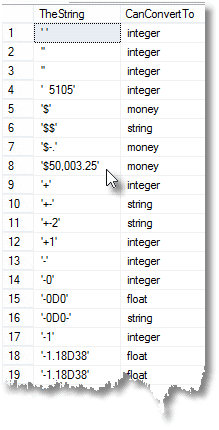 Now we can see how well IsNumeric() gets it right.
|
1 2 3 4 5 6 7 8 9 10 11 12 13 14 15 16 17 |
SELECT ''''+number+'''' AS TheString, datatype, IsItNumeric, CASE WHEN IsItNumeric=0 AND datatype<>'string' THEN 'wrong' ELSE 'correct' END AS agreement, Try_Convert(INT,number) AS AsInteger, Try_Convert(NUMERIC(14,4),number) AS AsNumber, Try_Convert(FLOAT,number) AS AsFloat, Try_Convert(MONEY,number) AS AsMoney, CASE WHEN datatype='string' THEN number ELSE NULL END AS AsString FROM (SELECT Number, IsNumeric(Number), Coalesce( CASE WHEN Try_Convert(INT,Number) IS NOT NULL THEN 'integer' END, CASE WHEN Try_Convert(NUMERIC(14,4),Number) IS NOT NULL THEN 'numeric' END, CASE WHEN Try_Convert(FLOAT,Number) IS NOT NULL THEN 'float' END, CASE WHEN Try_Convert(MONEY,Number) IS NOT NULL THEN 'money' END,'string') AS [datatype] FROM #testData AS TD )f(number,IsItNumeric,datatype) WHERE IsItNumeric=0 AND datatype<>'string' |
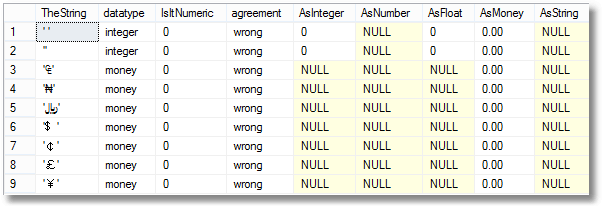 Even if you just wanted a simple yes/no answer about ‘whether a string can be converted to a number, but which datatype we’re not telling you’, then it is more reliable to use …
|
1 2 3 4 5 6 7 8 |
SELECT CASE WHEN TRY_CONVERT(INT, Number) IS NOT NULL OR TRY_CONVERT(NUMERIC(18, 6), Number) IS NOT NULL OR TRY_CONVERT(FLOAT, Number) IS NOT NULL OR TRY_CONVERT(MONEY, Number) IS NOT NULL THEN 1 ELSE 0 END AS PseudoIsInteger FROM #testData AS TD |
But I’m on an old version of SQL Server!!
No problem at all. We with grizzled muzzles have been avoiding IsNumeric() for many years and you can use the following code with any old version of SQL Server.|
1 2 3 4 5 6 7 8 9 10 11 12 13 14 15 16 17 18 19 20 21 22 23 24 25 26 27 28 |
SELECT ''''+Number+'''' AS TheString, Coalesce( CASE WHEN (Stuff(LTrim(Number),1,1,'') NOT LIKE N'%[^0123456789]%'--is it an integer AND Left(LTrim(Number),1) LIKE N'[-+0123456789]' COLLATE Latin1_General_BIN) OR Number=N'' COLLATE Latin1_General_BIN THEN 'integer' ELSE NULL END, CASE WHEN Stuff(LTrim(Number),1,1,'') NOT LIKE '%[^.0123456789]%' --is it numeric AND Left(LTrim(Number),1) LIKE '[-.+0123456789]' AND Number LIKE '%.%' AND Number NOT LIKE '%.%.%' AND Number LIKE '%[0123456789]%' THEN 'numeric' ELSE NULL END, CASE WHEN Stuff(LTrim(Number),1,1,'') NOT LIKE '%[^-+.ED0123456789]%' --is it a float? AND Left(LTrim(Number),1) LIKE '[-.+0123456789]' AND Number LIKE '%[0123456789][ED][-+0123456789]%' AND Right(Number ,1) LIKE N'[0123456789]' THEN 'float' ELSE NULL END, CASE WHEN (Stuff(LTrim(Number),1,1,'') NOT LIKE '%[^-+.,0123456789]%'--is it money? AND Number NOT LIKE '%.%.%' AND Number NOT LIKE '%[-+.]%[-+]%') AND Number NOT LIKE '%[0123456789][-+][0123456789]%' AND (Left(LTrim(Number),1) LIKE N'[$¢£¤¥৲৳฿៛₠₡₢₣₤₥₦₧₨₩₪₫€₭₮₯₰₱﷼﹩$¢£¥₩]' COLLATE Latin1_General_BIN OR (Left(LTrim(Number),1) LIKE N'[-.\+0123456789]' COLLATE Latin1_General_BIN)) THEN 'money' ELSE NULL END, 'string') AS Number_type FROM #testData AS TD |
|
1 2 3 4 5 6 |
SELECT '''' + Number + '''' AS TheString, Try_Convert(INT, Number) AS AsInteger, Try_Convert(NUMERIC(18, 6), Number) AS AsNumber, Try_Convert(FLOAT, Number) AS AsFloat, Try_Convert(MONEY, Number) AS AsMoney FROM #testData AS TD; |
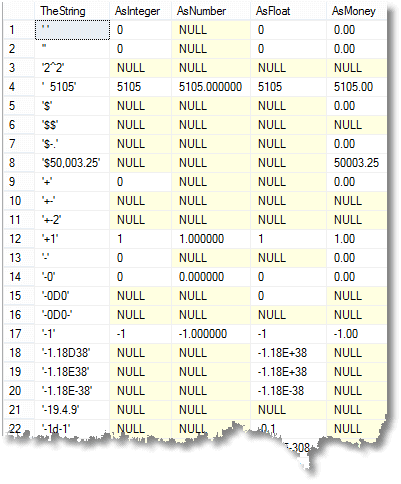 When you execute this, you’ll see that some strings will successfully convert to a number type other than integer, which can then be converted to an integer. The same is true in other directions. If, therefore, you want to get the maximum of success in your data you will need to put in some logic to convert first to the most accommodating format and thence to your target format. You could lose precision or get an overflow error! You’ll also want to define the type of integer and numeric to correspond with your requirements. Things can get more complex when you use Try_Parse() to import dates.
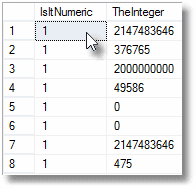
Here is an obvious example where such a tactic is excellent and appropriate. A lot of integer data comes from the real world with commas. Rather than strip them out, you can parse them.
|
1 2 3 4 5 6 7 8 |
SELECT --demonstrate a two-stage conversion IsNumeric(number) AS IsItNumeric, Coalesce( Try_Convert(INT, Number), Try_Convert(INT,Try_Convert(money, Number)), NULL) AS TheInteger FROM (VALUES(N'2,147,483,646'),(N'376,765'),(N'2,000,000,000'),(N'49,586'), (N'0'),(N','),(N'2147483646'),(N'475'))test(number) |
 Another great advantage of the Try_Convert(), Try_Cast() and Try_Parse() datatypes over IsNumeric() is that they check for overflow as well as well as whether it represents a number of that datatype. This test confirms it
|
1 2 3 4 5 6 |
SELECT --demonstrate that Try_Convert() checks for overflow IsNumeric(number), CASE WHEN Try_Convert(INT, Number) IS NOT NULL --is it an int? THEN Convert(INT, Number) ELSE NULL END AS AsInteger FROM (VALUES(N'5555'),(N'55555'),(N'555555'),(N'5555555'), (N'55555555'),(N'555555555'),(N'55555555555'),(N'555555555555'))test(number) |
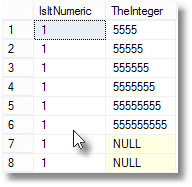 To use the wildcard matches for this purpose, as in our previous example, isn’t possible. We can get a rough idea by counting the digits and then matching the most significant digit, but it isn’t that accurate!
BIGINTs range from -9,223,372,036,854,775,808) to 9,223,372,036,854,775,807, INTEGERs go from -2,147,483,648 to 2,147,483,647, whereas SMALLINTs range from -32,768 to 32,767 Bytes and lastly TINYINTs just go from 0 to 255. This means that you’d have to construct a string check accordingly, remembering the complications of sign. It would usually be simpler to upgrade to SQL Server 2012!
But I want to use my own rules!
You’ll agree that IsNumeric() is liberal with what it considers to be an Integer, Numeric, Float or Money datatype. This is because TRY_Convert(), Try_Parse() and Try_Cast() all obey more or less the same liberal rules. If you want something stricter, then you’ll need to combine the LIKE wildcard techniques with TRY_Convert(). As an example, this query disallows blank strings or + signs as meaning zero as well as anything else that cannot be converted into an integer.|
1 2 3 4 5 6 7 8 |
SELECT ''''+number+'''', TheInteger FROM (SELECT number, CASE WHEN Stuff(LTrim(Number),1,1,'') NOT LIKE N'%[^0123456789]%'--is it an integer AND (LTrim(number) LIKE N'[-+][0123456789]%' COLLATE Latin1_General_BIN OR LTrim(number) LIKE N'[0123456789]%' COLLATE Latin1_General_BIN) THEN Try_Convert(INTEGER,number) ELSE NULL END AS TheInteger FROM #testData)TD WHERE TheInteger IS NOT null |
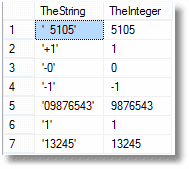 Likewise, you might feel it unreasonable that an amount should be specified entirely without any number, just a currency sign. That is cool. This would do the trick
|
1 2 3 4 5 6 7 8 9 10 11 |
SELECT ''''+number+'''' AS TheString, TheMoneyAmount FROM (SELECT number, CASE WHEN (Stuff(LTrim(Number),1,1,'') NOT LIKE '%[^-+.,0123456789]%'--is it money? AND Number NOT LIKE '%.%.%' AND Number NOT LIKE '%[-+.]%[-+]%')--just one decimal point AND Number NOT LIKE '%[0123456789][-+][0123456789]%'-- sign in the middle AND (Left(LTrim(Number),1) LIKE N'[$¢£¤¥৲৳฿៛₠₡₢₣₤₥₦₧₨₩₪₫€₭₮₯₰₱﷼﹩$¢£¥₩]' COLLATE Latin1_General_BIN OR (Left(LTrim(Number),1) LIKE N'[-.\+0123456789]' COLLATE Latin1_General_BIN)) AND Number LIKE N'%[0123456789]%'--at least one number THEN Try_Convert(Money,number) ELSE NULL END AS TheMoneyAmount FROM #testData)TD WHERE TheMoneyAmount IS NOT NULL |
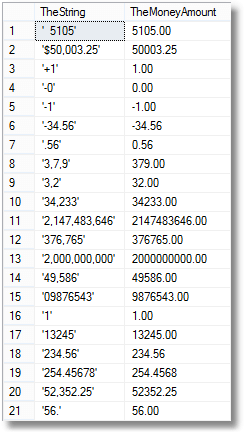 I hope that this makes the point that when you are filtering your input to ensure that correctly formed numbers are imported and anything that isn’t right is saved for amendment, you get a large measure of control by combining the two techniques
Dates
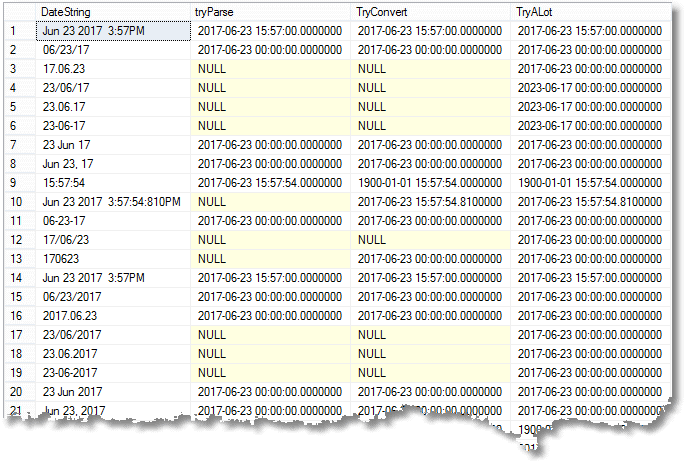
I haven’t mentioned dates, because this article is on the theme of IsNumeric() but the Try_Convert() function is a wonderful way of reading dates that are in a number of different formats. The SQL is scary, but so is the task of inputting dates successfully into SQL Server. This shows how it is done, but you may wish to vary the order in which you do the attempts according to your culture. What it shows is how you can do quite well with Try_Parse, even better with Try_Convert. But you can ace it with a coalesce function with a series of attempts. You would order those Try_Convert attempts in decreasing order of likelihood and with the correct orientation of the year for your culture and data before you try the reverse!|
1 2 3 4 5 6 7 8 9 10 11 12 13 14 15 16 17 18 19 20 21 22 23 24 25 |
SELECT DateString, Try_Parse(DateString AS datetime2 USING 'en-Uk') AS tryParse, Try_Convert(DATETIME2,DateString) AS TryConvert, Coalesce( Try_Convert(DATETIME2,DateString,0), Try_Convert(DATETIME2,DateString,1), Try_Convert(DATETIME2,DateString,2), Try_Convert(DATETIME2,DateString,3), Try_Convert(DATETIME2,DateString,4), Try_Convert(DATETIME2,DateString,5), Try_Convert(DATETIME2,DateString,6), Try_Convert(DATETIME2,DateString,7), Try_Convert(DATETIME2,DateString,8), Try_Convert(DATETIME2,DateString,9), Try_Convert(DATETIME2,DateString,10),Try_Convert(DATETIME2,DateString,11), Try_Convert(DATETIME2,DateString,12), Try_Convert(DATETIME2,DateString,101), Try_Convert(DATETIME2,DateString,102), Try_Convert(DATETIME2,DateString,103),Try_Convert(DATETIME2,DateString,104), Try_Convert(DATETIME2,DateString,105), Try_Convert(DATETIME2,DateString,106),Try_Convert(DATETIME2,DateString,107), Try_Convert(DATETIME2,DateString,108), Try_Convert(DATETIME2,DateString,109), Try_Convert(DATETIME2,DateString,110),Try_Convert(DATETIME2,DateString,111), Try_Convert(DATETIME2,DateString,112), Try_Convert(DATETIME2,DateString,113),Try_Convert(DATETIME2,DateString,114), Try_Convert(DATETIME2,DateString,120), Try_Convert(DATETIME2,DateString,121),Try_Convert(DATETIME2,DateString,126), Try_Convert(DATETIME2,DateString,127), Try_Convert(DATETIME2,DateString,130)) From (values( N'Jun 23 2017 3:57PM' ),(N'06/23/17' ),(N'17.06.23' ),( '23/06/17' ),(N'23.06.17' ), (N'23-06-17' ),(N'23 Jun 17' ),(N'Jun 23, 17' ),(N'15:57:54' ),(N'Jun 23 2017 3:57:54:810PM' ), (N'06-23-17' ),(N'17/06/23' ),(N'170623' ),(N'Jun 23 2017 3:57PM' ),(N'06/23/2017' ), (N'2017.06.23' ),(N'23/06/2017' ),(N'23.06.2017' ),(N'23-06-2017' ),(N'23 Jun 2017' ), (N'Jun 23, 2017' ),(N'15:57:54' ),(N'Jun 23 2017 3:57:54:810PM' ),(N'06-23-2017' ), (N'2017/06/23' ),(N'20170623' ),(N'23 Jun 2017 15:57:54:810' ),(N'15:57:54:810' ), (N'2017-06-23 15:57:54' ),(N'2017-06-23 15:57:54.810' ),(N'2017-06-23T15:57:54.810' ), (N'2017-06-23T15:57:54.810' ),(N'29 رمضان 1438 3:57:54:810PM' ) )sample(dateString) |
|
1 |
),(N'$'),(N'$-.'),(N'$50,003.25'),(N'+'),(N'+-'),(N'+-2'), (N'+1'),(N'-'),(N'-0'),(N'-0D0'),(N'-0D0-'),(N'-1'),(N'-1.18D38'),(N'-1.18E38'),(N'-1.18E-38'), (N'-19.4.9'),(N'-1d-1'),(N'-2.23E-308'),(N'-3.40E+38'),(N'-34.56'),(N'.'),(N'.-99'),(N'.56'), (N'3,7,9'),(N'3,2'),(N'34,233'),(N'2,147,483,646'),(N'376,765'),(N'2,000,000,000'),(N'49,586'), (N'/'),(N'09876543'),(N'1'),(N'1+1'),(N'1.18E-38'),(N'1.79D+308'),(N'1.79E+308'),(N'13245'), (N'1d1'),(N'1e'),(N'1e1'),(N'2.23E-308'),(N'234.56'),(N'254.45678'),(N'3 4'),(N'3.40E+38'), (N'4.56.5'),(N'52,352.25'),(N'56--4'),(N'56.'),(N'56..'),(N'5D105'),(N'9-8'),(N'NULL'),(N'\'), (N'_'),(N'd'),(N'e'),(N'e1'),(N'¹'),(N'½'),(N'₠'),(N'₤'),(N'₦'),(N'€'),(N'①'),(N'⒈'),(N'?'), (N'?'),(N'﷼'),(N'﹩'),(N'$'),(N'¢'),(N'£'),(N'¥') |
|
1 |
Now we can see how well IsNumeric() gets it right.
|
1 |
Even if you just wanted a simple yes/no answer about ‘whether a string can be converted to a number, but which datatype we’re not telling you’, then it is more reliable to use …
|
1 |
But I’m on an old version of SQL Server!!
No problem at all. We with grizzled muzzles have been avoiding IsNumeric() for many years and you can use the following code with any old version of SQL Server.|
1 |
|
1 |
When you execute this, you’ll see that some strings will successfully convert to a number type other than integer, which can then be converted to an integer. The same is true in other directions. If, therefore, you want to get the maximum of success in your data you will need to put in some logic to convert first to the most accommodating format and thence to your target format. You could lose precision or get an overflow error! You’ll also want to define the type of integer and numeric to correspond with your requirements. Things can get more complex when you use Try_Parse() to import dates.
Here is an obvious example where such a tactic is excellent and appropriate. A lot of integer data comes from the real world with commas. Rather than strip them out, you can parse them.
|
1 |
Another great advantage of the Try_Convert(), Try_Cast() and Try_Parse() datatypes over IsNumeric() is that they check for overflow as well as well as whether it represents a number of that datatype. This test confirms it
|
1 |
To use the wildcard matches for this purpose, as in our previous example, isn’t possible. We can get a rough idea by counting the digits and then matching the most significant digit, but it isn’t that accurate!
BIGINTs range from -9,223,372,036,854,775,808) to 9,223,372,036,854,775,807, INTEGERs go from -2,147,483,648 to 2,147,483,647, whereas SMALLINTs range from -32,768 to 32,767 Bytes and lastly TINYINTs just go from 0 to 255. This means that you’d have to construct a string check accordingly, remembering the complications of sign. It would usually be simpler to upgrade to SQL Server 2012!
But I want to use my own rules!
You’ll agree that IsNumeric() is liberal with what it considers to be an Integer, Numeric, Float or Money datatype. This is because TRY_Convert(), Try_Parse() and Try_Cast() all obey more or less the same liberal rules. If you want something stricter, then you’ll need to combine the LIKE wildcard techniques with TRY_Convert(). As an example, this query disallows blank strings or + signs as meaning zero as well as anything else that cannot be converted into an integer.|
1 |
Likewise, you might feel it unreasonable that an amount should be specified entirely without any number, just a currency sign. That is cool. This would do the trick
|
1 |
I hope that this makes the point that when you are filtering your input to ensure that correctly formed numbers are imported and anything that isn’t right is saved for amendment, you get a large measure of control by combining the two techniques
Dates
I haven’t mentioned dates, because this article is on the theme of IsNumeric() but the Try_Convert() function is a wonderful way of reading dates that are in a number of different formats. The SQL is scary, but so is the task of inputting dates successfully into SQL Server. This shows how it is done, but you may wish to vary the order in which you do the attempts according to your culture. What it shows is how you can do quite well with Try_Parse, even better with Try_Convert. But you can ace it with a coalesce function with a series of attempts. You would order those Try_Convert attempts in decreasing order of likelihood and with the correct orientation of the year for your culture and data before you try the reverse!|
1 |
FAQs
1. Why does SQL Server IsNumeric return unexpected results?
IsNumeric returns 1 if the input could be converted to at least one numeric type – which includes types developers often don’t want. Currency-formatted values (‘$100’), values with commas (‘1,000’), scientific notation (‘1E5’), and values with multiple leading signs (‘+-10’) all return IsNumeric = 1 because SQL Server considers them valid money, numeric, or float values respectively. When downstream code then tries CAST(@x AS INT), many of those values fail. IsNumeric answers ‘could this be ANY numeric?’ when the caller usually wants ‘could this be THE SPECIFIC numeric type I need?’ The mismatch is the root cause of most IsNumeric bugs.
2. What is the difference between IsNumeric and TRY_CAST in SQL Server?
IsNumeric returns a bit: 1 if the string is convertible to some numeric type, 0 otherwise – and the ‘some numeric type’ part is the problem. TRY_CAST and TRY_CONVERT return the converted value if conversion to the specific requested type succeeds, NULL if it fails. So TRY_CAST(‘$100’ AS INT) returns NULL (cast fails), while IsNumeric(‘$100’) returns 1 (looks numeric in the money sense). TRY_CAST also gives you the value directly, removing the redundant convert-after-validation step that IsNumeric requires. TRY_CAST was introduced in SQL Server 2012 and is the modern replacement for IsNumeric in virtually all cases.
3. How do I validate that a string is an integer in SQL Server?
Use TRY_CAST(@string AS INT) and check for NULL. If the result is not NULL, the string is a valid integer (and you have the converted value ready to use). On SQL Server 2012+: SELECT CASE WHEN TRY_CAST(@s AS INT) IS NOT NULL THEN ‘valid’ ELSE ‘invalid’ END. On older versions, use a LIKE-based check: CASE WHEN @s NOT LIKE ‘%[^0-9]%’ AND @s NOT LIKE ” AND LEN(@s) BETWEEN 1 AND 10 THEN ‘valid’ ELSE ‘invalid’ END – this handles only positive integers; add handling for the sign and length for full coverage. Do NOT use IsNumeric alone – it accepts too many variants.
4. When is IsNumeric still useful in SQL Server?
IsNumeric remains useful when you genuinely want to accept any string that SQL Server considers numeric-ish – for example, when loading a mixed column where currency, scientific-notation, and plain-number values all need to be accepted as valid, with actual conversion handled individually by downstream logic that inspects the specific format. This is niche. For validating that a string can be cast to a specific numeric type (INT, DECIMAL, MONEY, FLOAT), TRY_CAST of that type is always the right choice. For accepting any numeric-ish input and then coercing with follow-up logic, IsNumeric remains a legitimate first-pass filter – but even then, TRY_CAST AS MONEY often works as a more reliable substitute.
This document contains proprietary information and is protected by copyright law.
Copyright © 2026 Red Gate Software Limited. All rights reserved







Load comments