

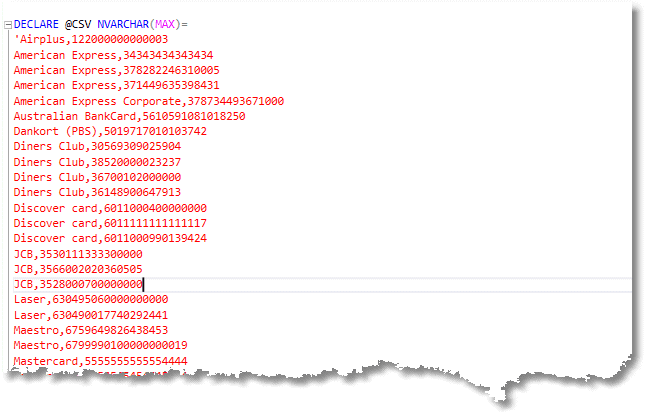
 … A lot of rows omitted here …
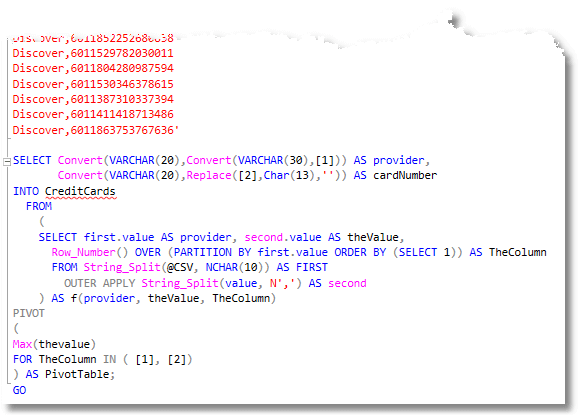 We just need to know the distribution. You must imagine that these cards are from a production system that you will never see. In reality, you would just receive from the Ops people the Generation Table #GenerationTable so you wouldn’t need access to the actual data
|
1 2 3 4 5 6 7 8 9 10 11 12 13 14 15 16 17 18 19 |
/* We create a table that gives us the distribution of the bank prefix of the number, for each length of card. This is the number of times that each 6-character Bank ID prefix occurs with a particular length It also calculates the range so as to be able to pick a random number right across the range. */ CREATE table #GenerationTable (Prefix char(6), Thelength INT, TheFrequency int, TheRange int) INSERT INTO #GenerationTable (Prefix, Thelength, TheFrequency, TheRange) SELECT f.IIN, --the prefix f.TheLength, --the length ofd the credit card f.frequency, --how often it occurs, Sum(f.frequency) OVER (ORDER BY f.IIN,TheLength)--the cumulative total (giving the range) FROM ( SELECT Count(*) AS frequency, Len(CardNumber) AS TheLength, Left(CreditCards.cardNumber, 6) AS IIN FROM CreditCards GROUP BY Left(CreditCards.cardNumber, 6),Len(CardNumber) ) AS f(frequency, TheLength, IIN); GO |
|
1 2 3 4 5 6 7 |
CREATE TABLE SpoofedCreditCards(Card CHAR(20)) DECLARE @topOfRange INT = (SELECT Sum(Thefrequency) FROM #GenerationTable) INSERT INTO SpoofedCreditCards(Card) SELECT dbo.ValidCardNumber(Prefix,TheLength) FROM #GenerationTable cross JOIN Random WHERE Convert(INT,Number*@topOfRange)+1 BETWEEN (TheRange-TheFrequency)+1 AND TheRange |
|
1 2 3 4 5 6 7 8 9 10 11 12 13 14 15 |
SELECT TheName.Fullname, TheCard.card FROM ( SELECT Coalesce(Person.Title + ' ', '') + Person.FirstName + Coalesce(' ' + Person.MiddleName + ' ', ' ') + Person.LastName + Coalesce(' ' + Person.Suffix, ''), Row_Number() OVER (ORDER BY NewId() ASC) FROM AdventureWorks2016.Person.Person ) AS TheName(Fullname, TheKey) INNER JOIN ( SELECT SpoofedCreditCards.Card, Row_Number() OVER (ORDER BY NewId()) FROM SpoofedCreditCards ) AS TheCard(card, TheKEY) ON TheName.TheKey = TheCard.TheKEY; |
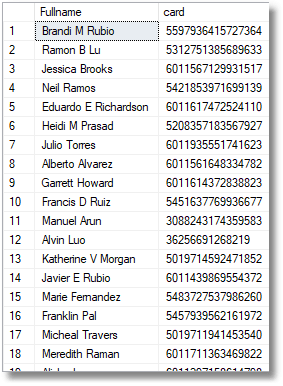 To do this, you would need to start with a view that gives you a twenty digit number when combined with the six-digit prefix
|
1 2 3 4 5 6 7 8 9 10 11 12 13 14 15 16 17 |
CREATE VIEW TwentyDigitNumber /* fourteen digit strings are returned */ AS SELECT Char(Ascii('0') + (Rand() * 9 + 1)) + Char(Ascii('0') + (Rand() * 9 + 1)) + Char(Ascii('0') + (Rand() * 9 + 1)) + Char(Ascii('0') + (Rand() * 9 + 1)) + Char(Ascii('0') + (Rand() * 9 + 1)) + Char(Ascii('0') + (Rand() * 9 + 1)) + Char(Ascii('0') + (Rand() * 9 + 1)) + Char(Ascii('0') + (Rand() * 9 + 1)) + Char(Ascii('0') + (Rand() * 9 + 1)) + Char(Ascii('0') + (Rand() * 9 + 1)) + Char(Ascii('0') + (Rand() * 9 + 1)) + Char(Ascii('0') + (Rand() * 9 + 1)) + Char(Ascii('0') + (Rand() * 9 + 1)) + Char(Ascii('0') + (Rand() * 9 + 1)) AS numbers; GO |
|
1 2 3 4 5 6 7 8 9 10 11 12 13 14 15 16 17 18 19 20 21 22 23 24 25 26 27 28 29 30 31 32 33 34 35 36 37 38 39 40 41 42 43 44 45 46 47 48 49 50 51 52 53 54 55 56 57 58 59 60 61 62 63 64 65 66 67 68 69 70 71 72 73 74 75 76 77 78 79 80 81 82 83 84 85 86 87 88 89 90 91 92 93 |
CREATE OR ALTER FUNCTION dbo.ValidCardNumber (@ProviderPrefix CHAR(6),--the six characters that denote the provider @length INT --between 13 and 19 digits including the provider /** Summary: > This function returns a valid credit card number, including the provider string or ANSI prefix supplied as a parameter. It is valid only in the sense that the card will past the Luhn Checksum test. It is generated by random numbers so is unlikely to be a genuine credit card number! The Luhn Algorithm (Modulus 10 Algorithm) is only a checksum formula (ISO/IEC 7812-1) that is an extra verification for human errors. The ANSI prefix (AKA the BIN, IIN,or BAN and PAN prefix) is the “primary account number” for credit card processing. Except for the first digit, the contents varies from provider to provider. The information cannot be used to identify a personal account but reveals the bank identity and country of issue and could indicate the currency being used. This information is company confidential. A very obscure prefix could potentially identify an individual when joined with other data but this is unlikely e.g. 540221 = ANZ National Bank ANZ Low Interest MasterCard Credit Card 490603 = BC VISA Credit Card issued by Industrial Bank of Korea 374671 = Blue American Express Card 630490 = Bank of Ireland Laser/Maestro debit card Author: Phil Factor Date: 06/08/2018 Database: PhilFactor Examples: - Select * from stuff - Select top 100 percent stuff Returns: > nothing **/ ) RETURNS VARCHAR(20) --between 13 and 19 digits AS BEGIN DECLARE @wideNumber CHAR(20), @checksum INT, @lastdigit INT, @AlteredDigit INT; IF @length > 20 OR @length < 0 SELECT @length = 16; IF @ProviderPrefix LIKE '%[^0-9]%' SELECT @ProviderPrefix = numbers FROM TwentyDigitNumber; SELECT @wideNumber = CASE WHEN @length % 2 = 1 THEN '0' ELSE '' END + @ProviderPrefix + Left(numbers, @length - Len(@ProviderPrefix)) + '00000000000000000000' FROM TwentyDigitNumber; SELECT @checksum = CASE WHEN @wideNumber LIKE '%[^0-9]%' THEN -2 WHEN @wideNumber IS NULL THEN -1 ELSE + 2 * cast(substring(@wideNumber, 1, 1) AS TINYINT) / 10 + 2 * cast(substring(@wideNumber, 1, 1) AS TINYINT) % 10 + cast(substring(@wideNumber, 2, 1) AS TINYINT) + 2 * cast(substring(@wideNumber, 3, 1) AS TINYINT) / 10 + 2 * cast(substring(@wideNumber, 3, 1) AS TINYINT) % 10 + cast(substring(@wideNumber, 4, 1) AS TINYINT) + 2 * cast(substring(@wideNumber, 5, 1) AS TINYINT) / 10 + 2 * cast(substring(@wideNumber, 5, 1) AS TINYINT) % 10 + cast(substring(@wideNumber, 6, 1) AS TINYINT) + 2 * cast(substring(@wideNumber, 7, 1) AS TINYINT) / 10 + 2 * cast(substring(@wideNumber, 7, 1) AS TINYINT) % 10 + cast(substring(@wideNumber, 8, 1) AS TINYINT) + 2 * cast(substring(@wideNumber, 9, 1) AS TINYINT) / 10 + 2 * cast(substring(@wideNumber, 9, 1) AS TINYINT) % 10 + cast(substring(@wideNumber, 10, 1) AS TINYINT) + 2 * cast(substring(@wideNumber, 11, 1) AS TINYINT) / 10 + 2 * cast(substring(@wideNumber, 11, 1) AS TINYINT) % 10 + cast(substring(@wideNumber, 12, 1) AS TINYINT) + 2 * cast(substring(@wideNumber, 13, 1) AS TINYINT) / 10 + 2 * cast(substring(@wideNumber, 13, 1) AS TINYINT) % 10 + cast(substring(@wideNumber, 14, 1) AS TINYINT) + 2 * cast(substring(@wideNumber, 15, 1) AS TINYINT) / 10 + 2 * cast(substring(@wideNumber, 15, 1) AS TINYINT) % 10 + cast(substring(@wideNumber, 16, 1) AS TINYINT) + 2 * cast(substring(@wideNumber, 17, 1) AS TINYINT) / 10 + 2 * cast(substring(@wideNumber, 17, 1) AS TINYINT) % 10 + cast(substring(@wideNumber, 18, 1) AS TINYINT) + 2 * cast(substring(@wideNumber, 19, 1) AS TINYINT) / 10 + 2 * cast(substring(@wideNumber, 19, 1) AS TINYINT) % 10 + cast(substring(@wideNumber, 20, 1) AS TINYINT) END; SELECT @AlteredDigit = CASE WHEN @length % 2 = 1 THEN @length + 1 ELSE @length END; SELECT @lastdigit = Cast(Substring(@wideNumber, @AlteredDigit, 1) AS TINYINT); IF (@checksum % 10 <= @lastdigit) SELECT @lastdigit = @lastdigit - (@checksum % 10); ELSE SELECT @lastdigit = @lastdigit + (10 - (@checksum % 10)); IF @checksum % 10 <> 0 SELECT @wideNumber = Stuff(@wideNumber, @AlteredDigit, 1, Char(Ascii('0') + @lastdigit)); RETURN Substring(@wideNumber, 1 + (@length % 2), @length); END; GO |
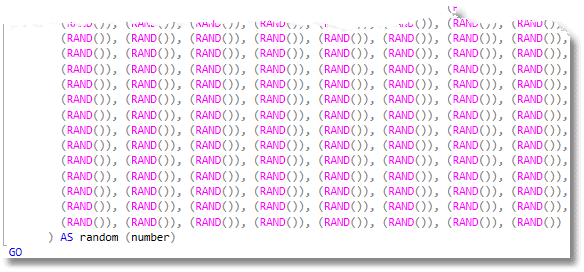
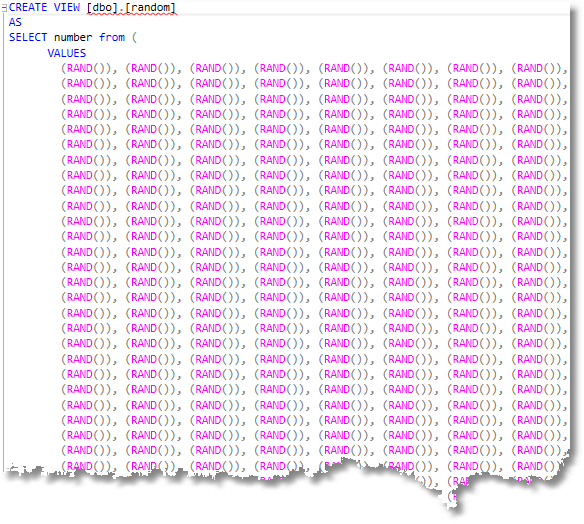 … and so on down to the end … (it avoids iteration and is fast)
 We can now compare the distribution of the old and new data, using the routine published here in ‘Visual Checks on How Data is Distributed in SQL Server’
|
1 2 3 4 5 6 7 8 9 10 11 12 13 14 15 16 17 18 |
DECLARE @FirstVariable IndependentVariable; --a simple table of numbers INSERT INTO @FirstVariable (number) SELECT Convert(FLOAT,(Left(CreditCards.cardnumber,6))) FROM CreditCards SELECT ColumnHistogram.line AS 'Original Modified date' FROM dbo.ColumnHistogram(@FirstVariable) ORDER BY ColumnHistogram.y DESC; GO DECLARE @SecondVariable IndependentVariable; --a simple table of numbers INSERT INTO @SecondVariable (number) SELECT Convert(FLOAT,Left(Card,6)) FROM SpoofedCreditCards; SELECT ColumnHistogram.line AS 'Spoofed Modified date' FROM dbo.ColumnHistogram(@SecondVariable) ORDER BY ColumnHistogram.y DESC; GO |
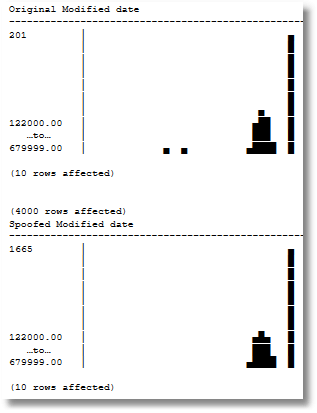 Can we improve on this in order to get a smoother distribution of provider strings? At the moment we can’t create a six-digit provider string that isn’t in the original data. To do so isn’t easy, because each provider uses the string in a different way, and not every combination of digit is used even for the individual provider. It would require maintenance as well because provider strings can come and so, or change.
This following routine is designed for generating lists. You can check the routine that creates the card by using an existing routine, dbo.fnIsValidCard, that I wrote a while back in The Luhn Algorithm in SQL .
|
1 2 3 4 5 |
SELECT CreditCards.provider, CreditCards.cardNumber FROM creditcards WHERE dbo.fnIsValidCard( dbo.ValidCardNumber(CreditCards.cardNumber, Len(CreditCards.cardNumber)) ) = 0; |
Downloads
BigRandomNumberView SampleCreditCardsFAQs
1. How do I generate fake credit card numbers in SQL Server for test data?
Three elements make a fake card number look realistic: correct length (13-19 digits depending on brand), valid-looking prefix (4 for Visa, 5 or 2 for Mastercard, 34 or 37 for Amex, 6011 or 65 for Discover), and a valid Luhn checksum (the last digit chosen so the whole number passes the Luhn algorithm). In SQL Server, implement the Luhn algorithm as a scalar function, generate random digits for all positions except the last, compute the Luhn-valid final digit, and prepend a brand prefix. Combine with a BigRandomNumberView (as shown in the article) to produce many cards at once. The resulting numbers pass basic validation but don’t correspond to real issuing-bank BINs.
2. What is the Luhn algorithm?
The Luhn algorithm is a simple checksum used to validate credit card numbers, IMEI numbers, national identification numbers, and similar identifiers. For a number, starting from the rightmost digit: double every second digit; if doubling produces a two-digit result, sum its digits; sum all the results; the total modulo 10 must equal zero. For a number being generated, compute the same sum for all digits except the last, then set the last digit so the total is congruent to zero modulo 10. The algorithm catches most single-digit errors and many transposition errors – it’s the ‘first line of defence’ against typos in card number entry, not a security measure.
3. Is it legal to generate fake credit card numbers for testing?
Generating Luhn-valid fake card numbers for use in test environments is legitimate and common practice – payment processors and major card brands publish test card numbers specifically for this purpose (Visa 4111 1111 1111 1111, Mastercard 5555 5555 5555 4444, etc.). Using those published test numbers is the safest approach for integration testing. Generating your own fake numbers is fine for populating test databases where you just need plausible-looking data that passes format validation; the numbers should not match real BIN prefixes of active issuing banks, should not be used to attempt actual transactions (which would be fraud), and should never appear in production systems where they might be mistaken for real cards.
4. What are the brand-specific credit card number formats?
The major brands have distinguishing prefix ranges and lengths: Visa – 16 digits starting with 4 (also 13 and 19 in rare cases); Mastercard – 16 digits starting with 51-55 (or 2221-2720 in newer ranges); American Express – 15 digits starting with 34 or 37; Discover – 16 digits starting with 6011 or 65, or 14-19 digits in newer ranges; JCB – 16 digits starting with 3528-3589; Diners Club – 14 digits starting with 300-305, 36, or 38. All use the Luhn algorithm for the final-digit checksum. For test data generation, pick the brand and length you need, generate random digits within the brand’s prefix and length, and Luhn-compute the final digit.
This document contains proprietary information and is protected by copyright law.
Copyright © 2026 Red Gate Software Limited. All rights reserved







Load comments