


Duplicate records are a costly problem in any system that stores people’s names. “Jon Smith” vs. “John Smith.” “Liz” vs. “Elizabeth.” “Renée” vs. “Renee.” To a human, these are obviously the same person. To an exact string comparison, they’re four different records. The fix is to stop asking “do these names match?” and start asking “how confident am I that they refer to the same person?”
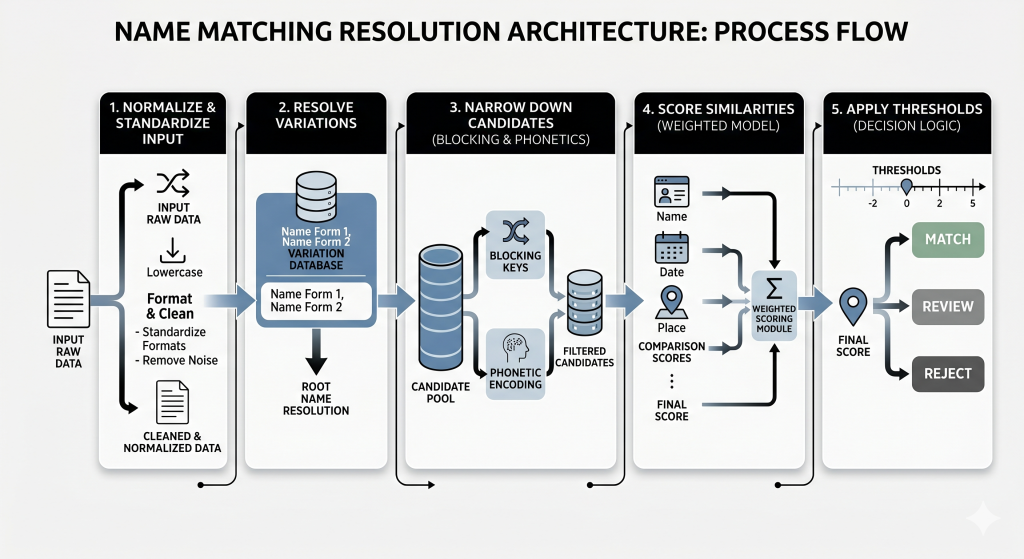
This article walks through a practical C# pipeline to do exactly that: normalize input, resolve nicknames, narrow candidates with blocking and phonetics, score similarity with Jaro-Winkler, and apply thresholds to decide what to accept, review, or reject.
A brief introduction
If you’ve worked with real-world data for any length of time, you’ve probably run into this problem: the same person shows up multiple times in your system… but with slightly different names.
Maybe it’s “Jon Smith” vs. “John Smith.” Maybe it’s “Liz” vs. “Elizabeth.” Or maybe it’s something more subtle, like punctuation, casing, or a missing accent mark.
These differences, albeit minor, do add up over time – leading to duplicate records, missed matches, and a growing amount of cleanup work. It’s all normal data, but it’s entered inconsistently.
Names, for example – as mentioned, they naturally vary depending on how they’re entered, stored or translated across systems. Typos, inconsistent formatting, etc. Unfortunately, exact string comparisons just aren’t flexible enough to deal with these issues.
The trick is to change your thinking from being all about exact matches, to how confident you are that, for example, two records do indeed refer to the same person. In this article, I’ll explore that shift from exact-matching to confidence-based matching in more detail.
To do so, I’ll demonstrate a practical, multi-stage approach you can implement in your own systems. The idea is to combine a few simple techniques into a pipeline that’s both effective and scalable:
- Normalize and standardize the input
- Resolve known variations (like nicknames)
- Narrow down candidates efficiently using blocking and phonetics
- Score similarities using a weighted model
- Apply thresholds to decide what to match, review, or reject
By the end, you’ll have a clear framework you can adapt for your own use case. Hopefully, you’ll also learn a thing or two along the way. Let’s start with some basic cleanup, and the Normalize function.
The Normalize function
To get started, remove noise words such as punctuation, honorifics, and generation makers, and convert everything to a common case.
How you do this is up to you – consistency is the main key – but in practice you should use culture-invariant case-folding (for example, ToUpperInvariant())), so that comparisons behave the same regardless of server locale.
You may also have diacritic marks to consider. Chloë / Zoë, Renée / René, André, José, etc. Any of these names could easily have their diacritic marks removed in one source but not another and still represent the same name. To remove these marks, we can use a function like this:
|
1 2 3 4 5 6 7 8 9 10 11 12 13 14 15 16 17 18 19 |
public static string RemoveDiacritics(string text) { if (string.IsNullOrWhiteSpace(text)) return text; var normalized = text.Normalize(NormalizationForm.FormD); var builder = new StringBuilder(normalized.Length); foreach (var c in normalized) { if (CharUnicodeInfo.GetUnicodeCategory(c) !=UnicodeCategory.NonSpacingMark) { builder.Append(c); } } return builder.ToString().Normalize(NormalizationForm.FormC); } |
The magic happens when we initialize the normalized variable. FormD will split a composed Unicode character into two parts: the base letter, and the accent mark. The loop then rebuilds the string explicitly skipping the accent marks. The last thing we do is convert back to FormC.
While builder.ToString() and the return value may look alike, they are not the same at the binary level. Converting back to FormC is critical.
We can add this to a complete Normalize function:
|
1 2 3 4 5 6 7 8 9 10 11 12 13 14 15 16 17 18 19 20 21 22 23 24 25 26 27 28 29 30 31 32 33 34 35 36 37 38 39 40 41 42 43 44 45 46 47 48 49 50 51 52 53 54 55 56 57 58 59 60 61 62 63 64 65 66 67 68 69 70 71 72 |
private static readonly HashSet<string> PersonNoiseWords = new HashSet<string>(StringComparer.OrdinalIgnoreCase) { // 1. Prefixes (Titles) "MR", "MRS", "MS", "MISS", "DR", "PROF", "REV", "FR", "SR", "SRA", "SIR", "MADAM", "HON", "CAPT", "MAJ", "COL", "GEN", "LT", // 2. Suffixes (Generational & Professional) "JR", "SR", "II", "III", "IV", "ESQ", "PHD", "MD", "DDS", "CPA" }; public static string NormalizePersonName(string rawName) { if (string.IsNullOrWhiteSpace(rawName)) return string.Empty; // Step 1: Remove Diacritics var text = RemoveDiacritics(rawName); // Step 2: Uppercase for comparison safety text = text.ToUpperInvariant(); // Step 3: Punctuation Cleanup // We want to transform "O'Connor" -> "OCONNOR" // but "Mary-Jane" -> "MARY JANE" var sb = new StringBuilder(text.Length); char lastChar = ' '; foreach (char c in text) { if (char.IsLetterOrDigit(c)) { sb.Append(c); lastChar = c; } else if (c == '\'') { // Eat the apostrophe (O'Neil -> ONEIL) continue; } else { // Turn all other punctuation (hyphens, periods, commas) // into a single space if (lastChar != ' ') { sb.Append(' '); lastChar = ' '; } } } // Step 4: Tokenize & Filter Noise string cleanedString = sb.ToString(); if (string.IsNullOrWhiteSpace(cleanedString)) return string.Empty; var tokens = cleanedString.Split(' ', StringSplitOptions.RemoveEmptyEntries); var finalTokens = new List<string>(tokens.Length); foreach (var token in tokens) { // If token is a known noise word -> Skip it if (PersonNoiseWords.Contains(token)) continue; // OTHERWISE -> Keep it finalTokens.Add(token); } return string.Join(" ", finalTokens); } |
If you feel like you might see some churn in the noise words, feel free to store the list in the database so that you can update that logic without having to recompile and deploy code.
Database considerations
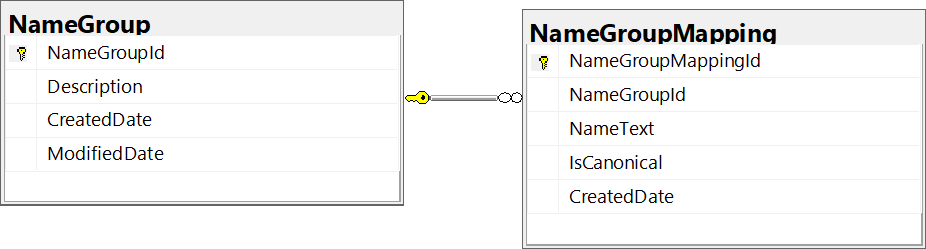
Normalization solves a lot of problems for our name comparisons, but we still have some problems to work through. Normalization will not help us with tracking nicknames, so we’ll need a lookup table here. The relationship between nicknames is intuitively a many-to-many relationship, but they are also often transitive.
For this example, we’ll use two tables to follow a Name Group Model. The tables can be rather simple:
We can get a catalog of configured names with queries like this:
|
1 2 3 4 5 6 7 |
SELECT description, nametext, iscanonical FROM namegroup INNER JOIN namegroupmapping ON namegroup.namegroupid = namegroupmapping.namegroupid WHERE namegroup.namegroupid = 1 |
And you can search for variations on a target name and easily find the canonical name with a query like this:
|
1 2 3 4 5 6 7 |
SELECT NickName.NameText FROM namegroupmapping InputName JOIN namegroupmapping NickName ON InputName.namegroupid = NickName.namegroupid WHERE InputName.nametext = 'CHUCK' -- Your input AND NickName.IsCanonical =1 ORDER BY NickName.iscanonical DESC; |
The NameGroup and NameGroupMapping tables only need to be populated with known nicknames that you want to track. As you discover new nicknames (or similar variations), you can easily update these tables. Maintenance becomes a simple matter of inserting new records with no code changes needed.
If the NameGroupMapping table is properly configured, it should return CHARLES. We can populate it with seed data such as this:
|
1 2 3 4 5 6 7 8 9 10 11 12 13 14 15 16 17 18 19 20 21 22 |
-- Seed data: NameGroup / NameGroupMapping for CHARLES -- Assumptions: -- 1) NameText is stored in UPPERCASE to match normalization -- 2) NameGroupId is an IDENTITY in NameGroup DECLARE @NameGroupId INT; INSERT INTO dbo.NameGroup (Description) VALUES ('CHARLES'); SET @NameGroupId = SCOPE_IDENTITY(); INSERT INTO dbo.NameGroupMapping (NameGroupId, NameText, IsCanonical) VALUES (@NameGroupId, 'CHARLES', 1), (@NameGroupId, 'CHUCK', 0), (@NameGroupId, 'CHARLIE', 0), (@NameGroupId, 'CHAS', 0), (@NameGroupId, 'CHAZ', 0), (@NameGroupId, 'CHIP', 0), (@NameGroupId, 'CHUCKY', 0), (@NameGroupId, 'CARL', 0); |
Then, we can tie it all together with EF access like this:
|
1 2 3 4 5 6 7 8 9 10 11 12 13 14 15 16 17 18 19 20 21 22 23 24 25 26 27 28 29 30 31 32 33 34 35 36 37 38 39 40 |
/// <summary> /// Resolves a nickname to its canonical form. /// </summary> /// <param name="normalizedName">Expects UPPERCASE, /// TRIMMED input (e.g. "CHUCK").</param> /// <returns>The canonical name in UPPERCASE for matching /// (e.g. \"CHARLES\"). Format for display (Title Case) /// at the UI boundary.</returns> public async Task<string> GetCanonicalNameAsync(string normalizedName) { if (string.IsNullOrWhiteSpace(normalizedName)) return normalizedName; var canonicalName = await _context.NameGroupMappings // 1. Filter: Match the already normalized input .Where(input => input.NameText == normalizedName) // 2. Join: Connect to siblings in the same group .Join(_context.NameGroupMappings, input => input.NameGroupId, nickName => nickName.NameGroupId, (input, nickName) => nickName) // 3. Filter: Find the Canonical version .Where(nickName => nickName.IsCanonical) // 4. Select: Grab the name string .Select(nickName => nickName.NameText) // 5. Execute .FirstOrDefaultAsync(); if (string.IsNullOrEmpty(canonicalName)) { // Fallback: If no match found, treat the input as the name. return normalizedName; } // Success: Return the resolved canonical name. return canonicalName; } |
Lookup data
Next, we’ll need lookup data to compare data against. This table has a few subtle points that make it deceptively more complicated than you might initially suspect.
Here’s the DDL (Data Definition Language) for defining this table:
|
1 2 3 4 5 6 7 8 9 10 11 12 13 14 15 16 17 18 19 20 21 22 23 24 25 26 27 28 29 30 31 32 33 34 35 36 37 38 39 |
CREATE TABLE [dbo].[Person] ( -- 1. Identity & Core Data [Id] INT IDENTITY(1,1) NOT NULL, [UserGuid] UNIQUEIDENTIFIER DEFAULT NEWID() NOT NULL, -- Raw Data (What the user actually typed) [RawFirstName] NVARCHAR(100) NOT NULL, [RawLastName] NVARCHAR(100) NOT NULL, [RawMiddleName] NVARCHAR(100) NULL, [DateOfBirth] DATE NULL, [ZipCode] VARCHAR(10) NULL, -- Useful for blocking [Gender] VARCHAR(1) NULL, -- 2. Normalization & Canonicalization Columns -- Populated by your C# 'NameNormalizer' before insert -- Uppercase, trimmed, stripped of accents/punctuation [NormalizedFirstName] VARCHAR(100) NOT NULL, [NormalizedLastName] VARCHAR(100) NOT NULL, -- Stores 'CHARLES' even if Raw is 'Chuck' [CanonicalFirstName] VARCHAR(100) NOT NULL, -- 3. Phonetic Keys (Double Metaphone) -- Populated by your C# 'PhoneticIdentityGenerator' [PhoneticPrimary] VARCHAR(4) NOT NULL, -- e.g. 'SM0' (Smith) [PhoneticSecondary] VARCHAR(4) NULL, -- e.g. 'XMT' (Schmidt alternative) -- 4. Blocking Key (The "Net") -- Application Logic: ZipCode + first 3 chars of NormalizedLastName -- (with sensible fallbacks for null/short values) -- Example: '29601SMY' [BlockingKey] VARCHAR(20) NOT NULL, -- Metadata [CreatedDate] DATETIME2 DEFAULT GETUTCDATE() NOT NULL, [LastUpdated] DATETIME2 DEFAULT GETUTCDATE() NOT NULL, CONSTRAINT [PK_Person] PRIMARY KEY CLUSTERED ([Id] ASC) ); |
We’ll talk more about the Phonetic columns and the BlockingKey shortly.
We want to include the extra demographic data of ZipCode, DateOfBirth, and Gender, to add more context and weight for our confidence score. In your specific scenario, though, you might want different demographic data.
UserGuid can be useful as a stable external identifier for APIs (so you don’t expose sequential IDs). You may also want to include other foreign keys to identify and track the original Person, or maybe even add a Source column to track where the original Person comes from.
In addition to this DDL, we will have key indexes that are critical to the performance we need. Without these, you would still see full table scans or excessive disk reads:
|
1 2 3 4 5 6 7 8 9 10 11 12 13 14 15 16 17 18 19 20 21 22 23 |
-- 1. The Blocking Index (The "Fast Lane") -- This allows your app to grab a small pool of \"candidate\" records quickly. -- We INCLUDE the columns needed for the scoring algorithm, so we don't hit the -- heap again. CREATE NONCLUSTERED INDEX [IX_Person_BlockingKey] ON [dbo].[Person] ([BlockingKey]) INCLUDE ([NormalizedFirstName], [NormalizedLastName], [CanonicalFirstName], [DateOfBirth], [ZipCode]); GO -- 2. The Phonetic Index (The "Sound-Alike" Lane) -- Used when a user searches by name without a Zip Code or when we need to -- broaden the search -- Allows queries like: WHERE PhoneticPrimary = 'SM0' CREATE NONCLUSTERED INDEX [IX_Person_Phonetic] ON [dbo].[Person] ([PhoneticPrimary], [PhoneticSecondary]) INCLUDE ([NormalizedFirstName], [NormalizedLastName], [CanonicalFirstName]); GO -- 3. The Canonical Index (The "Nickname" Lane) -- Used for finding "Elizabeth" when someone searches "Beth" CREATE NONCLUSTERED INDEX [IX_Person_Canonical] ON [dbo].[Person] ([CanonicalFirstName], [NormalizedLastName]) INCLUDE ([RawFirstName]); GO |
Before we can use this as a lookup table, though, we need to make sure that the initial records are populated correctly. We will use a PersonDto like this:
|
1 2 3 4 5 6 7 8 9 10 11 12 13 14 15 16 17 18 19 20 21 22 |
public class PersonDto { public int Id { get; set; } public Guid UserGuid { get; set; } public string RawFirstName { get; set; } public string RawLastName { get; set; } public string RawMiddleName { get; set; } public DateTime? DateOfBirth { get; set; } public string ZipCode { get; set; } public string Gender {get;set;} // Computed Columns public string NormalizedFirstName { get; set; } public string NormalizedLastName { get; set; } public string CanonicalFirstName { get; set; } public string PhoneticPrimary { get; set; } public string PhoneticSecondary { get; set; } public string BlockingKey { get; set; } public DateTime CreatedDate { get; set; } public DateTime LastUpdated { get; set; } } |
Assumption: This retrieval step assumes you have already normalized/canonicalized the incoming name (UPPERCASE) and precomputed its BlockingKey, PhoneticPrimary, and PhoneticSecondary before calling FindCandidatesAsync.
We can query the Person table, and load candidate rows into a PersonDto, using the indexes and filters we built above. Tune minCandidates and maxCandidates to match your data volume and performance needs.
Save 35% on Redgate’s .NET Developer Bundle
Note: the implementation below replaces the candidate list as it broadens (BlockingKey → PhoneticPrimary → PhoneticSecondary). An alternative approach is to union candidates across tiers (and de-duplicate), so you keep earlier matches while expanding the pool.
|
1 2 3 4 5 6 7 8 9 10 11 12 13 14 15 16 17 18 19 20 21 22 23 24 25 26 27 28 29 30 31 32 33 34 35 36 37 38 39 40 41 42 43 44 45 46 47 48 49 50 51 52 53 54 55 56 57 58 59 60 61 62 63 64 65 66 67 68 |
// Candidate retrieval strategy: // 1) Start with BlockingKey (fast + precise) // 2) If too few candidates, widen using PhoneticPrimary // 3) If still too few, widen again using PhoneticSecondary // 4) Cap results so scoring stays cheap public async Task<List<PersonDto>> FindCandidatesAsync( string blockingKey, string phoneticPrimary, string phoneticSecondary, int minCandidates = 10, int maxCandidates = 100, CancellationToken ct = default) { // Pull only the columns needed for downstream scoring // (plus the keys used for filtering) IQueryable<PersonDto> baseQuery = _context.Persons.AsNoTracking() .Select(p => new PersonDto { Id = p.Id, UserGuid = p.UserGuid, RawFirstName = p.RawFirstName, RawLastName = p.RawLastName, RawMiddleName = p.RawMiddleName, DateOfBirth = p.DateOfBirth, ZipCode = p.ZipCode, Gender = p.Gender, NormalizedFirstName = p.NormalizedFirstName, NormalizedLastName = p.NormalizedLastName, CanonicalFirstName = p.CanonicalFirstName, BlockingKey = p.BlockingKey, PhoneticPrimary = p.PhoneticPrimary, PhoneticSecondary = p.PhoneticSecondary }); // Stage 1: BlockingKey var q = baseQuery; if (!string.IsNullOrWhiteSpace(blockingKey)) { q = q.Where(p => p.BlockingKey == blockingKey); } // Materialize early. We may not need to go any further var candidates = await q.Take(maxCandidates).ToListAsync(ct); // Stage 2: widen via Primary phonetic key if (candidates.Count < minCandidates && !string.IsNullOrWhiteSpace(phoneticPrimary)) { candidates = await baseQuery .Where(p => p.PhoneticPrimary == phoneticPrimary) .Take(maxCandidates) .ToListAsync(ct); } // Stage 3: widen again using Secondary (alternate) phonetic key if (candidates.Count < minCandidates && !string.IsNullOrWhiteSpace(phoneticSecondary)) { candidates = await baseQuery .Where(p => p.PhoneticSecondary == phoneticSecondary || p.PhoneticPrimary == phoneticSecondary) // occasional cross-population some encoders only output Primary .Take(maxCandidates) .ToListAsync(ct); } return candidates; } |
Phonetics and double metaphone, explained
Phonetics is the study of sound (specifically speech sounds.) Phonetic algorithms convert a string into standardized phonetic codes. Soundex is an older phonetic algorithm which is well implemented, even in SQL Server, but it has some problems. Safe to say, it’s rather dumb compared to modern algorithms!
What is Soundex?
Soundex was designed primarily for English-language use and never considered the wider context of global data. As a result, it often performs poorly for many non-English surnames and naming conventions.
For starters, it only encodes the first letter and, even after that, only considers one character at a time – ignoring how letter combinations change sounds in wider contexts. The GH combination is a common example: the sound in “night” is completely different from the sound in “tough”, but Soundex treats them the same.
Soundex also suffers from truncation issues. No matter how long the string is, the Soundex value is always one letter followed by three numbers. If the original string is long, the end of the string will generally be ignored.
What is Double Metaphone?
Double Metaphone is different in several key ways. While Soundex returns exactly one four-character code, Double Metaphone returns a Primary and Secondary code.
The Primary will most likely support an English pronunciation, while the Secondary supports an alternate foreign pronunciation. Plus, while Soundex ignores all vowels except the first character, Double Metaphone can consider all vowels as required.
Double Metaphone will also give more accurate matches and fewer false positives. This is why our table and DTO has the two columns/properties: PhoneticPrimary and PhoneticSecondary.
We can use a library such as Lucene.Net to populate the phonetic columns. If you want Double Metaphone specifically, you’ll typically need the analysis package as well.
|
1 |
dotnet add package Lucene.Net.Analysis.Common |
|
1 2 3 4 5 6 7 8 9 10 11 12 13 14 15 16 17 18 19 20 21 22 23 24 25 26 27 28 29 30 31 32 33 34 35 36 37 38 39 40 41 42 43 44 45 46 47 48 49 |
/// <summary> /// Provides phonetic encoding utilities for fuzzy string /// matching and search. /// </summary> public static class PhoneticHelper { /// <summary> /// Generates the primary and alternate Double Metaphone phonetic /// encodings for the given input string. /// </summary> /// <param name="input">The string to encode. Returns a result /// with <see langword="null"/> values if null or whitespace.</param> /// <param name="maxLen">The maximum length of each phonetic code. /// Defaults to <c>4</c>.</param> /// <returns> /// A <see cref="PhoneticResult"/> containing the <c>Primary</c> /// and <c>Alternate</c> Double Metaphone codes, /// or <see langword="null"/> for both if <paramref name="input"/> /// is null or whitespace. /// </returns> public static PhoneticResult GetEncodings(string input, int maxLen = 4) { if (string.IsNullOrWhiteSpace(input)) return new PhoneticResult(null, null); // Create a local instance to avoid locking bottlenecks var encoder = new DoubleMetaphone { MaxCodeLen = maxLen }; return new PhoneticResult( Primary: encoder.GetDoubleMetaphone(input, false), Alternate: encoder.GetDoubleMetaphone(input, true) ); } } /// <summary> /// Represents the result of a Double Metaphone phonetic /// encoding operation. /// </summary> /// <param name="Primary">The primary phonetic encoding /// of the input string.</param> /// <param name="Alternate">The alternate phonetic encoding /// of the input string, which may differ for /// ambiguous pronunciations.</param> public record PhoneticResult(string Primary, string Alternate); |
What are distance algorithms?
Distance algorithms are used to measure how similar or different two pieces of data are. We intuitively understand physical distance, and time differences make sense, but generalized distance algorithms allow us to compare anything that can be represented as data.
This includes anything from simple strings (like we’re interested in here), to user preferences, and even DNA. Let’s take a look at some of the specific algorithms in detail.
The Levenshtein Distance algorithm
Levenshtein Distance measures the minimum number of single-character edits (insertions, deletions, or substitutions) needed to turn one string into another, regardless of length. The possible values range from 0, all the way to the length of the longest string being compared.
Additionally, it counts and weighs all edits the same. This is potentially problematic for our purposes, however, because it treats a typo at the beginning of the string the same as a typo at the end.
The Jaro-Winkler algorithm
Jaro-Winkler is a similar algorithm but, instead of distance, it measures similarity. It gives values in the range 0 to 1. In this case, 1 would mean that the two strings are identical, while 0 means that they have nothing in common. Simply put, bigger numbers are better.
Jaro-Winkler is optimized for comparing short strings. It has optimizations to penalize differences at the beginning of the strings more than differences at the end. This is ideal for comparing names since we’re more likely to get the start of a person’s name right; spelling differences/errors are more likely to show up towards the end.
When you read about string comparisons, you’ll hear about both algorithms and others. It can be difficult to understand the differences. However, since the optimizations found in Jaro-Winkler are especially tuned to our needs for comparing names, so we’ll use this for our example. It’ll give us a similarity metric to factor into our confidence score that two names refer to the same individual.
In our example, we’ll use the StringSimilarity nuget package to provide an implementation of the Jaro-Winkler algorithm. In addition to Jaro-Winkler, it gives us access to Levenshtein and many other useful algorithms.
Finally, it’s worth noting that Jaro-Winkler is surprisingly simple to implement and well understood. If you want, you can easily write your own implementation in about 40 lines of code or so.
|
1 |
dotnet add package F23.StringSimilarity |
|
1 2 3 4 5 6 7 8 9 10 11 12 13 14 15 16 17 18 19 20 |
private static readonly JaroWinkler _jw = new JaroWinkler (); /// <summary> /// Calculates the Jaro-Winkler similarity score between two strings. /// </summary> /// <param name="source">The first string to compare. </param> /// <param name="target">The second string to compare. </param> /// <returns>A double between 0 (no match) and 1 (perfect match). </returns> /// <summary> /// Returns the Jaro-Winkler similarity score (0.0 to 1.0). /// </summary> public static double CalculateJaroWinkler(string source, string target) { // Library handles null/empty check, but good to be explicit // if you want specific behavior for nulls. if (source == null || target == null) return 0.0; // The Similarity method returns 1.0 for perfect matches return _jw.Similarity(source, target); } |
How to build a confidence score
In our example, it’s now time to pull all the pieces together and decide how confident we are that the matches from our various filters from the database match to the targeted individual.
We’ll use a weighted scoring strategy where matching different parts of an individual’s name might carry different weights, and not matching demographic details might carry differing penalties.
For example, we might pay more attention to matches on the last name than matches on the first name. Or, we may switch that for women who may use their maiden name or a hyphenated name. We may want to penalize (lower the confidence) if the names match but the birth year and/or gender is wrong.
- Weighted Scoring Strategy:
- Assigning different weights to different components (e.g., Last Name similarity might be weighed 55%, First Name 35%, Middle Initial 10%). Use similarities in the 0 to 1 range (for example, Jaro-Winkler).
- Assigning different weights to different components (e.g., Last Name similarity might be weighed 55%, First Name 35%, Middle Initial 10%). Use similarities in the 0 to 1 range (for example, Jaro-Winkler).
- The Formula:
- Score = (WeightFirst × SimilarityFirst) + (WeightLast × SimilarityLast) + (WeightMiddle × SimilarityMiddle)
- Penalty Logic: reduce the score (or force a non-match) when key demographic fields disagree (for example, an exact DOB mismatch) and apply smaller penalties for weaker signals (for example, missing ZipCode).
Now we can build out the logic for a MatchEvaluator class. We’ll define some constants for configuration and define a coordinating method (EvaluateMatch), and some helper functions (CalculateBaseNameScore and CalculateDemographicPenalties.)
We’ll call the FindCandidatesAsync method and loop through the results to repeatedly call EvaluateMatch:
|
1 2 3 4 5 6 7 8 9 10 11 |
public class MatchEvaluator { // Thresholds for the gatekeeper routing private const double AutoAcceptThreshold = 0.85; private const double ManualReviewThreshold = 0.65; private const double EarlyRejectNameThreshold = 0.40; // Component Weights private const double LastNameWeight = 0.55; private const double FirstNameWeight = 0.35; private const double MiddleNameWeight = 0.10; |
|
1 2 3 4 5 6 7 8 9 10 11 12 13 14 15 16 17 18 19 20 21 22 23 24 25 26 27 28 29 30 31 32 33 34 35 36 37 38 39 40 41 42 43 44 45 46 47 48 49 50 51 52 53 |
/// <summary> /// The coordinating function that orchestrates the scoring /// and routing. /// </summary> public MatchResult EvaluateMatch(Person incoming, Person existing) { var result = new MatchResult(); // 1. Calculate Base Name Score result.BaseNameScore = CalculateBaseNameScore(incoming, existing); // Optimization: If the name score is completely unviable, // reject early to save CPU cycles on penalty calculations. if (result.BaseNameScore < EarlyRejectNameThreshold) { result.FinalScore = result.BaseNameScore; result.Resolution = MatchResolution.Reject; result.SystemNotes = "Rejected early due to severe name mismatch."; return result; } // 2. Calculate Tiered Penalties result.TotalPenalty = CalculateDemographicPenalties (incoming, existing); // 3. Apply Penalties to get Final Score // Ensure score doesn't drop below 0 result.FinalScore = Math.Max(0.0, result.BaseNameScore - result.TotalPenalty); // 4. Determine Resolution Category if (result.FinalScore >= AutoAcceptThreshold) { result.Resolution = MatchResolution.AutoAccept; result.SystemNotes = "High confidence match. Safe for automated merge/update."; } else if (result.FinalScore >= ManualReviewThreshold) { result.Resolution = MatchResolution.ManualReview; result.SystemNotes = "Weak match. Routed to exception queue for manual review."; } else { result.Resolution = MatchResolution.Reject; result.SystemNotes = "Confidence is too low after demographic penalties."; } return result; } |
|
1 2 3 4 5 6 7 8 9 10 11 12 13 14 15 16 17 18 19 20 21 22 23 24 25 26 27 28 29 30 31 32 33 34 35 36 37 38 39 40 41 42 43 44 45 46 47 48 49 50 51 52 53 54 55 56 57 58 59 60 61 62 63 64 65 66 67 68 69 70 71 72 73 74 75 76 77 78 79 80 81 82 83 84 85 86 87 88 89 90 91 92 93 94 95 96 97 98 99 100 101 |
/// <summary> /// Calculates the weighted score of the name components. /// </summary> private double CalculateBaseNameScore(Person incoming, Person existing) { // Note: GetSimilarity calls the Jaro-Winkler discussed previously double firstScore = StringMetrics.CalculateJaroWinkler( incoming. NormalizedFirstName, existing. NormalizedFirstName); double lastScore = StringMetrics.CalculateJaroWinkler( incoming.NormalizedLastName, existing.NormalizedLastName); // Handle missing middle initials gracefully double middleScore = 1.0; if (!string.IsNullOrWhiteSpace(incoming.RawMiddleName) && !string.IsNullOrWhiteSpace(existing.RawMiddleName)) { middleScore = incoming.RawMiddleName.Equals(existing.RawMiddleName, StringComparison.OrdinalIgnoreCase) ? 1.0 : 0.0; } return (firstScore * FirstNameWeight) + (lastScore * LastNameWeight) + (middleScore * MiddleNameWeight); } /// <summary> /// Evaluates demographic discrepancies and returns a cumulative /// penalty percentage. /// </summary> private double CalculateDemographicPenalties(Person incoming, Person existing) { double penalty = 0.0; // --- A. Date of Birth Penalties --- if (incoming.DateOfBirth.HasValue && existing.DateOfBirth.HasValue) { var inDob = incoming.DateOfBirth.Value; var exDob = existing.DateOfBirth.Value; if (inDob != exDob) { if (inDob.Year == exDob.Year && inDob.Month == exDob.Day && inDob.Day == exDob.Month) { // Transposed Day/Month (Common in international files) penalty += 0.05; } && inDob.Day == exDob.Day && Math.Abs(inDob.Year - exDob.Year) == 1) { // Off by exactly one year (common data entry typo) penalty += 0.10; } else { // Major DOB mismatch (> 1 year) penalty += 0.35; } } } // --- B. Gender Penalties --- if (!string.IsNullOrWhiteSpace(incoming.Gender) && !string.IsNullOrWhiteSpace(existing.Gender)) { if (!incoming.Gender.Equals(existing.Gender, StringComparison.OrdinalIgnoreCase)) { // Conflicting gender provided penalty += 0.15; } } // --- C. Location/Zip Penalties --- if (!string.IsNullOrWhiteSpace(incoming.ZipCode) && !string.IsNullOrWhiteSpace(existing.ZipCode)) { var inZip = incoming.ZipCode.Length >= 5 ? incoming.ZipCode.Substring(0, 5) : incoming.ZipCode; var exZip = existing.ZipCode.Length >= 5 ? existing.ZipCode.Substring(0, 5) : existing.ZipCode; if (inZip != exZip) { // Different Zip Code penalty += 0.05; } } return penalty; } } |
Summary
Exact string-matching breaks down quickly in real-world data. Names are messy: spelling variations, punctuation, diacritics, nicknames, and cultural conventions all create legitimate ways to refer to the same person. That’s where a confidence-based approach comes in. It replaces the brittle “match / no match” binary with a repeatable process that can be tuned to your risk tolerance and data quality.
The key is to combine multiple weak signals into one strong decision. We start by normalizing inputs (case-folding, punctuation, diacritics, and noise words) and canonicalizing known nicknames. We then use a blocking key (and, when needed, phonetic keys) to pull a small candidate set efficiently and finally compute a weighted similarity score with targeted demographic penalties.
Finally, the last step applies thresholds to route outcomes: automatic acceptance for high-confidence matches, a review queue for ambiguous cases, and rejection when confidence is too low.
How the solution outlined in this article helps
This layered design improves data integrity while keeping performance predictable at scale. Most records are eliminated by cheap, indexed filters before any expensive scoring occurs. It also makes the system auditable, since your weights, penalties, and thresholds explain why a match was accepted or rejected. Furthermore, it reduces manual work by focusing human review on the narrow band of uncertain cases.
In practice, the biggest wins come from treating configuration as a ‘living’ asset. Keep the nickname tables current, tune thresholds based on observed false positives/negatives, and periodically re-score samples as your data and business rules evolve.
Note: AI was used to generate the feature image for this article.
Simple Talk is brought to you by Redgate Software
FAQs: How to match names in C# without exact string comparisons
1. What is fuzzy name matching?
A technique that scores how similar two names are and uses a confidence threshold to decide whether they refer to the same person, rather than requiring an exact match.
2. Why isn't exact string matching enough?
Real-world name data contains typos, casing differences, diacritics, punctuation variations, and nicknames. Exact matching treats every variation as a different person, creating duplicates and missed matches.
3. What is Double Metaphone and why use it over Soundex?
Double Metaphone is a phonetic algorithm that converts a name into codes representing how it sounds. Unlike Soundex, it returns both primary and secondary codes, handles non-English names well, and produces fewer false positives.
4. Why use Jaro-Winkler instead of Levenshtein distance?
Jaro-Winkler is optimized for short strings and weights matching characters at the start of a name more heavily, which fits how people typically mistype names. Levenshtein treats every edit equally.
5. How does a confidence score work?
Weighted similarity scores for first, last, and middle names combine into a base score, demographic mismatches (date of birth, gender, ZIP) apply penalties, and the final number is compared to thresholds for auto-accept, manual review, or reject.
This document contains proprietary information and is protected by copyright law.
Copyright © 2026 Red Gate Software Limited. All rights reserved

Load comments