



A compact way to store ‘which days of the week does this happen?’ in SQL Server is as a bitwise flag set: Sunday = 1, Monday = 2, Tuesday = 4, Wednesday = 8, Thursday = 16, Friday = 32, Saturday = 64. A Monday/Wednesday/Friday schedule is 2 + 8 + 32 = 42, stored in a single TINYINT column. Testing whether a given day is in the set is a bitwise AND: (day_flag & schedule) != 0.
This article walks through the storage scheme, a function that tests weekday membership for a given date, a second function that expands a bit-pattern schedule into the list of concrete dates within a range, and discussion of future refinements. The technique applies anywhere a small fixed set of options needs compact storage: recurring job schedules, business-day calendars, user-preference toggles, feature flags.
I recently had to help support synchronization and distribution of workloads between multiple servers. Some of this work involves Task Scheduler and, be honest, who knew Task Scheduler was this complicated? On different servers, we wanted jobs to trigger on different days of the week. The way that Task Scheduler handles this programmatically is through a numeric property called WeeklyTrigger.DaysOfWeek, where the following coefficients are packed together into a single value:
|
1 2 3 4 5 6 7 8 9 |
1 = Sunday 2 = Monday 4 = Tuesday 8 = Wednesday 16 = Thursday 32 = Friday 64 = Saturday |
For example, 62 would be derived from 2 + 4 + 8 + 16 + 32, which means the schedule is for every weekday (excluding Saturday and Sunday), while 65 would come from 64 + 1, meaning only Saturday and Sunday. You can visualize this as follows, with a couple more examples:
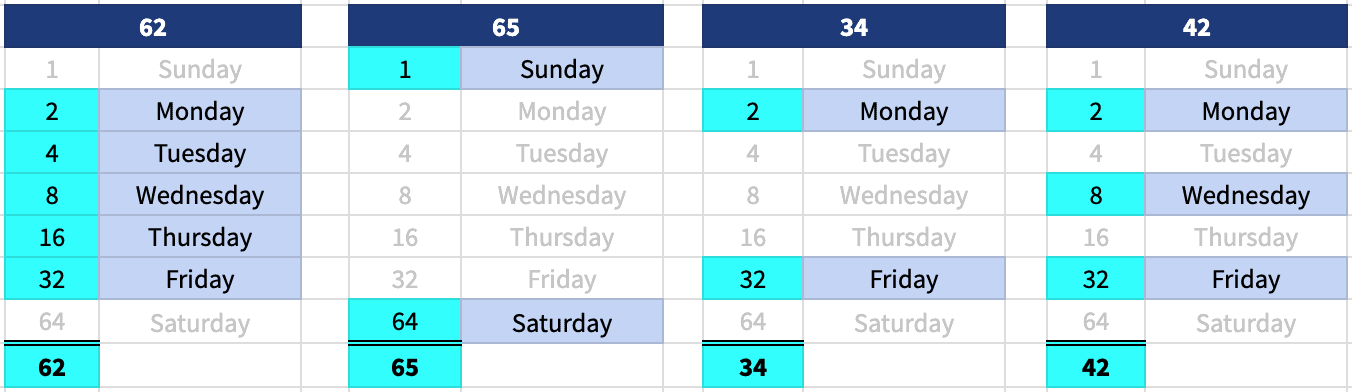
You can read more about this specific enum as it relates to Task Scheduler here and here.
I’m not a big fan of “hiding” values in a single integer and requiring bitwise operations to extract them. It seems an optimization holdover from the days of punch-cards and floppy disks, where space was way more valuable than logic and self-documentation. I’ve written about it before in When the DRY principle doesn’t apply : BITWISE operations in SQL Server. Still, in 2024, we can’t escape it. I don’t have to deal with bitwise in SQL Server very often, but I recently came across…
This use case
To interface between Task Scheduler and SQL Server, I wanted a way to translate the enum to produce different output depending on the consumer. When I know the trigger value from Task Scheduler but need to expose it to something in (or from) SQL Server, I wanted a table-valued function to return the day(s) of the week given any specific enum value. I might want one of the following output styles, say, from an enum value of 3 (which means Sunday and Monday):
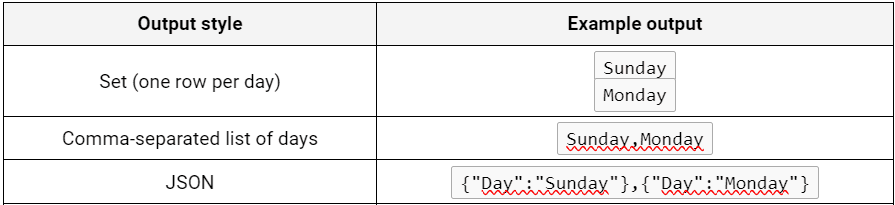
The first thing I had to do was define the enum in T-SQL somehow. One way is a table value constructor:
|
1 2 3 4 5 6 7 8 9 10 11 12 |
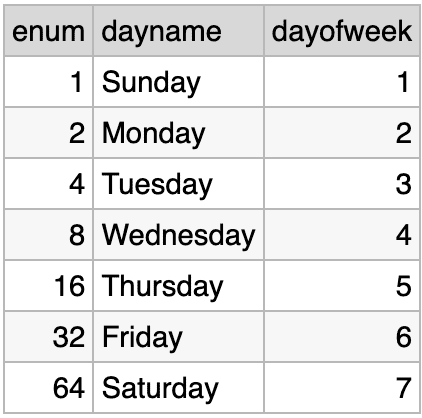
SELECT enum, dayname, dayofweek FROM ( VALUES (1, 'Sunday', 1), (2, 'Monday', 2), (4, 'Tuesday', 3), (8, 'Wednesday', 4), (16, 'Thursday', 5), (32, 'Friday', 6), (64, 'Saturday', 7) ) AS denum (enum, dayname, dayofweek); |
The output of this in isolation should not be shocking:
If I know the DaysOfWeek value, I can pull the relevant values from this constructor by simply ANDing the coefficient with the value passed in:
|
1 2 3 4 5 6 7 8 9 10 11 12 13 14 15 |
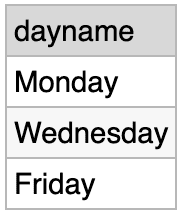
DECLARE @Enum tinyint = 42; SELECT dayname FROM ( VALUES (1, 'Sunday', 1), (2, 'Monday', 2), (4, 'Tuesday', 3), (8, 'Wednesday', 4), (16, 'Thursday', 5), (32, 'Friday', 6), (64, 'Saturday', 7) ) AS denum (enum, dayname, dayofweek) WHERE enum & @Enum > 0; |
Output:
Now I know how I can put this in a function:
|
1 2 3 4 5 6 7 8 9 10 11 12 13 14 15 16 17 18 19 20 21 22 23 24 25 |
CREATE OR ALTER FUNCTION dbo.GetDaysOfWeekFromEnum ( @Enum tinyint ) RETURNS TABLE AS RETURN ( WITH cte AS ( SELECT enum, dayname, dayofweek FROM ( VALUES (1, 'Sunday', 1), (2, 'Monday', 2), (4, 'Tuesday', 3), (8, 'Wednesday', 4), (16, 'Thursday', 5), (32, 'Friday', 6), (64, 'Saturday', 7) ) AS denum (enum, dayname, dayofweek) WHERE enum & @Enum > 0 ) SELECT dayname FROM cte ); |
If I call it with various arguments:
|
1 2 3 4 5 6 |
SELECT dayname FROM dbo.GetDaysOfWeekFromEnum(62); SELECT dayname FROM dbo.GetDaysOfWeekFromEnum(65); SELECT dayname FROM dbo.GetDaysOfWeekFromEnum(34); SELECT dayname FROM dbo.GetDaysOfWeekFromEnum(42); |
I get the same output illustrated above:
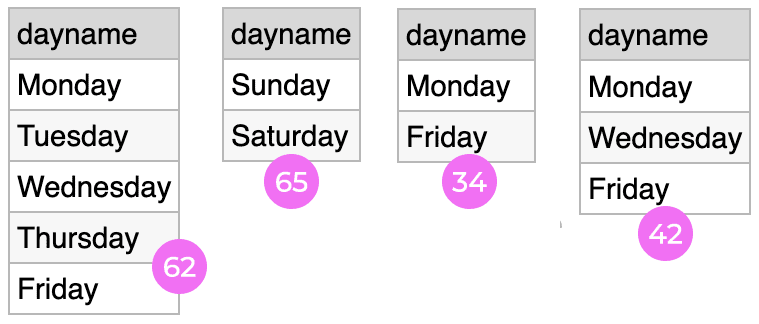
This handles the “set” style of output, where each day is on its own row. In order to derive the different styles, I can add an argument and then create a union between the different possibilities:
|
1 2 3 4 5 6 7 8 9 10 11 12 13 14 15 16 17 18 19 20 21 22 23 24 25 26 27 28 29 30 31 32 33 34 35 36 37 38 39 40 41 42 43 44 45 46 47 48 49 50 51 52 |
CREATE OR ALTER FUNCTION dbo.GetDaysOfWeekFromEnum ( @Enum tinyint, @Style varchar(4) /* set | csv | json */ ) RETURNS TABLE AS RETURN ( WITH cte AS ( SELECT enum, dayname, dayofweek FROM ( VALUES (1, 'Sunday', 1), (2, 'Monday', 2), (4, 'Tuesday', 3), (8, 'Wednesday', 4), (16, 'Thursday', 5), (32, 'Friday', 6), (64, 'Saturday', 7) ) AS denum (enum, dayname, dayofweek) WHERE enum & @Enum > 0 ) SELECT dayname FROM ( SELECT dayname FROM cte WHERE @Style = 'set' UNION ALL SELECT STRING_AGG(dayname, ',') WITHIN GROUP (ORDER BY dayofweek) FROM cte WHERE @Style = 'csv' UNION ALL SELECT Day FROM ( SELECT dayname FROM ( SELECT dayname FROM cte WHERE @Style = 'json' ) AS i ORDER BY dayofweek FOR JSON PATH, WITHOUT_ARRAY_WRAPPER ) AS o(Day) ) AS f WHERE dayname IS NOT NULL ); |
If I ask for the days for 62 in each style:
|
1 2 3 4 5 |
SELECT dayname FROM dbo.GetDaysOfWeekFromEnum(62, 'set'); SELECT dayname FROM dbo.GetDaysOfWeekFromEnum(62, 'csv'); SELECT dayname FROM dbo.GetDaysOfWeekFromEnum(62, 'json'); |
You can see the different output:
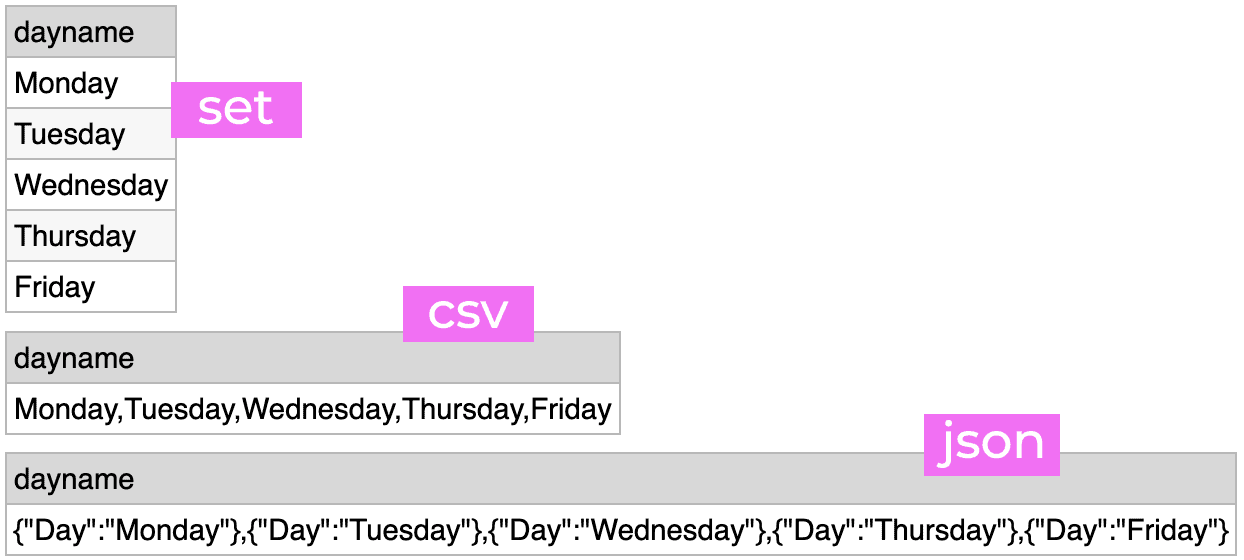
Now all of my PowerShell and C# can just pass the trigger value into SQL Server and not have to think about it. This works great for me, because T-SQL is where I am much more comfortable.
Note that there’s not a tidy way in this function to ensure that the set version will return the days in proper order, unless you output the dayofweek column (and a dummy column for the other two union queries).
A second use case
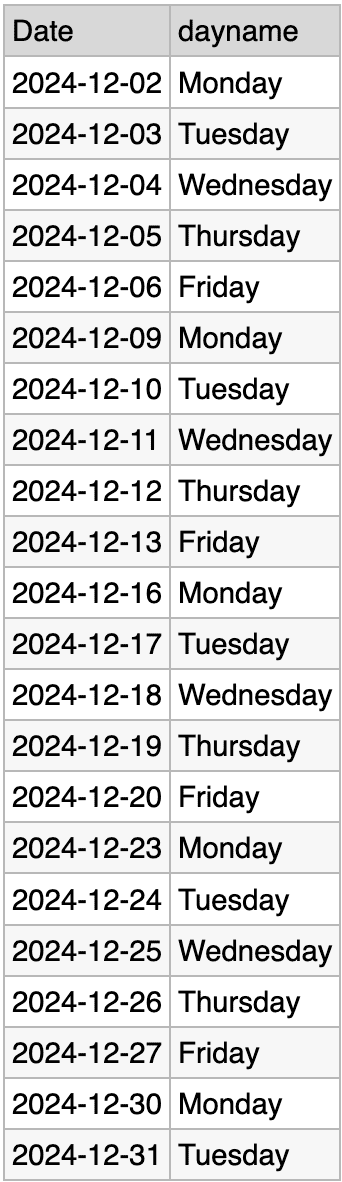
Sometimes I need to know all the dates a job will run within a date range (say, a month). For this I wanted a different TVF that returns a list of dates, on the days of the week represented by the enum, between @StartDate and @EndDate. What this really means is, generate a series of dates from the start date to the end date, and from that series, return the dates that match any of the weekdays present in the DaysOfWeek value.
In SQL Server 2022, we can use GENERATE_SERIES* to create a set of days. For example, to get all the dates in December 2024:
|
1 2 3 4 5 6 7 |
DECLARE @StartDate date = '20241201', @EndDate date = '20241231'; SELECT DATEADD(DAY, value, @StartDate) FROM GENERATE_SERIES(0, DATEDIFF(DAY, @StartDate, @EndDate)); |
I’m not going to prove it with a screenshot, but that returns a set of 31 days, from December 1st through the 31st.
Next, to match these dates up with the days of the week present in the enum, I can extract the DATENAME for the day of week from each date, and join on that. For example:
|
1 2 3 4 5 6 7 8 9 10 11 12 13 14 15 16 17 18 19 20 21 22 23 24 25 26 27 28 29 30 31 32 33 34 35 36 37 |
CREATE OR ALTER FUNCTION dbo.GetDatesFromEnumInRange ( @Enum tinyint, @StartDate date, @EndDate date ) RETURNS TABLE AS RETURN ( WITH daysofweek AS ( SELECT dayname FROM ( VALUES (1, 'Sunday', 1), (2, 'Monday', 2), (4, 'Tuesday', 3), (8, 'Wednesday', 4), (16, 'Thursday', 5), (32, 'Friday', 6), (64, 'Saturday', 7) ) AS denum (enum, dayname, dayofweek) WHERE enum & @Enum > 0 ), days(Date) AS ( SELECT DATEADD(DAY, value, @StartDate) FROM GENERATE_SERIES(0, DATEDIFF(DAY, @StartDate, @EndDate)) ) SELECT days.Date, daysofweek.dayname FROM days INNER JOIN daysofweek ON DATENAME(WEEKDAY, days.Date) = daysofweek.dayname ); |
* Note: I have to rely on either @@LANGUAGE being some form of English, or use the dayofweek value and rely on @@DATEFIRST. If you use a different language, or a different DATEFIRST setting, you could just construct your enum accordingly. Just remember that any user could have a different setting in their own session.
Also, GENERATE_SERIES requires SQL Server 2022 or Azure SQL Database; see alternatives for earlier versions in this post.
If I call that for the enum 62, for the month of December:
|
1 2 3 4 5 6 7 8 9 10 |
DECLARE @Enum tinyint = 62, @StartDate date = '20241201', @EndDate date = '20241231'; SELECT Date, dayname FROM dbo.GetDatesFromEnumInRange (@Enum, @StartDate, @EndDate) ORDER BY Date; |
Here is the output:
Future enhancements?
There are definitely some fixes for the future. One is that, now that I have two separate functions referencing it, I should be storing my enum in a table somewhere. The other is that I’d like to fix it so that I don’t have to rely on a stable DATEFIRST setting but, thankfully, the function rarely gets invoked manually.
Depending on your use case, you may also want to integrate a calendar table, so that you can highlight (or even exclude) holidays or scheduled maintenance windows from certain results.
FAQs
1. How do I store a set of weekdays in a single SQL Server column?
Use a bitwise flag pattern: assign each day a power of two (Sunday=1, Monday=2, Tuesday=4, Wednesday=8, Thursday=16, Friday=32, Saturday=64), then store any combination as the sum of the chosen days’ values in a TINYINT column. Monday/Wednesday/Friday = 2 + 8 + 32 = 42. The seven possible values cover every weekday, and any subset of weekdays maps to exactly one value between 0 (none) and 127 (all seven). To retrieve which days a value represents, test each day’s flag with bitwise AND: (value & 2) != 0 means Monday is in the set. This is significantly more compact and faster to query than a separate table with one row per day.
2. How do bitwise operators work in SQL Server T-SQL?
SQL Server supports four bitwise operators on integer types (TINYINT, SMALLINT, INT, BIGINT, BIT): & (AND), | (OR), ^ (XOR), ~ (NOT). Bitwise AND (&) returns bits set in both operands – used for membership testing. Bitwise OR (|) returns bits set in either operand – used for adding a flag to a set. Bitwise XOR (^) returns bits set in exactly one operand – used for toggling. Bitwise NOT (~) inverts all bits – less commonly used. Bitwise operators work column-by-column like arithmetic, so SELECT schedule & 2 FROM Jobs returns 2 for rows where Monday is in the schedule and 0 for rows where it isn’t.
3. Why use bitwise flags instead of a separate table for SQL Server weekday schedules?
Bitwise flags use a single TINYINT column instead of a child table with up to seven rows per parent. Queries are simpler (a single WHERE clause with bitwise AND instead of a JOIN and HAVING COUNT) and usually faster. The downside is lower discoverability – a developer joining the schema for the first time needs to know what the integer value means. For small fixed sets like weekdays (7 options) or months (12 options) where the domain never changes, bitwise flags are a pragmatic choice. For larger or evolving domains (user permissions, feature toggles in a growing application), a proper lookup table plus many-to-many mapping is more maintainable.
4. How do I expand a bitwise weekday schedule to a list of concrete dates in SQL Server?
Join the bitwise schedule value against a date range and filter for dates where the day-of-week flag is in the schedule. Use GENERATE_SERIES (SQL Server 2022+) or a numbers table to produce the date range, compute each date’s day-of-week flag with POWER(2, DATEPART(WEEKDAY, d) – 1) using the correct DATEFIRST setting, and filter: WHERE (schedule & day_flag) != 0. The article provides a table-valued function encapsulating this pattern. For SQL Server 2019 and earlier without GENERATE_SERIES, use a recursive CTE or pre-built numbers table instead of the built-in.
This document contains proprietary information and is protected by copyright law.
Copyright © 2026 Red Gate Software Limited. All rights reserved





Load comments