


VACUUM in PostgreSQL makes the space held by dead row versions reusable, but doesn’t shrink tables, compact half-empty pages, or remove rows an older transaction can still see.
That’s why tables and indexes keep growing, and queries keep slowing down, even when autovacuum is running and n_dead_tup looks healthy.
If your busiest tables keep getting bigger, sequential scans read more pages every month, and a query that took 20ms last quarter now takes 60 (with nobody having changed anything), this is the likely reason.
This article covers four causes of bloat that health checks often miss, plus where fillfactor helps, all reproduced on a PostgreSQL 18.4 server with a workload you can run on a laptop.
For each one, you’ll see what happens inside the table and its indexes, how to spot it with tools PostgreSQL already ships, and what to do about it.
The final section is a remediation playbook: which settings to change per table, what to monitor, and how to rebuild a bloated table or index safely.
PostgreSQL bloat after VACUUM: the four causes at a glance
| Symptom | What you see | Why VACUUM doesn’t fix it | Fix |
|---|---|---|---|
| 1. Table stays the same size | n_dead_tup is 0, but free space is high and full scans read the same number of pages | VACUUM marks space reusable but doesn’t move rows. It only truncates empty pages at the end of the file | Usually nothing. After a one-off mass delete, rewrite with pg_repack or VACUUM FULL |
| 2. Indexes keep growing | Index size stays flat or grows, leaf density drops (as low as 9.2%) and deleted pages pile up | A B-tree page is only freed when every entry on it is gone. Timestamp-style keys never refill old gaps | REINDEX INDEX CONCURRENTLY, and stop indexing columns that change on every update |
3. autovacuum falls behind | Dead rows build to hundreds of thousands before a run starts | Trigger is 50 + 20% of rows, and the launcher only checks once per autovacuum_naptime | Per-table scale factor (0.01–0.05), higher cost limit, shorter naptime |
| 4. One old transaction blocks cleanup | VACUUM reports rows “dead but not yet removable”. Heap and indexes grow | The xmin horizon applies to the whole database | End the session or drop the slot, and set idle_in_transaction_session_timeout |
What UPDATE and DELETE leave behind in PostgreSQL
Everything in this article follows from one design decision, so it’s worth being precise about it before we look at any numbers.
Firstly, PostgreSQL never changes a row in place. When you run an UPDATE, it writes a complete new version of the row, and marks the old version as expired by your transaction.
Then, a DELETE simply marks the current version as expired, and the old versions stay exactly where they were – in the same 8 kB page – because other transactions that started earlier may still need to see them.
This is multi-version concurrency control (MVCC), and it’s the reason readers never block writers in PostgreSQL.
Once no running transaction can possibly see an old version any more, it becomes a dead tuple – and dead tuples are pure waste.
They take up space in the page, they are still read by sequential scans, and indexes still point at them – and that’s where VACUUM comes in.
VACUUM removes dead tuples and marks their space as reusable inside the same page, but it only returns space to the operating system when completely empty pages sit at the end of the file.
The page itself stays in the file, which doesn’t get smaller.
Here’s the life of a single page through that cycle:
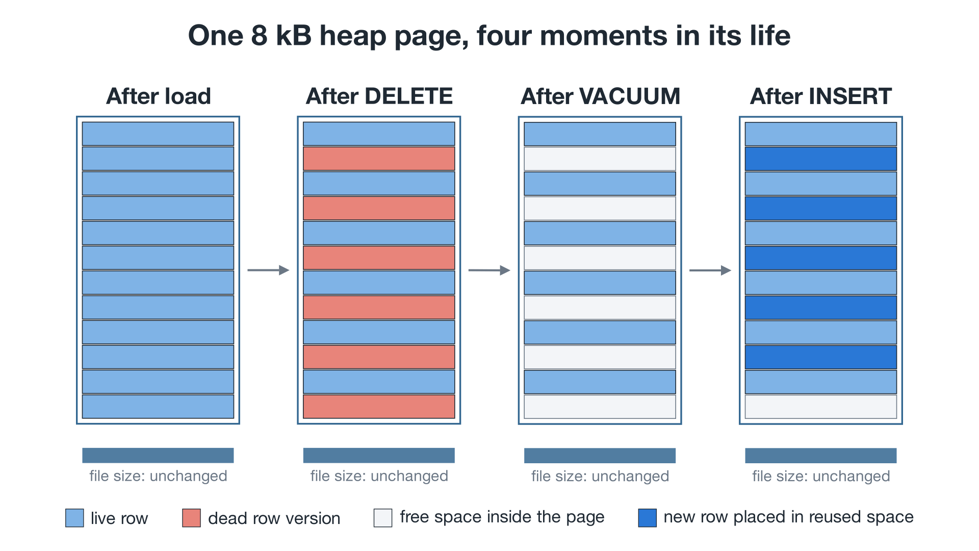
DELETE, VACUUM, and INSERT. VACUUM turns dead row versions into free space that new rows can reuse, but the page, and the file, stay the same size.So, vacuumed means the dead space can be reused – but the table is still not compact, neither is it healthy. I’ll now explain where these two ideas drift apart.
How we tested: lab setup and autovacuum defaults
Everything that follows was run on PostgreSQL 18.4 (Homebrew build) on a MacBook with an Apple M5 Max (48GB memory) using the server’s default configuration.
The settings
The settings that matter most here are the autovacuum defaults:
autovacuum_naptime = 60s
autovacuum_vacuum_scale_factor = 0.2
autovacuum_vacuum_threshold = 50
autovacuum_vacuum_cost_limit = -1 (which falls back to vacuum_cost_limit = 200)
autovacuum_vacuum_cost_delay = 2ms
autovacuum_max_workers = 3
PostgreSQL 18 also added autovacuum_vacuum_max_threshold, which caps the trigger point at 100 million dead rows. (Our tables are far smaller than that, so this never comes into play.)
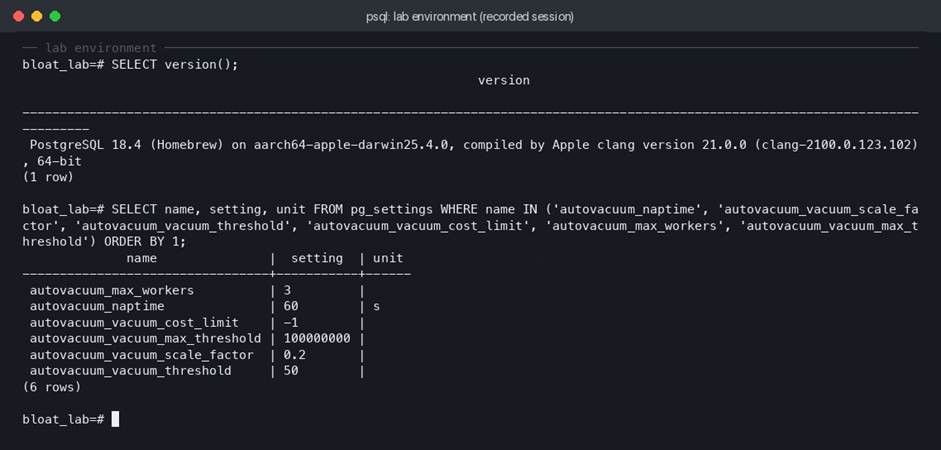
The server and autovacuum settings used throughout this article. (Recorded terminal session.)
What PostgreSQL contributor extensions do I need to follow this guide?
In this guide, I’ll use three contributor extensions that ship with PostgreSQL, plus pg_repack:
pgstattupleto precisely measure live, dead, and free space.pageinspectto look inside B-tree indexes.pg_freespacemapto read the free space map and, in the last section,pg_repack1.5.3 to rebuild a table online.
Where to find the lab repository
The scripts, SQL, and load generator are in the lab repository (also linked to at the end of the guide), so you can reproduce every number on your own machine.
To keep the measurements comparable, most of the examples use a small helper function that runs a query under EXPLAIN (ANALYZE, BUFFERS) and returns the number of 8 kB pages it touched.
Timings on a warm laptop cache move around a lot, unlike the number of pages a query has to read. This is what turns into I/O (input/output) on a real server.
Symptom 1: a vacuumed PostgreSQL table doesn’t get smaller
You delete half the rows in a table and run VACUUM. The dead rows are gone, so you would expect the table to be roughly half the size, and a full scan to read roughly half as many pages – but that’s not what happens.
What actually happens to table size after VACUUM
Shown below is a table with a scattered 50% delete. It’s a one-million-row orders table, with autovacuum switched off for this table only (so we can control exactly when VACUUM runs.) We then delete every second row, and vacuum:
|
1 2 3 4 5 6 7 8 9 10 11 12 13 14 15 16 17 18 |
CREATE TABLE orders ( id bigint PRIMARY KEY, customer_id int NOT NULL, status text NOT NULL, amount numeric(10,2) NOT NULL, note text NOT NULL, created_at timestamptz NOT NULL ) WITH (autovacuum_enabled = off); CREATE INDEX orders_customer_idx ON orders (customer_id); INSERT INTO orders SELECT g, (random() * 50000)::int, 'shipped', round((random() * 500)::numeric, 2), md5(g::text) || repeat('x', 60), now() - g * interval '1 second' FROM generate_series(1, 1000000) g; VACUUM ANALYZE orders; DELETE FROM orders WHERE id % 2 = 0; -- 500,000 rows, spread across every page VACUUM (VERBOSE) orders; |
VACUUM reports that it did its work. The interesting lines of its output are:
|
1 2 3 |
pages: 0 removed, 19231 remain, 19231 scanned (100.00% of total), 0 eagerly scanned tuples: 20 removed, 500000 remain, 0 are dead but not yet removable index scan needed: 19231 pages from table (100.00% of total) had 500000 dead item identifiers removed |
Only 20 tuples were reported as removed because the full scan we ran straight after the DELETE had already pruned nearly all the dead rows inside their pages.
Note that PostgreSQL does this opportunistically when a query reads a page that is nearly full.
VACUUM then finished the job by removing the 500,000 leftover item pointers and the matching index entries, and the dead rows are now gone.
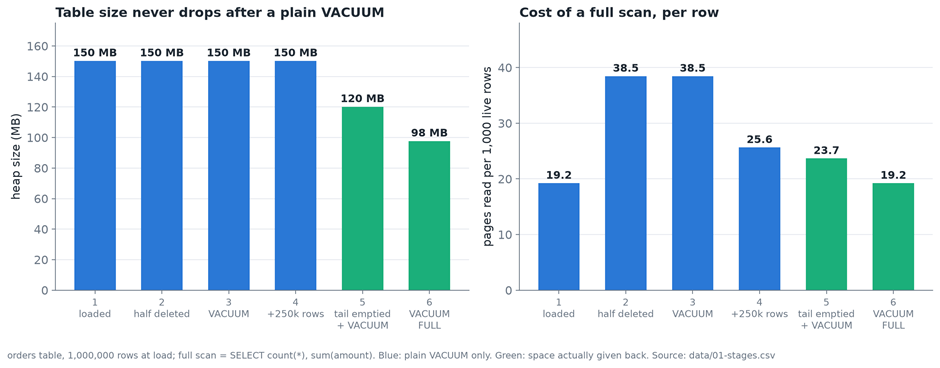
Now, look at what the table looks like at each of the six steps (measured with pgstattuple and the page-count helper):
| Stage | Heap | Indexes | Live rows | Dead rows | Free space | Pages read by SELECT count(*), sum(amount) |
| 1. Loaded | 150.2 MB | 30.7 MB | 1,000,000 | 0 | 0.7 % | 19,231 |
2. Deleted half, before VACUUM | 150.2 MB | 30.7 MB | 500,000 | 500,000 | 0.7 % | 19,231 |
3. After VACUUM | 150.2 MB | 30.7 MB | 500,000 | 0 | 49.0 % | 19,231 |
| 4. After inserting 250,000 new rows | 150.2 MB | 36.1 MB | 750,000 | 0 | 24.8 % | 19,231 |
5. After emptying the last 20% of pages and VACUUM | 120.2 MB | 36.1 MB | 650,010 | 0 | 18.8 % | 15,385 |
6. After VACUUM FULL | 97.7 MB | 19.4 MB | 650,010 | 0 | 0.7 % | 12,501 |
Stage 3 is the one that catches people out. VACUUM ran, dead rows are zero, and the table is exactly the same size: 150MB, now 49% empty.
A full scan still reads all 19,231 pages to find half as many rows, so every row now costs twice the I/O it did before:
You can see the same behavior in a couple of minutes on a smaller table. In the session shown below, a 200,000-row table is 27MB. Half its rows are deleted and the table is vacuumed: pgstattuple now counts 100,000 live rows, no dead ones, and 48.8% free space, and the table is still 27MB.
Only VACUUM FULL brings it down to 13MB:
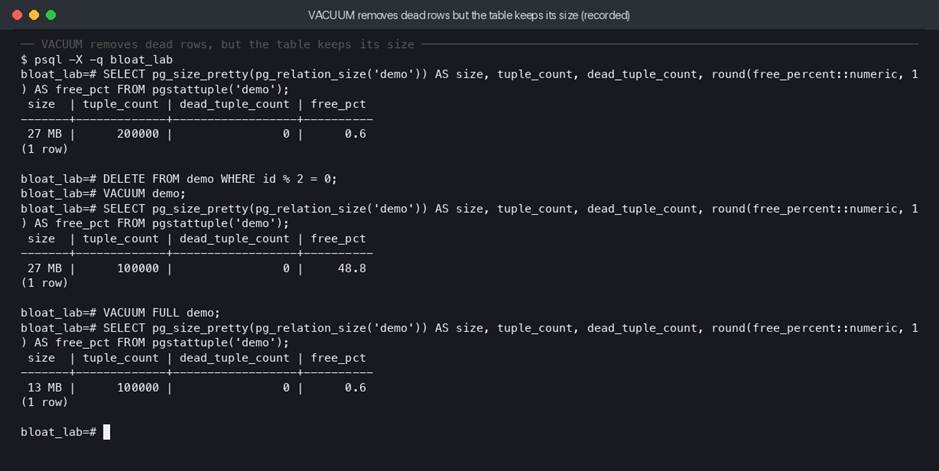
VACUUM, free space goes to 48.8%, and the size doesn’t move until VACUUM FULL. (Recorded terminal session.)Why VACUUM can’t shrink the table
This happens because VACUUM works page-by-page. Each page that held deleted rows now holds half as many live rows, and a lot of free space. This is confirmed below, showing the free space inside the table after VACUUM:
|
1 2 3 4 5 6 7 8 |
SELECT count(*) AS pages, count(*) FILTER (WHERE avail >= 4000) AS pages_half_or_more_free, round(avg(avail)) AS avg_free_bytes FROM pg_freespace('orders'); pages | pages_half_or_more_free | avg_free_bytes -------+-------------------------+---------------- 19231 | 19231 | 4000 |
Every single page is now about half empty. The rows that survived are still spread across all 19,231 pages, so any query that has to look at all of them, or even a large range of them, reads twice as many pages as it would in a compact table.
That space is not wasted forever, though. In stage 4, despite inserting 250,000 new rows, the table didn’t grow by a single page; PostgreSQL found room for every one of them in the gaps VACUUM had left.
That’s the good news – and is why a table that churns at a steady rate usually settles at a stable size instead of growing without limit.
How does plain VACUUM give space back?
The only way plain VACUUM gives space back to the operating system is by cutting off completely empty pages at the end of the file. Stage 5 shows it: we deleted every row stored in the last 20% of the file and then VACUUM reported truncated 19231 to 15385 pages.
PostgreSQL doesn’t move rows around during a normal VACUUM, so any empty pages in the middle of the file can’t be returned. To actually compact the table you need to rewrite it – exactly what VACUUM FULL did in stage 6.
How to spot table bloat when n_dead_tup is zero
n_dead_tup is zero, so is of no help here. The signal is free space (a table whose pgstattuple free percentage stays high, or whose size stays flat while its live row count falls.)
On large tables, meanwhile, pgstattuple reads the whole relation – so for routine checks use pgstattuple_approx(), which skips pages the visibility map says are all-visible (plus, is much cheaper!)
We’ll return to monitoring in the playbook at the end of the guide.
What to do about a bloated table
Nothing, most of the time. A table that’s 20 or 30% free and stable in size is doing exactly what MVCC tables do, and the free space will be used by the next inserts.
The problem cases are a table that had a one-off mass delete and will never refill that space, or a table whose size is climbing enough that VACUUM can’t keep up (as detailed in Symptom 3 later), or is being blocked (Symptom 4).
For the first case, a rewrite with pg_repack or VACUUM FULL is the answer. The playbook covers how to do that safely.
Symptom 2: PostgreSQL indexes keep growing after VACUUM
VACUUM cleans indexes as well as the table. When it removes a dead row, it also removes the index entries that pointed at it.
So, after a big delete and a VACUUM, you’d expect the indexes to shrink along with the data – and index scans to get cheaper – but that’s not what happens…
What actually happens to a B-tree index after deletes and updates
As shown below, it builds an events table with a million rows and an index on created_at, then runs the kind of retention job many systems have: keep one row in ten, delete the rest, and vacuum:
|
1 2 3 4 5 6 7 8 9 10 11 12 13 14 |
CREATE TABLE events (id bigint PRIMARY KEY, created_at timestamptz NOT NULL, payload text NOT NULL) WITH (autovacuum_enabled = off); INSERT INTO events SELECT g, timestamptz '2026-01-01' + g * interval '1 second', repeat('e', 40) FROM generate_series(1, 1000000) g; CREATE INDEX events_created_idx ON events (created_at); VACUUM ANALYZE events; DELETE FROM events WHERE id % 10 <> 0; -- keep 1 row in 10 VACUUM ANALYZE events; SELECT pg_relation_size('events_created_idx') / 8192 AS pages, leaf_pages, deleted_pages, round(avg_leaf_density::numeric, 1) AS avg_leaf_density FROM pgstatindex('events_created_idx'); |
pgstatindex (from the pgstattuple extension) describes the B-tree page-by-page. Before the delete, the index had 2,745 pages and its leaf pages were 90% full. After the delete and VACUUM, however, it still had 2,745 pages, and they were 9.2% full.
Additionally, a query that counts the rows in a three-day window read 715 pages before the delete, and 712 after – even though it now returns a tenth as many rows.
After REINDEX INDEX CONCURRENTLY, the same index was 276 pages and the same query read 74.
Here are the three states:
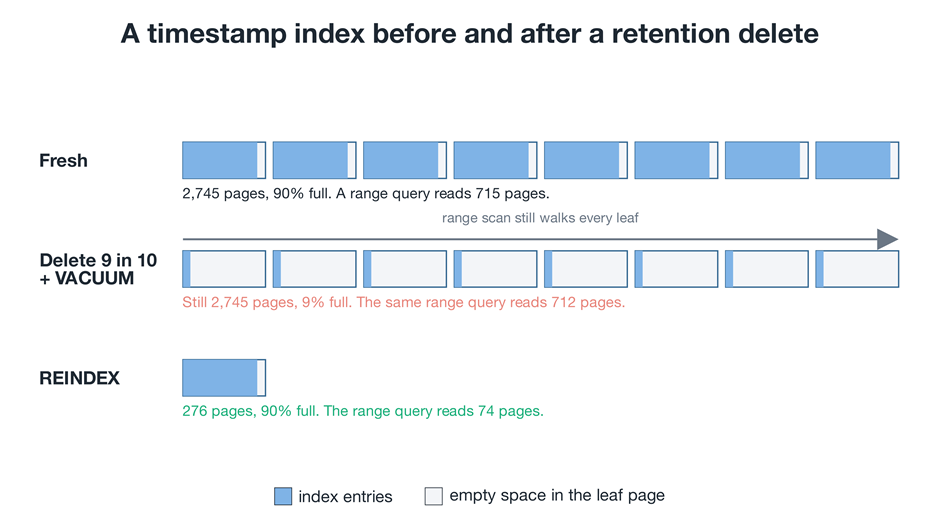
created_atindex BEFORE and AFTER a retention delete. VACUUM removes the dead entries but leaves each leaf page in place, so a range scan walks the same number of pages. Only a rebuild packs the survivors together.Shown below is a repeat of the experiment interactively on a copy of the table. The index stays at 21MB and 2,733 leaf pages after the delete and VACUUM, while leaf density drops from 90% to 9.2%.
REINDEX INDEX CONCURRENTLY brings it down to 2,208kB:
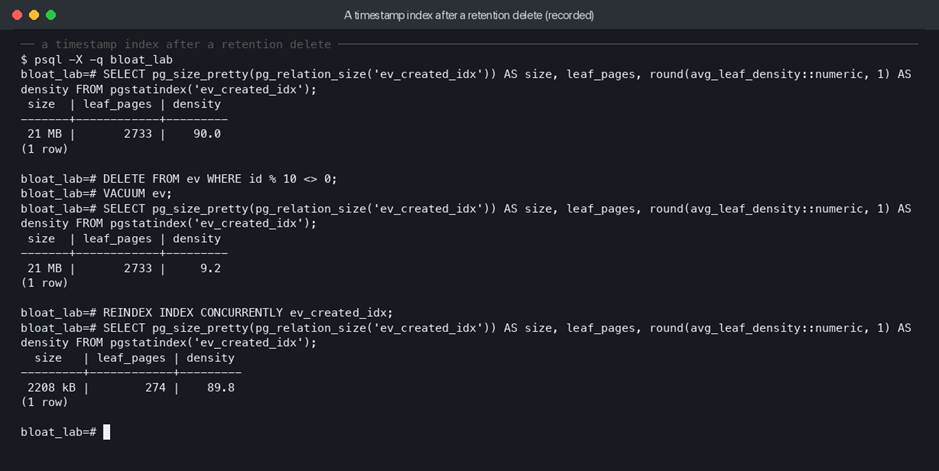
VACUUM; only a rebuild shrinks it. (Recorded terminal session.)The second pattern is more common and harder to see. As shown below, it updates 20% of an accounts table in each of ten rounds and changes updated_at every time – exactly what an application does when it stamps every row it touches.
There’s also an index on updated_at, and VACUUM runs after every round:
|
1 2 3 4 |
UPDATE accounts SET balance = balance + 1, updated_at = clock_timestamp() WHERE id % 5 = :round % 5; VACUUM accounts; |
The index grew from 551 to 1,208 pages over the first six rounds and then stopped growing. Stopping sounds like good news until you look at what pgstatindex says about it:
|
1 2 3 4 5 |
stage | size | pages | leaf_pages | deleted_pages | avg_leaf_density --------------+---------+-------+------------+---------------+------------------ B0 fresh | 4408 kB | 551 | 547 | 0 | 90.0 B6 round 6 | 9664 kB | 1208 | 547 | 657 | 89.9 B10 round 10 | 9664 kB | 1208 | 547 | 656 | 89.9 |
The live part of the index is the same 547 leaf pages it started with, packed to the same 90% density. More than half the file (656 pages) is made up of pages that VACUUM emptied and marked as deleted.
PostgreSQL will reuse them for future splits in this index, which is why growth levelled off, but it will never hand them back without a rebuild.
This is the index version of Symptom 1, and it’s well-hidden – the density figure most bloat queries look at say 90%.
Why B-tree pages aren’t reclaimed
A B-tree only frees a leaf page when every entry on it is gone. When some entries are deleted and some survive, the page keeps its place in the tree with whatever is left.
Inserts can only refill the gaps if new keys belong in that part of the key range – and, for a timestamp index, they never do. New keys always go to the right-hand end, so the emptied pages on the left stay emptied.
There’s one piece of genuinely good news here, though, and it shows up in the third and fourth runs of the same experiment. PostgreSQL has two defenses against index growth from updates that do not change any indexed column.
They are HOT (heap-only tuple) updates (which avoid creating index entries entirely) and, since PostgreSQL 14, bottom-up index deletion, which removes entries for old row versions when a leaf page is about to split.
Both need the old row versions to be dead already.
Here’s a comparison of the three patterns:
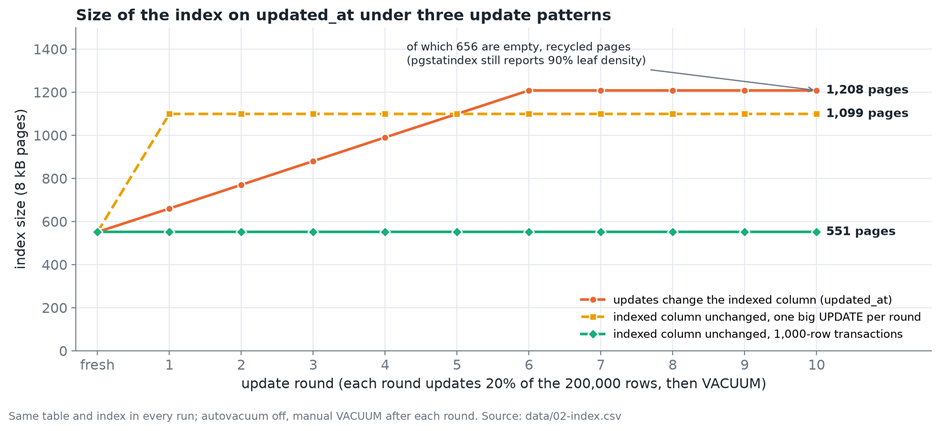
updated_atunder three update patterns. Changing the indexed column doubles the index, whereas leaving it alone costs nothing if the work is committed in small transactions.With one big UPDATE per round, the first round doubled the index to 1,099 pages. Every table page was full, so each new row version went to a different page and needed a new index entry.
Also, the old versions weren’t dead yet, since the statement that made them hadn’t committed.
When the same work was done as 40 transactions of 1,000 rows each, 96% of the updates were HOT (383,604 of 400,000), and the index didn’t grow by a single page.
The bottom line is, the shape of your write transactions matters just as much as the schema.
How to spot index bloat with pgstatindex
Compare an index’s size with the number of pages it actually needs.
For example, pgstatindex gives you leaf_pages, deleted_pages, and avg_leaf_density. Here, deleted_pages is a large share of the total and is carrying dead weight wherever density is low.
So, watch for indexes that have grown much faster than their table, and/or range scans whose buffer counts climb while the number of rows they return does not.
On very large indexes, pgstatindex reads the whole index, so run it off-peak or on a replica.
How to fix index bloat
Rebuild the index with REINDEX INDEX CONCURRENTLY, which builds a fresh copy alongside the old one and swaps it in without blocking reads or writes.
Just be aware that it needs enough disk for a second copy of the index, it takes longer than a plain REINDEX, and it’ll leave an invalid index behind (which you must drop) if it fails part-way. The playbook covers all these details.
Longer term, take frequently changing columns such as updated_at out of indexes (unless a query really needs them), and prioritize many small committed transactions over having a single large one on HOT tables.
Symptom 3: autovacuum is running, but falling behind on busy tables
autovacuum is on, it runs regularly, and the logs show it finishing. It’s therefore natural to assume it’s keeping every table (close to) clean, but that’s not actually happening.
What actually happens: the autovacuum trigger grows with table size
In reality, autovacuum doesn’t look at a table until it has accumulated enough dead rows to cross a threshold – and that threshold grows with the table:
|
1 2 |
vacuum threshold = autovacuum_vacuum_threshold + autovacuum_vacuum_scale_factor x reltuples = 50 + 0.2 x (number of rows) -- with the defaults |
(PostgreSQL 18 also caps the result at autovacuum_vacuum_max_threshold 100 million by default.)
For a table of two million rows, the default trigger is 400,050 dead rows. For a table of 200 million rows, it’s 40 million. The bigger and more important the table, the more garbage it’s allowed to collect before anybody looks at it.
To see what that means in practice, the lab ran a steady load against a sessions table of two million rows (300MB of heap and 56MB of indexes). Four workers updated 2,000 random rows per second in small transactions, with each update setting last_seen and incrementing a counter.
It ran for seven minutes (first with the default settings and then with the per-table settings shown below), while a sampler recorded pg_stat_user_tables and pg_stat_progress_vacuum every five seconds:
|
1 2 3 4 5 |
ALTER TABLE sessions SET ( autovacuum_vacuum_scale_factor = 0.01, -- trigger at 1% dead rows instead of 20% autovacuum_vacuum_threshold = 1000, autovacuum_vacuum_cost_limit = 2000 -- let this table's vacuum do 10x more work per cycle ); |
sessionstable under the same load. With the defaults, autovacuum waited until nearly half a million dead rows had built up. With per-table settings, it ran every minute.As can be seen, the dead rows climbed in a straight line for three and a half minutes with the defaults (in orange).
Here, once the count passed 400,050 (at about 206 seconds), autovacuum started. It needed roughly 45 seconds to work through the table, by which time the peak was 489,294 dead rows.
As soon as it finished, the count started climbing again towards the next trigger.
With the per-table settings (in blue), autovacuum ran seven times in the same seven minutes. Each run took around five seconds, and the peak was 125,211.
Here’s seven minutes of the same load:
| Default settings | Per-table settings | |
autovacuum runs | 1 | 7 |
| Peak dead rows | 489,294 | 125,211 |
| Dead rows at the end | 404,327 | 82,899 |
| Heap size, start to end | 301 to 309 MB | 301 to 306 MB |
| Index size, start to end | 56 to 73 MB | 56 to 73 MB |
There are two things of note here.
First, the tuned table still carried about 120,000 dead rows before each run (far above its 21,000 trigger) – a result of autovacuum_naptime.
The launcher only checks each database once a minute, and at 2,000 updates per second a minute’s worth of changes is 120,000 dead rows. A per-table scale factor can’t make autovacuum look any more often than that.
Second, the sizes barely differ after seven minutes; 840,000 updates spread over two million rows had plenty of free space to fall into!
The difference is the trend. The default table is carrying three times as many dead rows as the tuned one, every page of which is read by every scan, and the next time it crosses 400,000 the cycle starts again.
And, over days rather than minutes, that’s exactly how a table drifts.
The indexes grew by the same amount in both runs. Every update changed last_seen, which is indexed – so none of the 840,000 updates was HOT, and each one added an index entry no matter how often VACUUM ran.
With Symptom 2, we’ve already seen why that growth stays.
Three settings decide how fast autovacuum can keep up with a table:
- How much garbage it waits for (
autovacuum_vacuum_scale_factorandautovacuum_vacuum_threshold). - How often it looks (
autovacuum_naptime,global). - How fast it works once it starts (
autovacuum_vacuum_cost_limitandautovacuum_vacuum_cost_delay).
The defaults are sensible for a database with many modest tables. However, for a handful of large, HOT tables, they’re far too relaxed.
This is because, with only three autovacuum workers by default, a few slow runs on big tables can delay the others.
Get started with PostgreSQL – free book download
How to spot autovacuum falling behind
The early warning signs are visible in pg_stat_user_tables long before anyone notices slower queries.
Here’s the query I would put on a dashboard, showing the tables where autovacuum is falling behind:
|
1 2 3 4 5 6 7 8 9 10 11 12 |
SELECT relname, n_live_tup, n_dead_tup, round(100.0 * n_dead_tup / nullif(n_live_tup + n_dead_tup, 0), 1) AS dead_pct, last_autovacuum, now() - last_autovacuum AS since_last_autovacuum, autovacuum_count, pg_size_pretty(pg_total_relation_size(relid)) AS total_size FROM pg_stat_user_tables WHERE n_dead_tup > 10000 ORDER BY n_dead_tup DESC LIMIT 20; |
A HOT table whose dead percentage keeps climbing between runs, whose last_autovacuum is far older than you would expect for its write rate, or which appears in pg_stat_progress_vacuum for a large part of the day, is a table that autovacuum is not keeping up with.
How to tune autovacuum for large tables
Tune the HOT tables individually rather than changing the global defaults.
A scale factor of 0.01 to 0.05 and a fixed threshold suited to the table’s size is a good starting point, while a higher per-table cost limit lets each run finish quickly.
If your hottest tables change faster than one naptime can absorb, lower autovacuum_naptime for the whole server and consider more autovacuum_max_workers. Just remember that workers share the cost limit!
Also, make sure to look again at which columns you index. An index on a column that changes on every update will grow regardless of how aggressively you vacuum.
Symptom 4: one old transaction stops VACUUM across the whole database
You’ve tuned autovacuum for the HOT tables. It runs every minute and finishes quickly. The table should stay close to clean – but it doesn’t.
What actually happens (how an old snapshot blocks dead-row removal)
VACUUM can only remove a dead row version when no running transaction could still need it.
PostgreSQL tracks the oldest snapshot that any session is still using – often called the xmin horizon – and every dead row newer than that horizon has to stay, in every table of the database, no matter how often VACUUM runs.
In brief:
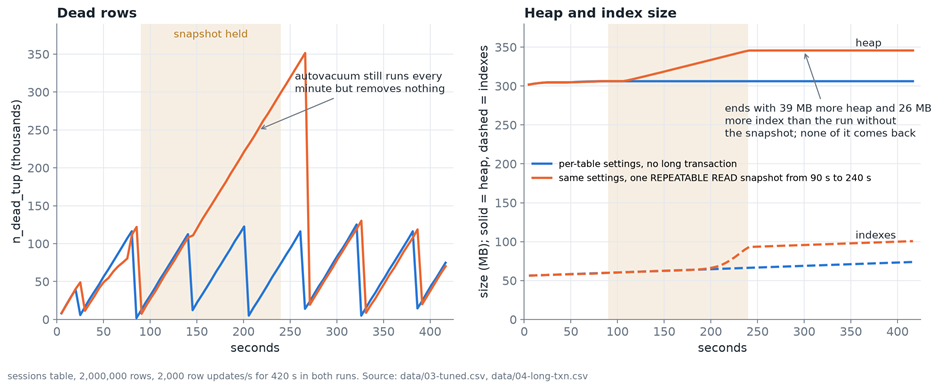
VACUUM must keep them. Once it ends, they can all be removed together.To measure the effect, the lab repeated the tuned run from Symptom 3 with the exact same table and per-table settings, and the same 2,000 updates per second.
There was just one difference: a separate session opened a REPEATABLE READ transaction at 90 seconds, ran one small query to take its snapshot, and then sat idle until 240 seconds.
That’s the shape of a reporting job that opens a transaction and spends two and a half minutes thinking – or of an application that forgets to commit.
A manual VACUUM revealed exactly what was going on just two minutes into that window:
|
1 2 3 |
pages: 0 removed, 42693 remain, 42693 scanned (100.00% of total), 0 eagerly scanned tuples: 0 removed, 2219884 remain, 219892 are dead but not yet removable removable cutoff: 1350952, which was 4401 XIDs old when operation ended |
It scanned the whole table and removed nothing. The removable cutoff (1350952) is the snapshot of the idle report.
The recorded session shown below reproduces the same situation by hand on a smaller table, and ends with the query that finds the culprit:
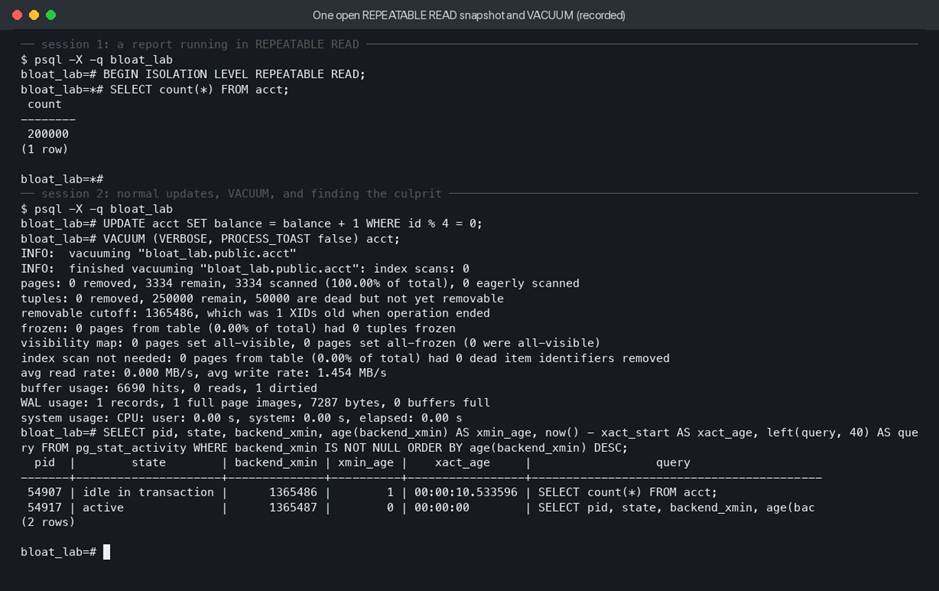
REPEATABLE READ transaction and reads the table once. Session 2 updates a quarter of the rows, runs VACUUM (VERBOSE), and then looks for the session holding the oldest backend_xmin. (Recorded terminal session.)Here’s a comparison of the two runs over the full seven minutes:
autovacuum settings, with and without a 150-second snapshot.As shown above, dead rows follow the familiar one-minute sawtooth and the heap stays flat at 306MB without the long transaction (in blue).
With the long transaction (in orange), however, autovacuum still ran at 141 and 201 seconds, and both runs finished – but the dead-row count went straight through them and reached 351,374.
Updates that couldn’t find reusable space went into new pages, increasing the heap from 306 to 345MB and the indexes from 60 to 93MB while the snapshot was open.
What happened when the report ended?
When the report ended, the next autovacuum cleared the backlog in one pass, but the file sizes didn’t come back down. The run finished with 39MB more heap and 26MB more index than the run without the snapshot.
And, as Symptom 1 demonstrated, a plain VACUUM won’t return that space – which is why having one long transaction is worth considering.
Every table updated during those two and a half minutes carries the extra pages from then on. On a production system with a report that runs every hour, the damage accumulates!
Why the xmin horizon is database-wide
MVCC promises that a transaction sees a consistent snapshot of the database for as long as it needs one – and the only way to keep that promise is to keep every row version the snapshot might read.
PostgreSQL doesn’t know which tables the report will touch next, though, so the horizon applies to the whole database.
Long-running transactions are the most common culprit, but not the only one. It could be an abandoned replication slot, a forgotten prepared transaction, or a standby with hot_standby_feedback.
When it comes to running a long query, they all hold the horizon back in the same way.
How to find what’s holding back cleanup
All the usual suspects are listed in the command below. Run it whenever VACUUM (VERBOSE) reports rows that are “dead but not yet removable”, or put it on a dashboard and alert on the age:
|
1 2 3 4 5 6 7 8 9 10 11 12 13 14 15 16 |
-- sessions, oldest snapshot first SELECT pid, usename, application_name, state, backend_xmin, age(backend_xmin) AS xmin_age, now() - xact_start AS transaction_age, left(query, 60) AS last_query FROM pg_stat_activity WHERE backend_xmin IS NOT NULL ORDER BY age(backend_xmin) DESC LIMIT 10; -- replication slots, including ones nobody is reading any more SELECT slot_name, active, xmin, catalog_xmin, age(xmin) AS xmin_age FROM pg_replication_slots; -- prepared transactions that were never committed or rolled back SELECT gid, prepared, owner, database FROM pg_prepared_xacts; |
In the lab, the first query found the report straight away: a session idle in transaction, one minute and 49 seconds old, with a backend_xmin 4,397 transactions behind everyone else.
How to stop long transactions blocking VACUUM
Keep transactions short and let the server enforce it. idle_in_transaction_session_timeout ends sessions that sit idle inside an open transaction, and transaction_timeout (new in PostgreSQL 17) puts a ceiling on any transaction.
Set them per-role for applications and reporting users rather than globally, so that a legitimate batch job doesn’t get cut off.
You should also run long reports against a replica and, if that replica uses hot_standby_feedback, remember: its long queries now hold back cleanup on the primary!
So, drop replication slots you no longer need, and make monitoring on age (backend_xmin) as routine as monitoring on disk space.
When lowering fillfactor reduces bloat (and when it doesn’t)
A common piece of advice for update-heavy tables is to lower fillfactor so that each page keeps some free space for future versions of its rows. The hope is for more HOT updates, fewer index entries, and less bloat.
However, that’s not the reality.
You may also be interested in…
What is fillfactor in PostgreSQL – and when should you adjust it?
What actually happens (how fillfactor changes HOT updates and heap size)
The advice is sound, but its value depends heavily on how you update.
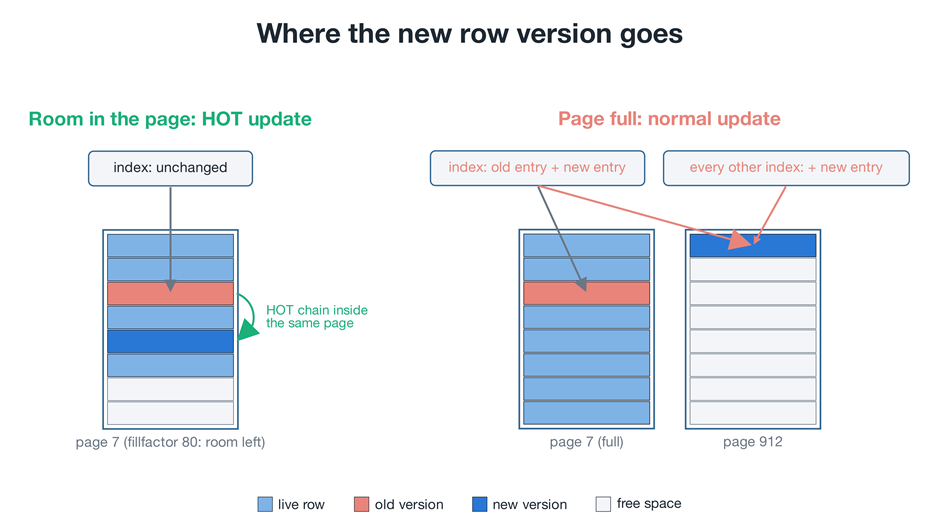
As shown below, HOT is only possible when the new row version fits in the same page as the old one and no indexed column changes:
HOT update). When the page is full, the new version goes elsewhere, and every index gets a new entry.The lab loaded 200,000 rows into an items table at fillfactor 100, 90, 80 and 70 respectively. It then ran five rounds, each updating an unindexed stock column in 20% of the rows, with a VACUUM after each round.
It did that twice for each fillfactor – once with the work split into transactions of 1,000 rows, and once as a single UPDATE per round.
That’s shown below:
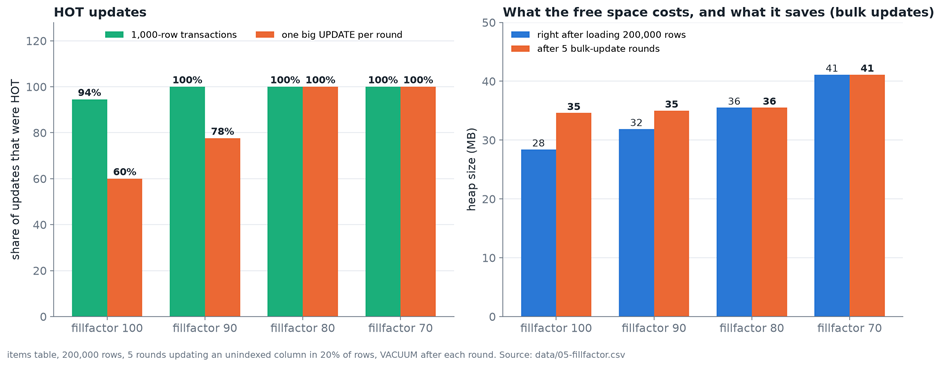
HOT updates and heap size for four fillfactors and two update patterns.As can be seen, fillfactor 100 already achieved 94.5% HOT updates when the transactions were small (the green columns).
This is because PostgreSQL prunes dead versions inside a page as it goes, and the space they free is enough for the next update.
fillfactor 90, on the other hand, took that to 100% and stopped the heap growing at the price of a table that was 12% bigger from the moment it was loaded.
Meanwhile, with one large UPDATE per round (in orange), fillfactor made a real difference. Here, only 60% of updates were HOT at 100, 78% at 90, and 100% at 80 or 70.
Then, at fillfactor 100, the heap grew by 22% – and at 80, it didn’t grow at all, but started 25% larger!
There’s also the case where fillfactor can’t help at all. When the same five rounds updated the indexed category column instead, the result was 0% HOT at both fillfactor 100 and 70.
The 70 table simply wasted 40% more space for nothing.
Why fillfactor only helps in some workloads
fillfactor reserves free space when rows are first written into a page. That space matters most in the window before VACUUM or page pruning has freed anything else, which is exactly what a large update of recently loaded rows hits.
In a steady OLTP workload of small transactions, pruning keeps recycling space inside each page, and the extra reserve matters less – but neither can help when the update changes an indexed column, because a HOT update is ruled out regardless of how much room there is.
When to lower fillfactor
Lower fillfactor for tables that receive large batches of updates to non-indexed columns, or whose rows are updated soon after insertion; 80 to 90 is usually enough.
Leave it at 100 for insert-only tables and for tables whose updates mostly change indexed columns, and check the effect with n_tup_hot_upd against n_tup_upd in pg_stat_user_tables.
Changing fillfactor with ALTER TABLE ... SET (fillfactor = 90) only affects pages written from then on. To apply it to existing data, you need a rewrite – which brings us nicely to the playbook…
PostgreSQL bloat remediation playbook
All the symptoms above have different causes but, in practice, you deal with them in the same order: stop the bloat from growing, find out where it already is, and then remove it.
While removing the bloat first is tempting (because it gives an immediate result), it doesn’t work in the long run, because a table rebuilt on Monday under the same conditions will be bloated again by Friday!
Step 1: give the HOT tables their own autovacuum settings
Most databases have a handful of tables that take most of the writes. Give each of them per-table settings, as covered earlier: a scale factor between 0.01 and 0.05, a fixed threshold sized to the table, and a cost limit high enough for each run to finish quickly.
In the lab, those three settings cut the peak backlog on the sessions table from 489,294 dead rows to 125,211. Leave the global defaults alone unless many tables need the same change and, if the busiest tables still build up a large backlog within one autovacuum_naptime, shorten the naptime.
At the same time, set idle_in_transaction_session_timeout for application roles, find out which reports run for minutes rather than seconds, and check for unused replication slots.
Symptom 4 showed that just one open snapshot can undo every single autovacuum setting you have.
Step 2: measure where the bloat is
Shown below is a reasonable weekly check using pgstattuple_approx(), which reads only the pages the visibility map can’t vouch for (so is cheap enough to run on large tables):
|
1 2 3 4 5 6 7 8 9 10 11 |
SELECT s.relname, pg_size_pretty(pg_table_size(s.relid)) AS table_size, pg_size_pretty(pg_indexes_size(s.relid)) AS index_size, round(a.dead_tuple_percent::numeric, 1) AS dead_pct, round(a.approx_free_percent::numeric, 1) AS free_pct, to_char(s.last_autovacuum, 'YYYY-MM-DD HH24:MI') AS last_autovacuum FROM pg_stat_user_tables s CROSS JOIN LATERAL pgstattuple_approx(s.relid) a WHERE pg_table_size(s.relid) > 10 * 1024 * 1024 ORDER BY pg_table_size(s.relid) DESC LIMIT 10; |
On the lab database at the end of the experiments, it gave the following (abbreviated):
|
1 2 3 4 5 6 |
relname | table_size | index_size | dead_pct | free_pct | last_autovacuum ------------+------------+------------+----------+----------+------------------ sessions | 346 MB | 101 MB | 0.0 | 13.0 | 2026-09-27 03:53 orders | 98 MB | 19 MB | 0.0 | 0.7 | events | 89 MB | 24 MB | 0.0 | 85.9 | items | 41 MB | 8304 kB | 0.0 | 30.5 | |
Since events has no dead rows at all and is 85.9% empty, it has a retention delete that will never be refilled and is therefore a clear candidate for a rewrite.
On the other hand, sessions is 13% free – much of it from the long transaction in Symptom 4 – so that space will be reused by future updates. It’s therefore worth just watching this, rather than fixing, for now.
Then we have items, which is 30% free because it was (intentionally) loaded with fillfactor 70.
Remember, the numbers alone don’t decide anything – it’s just the history of the table that does!
For indexes, run pgstatindex on the large indexes of the HOT tables (Symptom 2), and compare their size with the size of a fresh build. You can estimate this from a copy of the table or a recent rebuild.
Step 3: rebuild bloated indexes with REINDEX CONCURRENTLY
An index is much cheaper to fix than a table, and in Symptom 2 the index was usually the bigger problem.
REINDEX INDEX CONCURRENTLY builds a new copy and swaps it in, and reads and writes carry on while it works, but keep four things in mind:
- It cannot run inside a transaction block, and needs disk space for a second copy of the index while it runs.
- It waits for transactions that started before it, so a long-running report will also hold up the rebuild.
- If it fails or is cancelled, it leaves an invalid index behind (with
a _ccnewsuffix) that still has to be maintained on every write. Check it withSELECT indexrelid::regclass FROM pg_index WHERE NOT indisvalid, and drop what you find. - Rebuild one large index at a time. Each rebuild does a full index build with its own I/O and WAL.
Step 4: rewrite a table with pg_repack or VACUUM FULL (but only when you must)
When a table like events has a lot of free space that it will never reuse, the only way to give that space back is to rewrite the table.
PostgreSQL’s built-in way to do that is VACUUM FULL, and its cost is the lock – as shown below on a table with four million rows (half of them deleted):
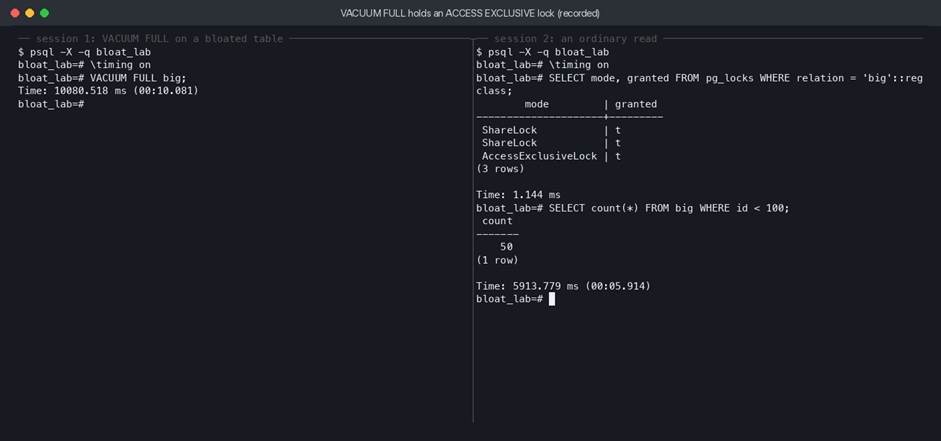
VACUUM FULL runs, pg_locks shows it holding an AccessExclusiveLock, and an ordinary SELECT in the other session waits 5.9 seconds for it to finish. (Recorded terminal session.)VACUUM FULL took 10 seconds and, during that time, the table couldn’t be read (let alone written) – so the SELECT in session 2 simply waited.
On a production table many times larger, this could amount to tens of minutes, or even hours, of outage.
pg_repack does the same rewrite online. It copies the table into a new one, records the changes made during the copy in a log table, replays them, and then swaps the files, holding an ACCESS EXCLUSIVE lock only briefly at the start and at the end – as shown below in the same table:
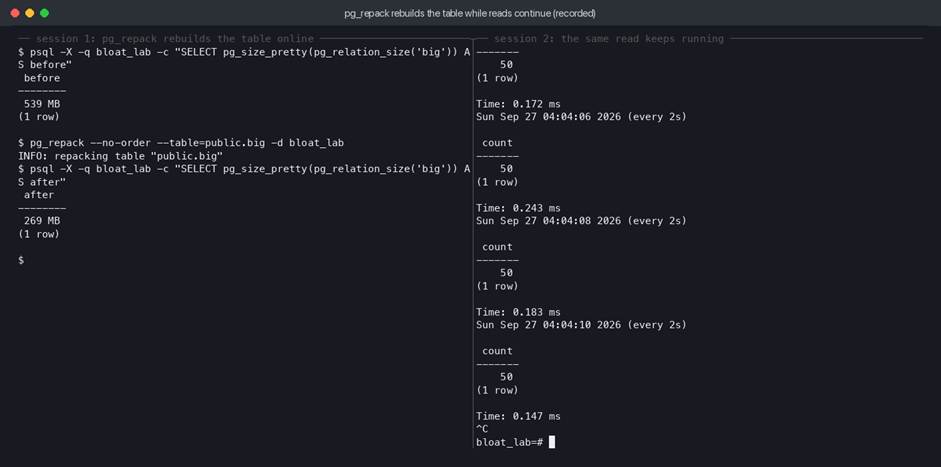
pg_repack rewrites the table from 539MB to 269MB, while the query in session 2 keeps running every two seconds. No read took longer than 2.5 ms. (Recorded terminal session.)
But, it’s not free!
It’s not free, though!
pg_repack needs the extension installed in the database and is normally run as a superuser, the table must have a primary key or a unique index on non-NULL columns, and it needs free disk space for a full copy of the table and its indexes.
Plus, its short locks can still be held up by a long-running transaction, so run it outside the reporting window.
It also carries the table’s storage parameters over to the new copy. When we set fillfactor = 70 on the same table and repacked it, for example, it grew from 269MB to 391MB, with 31.4% free space.
That makes a repack a convenient moment to apply a new fillfactor – and is also a reason to check that setting before you start!
Step 5: which fix for which symptom
| What you see | What it means | What to do |
|---|---|---|
High n_dead_tup that keeps growing | autovacuum is behind | Tune that table first (Step 1) |
VACUUM (VERBOSE) reports rows “dead but not yet removable” | Something is holding the xmin horizon | Run the three queries from Symptom 4 → “How to find what’s holding back cleanup”, then end the session or drop the slot |
| No dead rows, lots of free space the workload will reuse | Normal MVCC behaviour | Leave it alone |
| No dead rows, lots of free space that will never be reused | Typically a one-off mass delete | Rewrite with pg_repack, or VACUUM FULL in a maintenance window |
| Index much larger than a fresh build, or low leaf density | Index bloat | REINDEX INDEX CONCURRENTLY, then ask whether the indexed column needs to change so often |
Many non-HOT updates, and updates don’t touch indexed columns | Not enough room in pages | Lower fillfactor and apply it at the next rewrite |
Summary: what VACUUM does and doesn’t do
VACUUM does exactly one thing well – it makes the space held by dead row versions available again. To summarize:
- A vacuumed table keeps its size. The space is reused by new rows, and only empty pages at the end of the file are returned.
- Indexes keep their pages after a mass delete, and indexes on frequently changing columns grow under every update that is not
HOT. - With default settings,
autovacuumon a large, busy table starts late and rarely runs. Per-table settings fix most of that, butautovacuum_naptimestill sets a floor. - One old snapshot stops cleanup across the whole database, and the growth it causes stays after it ends.
fillfactorhelps bulk updates to non-indexed columns, helps small transactions much less, and does nothing when an indexed column changes.
None of this means autovacuum is broken – it’s more that vacuumed is a statement about dead rows rather than size, and a healthy system needs both.
Tune the HOT tables, watch the horizon, measure free space and index density, and rebuild only what will not recover by itself.
When done in that order, you’re no longer asking VACUUM for something it never promised, so it stops looking like it’s lying.
How to reproduce the lab
The lab is available on GitHub. You need PostgreSQL with the contrib extensions (the scripts were run on 18.4 and use only standard features), and Python 3.10 or later for the load generator.
Each experiment is a separate script and takes between a few seconds and about 15 minutes.
|
1 2 3 4 5 6 7 8 9 10 11 |
git clone https://github.com/chandanshukla1989/postgres-vacuum-bloat cd postgres-vacuum-bloat python3 -m venv .venv && .venv/bin/pip install -r requirements.txt createdb bloat_lab psql -d bloat_lab -f sql/00_helpers.sql ./experiments/01_vacuumed_not_smaller.sh # Symptom 1 ./experiments/02_index_bloat.sh # Symptom 2 ./experiments/03_autovacuum_outpaced.sh # Symptom 3 (two 7-minute runs) ./experiments/04_long_transaction.sh # Symptom 4 ./experiments/05_fillfactor.sh # Fillfactor |
Results go to evidence/raw (the psql output) and data (CSV files).
The pg_repack example also needs the pg_repack extension, created with CREATE EXTENSION pg_repack;, and the matching pg_repack client on your PATH.
The exact numbers will differ a little on other hardware and versions, but the shapes should not.
Free desktop tool for fast PostgreSQL monitoring and diagnostics
FAQs: PostgreSQL bloat and VACUUM
1. Why is my PostgreSQL table still large after VACUUM?
Plain VACUUM marks dead row versions as reusable free space, but it doesn’t move rows or shrink the file. It only returns space to the operating system when empty pages sit at the end of the file. A table with free space scattered through it stays the same size until you rewrite it with VACUUM FULL or pg_repack.
2. Does VACUUM shrink PostgreSQL indexes?
No. VACUUM removes dead index entries but leaves leaf pages in place, so after a mass delete an index keeps its size while leaf density can drop below 10%. B-tree pages are only freed when every entry on them is gone. Rebuild with REINDEX INDEX CONCURRENTLY, which doesn’t block reads or writes.
3. Why is autovacuum running but dead rows keep building up?
Usually for one of two reasons. By default, autovacuum only triggers once dead rows pass 50 plus 20% of the table’s rows, so large tables collect hundreds of thousands first. Alternatively, an old transaction, replication slot or prepared transaction is holding back the xmin horizon, so VACUUM reports rows as “dead but not yet removable”.
4. Should I use VACUUM FULL or pg_repack to reclaim space?
VACUUM FULL holds an ACCESS EXCLUSIVE lock for the whole rewrite, so the table can’t be read or written. pg_repack rewrites online and only locks briefly at the start and end, but needs the extension, a primary key or unique index, and disk space for a full copy. Only use VACUUM FULL in a maintenance window.
5. Does lowering fillfactor reduce PostgreSQL bloat?
It can. A fillfactor of 80 to 90 leaves room in each page for HOT updates, which helps most with large batch updates to non-indexed columns. It helps little with small transactions (fillfactor 100 already reached 94.5% HOT in the lab) and nothing when an indexed column changes. It only applies to newly written pages until you rewrite the table.
This document contains proprietary information and is protected by copyright law.
Copyright © 2026 Red Gate Software Limited. All rights reserved




Load comments