





fillfactor in PostgreSQL controls how full table or index pages are. The lower the fillfactor, the better the performance on update-heavy tables. In this article, learn everything you need to know about fillfactor in PostgreSQL – from what it is, to exactly when (and how) you should adjust it.
PostgreSQL comes pre-configured with hundreds of various settings. We’ll never want to change (or are even aware of) most of them, but there is one you definitely should be familiar with: fillfactor.
First, some background. All database management systems (DBMS’) implement ways to avoid conflicts between users simultaneously modifying and accessing the same data. PostgreSQL uses a system called MVCC – multi-version concurrency control.
MVCC generally outperforms competing systems like lock-based protocols, especially in reading or inserting new data. But there is one use case for which MVCC often struggles: heavily-updated tables.
How table rows are updated in PostgreSQL (and where fillfactor comes in)
Some people are surprised to learn that PostgreSQL never directly updates a table row. Instead, it writes an entirely new version of the row, leaving the original untouched. Later, when no running queries are referencing the old version, PostgreSQL will delete it. Effectively, the UPDATE works like an INSERT, followed by a later DELETE.
When updates are frequent or vacuum operators are far apart, there may be several different versions of a row still in the table. And because every UPDATE is inserting a new row, we must also update the table’s indexes – even when we’re not updating any indexed columns. Treating every update as an INSERT is expensive and leads to index fragmentation. This means performance in update-heavy workloads can suffer, sometimes badly – but there’s a solution.
‘HOT’ updates in PostgreSQL
PostgreSQL contains an optimization that can help: a “HOT update”. HOT — which stands for “Heap-Only Tuple” — is a type of update in which the new row is inserted on the same data page as the existing row, then “chained” to the earlier copy. This allows PostgreSQL to skip updating the table’s indexes. Also, future row accesses can delete the old copies (the entire “HOT chain”) without having to perform a vacuum.
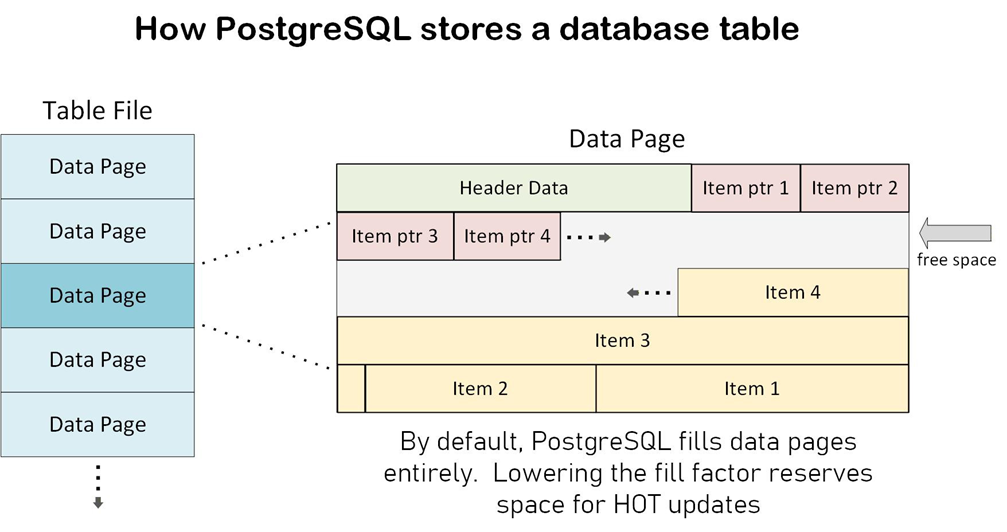
For a HOT update to happen, none of the columns being altered can be indexed. And, most importantly, there must be room in the data page to store the new row. This is where fillfactor comes in. By default, PostgreSQL fills a table’s data pages to 100%, leaving no free space (fill factor = 100). But we can lower this default setting on a per-table basis. If we set a value of 80, then 20% of every data page is available for HOT updates.
Get started with PostgreSQL – free book download
How much free space is best for HOT updates in PostgreSQL?
If a lack of free space prevents HOT updates from happening in PostgreSQL, why not set the amount of free space even higher? Wouldn’t more room be better? Well, no. Not usually.
A fill factor of 80 means 20% of the table’s data pages are effectively empty, making your table that much larger. This impacts on all operations on that table: reads and inserts included. This is why PostgreSQL defaults to a 100% fillfactor: most tables experience many more selects and inserts than they do updates.
A fillfactor below 70 only pays off in the rare case when there are several times more updates against a table than inserts and selects combined. And remember – a SELECT that returns 100 rows is more load than one that returns a single row.
There are also other factors. The more indexes on a table, the more it can benefit by avoiding a HOT update. However, if the updates are modifying indexed columns, the HOT cannot happen. To complicate matters further, HOT update rates are affected by row size and the frequency of vacuum operations (among other considerations.)
The interplay of all these factors makes coming up with a “rule of thumb” for setting the fillfactor nearly impossible. Only testing can reveal the best value for each table. Still, it’s not incorrect to say that most frequently-updated tables will benefit from lowering the fillfactor.
One misconception is that fillfactor operates like the balance on a scale: lowering it improves update speed only at the cost of reduced select performance. While this is often true, when HOT updates are bogging down a server is when tuning the fillfactor can also improve SELECT performance. Additionally, more HOT updates means less index fragmentation, which also helps SELECT performance.
How does PostgreSQL store a database table?
How to alter a table’s fillfactor in PostgreSQL
fillfactor is a table-specific setting. Altering it is easy: to adjust the factor to 80 for table ‘sales’, for instance, execute this statement:
ALTER TABLE sales SET (fillfactor = 80);
Do note that this only alters the value for new data – not data already in the table. If you want to see immediate results, you’ll need to dump and reload the table’s data. Otherwise, you’ll only see the results gradually over time (as existing data pages get updated.) For a large table, this may take days or weeks, so bear this in mind when testing your results.
How to check the effectiveness of fillfactor in PostgreSQL
The following query will tell you the total number of updates made to a table, the number of which qualified for a HOT update, and the HOT update percentage (the ratio of the first two):
|
1 2 3 4 5 6 7 8 9 |
SELECT relname AS "Table name", n_tup_upd AS "Total updates", n_tup_hot_upd AS "HOT updates", ROUND(100.0 * n_tup_hot_upd / NULLIF(n_tup_upd,0), 1) AS "HOT update %" FROM pg_stat_user_tables WHERE relname = {table_name}; |
Unless you’ve previously cleared the statistics counters, these values start from when the table was created. It’s therefore recommended you execute the system function pg_stat_reset() after resetting the fillfactor. Otherwise, this query will contain mostly data from before the setting was changed.
If you reloaded your table data after lowering the fillfactor, you should see an immediate improvement in hit rates. Otherwise, you should expect to see the hit rate climb slowly over time. I can’t stress this latter point enough. For large tables, it may take several weeks before the HOT hit rate climbs appreciably.
When (and how) to use fillfactor for indexes in PostgreSQL
Every index in PostgreSQL has a fillfactor setting. Unlike tables, which default to 100%, indexes default to 90%. The setting affects indexes differently than tables, and the criteria for changing it is also different.
A lower index fill factor reduces expensive page splits for the index. These splits can occur on both inserts and updates – but only for updates that alter an indexed column. So, when choosing indexes to potentially lower the fillfactor on, the ratio we’re interested in is (total insert + index-involved updates) vs .(total select + non-index updates). As before, we measure each value based on the number of rows affected, not just the transaction count.
Also note that indexes are even more sensitive than tables to the performance implications of lowering the fillfactor. In practice, you’ll rarely want to set an index fillfactor lower than 80. The syntax for doing this is similar to that of tables: for an index called idx_sales, for instance, you would use this command:
ALTER INDEX idx_sales SET (fillfactor = 80);
Note: PostgreSQL contains an optimization for so-called “monotonic inserts”, such as a sequentially-increasing primary key. This drastically reduces the number of page splits, so you’ll rarely want to consider these indexes for adjustment. Focus on indexes with values that are inserted or updated on a random basis.
If your table is static (no inserts or updates to indexed columns), you can set its index fillfactor to 100 for maximum performance. This packs the index as tightly as possible, removing all wasted space. It even works for tables that receive updates (as long as those updates don’t alter indexed columns.)
Further optimization: using TOASTing in PostgreSQL
If your table has text columns holding lengthy strings, but not quite long enough for the rows to be TOASTed (moved by PostgreSQL into separate storage), this can make maintaining free space on a data page difficult. If these text columns aren’t often referenced, you can further improve performance by lowering the table setting ‘toast_tuple_target‘.
Feel free to share your thoughts about PostgreSQL’s fillfactor in the comments below!
Simple Talk is brought to you by Redgate Software
FAQs: fillfactor in PostgreSQL
1. What is fillfactor in PostgreSQL?
fillfactor in PostgreSQL controls how full table or index pages are. Lower values leave free space for updates.
2. What is the default fillfactor in PostgreSQL?
- Tables: 100
- Indexes: 90
3. Why change fillfactor in PostgreSQL?
Lowering fillfactor improves performance on update-heavy tables by enabling HOT updates and reducing index overhead.
4. What are HOT updates in PostgreSQL?
HOT (Heap-Only Tuple) updates store new row versions on the same page, avoiding index updates and improving performance.
5. When should I lower fillfactor in PostgreSQL?
- Try ~80 for frequently updated tables
- Stick to 100 for rare updates
6. Can lower fillfactor hurt performance in PostgreSQL??
Yes. It increases table size and can slow reads and inserts if overused.
7. How do I change fillfactor in PostgreSQL?
SQL code:
ALTER TABLE table_name SET (fillfactor = 80);
8. Does fillfactor in PostgreSQL apply to existing data?
No. It only affects new or updated rows unless you rebuild the table.
9. How do I measure results?
Check HOT update rates using pg_stat_user_tables.
10. Should I change index fillfactor in PostgreSQL?
Sometimes. You can lower it (e.g., to 80–90) for indexes with frequent inserts or updates.
11. What’s the best PostgreSQL fillfactor value?
There’s no universal ‘best’ value – simply test based on your workload.
This document contains proprietary information and is protected by copyright law.
Copyright © 2026 Red Gate Software Limited. All rights reserved





Load comments