


What is In-Memory OLTP – and why is it important?
In-Memory OLTP, also known as Hekaton, can significantly improve the performance of OLTP (Online transaction processing) database applications. It improves throughput and reduces latency for transaction processing, and can help improve performance where data is transient, such as in temporary tables and during ETL (Extract Transfer and Load). In-Memory OLTP is a Memory-optimized database engine that is integrated into the SQL Server engine, and optimized for transaction processing. In order to use In-Memory OLTP, you define a heavily-accessed table as memory-optimized. Memory-optimized tables are fully transactional, durable, and are accessed using Transact-SQL in the same way as disk-based tables. A single query can reference both Hekaton memory-optimized tables and disk-based tables. A transaction can update data in both Hekaton tables and disk-based tables. Stored procedures that only reference memory-optimized tables can be natively compiled into machine code for further performance improvements. The In-Memory OLTP engine is designed for an extremely high session concurrency for the OLTP type of transactions driven from a highly scaled-out middle-tier. To achieve this, it uses latch-free data structures and optimistic, multi-version concurrency control. The result is the predictable, sub-millisecond low latency and high throughput with linear scaling for database transactions. The actual performance gain depends on many factors, but it is common to find 5 to 20 times performance improvements. Here is the downloadable link to the detailed overview of a memory-optimized table available from Microsoft White Paper: SQL Server In-Memory OLTP Internals for SQL Server 2016 – by Kalen Delaney However, in this section I will demonstrate how to migrate a disk-based table to a memory-optimized table.Note: In-Memory Optimized OLTP table was introduced in SQL Server 2014. Unfortunately, it had many limitations which made it quite impractical to use. In SQL Server 2016 the memory-optimized table was dramatically improved and the restraints were significantly reduced. Only a few limitations still stay in the SQL Server 2016 version. All samples and techniques provided in this section will work for SQL Server 2016 version only.
MEMORY_OPTIMIZED_DATA filegroup. This filegroup is used for storing the data and delta file pairs needed by SQL Server to recover the memory-optimized tables. Although the syntax for creating them is almost the same as for creating a regular filestream filegroup, it must also specify the CONTAINS MEMORY_OPTIMIZED_DATA option.
To make the code below compile, you will need to either replace ‘C:\SQL2016’ with your disk settings, or create the folder.
|
1 2 3 4 5 6 7 |
CREATE DATABASE [TestDB] ON PRIMARY ( NAME = N'TestDB_data', FILENAME = N'C:\SQL2016\TestDB_data.mdf'), FILEGROUP [TestDBSampleDB_mod_fg] CONTAINS MEMORY_OPTIMIZED_DATA DEFAULT ( NAME = N'TestDB_mod_dir', FILENAME = N'C:\SQL2016\TestDB_mod_dir' , MAXSIZE = UNLIMITED) LOG ON ( NAME = N'TestDBSampleDB_log', FILENAME = N'C:\SQL2016\TestDB_log.ldf' ) |
MEMORY_OPTIMIZED_DATA option for an existing database, you need to create a filegroup with the MEMORY_OPTIMIZED_DATA option, and then files can be added to the filegoup.
|
1 2 3 4 5 6 |
ALTER DATABASE [TestDB] ADD FILEGROUP [TestDBSampleDB_mod_fg] CONTAINS MEMORY_OPTIMIZED_DATA; ALTER DATABASE [TestDB] ADD FILE (NAME='TestDB_mod_dir', FILENAME='C:\SQL2016\TestDB_mod_dir') TO FILEGROUP [TestDBSampleDB_mod_fg]; |
MEMORY_OPTIMIZED_DATA option is enabled.
|
1 2 3 4 |
USE TestDB SELECT g.name, g.type_desc, f.physical_name FROM sys.filegroups g JOIN sys.database_files f ON g.data_space_id = f.data_space_id WHERE g.type = 'FX' AND f.type = 2 |
|
1 2 3 4 5 6 7 8 |
try { Import-Module SQLServer -Global -ErrorAction Stop } catch { Import-Module SQLPS } #loading the assemblies $Server = New-Object 'Microsoft.SqlServer.Management.Smo.Server' 'MyServer' if ($server.databases['TestDB'].HasMemoryOptimizedObjects) { 'has memory-optimised tables' } else { 'no memory-optimised tables' } |
MEMORY_OPTIMIZED_DATA: open the database property, select Filegroups, the filegroup name displays on the MEMORY_OPTIMIZED_DATA option.
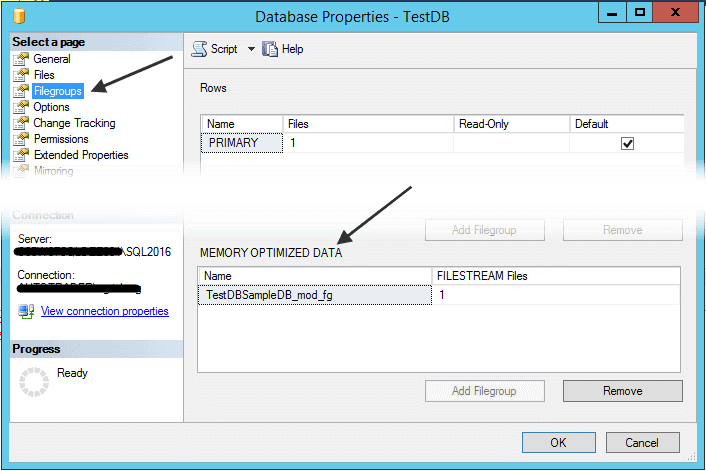 Here is the list of differences between disk-based tables and memory-optimized tables:
MEMORY_OPTIMIZED property– the pages do not need to be read into cache from the disk when the memory-optimized tables are accessed. All of the data is stored in memory, at all times.DURABILITY property– memory-optimized tables can be either durable (SCHEMA_AND_DATA) or non-durable (SCHEMA_ONLY). The default is for these tables to be durable (SCHEMA_AND_DATA), and these durable tables also meet all the other transactional requirements; they are atomic, isolated, and consistent. A set of checkpoint files (data and delta file pairs), which are only used for recovery purposes, is created using operating system files residing in memory-optimized filegroups that keep track of the changes to the data in the durable tables. These checkpoint files are append-only. Non-durable and not logged, using an option SCHEMA_ONLY. As the option indicates, the table schema will be durable, even though the data is not. These tables do not require any IO operations during transaction processing, and nothing is written to the checkpoint files for these tables. The data is only available in memory while SQL Server is running.Indexes– noCLUSTEREDindexes are implemented on memory-optimized tables. Indexes are not stored as traditional B-trees. Memory-optimized tables support hash indexes, stored as hash tables with linked lists connecting all the rows that hash to the same value and “range” indexes, which for memory-optimized tables are stored using special Bw-trees. The range index with Bw-tree can be used to quickly find qualifying rows in a range predicate just like traditional a B-tree but it is designed with optimistic concurrency control with no locking or latching. (See SQL Server In-Memory OLTP Internals for SQL Server 2016 – by Kalen Delaney)
Migrating Disk-Based to Memory Optimized OLTP Table
A table is a collection of columns and rows. It is necessary to know the limitations of the memory-optimized table columns data types in order to migrate a disk-based table to the memory-optimized table. The following data types are not supported:datetimeoffset, geography, geometry, hierarchyid, rowversion, xml, sql_variant, all User-Defined Types and all legacy LOB data types (including text, ntext, and image)
Supported datatypes include:
bit,tinyint,smallint,int,bigint.Numericanddecimalmoneyandsmallmoneyfloatandreal- date/time types:
datetime,smalldatetime,datetime2,dateandtime char(n),varchar(n),nchar(n),nvarchar(n),sysname,varchar(MAX) andnvarchar(MAX)binary(n),varbinary(n) andvarbinary(MAX)- Uniqueidentifier
- The
MEMORY_OPTIMIZEDproperty is set toON(MEMORY_OPTIMIZED=ON) - The
DURABILITYproperty is set toSCHEMA_AND_DATAorSCHEMA_ONLY(SCHEMA_AND_DATAis default) - The memory-optimized table must have a
PRIMARY KEYindex. IfHASHindex is selected for the primary key, thenBUCKET_COUNTmust be specified. - Only 8 indexes including the primary key are allowed in the memory-optimized table.
IDENTITYproperties have to be set as seed = 1 and increment = 1 only.- No Computed Columns are allowed in the memory-optimized tables.
INSERT, UPDATE, and DELETE) and the most readable tables. Yet this list is not quite complete for the migration. However, the tables that should not be migrated are the static metadata tables; the tables that violate the memory-optimized tables’ limitations; the tables with fewer rows.
In SQL Server 2016 it is possible to generate a migration checklist using SQL Server PowerShell. In Object Explorer, right-click on a database and then click Start PowerShell; verify that the following prompt appears, execute following code:
|
1 |
PS SQLSERVER:\SQL\{Instance Name}\DEFAULT\Databases\{DB Name}> |
|
1 |
Save-SqlMigrationReport –FolderPath “C:\Temp” |

Note: If you need to run the Migration Report on the single table then expand the Database node, expand the Tables node, right click on the table, and then select Start PowerShell from pop up menu.
FolderPath. Therefore, the folder path to the reports will be specified as FolderPath in the PowerShell script plus the database name that the checklist has been executed for. In this example it’s C:\Temp\Northwind.
Note: Also the In-Memory OLTP Migration Checklist could be generated from SQL Server 2016 SSMS. Please follow link https://msdn.microsoft.com/en-gb/library/dn284308.aspx
TEST_Disk. For demo purposes, the table has been created with a number of migration violations that we will see in the report later.
|
1 2 3 4 5 6 7 8 9 10 11 12 13 14 |
CREATE TABLE dbo.TEST_Disk( ID int IDENTITY(10000, 1), ProductID int NOT NULL, OrderQty int NOT NULL, SumOrder as ProductID + OrderQty, XMLData XML NULL, Description varchar(1000) SPARSE, StartDate datetime CONSTRAINT DF_TEST_DiskStart DEFAULT getdate() NOT NULL, ModifiedDate datetime CONSTRAINT DF_TEST_DiskEnd DEFAULT getdate() NOT NULL, CONSTRAINT PK_TEST_Disk_ID PRIMARY KEY CLUSTERED ( ID ) ) |
- XMLData column have XML data type
- SumOrder is Computed Column
- Description column is SPARSE
- ID have IDENTITY seed value 10000
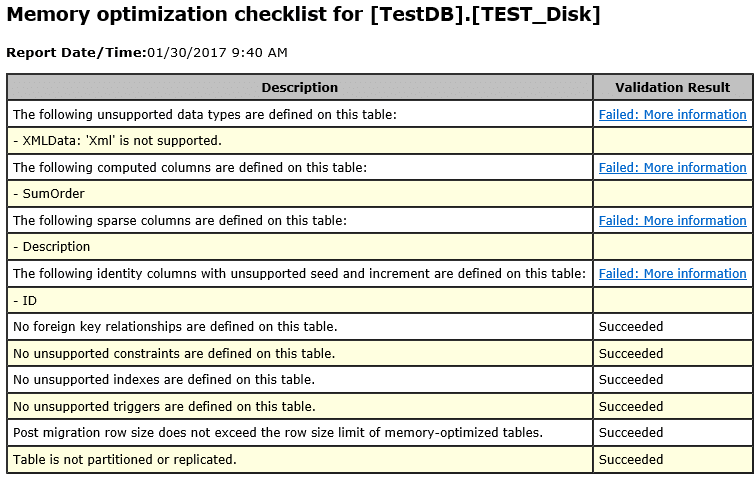 According to the report all listed violations have to be corrected or the table cannot be migrated. Let’s fix all of those violations:
XMLDatacolumn will be converted toNVARCHAR(MAX) data type; that is the nature of XML. However, when an application or the database does not implement UNICODE, thenVARCHAR(MAX) data type can be considered as well.SumOrderis computed column, where the value calculates by formula ProductID column summarized with OrderQty column (formula ProductID + OrderQty was created for demo purpose only). Both ProductID and OrderQty columns have int data type. Therefore, SumOrder column inherited int data type from the ProductID and OrderQty columns (How to correct the computed column issue will be explained in section “Fixing the Computed column issue”).Descriptioncolumn, to correct this issue, simply removeSPARSEoption.IDcolumnIDENTITYseed value will be 1 then seed value 10,000 will be forced with explicitIDENTITYINSERT.
|
1 2 3 4 5 6 7 8 9 10 11 12 13 14 |
CREATE TABLE dbo.TEST_Memory( ID int IDENTITY(1, 1), ProductID int NOT NULL, OrderQty int NOT NULL, SumOrder int NULL, XMLData nvarchar(MAX) NULL, Description varchar(1000) NULL, StartDate datetime CONSTRAINT DF_TEST_MemoryStart DEFAULT getdate() NOT NULL, ModifiedDate datetime CONSTRAINT DF_TEST_MemoryEnd DEFAULT getdate() NOT NULL, CONSTRAINT PK_TEST_Memory_ID PRIMARY KEY NONCLUSTERED HASH ( ID )WITH (BUCKET_COUNT = 1572864) ) WITH ( MEMORY_OPTIMIZED = ON , DURABILITY = SCHEMA_AND_DATA ) |
|
1 2 3 4 5 6 7 8 9 10 11 12 13 14 |
-- 1. Insert dummy row SET IDENTITY_INSERT TEST_Memory ON INSERT TEST_Memory (ID,ProductID, OrderQty, SumOrder) SELECT 10000, 1,1,1 SET IDENTITY_INSERT TEST_Memory OFF -- 2. Remove the record DELETE TEST_Memory WHERE ID = 10000 -- 3. Verify Current Identity SELECT TABLE_NAME, IDENT_SEED(TABLE_NAME) AS Seed, IDENT_CURRENT(TABLE_NAME) AS Current_Identity FROM INFORMATION_SCHEMA.TABLES WHERE OBJECTPROPERTY(OBJECT_ID(TABLE_NAME), 'TableHasIdentity') = 1 AND TABLE_NAME = 'TEST_Memory' |
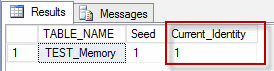 before |
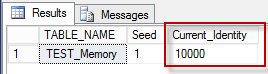 after |
|
1 2 3 4 5 6 7 8 9 10 11 12 13 14 15 16 17 18 19 20 21 22 23 24 25 |
;With ZeroToNine (Digit) As (Select 0 As Digit Union All Select Digit + 1 From ZeroToNine Where Digit < 9), OneMillionRows (Number) As ( Select Number = SixthDigit.Digit * 100000 + FifthDigit.Digit * 10000 + FourthDigit.Digit * 1000 + ThirdDigit.Digit * 100 + SecondDigit.Digit * 10 + FirstDigit.Digit * 1 From ZeroToNine As FirstDigit Cross Join ZeroToNine As SecondDigit Cross Join ZeroToNine As ThirdDigit Cross Join ZeroToNine As FourthDigit Cross Join ZeroToNine As FifthDigit Cross Join ZeroToNine As SixthDigit ) Select Number+1 ID,ABS(CHECKSUM(NEWID())) % 50 ProductID, ABS(CHECKSUM(NEWID())) % 55 OrderQty , (SELECT Number+1 as ProductID,ABS(CHECKSUM(NEWID())) % 50 as OrderQty FROM master.dbo.spt_values as data WHERE type = 'p' and data.number = v.number % 2047 FOR XML AUTO, ELEMENTS, TYPE ) XMLData INTO TEST_DataLoad From OneMillionRows v |
TEST_DataLoad is ready, let’s run a test load for disk-based and the memory-optimized table. That was done on the server with 32 CPU; 512 GB of memory; Fusion (Solid State) Drive. However, the memory-optimized table performed more than twice as fast as the disk table.
|
1 2 3 4 5 6 7 8 9 10 11 12 13 14 15 |
---- Load disk-based table SET STATISTICS TIME ON; INSERT [dbo].[TEST_Disk] ( ProductID, OrderQty ) select ProductID, OrderQty from TEST_DataLoad SET STATISTICS TIME OFF; SQL Server Execution Times: CPU time = 5968 ms, elapsed time = 6322 ms. ---- Load the memory-optimized table SET STATISTICS TIME ON; INSERT [dbo].[TEST_Memory](ProductID, OrderQty, SumOrder) select ProductID, OrderQty,ProductID + OrderQty from TEST_DataLoad SET STATISTICS TIME OFF; SQL Server Execution Times: CPU time = 2500 ms, elapsed time = 2561 ms. |
Indexing memory-optimized tables
Having created the table, you will have to plan a new indexing strategy and choose effective indexes that are appropriate for the way the table will be used. As mentioned earlier, memory optimized table indexes cannot be created asCLUSTERED, and are not stored as traditional B-trees: They are stored using special Bw-trees. A maximum of 8 indexes can be created on the memory-optimized tables. There two types of memory optimized table indexes:
- HASH
- RANGE
BUCKET_COUNT property value. The HASH indexes are more efficient with the equal (=) operator. The BUCKET_COUNT is calculated with the number of unique values multiplied by 2 for tables with fewer than 1 million rows, or multiplied by 1.5 for tables that have more than 1 million rows. The Query below, returns the estimated BUCKET_COUNT value for the table TEST_Memory and the column ProductID.
|
1 2 3 4 5 6 7 8 9 10 11 |
;WITH CTE AS ( SELECT COUNT(DISTINCT ProductID) CntID FROM TEST_Memory ) SELECT POWER(2,CEILING(LOG(CntID)/LOG(2))) AS [BUCKET COUNT] FROM CTE ALTER TABLE DDL need to be execute to create additional index on the memory-optimized table. ALTER TABLE TEST_Memory ADD INDEX [IX_ TEST_Memory_ProductID] NONCLUSTERED HASH ( [ProductID] ) WITH ( BUCKET_COUNT = 1048576) |
ALTER TABLE command rebuilds the entire memory-optimized table and makes the table unavailable during the rebuild process.
To review the bucket count for HASH statistics, you can run the SQL code.
|
1 2 3 4 5 6 7 8 9 10 |
SELECT object_name(hs.object_id) AS [Object Name], i.name as [Index Name], hs.total_bucket_count, hs.empty_bucket_count, (hs.total_bucket_count-hs.empty_bucket_count) * 1.3 as NeededBucked, FLOOR(his.empty_bucket_count*1.0/his.total_bucket_count * 100) AS [Empty Bucket %], hs.avg_chain_length, hs.max_chain_length FROM sys.dm_db_xtp_hash_index_stats AS hs JOIN sys.indexes AS i ON hs.object_id=i.object_id AND hs.index_id=i.index_id |
RANGE indexes are optimized for the BETWEEN predicate. If are unsure of the number of buckets you’ll need for a particular column, or if you know you’ll be searching for your data based on a range of values, you should consider creating a range index instead of a hash index. Range indexes are implemented using a new data structure called a Bw-tree, originally envisioned and described by Microsoft Research in 2011. A Bw-tree is a lock- and latch-free variation of a B-tree.
When no HASH is specified, the index creates as RANGE. For example:
|
1 2 3 4 |
ALTER TABLE TEST_Memory ADD INDEX [IX_ TEST_Memory_OrderQty] NONCLUSTERED ( OrderQty ) |
|
1 2 3 4 5 6 7 8 9 10 11 12 13 14 15 16 |
CREATE TABLE dbo.TEST_Memory( ID int IDENTITY(1, 1), ProductID int NOT NULL, OrderQty int NOT NULL, SumOrder int NOT NULL, XMLData nvarchar(MAX) NULL, Description varchar(1000) NULL, StartDate datetime CONSTRAINT DF_TEST_MemoryStart DEFAULT getdate() NOT NULL, ModifiedDate datetime CONSTRAINT DF_TEST_MemoryEnd DEFAULT getdate() NOT NULL, INDEX [IX_ TEST_Memory_ProductID] NONCLUSTERED HASH ([ProductID]) WITH (BUCKET_COUNT = 1048576), INDEX [IX_ TEST_Memory_OrderQty] NONCLUSTERED (OrderQty), CONSTRAINT PK_TEST_Memory_ID PRIMARY KEY NONCLUSTERED HASH ( ID )WITH (BUCKET_COUNT = 1572864) ) |
Fixing the Computed column issue
One of the reported issues was that In-Memory OLTP table does not allow Computed columns. Depending on how the table is utilizing a database or the applications, the solutions can vary from very simple to complex. For example, do not include the computed column when the In-Memory OLTP table is created or keep the column name as nullable with the appropriate data type (a type of dummy column just to preserve the legacy table structure, as I did for the TEST_Memory table). For a more complex solution such as create User-Defined Table Type, implement it in the Natively Compiled Stored Procedure. An easy option to avoid the computed column issues for In-Memory OLTP table is to create a view with a computed formula. For example:|
1 2 3 4 5 6 7 8 9 10 |
CREATE VIEW vw_TEST_Memory AS SELECT ID ,ProductID ,OrderQty ,SumOrder = ProductID + OrderQty ,XMLData ,StartDate ,ModifiedDate FROM dbo. TEST_Memory |
INSTEAD OF trigger for the vw_TEST_Memory view, and use this view to insert new rows. For example:
|
1 2 3 4 5 6 |
CREATE TRIGGER tr_TEST_Memory ON dbo.vw_TEST_Memory INSTEAD OF INSERT AS INSERT dbo.TEST_Memory ( ProductID, OrderQty, SumOrder, XMLData, StartDate, ModifiedDate) SELECT ProductID, OrderQty, ProductID + OrderQty, XMLData, StartDate, ModifiedDate FROM inserted |
|
1 2 3 4 5 6 7 8 |
CREATE TYPE [dbo].[tt_TEST_Disk] AS TABLE( [ProductID] [int] NOT NULL, [OrderQty] [int] NOT NULL, [XMLData] [xml] NULL, [Description] [varchar](1000) NULL, [StartDate] [datetime] NOT NULL, [ModifiedDate] [datetime] NOT NULL ) |
MEMORY_OPTIMIZED has to be enabled, and the UDTT must have an index. Without those two options, the UDTT can be created, but SQL Server will raise an error when the UDTT is bound to the Natively Compiled Stored Procedure. Here is a sample error massege:
|
1 2 |
Msg 41323, Level 16, State 1, Procedure usp_NC_Insert_TEST_Memory, Line 2 [Batch Start Line 56] The table type 'dbo.tt_TEST_Memory' is not a memory optimized table type and cannot be used in a natively compiled module. |
|
1 2 3 4 5 6 7 8 9 10 11 12 13 |
CREATE TYPE tt_TEST_Memory as TABLE( ProductID int NOT NULL, OrderQty int NOT NULL, XMLData varchar(max) NULL, [Description] varchar(1000) NULL, StartDate datetime NOT NULL, ModifiedDate datetime NOT NULL, INDEX IXNC NONCLUSTERED ( StartDate ASC ) ) WITH ( MEMORY_OPTIMIZED = ON ) |
|
1 2 3 4 5 6 7 8 9 10 11 |
CREATE PROCEDURE [dbo].[usp_NC_Insert_TEST_Memory] (@VRT dbo.tt_TEST_Memory READONLY) WITH NATIVE_COMPILATION, SCHEMABINDING AS BEGIN ATOMIC WITH (TRANSACTION ISOLATION LEVEL=snapshot, LANGUAGE=N'us_english') INSERT [dbo].[TEST_Memory] (ProductID, OrderQty, SumOrder, XMLData, Description, StartDate, ModifiedDate) SELECT ProductID, OrderQty, [ProductID]+[OrderQty], XMLData, Description, StartDate, ModifiedDate FROM @VRT END |
- After parameters list (if it exists) add WITH NATIVE_COMPILATION, SCHEMABINDING options
- The T-SQL code body surrounded with BEGIN ATOMIC WITH (TRANSACTION ISOLATION LEVEL=snapshot, LANGUAGE=N’us_english’) … END . Where the transaction isolation level can be selected from supported levels (https://msdn.microsoft.com/en-us/library/dn133175.aspx):
- SNAPSHOT
- REPEATABLE READ
- SERIALIZABLE
- READ COMMITTED
Migrating existing DML triggers
it is worth noting that an In-Memory OLTP table does not supportINSTEAD OF triggers. However, INSTEAD OF triggers can be used for the view with In-Memory OLTP table. The migration rules for the triggers are the same as for the stored procedures.
- WITH NATIVE_COMPILATION, SCHEMABINDING options must be added after ON [tableName] section
- The T-SQL code body surrounded with BEGIN ATOMIC WITH (TRANSACTION ISOLATION LEVEL=snapshot, LANGUAGE=N’us_english’) … END
|
1 2 3 4 5 6 7 8 9 |
CREATE TRIGGER tr_TriggerName ON TableName AFTER INSERT, UPDATE, DELETE AS BEGIN /* The trigger code here */ END |
|
1 2 3 4 5 6 7 8 9 10 11 |
CREATE TRIGGER tr_TriggerName ON TableName WITH NATIVE_COMPILATION, SCHEMABINDING AFTER INSERT, UPDATE, DELETE AS BEGIN ATOMIC WITH (TRANSACTION ISOLATION LEVEL=snapshot, LANGUAGE=N'us_english') /* The trigger code here */ END |
- You cannot create memory-optimized tables if the database or server has one or more DDL triggers defined on CREATE_TABLE or any event group that includes it. You cannot drop a memory-optimized table if the database or server has one or more DDL trigger defined on DROP_TABLE or any event group that includes it.
- You cannot create natively compiled stored procedures if there are one or more DDL triggers on CREATE_PROCEDURE, DROP_PROCEDURE, or any event group that includes those events.
Conclusion
The In-Memory OLTP table was introduced in SQL Server 2014. However, a massive number of limitations made In-Memory OLTP table usage practically impossible. Thankfully, In SQL Server 2016 many of those limitations were eliminated, which makes it possible to start implementing In-Memory OLTP table in the database. As you can read in this article, the process that is required to migrate the disk tables to In-Memory OLTP tables is not straightforward and requires analysis before you can make a final decision for migration. However, the benefits that an In-Memory OLTP table delivers is worth your effort. If you are looking to improve transactional speed and reduce blocking for your server, the In-Memory OLTP table is an excellent way to accomplish this task.FAQs
1. What is a SQL Server memory-optimized table?
A SQL Server memory-optimized table (also known as In-Memory OLTP, codename Hekaton) is a table whose rows are stored in memory-resident data structures rather than disk-based 8KB pages. Memory-optimized tables use optimistic multi-version concurrency control (no lock/latch contention between readers and writers), lock-free data structures, and natively-compiled stored procedures for very high transaction throughput on OLTP workloads that fit entirely in memory. Introduced in SQL Server 2014 with many limitations, substantially improved in 2016, 2017, and 2019. The database must have a MEMORY_OPTIMIZED_DATA filegroup; individual tables opt in via WITH (MEMORY_OPTIMIZED = ON). Memory-optimized tables coexist with regular disk tables in the same database.
2. How do I migrate a disk-based table to memory-optimized in SQL Server?
Seven-step workflow. (1) Confirm the database has a MEMORY_OPTIMIZED_DATA filegroup – add one if not with ALTER DATABASE. (2) Audit the source table for unsupported features: large object columns, UNIQUE constraints on columns longer than 900 bytes, INSTEAD OF triggers, specific types – plan a replacement strategy for each. (3) Rebuild the indexing strategy – memory-optimized tables don’t have clustered indexes; choose hash indexes (for equality lookups) or memory-optimized nonclustered indexes (for range scans). (4) Handle computed columns via the memory-optimized-supported subset or extract them to a view. (5) Migrate DML triggers – AFTER triggers work with restrictions; INSTEAD OF triggers need reworking as procedures. (6) Create the new table with CREATE TABLE … WITH (MEMORY_OPTIMIZED = ON, DURABILITY = SCHEMA_AND_DATA). (7) Migrate data from disk to memory-optimized table (INSERT INTO … SELECT FROM), verify row counts and data integrity, switch application references, drop the old disk table. Each step has gotchas detailed in the article.
3. What is the difference between a hash index and a nonclustered index in memory-optimized tables?
Hash indexes use a hash function on the indexed column(s) to produce a fixed-size hash table with buckets – O(1) average lookup for equality predicates (column = value), optimal when you know the bucket count up front (rule of thumb: 1-2x the number of unique keys). No support for range predicates, sorting, or inequality queries. Memory-optimized nonclustered indexes use a Bw-tree structure optimised for memory – O(log n) lookup like disk B-trees, support range predicates (column BETWEEN x AND y), sorting (ORDER BY), and inequality. Choose hash when queries against the table are almost always equality lookups on a specific column and the unique-key count is stable. Choose memory-optimized nonclustered otherwise. Memory-optimized tables can have both types; hash on the most-frequently-equality-queried column, nonclustered on range-queried columns.
4. What are the limitations of SQL Server memory-optimized tables?
The limitations have shrunk with each release but some remain. (1) No clustered indexes (use hash or memory-optimized nonclustered). (2) Row size limit of 8,060 bytes without the large-row support option (up to 256MB per row with the option). (3) Certain column types unsupported or restricted: IMAGE, TEXT, NTEXT are not allowed (use VARCHAR(MAX)); XML and spatial have limited support. (4) No FOREIGN KEY relationships from memory-optimized tables to disk-based tables (to/from memory-optimized tables is OK). (5) No INSTEAD OF triggers; AFTER triggers have restrictions. (6) Natively compiled stored procedures have reduced T-SQL surface area – not all T-SQL is allowed. (7) DDL restrictions – can’t ALTER the table while it’s in use. Always check the current documentation for your SQL Server version; limitations that existed in 2014 have been lifted progressively in later releases.
This document contains proprietary information and is protected by copyright law.
Copyright © 2026 Red Gate Software Limited. All rights reserved

Load comments