




Should you choose a local or remote MCP server? The best option depends on your security needs, performance goals, and deployment model. This guide explains the differences between local and remote Model Context Protocol (MCP) servers, including privacy, scalability, latency, and integration trade-offs. You’ll then be able to choose the right MCP architecture for AI agents, enterprise tools, and production systems.
Firstly, though, what are MCP (Model Context Protocol) servers? They let AI apps access real-time data and external tools, improving accuracy beyond static model knowledge. Choosing between local and remote MCP servers affects security, scalability, and integration.
So, when you have an application or agent using MCP (model context protocol) servers, one of the architectural decisions you’ll need to take is where exactly they should be located.
Why use MCP servers?
Large language models (LLMs) are trained on vast amounts of data but don’t have built-in access to live, up-to-date information. Their knowledge is limited to the data available at the time of training. This doesn’t usually include data held within an organization’s own systems.
This limitation matters in business settings, where information changes continuously. For example, customer records, product inventories, orders, and financial data are updated regularly. In order to produce useful output, applications or AI systems often need access to the latest version of this information.
When a user asks a question that depends on information that the model doesn’t yet have, it can rely on external tools to obtain the missing data. An application or agent invokes these tools, retrieves the relevant information, and supplies it to the model as additional context. The model can then generate a response that combines its general trained knowledge with current, organization-specific data.
MCP servers provide a standard way for applications or agents to interact with services. Instead of needing to understand the specific details of each service API, a client only needs to know how to connect to an MCP server. Once connected, the server describes the capabilities it makes available. These capabilities generally fall into three categories:
- Resources: structured information the server exposes. In a database-related server these might include tables, views, or other entities – but it really is any data or content exposed by the server.
- Tools: actions that the client can invoke. For databases, these might include executing queries, running data definition language (DDL) statements, or performing other supported operations.
- Prompts: prompt templates, or structured messages and instructions, that a client can discover, retrieve, and optionally parameterize.
Where are MCP servers located?
AI-based apps and agents often connect to multiple MCP services:
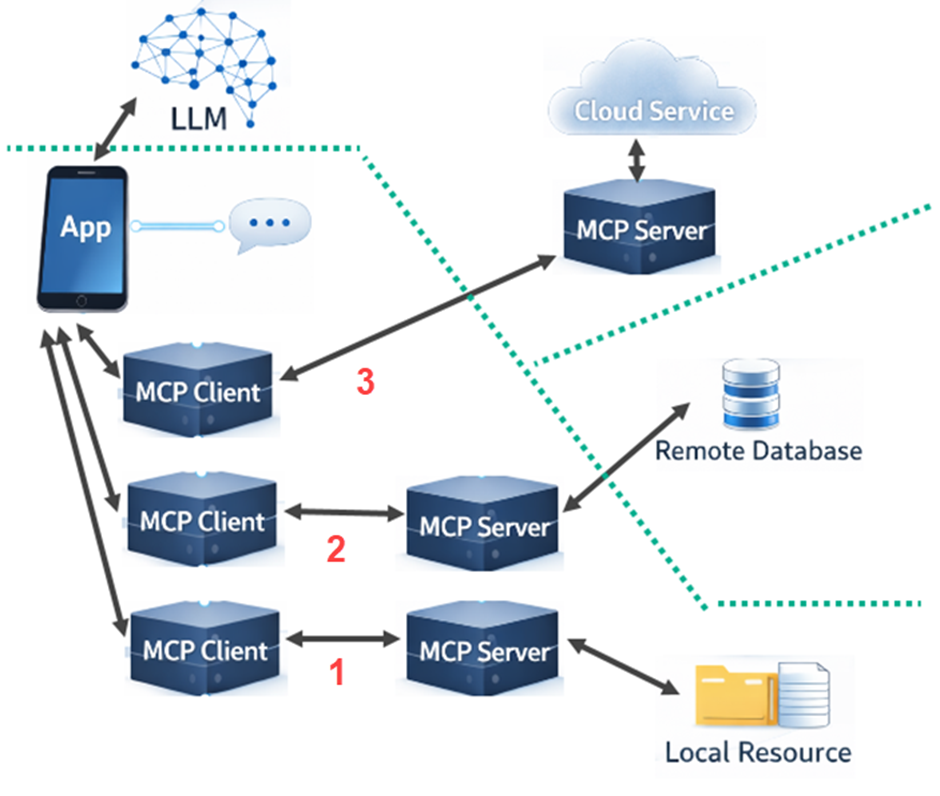
In the example shown above, the app is talking to a large language model but is also able to make use of a cloud service, a remote database, and a local filesystem resource.
This demonstrates the different locations for the MCP servers. On the local server, the app spins up three MCP clients – one for each of the MCP servers.
Simple Talk is brought to you by Redgate Software
Explaining the three different MCP clients
The simplest option is example 1 (shown at the bottom of the graph.) There is a local MCP server that provides access to the file system, and the app spins up an MCP client to connect to it.
Example 3 (at the top) is where a remote cloud service provides its own MCP server. The app then just needs to spin up the MCP client, which connects to the provided server over the Internet or local network.
Example 2 (in the middle) is the most commonly used today. The remote database doesn’t offer its own MCP server but the code for one is provided. This code is often supplied by the database vendor but it could also come from a third party. The MCP server for the database is also instantiated locally on the app server, along with an MCP client that can talk to it. Between the database MCP server and the remote database, the communication uses the API of the database engine, often via a database driver.
The reason why the middle example is so common today is related to security. The top example requires a shared security setup, which is not always available. It’s usually easier, therefore, to have the MCP server within the local system boundary, as in the middle example.
Security is improving fast, though, and the current specification includes explicit security guidance for Streamable HTTP. This includes origin validation, localhost binding guidance, authentication recommendations, and an authorization model based on OAuth 2.1 conventions.
What are MCP client-to-server transports?
MCP clients (like MCP Inspector) define two standard transport options: Streamable HTTP and stdio. They carry the same MCP messages but suit different deployment styles.
Streamable HTTP explained
With Streamable HTTP, the server runs as an independent service, and clients talk to it over HTTP. The specification uses POST for client-to-server messages. This makes it far more suitable for remote access, shared services, and multi-client scenarios.
Streamable HTTP replaced the older HTTP+SSE transport, and SSE (server-side events) now appears as an optional streaming mechanism within Streamable HTTP or as part of backwards compatibility, rather than as a separate current standard transport.
stdio explained
The simpler option is stdio. The client starts the MCP server as a local subprocess, sends JSON-RPC messages through stdin, and receives responses on stdout. That makes it a natural fit for local tools, desktop apps, and development scenarios where everything runs on one machine.
The main advantage of stdio is its simplicity. There is no separate web server to publish, no HTTP endpoint to configure, and no network path to secure. It can be a very direct way for a client such as a desktop application to talk to a local MCP server.
stdio is usually the easier choice when the server is local and tightly coupled to one client, while HTTP is the stronger choice when the server needs to be reachable over a network, reused by many clients, or integrated with broader web infrastructure.
For HTTP transports, the specification includes specific security guidance. By contrast, local stdio servers often rely on the local machine context and environment-based credentials instead.
Summary
In practice, the choice between local and remote MCP servers is mainly a question of deployment, connectivity, and security. Local servers are often simpler to run and easier to secure within an existing application boundary, while remote servers are better suited to shared services and broader network access. As MCP continues to mature, understanding these trade-offs will help architects choose the approach that best fits their applications, data sources, and operational constraints.
FAQs: Local vs remote MCP servers – which should you choose?
1. What is an MCP server?
An MCP server is a standard interface that lets AI apps access data, tools, and prompts from external systems.
2. Why use MCP servers?
MCP servers are used to give AI access to up-to-date, organization-specific data.
3. Where can MCP servers run?
MCP servers can run locally, remotely, or in a hybrid setup.
4. Which setup is most common?
The most common MCP setup is a local MCP server connecting to a remote service (like a database).
5. What transports does MCP use?
MCP uses the following transports: Streamable HTTP (networked) and stdio (local).
6. Which transport should I choose for MCP?
What else is new on Simple Talk?
- The key syntax differences between MySQL and PostgreSQL – everything you should know
- SQL Server 2016 end of support: how to choose your upgrade path
- How to fix “too many connections” in PostgreSQL (step-by-step guide)
- Why your schema shouldn’t mirror your database (and what to do instead)
- What I learned after a weekend of AI troubleshooting gone wrong (8 key lessons)
This document contains proprietary information and is protected by copyright law.
Copyright © 2026 Red Gate Software Limited. All rights reserved




Load comments