



sp_helptext has served SQL Server DBAs for years, but it has its very obvious – and many – limitations: broken lines, missing triggers, no help with encrypted objects, to name just a few. That’s where sp_showcode comes in…
Why DBAs Need Better Code Retrieval
If there’s one thing I did a lot over the years as a SQL Server DBA, it was working with the likes of procedures and views. Straight away with SQL Server I learned to create procedures and, later, other types of objects, such as functions and triggers – objects that have code saved in the database.
It’s very common for those who work with these to frequently deal with the code, whether modifying it or just reading it to understand or confirm some behavior. There are those who prefer to use SQL Server Management Studio, navigate the hierarchical structure, right-click and open it.
And, there are those – like myself – who prefer to display the text directly from the code window with the famous sp_helptext, which I find much faster than using the interface, as demonstrated below:
Limitations of sp_helptext in SQL Server
sp_helptext originally returns the code as one column in multiple lines, whereby each line is a line of the source code. If you copy and paste directly into SSMS, you lose formatting. To bypass this, you can activate text mode in SSMS (shortcut CTRL+T) and voilà: your proc, however complex it may be, returns with the correct formatting and is much easier to copy…in most cases!
This is because, occasionally, the lines may be broken, or in the wrong place, and the column header Text comes along. In 99% of cases it’s still very useful, and I think it’s better than looking for it in the interface, but its limitations don’t stop there:
- I need to know exactly what I’m looking for. If I only know part of the object’s name, I need to go to
sys.objectsorsys.procedures, find the exact name, and then callsp_helptextor use a function like the Object Definition. - Another pain is that it doesn’t decrypt by itself even if it’s a sysadmin, or if I’m connected as a Dedicated Admin (DAC).
- And, if I want DDL Triggers, logon trigger? Forget it –
sp_helptextwon’t find it!
This is where I present to you an evolution after using sp_helptext so much in my life: sp_showcode
Let’s take a closer look at it.
Introducing sp_showcode: The Evolution of sp_helptext in SQL Server
Automatic Text Output
With sp_helptext, if I ask to display the code for the procedure MyProc, it will display it like this by default:
|
1 |
sp_helptext MyProc |
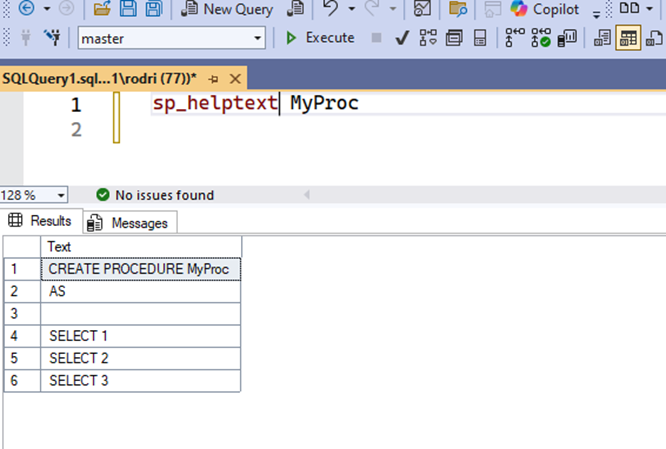
Note that it is a table with 1 column called Text, and the result. If I want to display it as text, I press the option in SSMS (or use the shortcut CTRL+T) and:
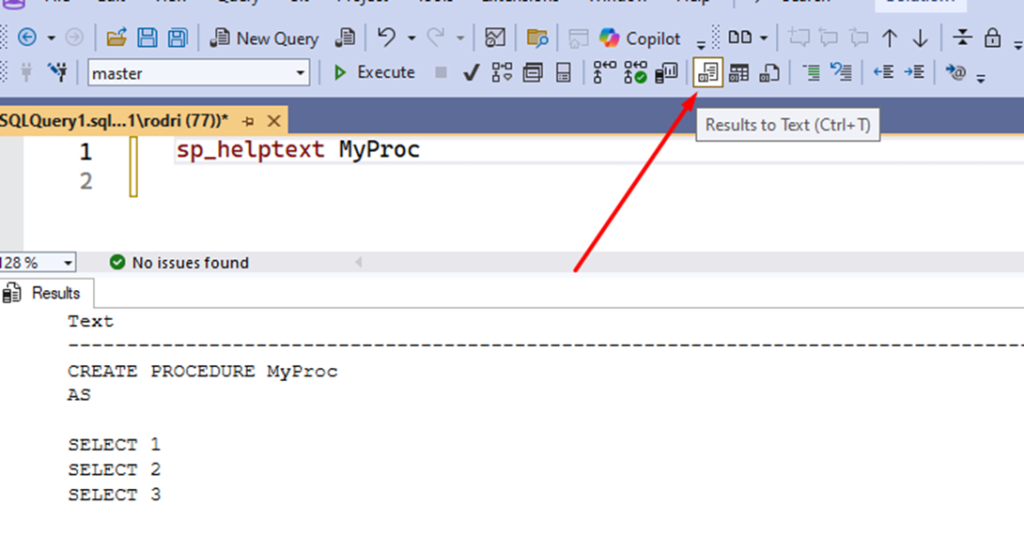
Thus the formatting is maintained, but not everything is rosy. This is a more bizarre case, using stpPowerAlert_Log_Full, a standard procedure from the Power Alerts which warns about the use of logs:
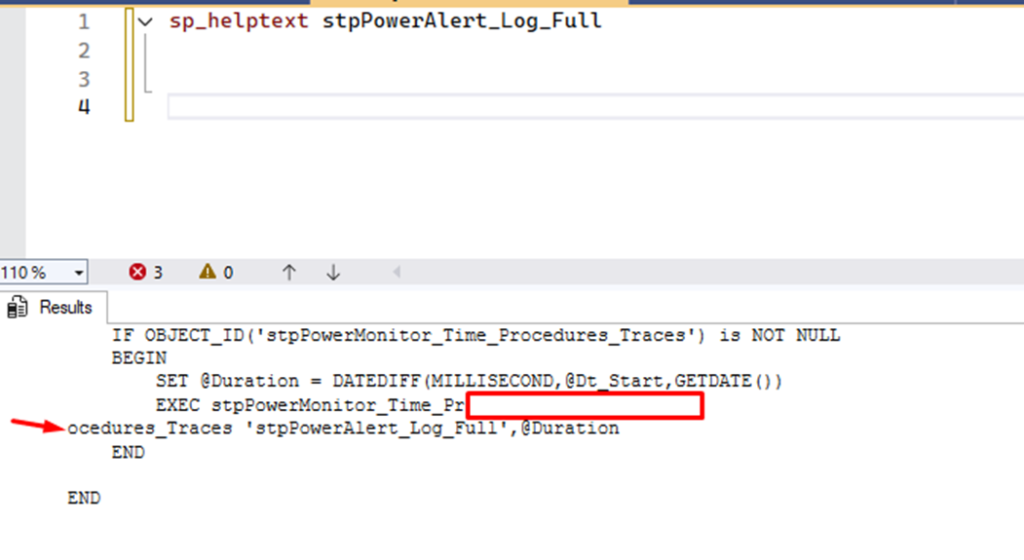
sp_helptext ended up breaking a line where it shouldn’t have.sp_showcode comes with several improvements here, the first being that you don’t need to enable SSMS text mode:
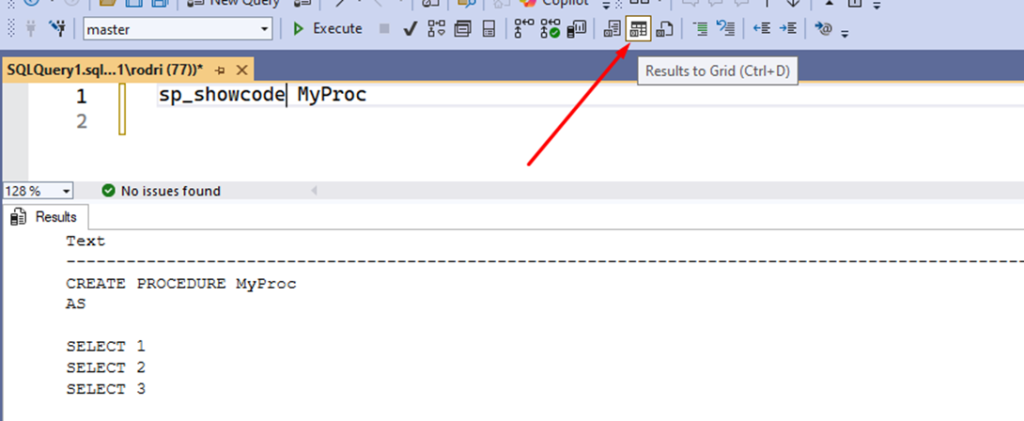
sp_showcode sent it to the text output.And it keeps the formatting identical:
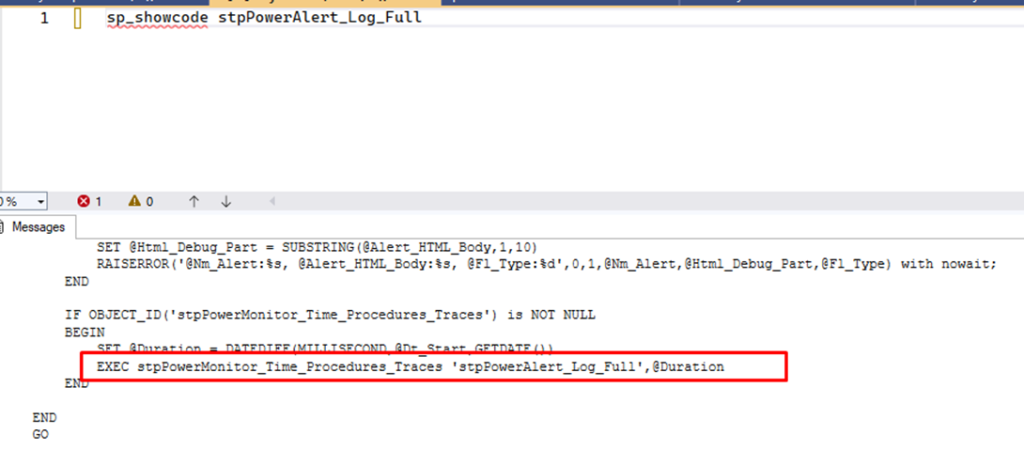
Note that it has everything there to make it easy to copy. There’s only one disadvantage: the maximum line length is 4000 characters (sp_helptext tries to circumvent this problem but makes the situation worse).
If you have an object with code that has a line with more than 4000 characters, see a doctor, sp_showcode will go to the next line and it’ll be different from the original. But, in over 10 years as a DBA, I don’t think I’ve ever seen code with such a long line – not even the internal procs created by Microsoft.
Between us, if someone crammed more than 4000 characters into a single line, it’s because they don’t want you to easily read that proc!
Want more hands-on help with your SQL Server?
Using XML Mode with sp_showcode for Easy Copying in SQL Server
If you still don’t want text output for these cases, you can switch to XML:
|
1 |
sp_showcode MyProc,’xml’ |
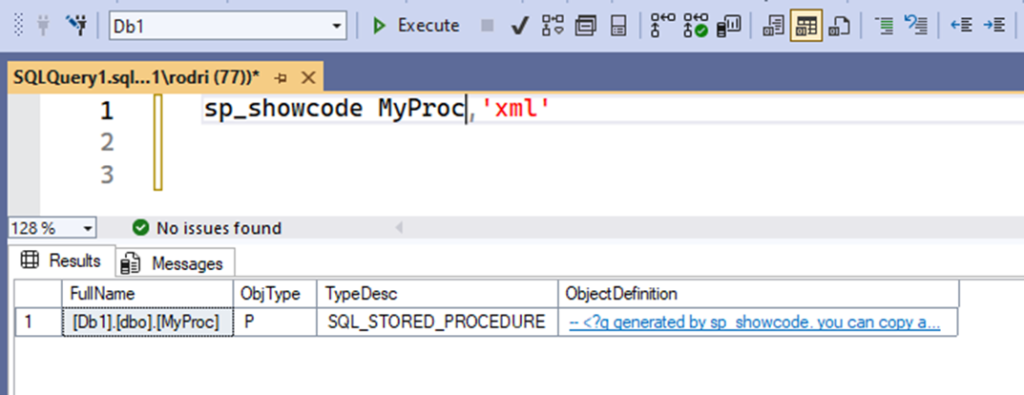
Clicking on the returned ObjectDefinition column opens a new tab:
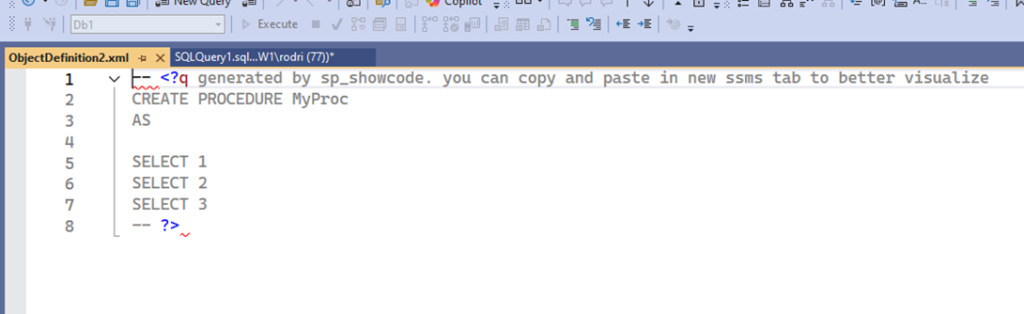
sp_whoisactive.In this mode, you’ll only have problems if you use an invalid XML character; the procedure attempts to replace the most probable invalid characters with “?”, but there might be some that we haven’t mapped.
However, these are generally invisible control characters, so you’ll hardly use them in the procedure. If you encounter this problem, report the invalid character as an issue in my git repo (if possible), so we can think about improvements. Again, this is a problem that will only occur with XML output.
Search by Partial Object Name in SQL Server
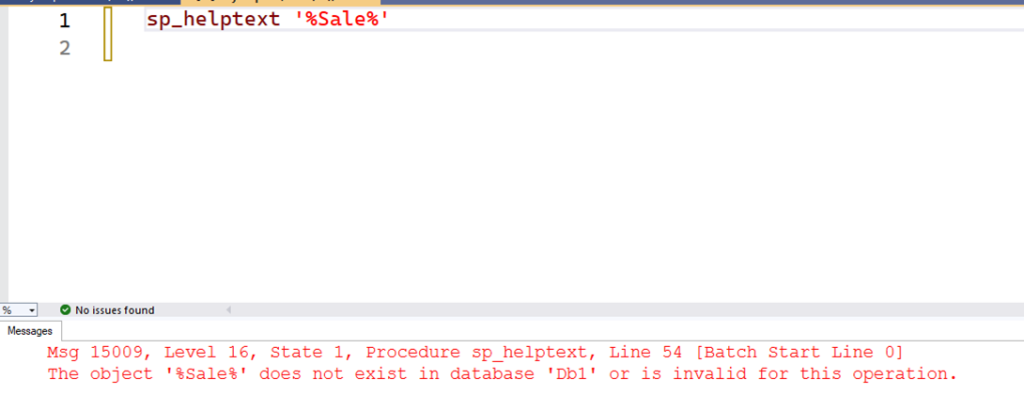
It’s quite common to work with several procedures in a project, such as prcGetSales or prcNewSale. Sometimes you don’t remember the exact name (due to working with so many) and need to consult before using sp_helptext, which only accepts the full name. With sp_showcode, you can use % to perform a LIKE:
|
1 |
sp_showcode '%Sales%' |
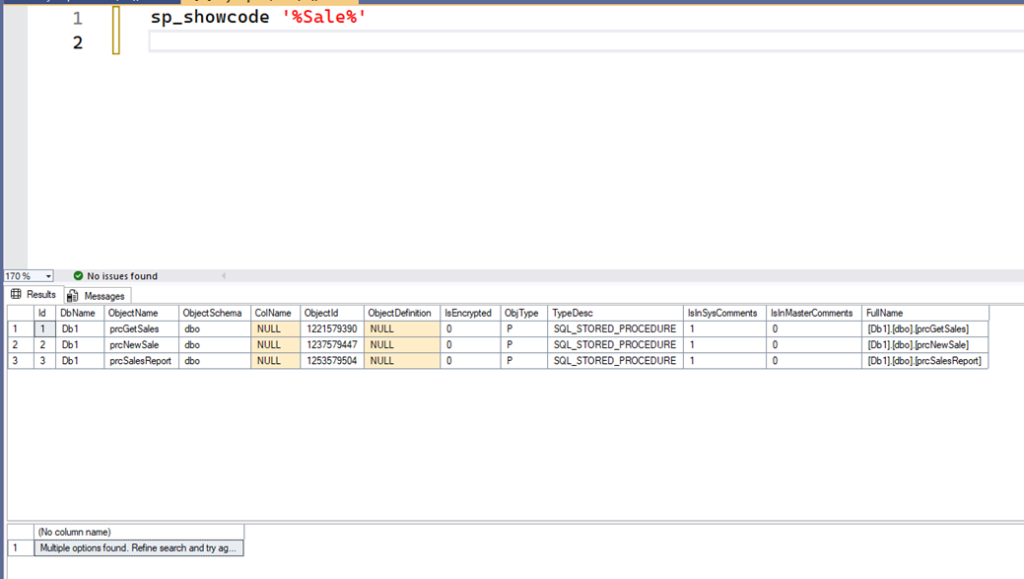
sp_showcode, I would do a select * from sys.objects with a name like ‘%sale%’, analyze the result, and only then use sp_helptext. Now, with sp_showcode, everything is right there!When you specify % and sp_showcode finds more than one option, it understands that you don’t know what you want and simply shows you all the options. However, you can prevent this by copying the correct name, or changing some parameters which alters this behavior. In sp_helptext, though, you cannot do this.
Multi-Database Search using sp_showcode in SQL Server
By default, sp_showcode only searches for objects in the current database (again, to avoid causing too much processing). But, you can search in other databases:
|
1 |
sp_showcode '%..%Sale%' |
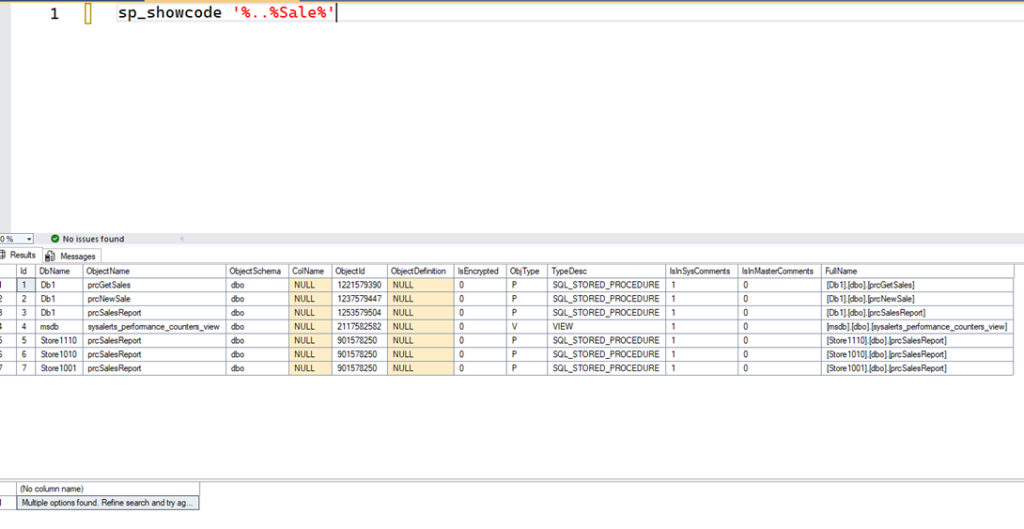
By using the % filter, you specify that you want to look in other databases beyond the current one. Note that in the image above, sysalerts_performance_counters_view was correctly returned because of the sale string in sysalerts; you can filter this out while reviewing the results.
You can also filter specific databases. For example, suppose you have databases in the format StoreNNNN, where NNNN is a store code:
|
1 |
sp_showcode 'Store10%..%Sale%' |
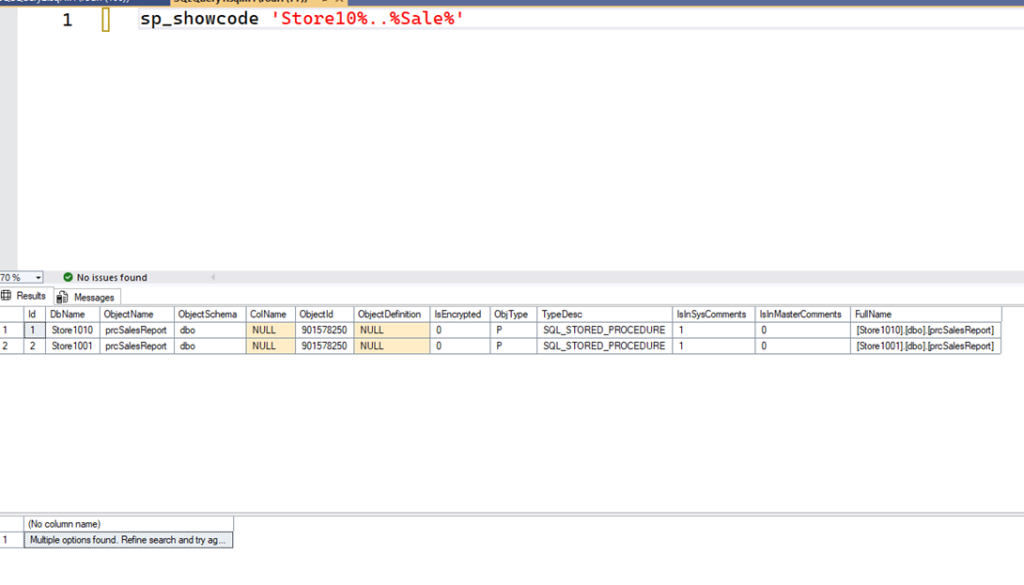
If you want to display the text for all, use @all = 1:
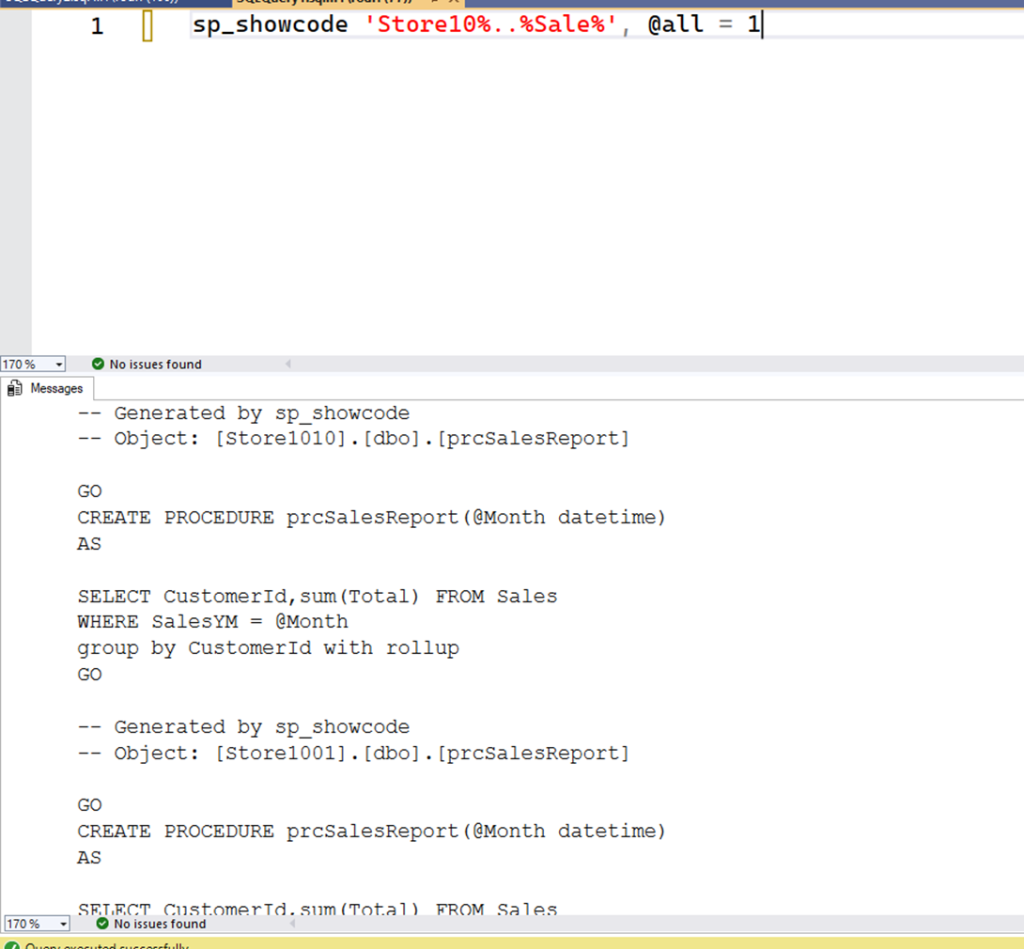
And use the following if you want to display it as a clickable XML in SSMS:
|
1 |
sp_showcode 'Store10%..%Sale%','xml', @all = 1 |
sp_showcode in SQL Server: Automatic Decryption for Encrypted Procedures
Have you tried to view the code of an encrypted procedure with sp_helptext?
|
1 |
sp_helptext spencrypted |
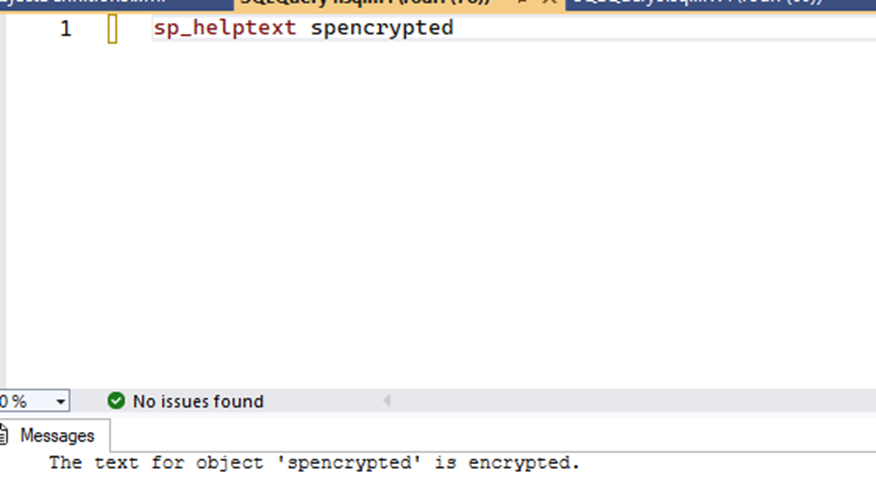
If so, you would have noticed that, even if you have DAC (a special connection that a sysadmin can open and can access internal SQL tables), you’re presented with this error:
|
1 2 3 4 5 6 7 8 |
declare @IsAdmin varchar(1) select @IsAdmin = ep.is_admin_endpoint from sys.dm_exec_connections c join sys.endpoints ep on ep.endpoint_id = c.endpoint_id where session_id = @@spid print 'Is Admin Endpoint (dac)? ' + @IsAdmin GO sp_helptext spencrypted |
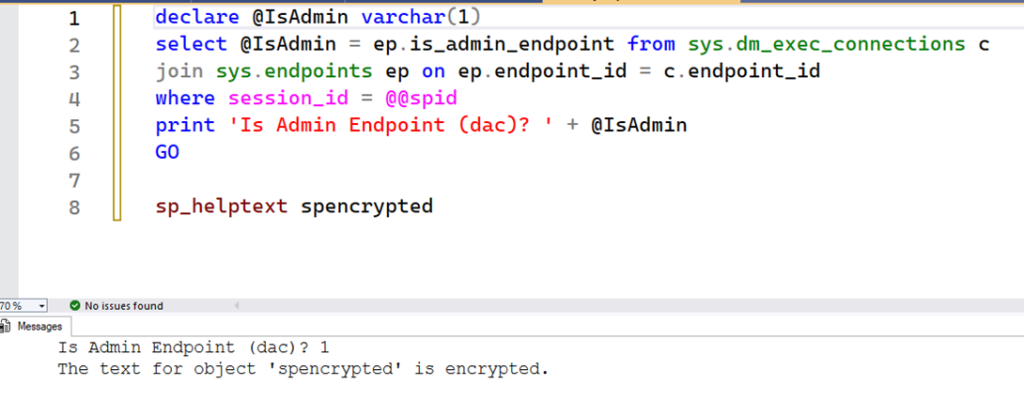
However, with sp_showcode, if you’re connected as DAC it’ll automatically decrypt the proc:
|
1 2 3 4 5 6 7 8 |
declare @IsAdmin varchar(1) select @IsAdmin = ep.is_admin_endpoint from sys.dm_exec_connections c join sys.endpoints ep on ep.endpoint_id = c.endpoint_id where session_id = @@spid print 'Is Admin Endpoint (dac)? ' + @IsAdmin GO sp_showcode spencrypted |
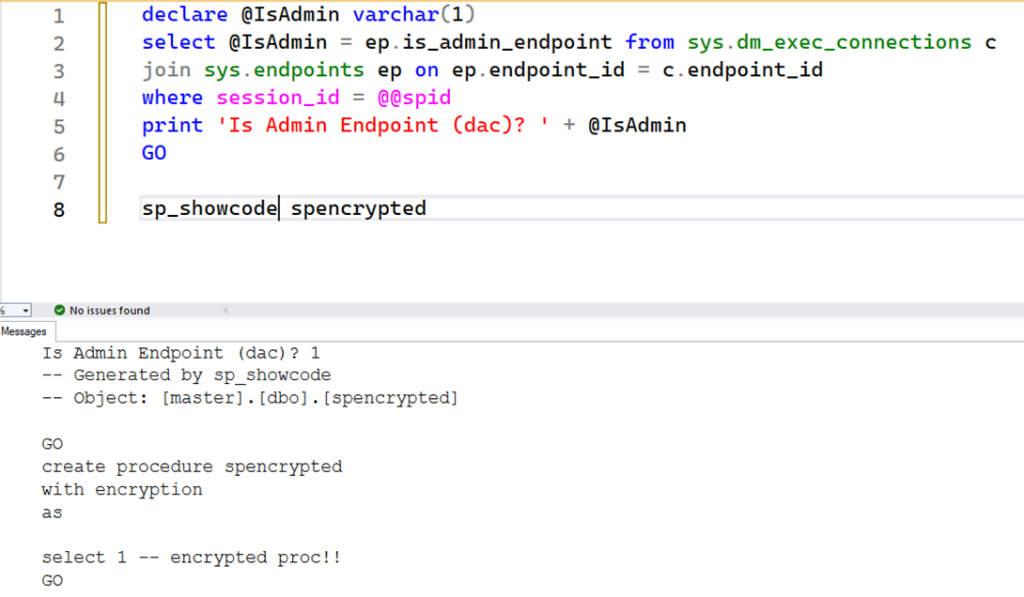
On the other hand, if it’s not set as DAC, you’ll see this warning:
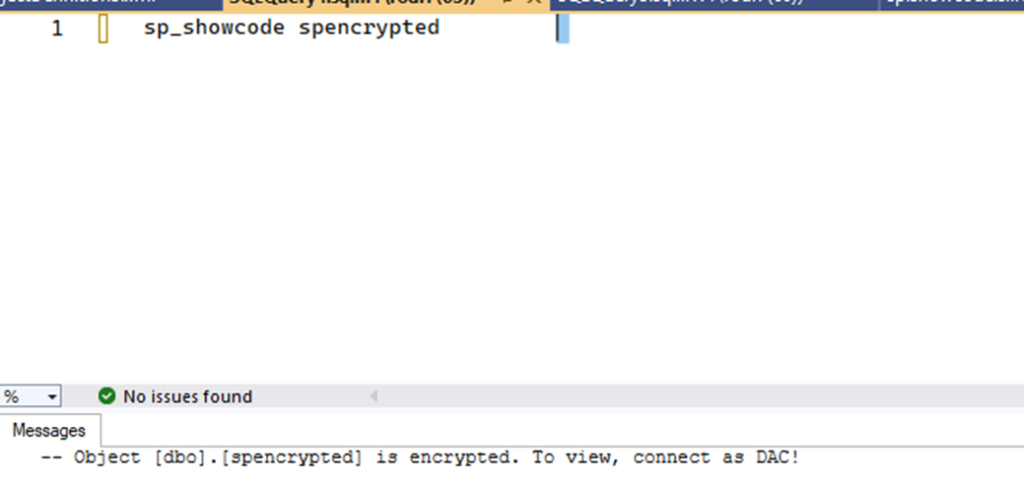
It’s worth remembering that only sysadmins can connect as DAC – another convenience for a DBA who may be investigating something or needs to recover procs created by someone no longer working for the organization.
They would still be able to do this without sp_showcode, but it’s more work. With sp_showcode, the ‘biggest’ hurdle is simply opening a DAC connection.
sp_showcode in SQL Server: Support for DDL Triggers
sp_helptext doesn’t display another common type of SQL Server object: DDL triggers.
|
1 |
sp_helptext ddl_trig_database |
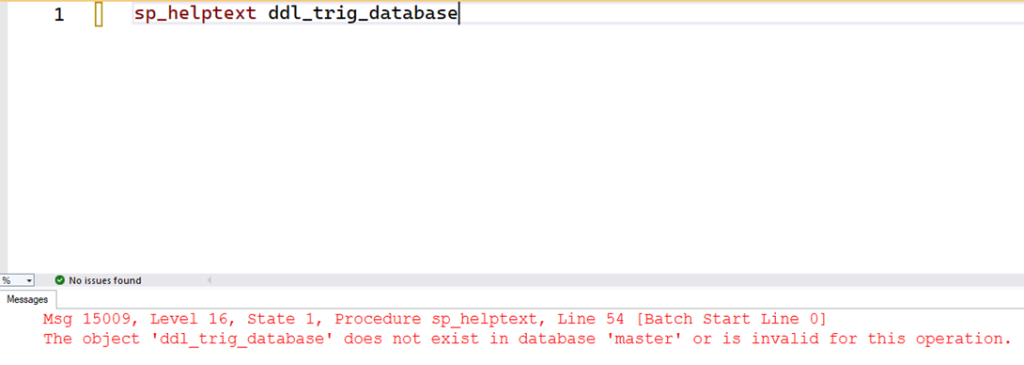
With sp_showcode, just do what you learned above – pass the name (or part of it) and it will produce:
|
1 |
sp_showcode ddl_trig_database |
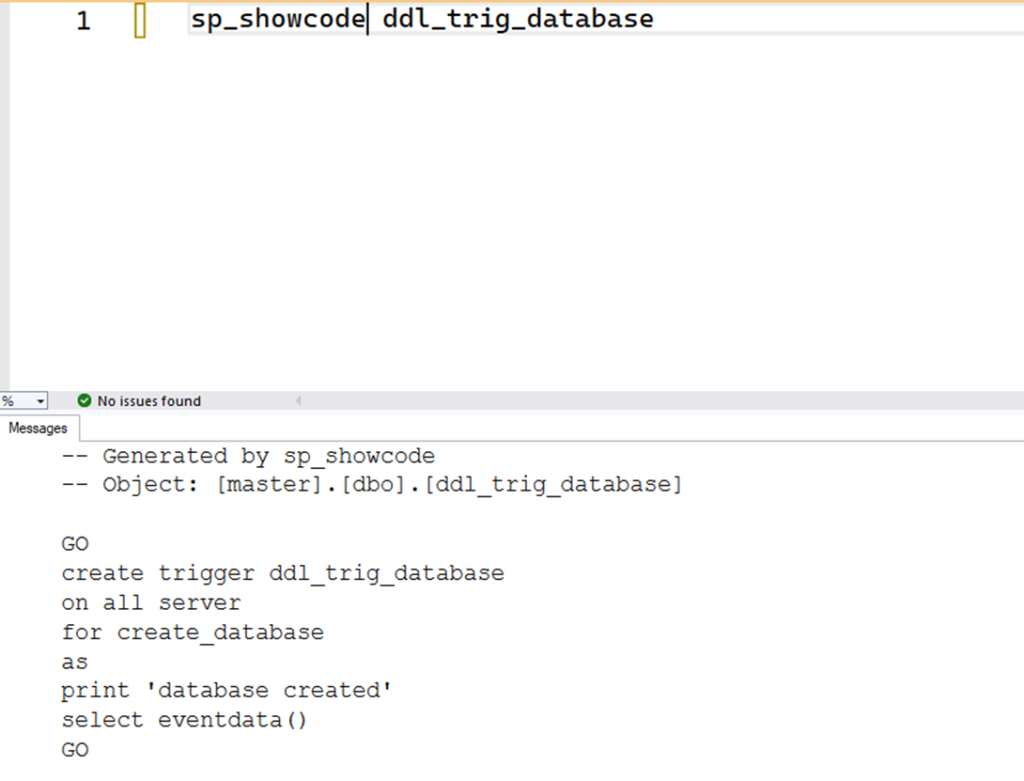
And remember: if you don’t recall the exact name, or even the bank, just use % to search.
How to Filter Multiple Options with the Exception of Others
Another great feature is to filter multiple options with the exception of others. Yes, this is copied from Ola’s maintenance procedures, because I find it a very valuable resource!
For example: suppose you want to find all objects, across all databases, containing ‘sale’ in the name – except those in the msdb or those that contain ‘report’ in the name. This is impossible with sp_helptext, but entirely doable with sp_showcode, as follows:
|
1 |
sp_showcode '%.%.%sale%,-msdb.%.%,-%.%.%report%','xml',@all = 1 |
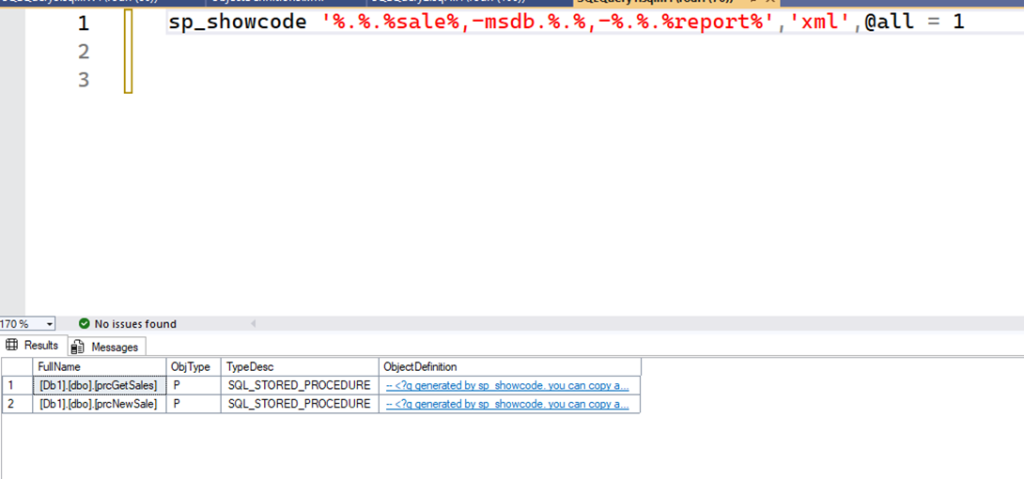
Remember, there are multiple procs, including in msdb. So, in the last example, I’ll demonstrate how you can use negative filters with wildcards to your advantage.
In this case, I used the comma to specify multiple options, and the second one is a negation (starts with a -). The other parameters simply displayed their results as XML. To do this without sp_showcode, you’d spend a lot of time building your queries and looking in various databases.
sp_showcode: A Must-Have Tool for SQL Server DBAs
I created sp_showcode primarily to be used as an auxiliary procedure, especially with Management Studio. But, if you want more advanced scenarios, you have total control over the result with the other parameters.
For example, the export mode returns the original definition of each procedure found, and you can use it to read in your application, or a PowerShell script, etc. You can also remove the headers, and more.
So, although the main use is to facilitate daily life in SSMS, it can still be useful for backing up several procedures such as:
|
1 |
sqlcmd -S .\a25 -d Db1 -y 0 -Q "sp_showcode '%','exportgo',@all = 1, @type = 'proc,function,view,trigger' – export all user modules found in database" |
There are many other parameters there, and I’ve left a small documentation inside the procedure script and examples of how to use them. I invite you to explore it!
I am still using, testing, and adjusting it, so it may contain errors and even some performance issues in more extreme cases (e.g. when using wildcard and databases filtered contains multiple objects).
So, if you use it in production, be careful and monitor consumption. The more search options you provide, the more work it will have, and consequently, depending on the number of databases and objects, it may take longer. But, over time, I believe I will make it better and more efficient.
For years, whenever I needed to do these things, I spent a lot of time looking for the object and opening or writing the query in internal tables. It may seem like a small amount but, when you work with a lot of code, these small shortcuts can save you a great deal of time.
The overall objective of the proc is to make it easier to access the code of the objects, with more flexibility in how you do so. Going forward, I plan to add other types – such as Jobs – and allow advanced searches. Who knows, maybe even using natural language?
The procedure is free and available now in my SQL Scripts repository: sqlserver-lib/Modulos/sp.showcode.sql at main · rrg92/sqlserver-lib.
If you have suggestions or discover problems, please submit these and I will review them when I have time. Additionally, feel free to leave comments and feedback down below!
FAQs: sp_showcode in SQL Server
1. What is sp_showcode in SQL Server?
sp_showcode is a custom procedure that retrieves SQL object code with better formatting, search flexibility, and decryption support compared to sp_helptext.
2. How is sp_showcode different from sp_helptext in SQL Server?
Unlike sp_helptext, sp_showcode offers XML output, partial name search, multi-database queries, and automatic decryption for encrypted objects.
3. Can sp_showcode display DDL triggers in SQL Server?
Yes, sp_showcode supports DDL triggers, while sp_helptext does not.
4. Does sp_showcode in SQL Server require special permissions?
For encrypted objects in SQL Server, you’ll need a DAC connection and sysadmin rights. For regular objects, standard permissions apply.
5. Where can I get sp_showcode for SQL Server?
sp_showcode is free and available now in my SQL Scripts repository: sqlserver-lib/Modulos/sp.showcode.sql at main · rrg92/sqlserver-lib
Subscribe to the Simple Talk newsletter
This document contains proprietary information and is protected by copyright law.
Copyright © 2026 Red Gate Software Limited. All rights reserved







Load comments