


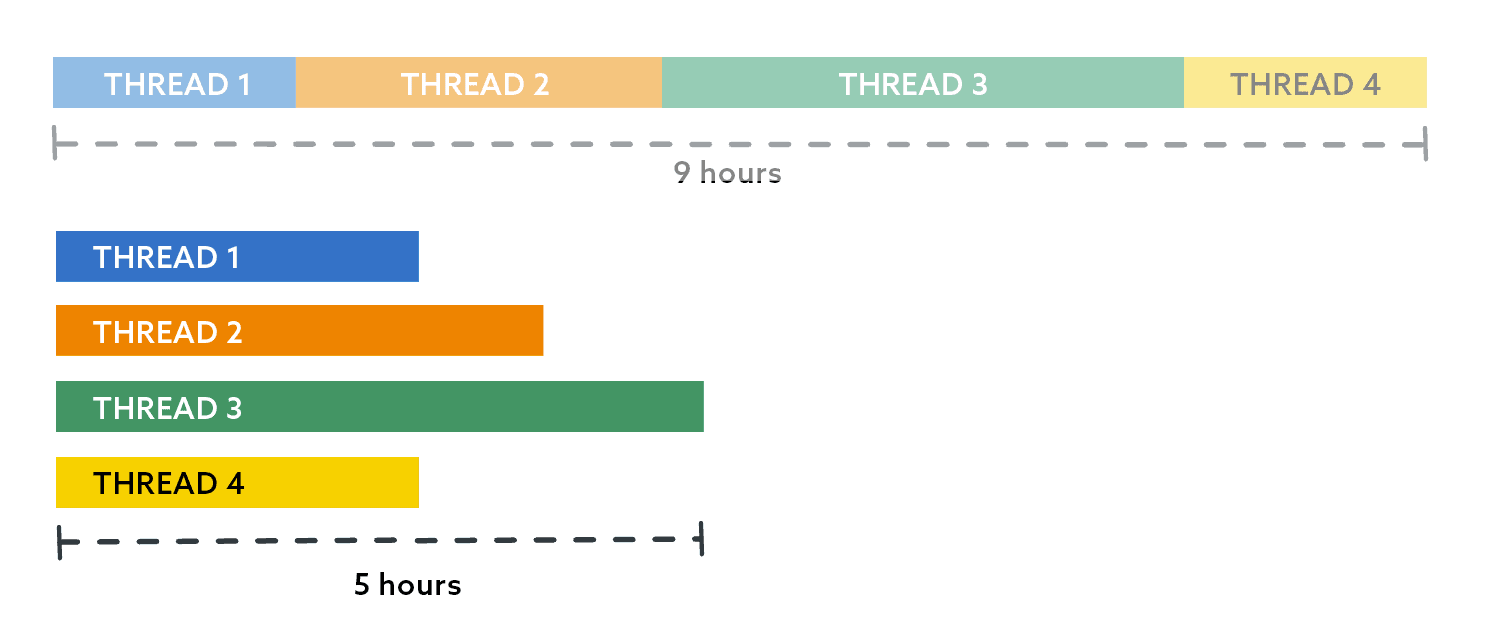
 If we put little slices in there to represent the databases in each thread, it looks something like this:
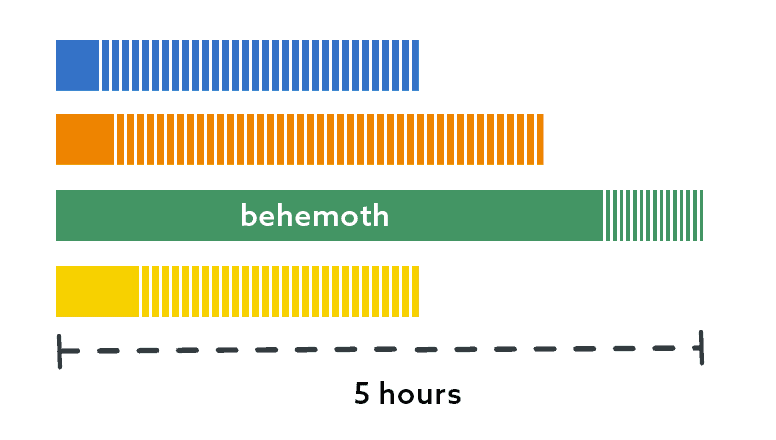 (Note: None of these graphs are precise.)
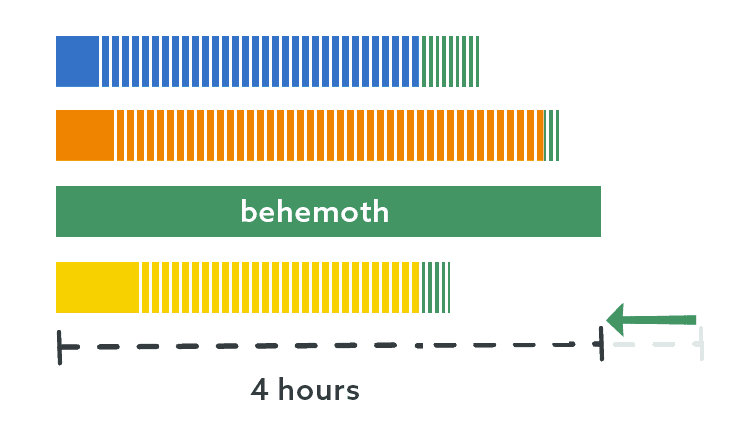
I did what I suggested previously: I put this behemoth on its own thread. I simply ran my script again with a ThreadCount of 3, without the behemoth database, and just assigned it thread 4 manually.
(Note: None of these graphs are precise.)
I did what I suggested previously: I put this behemoth on its own thread. I simply ran my script again with a ThreadCount of 3, without the behemoth database, and just assigned it thread 4 manually.
|
1 2 3 4 5 6 7 8 9 10 11 12 13 14 15 16 17 18 19 20 |
DECLARE @ThreadCount tinyint = 3; SELECT name, size, r = RowNum, GroupNo, Odd, ThreadID = RANK() OVER ( PARTITION BY GroupNo ORDER BY CASE Odd WHEN 1 THEN -RowNum ELSE RowNum END, name ) FROM ( SELECT name, size, RowNum, GroupNo = (RowNum-1)/@ThreadCount, Odd = (RowNum-1)/@ThreadCount % 2 FROM dbo.DatabasesBySize WHERE name <> N'Behemoth' ) AS sq ORDER BY r; |
But I want more
The underlying task here processes data from 7 different tables. Like the databases, these tables aren’t evenly distributed, and this is most prominently the case in the behemoth database. It is the fastest growing table and many times larger than the others. When I analyzed the runtime for these processes, the thread this database was on still spent a majority of its time processing this one table, while the other tables had to wait: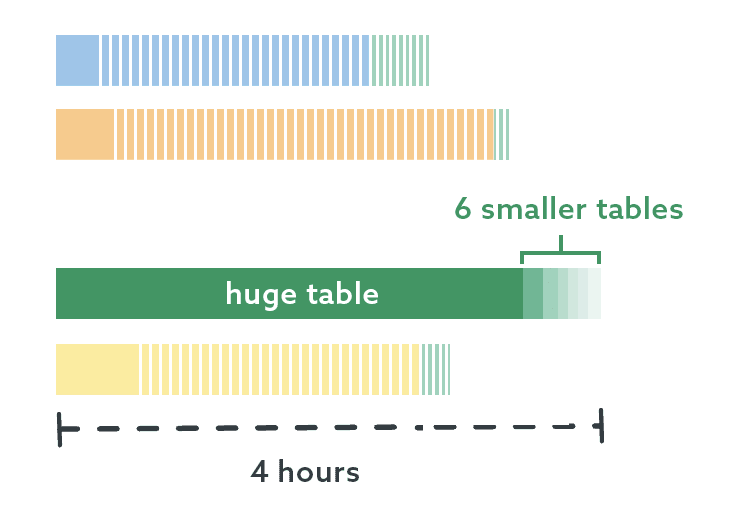 I determined that I could further parallelize the work by putting this one table on its own thread, and the other 6 tables could be processed in the meantime. And we’re down to a small enough number of objects that I no longer have to do this through code – I know which table is largest and I know the names of the other 6 tables. I don’t even have to use my toes! I made two sub-threads here, one with the biggest table, and one with the rest:
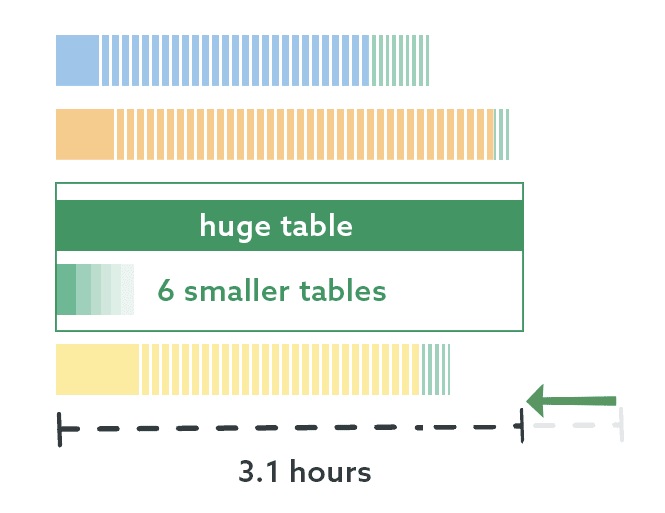 This is great progress! We’ve taken a job that used to take 9 hours and shrunk it down to just over 3 hours, with mostly negligible performance impact on the server (aside from slightly elevated CPU).
But I still want more
The work in this database is still unevenly distributed, and I knew that I could reduce the runtime even further by parallelizing this table on its own, using pagination. If I can have 4 threads processing this one table simultaneously then, at least in theory, I should be able to have an even bigger impact on runtime. The table currently has about 161 million relatively wide rows, and a primary key on a column calledElephantID. I used the system metadata to tell me how to distribute those rows across 4 threads, but I also only wanted any one thread to process 250,000 rows at a time. This query told me everything I needed to know:
|
1 2 3 4 5 6 7 8 9 10 11 12 13 14 15 16 17 18 19 20 21 22 23 24 25 26 27 28 29 30 31 32 33 34 |
DECLARE @TableName sysname = N'dbo.Elephant', @ThreadCount int = 4, @RowsPerPage int = 250000; ;WITH threads AS ( SELECT ThreadID = value FROM GENERATE_SERIES(1, @ThreadCount) ) SELECT [RowCount], PageCount, RowsPerThread, ThreadID, [FirstRow] = RowsPerThread * (ThreadID - 1) + 1, [LastRow] = RowsPerThread * ThreadID, FirstPage = ((ThreadID-1) * [PageCount] / @ThreadCount) + 1, LastPage = ((ThreadID) * [PageCount] / @ThreadCount) FROM threads CROSS JOIN ( SELECT [Rowcount], RowsPerThread = [Rowcount] / @ThreadCount, [PageCount] = [Rowcount] / @RowsPerPage FROM ( SELECT [Rowcount] = SUM([rows]) FROM sys.partitions WHERE [object_id] = OBJECT_ID(@TableName) AND index_id = 1 ) AS rowcounts ) AS breakdown; |
 The jobs or scripts would run that query and pull the information only for their thread, calling the following procedure in a loop for each page in their bucket:
|
1 2 3 4 5 6 7 8 9 10 11 12 13 14 15 16 17 18 19 20 21 22 23 |
CREATE PROCEDURE dbo.PagingTheElephant @PageNumber int, @PageSize int AS BEGIN SET NOCOUNT ON; ;WITH ThisPage AS ( SELECT ElephantId FROM dbo.Elephant ORDER BY Id OFFSET @PageSize*(@PageNumber-1) ROWS FETCH NEXT @PageSize ROWS ONLY ) SELECT e.ElephantId /* , e.OtherCols */ FROM dbo.Elephant AS e INNER JOIN ThisPage AS tp ON tp.ElephantId = e.ElephantID ORDER BY e.ElephantId; END |
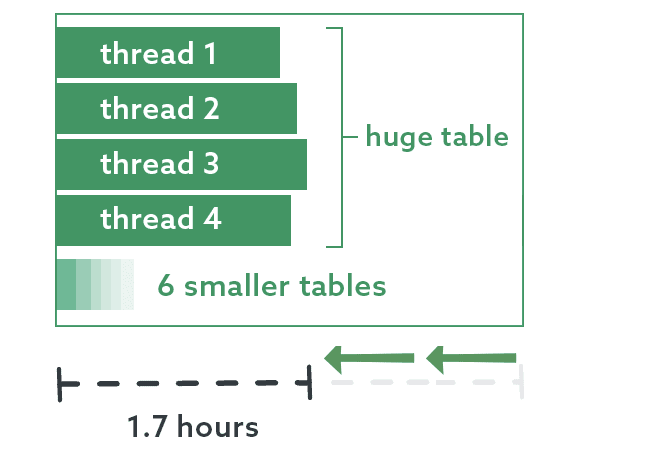 As I mentioned before, I could experiment with adding even more threads to process some of these simultaneously, and possibly bring the runtime down even further. For now, though, I am extremely happy with these improvements.
Next time
In my next post – my last in this series, I promise – I’ll show how I coordinate all of the threads finishing with starting the next task, avoiding conflicts or unnecessary delays.FAQs
1. How do I apply snake-draft sorting within a single SQL Server database?
The same serpentine-assignment logic applies, with the work-unit granularity changing from ‘database’ to ‘table’ (or partition, or file-group). Sort tables by estimated work size descending (row count, size in MB, or a domain-specific metric); number them 1 to M; assign table N to worker W using the serpentine rule: if (N-1) DIV worker_count is even, assign to ((N-1) mod worker_count) + 1; if odd, assign to worker_count – ((N-1) mod worker_count). When workers operate against the same database, add a coordination layer – a shared queue, a workers-owned-tables table, or a session context – to prevent conflicts and race conditions. Part 3 of the snake-draft series walks through a seven-table example with measured runtime.
2. What work metric should I use for snake-draft sorting in SQL Server?
The metric should predict execution time as closely as possible. For bulk inserts or table scans, row count or data-file size in MB is a reasonable proxy. For queries with different complexities per table, use an estimated query cost (from the plan cache, or derived from a recent execution sample). For hybrid workloads, use wall-clock time from a recent representative run if you have it. A crude but often-adequate starting point is just row count; refine the metric if the observed balance is poor. The serpentine assignment is robust to moderate metric inaccuracy – it only needs to get the ordering approximately right.
3. How many workers should I use for parallel SQL Server batch jobs?
Start with the number of logical CPUs available, then adjust based on what the workload is bottlenecked on. CPU-bound work (computation-heavy queries, complex joins) scales roughly linearly with workers up to CPU count, then plateaus. IO-bound work (bulk inserts, scans from disk) scales until you hit storage throughput limits, usually well before CPU count. Memory-pressured work (large sorts, hash joins) may scale poorly beyond a small worker count because each worker needs working memory. Monitor MAXDOP settings, wait stats, and disk queue depth to identify the constraint. Part 3’s seven-table example uses a worker count that matches the observed CPU and IO characteristics of that specific workload.
4. Can I combine snake-draft sorting with SQL Server parallelism (MAXDOP)?
Yes, but treat them as orthogonal controls. Snake-draft sorting distributes work across independent jobs or threads at the application layer; MAXDOP controls parallelism within a single query at the engine layer. A common pattern is to use snake-draft to split a batch across N SQL Agent jobs, and set each job’s MAXDOP to a fraction of CPU count so that N * per-job-MAXDOP ≈ total CPUs available. Avoid the combination of high N with high per-job MAXDOP – that over-subscribes CPU and causes context-switch thrashing. Measure actual resource utilisation; don’t assume the math matches reality.
This document contains proprietary information and is protected by copyright law.
Copyright © 2026 Red Gate Software Limited. All rights reserved





Load comments