


ASP.NET MVC provides three mechanisms for passing data from a controller to a view: ViewData, ViewBag, and TempData. Understanding when to use each is a core MVC skill. This article walks through each mechanism with code examples and a side-by-side comparison.
ViewBag, ViewData, and TempData all are Dictionary objects in ASP.NET MVC and these are used for data passing in various situations.
The following are the situations where we can use TempData and other objects.
- Pass the data from Controller to View.
- Pass the data from an action to another action in Controller.
- Pass the data in between Controllers.
- Pass the data between consecutive requests.
What is Dictionary Object?
In C#, Dictionary is used to store the key-value pairs. The Dictionary is the same as the non-generic hashtable. It can be defined under System.Collection.Generic namespace. It has a dynamic nature which means the size of the dictionary grows according to the need.
Here is an example:
|
1 2 3 4 5 6 7 8 9 10 11 12 13 14 15 16 17 18 19 20 21 22 23 24 25 26 27 28 29 30 31 32 33 |
using System; using System.Collections.Generic; class Demo { static public void Main () { Dictionary<int, string> My_dict1 = new Dictionary<int, string>(); My_dict1.Add(1123, "Welcome"); My_dict1.Add(1124, "to"); My_dict1.Add(1125, "Programming"); foreach(KeyValuePair<int, string> ele1 in My_dict1) { Console.WriteLine("{0} and {1}", ele1.Key, ele1.Value); } Console.WriteLine(); Dictionary<string, string> My_dict2 = new Dictionary<string, string>(){ {"a.1", "Dog"}, {"a.2", "Cat"}, {"a.3", "Pig"} }; foreach(KeyValuePair<string, string> ele2 in My_dict2) { Console.WriteLine("{0} and {1}", ele2.Key, ele2.Value); } } } |
What is ViewData?
In MVC, when we want to transfer the data from the controller to view, we use ViewData. It is a dictionary type that stores the data internally.
ViewData contains key-value pairs which means each key must be a string in a dictionary.
The only limitation of ViewData is, it can transfer data from controller to view. It can not transfer in any other way and it is valid only during the current request.
Syntax:
|
1 |
public ViewDataDictionary ViewData { get; set; } |
When we want to use the key-value pair to ViewData,
|
1 |
ViewData["DemoText”]="This is syntax."; |
We can also use ViewData in the razor view from controller. Here is the syntax for that:
|
1 |
<h1>@ViewData["PageTtitle"]</h1> |
When we want to add custom objects, array, list, etc, in ViewData, and cast them back in the View. We can use the code snippet as below:
|
1 2 3 4 5 6 7 8 9 10 11 12 13 14 |
public ActionResult actionViewData() { ArrayList alCit y = new ArrayList(); alCity.Add("Ahmedabad"); alCity.Add("Rajkot"); alCity.Add("Amreli"); alCity.Add("Bhavnagar"); alCity.Add("Surat"); alCity.Add("Junagadh"); alCity.Add("Vadodara"); ViewData["City"] = alCity; return View(); } |
|
1 2 3 4 5 6 7 |
@{ ArrayList _city = ViewData["City"] as ArrayList; foreach (string city in _city) { <div>@city</div> } } |
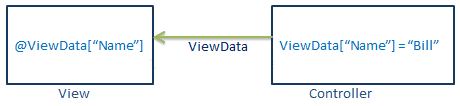
Figure 1: ViewData Flow
Here is an example of ViewData which shows how to transfer data from controller to view using ViewData.
|
1 2 3 4 5 6 7 8 9 10 |
public ActionResult Index() { IList<Employee> employeeList = new List<Employee>(); employeeList.Add(new Employee(){ EmployeeName = "Hemanshu" }); employeeList.Add(new Employee(){ EmployeeName = "Harsh" }); employeeList.Add(new Employee(){ EmployeeName = "Hiren" }); ViewData["employees"] = employeeList; return View(); } |
In this example, ViewData[“employees”] is assigned to an employeeList where “employees” is a key and employeeList is a value.
To access the ViewData[“employees”] in the view, here is the snippet of code you can use.
|
1 2 3 4 5 6 7 8 |
<ul> @foreach (var std in ViewData["employees"] as IList<Employee>) { <li> @emp.EmployeeName </li> } </ul> |
In simple terms, these are the ways to store and retrieve data to and for respectively ViewData as shown:
Storing :
|
1 |
ViewData[“employees”] = employeeList; |
Retriving :
|
1 |
string employee = ViewData[“Employee”].ToString(); |
In MVC, ViewData does not check compile-time errors. If we misspell the key names, we would not get any errors but we can identify them at the run time.
For example,
Controller:
|
1 2 3 4 5 6 7 8 9 10 11 12 13 14 15 16 |
using System.Collections.Generic; using System.Web.Mvc; namespace DemoMvcApplication.Controllers{ public class HomeController : Controller{ public ViewResult Index(){ ViewData["Countries"] = new List<string>{ "India", "Malaysia", "Dubai", "USA", "UK" }; return View(); } } } |
View
|
1 2 3 4 5 6 7 8 9 |
@{ ViewBag.Title = "Countries List"; } <h2>Countries List</h2> <ul> @foreach(string country in (List<string>)ViewData["Countries"]){ <li>@country</li> } </ul> |
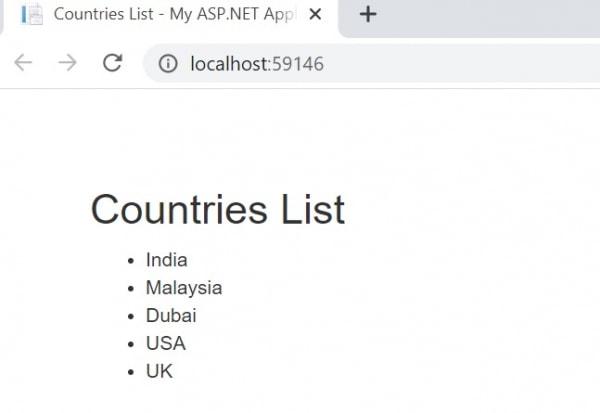
Figure 2: Output
Simple Talk is brought to you by Redgate Software
What is ViewBag?
ViewBag is an object which is dynamically passing the data from Controller to View and this will pass the data as the property of object ViewBag. We do not need to typecast to read the data for null checking here.
Controller:
|
1 2 3 4 5 |
Public ActionResult Index() { ViewBag.Title = “Hello”; return View(); } |
View:
|
1 |
<h2>@ViewBag.Title</h2> |
Here is an example:
Controller:
|
1 2 3 4 5 6 7 8 9 10 11 12 13 14 15 16 17 18 19 |
using System; using System.Collections.Generic; using System.Web.Mvc; namespace ViewBagExample.Controllers { public class ViewBagController : Controller { public ActionResult Index() { List<string> Courses = new List<string>(); Courses.Add("J2SE"); Courses.Add("J2EE"); Courses.Add("Spring"); Courses.Add("Hibernates"); ViewBag.Courses = Courses; return View(); } } } |
View:
|
1 2 3 4 5 6 7 8 9 10 11 12 13 14 15 16 17 18 |
<!DOCTYPE html> <html> <head> <meta name="viewport" content="width=device-width" /> <title>Index</title> </head> <body> <h2>List of Courses</h2> <ul> @{ foreach (var Courses in ViewBag.Courses) { <li> @Courses</li> } } </ul> </body> </html> |
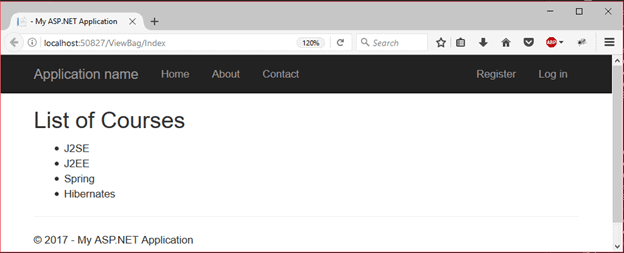
Figure 3: Output
What is TempData?
TempData is a dictionary object derived from TempDataDictionary which contains key-pair values. It is useful when we want to transfer the data from the Controller to the View in ASP.NET MVC Application. It stays for a subsequent HTTP request as opposed to other options we discussed prior who stay only for the current request.
Although it removes the key-value pair once it is accessed, we can keep it using
Here is an example:
Controller:
|
1 2 3 4 5 6 7 8 9 10 11 12 13 14 15 16 17 18 19 20 |
public class HomeController : Controller { public ActionResult Index() { TempData["name"] = "Ishan"; return View(); } public ActionResult About() { string name; if(TempData.ContainsKey("name")) name = TempData["name"].ToString(); return View(); } public ActionResult Contact() { return View(); } } |
View:
|
1 2 3 4 5 6 7 8 9 10 11 12 13 14 15 16 |
public class HomeController : Controller { public ActionResult Index() { TempData["name"] = "Ishan"; return View(); } public ActionResult About() { return View(); } public ActionResult Contact() { return View(); } } |
Differences between ViewData, ViewBag and TempData:
|
ViewData |
ViewBag |
TempData |
|
Key-Value Dictionary Object |
Type Object |
Key-Value Dictionary Collection |
|
A property of ControllerBase class |
A Dynamic property of ControllerBase class |
A property of the controllerBase class |
|
Faster |
Slower |
– |
|
Introduced in MVC 1.0, Available in MVC 1.0 and above |
Introduced in MVC 3.0, Available in MVC 3.0 and above |
Introduced in MVC 1.0, Available in MVC 1.0 and above. |
|
Works with .NET Framework 3.5 and above |
Works with .NET framework 4.0 and above |
Works with .NET framework 3.5 and above |
|
Type Conversion code is required |
Type Conversion code is not required |
Type Conversion code is required |
|
Value becomes null if a redirection has occurred |
Value becomes null if a redirection has occurred |
TempData is used to pass data between two consecutive requests |
|
Lies only during the current request |
Lies only during the current request |
Only works during the current and subsequent request |
Conclusion
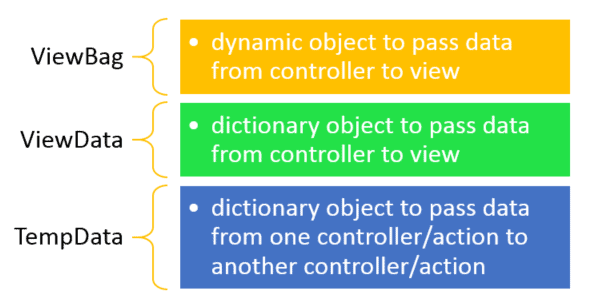
Figure 4: Summary
To conclude, it is clear that ViewData is used to pass the data from Controller action to View. Here, we discussed ViewData properties and how to use that in any MVC application.
Stop proving compliance by hand
FAQs
1. What is the difference between ViewData and ViewBag in ASP.NET MVC?
ViewData and ViewBag are the same underlying storage – a ViewDataDictionary keyed by string, valued by object – with two different access syntaxes. ViewData uses dictionary syntax: ViewData[‘UserName’] = ‘Alice’ in the controller, @ViewData[‘UserName’] in the view, requiring a cast if you need typed access like (string)ViewData[‘UserName’]. ViewBag uses dynamic-property syntax (via C#’s dynamic type): ViewBag.UserName = ‘Alice’ in the controller, @ViewBag.UserName in the view, no cast needed. They’re interchangeable – ViewData[‘X’] and ViewBag.X access the same value. Choose based on preference: ViewBag’s dynamic syntax is cleaner for reads but provides no compile-time checking (a typo in @ViewBag.UsreName fails silently as null rather than a compile error). ViewData’s dictionary access is more explicit but more verbose. Both have the same lifetime (current request only) and the same fundamental limitations – modern ASP.NET MVC best practice is strongly-typed view models for primary page data; ViewData/ViewBag for ancillary data only.
2. What is TempData and when should I use it?
TempData is a dictionary-like object (TempDataDictionary) designed for scenarios where data must survive a redirect. Typical example: a controller action processes a form submission and succeeds, then redirects the browser to a confirmation page – the confirmation message needs to be displayed on the confirmation page, but after the redirect the original controller action’s ViewData and ViewBag are gone (different request). TempData stores values for exactly one additional request cycle: TempData[‘Message’] = ‘Saved successfully’; return RedirectToAction(‘Index’);. The redirected-to action can read @TempData[‘Message’]; after that read, the value is marked for removal. Backed by session state by default (or cookies in newer configurations), so TempData adds session dependency. Use TempData for: post-redirect flash messages (success confirmations, error notices), short-lived data crossing a redirect boundary. Don’t use TempData for: data that should persist longer than one request cycle (use session directly), primary page data (use view models), data that doesn’t cross a redirect (use ViewData/ViewBag).
3. Should I use ViewData or a view model in ASP.NET MVC?
Modern ASP.NET MVC best practice: view models for primary page data, ViewData/ViewBag for ancillary supporting data only. Rationale: strongly-typed view models provide compile-time checking (typos in property names are errors, not runtime nulls), IntelliSense in the view template, easier refactoring (rename a property, see all usages update), and clearer contracts between controller and view. Pattern: define a view model class (class UserProfileViewModel { public string UserName {get; set;} public int Age {get; set;} public List<Order> RecentOrders {get; set;} }), populate it in the controller, pass to the view via return View(model), and access strongly-typed properties in the view (@Model.UserName). Use ViewData/ViewBag sparingly for: page title, breadcrumbs, layout-only data that’s not part of the view’s primary responsibility, flash messages from TempData. The general rule: if the view’s template repeatedly references the same data, that data belongs in a view model; if the data is cross-cutting layout concerns, ViewData/ViewBag is appropriate. Razor Pages (newer) has stronger guidance toward PageModel (its equivalent of view model) as the primary pattern; ViewData/ViewBag usage continues to decline in modern ASP.NET Core applications.
This document contains proprietary information and is protected by copyright law.
Copyright © 2026 Red Gate Software Limited. All rights reserved

Load comments