


To concatenate row values in SQL Server – combining multiple rows into a single delimited string – use STRING_AGG() if you are on SQL Server 2017 or later. It is the cleanest, most readable approach and handles grouping, ordering, and distinct values natively. For SQL Server 2016 and earlier, the FOR XML PATH trick is the most reliable method. This article documents both in detail, alongside recursive CTEs, CLR aggregates, and cursor-based approaches, with guidance on which to use based on your SQL Server version and dataset size.
Contents
- Introduction.
- A core issue.
- Considerations
- Concatenating values when the number of items is small and known beforehand
- Concatenating values when the number of items is not known.
- Unreliable approaches
- Conclusion.
- References
- Acknowledgements
Introduction
Many a time, SQL programmers are faced with a requirement to generate report-like resultsets directly from a Transact SQL query. In most cases, the requirement arises from the fact that there neither sufficient tools nor in-house expertise to develop tools that can extract the data as a resultset, and then massage the data in the desired display format. Quite often folks are confused about the potential of breaking relational fundamentals such as the First Normal Form or the scalar nature of typed values. (Talking about 1NF violations in a language like SQL which lacks sufficient domain support, allows NULLs and supports duplicates is somewhat ironic to begin with, but that is a topic which requires detailed explanations.)
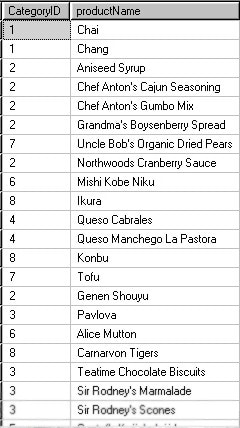
By ‘Concatenating row values’ we mean this:
You have a table, view or result that looks like this…
…and you wish to have a resultset like the one below:
In this example we are accessing the sample NorthWind database and using the following SQL
|
1 2 |
SELECT CategoryId, ProductName FROM Northwind..Products |
The objective is to return a resultset with two columns, one with the Category Identifier, and the other with a concatenated list of all the Product Names separated by a delimiting character: such as a comma.
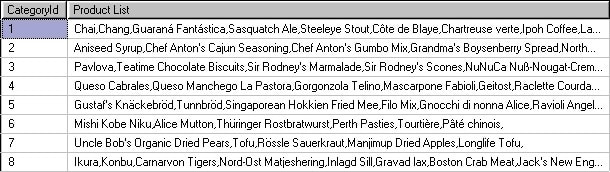
Concatenating column values or expressions from multiple rows are usually best done in a client side application language, since the string manipulation capabilities of Transact SQL and SQL based DBMSs are somewhat limited. However, you can do these using different approaches in Transact SQL, but it is best to avoid such methods in long-term solutions
A core issue
Even though SQL, in general, deviates considerably from the relational model, its reliance on certain core aspects of relational foundations makes SQL functional and powerful. One such core aspect is the set based nature of SQL expressions (well, multi-sets to be exact, but for the given context let us ignore the issue of duplication). The primary idea is that tables are unordered and therefore the resultsets of any query that does not have an explicit ORDER BY clause is unordered as well. In other words, the rows in a resultset of a query do not have a prescribed position, unless it is explicitly specified in the query expression.
On the other hand, a concatenated list is an ordered structure. Each element in the list has a specific position. In fact, concatenation itself is an order-utilizing operation in the sense that values can be prefixed or post fixed to an existing list. So approaches that are loosely called “concatenating row values”, “aggregate concatenation” etc. would have to make sure that some kind of an order, either explicit or implicit, should be specified prior to concatenating the row values. If such an ordering criteria is not provided, the concatenated string would be arbitrary in nature.
Considerations
Generally, requests for row value concatenations often comes in two basic flavors, when the number of rows is known and small (typically less than 10) and when the number of rows is unknown and potentially large. It may be better to look at each of them separately.
You may also be interested in: Joining datasets with FULL OUTER JOIN before aggregation
In some cases, all the programmer wants is just the list of values from a set of rows. There is no grouping or logical partitioning of values such as the list of email addresses separated by a semicolon or some such. In such situations, the approaches can be the same except that the join conditions may vary. Minor variations of the examples list on this page illustrate such solutions as well.
For the purpose of this article the Products table from Northwind database is used to illustrate column value concatenations with a grouping column. Northwind is a sample database in SQL Server 2000 default installations. You can download a copy from from the Microsoft Downloads
Concatenating values when the number of items is small and known beforehand
When the number of rows is small and almost known beforehand, it is easier to generate the code. One common approach where there is a small set of finite rows is the pivoting method. Here is an example where only the first four alphabetically-sorted product names per categoryid is retrieved:
|
1 2 3 4 5 6 7 8 9 10 11 12 |
SELECT CategoryId, MAX( CASE seq WHEN 1 THEN ProductName ELSE '' END ) + ', ' + MAX( CASE seq WHEN 2 THEN ProductName ELSE '' END ) + ', ' + MAX( CASE seq WHEN 3 THEN ProductName ELSE '' END ) + ', ' + MAX( CASE seq WHEN 4 THEN ProductName ELSE '' END ) FROM ( SELECT p1.CategoryId, p1.ProductName, ( SELECT COUNT(*) FROM Northwind.dbo.Products p2 WHERE p2.CategoryId = p1.CategoryId AND p2.ProductName <= p1.ProductName ) FROM Northwind.dbo.Products p1 ) D ( CategoryId, ProductName, seq ) GROUP BY CategoryId ; |
The idea here is to create a expression inside the correlated subquery that produces a rank (seq) based on the product names and then use it in the outer query. Using common table expressions and the ROW_NUMBER() function, you can re-write this as:
|
1 2 3 4 5 6 7 8 9 10 11 |
; WITH CTE ( CategoryId, ProductName, seq ) AS ( SELECT p1.CategoryId, p1.ProductName, ROW_NUMBER() OVER ( PARTITION BY CategoryId ORDER BY ProductName ) FROM Northwind.dbo.Products p1 ) SELECT CategoryId, MAX( CASE seq WHEN 1 THEN ProductName ELSE '' END ) + ', ' + MAX( CASE seq WHEN 2 THEN ProductName ELSE '' END ) + ', ' + MAX( CASE seq WHEN 3 THEN ProductName ELSE '' END ) + ', ' + MAX( CASE seq WHEN 4 THEN ProductName ELSE '' END ) FROM CTE GROUP BY CategoryId ; |
Note that ROW_NUMBER() is a newly-introduced feature in SQL 2005. If you are using any previous version, you will have to use the subquery approach (You can also use a self-join, to write it a bit differently). Using the recently introduced PIVOT operator, you can write this as follows:
|
1 2 3 4 5 6 7 |
SELECT CategoryId, "1" + ', ' + "2" + ', ' + "3" + ', ' + "4" AS Product_List FROM ( SELECT CategoryId, ProductName, ROW_NUMBER() OVER (PARTITION BY CategoryId ORDER BY ProductName) FROM Northwind.dbo.Products ) P ( CategoryId, ProductName, seq ) PIVOT ( MAX( ProductName ) FOR seq IN ( "1", "2", "3", "4" ) ) AS P_ ; |
Not only does the syntax appear a bit confusing, but also it does not seem to offer any more functionality than the previous CASE approach. However, in rare situations, it could come in handy.
Concatenating values when the number of items is not known
When you do not know the number of items that are to be concatenated beforehand, the code can become rather more demanding. The new features in SQL 2005 make some of the approaches easier. For instance, the recursive common table expressions (CTEs) and the FOR XML PATH(”) syntax makes the server do the hard work behind the concatenation, leaving the programmer to deal with the presentation issues. The examples below make this point obvious.
Recursive CTE methods
The idea behind this method is from a newsgroup posting by Vadim Tropashko. It is similar to the ideas behind generating a materialized path for hierarchies.
|
1 2 3 4 5 6 7 8 9 10 11 12 13 14 15 16 17 |
WITH CTE ( CategoryId, product_list, product_name, length ) AS ( SELECT CategoryId, CAST( '' AS VARCHAR(8000) ), CAST( '' AS VARCHAR(8000) ), 0 FROM Northwind..Products GROUP BY CategoryId UNION ALL SELECT p.CategoryId, CAST( product_list + CASE WHEN length = 0 THEN '' ELSE ', ' END + ProductName AS VARCHAR(8000) ), CAST( ProductName AS VARCHAR(8000)), length + 1 FROM CTE c INNER JOIN Northwind..Products p ON c.CategoryId = p.CategoryId WHERE p.ProductName > c.product_name ) SELECT CategoryId, product_list FROM ( SELECT CategoryId, product_list, RANK() OVER ( PARTITION BY CategoryId ORDER BY length DESC ) FROM CTE ) D ( CategoryId, product_list, rank ) WHERE rank = 1 ; |
The CASE in the recursive part of the CTE is used to eliminate the initial comma, but you can use RIGHT or the SUBSTRING functions instead. This may not be the best performing option, but certain additional tuning could be done to make them suitable for medium sized datasets.
Another approach using recursive common table expressions was sent in by Anub Philip, an Engineer from Sathyam Computers that uses separate common table expressions for the anchor and recursive parts.
|
1 2 3 4 5 6 7 8 9 10 11 12 13 14 15 16 17 18 19 20 21 22 |
WITH Ranked ( CategoryId, rnk, ProductName ) AS ( SELECT CategoryId, ROW_NUMBER() OVER( PARTITION BY CategoryId ORDER BY CategoryId ), CAST( ProductName AS VARCHAR(8000) ) FROM Northwind..Products), AnchorRanked ( CategoryId, rnk, ProductName ) AS ( SELECT CategoryId, rnk, ProductName FROM Ranked WHERE rnk = 1 ), RecurRanked ( CategoryId, rnk, ProductName ) AS ( SELECT CategoryId, rnk, ProductName FROM AnchorRanked UNION ALL SELECT Ranked.CategoryId, Ranked.rnk, RecurRanked.ProductName + ', ' + Ranked.ProductName FROM Ranked INNER JOIN RecurRanked ON Ranked.CategoryId = RecurRanked.CategoryId AND Ranked.rnk = RecurRanked.rnk + 1 ) SELECT CategoryId, MAX( ProductName ) FROM RecurRanked GROUP BY CategoryId; |
On first glance, this query may seem a bit expensive in comparison, but the reader is encouraged to check the execution plans and make any additional tweaks as needed.
The blackbox XML methods
Here is a technique for string concatenation that uses the FOR XML clause with PATH mode. It was initially posted by Eugene Kogan, and later became common in public newsgroups.
|
1 2 3 4 5 6 7 8 9 |
SELECT p1.CategoryId, ( SELECT ProductName + ',' FROM Northwind.dbo.Products p2 WHERE p2.CategoryId = p1.CategoryId ORDER BY ProductName FOR XML PATH('') ) AS Products FROM Northwind.dbo.Products p1 GROUP BY CategoryId ; |
There is a similar approach that was originally found in the beta newsgroups, using the CROSS APPLY operator.
|
1 2 3 4 5 6 7 |
SELECT DISTINCT CategoryId, ProductNames FROM Northwind.dbo.Products p1 CROSS APPLY ( SELECT ProductName + ',' FROM Northwind.dbo.Products p2 WHERE p2.CategoryId = p1.CategoryId ORDER BY ProductName FOR XML PATH('') ) D ( ProductNames ) |
You may notice a comma at the end of the concatenated string, which you can remove using a STUFF, SUBSTRING or LEFT function. While the above methods are deemed reliable by many at the time of writing, there is no guarantee that it will stay that way, given that the internal workings and evaluation rules of FOR XML PATH() expression in correlated subqueries are not well documented.
The problem with this approach is that the contents of the ProductName column is interpreted a XML rather than text, which will lead to certain characters being ‘entitized’, or in some cases, leading to the SQL causing an error. (see note below, and solution by Adam Machanic in comments below) and to avoid this, it is better to use a slightly revised syntax like this..
|
1 2 3 4 5 6 7 8 9 10 |
SELECT p1.CategoryId, stuff( (SELECT ','+ProductName FROM Northwind.dbo.Products p2 WHERE p2.CategoryId = p1.CategoryId ORDER BY ProductName FOR XML PATH(''), TYPE).value('.', 'varchar(max)') ,1,1,'') AS Products FROM Northwind.dbo.Products p1 GROUP BY CategoryId ; |
…and this…
|
1 2 3 4 5 6 7 8 9 10 |
SELECT DISTINCT CategoryId, ProductNames FROM Northwind.dbo.Products p1 CROSS APPLY ( SELECT stuff( (SELECT ','+ProductName FROM Northwind.dbo.Products p2 WHERE p2.CategoryId = p1.CategoryId ORDER BY ProductName FOR XML PATH(''), TYPE).value('.', 'varchar(max)') ,1,1,'') ) D ( ProductNames ) |
Using Common Language Runtime
Though this article is about approaches using Transact SQL, this section is included due to the popularity of CLR aggregates in SQL 2005. It not only empowers the CLR programmer with new options for database development, but also, in some cases, they work at least as well as native Transact SQL approaches.
If you are familiar with .NET languages, SQL 2005 offers a convenient way to create user defined aggregate functions using C#, VB.NET or similar languages that are supported by the Common Language Runtime (CLR). Here is an example of a string concatenate aggregate function written using C#.
|
1 2 3 4 5 6 7 8 9 10 11 12 13 14 15 16 17 18 19 20 21 22 23 24 25 26 27 28 29 30 31 32 33 34 35 36 37 38 39 40 41 42 |
using System; using System.Collections.Generic; using System.Data.SqlTypes; using System.IO; using Microsoft.SqlServer.Server; [Serializable] [SqlUserDefinedAggregate(Format.UserDefined, MaxByteSize=8000)] public struct strconcat : IBinarySerialize{ private List values; public void Init() { this.values = new List(); } public void Accumulate(SqlString value) { this.values.Add(value.Value); } public void Merge(strconcat value) { this.values.AddRange(value.values.ToArray()); } public SqlString Terminate() { return new SqlString(string.Join(", ", this.values.ToArray())); } public void Read(BinaryReader r) { int itemCount = r.ReadInt32(); this.values = new List(itemCount); for (int i = 0; i <= itemCount - 1; i++) { this.values.Add(r.ReadString()); } } public void Write(BinaryWriter w) { w.Write(this.values.Count); foreach (string s in this.values) { w.Write(s); } } } |
Once you build and deploy this assembly on the server, you should be able to execute your concatenation query as:
|
1 2 3 4 |
SELECT CategoryId, dbo.strconcat(ProductName) FROM Products GROUP BY CategoryId ; |
If you are a total newbie on CLR languages, and would like to learn more about developing database solutions using CLR languages, consider starting at Introduction to Common Language Runtime (CLR) Integration
Scalar UDF with recursion
Recursive functions in t-SQL have a drawback that the maximum nesting level is 32. So this approach is applicable only for smaller datasets, especially when the number of items within a group, that needs to be concatenated, is less than 32.
|
1 2 3 4 5 6 7 8 9 10 11 12 13 14 15 |
CREATE FUNCTION udf_recursive ( @cid INT, @i INT ) RETURNS VARCHAR(8000) AS BEGIN DECLARE @r VARCHAR(8000), @l VARCHAR(8000) SELECT @i = @i - 1, @r = ProductName + ', ' FROM Northwind..Products p1 WHERE CategoryId = @cid AND @i = ( SELECT COUNT(*) FROM Northwind..Products p2 WHERE p2.CategoryId = p1.CategoryId AND p2.ProductName <= p1.ProductName ) ; IF @i > 0 BEGIN EXEC @l = dbo.udf_recursive @cid, @i ; SET @r = @l + @r ; END RETURN @r ; END |
This function can be invoked as follows:
|
1 2 3 4 |
SELECT CategoryId, dbo.udf_recursive( CategoryId, COUNT(ProductName) ) FROM Northwind..Products GROUP BY CategoryId ; |
Table valued UDF with a WHILE loop
This approach is based on the idea by Linda Wierzbecki where a table variable with three columns is used within a table-valued UDF. The first column represents the group, second represents the currently processing value within a group and the third represents the concatenated list of values.
|
1 2 3 4 5 6 7 8 9 10 11 12 13 14 15 16 17 18 19 20 21 22 23 24 |
CREATE FUNCTION udf_tbl_Concat() RETURNS @t TABLE( CategoryId INT, Product VARCHAR(40), list VARCHAR(8000) ) BEGIN INSERT @t (CategoryId, Product, list) SELECT CategoryId, MIN(ProductName), MIN(ProductName) FROM Products GROUP BY CategoryId WHILE ( SELECT COUNT(Product) FROM @t ) > 0 BEGIN UPDATE t SET list = list + COALESCE( ( SELECT ', ' + MIN( ProductName ) FROM Northwind..Products WHERE Products.CategoryId = t.CategoryId AND Products.ProductName > t.Product), ''), Product = ( SELECT MIN(ProductName) FROM Northwind..Products WHERE Products.CategoryId = t.CategoryId AND Products.ProductName > t.Product ) FROM @t t END RETURN END |
The usage of the above function can be like:
|
1 2 |
SELECT CategoryId, list AS Products FROM udf_tbl_Concat() ; |
Dynamic SQL
This approach is a variation of the kludge often known using the nickname of ‘dynamic cross tabulation’. There is enough literature out there which demonstrates the drawbacks and implications of using Dynamic SQL. A popular one, at least from Transact SQL programmer’s perspective, is Erland’s Curse and Blessings of Dynamic SQL. The Dynamic SQL approaches can be developed based on creating a Transact SQL query string based on the number of groups and then use a series of CASE expressions or ROW_NUMBER() function to pivot the data for concatenation.
|
1 2 3 4 5 6 7 8 9 10 11 12 13 14 15 16 17 18 19 20 21 22 23 24 25 26 27 28 29 |
DECLARE @r VARCHAR(MAX), @n INT, @i INT SELECT @i = 1, @r = 'SELECT CategoryId, ' + CHAR(13), @n = (SELECT TOP 1 COUNT( ProductName ) FROM Northwind..Products GROUP BY CategoryId ORDER BY COUNT( ProductName ) DESC ) ; WHILE @i <= @n BEGIN SET @r = @r + CASE WHEN @i = 1 THEN 'MAX( CASE Seq WHEN ' + CAST( @i AS VARCHAR ) + ' THEN ProductName ELSE SPACE(0) END ) + ' + CHAR(13) WHEN @i = @n THEN 'MAX( CASE Seq WHEN ' + CAST( @i AS VARCHAR ) + ' THEN '', '' + ProductName ELSE SPACE(0) END ) ' + CHAR(13) ELSE 'MAX( CASE Seq WHEN ' + CAST( @i AS VARCHAR ) + ' THEN '', '' + ProductName ELSE SPACE(0) END ) + ' + CHAR(13) END ; SET @i = @i + 1 ; END SET @r = @r + ' FROM ( SELECT CategoryId, ProductName, ROW_NUMBER() OVER ( PARTITION BY CategoryId ORDER BY ProductName ) FROM Northwind..Products p ) D ( CategoryId, ProductName, Seq ) GROUP BY CategoryId;' EXEC( @r ) ; |
The Cursor approach
The drawbacks of rampant usage of cursors are well-known among the Transact SQL community. Because they are generally resource intensive, procedural and inefficient, one should strive to avoid cursors or loop based solutions in general Transact SQL programming.
|
1 2 3 4 5 6 7 8 9 10 11 12 13 14 15 16 17 18 19 20 21 22 23 |
DECLARE @tbl TABLE (id INT PRIMARY KEY, list VARCHAR(8000)) SET NOCOUNT ON DECLARE @c INT, @p VARCHAR(8000), @cNext INT, @pNext VARCHAR(40) DECLARE c CURSOR FOR SELECT CategoryId, ProductName FROM Northwind..Products ORDER BY CategoryId, ProductName ; OPEN c ; FETCH NEXT FROM c INTO @cNext, @pNext ; SET @c = @cNext ; WHILE @@FETCH_STATUS = 0 BEGIN IF @cNext > @c BEGIN INSERT @tbl SELECT @c, @p ; SELECT @p = @PNext, @c = @cNext ; END ELSE SET @p = COALESCE(@p + ',', SPACE(0)) + @pNext ; FETCH NEXT FROM c INTO @cNext, @pNext END INSERT @tbl SELECT @c, @p ; CLOSE c ; DEALLOCATE c ; SELECT * FROM @tbl ; |
Unreliable approaches
This section details a couple of notorious methods often publicized by some in public forums. The problem with these methods is that they rely on the physical implementation model; changes in indexes, statistics etc or even a change of a simple expression in the SELECT list or ORDER BY clause can change the output. Also these are undocumented, unsupported and unreliable to the point where one can consistently demonstrate failures. Therefore these methods are not recommended at all for production mode systems.
Scalar UDF with t-SQL update extension
It is rare for the usage of an expression that involves a column, a variable and an expression in the SET clause in an UPDATE statement to appear intuitive. However, in general, the optimizer often seems to process these values in the order of materialization, either in the internal work tables or any other storage structures.
|
1 2 3 4 5 6 7 8 9 10 11 12 13 |
CREATE FUNCTION udf_update_concat (@CategoryId INT) RETURNS VARCHAR(MAX) AS BEGIN DECLARE @t TABLE(p VARCHAR(40)); DECLARE @r VARCHAR(MAX) ; SET @r = SPACE(0) ; INSERT @t ( p ) SELECT ProductName FROM Northwind..Products WHERE CategoryId = @CategoryId ; IF @@ROWCOUNT > 0 UPDATE @t SET @r = @r + p + ',' ; RETURN(@r) END |
Here is how to use this function:
|
1 2 3 |
SELECT CategoryId, dbo.udf_update_concat(CategoryId) FROM Northwind..Products GROUP BY CategoryId ; |
Again, it is important to consider that lack of physical independence that is being exploited here before using or recommending this as a usable and meaningful solution.
Scalar UDF with variable concatenation in SELECT
This is an approach purely dependent on the physical implementation and internal access paths. Before using this approach, make sure to refer to the relevant knowledgebase article.
|
1 2 3 4 5 6 7 8 9 |
CREATE FUNCTION dbo.udf_select_concat ( @c INT ) RETURNS VARCHAR(MAX) AS BEGIN DECLARE @p VARCHAR(MAX) ; SET @p = '' ; SELECT @p = @p + ProductName + ',' FROM Northwind..Products WHERE CategoryId = @c ; RETURN @p END |
And, as for its usage:
|
1 2 3 |
SELECT CategoryId, dbo.udf_select_concat( CategoryId ) FROM Northwind..Products GROUP BY CategoryId ; |
Conclusion
Regardless of how it is used, “aggregate concatenation” of row values in Transact SQL, especially when there is a grouping, is not a simple routine.
You may also be interested in: Producing JSON documents from SQL Server queries
You need to consider carefully the circumstances before you choose one method over another. The most logical choice would to have a built-in operator with optional configurable parameters that can do the concatenation of the values depending on the type. Till then, reporting requirements and external data export routines will have to rely on such Transact SQL programming hacks.
References
- PRB: Execution Plan and Results of Aggregate Concatenation Queries Depend Upon Expression Location
- Northwind and pubs Sample Databases for SQL Server 2000
- The Curse and Blessings of Dynamic SQL
- Introduction to Common Language Runtime (CLR) Integration
Acknowledgements
Umachandar Jayachandran, Linda Wierzbecki, Bruce Margolin, Roy Harvey, Eugene Kogan, Vadim Tropashko, Anub Philip.
Additional information about the XML Blackbox approach inserted 22/03/2012.
FAQs: Concatenating Row Values in Transact SQL
1. What is the best way to concatenate rows in SQL Server?
If you are on SQL Server 2017 or later, use STRING_AGG(column, delimiter). It is built in, supports WITHIN GROUP ordering, and handles NULLs cleanly. For SQL Server 2016 and earlier, the FOR XML PATH(”) technique is the most widely used and reliable alternative. Avoid cursor-based approaches and the SET variable trick – both are fragile under query plan changes.
2. How does STRING_AGG work in SQL Server?
STRING_AGG(expression, separator) concatenates non-NULL values from multiple rows into a single string using the specified separator. It works like an aggregate function: combine it with GROUP BY to produce one concatenated string per group. Use WITHIN GROUP (ORDER BY column) to control the order of values in the output string.
3. How do I concatenate rows in SQL Server 2014 or 2016?
Use the FOR XML PATH(”) technique: SELECT STUFF((SELECT ‘,’ + column FROM table WHERE group_col = t.group_col FOR XML PATH(”), TYPE).value(‘.’, ‘NVARCHAR(MAX)’), 1, 1, ”) FROM table t GROUP BY group_col. The STUFF removes the leading delimiter, and the .value() call handles XML character escaping.
4. Does STRING_AGG remove duplicate values?
Not by default. STRING_AGG concatenates all values including duplicates. To deduplicate, you cannot use DISTINCT directly inside STRING_AGG in all SQL Server versions – instead, pre-aggregate your values in a subquery or CTE and use DISTINCT there, then feed the deduplicated set into STRING_AGG.
This document contains proprietary information and is protected by copyright law.
Copyright © 2026 Red Gate Software Limited. All rights reserved


Load comments