




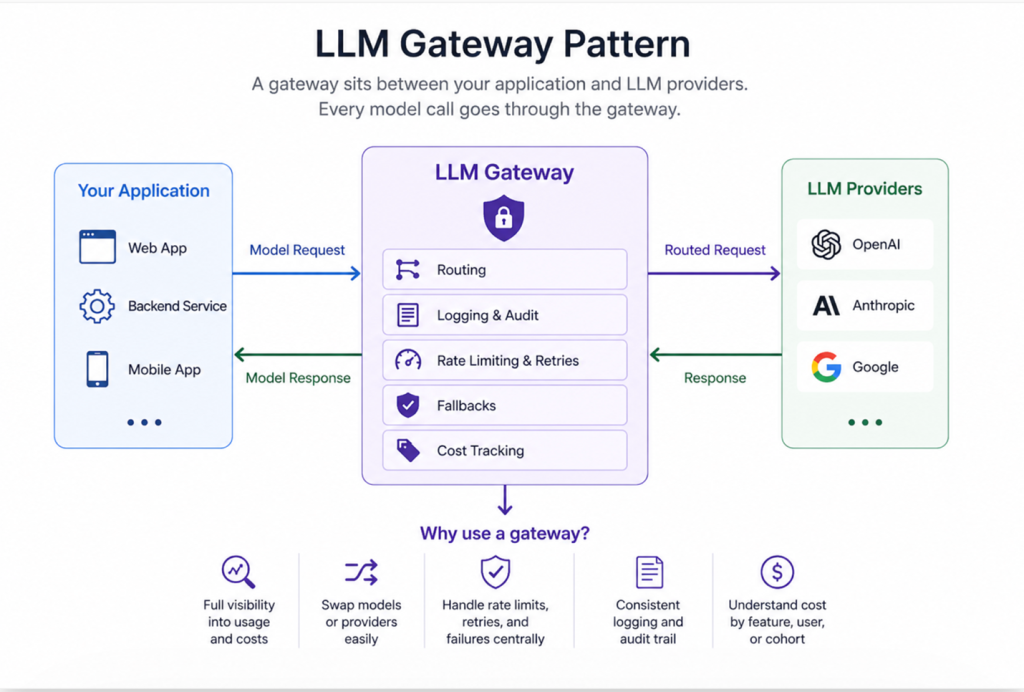
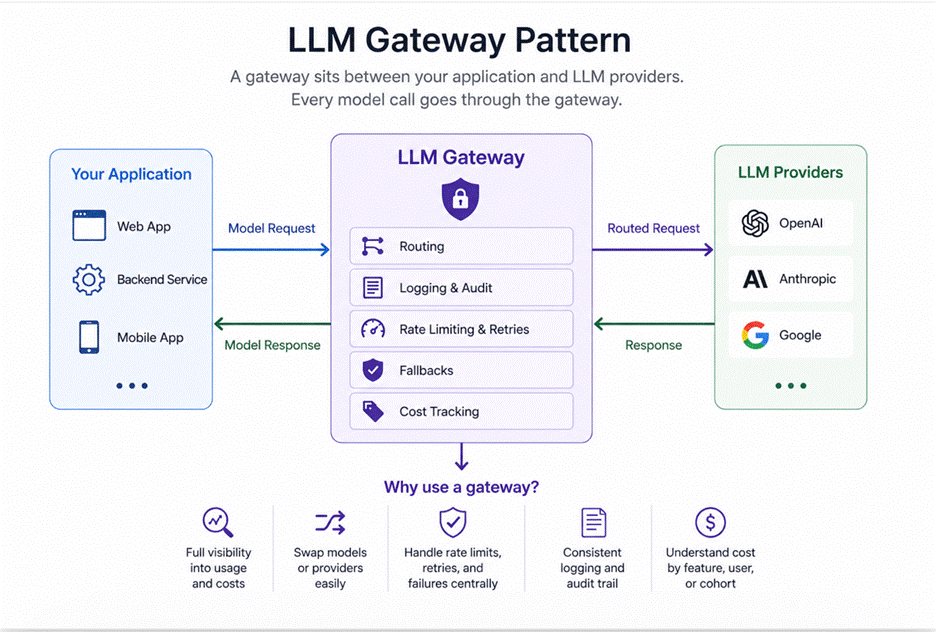
The LLM gateway pattern is a thin service layer that sits between your app and large language model (LLM) providers, centralizing every AI call through a single entry point. It gives you immediate control over routing, logging, retries, fallbacks, and cost tracking – preventing the chaos of scattered integrations, unclear billing, and provider lock-in as your system scales. Learn all you need to know about the LLM gateway pattern in this article.
Every development team reaches a critical juncture. You’re able to make your first call to a large language model (LLM) directly in your application code. Everything’s going to plan and everyone is happy. Three months later, though, you’ve found yourselves in a situation where five distinct services are independently communicating with the application programming interface (API).
There are four disparate retry implementations, no shared logging mechanisms, and you have an unexpected billing issue to solve at the end of the month. Worst of all, the billing issue arose independently, with no clear attribution to any specific feature.
That’s where the gateway pattern comes along and saves the day. It’s an architectural decision that may seem unnecessary – and therefore is often left out until it’s too late – but its value cannot be understated.
What is the LLM gateway pattern?
A gateway is a thin service layer that sits between your application and any LLM provider. There’s nothing talking directly to the A.P.I – all model calls go through the gateway. The gateway pattern has just a single (one) entry point – and its value comes from what centralizing that single entry point lets you do. It’s an architectural choice that might seem like overkill at first, so often gets ignored until it’s too late.
Four things your application code should never own
1. Routing
Calling the LLM directly from your application means you’re limited to only those where the model creator has a point of presence. That means you’re hitting up OpenAI, Anthropic, or whoever the provider is — and if you want to switch, you have to fight with every service that makes model calls.
A gateway breaks the connection between your application and the specific model provider. Instead, you route to a model alias like “chat-standard,” “chat-fast” or “embeddings,” and the gateway determines which real provider and model to use.
For example, replacing Claude with GPT-4 in a summarization feature requires changing only one line in the gateway’s configuration file – and the application does not need to know.
This may seem trivial but, in my experience, most teams end up underestimating the importance of it all. Models releases happen frequently. The optimal model for your use case might not be the most cost-effective today. You’ll likely also need this flexibility as provider pricing changes. If every service is hardcoded, you’re now stuck.
2. Logging
In the past several months, I’ve seen teams run production LLM systems without knowing what their model is being asked. Then, when something goes wrong — a strange LLM response, a hallucinated fact, or a compliance issue – they have no way to dig into what happened.
The gateway is the perfect spot to log everything about every request: what prompt went in, what came back, how long it took, which model handled it, how many tokens it cost. It’s an audit trail, a debugging surface, and cost tracking – all in one.
Another approach is to try and enforce consistent logging at the application layer — but that never works. Some services may be logging correctly, some may be logging incorrectly, and others may not be logging at all. A misunderstanding of the guidelines by new programmers. Bottom line: you’ve got to centralize it!
3. Rate limiting and retry logic
Rates are set by each provider, but what actually matters is how your system handles them.
Without a gateway, each service would have to implement its own API retry logic. And in the absence of coordination, the different services would employ different backoff strategies, have inconsistent 429 error handling, and would not work as a team when multiple services are hammering the API at once. Basically, one service’s overzealous retry loop could starve another service’s critical path.
On the client side, the gateway can buffer requests near the limit, and implement per-feature rate limits and exponential backoff and jitter – so every call is treated the same.
4. Fallback logic
Provider outages happen. So do context-length failures, content policy rejections, and timeout spikes.
The gateway provides you with a contingency plan. If a primary model fails, you can resort to a backup; if a more costly model is saturated, you can fall back to a cheaper model for less-critical requests. And, if the latency is slower than what was promised, you can return a graceful degradation response, as opposed to making the user wait.
It doesn’t have to be complicated. But it does have to be in one dependable place — and that’s the portal.
Accelerate and simplify database development with Redgate
The cost visibility problem
This one is in a category all its own, because it surprises teams more than anything.
Most AI companies charge not by the API call, but by the token — that is, the tiny chunks of words and letters your requests burn through as they make their way through a large language model’s neural net. So while you might assume that it costs a fraction of a cent to complete a few short tasks, it’s incredibly easy to spend a significant chunk of change if you’re routing lots of queries through AI. Additionally, there’s no centralized way to keep track of the tokens you’re using.
It becomes nearly impossible, therefore, to identify whether too many tokens are being used due to a prompt template, an incredibly useful but extraneous feature, or even your toxic ex that comes traipsing back into your life without warning. Which prompt template is way too heavy? Which user group is using 10 times the average token amount?
The gateway is also where you can tag your requests with whatever matters to you — feature name, user group, experiment version, etc. Tagging lets you see how much each feature costs, which is the information you actually need to make smart choices about model selection, prompt tweaks, caching plans and more. In AWS, tagging is the key to making your cost data actually make sense.
Direct calls vs. gateway: what changes?
| Concern | Without a Gateway | With a Gateway |
| Cost visibility | Token usage scattered across services, no unified view | Per-feature, per-user tracking in one place |
| Provider lock-in | Model calls hardcoded into application logic | Swap providers by changing one config value |
| Rate limit handling | Each service reinvents retry logic independently | Centralized backoff, queuing, and fallback |
| Audit trail | No consistent record of what the model was asked | Every request and response logged uniformly |
| Reliability | One provider outage takes down everything | Automatic failover to backup model or provider |
What lives in the gateway – and what stays in the app?
There’s a natural tendency to over-engineer what lives in the gateway and what lives in the application. The gateway should be thin. It’s an infrastructure component, not a business logic layer.
In the gateway: routing resolution, authentication, logging, rate limiting, retry logic, fallback routing, response caching for identical requests, cost tagging.
In the application: prompt construction, result parsing, business logic, user-facing formatting. Everything domain-specific stays out of the gateway.
The gateway shouldn’t know anything about what your application is doing with the response. It’s a pipe with observability and resilience built in — not a second application.
When don’t you need a gateway?
A gateway pattern doesn’t make sense if you have just one app making model calls, or you’re using a single provider. In this case, it’s highly likely that your team is small, you don’t have many complex use cases, and you aren’t operating at a high volume.
Things can break quickly when several services all call the API, or when you’re A/B testing models, or when you need a serious audit trail for compliance, or when you get a shocker of a bill. A solid shared module that handles logging and retries consistently does the trick just fine.
However, most teams build this reactively after they’ve already felt the pain. Perhaps, for example, they’ve spent weeks arguing over whose logging format is the right one as they try to untangle five different integration patterns. A more proactive approach here is wise; proactive teams just take a few days upfront to set it up, then forget about it.
LLM gateways: what to build and what to buy
LiteLLM is currently (as of May 2026) the top open-source LLM gateway that handles routing, fallbacks, and cost tracking with sane defaults. Also consider Portkey and Helicone. They’re all ready to go.
For most production systems, writing a ‘homemade’ gateway (essentially a reverse proxy with some retry and logging logic), is only a few hundred lines of code, and most companies have their own versions. Of course, the decision to use one of these versus building your own depends on the number of third-party dependencies your organization is comfortable with in critical systems, and the amount of custom routing that you actually need. Plus, making a homegrown gateway is a manageable engineering task.
Application services should be able to call (and get a response from) something that feels like a model API. It shouldn’t – and doesn’t – matter how you get there.
In summary: the benefits of the gateway
What, exactly, does the gateway do? Setting up the functions that the gateway performs is not all that difficult. Logging is part of the Sugar activity set, so you need not worry about including it in your code. Routing is easy to set up.
Without the gateway, however, these things get done, by different people, at different times, in different services, over and over and over again. We always want a consistent world – and that means there should be some central place in the system of distributed nodes to keep things consistent.
That’s exactly where the gateway enters the scene – especially when LLM adoption really starts to ramp up.
“Everyone wants to move faster with AI, but few are truly ready for it.”
FAQs: LLM gateway patterns
1. What is an LLM gateway?
An LLM (large language model) gateway is a thin service layer that sits between your app and LLM providers, routing all model calls through a single entry point.
2. Why use an LLM gateway?
To centralize routing, logging, retries, fallbacks, and cost tracking. All of this improves reliability, visibility, and flexibility.
3. Do I need an LLM gateway?
Not always. Small apps using one provider may not need it, but multi-service or production systems benefit significantly.
4. How does an LLM gateway reduce costs?
By tracking token usage per feature/user and enabling smarter routing to cheaper or more efficient models.
5. Does an LLM gateway prevent vendor lock-in?
Yes. It abstracts providers behind model aliases, so you can switch models without changing application code.
6. What should live in the gateway vs the app?
What should live in the gateway: routing, logging, retries, rate limits, fallbacks.
What should live in the app: prompts, business logic, and response handling.
7. Should I build or buy an LLM gateway?
This document contains proprietary information and is protected by copyright law.
Copyright © 2026 Red Gate Software Limited. All rights reserved



Load comments