



There’s not much to database keys, right? When you build a new table, you add a column to act as the primary key, then set it to auto-generate. Done. That’s all there is to know…right?
The goal of this article is to demonstrate that there’s much more to the process than this. There are options to selecting, defining, and using keys. For optimal design and performance, consider your choices carefully.
What are the different types of database keys?
Keys come in two basic flavors: natural and surrogate. Natural keys, as their name suggests, are values that occur naturally in the data. They have real-world or business meaning: an email address, the street address of a building, the serial number of an inventory item, etc. In contrast, a surrogate key (sometimes called a synthetic key) is a value added to each row upon creation. A surrogate exists only within the confines of the database; it has no meaning outside of it.
A natural key often contains two or more columns. For instance, the key for a table of vehicle types might include the make, model, year, and trim level, all four columns of which must be combined to create the value that uniquely identifies each row. Surrogate keys are always a single column, though the value of each key may be anything you choose – as long as each value is distinct from all others.
Why use a surrogate database key?
Some tables lack natural keys and so a surrogate must be used. But even when a natural key exists, developers still usually add a surrogate. In fact, in many development shops, it’s best practice to add a surrogate to all tables. But if a natural key is already in the data, why go to the extra trouble to add a surrogate? There are a few reasons why natural keys may be unsuitable:
- They can be unstable. Since natural keys have real-world meaning, their values can change over time. Even values we think of as constant – like a social security number or building’s street address – can change on rare occasions. When that happens, it can mean updating not just the parent table, but thousands, millions, or even billions of foreign keys in child tables. Surrogates, though, exist only in our database: we have total control over them, and can ensure they never change.
- They can be incomplete. If you track customers by email address, what do you do for the rare individual who either lacks an email or refuses to share their address? If a table of cars for sale tracks vehicles by VIN number, how do you handle older vintage vehicles that lack this ID?
- They can be unwieldy or overly long. When a key spans several columns, referencing them all for every lookup makes for cumbersome queries. And even a single-column natural key may run to dozens or even hundreds of bytes. Replacing a long text value with a single 4-byte or 8-byte integer means less storage and smaller, faster indexes, especially when the value is used in many foreign keys.
In the early days of databases, adding a surrogate key and automatically generating its value was difficult and fraught with pitfalls. That’s no longer true: all modern DBMS’ natively support automatically-generated surrogates with just a single statement, though the syntax does vary slightly between platforms.
Should you always use a surrogate database key?
Now we ask the opposite question: with all the advantages surrogates have, why would we not use one? The simple answer is performance. Even with today’s hardware, wider rows mean less performance. On most tables, the overhead of a single additional column is negligible, but for large, narrow tables (such as certain time series data) the performance hit can be significant.
Also, we often must index on the natural key regardless of whether it’s used as the primary, so a surrogate means an extra index, further impacting performance. If the natural key is stable and succinct, you may wish to consider using it alone.
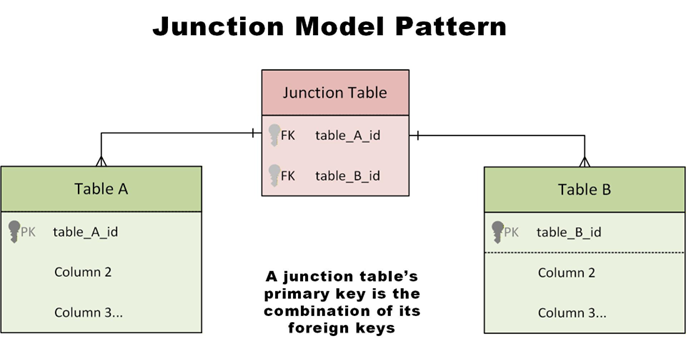
Another common area where surrogates generally aren’t used is in a so-called “junction table” (associative entity), made to implement a many-to-many relationship between two other tables. The primary key for a junction table is (usually) the two foreign keys that link to the base tables.
How to populate a surrogate database key
The vast majority of surrogate keys are auto-generated from a numeric sequence: every key one value number larger than the record before. But there is nothing inherent in surrogates that require them to work like this, and sometimes the behavior isn’t ideal; because numeric sequences are predictable, they expose a certain amount of information you may wish be kept private.
For example, if a customer is sent invoice #10500 one month and invoice #10600 the next, they know the system is generating 100 invoices a month. If “transaction ID #96591” appears on a receipt, then a potential hacker knows what the next transaction ID will be, and may be able to exploit that.
If users never see the primary key, these issues don’t arise – but if they do, you may wish to consider keys based on something other than a numeric sequence: a non-sequential surrogate.
Fast, reliable and consistent SQL Server development…
Everything you need to know about non-sequential surrogates
For auto-generated keys, the most common non-sequential type is the Universal Unique Identifier (UUID). Sometimes called a Globally Unique Identifier (GUID), it’s 128 bits wide – 32 hexadecimal characters separated by four hyphens. There are several different variants (eight, to be precise) but they all share one common trait: they’re wide enough so that collisions (duplicate keys) are nearly impossible, even when randomly creating quadrillions of random values. Some UUIDs are time-based so, as long as you don’t create more than one every 100 nanoseconds or so, a duplicate key is actually impossible.
Because UUID collisions are so unlikely, you don’t need a central database to assign key values: they can be created at the application level, even by remote computers or mobile devices when they lack a database connection. This ability to work in a disconnected, decentralized manner is the primary benefit of UUIDs.
This feature is very useful but comes with a significant drawback: performance. 128-bit keys are much larger than a typical four-byte or eight-byte numeric key – they take more storage and more time to sort and compare. Indexes on UUIDs take up more space in memory, which means less of the index can be loaded at one time. And using a non-sequential primary key means many more page splits during index updates. For insert-heavy tables like time-series data, this further erodes performance.
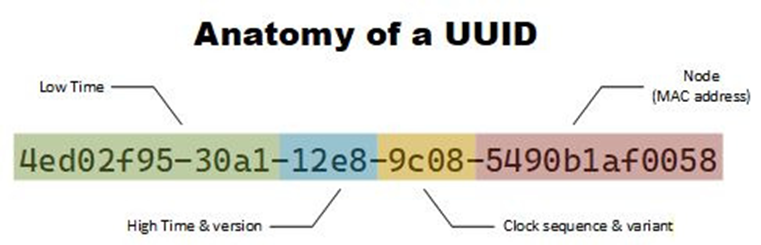
Note: there are multiple UUID variants. If you decide to use UUIDs in your application, investigate which one best fits your needs. The Version 1 form pictured above exposes your server’s MAC address, which may be a problem for some applications.
What are some alternatives to UUID?
There are several successors to UUIDs, such as the Universally Unique Lexicographically Sortable Identifier (ULID), designed to improve performance or address security concerns. If you just want to hide the sequential nature of key values from prying eyes, however, the best way to do this is to generate the values sequentially as normal, but encode or obfuscate them in some manner.
There exists libraries specifically for this, such as Sqids, but replacing a key value with its MMI (modular multiplicative inverse) is fast, secure, and can be calculated in a single line of code.
Sometimes obfuscation is done at the application level, encoding and decoding the value each time it’s accessed, but if you store the obfuscated value directly in the database, there’s no need to ever recover the original value.
If you just wish to make the sequential character of the key less glaringly apparent, you can set the sequence to increment by a value other than one. For instance, in SQL Server, this statement defines an auto-generated primary key that starts at value 100 and increments by 3 each time:
|
1 2 3 4 |
CREATE TABLE employees ( employee_id INT IDENTITY(100,3) PRIMARY KEY, ... ) |
This obviously isn’t very secure, and it also consumes three times as many key values per row so, if you use this trick, remember to size your key appropriately.
Why you should keep your database keys to yourself
The value of a surrogate key relies upon it being isolated from the outside world. Every time you expose a key to users, you erode that isolation ever so slightly. This is an entirely separate problem from the security issues of sequential keys.
The more users see a key value, the more you risk the value gaining meaning to them, and then you no longer have complete control over it. This isn’t simply hypothetical: in one case I experienced, a major telecom company implemented a new system with fresh surrogate keys for its network elements, but the keys were included on pipelines to other systems.
They appeared in reports, URLs, dashboards….and users began to refer to elements by key value and, eventually, demanded (and received) the ability to search on the key as any other value. The surrogate had become a natural key – owned by users, not the database developers.
Move fast. Govern at scale.
What are smart database keys – and why are they the ‘worst of both worlds’?
A smart key is a sort of hybrid between a surrogate and natural key. The thought process that leads to a smart key generally runs something like this: you have several columns in a table that when combined almost – but not quite – uniquely identifies each row. You decide to add a short sequential or random value to this, creating an almost-surrogate that still preserves the business meaning.

Anyone who’s ever designed such a key (including myself) is usually captivated by their surface elegance but, like a used car purchased from a shady dealer, problems usually begin to soon arise.
A smart key has all the drawbacks of both surrogate and natural keys, and no real advantage over either. Sometimes these keys are demanded by business requirements, and sometimes we receive them from other sources, in which case they’re technically a natural key (we have no control over them). If you’re thinking about creating your own, it’s generally best to avoid them.
How big a database key do I need?
One of the most painful acts a DBA must perform is expanding a key column to a larger type, which often means altering not just the primary table itself, but foreign keys in dozens of other tables, and rebuilding all associated indexes. Give yourself room for growth – when a table outgrows its key, you have no choice but to expand it. A four-byte integer is limited to 2.1 billion rows (double that if your particular DBMS supports autogenerating unsigned integers) – estimate the maximum growth over the next several years, then double it. If you’re anywhere near the limit, use an eight-byte key.
Planning for growth, though, can be taken to extremes. Don’t automatically use an overly-large key for tables that will always remain small. Eight-byte BIGINTs take more space, which means much bigger indexes, fewer index pages in memory, and slower operation overall.
Regardless of what size you use, ensure all your foreign key references match the primary’s type. While some DBMS’ allow mismatched types, this will cause problems down the road.
What are primary database keys?
This is a more subtle question than it appears. Since SQL-92, the language has allowed you to declare primary keys within the table definition. But this is simply a declaration; what defines the primary key is your use of it. The value you use primarily in queries to uniquely identify rows and in foreign-key references is the primary key. The declaration in the table definition documents your choice – it doesn’t enforce it.
Why is this distinction important? Because declaring the primary key does more than just document it – it creates an index on the key as well. There are times you may want to override how this index is created, or defer creation until later (such as bulk loading a table). That’s OK. The primary key is still there, whether or not you declare it as such.
Do I always need a primary database key?
For most people, this question is a no-brainer: every table needs a key, period. After all, without a key, there’s no way to uniquely identify a single row for updating or deleting. With no key, there’s no way to link child rows to the table either. Tables need keys like fish need water…right?
There is a rare but important case for which you may wish to consider leaving a table keyless. If the table contains immutable data – data which business rules require to never be altered once inserted – then the lack of a primary key is a powerful tool to enforce this rule. This isn’t iron-clad protection – most DBMS’ have language extensions that can reference a keyless row – but is a clear self-documenting reminder of the immutable nature of the data. The data must be in a leaf table (without child tables), as the lack of a key obviously prevents any foreign key references.
What are foreign database keys?
Foreign key declarations are a contentious topic: developers love them for their ability to securely enforce referential integrity but DBAs often resist them for complicating some database maintenance operations. And all those integrity checks do eventually impact performance. Some shops demand all FKs be declared, others don’t allow any whatsoever, and some leave it up to the individual developer.
Regardless of what standard your shop agrees upon, it’s important to remember these declarations are no different than for a primary key: the declaration documents and enforces the foreign key, but defining the foreign key is done by your usage of it. If you don’t declare a FK at the database level, be prepared to enforce referential integrity at the application level.
Final thought: keep exploring database keys
The topic of database keys is a pool both deep and wide. This article only dived into the shallow end of that pool, but hopefully it’s convinced you that the rest of the water is worth exploring.
FAQs: Database keys
1. What is a database key?
A database key is a column or set of columns that uniquely identifies a row in a table. Keys are used to link tables, enforce data integrity, and improve query performance through indexing.
2. What are the different types of database keys?
The two main database keys are:
-
Natural keys – real-world values like email address, VIN, or serial number.
-
Surrogate keys – artificial identifiers (often auto-generated integers or UUIDs) with no business meaning.
Natural keys may span multiple columns, while surrogate keys are always a single column.
3. Why use a surrogate key instead of a natural key?
Surrogate keys are preferred because natural keys can be:
-
Unstable: real-world values change.
-
Incomplete: some rows may not have a usable natural key.
-
Large or composite: slower joins and bigger indexes.
Surrogate keys are small, stable, and efficient for joins and indexing.
4. Should every table use a surrogate key?
Not every table should use a surrogate key. Avoid surrogates when:
-
The natural key is short, stable, and meaningful.
-
The table is large and narrow (extra columns hurt performance).
-
The table is a junction table (many-to-many relationships), where a composite key of two foreign keys is usually best.
5. How should surrogate keys be generated?
Most systems use auto-incrementing numeric sequence – these are fast and compact, but predictable. If key values are exposed to users, consider non-sequential alternatives or obfuscation.
6. Are UUIDs good primary keys?
Use UUIDs for distributed or offline systems. They ensure global uniqueness but use more space and perform worse than numeric keys.
7. What are alternatives to UUIDs?
-
ULID (sortable, better index performance)
-
Obfuscated sequential IDs using tools like Sqids
8. Should database keys be exposed to users?
No, database keys should not be exposed to users. Exposed keys gain meaning, create coupling, and limit future schema changes. Use public IDs instead.
9. What are smart keys?
Smart keys are hybrid keys with business meaning + sequence. They’re fragile and usually the worst option, so avoid when possible.
10. How big should a primary key be?
Use the smallest type of primary key that supports future growth:
-
INTfor smaller tables -
BIGINTfor large or fast-growing tables
Always match foreign key types to the primary key.
11. Do all tables need a primary key?
Nearly all tables need a primary key – the rare exception is immutable, append-only leaf tables.
This document contains proprietary information and is protected by copyright law.
Copyright © 2026 Red Gate Software Limited. All rights reserved





Load comments