


Nowadays, artificial intelligence is everywhere. It’s so prevalent that even universities are implementing it into their curriculums. That’s the case because on its face, AI really is immensely powerful – we can find pretty much any information on anything we desire.
Beneath the surface though, AI is just a tool that learns certain patterns and draws conclusions from information on the Web to answer questions, make decisions, or craft a code sample or two. Those that have used AI in the past will know that just as it’s capable of providing valuable information, AI tools can also generate inaccurate responses, and that’s why it’s important to use it wisely.
AI and Software Development: Why It Matters
When it comes to software appliances, AI has also found its way in. You don‘t have to search far to find terms akin to ‘vibe coding’ – a style of programming where developers focus on the ‘flow’ of programming and how development makes them feel rather than diving deep into a code base and figuring out problems. Vibe coding is a fun slang often used in conversations as well as in memes, and was in fact recently crowned Collins’ Word of the Year for 2025.
Beyond that, though, is the raw truth of software development: AI now assists everything. Structural decisions, project and product management, solutions to coding issues by providing a code block to an AI chatbot – everything‘s on the table. Making AI part of your software ecosystem helps everything run more efficiently: developers move faster, projects stay in shape, managers make important decisions quicker, and databases stay healthier.
Additionally, tools with AI capabilities like SLQ Prompt help users to write SQL queries, while there are also programs that assist with database design tasks by:
– Creating ER diagrams
– Normalizing data or suggesting relationships between tables
– Analyzing slow queries, missing indexes or high I/O (input/output) usage
– Assist in alleviating locking issues
– Help with automated monitoring and anomaly detection by alerting us of unexpected query or traffic patterns, disk or memory issues, or other potential bottlenecks.
Another popular client, DBeaver, has a feature called AI Assistant where the tool provides AI-enabled assistance in creating and editing queries, answering questions, or exploring database objects.
So, AI is vital for database operations too. Just always remember: give the AI tool as much detail as possible. Ask vague questions and you’ll receive vague responses.
How AI Chatbots & Tools Work
On a high level, many developers imagine that AI talking to their database would look like this:

That has some truth to it since we often come to AI with a brief, yet specific, problem we need a solution to. For AI chatbots like ChatGPT, questions like “why is the query SELECT * FROM table WHERE column = ‘value’ slow?” are very common because slow queries are a frequent issue.
These AI tools then analyze patterns from sources and data to provide explanations or suggestions based on those patterns, making them well-suited to troubleshoot database issues.
In reality, to receive helpful and actionable responses from AI, you have to consider many things applicable to your database, application, server, and use case as a whole. Some of them will include the following:
Your database management system
- How is the database management system configured?
- Any replicas in use?
- What’s the database schema and structure?
- What data types, character sets are in use?
- Any indexes and constraints?
- What about partitions?
- Any stored procedures or views that AI needs to consider or respect?
- If you’re working with bigger data sets, the size of your tables and files.
The architecture of your application
- What is the use case of your application? Does it come with heavy read/write operations for the database
- What are the rules governing business operations? (e.g. can something go into the negative?)
- What are the typical ways your applications reads/writes/modifies data?
- How does your application/server handle failed queries, timeouts, unexpected input, etc.?
Your server
- Do you use shared hosting, VPS, or a dedicated server?
- What are the parameters applicable to your server? What about the disk, RAM, I/O?
- How many queries/users can the server handle at once?
- Do you log queries executed by your application/database? Are they backed up? (I‘ve heard of cases where forums backed up log files to a different server in the event of a compromise)
- Do you have backup servers in case of hardware failure?
Benefits of AI-Powered Database Queries
Take two different queries:
| Query 1 | Query 2 |
| Why is this JOIN query taking so long? [JOIN query here] | Why is this JOIN query taking so long? [JOIN query here] I execute this JOIN through a custom plugin in WordPress (find its code in the attached file wp.php.) I run MySQL 8.0.44 with the following configuration: (my.cnf settings applicable to your storage engine here.) My database schema and structure is attached to this prompt through the file db.sql. I run Ubuntu Linux, I have 2TB of disk space and 32GB of operating memory, with 28GB available for immediate use. The use case of my application is a rental system based on WordPress 6.9. |
It‘s obvious that the second prompt will provide us with a better response because the AI chatbot has more information it can act on. Now, everything looks different:
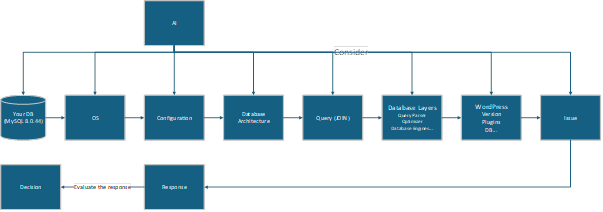
From the second prompt alone, AI will take different things into account:
- The version of your DBMS and the configuration surrounding it.
- The database schema and structure.
- The specific type of operating system in use (Ubuntu)
- The amount of available disk space and the amount of operating memory.
- The application/content management systems in use.
- The context: the fact that we’re executing a JOIN query through a custom plugin in WordPress.
These won’t guarantee an 100% accurate response (even ChatGPT notes that it can make mistakes and that important information must be double-checked), but anyone can see that the response to the second question will almost surely hit the mark in terms of what we need without us returning to the chatbot to ask four additional questions afterwards, because AI will not only act on a single specific piece of context (#6) as often happens.
Instead, it will know that:
- The chatbot should only provide advice applicable specifically to MySQL 8.0.44, not SQL Server, PostgreSQL, or MariaDB 10.5.
- The chatbot should only consider Ubuntu as the OS.
- Constraints are in place (2TB of disk space, 32GB of operating memory.) Those will not be exceeded.
- AI knows what CMS is in use (WordPress 6.9) and can act on this information if necessary (provide advice on what to upgrade, implement, etc.)
Much better, isn’t it?
How to Get the Most Out of AI
Think of AI chatbots like consultants that you pay hourly for. You want them to get work done as quickly as possible to reduce cost, so you have to present them with an actionable task with as much information as possible. Not having enough information paves the way for scope creep in real world projects, and it’s not much different with AI; you want to avoid having to ask it multiple questions to receive the response you’re looking for. The more information you provide, the quicker it’ll get this to you.
Many developers have had situations where managers or customers would keep tweaking things after work is already underway adding or modifying requirements after a portion of work has been done. Such “scope creep” is not only applicable to software – you can get rid of it by documenting everything that you’re doing (have a complete project specification – from A to Z – in the contract) or say “good idea” and put the requirements down for version two.
Receiving “satisfying” responses from an AI chatbot isn’t much different: the more things AI has at hand to consider, the quicker it’ll give you something you’re happy with. Always consider the DBMS in use (different database management systems work in different ways since they’re built differently), your server, application (and your CMS if you use one), and your use case.
Then, be as detailed as possible in your queries to the chatbot, and don’t forget that you have a head on your shoulders too. Ultimately, decisions like ‘how often do we back-up our databases?’ should come down to you – not ChatGPT exclusively.
Using AI: Best Practices
When using AI to assist you, ask clear, specific, and context-aware questions for the best (and quickest) responses. Additionally:
- Don‘t forget the objective: state the objective of what you want to achieve at the start of your question.
- Provide context: what version of a specific DBMS do you use? What are the tables, partitions, indexes, and constraints within your database and how do they interact?
- Include all applicable constraints, limits, and considerations: mention rules that should be respected such as the amount of available memory, security restrictions, etc.
- Specify the output format or action: do you want the AI chatbot to return a piece of code to solve your issues? Actionable advice? Generate an image? Specifying the output format, e.g “Return a piece of code in an SQL format that doesn‘t include any JOIN queries“.
- Ask AI about multiple options or trade-offs: AI can come up with multiple ways to solve the same issue. You can always ask AI to compare them or suggest what‘s best for your specific circumstance.
You can ask AI multiple times, but receiving adequate responses 3/3 times will inevitably lead to better results in the future than receiving them once in a while because you couldn‘t explain everything necessary all at once. The same applies to software: explain everything surrounding your application, then detail your issue, and you should be good to go.
FAQs
1. Should I Use AI to Solve Database Issues?
Yes, absolutely. AI chatbots like ChatGPT are a very powerful tool that can help solve many software and database issues. Ensure you provide as much information as possible to help AI best assist your use case.
2. How Best to Use Artificial Intelligence to Solve Database Issues?
Regardless of what AI tool you use, ensure to ask it concrete, specific and context-aware questions – and don‘t forget to state the objective: what do you want to achieve?
3. Can I Trust Artificial Intelligence in Solving Database Problems?
Yes, you can trust AI with your database issues, but make sure to verify and check every response it gives you. It’s not uncommon for AI to provide wrong, and sometimes even meaningless, information.




Load comments