



Four years ago I wrote a blog on this site explaining why Python is better than C# and, arguably, most other programming languages. To redress the balance, here are 10 reasons why you might want to avoid getting caught up in Python’s oh-so-tempting coils – particularly when building large, long-lived systems.
If this sounds like an attempt to have my cake and eat it, my defense is that I follow in my work what I preach here: I use Python for ad-hoc jobs, at which it is unsurpassed. For larger systems – such as our MV website – I use C#, due to its strengths in maintainability, tooling as well as the practical consideration that my personal preference for Visual Basic is not shared by the wider team.
This article was peer reviewed by Rutuja Patil.
1. Argument Types
Consider this Python function:
|
1 2 3 4 5 6 7 8 9 10 11 12 13 14 15 |
def formal_name( first_name: str, last_name: str ) -> str: """ Creates a formal name (eg "Tom", "Cruise" becomes "Tom Cruise") """ return "{0} {1}".format( first_name.capitalize(), last_name.capitalize() ) # show this name print(formal_name("Bob","Smith")) |
These str expressions are called type annotations, introduced in Python 3.5. They are written using the following syntax:
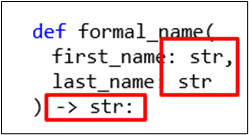
Type annotations are a useful feature because they enable development tools to provide more accurate auto-completion when accessing object attributes – for example, in the following code, the type annotation allows tooling to infer that last_name holds a string:
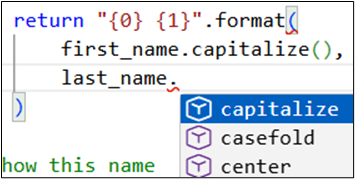
Sadly, however, this type information is not enforced at runtime and is only relied upon when incompatible operations are performed inside the function. You can make horrible calls like this (below), and they will initially run perfectly:
|
1 2 |
# print a name consisting of a date and pi print(formal_name(2025-12-31,3.14)) |
This code won’t crash at the time the function is called as Python will quite happily create two arguments: one called first_name (to hold a date), and another called last_name (to hold a float value). It’ll only crash when the code attempts to capitalize ‘pi’!

This is a typical Python feature, placing the onus on the developer to follow conventions, and is a recipe for bugs when developer A passes inappropriate data types to a function written by developer B simply because they can. C# programmers – look on and despair.
2. Module Inconsistency
Python modules are its superpower: whatever you want to do, there’s a module for it. To test this theory, I asked ChatGPT to help me find a module to manage my (imaginary) Lego collection, more in hope than expectation, and got this:
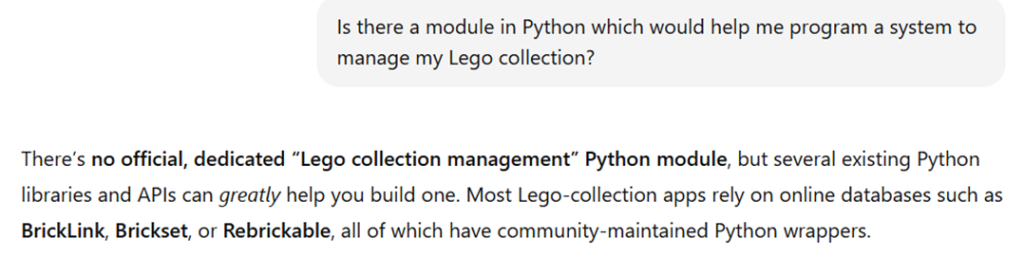
Truly, there is a module for everything! However, because Python is open-source and its development relies on the goodwill of volunteers, these modules aren’t always consistent – and that’s an understatement!
Here is one example to illustrate this. The following code uses the popular BeautifulSoup module to print out the first hyperlink on Simple Talk:
|
1 2 3 4 5 6 7 8 9 10 11 12 13 14 15 16 17 18 |
import requests from bs4 import BeautifulSoup as bs # go to Simple Talk website visit = requests.get("https://www.red-gate.com/simple-talk/") # check visit went OK if visit.status_code != 200: print(visit.status_code) quit() # get the underlying HTML and parse it html = visit.text soup = bs(html, "html.parser") # show first hyperlink first_link = soup.body.a print(first_link.get("href")) |
However, there is no reliable auto-completion to help you with the penultimate line, as this information is only available at runtime. It’s up to you to guess that you can refer to the body of the HTML page in this way:
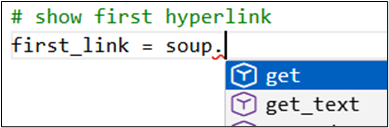
BeautifulSoup is an excellent and powerful module – and the online documentation is, fortunately, very good – but, much like third-party Python libraries, it doesn’t always follow what you might think of as standard Python conventions. This feels like a side effect of open-source development; perhaps there’s something to be said for having Microsoft in overall control of a codebase after all!
3. Data Type Inconsistency
C# may have a bewildering variety of data types, but at least they are universal: an int32 will always be an int32, no matter which namespace you’re referencing. This is not the case with Python.
Initially, Python’s numeric types are refreshingly simple (and dare one say, Pythonic?):
| Data type | What it contains |
| str | Any string of text |
| int | Any whole number |
| float | Any decimal number |
| bool | Something which can be either true or false |
However, many of the most important modules are written in C, and therefore use C’s data types. As a result, NumPy defines its own set of numeric types (which Pandas largely build):
| Type of data | NumPy data type | C equivalents |
| Integer | np.int16, np.int32 or np.int64 | int16, int32, int64 |
| Floating point | np.float32, np.float64 | single, double |
| Boolean | bool8 | bool |
This often means you have to learn one way of doing things in “vanilla” Python and another way in, for example, Pandas. Here’s one of the most egregious examples (I’m so proud of using this word in anger, as I’ve finally learned what it means!). Suppose we want to show, in a Pandas data frame of films, the number of characters in each film’s title (shown twice below):
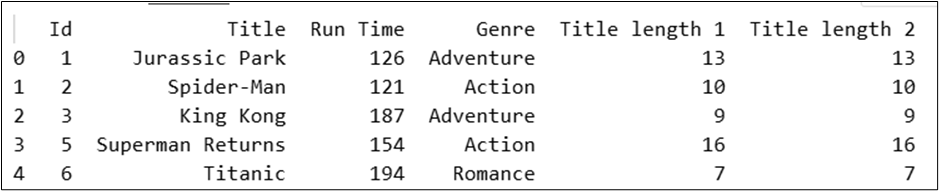
Here’s some sample code to do this:
|
1 2 3 4 5 6 7 8 9 10 11 12 13 14 15 16 17 18 19 20 21 |
# create a dictionary to hold some films films_dict = { "Id": [ 1,2,3,5,6 ], "Title": [ "Jurassic Park", "Spider-Man", "King Kong", "Superman Returns", "Titanic"], "Run Time": [ 126, 121, 187, 154, 194 ], "Genre": [ "Adventure", "Action","Adventure", "Action","Romance"] } import pandas as pd # add a field giving length of each film name using a standard # Python list comprehension and the "len" function films_dict["Title length 1"] = [len(title) for title in films_dict["Title"]] # create a dataframe based on this dictionary film_dataframe = pd.DataFrame(films_dict) # add a column showing the film name length, converting the Title column # (which is held as an object) to a string and then taking the length of this film_dataframe["Title length 2"] = film_dataframe["Title"].str.len() print(film_dataframe) |
In vanilla Python you find the length of each string using the built-in len function, but once you’re in Pandas you have to convert the column to a string using the str property and then apply the len method – neither of which are part of standard Python. Inconsistency like this makes Python harder to learn and more unpredictable.
4. Python isn’t always as ‘pythonic’ as it thinks it is
While most things in Python are beautifully simple, not everything is. Here are four of my pet bugbears.
If you want to check if something is contained in something else, you have to use this syntax:
|
1 2 3 4 |
person_names = ["BRIAN","SALLY","MAX"] # test if someone in the list if person_name in person_names: |
It would be so much more intuitive to use:
|
1 2 |
# test if someone in the list if person_names.contains(person_name): |
Bizarrely, there is a dunder (double-underscore, but you knew that, I’m sure) method called contains,which does let you do this.
My second bugbear is the lack of a .length property for any sequence:
|
1 2 3 4 5 |
# this works ... print(len("Hippopotamus")) # ... but this doesn't print("Hippopotamus".length) |
There’s a hidden len property – why not expose a length property, to make this consistent with the
way the rest of string properties and methods work?
A third bugbear – why when you write to a text file is there no writeline method?
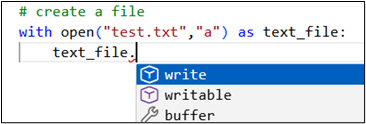
This means you have to remember to include a carriage return whenever you write something to a text file.
And finally, the way you loop over dictionary items is just odd, and hard to remember:
|
1 2 3 4 5 6 7 8 9 10 |
# create a dictionary to hold some films films_dict = { "Jurassic Park": (126, "Adventure", "Bit scary"), "Titanic": (194, "Action", "Good, but too long"), "King Kong": (187, "Adventure", "Not seen") } # show the film name and genre for key, value in films_dict.items(): print("{0} |
This would produce this output:
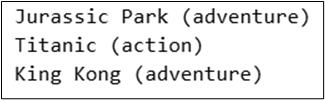
But why do you need to put .items after the name of the dictionary, when Python knows it’s a dictionary? And why is items a method, instead of a property?
5. Indentation – good or bad?
One of the most distinctive features of Python is its reliance on indentation for meaning, but this can create code which is difficult to read (and easy to insert bugs within). This pseudo-code would create a series of parties for each of my circles of friends:
|
1 2 3 4 5 6 7 8 9 10 11 12 13 |
# loop over all of my circles of friends (in reality # this would be a very short loop) For each of my circles of friends: # for each circle, create a party for its members Create a new party for this circle For each friend in this circle: # for each friend in this circle, invite them # to this particular party IF I like them enough If I really like them: Add them to my Xmas card list Invite them to this party |
This variation would invite every friend to every party, regardless of how much I liked them:
|
1 2 3 4 5 6 7 8 9 10 11 12 13 |
# loop over all of my circles of friends (in reality # this would be a very short loop) For each of my circles of friends: # for each circle, create a party for its members Create a new party for this circle For each friend in this circle: # for each friend in this circle, invite them # to this particular party IF I like them enough If I really like them: Add them to my Xmas card list Invite them to this party |
You could of course make the same mistake in C#-style code, but it’s a bit more obvious where loops and conditions begin and end:
|
1 2 3 4 5 6 7 8 9 10 11 12 13 14 15 16 |
# loop over all of my circles of friends (in reality # this would be a very short loop) For each of my circles of friends { # for each circle, create a party for its members Create a new party for this circle For each friend in this circle { # for each friend in this circle, invite them # to this particular party IF I like them enough If I really like them { Add them to my Xmas card list Invite them to this party } } } |
Of course, it’s clearest of all in Visual Basic, but that’s another story …🙂
The problem really comes when I copy code from a website, and lose the indentation:
|
1 2 3 4 5 6 7 8 9 10 11 12 13 |
# loop over all of my circles of friends (in reality # this would be a very short loop) For each of my circles of friends: # for each circle, create a party for its members Create a new party for this circle For each friend in this circle: # for each friend in this circle, invite them # to this particular party IF I like them enough If I really like them: Add them to my Xmas card list Invite them to this party |
The chances of introducing a bug in this code are high, whereas with almost any other language it would still be clear where loops and conditions begin and end. In Visual Studio, for example, you could press Ctrl + K followed by Ctrl + D to restore the correct indentation automatically, an option that simply doesn’t work the same way for Python.
6. Oh, Those Classes!
I’ve left this until halfway down my list because I didn’t want to lose too many readers at the start, but classes in Python are just pants. Fortunately, the majority of Python programmers never discover this because you can create ad-hoc programs in Python without ever creating classes!
Suppose you want to create a simple (if pointless) class to allow someone to create a pet object like this in Python:
|
1 2 3 4 5 6 |
# example use of class - creating Neo the Cat my_pet = Pet("Neo", "Cat") # create and show description of pet my_pet.Document() print(my_pet.output) |
Or like this in C# (I’m outputting the text to a web page):
|
1 2 3 4 5 6 |
// example use of class - creating Neo the Cat var my_pet = new Pet("Neo", "Cat"); // show what we've created my_pet.Document(); PetList = my_pet.Output; |
Either of these code snippets should produce output like this for a cat called Neo:
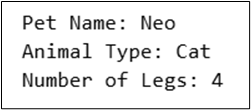
Here is the code you could create in C#:
|
1 2 3 4 5 6 7 8 9 10 11 12 13 14 15 16 17 18 19 20 21 22 23 24 25 26 27 28 29 30 31 32 33 34 35 36 37 38 39 40 41 42 43 44 45 46 47 48 49 50 51 52 53 54 55 |
public class Pet { public string Output = ""; // a class to hold instances of people's pets // private variables private string name = null; private int? legs = null; // used to determine number of legs given animal type private Dictionary<string, int> animalLegs = new Dictionary<string, int> { { "dog", 4 }, { "cat", 4 }, { "bird", 2 }, { "fish", 0 } }; public Pet(string petName, string petAnimal) { // the constructor: when you create a pet, must give it a // name and say what sort of animal it is name = petName; // setting the animal type will set the number of legs Animal = petAnimal; } // read/write property for the animal type private string animal = null; public string Animal { get { return animal; } set { animal = value; if (animalLegs.TryGetValue(value.ToLower(), out int legCount)) { legs = legCount; } else { legs = null; } } } public void Document() { // a method to print out the pet's details Output += $"Pet Name: {name}<br />"; Output += $"Animal Type: {animal}<br />"; Output += $"Number of Legs: {legs}"; } } |
The Animal property is public, and it’s ‘getter’ and ‘setter’ define the public interface, so when you consume the class you only see the publicly exposed properties and methods of each object:
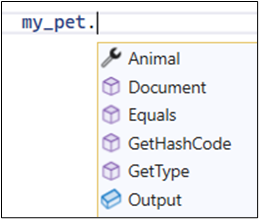
This is as it should be. Compare this with the Python (rough) equivalent:
|
1 2 3 4 5 6 7 8 9 10 11 12 13 14 15 16 17 18 19 20 21 22 23 24 25 26 27 28 29 30 31 32 33 34 35 36 |
class Pet: # a class to hold instances of people's pets # used to determine number of legs given animal type _leg_lookup = { "dog": 4, "cat": 4, "bird": 2, "fish": 0 } def __init__(self, name, animal): # the constructor: when you create a pet, must give it a # name and say what sort of animal it is self.Name = name # setting the animal type will set the number of legs too self.Animal = animal # the final output self.output = ""; # read/write property for the animal type @property def Animal(self): return self._animal @Animal.setter def Animal(self, value): self._animal = value # set legs based on lookup, defaulting to None if unknown self.Legs = self._leg_lookup.get(value.lower(), None) def Document(self): # a method to print out the pet's details self.output += f"Pet Name: {self.Name}\n"; self.output += f"Animal Type: {self.Animal}\n" self.output += f"Number of Legs: {self.Legs}" |
When I come to consume the class, I see not only the properties I want to see, but also the ones I’d prefer to be private (so, not visible):
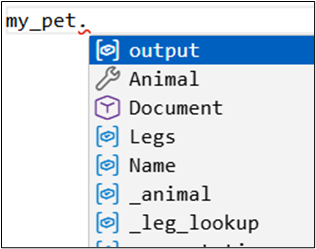
The syntax of a read-write property is itself the opposite of a thing of beauty:
|
1 2 3 4 5 6 7 8 9 10 11 |
# read/write property for the animal type @property def Animal(self): return self._animal @Animal.setter def Animal(self, value): self._animal = value # set legs based on lookup, defaulting to None if unknown self.Legs = self._leg_lookup.get(value.lower(), None) |
There’s no obvious reason why this should be the syntax for the get and set parts of a property. The constructor (the bit of code which runs whenever an instance of a class is initialized) is nasty too:
|
1 2 3 4 5 6 7 8 9 10 11 |
def __init__(self, name, animal): # the constructor: when you create a pet, must give it a # name and say what sort of animal it is self.Name = name # setting the animal type will set the number of legs too self.Animal = animal # the final output self.output = ""; |
It’s irritating having to keep passing a reference to the object being created (self) to each method and property, and this implicit way of defining properties is anything but clear.
I could go on, but I think I already have for long enough! It’s as if whoever created Python abandoned usability when they got to classes.
Move fast. Govern at scale.
7. Python is interpreted – not compiled
Python is interpreted, not compiled. What this means is that, every time you run a Python program, the interpreter has to read through it line-by-line in sequential order, executing each line as it does so.
There are two main downsides arising from Python’s approach. The first is that Python runs more slowly than a compiled language like C#. I will freely admit I’m not an authority on the subject, and can only dutifully report what others tell me: that Python uses more memory, has no support for true parallel execution of threads, and loads more slowly. For the programs I write, Python’s speed has never been an issue, but that’s because I rarely work with machine learning, AI, or vast amounts of data.
The second downside is that Python forces you to write programs in a certain order, and in particular you must declare functions before you can call them:
|
1 2 3 4 5 6 7 8 9 10 11 12 |
def get_bmi( weight_in_kilos:float, height_in_metres: float ) -> float: """ Calculates someone's BMI """ return weight_in_kilos / (height_in_metres ** 2) # show my BMI print(get_bmi(80,1.8)) |
Compare this with the more logical C# version, where you can call a function at the top of your program:
|
1 2 3 4 5 6 7 8 9 10 11 |
Console.WriteLine(getBMI(80.0, 1.8).ToString("0.000")); private double getBMI( double weightKilos, double heightMetres ) { // calculate someonne's BMI return weightKilos / (heightMetres * heightMetres); } |
C# first compiles any program into an executable before running it, which means you can put the functions and function calls in any order you like.
8. Dynamically-typed variables
I suspect that the average C# programmer would have put this at the start of their list, but I can only report on nuisances in the order in which I perceive them!
Consider this block of code:
|
1 2 3 4 5 6 7 8 9 10 |
# start with a simple integer counter count = 0 count += 1 # much later in the code, someone # accidentally assigns it as a string count = "one" # then within a later loop, Python will crash count += 1 |
This creates an int variable called count, but then replaces it with a str variable with the same name (I’m aware that this isn’t exactly what happens, but it’s a good model of it). The final line will then crash, since it’s trying to add 1 to a string. You wouldn’t and couldn’t get this bug in C#:
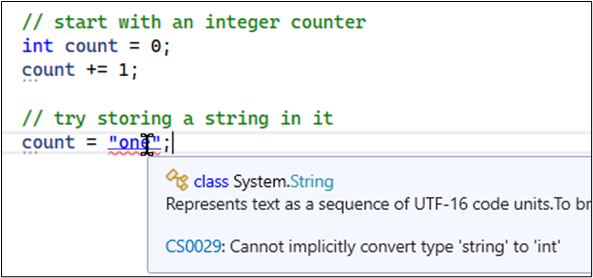
The problem isn’t that Python implicitly converts data types from one thing to another – it doesn’t – but that Python doesn’t prevent you rebinding a name to a value of a different type. I have to admit that I’ve never found this to be a problem myself, but enough other people do that it would be remiss of me not to include it in this list.
9. Releasing and packaging systems
The great benefit of a compiled language is that you can produce a single executable file. Here is the single file containing all of the C# code for our website (apart from the bits embedded in web pages):

This makes distributing a system comparatively simple – you just copy over the single executable file to the relevant network drive. OK, I’m over-simplifying, particularly as you have to ensure that all the referenced packages are also included, but you the principle holds.
With Python, things are more complicated as you have to package together all of the .py files that you’ve created along with any third-party modules they depend on. I’ll admit that the only time I ever tried doing this (using PyInstaller), I gave up.
The situation is further complicated by the way Python uses virtual environments to manage different versions of modules. In the simple diagram below there are two virtual environments: the red one containing modules used by the timesheet system, and the blue one containing modules used by the expenses system.
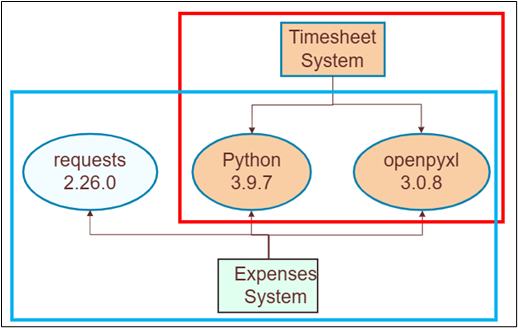
Unfortunately, new versions of modules (and of Python) are released quite often, so you can end up with several different virtual environments on your computer – each containing more-or-less duplicate files for your Python interpreter and the modules you’re importing.
10. Python’s GUIs are hard to use
Python comes with a built-in GUI called TKinter, which can be used to create tools like Wordle, and a while ago I did exactly that. However, TKinter is also quite limited, so I then spent some considerable time trying to write a GUI using PyQt – another popular Python module for creating a forms-based system – using the separate Qt Designer to draw my forms on-screen:
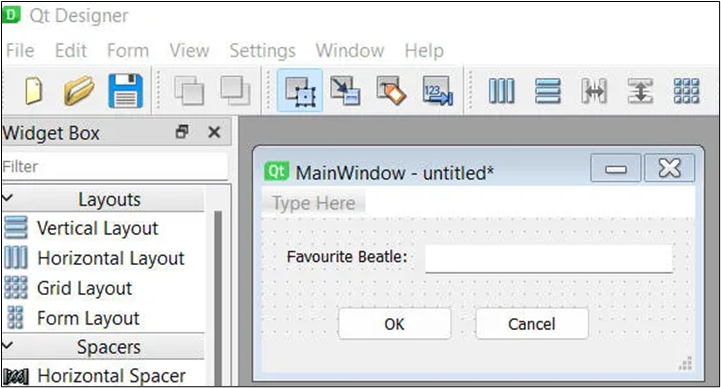
Reader, eventually I gave up. The biggest problem was working with a built-in widget called QTableView to control the display of rows of data, which I found pretty much unmanageable. I’ve also worked with WPF and Windows Forms and have to say that WinForms was by far the simplest of the GUI interfaces to work with – although I accept it’s platform-dependent and not as powerful.
So, what do I use Python for – where does it shine?
Python remains my preferred language for solving one-off problems, whether that involves processing files, converting images, finding broken links on a website, automating the submission of prompts to AI tools or any other ad-hoc problem. I find the syntax easy to remember and a pleasure to use. I’m a particular fan of sequences and slicing in Python.
However, if you asked me to build a larger system with a longer lifetime, perhaps involving a team of programmers, Python’s class model alone would push me towards a more conventional language such as C#. As they say in the UK (I have no idea whether this expression is universally known in English) – horses for courses!
The latest from Simple Talk:
- Cybersecurity training doesn’t work – here’s why
- How to close SQL Server operational blind spots (linked servers, DMVs, and KILL command security risks & fixes)
- How to run PostgreSQL in Docker (getting started with PostgreSQL, part one)
- The one big difference between MySQL and MariaDB you may have overlooked
- How test data management helps meet DORA’s resilience testing requirements
This document contains proprietary information and is protected by copyright law.
Copyright © 2026 Red Gate Software Limited. All rights reserved

Load comments