





Learn how to build a sleek, AI-powered semantic search engine that lives inside your existing database. We’ll walk through how to store vector embeddings, run similarity-based queries, and turn ordinary text searches into meaning-aware retrieval with nothing more than standard SQL and a vector extension.
Imagine trying to describe a movie to a friend without naming it. You might say, “it’s that film about an astronaut stranded on another planet who grows potatoes to survive” and, even though you never mentioned the title, your friend instantly knows you’re talking about The Martian.
Humans are great at understanding the meaning behind words, not just matching exact keywords. Traditional databases, by contrast, have historically required exact matches to find results.
This is changing. With the pgvector extension for PostgreSQL, your database can finally search by meaning – not just by matching text patterns. By turning text and other data into high-dimensional vectors (numeric representations of meaning), PostgreSQL can perform similarity searches based on intent and context.
This unlocks powerful new capabilities for search, recommendations, and AI-driven applications – all within the SQL database you already know and love.
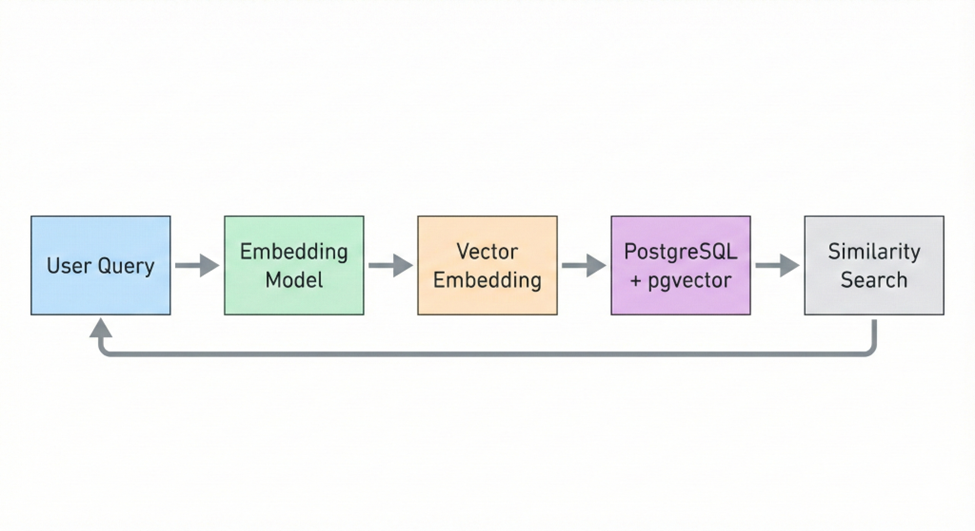
Why Traditional Keyword Search Falls Short
Standard SQL queries excel at exact matching (finding products in a given category, or documents containing specific keywords), but fall short when it comes to understanding context or intent. For example:
- A shopper might search for “affordable laptops for coding”, but your catalog tags products as “budget-friendly computers for programming.” A plain keyword search could miss these matches, even though the intent is the same.
- You want to recommend articles similar to what a user just read, even if the articles use different wording. Exact keyword overlap might be minimal or nonexistent.
- A support chatbot needs to fetch answers that fit the intent of a customer’s question, not just the exact words typed.
These scenarios require semantic understanding – grasping the meaning behind words. Enter vector embeddings.
What are Vector Embeddings?
A vector embedding is essentially a list of numbers that encodes the semantic essence of data, often text. Think of it as mapping meaning to a point in a high-dimensional space. Similar concepts end up as nearby points in that space.
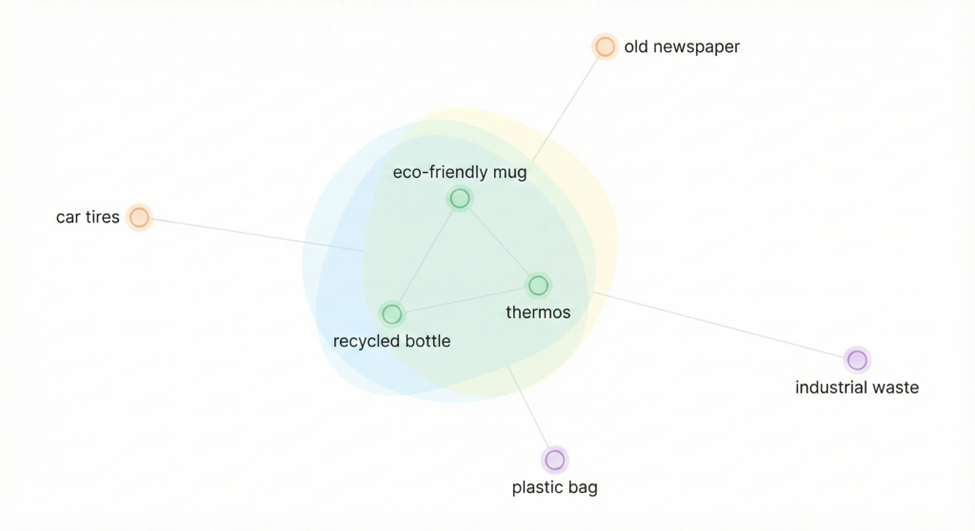
Key features of embeddings:
- Semantic representation: Phrases or concepts with similar meaning have similar vectors. For example, “I need a vacation” and “Looking for a holiday getaway” would produce embeddings close to each other, even though the words differ.
- Measurable similarity: We can measure how close two pieces of text are by computing the distance between their vectors.
- AI-generated: Embeddings come from AI models trained on massive datasets. Models built by OpenAI or Cohere, for example, or sentence transformers, convert text into these numeric signatures.
You can think of a text embedding as an “idea index” – a numeric signature of a sentence or document. By comparing these signatures, we can quickly find semantically related content in a database.
What is the pgvector Extension in PostgreSQL?
Up until now, searching semantically often meant using a specialized vector database or external search service. The pgvector extension changes that by bringing vector search directly into PostgreSQL. With pgvector, you can:
- Store embeddings in a native
VECTORcolumn. - Perform similarity queries using vector operators like
<->(for distance). - Index vector columns for blazing-fast nearest-neighbor searches.
- Combine vector search with traditional SQL filters and full-text search.
In short, pgvector lets you build AI-powered search and recommendation features right in your existing PostgreSQL database. No need for a separate search engine – just SQL and vectors.
How to Get Started with pgvector in PostgreSQL
Let’s walk through the basic steps to enable semantic search in your database.
Install the pgvector Extension
First, enable the vector extension:
|
1 |
CREATE EXTENSION IF NOT EXISTS vector; |
Most managed PostgreSQL services (AWS RDS, Aurora, Google Cloud SQL, Azure Database, etc) support pgvector. Once installed, you get a new vector data type.
While most cloud-hosted PostgreSQL services now support pgvector, on-premises installations may require manual extension installation. This is typically straightforward on standard PostgreSQL distributions, but compatibility varies for Postgres “flavors” like Percona, EDB or older self-hosted builds.
If your environment does not include pgvector by default, you can compile and enable it manually as long as the server allows custom extensions.
Creating Tables with Vector Column
Next, create a table to hold your data (documents, products, etc) and include a column for embeddings. For example:
|
1 2 3 4 5 |
CREATE TABLE documents ( id SERIAL PRIMARY KEY, content TEXT, embedding VECTOR(1536) -- dimensions depend on your embedding model ); |
Here, VECTOR(1536) means each embedding has 1536 dimensions. That matches OpenAI’s text-embedding-3-small model. If you use a different model (like a Cohere model or an open-source transformer), adjust the dimension accordingly.
Tip: For quick tests you could use a small dimension (like VECTOR(3)), but in production you’ll want to match the full dimension of your embedding model for best results.
Generating and Storing Embeddings
Now, let’s generate embeddings for your data and insert them. As an example, here’s how you might use Python and OpenAI’s API:
|
1 2 3 4 5 6 7 8 9 10 11 12 13 14 15 16 17 18 19 20 21 22 23 |
import openai import psycopg client = openai.OpenAI(api_key="YOUR_API_KEY") # Example text text = "A suspenseful sci-fi adventure with a twist ending." # Generate an embedding for the text response = client.embeddings.create( model="text-embedding-3-small", input=text ) embedding = response.data[0].embedding # This is a list of 1536 floats # Insert into Postgres conn = psycopg.connect("dbname=vector_demo user=postgres") with conn.cursor() as cur: cur.execute( "INSERT INTO documents (content, embedding) VALUES (%s, %s)", (text, embedding) ) conn.commit() |
Notice that the psycopg driver automatically converts the Python list into PostgreSQL’s VECTOR type.
Running Similarity Queries
With data in place, you can find entries similar to a query by comparing embeddings. For instance, if you have a query embedding (perhaps from another API call), you can run:
|
1 2 3 4 5 6 7 8 9 10 11 12 13 14 15 |
SELECT id, content FROM documents ORDER BY embedding <-> '[0.12, -0.44, ...]' -- your query vector here LIMIT 5; For example, the query might return results like: id | content ----+------------------------------------------------------------- 3 | "A thrilling sci-fi drama set on a distant colony." 7 | "A story about surviving in an alien world." 1 | "Suspenseful sci-fi adventure with a twist ending." 9 | "Exploration narrative with strong science themes." These are the documents whose vectors lie closest to the query embedding, making them the most semantically relevant. |
The <-> operator calculates the Euclidean distance between vectors (a smaller distance means more similar). This query returns the 5 documents whose embeddings are closest to the query. Those are your most semantically relevant results.
Optimizing Performance: Indexing Vectors for Speed
When you only have a few rows, a full table scan might be fine. However, as your data grows, you’ll want an index on the embedding column. pgvector offers two main index types:
- HNSW (Hierarchical Navigable Small World): A graph-based index that links vectors to their neighbors. It’s very fast and accurate out-of-the-box and doesn’t require extra training. Great for datasets up to tens of millions of vectors.
- IVFFlat (Inverted File with Flat Quantization): Clusters vectors into buckets (using k-means) so that only certain clusters are searched. It needs a training step (
ANALYZE) but can scale to very large datasets (hundreds of millions of vectors). It lets you trade some recall for speed by adjusting how many clusters you probe.
Both HNSW and IVFFlat are forms of Approximate Nearest Neighbor (ANN) indexing. Instead of scanning every vector, ANN structures explore only a subset of the search space, dramatically reducing query time while maintaining high recall. This trade-off makes ANN indexing well-suited for real-time search applications where speed is more important than perfect precision.
To create an index on the documents table:
For HNSW (using Euclidean distance):
|
1 |
CREATE INDEX ON documents USING hnsw (embedding vector_l2_ops); |
Use vector_cosine_ops if you want cosine similarity instead.
For IVFFlat (with L2 distance, say 100 lists):
|
1 2 |
CREATE INDEX ON documents USING ivfflat (embedding vector_l2_ops) WITH (lists = 100); ANALYZE documents; -- trains the IVFFlat index |
The lists = 100 setting means “cluster into 100 groups”. More lists = more clusters (potentially higher accuracy, but more memory and training time). The ANALYZE command is crucial for IVFFlat as it builds the clusters on your data.
Tuning the Index
These indexes are approximate (they use nearest-neighbor algorithms), so you can tweak them:
- For HNSW, increase
hnsw.ef_searchfor higher recall (at the cost of slower search). For example:
SET hnsw.ef_search = 100; - For IVFFlat, increase
ivfflat.probesto search more clusters per query:
SET ivfflat.probes = 10; - Experiment with these settings on your data to balance accuracy and performance.
Enjoying this article? Subscribe to the Simple Talk newsletter
Combining Semantic and Traditional Search
Vector search plays nicely with regular SQL filtering and even full-text search. Often, you want to find results that match certain metadata or keywords and are semantically relevant. This hybrid approach delivers very precise results.
For example, suppose you’re searching for recent sci-fi articles about space. You might write:
|
1 2 3 4 5 6 7 |
SELECT id, content FROM documents WHERE category = 'sci-fi' AND published_date > '2023-01-01' AND to_tsvector('english', content) @@ plainto_tsquery('space') ORDER BY embedding <-> '[0.12, -0.44, ...]' -- your query vector LIMIT 10; |
This query does four things:
- Filters to
category = 'sci-fi'. - Filters to recent content.
- Applies a keyword filter (
space) using PostgreSQL’s full-text search. - Ranks results by semantic closeness to the query vector.
The end result is a shortlist of recent sci-fi articles about space that are most relevant to the query’s intent.
Practical Use Cases of Semantic Search with pgvector
Here are some concrete ways teams are using semantic search with pgvector:
Smart Product Search: An online store might take a user query like “lightweight laptop good for video editing”, convert it to a vector, and run:
|
1 2 |
# Application code query_embedding = get_embedding("lightweight laptop good for video editing") |
Then in SQL:
|
1 2 3 4 5 |
SELECT id, name, price, description FROM products WHERE category = 'computers' AND in_stock = true ORDER BY embedding <-> query_embedding LIMIT 10; |
This returns the computer’s most semantically-matching query, filtered by category and stock. It finds relevant laptops even if their descriptions use different wording.
Knowledge Base Chatbots: A support system can embed a user’s question and search FAQs:
question_embedding = get_embedding("How do I reset my password?")
Then:
|
1 2 3 4 |
SELECT id, question, answer FROM knowledge_base ORDER BY embedding <-> question_embedding LIMIT 3; |
The chatbot retrieves the top FAQs about password reset (even if phrased differently), giving better answers.
Content Recommendations: A news site can recommend similar articles. Compute an embedding for the current article:article_embedding = get_embedding(current_article.content)
Then find similar ones:
|
1 2 3 4 5 6 |
SELECT id, title, summary FROM articles WHERE id != current_article.id AND published_date > (CURRENT_DATE - INTERVAL '30 days') ORDER BY embedding <-> article_embedding LIMIT 5; |
This finds other recent articles whose content is closest in meaning to what the reader is viewing.
These examples show how semantic search can surface relevant content based on meaning, not just keyword matches.
Best Practices for Production
As you scale up, here are some best practices to follow:
Pick the Right Embedding Model: Different models offer different trade-offs. For many use cases, OpenAI’s text-embedding-3-small (1536 dimensions) is a sweet spot of quality and cost. If you need top-tier results, text-embedding-3-large (over 3000 dimensions) is more accurate but costs more per query. Benchmarks show that larger models (even when dimension-reduced) often outperform older models like text-embedding-ada-002. Test and choose a model that fits your accuracy needs and budget.
Batch Your Embedding Requests: To avoid making an API call per document, send texts in batches. For example:
|
1 2 3 4 5 6 |
texts = ["Document 1", "Document 2", "Document 3", ...] response = client.embeddings.create( model="text-embedding-3-small", input=texts ) embeddings = [item.embedding for item in response.data] |
This fetches embeddings for many documents at once, which is more efficient and cost-effective.
Load Data in Bulk: When inserting many rows, use bulk methods. For instance, with psycopg:
|
1 2 3 4 5 6 7 |
data = [(texts[i], embeddings[i]) for i in range(len(texts))] with conn.cursor() as cur: cur.executemany( "INSERT INTO documents (content, embedding) VALUES (%s, %s)", data ) conn.commit() |
Or use PostgreSQL’s COPY command if you have a large file. Bulk loading dramatically speeds up ingestion.
Ensure Your Index is Used: After creating a vector index, double-check that queries use it. Use EXPLAIN:
|
1 2 3 4 |
EXPLAIN SELECT id, content FROM documents ORDER BY embedding <-> '[0.12, -0.44, ...]' LIMIT 5; |
The plan should show something like Index Scan using ..._embedding_idx. If it falls back to a sequential scan, check your query and index definitions.
Partition Large Tables: If you have a very large collection (hundreds of millions of vectors), consider partitioning. For example:
|
1 2 3 4 5 6 7 8 9 10 |
CREATE TABLE documents ( id SERIAL PRIMARY KEY, category TEXT, content TEXT, embedding VECTOR(1536) ) PARTITION BY LIST (category); CREATE TABLE documents_tech PARTITION OF documents FOR VALUES IN ('technology'); CREATE TABLE documents_health PARTITION OF documents FOR VALUES IN ('health'); -- Add more partitions as needed |
Partitioning by category (or time, region, etc) can improve manageability and query performance at scale.
The Future of Vector Search in PostgreSQL
PostgreSQL’s vector capabilities keep getting better. With each pgvector release, we see enhancements like:
- More advanced ANN algorithms and index types.
As ANN methods evolve, pgvector continues to adopt newer algorithms that further improve search quality and reduce latency.
- Support for additional distance metrics (cosine, inner product, etc.) and vector types.
- Better parallel query execution for vector searches.
- Smarter query planning and optimization for hybrid (vector + text) queries.
These ongoing improvements mean PostgreSQL is becoming an even more powerful platform for AI-driven applications. You can combine vector search with all the usual SQL features (joins, transactions, etc), enabling simpler architectures. No need for a separate search engine – your database does it all.
Summary & Key Takeaways
Vector search transforms PostgreSQL from a traditional relational database into a semantic search engine. With pgvector, you can:
- Store and search data by meaning – not just by keywords.
- Build semantic search, recommendation systems, and other AI-powered features.
- Keep everything within the PostgreSQL database you already use.
- Combine vector similarity with your existing filters, joins, and full-text search.
- Scale to millions of embeddings with proper indexing.
The ability to find data by meaning is revolutionizing search and discovery. Best of all, you can implement these capabilities using the tools you already trust. Your database now understands data as well as storing it.
FAQs: How to Build an AI-Powered Semantic Search in PostgreSQL with pgvector
1. What is semantic search?
Semantic search finds results based on meaning (understanding intent and context) – not exact keywords.
2. How does pgvector enable semantic search in PostgreSQL?
pgvector stores high-dimensional vector embeddings of text (or other data) and lets you query by similarity directly in SQL.
3. What is a vector embedding?
A numeric representation of meaning. Similar concepts produce vectors close to each other in high-dimensional space.
4. How do I find similar content?
Generate a query embedding and order results by similarity using the <-> operator:
SELECT id, content

FROM documents

ORDER BY embedding <-> '[query_vector]'

LIMIT 5;
5. Can I combine semantic and traditional search?
Yes – filter by metadata, keywords, or full-text search while ranking by semantic similarity.
6. How can I scale searches for large datasets?
Use approximate nearest neighbor (ANN) indexes like HNSW or IVFFlat, and tune their parameters for speed vs. accuracy.
7. What are some common use cases of semantic search?
Product search, knowledge base retrieval, content recommendations, and finding similar documents or media.
This document contains proprietary information and is protected by copyright law.
Copyright © 2026 Red Gate Software Limited. All rights reserved

Load comments