


You often need to run batch SQL processes on a database as a SQL Agent task. ETL tasks, for example, are common on commercial databases; Data Warehouses also use batch process to import and transform data; OLTP systems have batches to process information.
I have worked in development teams that have given developers complete autonomy to create and run batch processes on the database servers. Because the many optimizations that can, and should, be done for a batch process so that it runs faster and more efficiently, a better result would often be achieved if developers can work together with DBAs. This is because a slow-running batch process can have a knock-on effect, draining CPU and IO resources, blocking other processes and locking shared database assets. Team work between developers and DBAs can avoid this, making for much better batch processes. I will show an example of optimizing a batch process, and explain what you need to analyze while creating these process and I hope I will prove to you that this should be more than a developer task, because the DBA can make a positive contribution.Test Environment
Development and testing is generally done on an isolated development server with a single user. The focus is on the creation of the batch process before the batch is deployed to production. Our test environment has the adventureworks2012 database, but we will create a new database during the tests and import information from the adventureworks2012 database. The script to create the test environment is this:|
1 2 3 4 5 6 7 8 9 10 11 12 13 14 15 16 17 18 19 20 21 |
-- Creating the database create database Testbatch on (name=data,filename='c:\banco\dados.mdf',size=5mb) log on (name=log, filename='c:\banco\log.ndf', size=1mb) go use testbatch go -- Creating a table with primary key and clustered index CREATE TABLE produtos ( Id int identity(1,1) not null primary key, ProductId INT NOT NULL, ProductSubcategoryId INT NULL, UnitPrice MONEY NOT NULL ) GO -- Creating a non-clustered index create index indsub on produtos(productsubcategoryid) go |
|
1 2 3 4 5 6 7 8 9 10 11 12 13 14 15 16 17 18 19 20 21 22 23 24 25 26 27 28 29 30 31 32 33 |
declare @i bigint declare @icnt int select @icnt=1 -- Let's repeat the insert's 3 times 3 x 1032192 while @icnt<=3 begin select @i=0 -- This is the number of records resulting from the cross apply bellow while @i<1032192 begin with qry as (SELECT p.ProductID, p.ProductSubcategoryId, ROW_NUMBER() OVER ( ORDER BY n.number ) as unitprice --- It's a fake value that help to control the inserts FROM Adventureworks2012.production.Product AS p CROSS APPLY master..spt_values AS n --- This table is used to create test data WHERE n.type = 'p') INSERT INTO Produtos select * from qry where unitprice >=@i and unitprice <@i+1000 -- The inserts will be done in chunks of 1 thousand records select @i=@i+1000 end select @icnt=@icnt+1 end |
Metrics for the Test
Results
For each test run, we will gather some counters so that we can compare the results.Execution Time
The execution time can vary a lot relative to your system, but the relative differences in time between the executions is likely to be similar.Wait Stats
We will check wait stats, using the following queries:|
1 2 |
select top 30 * from sys.dm_os_wait_stats order by waiting_tasks_count desc |
|
1 |
dbcc sqlperf('sys.dm_os_wait_stats',clear) |
Performance Counter
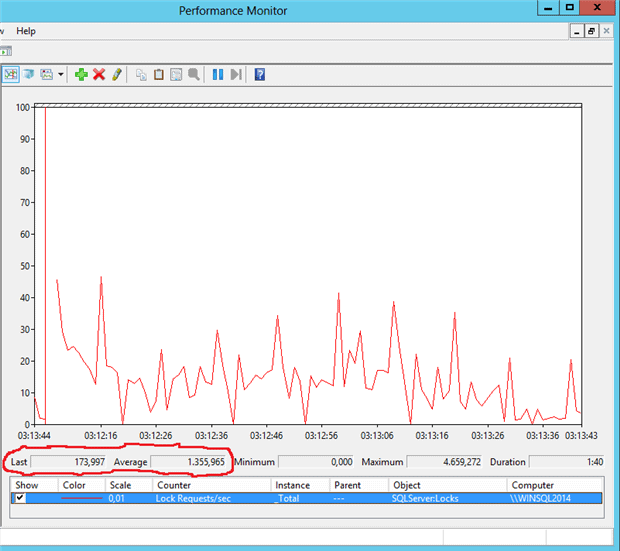
We will also use Performance Monitor to check Lock Request/sec counter. We will see how important this counter is. You can see in the image below how to select this counter in performance monitor.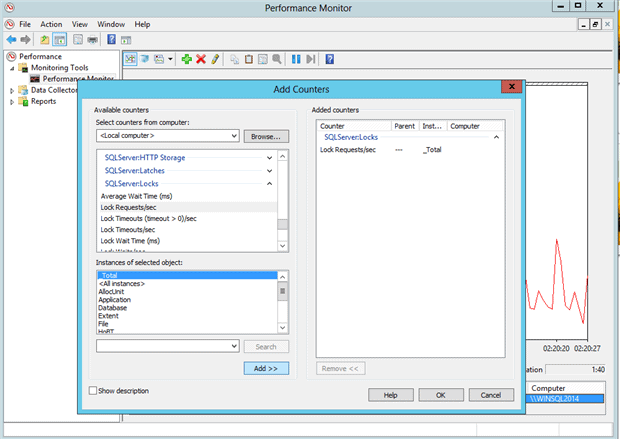
Log Flushes
Last but not least, we will check the number of log flushes that are happening during the batch. A Log flush is the name given to the event where SQL Server writes the log cache to the log file and it happens after every commit transaction or when the log buffer is full. This is a more difficult metric. We will need to create an Extended Events session to check this information. ‘Extended events’ provide a less intrusive event system introduced in SQL Server 2008 that allow us to capture several kinds of events, much more than SQL Profiler, which is now deprecated. We will create the XE session with the following instruction:|
1 2 3 4 5 6 |
CREATE EVENT SESSION [logFlush] ON SERVER ADD EVENT sqlserver.log_flush_start( ACTION(sqlserver.database_name)) ADD TARGET package0.histogram(SET filtering_event_name=N'sqlserver.log_flush_start', source=N'database_id',source_type=(0)) GO |
|
1 2 3 4 5 6 7 8 9 10 11 |
SELECT db_name( n.value('(value)[1]', 'int')) AS chave, n.value('(@count)[1]', 'int') AS EventCount FROM (SELECT CAST(target_data as XML) target_data FROM sys.dm_xe_sessions AS s JOIN sys.dm_xe_session_targets t ON s.address = t.event_session_address WHERE s.name = 'LogFlush' AND t.target_name = 'histogram') as tab CROSS APPLY target_data.nodes('HistogramTarget/Slot') as q(n) |
Cleanup Sequence
We will also need a cleanup sequence to ensure the independence of each test execution. This will be the following sequence:- Drop the database if it already exists
- Run the script to create the environment
- Clear the wait stats
- Clear the performance monitor window
- Clear the SQL Server cache
12dbcc freeproccachedbccdropcleanbuffers
- Stop/start the logFlush XE session
In the first execution, let’s only start the session:
1alter event session logflush on server state=start
First Execution
We will use the time taken by the first execution as a reference to see how much we can improve the batch, but of course it will depend considerably on your test environment. Let’s do the cleanup steps I’ve just shown, and then execute the batch. The first execution took 08:04mThe first problem: Auto-Growth
The first thing to notice is that the size of both the data file and log file has increased after the execution of the batch, the data file much more than the log file. The database has auto-growth on and the amount of growth was determined by the database auto-growth configuration. You can use sp_helpdb procedure to get the result in the image below.|
1 |
exec sp_helpdb testbatch |
 Auto-growth is there to prevent disasters, and so is a great backstop, but we should try to avoid it happening in the middle of batch executions, because it makes our batch a lot slower. We need the auto-growth configured to prevent a disaster because it would be much worse to have our batch aborted by lack of space, but we will try to reduce the number of auto-growth events occurring during the batch. We can do this by doing the following:
- We will change the database and log file size to accommodate all the new data before the execution of the batch. The DBA can schedule this change to happen just before the execution.
- We will change the auto-growth configuration so that the files will grow in bigger increments. If we fail to predict the size needed for the files, we will still minimize the number of auto-growths during the batch execution.
|
1 2 3 4 5 6 7 8 9 10 11 12 13 14 15 16 17 18 19 20 21 22 23 24 25 26 27 28 |
DECLARE @path NVARCHAR(260); -- First: Retrieve the physical path where -- the trace files are SELECT @path = REVERSE(SUBSTRING(REVERSE([path]), CHARINDEX('\', REVERSE([path])), 260)) + N'log.trc' FROM sys.traces WHERE is_default = 1; -- Second: Use sys.fn_trace_gettable to read -- the information in the trace files SELECT DatabaseName, [FileName], SPID, Duration, StartTime, EndTime, FileType = CASE EventClass WHEN 92 THEN 'Data' WHEN 93 THEN 'Log' END FROM sys.fn_trace_gettable(@path, DEFAULT) WHERE EventClass IN (92,93) -- 92: Data File, 93: Log File ORDER BY StartTime DESC; |
|
1 2 3 4 5 6 7 8 9 10 11 12 13 14 15 16 17 18 19 20 21 22 23 24 25 26 27 28 29 30 31 32 33 |
DECLARE @path NVARCHAR(260); SELECT @path = REVERSE(SUBSTRING(REVERSE([path]), CHARINDEX('\', REVERSE([path])), 260)) + N'log.trc' FROM sys.traces WHERE is_default = 1; with qry as ( SELECT DatabaseName, [FileName], SPID, Duration, StartTime, EndTime, FileType = CASE EventClass WHEN 92 THEN 'Data' WHEN 93 THEN 'Log' END FROM sys.fn_trace_gettable(@path, DEFAULT) WHERE EventClass IN (92,93) ) select filetype, count(*) as growth -- Total of file growths from qry where -- only information from our database databasename='testbatch' and -- only last 15 minutes starttime > DATEADD(MINUTE,-15,getdate()) -- Grouping by filetype (data/log) group by filetype |
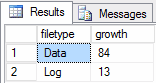 The solution is to make the files bigger for the data before you run the batch.
Here is the first proof that you would benefit from having the advice of a DBA when you plan the batch process: The DBA will help to predict the impact of the batch import of data on the size of your data and log files and, if necessary, correct the growth settings.
Planning the size of the data and log files
The new CREATE DATABASE instruction for the test system will be like this:|
1 2 3 4 5 |
create database Testbatch on (name=data,filename='c:\banco\dados.mdf',size=100mb,filegrowth=100mb) log on (name=log, filename='c:\banco\log.ndf', size=10mb,filegrowth=10mb) go |
|
1 2 3 |
alter database testbatch modify file (name='data', size=100, filegrowth=100) alter database testbatch modify file (name='log', size=10, filegrowth=10) |
Second Execution
Let’s now repeat the steps to do a new execution with the larger data file and log file sizes:- Drop the database if it already exists
- Run the script to create the environment
- Clear the wait stats
- Clear SQL Server cache
- Clear the performance monitor window
- Stop/start the logFlush XE session
12alter event session logflush on server state=stopalter event session logflush on server state=start
Monitoring the Auto-Growth
Let’s say something went wrong in the planning steps. How could you know that one batch already in production is suffering from the auto-growth during the batch? Here some solutions you can use:- Data Collector can create a graphical report that demonstrated the data file and log growth. You can read more about the data collector in my article ‘Centralize Your Database Monitoring Process’
- You can add the same query that we used to check the auto-growth events as a new step in your batch, adding the result to a new table that you will need to check later.
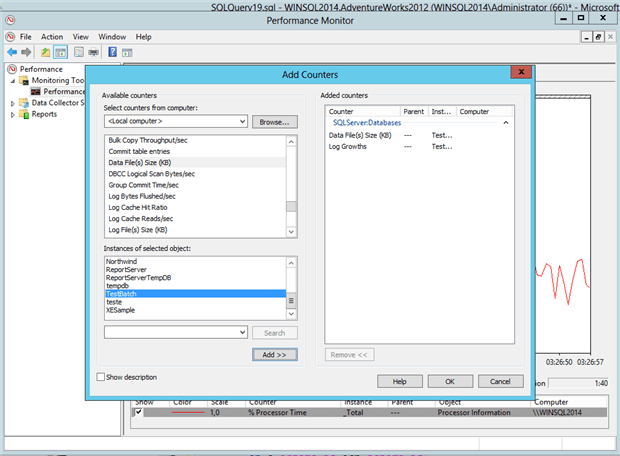
- You can use performance monitor to check the auto-growth. There is a counter named ‘Log file Growth’ and another one named ‘Data File(s) Size(kb)’. You can use Performance Monitor to capture this information to a file and check the file later.
Second Problem: Locks
By observing the results of ‘Lock acquired/sec’ in performance monitor, we would notice a huge number of locks. Does our batch run concurrently with other tasks? If this is an overnight batch performing an ETL task during a quiet time, we probably wouldn’t need this number of locks because there is less risk of inadvertently blocking another process.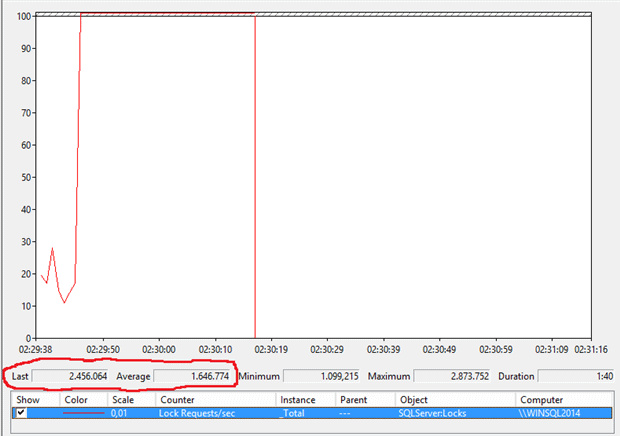
|
1 2 3 4 5 6 7 8 9 10 11 12 13 14 15 16 17 18 19 20 21 22 23 24 25 26 27 28 29 30 31 32 33 34 35 36 37 |
-- It's basically the same logic than -- our previous batch, with only a few -- changes declare @i bigint declare @icnt int select @icnt=1 while @icnt<3 begin select @i=0 while @i<1032192 begin with qry as (SELECT p.ProductID, p.ProductSubcategoryId, ROW_NUMBER() OVER ( ORDER BY n.number ) as unitprice -- tablockx in the tables will avoid a bunch of -- locks in table Product and spt_values FROM Adventureworks2012.production.Product (tablockx) AS p CROSS APPLY master..spt_values (tablockx) AS n WHERE n.type = 'p') -- tablockx in the insert will avoid a bunch of locks -- in table Produtos INSERT Produtos with (tablockx) select ProductID,ProductSubCategoryId,UnitPrice from qry where unitprice >=@i and unitprice <@i+1000 select @i=@i+1000 end select @icnt=@icnt+1 end |
- Drop the database if it already exists
- Run the script to create the environment
- Clear the wait stats
- Clear the SQL Server cache
- Clear the performance monitor window
- Clear and start the logFlush XE session.
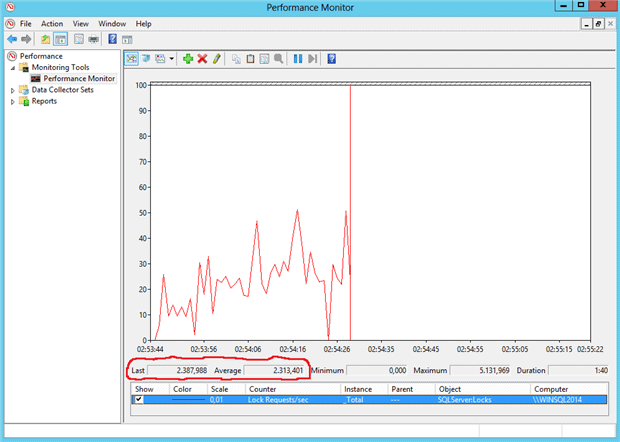
Monitoring Locks in Production
To monitor locks in production, you need to create a baseline. This means you need to be continuously monitoring the number of locks, so you set a baseline, the regular amount of locks in your system then you will notice anything different, especially when you deploy new batches in production. You can use data collector to monitor locks in your servers and created the baseline. The article ‘Centralize Your Database Monitoring Process’ is a good start.Third Problem: WriteLog
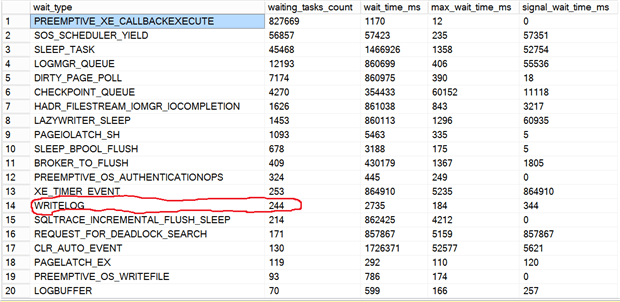
Let’s take a look at the wait stats to identify another main problem in our batch. You will notice WRITELOG with a big value, 2561 in our example. This is causing problems for our batch. The first thought would be to get a better disk and to locate the log and data files on separate disks. Both solutions are good, but we need to return to the basics: Is our batch doing more log flushes than is actually required?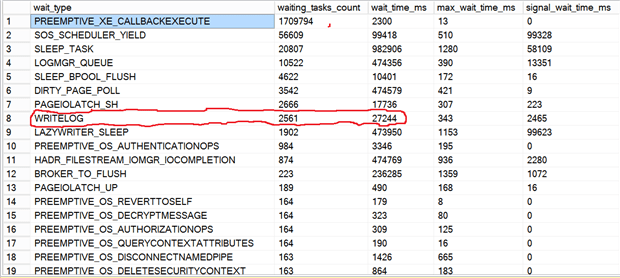
|
1 2 3 4 5 6 7 8 9 10 11 |
SELECT db_name( n.value('(value)[1]', 'int')) AS chave, n.value('(@count)[1]', 'int') AS EventCount FROM (SELECT CAST(target_data as XML) target_data FROM sys.dm_xe_sessions AS s JOIN sys.dm_xe_session_targets t ON s.address = t.event_session_address WHERE s.name = 'LogFlush' AND t.target_name = 'histogram') as tab CROSS APPLY target_data.nodes('HistogramTarget/Slot') as q(n) |
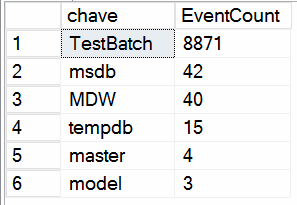 We can see that we had 8871 log flushes during our batch.
The first solution we think of is simple: make the entire batch one single transaction. Now our batch will have an explicit BEGIN TRANSACTION/COMMIT TRANSACTION. The new script will be like this:
|
1 2 3 4 5 6 7 8 9 10 11 12 13 14 15 16 17 18 19 20 21 22 23 24 25 26 27 28 29 30 31 32 33 34 35 36 37 |
-- It's basically the same logic than -- our previous batch, with only a few -- changes declare @i bigint declare @icnt int select @icnt=1 -- Now we have a transaction during the -- entire operation begin transaction while @icnt<=3 begin select @i=0 while @i<1032192 begin with qry as (SELECT p.ProductID, p.ProductSubcategoryId, ROW_NUMBER() OVER ( ORDER BY n.number ) as unitprice FROM Adventureworks2012.production.Product (tablockx) AS p CROSS APPLY master..spt_values (tablockx) AS n WHERE n.type = 'p') INSERT Produtos with (tablockx) select ProductID,ProductSubCategoryId,UnitPrice from qry where unitprice >=@i and unitprice <@i+1000 select @i=@i+1000 end select @icnt=@icnt+1 end commit transaction |
- Drop the database if it already exists
- Run the script to create the environment
- Clear the wait stats
- Clear the SQL Server cache
- Clear the performance monitor window
- Clear and start the logFlush XE session.
Fourth Problem: Auto-Growth again
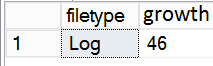
The execution got a little better but not as much as we might have been hoping for. Let’s check again the number of log flushes. It dropped, but not too much: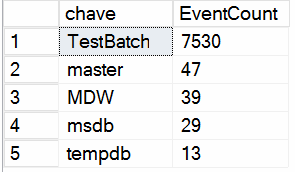

 Why did the log file get so much bigger?
The transaction log space management is directly tied with the transactions and the recovery model of the database, which, in turn, is tied with the database backup plan.
We can check the recovery model of the database using the following query:
|
1 2 3 |
SELECT 'The recovery model is '+recovery_model_desc FROM sys.databases where db_id() = database_id |
|
1 2 3 4 |
select name,last_log_backup_lsn from sys.databases a, sys.database_recovery_status b where a.database_id=b.database_id |
The batch with Full Recovery Model
When we use the ‘full recovery’ model, the log truncations do not happen in each checkpoint, but instead happen only when we do a log backup (notice that’s an error to use full recovery model without executing regular log backups). To take control of log space probably the DBA would like to schedule a log backup right after the batch execution. The log backup will execute a log truncation after the backup, leaving the log with a lot of empty space. Even if the exact amount of space couldn’t be predicted from the tests, the exact space needed in the log would become clearer after the first or a few more executions in production: It will then be possible to avoid all the log growth during the batch execution. The DBA could choose whether to increase the log file size before the batch and return it to its regular size after the log backup or just keep the log file size always with enough space for the batch.The batch with Simple Recovery model
Before we included the BEGIN/COMMIT in the script, we had many transactions in the batch, so at each checkpoint, SQL Server could delete all completed transactions from the log (the log truncation process) and the log would not grow too much. Now that we have only one transaction, SQL Server will only remove this transaction from the log in the first truncation after the entire transaction finishes. Therefore, you will need to have enough space in the log for the entire transaction. We need to make the log file bigger to support the entire transaction but, of course, we will not keep a huge transaction log only because of a single batch execution. The best approach is to increase the log for the batch and after the batch return the log for its normal size. However, using the simple recovery model we do not really need a single transaction. We can afford a balance between the log size, the transaction volume and the log flushes. At first, we had many small transactions, causing many log flushes. However, the COMMIT TRANSACTION isn’t the only reason of a log flush: if the log buffer is full, the flush will happen anyway. So, if we reduce the transactions to a single one, we will not reduce the log flushes to one and will greatly increase the space needed. We can use bigger chunks than a thousand rows, but smaller than all the total amount of records, achieving this way a balance between log flushes, transactions and log space. In our sample batch, there are a few solutions:- Remove the Begin Transaction/Commit Transaction and increase the size of the chunk
123456789-- ...-- ...INSERT Produtos with (tablockx)select ProductID,ProductSubCategoryId,UnitPricefrom qry whereunitprice >=@i and unitprice <@i+10000select @i=@i+10000-- ...
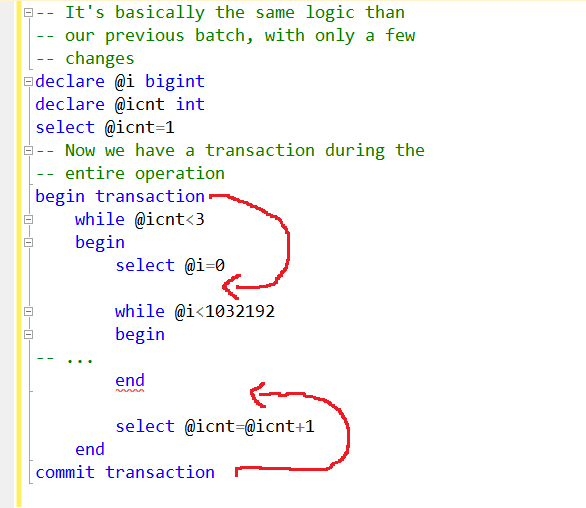
- Change the position of the Begin Transaction/Commit Transaction to inside the first while:
- Create another while and counter variable to control the amount of records in each transaction
Changing our Script
As we just saw, there are plenty of possibilities to balance the log size, transaction volume and log flushes. I will proceed with the tests using a single transaction and leave to you to find the balance for your environment. We can do a test to find the approximate amount of space needed for the log. We can insert one record in the table and check the amount of log generated. This will work better if the recovery model is simple, otherwise will be more difficult to find the information in the log. The script to insert a record and read the log will be this one:|
1 2 3 4 5 6 7 8 9 10 11 12 13 14 |
-- force a checkpoint, which will truncate the log if recovery is simple checkpoint go -- Insert one record insert into produtos SELECT top 1 p.ProductID, p.ProductSubcategoryId, 10 as unitprice FROM Adventureworks2012.production.Product AS p go -- read the information in the log SELECT * FROM fn_dblog (NULL, NULL) |

|
1 2 3 4 5 |
create database Testbatch on (name=data,filename='c:\banco\dados.mdf',size=100mb,filegrowth=100mb) log on (name=log, filename='c:\banco\log.ndf', size=800mb,filegrowth=200mb) go |
Fifth Execution
Now we will repeat the clean up and do a new test run of the batch execution:- Drop the database if it already exists
- Run the script to create the environment
- Clear the wait stats
- Clear the SQL Server cache
- Clear the performance monitor window
- Stop/start the logFlush XE session
Fifth Problem: Index and Fragmentation
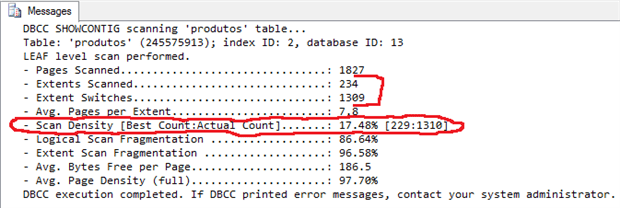
The table that is receiving the data has indexes; one clustered and one non-clustered. We created the clustered index to enforce the primary key, using an always-increasing key defined with Identity attribute. The problem is the non-clustered index: For each row inserted, the non-clustered index needs to be updated, slowing our batch. The rows are inserted over the entire index tree because the key isn’t always-increasing, so we have a lot of page splits during the batch, slowing even more the process and resulting in a very fragmented index, which will need to be defragmented after the batch. We can use the following instruction to identify the index fragmentation:|
1 |
dbcc showcontig('produtos','indsub') |
|
1 2 3 4 5 6 7 8 9 10 11 12 13 14 15 16 17 |
-- Create the database create database TestBatch on (name=data,filename='c:\banco\dados.mdf',size=100mb) log on (name=log, filename='c:\banco\log.ndf', size=900mb) go use testbatch go -- Create the table with a primary key CREATE TABLE produtos ( Id int identity(1,1) not null primary key, ProductId INT NOT NULL, ProductSubcategoryId INT NULL, UnitPrice MONEY NOT NULL ) GO |
- Drop the database if it already exists
- Run the script to create the environment
- Clear the wait stats
- Clear the SQL Server cache
- Clear the performance monitor window
- Stop/start the logFlush XE session
Sixth Problem: Balance the amount of log flushes
We still didn’t achieve a good balance with the amount of log flushes. This problem is very difficult to identify. There are a few wait stats that will indicate the problem: The Writelog was reduced but still happens, SOS_Scheduler_YIELD is high even considering that our batch query plan doesn’t use parallelism; Dirty_Page_Pool and LOGMGR_QUEUE, two wait stats generated by background process, are also high. The key question is: How often will SQL Server flush the log? Now that we have only a single transaction, the log flushes will happen when the log buffer become full. The log buffer is a structure that has a dynamic size between 512 bytes and 60kb. SQL Server decides the log buffer size according to the batch and log record size. We need to adjust our batch to maximize the log buffer size and have as few log flushes as possible. To achieve this we need to adjust our chunk size, currently in 1 thousand records, to a bigger value. There isn’t an exact calculation for this. We can do a few tests and use our Extended Events session to capture the log flushes, so we will find the best value. First, let’s use the following insert for our tests:|
1 2 3 4 5 6 7 8 9 10 11 12 13 |
with qry as (SELECT top 1000 -- the size of the chunk p.ProductID, p.ProductSubcategoryId, 10 as unitprice FROM Adventureworks2012.production.Product AS p CROSS APPLY master..spt_values AS n --- This table is used to create test data WHERE n.type = 'p') INSERT INTO Produtos select ProductID,ProductSubcategoryID, unitprice from qry |
| Chunk Size | Log Flushes |
| 1000 records | 3 |
| 5000 records | 11 |
| 10.000 records | 22 |
| 20.000 records | 44 |
| 30.000 records | 66 |
| Wait Stats | 1000 records | 10.000 records | 20.000 records | 30.000 records |
| WRITELOG | 244 | 193 | 5 | 73 |
| LOGMGR_QUEUE | 10.522 | 5.031 | 5.010 | 4.888 |
| DIRTY_PAGE_POOL | 7.174 | 917 | 484 | 606 |
| PAGELATCH_EX | 119 | 1 | 0 | 51 |
| SOS_SCHEDULER_YIELD | 56.857 | 11.546 | 6.602 | 5.344 |
Seventh Execution
Now that we found the chunk size we should use, let’s change our batch to use this value:|
1 2 3 4 5 6 7 8 9 10 11 12 13 14 15 16 17 18 19 20 21 22 23 24 25 26 27 28 29 30 31 32 |
declare @i bigint declare @icnt int select @icnt=1 begin transaction while @icnt<=3 begin select @i=0 while @i<1032192 begin with qry as (SELECT p.ProductID, p.ProductSubcategoryId, ROW_NUMBER() OVER ( ORDER BY n.number ) as unitprice FROM Adventureworks2012.production.Product (tablockx) AS p CROSS APPLY master..spt_values (tablockx) AS n WHERE n.type = 'p') INSERT Produtos with (tablockx) select ProductID,ProductSubCategoryId,UnitPrice from qry where unitprice >=@i and unitprice <@i+20000 - chunk size select @i=@i+20000 - chunk size end select @icnt=@icnt+1 end commit transaction |
- Drop the database if it already exists
- Run the script to create the environment
- Clear the wait stats
- Clear the SQL Server cache
- Clear the performance monitor window
- Stop/start the logFlush XE session
Further Improvements
There are a few more improvements you should test in you environment:- If you are sure your data is already correct, you can disable constraints and re-enable after the batch.
- If your table have triggers, should they really be executed during the batch? You can disable the triggers.
- Keep track of the wait stats in your server to identify what’s slowing down the server.
- You can check the possibility to use the Bulk-Logged recovery model and use minimally logged operations, like INSERT/SELECT. However, the restriction for an operation like INSERT/SELECT work as bulk logged are very restrictive, it will help only in a few cases. You can see more about this in https://technet.microsoft.com/en-us/library/ms191244(v=sql.105).aspx
- You can use the new feature of SQL Server 2014, delayed durability, to improve the batch performance.
Conclusion
You saw several ways that we can improve the performance and efficiency of a batch process. If you are developing a regular scheduled batch process, then get the help of a DBA, because DBAs and developers need to work together to make well-performing batches. It is also worth discussing with the DBAs who will be maintaining the database in production how best to keep a logged check of the performance of batch jobs in case circumstances change and batches start to perform poorly in production.FAQs
1. How do I optimize a batch process in SQL Server?
Tune iteratively. First, measure the baseline execution – capture elapsed time, wait stats (especially WRITELOG, PAGEIOLATCH, LCK_M_X), auto-growth events, and log flush counts. Then address the biggest wait or blocker first, measure again, and repeat. Common optimizations in order of usual impact: pre-size data and log files to eliminate auto-growth during the batch; size transactions correctly (very small transactions cause log-flush overhead; very large transactions cause log bloat and long locks); choose the appropriate recovery model for the workload (Simple for pure bulk loads, Full with log backups for production transactional systems); drop or disable non-clustered indexes during bulk load and rebuild afterwards; find the chunk size that balances log-flush frequency against transaction duration. Each change should be measured before and after to confirm it helped.
2. What causes WRITELOG waits in SQL Server?
WRITELOG waits occur when a session is waiting for a log record to be written (flushed) to disk. Every transaction commit triggers a log flush, so workloads with many small transactions produce high WRITELOG waits because each commit forces a synchronous disk write. The fix is usually to size transactions correctly: group related inserts/updates into larger transactions (reducing commit frequency and therefore flush frequency), or – for pure bulk load workloads – use Simple recovery model with minimally logged operations. A separate cause is slow log-disk throughput (spinning disks, shared storage, or undersized IOPS) – checking disk latency alongside WRITELOG waits tells you whether the problem is transaction sizing or the underlying storage.
3. Should I disable indexes during a bulk load in SQL Server?
For large bulk loads, yes – dropping or disabling non-clustered indexes before the load and rebuilding them afterwards is typically faster than loading with the indexes in place. Every row inserted into a table with N indexes requires N+1 index updates, and the updates to secondary indexes often cause random I/O and fragmentation. The break-even point depends on the ratio of load volume to existing table size: if you’re loading 10% of the table’s current row count, keeping indexes is usually fine; if you’re loading 50%+ or more, dropping and rebuilding is faster. The clustered index is usually left in place because dropping it physically reorganises the table. Always benchmark on your specific data distribution – the theoretical advice doesn’t always match real workloads.
4. How do I find the optimal batch chunk size in SQL Server?
Test a range of chunk sizes (for example, 1,000, 10,000, 100,000, 1,000,000 rows per transaction) on representative data and measure elapsed time plus WRITELOG waits and log file growth. The optimal size is usually a range, not a single value – too small causes WRITELOG overhead; too large causes log bloat, long locks, and memory pressure. The article’s measured example settled near 100,000 rows per chunk as the sweet spot for that specific workload. Your workload’s optimum will depend on row size, indexes, recovery model, and log disk characteristics – test empirically rather than trusting a universal number.
This document contains proprietary information and is protected by copyright law.
Copyright © 2026 Red Gate Software Limited. All rights reserved






Load comments