

Converting Simple JSON Arrays of Objects to Table-sources
We will start off by creating a simple table that we want to import into.|
1 2 3 4 5 6 7 8 9 |
DROP TABLE IF EXISTS SheepCountingWords CREATE TABLE SheepCountingWords ( Number INT NOT NULL, Word VARCHAR(40) NOT NULL, Region VARCHAR(40) NOT NULL, CONSTRAINT NumberRegionKey PRIMARY KEY (Number,Region) ); GO |
|
1 2 3 4 5 6 7 8 9 10 11 12 13 14 15 16 17 18 19 20 21 |
[{ "number": 11, "word": "Yan-a-dik" }, { "number": 12, "word": "Tan-a-dik" }, { "number": 13, "word": "Tethera-dik" }, { "number": 14, "word": "Pethera-dik" }, { "number": 15, "word": "Bumfit" }, { "number": 16, "word": "Yan-a-bumtit" }, { "number": 17, "word": "Tan-a-bumfit" }, { "number": 18, "word": "Tethera-bumfit" }, { "number": 19, "word": "Pethera-bumfit" }, { "number": 20, "word": "Figgot" }] |
|
1 2 3 4 5 6 7 8 9 10 11 12 13 14 15 16 17 18 19 20 21 22 23 24 |
SELECT Number, Word FROM OpenJson('[{ "number": 11, "word": "Yan-a-dik" }, { "number": 12, "word": "Tan-a-dik" }, { "number": 13, "word": "Tethera-dik" }, { "number": 14, "word": "Pethera-dik" }, { "number": 15, "word": "Bumfit" }, { "number": 16, "word": "Yan-a-bumtit" }, { "number": 17, "word": "Tan-a-bumfit" }, { "number": 18, "word": "Tethera-bumfit" }, { "number": 19, "word": "Pethera-bumfit" }, { "number": 20, "word": "Figgot" }] ' )WITH (Number INT '$.number', Word VARCHAR(30) '$.word') |
|
1 2 3 4 5 6 7 8 9 10 11 12 13 14 15 16 17 18 19 20 21 22 23 24 25 26 27 28 29 30 31 32 33 34 35 36 37 38 |
DROP PROCEDURE IF EXISTS #MergeJSONwithCountingTable; GO CREATE PROCEDURE #MergeJSONwithCountingTable @json NVARCHAR(MAX), @source NVARCHAR(MAX) /** Summary: > This inserts, or updates, into a table (dbo.SheepCountingWords) a JSON string consisting of sheep-counting words for numbers between one and twenty used traditionally by sheep farmers in Gt Britain and Brittany. it allows records to be inserted or updated in any order or quantity. Author: PhilFactor Date: 20/04/2018 Database: CountingSheep Examples: - EXECUTE #MergeJSONwithCountingTable @json=@OneToTen, @Source='Lincolnshire' - EXECUTE #MergeJSONwithCountingTable @Source='Lincolnshire', @json='[{ "number": 11, "word": "Yan-a-dik"}, {"number": 12, "word": "Tan-a-dik"}]' Returns: > nothing **/ AS MERGE dbo.SheepCountingWords AS target USING ( SELECT DISTINCT Number, Word, @source FROM OpenJson(@json) WITH (Number INT '$.number', Word VARCHAR(20) '$.word') ) AS source (Number, Word, Region) ON target.Number = source.Number AND target.Region = source.Region WHEN MATCHED AND (source.Word <> target.Word) THEN UPDATE SET target.Word = source.Word WHEN NOT MATCHED THEN INSERT (Number, Word, Region) VALUES (source.Number, source.Word, source.Region); GO |
|
1 2 3 4 5 6 7 8 9 10 11 12 13 14 15 16 17 18 19 20 21 22 23 |
DECLARE @oneToTen NVARCHAR(MAX) = ( SELECT LincolnshireCounting.number, LincolnshireCounting.word FROM ( VALUES (1, 'Yan'), (2, 'Tan'), (3, 'Tethera'), (4, 'Pethera'), (5, 'Pimp'), (6, 'Sethera'), (7, 'Lethera'), (8, 'Hovera'), (9, 'Covera'), (10, 'Dik') ) AS LincolnshireCounting (number, word) FOR JSON AUTO ) DECLARE @ElevenToTwenty NVARCHAR(MAX) = ( SELECT LincolnshireCounting.number, LincolnshireCounting.word FROM ( VALUES (11, 'Yan-a-dik'), (12, 'Tan-a-dik'), (13, 'Tethera-dik'), (14, 'Pethera-dik'), (15, 'Bumfit'), (16, 'Yan-a-bumtit'), (17, 'Tan-a-bumfit'), (18, 'Tethera-bumfit'), (19, 'Pethera-bumfit'), (20, 'Figgot') ) AS LincolnshireCounting (number, word) FOR JSON AUTO ) |
|
1 2 3 4 5 |
EXECUTE #MergeJSONwithCountingTable @json=@ElevenToTwenty, @Source='Lincolnshire' EXECUTE #MergeJSONwithCountingTable @json=@OneToTen, @Source='Lincolnshire' --and make sure that we are protected against duplicate inserts EXECUTE #MergeJSONwithCountingTable @Source='Lincolnshire', @json='[{ "number": 11, "word": "Yan-a-dik"}, {"number": 12, "word": "Tan-a-dik"}]' |
|
1 |
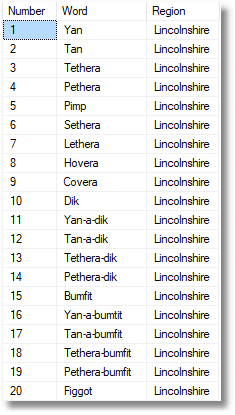
SELECT * FROM SheepCountingWords |
Converting to Table-source JSON Arrays of Objects that have Embedded Arrays
What if you want to import the sheep-counting words from several regions? So far, what we’ve been doing is fine for a collection that models a single table. However, real life isn’t like that. Not even Sheep-Counting Words are like that. A little internalized Chris Date will be whispering in your ear that there are two relations here, a region and the name for a number. Your JSON for a database of sheep-counting words will more likely look like this (I’ve just reduced it to two numbers in the sequence array rather than the original twenty). Each JSON document in our collection has an embedded array.|
1 2 3 4 5 6 7 8 9 10 11 12 13 14 15 16 17 18 19 20 |
[{ "region": "Wilts", "sequence": [{ "number": 1, "word": "Ain" }, { "number": 2, "word": "Tain" }] }, { "region": "Scots", "sequence": [{ "number": 1, "word": "Yan" }, { "number": 2, "word": "Tyan" }] }] */ |
|
1 2 3 4 5 6 7 8 9 10 11 12 13 14 15 16 17 18 19 20 21 22 23 24 25 |
SELECT Number, Word, Region FROM OpenJson('[{ "region": "Wilts", "sequence": [{ "number": 1, "word": "Ain" }, { "number": 2, "word": "Tain" }] }, { "region": "Scots", "sequence": [{ "number": 1, "word": "Yan" }, { "number": 2, "word": "Tyan" }] }]' ) WITH (Region NVARCHAR(30) N'$.region', sequence NVARCHAR(MAX) N'$.sequence' AS JSON) OUTER APPLY OpenJson(sequence) --to get the number and word within each array element WITH (Number INT N'$.number', Word NVARCHAR(30) N'$.word'); |
|
1 2 3 4 5 6 7 8 9 10 11 12 13 14 15 16 17 18 19 20 21 22 23 24 25 |
SELECT number, word, region FROM OpenJson('[{ "region": "Wilts", "sequence": [{ "number": 1, "word": "Ain" }, { "number": 2, "word": "Tain" }] }, { "region": "Scots", "sequence": [{ "number": 1, "word": "Yan" }, { "number": 2, "word": "Tyan" }] }]' ) WITH (region NVARCHAR(30), sequence NVARCHAR(MAX) AS JSON) OUTER APPLY OpenJson(sequence) --to get the number and word within each array element WITH (number INT, word NVARCHAR(30)); |
|
1 2 3 4 5 6 7 8 9 10 11 12 13 14 15 16 17 18 19 20 21 22 23 24 25 26 27 28 29 30 31 32 33 34 35 36 37 38 39 |
DROP PROCEDURE IF EXISTS #MergeJSONWithEmbeddedArraywithCountingTable; GO CREATE PROCEDURE #MergeJSONWithEmbeddedArraywithCountingTable @json NVARCHAR(MAX) /** Summary: > This inserts, or updates, into a table (dbo.SheepCountingWords) a JSON collection consisting of documents with an embedded array containing sheep-counting words for numbers between one and twenty used traditionally by sheep farmers in Gt Britain and Brittany. it allows records to be inserted or updated in any order or quantity. Author: PhilFactor Date: 20/04/2018 Database: CountingSheep Examples: - EXECUTE #MergeJSONWithEmbeddedArraywithCountingTable @json=@AllTheRegions, - EXECUTE #MergeJSONWithEmbeddedArraywithCountingTable @json=' [{"region":"Wilts","sequence":[{"number":1,"word":"Ain"},{"number":2,"word":"Tain"}]}, {"region":"Scots","sequence":[{"number":1,"word":"Yan"},{"number":2,"word":"Tyan"}]}]' Returns: > nothing **/ AS MERGE dbo.SheepCountingWords AS target USING ( SELECT DISTINCT Number, Word, Region FROM OpenJson(@json) WITH (Region NVARCHAR(30) N'$.region', sequence NVARCHAR(MAX) N'$.sequence' AS JSON) OUTER APPLY OpenJson(sequence) WITH (Number INT N'$.number', Word NVARCHAR(30) N'$.word') ) AS source (Number, Word, Region) ON target.Number = source.Number AND target.Region = source.Region WHEN MATCHED AND (source.Word <> target.Word) THEN UPDATE SET target.Word = source.Word WHEN NOT MATCHED THEN INSERT (Number, Word, Region) VALUES (source.Number, source.Word, source.Region); GO |
|
1 2 3 4 5 |
DECLARE @JSON nvarchar(max) SELECT @json = BulkColumn FROM OPENROWSET (BULK 'D:\raw data\YanTanTethera.json', SINGLE_BLOB) as jsonFile EXECUTE #MergeJSONWithEmbeddedArraywithCountingTable @JSON --The file must be UTF-16 Little Endian |
|
1 2 3 4 5 6 7 8 9 10 11 12 13 14 15 16 17 18 19 20 21 |
SELECT SheepCountingWords.Number, Max(CASE WHEN SheepCountingWords.Region = 'Ancient British' THEN SheepCountingWords.Word ELSE '' END ) AS [Ancient British], Max(CASE WHEN SheepCountingWords.Region = 'Borrowdale' THEN SheepCountingWords.Word ELSE '' END ) AS Borrowdale, Max(CASE WHEN SheepCountingWords.Region = 'Bowland' THEN SheepCountingWords.Word ELSE '' END ) AS Bowland, Max(CASE WHEN SheepCountingWords.Region = 'Breton' THEN SheepCountingWords.Word ELSE '' END ) AS Breton, /* Many columns missing here. Full source of query included on GitHub */ Max(CASE WHEN SheepCountingWords.Region = 'Wilts' THEN SheepCountingWords.Word ELSE '' END ) AS Wilts FROM SheepCountingWords GROUP BY SheepCountingWords.Number ORDER BY SheepCountingWords.Number |
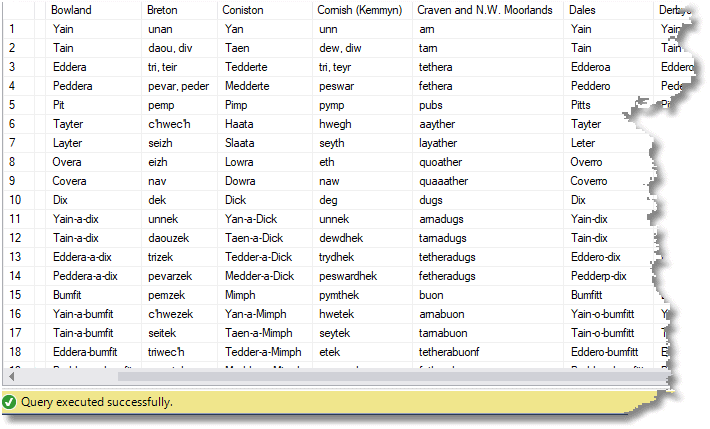 Just as a side-note, this data was collected for this article in various places on the internet but mainly from Yan Tan Tethera. Each table was pasted into Excel and tidied up. The JSON code was created by using three simple functions, one for the cell-level value, one for the row value and a final summation. This allowed simple adding, editing and deleting of data items. The technique is only suitable where columns are of fixed length.
Importing a More Complex JSON Data Collection into a SQL Server Database
We have successfully imported the very simplest JSON files into SQL Server. Now we need to consider those cases where the JSON document or collection represents more than one table. In any relational database, we can use two approaches to JSON data, we can accommodate it, meaning we treat it as an ‘atomic’ unit and store the JSON unprocessed, or we can assimilate it, meaning that we turn the data into a relational format that can be easily indexed and accessed.- To accommodate JSON, we store it as a CLOB, usually NVARCHAR(MAX), with extra columns containing the extracted values for the data fields with which you would want to index the data. This is fine where all the database has to do is to store an application object without understanding it.
- To assimilate JSON, we need to extract all the JSON data and store it in a relational form.
|
1 2 3 4 5 6 7 8 9 10 11 12 13 14 15 16 17 18 19 20 21 22 23 24 25 26 27 28 29 30 31 32 33 34 35 36 37 38 39 40 41 42 43 44 45 46 47 48 49 50 51 52 53 54 55 56 57 58 59 60 61 62 63 64 65 66 |
{ "Full Name" : "Mr Philip Fortescue Factor esq.", "Name" : { "Title" : "Mr", "First Name" : " Philip", "Middle Name" : " Fortescue", "Last Name" : "Factor", "Suffix" : "Esq." }, "Addresses" : [ { "type" : "Home", "Full Address" : "83a Manor Parkway Crook , York, Cornwall CF9 7MU", "County" : "Cornwall", "Dates" : { "Moved In" : "2012-04-01T16:11:29.570", } } ], "Notes" : [ { "Text" : "you! your like to products. happy your management time) thank all plus service. Thank our our that as promise in", "Date" : "2014-11-06T04:05:05.020" } ], "Phones" : [ { "TypeOfPhone" : "Home", "DiallingNumber" : "01593 611001", "Dates" : { "From" : "2004-10-20T15:57:47.480" } } ], "EmailAddresses" : [ { "EmailAddress" : "Kian1@AAL.com", "StartDate" : "2013-05-25", "EndDate" : "2017-06-01" }, { "EmailAddress" : "William1@Gmoul.com", "StartDate" : "2017-06-31" } ], "Cards" : [ { "CardNumber" : "4684453190680369", "ValidFrom" : "2017-05-14", "ValidTo" : "2026-01-26", "CVC" : "262" }, { "CardNumber" : "5548597043927766", "ValidFrom" : "2017-03-16", "ValidTo" : "2028-10-27", "CVC" : "587" }, { "CardNumber" : "4896940995709652", "ValidFrom" : "2015-08-17", "ValidTo" : "2022-12-03", "CVC" : "220" } ] } |
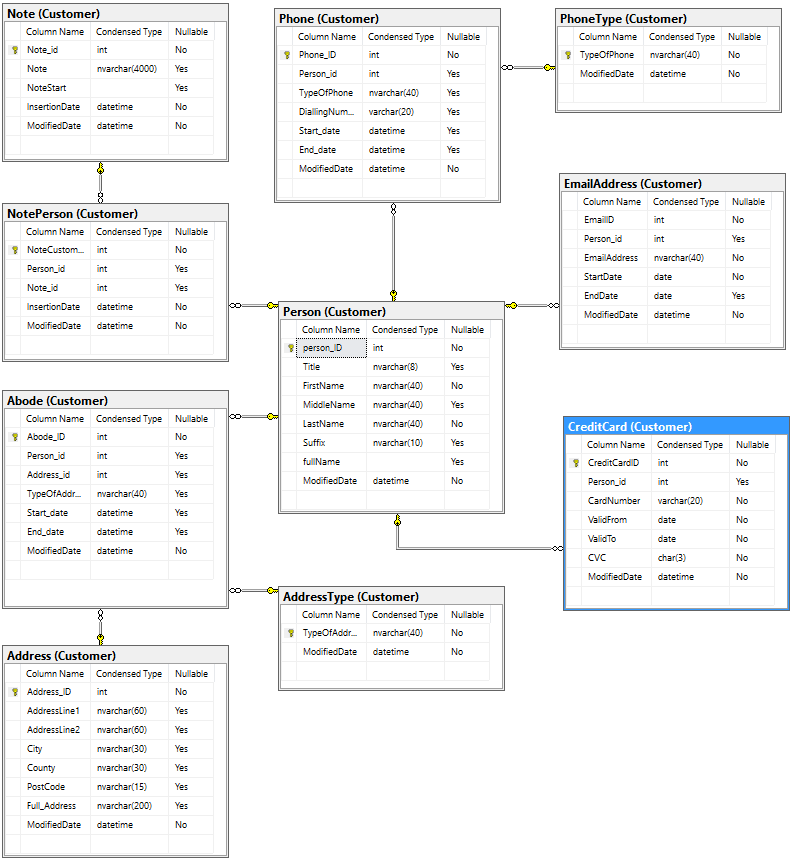 The build script is included with the download on GitHub.
So, all we need now is the batch to import the JSON file that contains the collection and populate the table with the data. We will now describe individual parts of the batch.
We start out by reading the customersUTF16.json file into a variable.
|
1 2 3 4 |
DECLARE @CJSON nvarchar(max) SELECT @Cjson = BulkColumn FROM OPENROWSET (BULK 'D:\raw data\customersUTF16.json', SINGLE_BLOB) as j --text encoding must be littlendian UTF16 |
- The details of the Name,
- Addresses,
- Credit Cards,
- Email Addresses,
- Notes,
- Phone numbers
|
1 2 3 4 5 6 7 8 9 10 11 12 13 |
DROP TABLE IF EXISTS dbo.JSONDocuments; CREATE TABLE dbo.JSONDocuments ( Document_id INT NOT NULL, [Full_Name] NVARCHAR(30) NOT NULL, Name NVARCHAR(MAX) NOT NULL,--holds a JSON object Addresses NVARCHAR(MAX) NULL,--holds an array of JSON objects Cards NVARCHAR(MAX) NULL,--holds an array of JSON objects EmailAddresses NVARCHAR(MAX) NULL,--holds an array of JSON objects Notes NVARCHAR(MAX) NULL,--holds an array of JSON objects Phones NVARCHAR(MAX) NULL,--holds an array of JSON objects CONSTRAINT JSONDocumentsPk PRIMARY KEY (Document_id) ) ON [PRIMARY]; |
|
1 2 3 4 5 6 7 8 9 10 11 12 |
INSERT INTO dbo.JSONDocuments ( Document_id,Full_name,[Name],Addresses, Cards, EmailAddresses, Notes, Phones) SELECT [key] AS Document_id,Full_name,[Name],Addresses, Cards, EmailAddresses, Notes, Phones FROM OpenJson(@CJSON) AS EachDocument CROSS APPLY OpenJson(EachDocument.Value) WITH ( [Full_Name] NVARCHAR(30) N'$."Full Name"', Name NVARCHAR(MAX) N'$.Name' AS JSON, Addresses NVARCHAR(MAX) N'$.Addresses' AS JSON, Cards NVARCHAR(MAX) N'$.Cards' AS JSON, EmailAddresses NVARCHAR(MAX) N'$.EmailAddresses' AS JSON, Notes NVARCHAR(MAX) N'$.Notes' AS JSON, Phones NVARCHAR(MAX) N'$.Phones' AS JSON) |
|
1 2 3 4 5 6 7 8 9 10 11 12 13 14 15 16 17 18 19 20 21 22 23 |
SET IDENTITY_INSERT [Customer].[Person] On MERGE [Customer].[Person] AS target USING (--get the required data for the person table and merge it with what is there SELECT JSONDocuments.Document_id, Title, FirstName, MiddleName, LastName, Suffix FROM dbo.JSONDocuments CROSS APPLY OpenJson(JSONDocuments.Name) WITH ( Title NVARCHAR(8) N'$.Title', FirstName VARCHAR(40) N'$."First Name"', MiddleName VARCHAR(40) N'$."Middle Name"', LastName VARCHAR(40) N'$."Last Name"', Suffix VARCHAR(10) N'$.Suffix' ) ) AS source (person_id, Title, FirstName, MiddleName, LastName, Suffix) ON target.person_id = source.person_id WHEN NOT MATCHED THEN INSERT (person_id, Title, FirstName, MiddleName, LastName, Suffix) VALUES (source.person_id, source.Title, source.FirstName, source.MiddleName, source.LastName, source.Suffix); SET IDENTITY_INSERT [Customer].[Person] Off |
|
1 2 3 4 5 6 7 8 9 10 11 12 13 14 15 16 17 18 19 20 21 22 23 24 25 26 27 |
DECLARE @Note TABLE (document_id INT NOT NULL, Text NVARCHAR(MAX) NOT NULL, Date DATETIME) INSERT INTO @Note (document_id, Text, Date) SELECT JSONDocuments.Document_id, Text, Date FROM dbo.JSONDocuments CROSS APPLY OpenJson(JSONDocuments.Notes) AS TheNotes CROSS APPLY OpenJson(TheNotes.Value) WITH (Text NVARCHAR(MAX) N'$.Text', Date DATETIME N'$.Date') WHERE Text IS NOT null --if the notes are new then insert them INSERT INTO Customer.Note (Note) SELECT DISTINCT newnotes.Text FROM @Note AS newnotes LEFT OUTER JOIN Customer.Note ON note.notestart = Left(newnotes.Text,850)--just compare the first 850 chars WHERE note.note IS NULL /* now fill in the many-to-many table relating notes to people, making sure that you --do not duplicate anything*/ INSERT INTO Customer.NotePerson (Person_id, Note_id) SELECT newnotes.document_id, note.note_id FROM @Note AS newnotes INNER JOIN Customer.Note ON note.note = newnotes.Text LEFT OUTER JOIN Customer.NotePerson ON NotePerson.Person_id=newnotes.document_id AND NotePerson.note_id=note.note_id WHERE NotePerson.note_id IS null |
|
1 2 3 4 5 6 7 8 9 10 11 12 13 14 15 16 17 18 19 20 21 22 23 24 25 26 27 28 29 30 31 32 33 34 35 36 37 38 39 40 41 42 43 44 45 46 47 48 49 50 51 52 53 54 |
DECLARE @addresses TABLE ( person_id INT NOT null, Type NVARCHAR(40) NOT null, Full_Address NVARCHAR(200)NOT null, County NVARCHAR(30) NOT null, Start_Date DATETIME NOT null, End_Date DATETIME null ); --stock the table variable with the address information INSERT INTO @Addresses(person_id, Type,Full_Address, County, [Start_Date], End_Date) SELECT Document_id, Address.Type,Address.Full_Address, Address.County, WhenLivedIn.[Start_date],WhenLivedIn.End_date FROM dbo.JSONDocuments CROSS APPLY OpenJson(JSONDocuments.Addresses) AllAddresses CROSS APPLY OpenJson(AllAddresses.value) WITH ( Type NVARCHAR(8) N'$.type', Full_Address NVARCHAR(200) N'$."Full Address"', County VARCHAR(40) N'$.County',Dates NVARCHAR(MAX) AS json ) Address CROSS APPLY OpenJson(Address.Dates) WITH ( Start_date datetime N'$."Moved In"',End_date datetime N'$."Moved Out"' )WhenLivedIn --first make sure that the types of address exists and add if necessary INSERT INTO Customer.Addresstype (TypeOfAddress) SELECT DISTINCT NewAddresses.Type FROM @addresses AS NewAddresses LEFT OUTER JOIN Customer.Addresstype ON NewAddresses.Type = Addresstype.TypeOfAddress WHERE Addresstype.TypeOfAddress IS NULL; --Fill the Address table with addresses ensuring uniqueness INSERT INTO Customer.Address (Full_Address, County) SELECT DISTINCT NewAddresses.Full_Address, NewAddresses.County FROM @addresses AS NewAddresses LEFT OUTER JOIN Customer.Address AS currentAddresses ON NewAddresses.Full_Address = currentAddresses.Full_Address WHERE currentAddresses.Full_Address IS NULL; --and now the many-to-many Abode table INSERT INTO Customer.Abode (Person_id, Address_ID, TypeOfAddress, Start_date, End_date) SELECT newAddresses.person_id, address.Address_ID, newAddresses.Type, newAddresses.Start_Date, newAddresses.End_Date FROM @addresses AS newAddresses INNER JOIN customer.address ON newAddresses.Full_Address = address.Full_Address LEFT OUTER JOIN Customer.Abode ON Abode.person_id = newAddresses.person_id AND Abode.Address_ID = address.Address_ID WHERE Abode.person_id IS NULL; |
|
1 2 3 4 5 6 7 8 9 10 11 12 13 14 15 16 |
INSERT INTO customer.CreditCard (Person_id, CardNumber, ValidFrom, ValidTo, CVC) SELECT JSONDocuments.Document_id AS Person_id, new.CardNumber, new.ValidFrom, new.ValidTo, new.CVC FROM dbo.JSONDocuments CROSS APPLY OpenJson(JSONDocuments.Cards) AS TheCards CROSS APPLY OpenJson(TheCards.Value) WITH ( CardNumber VARCHAR(20), ValidFrom DATE N'$.ValidFrom', ValidTo DATE N'$.ValidTo', CVC CHAR(3) ) AS new LEFT OUTER JOIN customer.CreditCard ON JSONDocuments.Document_id = CreditCard.Person_id AND new.CardNumber = CreditCard.CardNumber WHERE CreditCard.CardNumber IS NULL; |
|
1 2 3 4 5 6 7 8 9 10 11 12 13 14 15 16 |
INSERT INTO Customer.EmailAddress (Person_id, EmailAddress, StartDate, EndDate) SELECT JSONDocuments.Document_id AS Person_id, new.EmailAddress, new.StartDate, new.EndDate FROM dbo.JSONDocuments CROSS APPLY OpenJson(JSONDocuments.EmailAddresses) AS TheEmailAddresses CROSS APPLY OpenJson(TheEmailAddresses.Value) WITH ( EmailAddress NVARCHAR(40) N'$.EmailAddress', StartDate DATE N'$.StartDate', EndDate DATE N'$.EndDate' ) AS new LEFT OUTER JOIN Customer.EmailAddress AS email ON JSONDocuments.Document_id = email.Person_id AND new.EmailAddress = email.EmailAddress WHERE email.EmailAddress IS NULL; |
|
1 2 3 4 5 6 7 8 9 10 11 12 13 14 15 16 17 18 19 20 21 22 23 24 25 26 27 28 29 30 31 32 33 34 35 36 37 38 39 40 |
DECLARE @phones TABLE ( Person_id INT, TypeOfPhone NVARCHAR(40), DiallingNumber VARCHAR(20), Start_Date DATE, End_Date DATE ); INSERT INTO @phones (Person_id, TypeOfPhone, DiallingNumber, Start_Date, End_Date) SELECT JSONDocuments.Document_id, EachPhone.TypeOfPhone, EachPhone.DiallingNumber, [From], [To] FROM dbo.JSONDocuments CROSS APPLY OpenJson(JSONDocuments.Phones) AS ThePhones CROSS APPLY OpenJson(ThePhones.Value) WITH ( TypeOfPhone NVARCHAR(40), DiallingNumber VARCHAR(20), Dates NVARCHAR(MAX) AS JSON ) AS EachPhone CROSS APPLY OpenJson(EachPhone.Dates) WITH ([From] DATE, [To] DATE); --insert any new phone types INSERT INTO Customer.PhoneType (TypeOfPhone) SELECT DISTINCT new.TypeOfPhone FROM @phones AS new LEFT OUTER JOIN Customer.PhoneType ON PhoneType.TypeOfPhone = new.TypeOfPhone WHERE PhoneType.TypeOfPhone IS NULL AND new.TypeOfPhone IS NOT null; --insert all new phones INSERT INTO Customer.Phone (Person_id, TypeOfPhone, DiallingNumber, Start_date, End_date) SELECT new.Person_id, new.TypeOfPhone, new.DiallingNumber, new.Start_Date, new.End_Date FROM @phones AS new LEFT OUTER JOIN Customer.Phone ON Phone.DiallingNumber = new.DiallingNumber AND Phone.Person_id = new.Person_id WHERE Phone.Person_id IS NULL AND new.TypeOfPhone IS NOT null; |
Conclusion
JSON support in SQL Server has been the result of a long wait, but now that we have it, it opens up several possibilities. No SQL Server Developer or admin needs to rule out using JSON for ETL (Extract, Transform, Load) processes to pass data between JSON-based document databases and SQL Server. The features that SQL Server has are sufficient, and far easier to use than the SQL Server XML support. A typical SQL Server database is far more complex than the simple example used in this article, but it is certainly not an outrageous idea that a database could have its essential static data drawn from JSON documents: These are more versatile than VALUE statements and more efficient than individual INSERT statements. I’m inclined to smile on the idea of transferring data between the application and database as JSON. It is usually easier for front-end application programmers, and we Database folks can, at last, do all the checks and transformations to accommodate data within the arcane relational world, rather than insist on the application programmer doing it. It will also decouple the application and database to the extent that the two no longer would need to shadow each other in terms of revisions. JSON collections of documents represent an industry-standard way of transferring data. It is today’s CSV, and it is good to know that SQL Server can support it.FAQs
1. How do I import a JSON array of objects into a SQL Server table?
Use OPENJSON with a WITH clause that defines the target columns and their types. For a JSON array like [{“id”: 1, “name”: “Alice”}, {“id”: 2, “name”: “Bob”}], write: SELECT id, name FROM OPENJSON(@json) WITH (id INT ‘$.id’, name NVARCHAR(100) ‘$.name’). OPENJSON returns one row per element in the array, with each property extracted into the named column. If the column names match the JSON property names, the JSON path can be omitted. To INSERT the result into a table, wrap the SELECT in INSERT … SELECT. For large JSON documents, load the file contents via OPENROWSET(BULK) first, then pass to OPENJSON.
2. How do I handle nested arrays when importing JSON into SQL Server?
Use CROSS APPLY with a second OPENJSON call to expand the inner array. For a document like {“region”: “north”, “words”: [“one”, “two”, “three”]}, write: SELECT outer.region, inner.value FROM OPENJSON(@json) WITH (region NVARCHAR(50), words NVARCHAR(MAX) AS JSON) AS outer CROSS APPLY OPENJSON(outer.words) AS inner. The ‘AS JSON’ modifier tells OPENJSON to return the inner array as raw JSON for re-parsing; CROSS APPLY calls OPENJSON once per outer row, producing one row per inner-array element. This pattern generalises to arbitrarily deep nesting – add another CROSS APPLY for each level.
3. What is the $.path syntax in SQL Server OPENJSON?
The $.path syntax in OPENJSON’s WITH clause specifies which JSON property to extract into each column. $ refers to the root of the JSON document; $.propName navigates to a named property; $.arrayName[0] accesses the first element of an array; $.nested.deep navigates multiple levels. Example: OPENJSON(@json) WITH (user_id INT ‘$.user.id’, email NVARCHAR(100) ‘$.user.email’). The path is optional when the column name matches the property name at the top level. For complex documents, explicit paths make the extraction unambiguous and resilient to renaming.
4. How do I convert a JSON document to multiple SQL Server tables?
For a JSON document containing multiple collections (for example, orders and customers in a single blob), extract each collection into its own staging table using OPENJSON with the appropriate path, then INSERT from each staging result to the target tables. Pattern: INSERT INTO Customers SELECT … FROM OPENJSON(@json, ‘$.customers’) WITH (…); INSERT INTO Orders SELECT … FROM OPENJSON(@json, ‘$.orders’) WITH (…). If the child collections reference parent keys, ensure the parent is inserted first and that any generated keys are captured with OUTPUT. For large JSON documents processed at scale, consider parsing once into a normalised row-per-element staging table, then using SQL joins to build the final tables.
This document contains proprietary information and is protected by copyright law.
Copyright © 2026 Red Gate Software Limited. All rights reserved







Load comments