

Comparing two JSON documents in SQL Server – checking whether a stored procedure or query produces the JSON output you expect – can be done entirely in T-SQL using a table-valued function that walks the JSON hierarchy and returns a structured difference report. Each row in the result uses an indicator column: == for exact matches, <> for value differences, -> for properties present in the target but missing from the source, and <- for properties present in the source but missing from the target. This article presents the Compare_JsonObject function and two worked examples: comparing department query output across SQL Server versions, and diffing stored JSON variables.
If you are working on any module or routine such as a procedure, function or batch that produces a result, then you will want to compare it with something that you’ve prepared earlier to make sure that it is the same.
It is often necessary to compare objects, particularly when you are working on a routine that generates an object and you want to check that an improvement you’ve made is actually returned the same result. An XML or JSON document is the nearest we get to an object in SQL Server. This is probably as near as you’d want.
Although this routine is designed to compare JSON documents, and takes them as input, it can be used for comparing any results.
First Example
Imagine, if you can, that you are writing a routine that gives you a list of departments for every group within your AdventureWorks organisation. You want to do it the best way according to the version of SQL Server, but you want the two versions to give the same output. Fortunately, we have our table-valued function that compares any two results converted to JSON. Using this, called dbo.Compare_JsonObject, we can simply do this.
|
1 2 3 4 5 6 7 8 9 10 11 12 13 14 15 16 17 18 19 20 21 22 23 24 25 26 |
SELECT * FROM dbo.Compare_JsonObject(--compares two JSON Documents -- here is your non-json query. This is just an example using 'string_agg'. (SELECT GroupName, String_Agg(Name, ', ') WITHIN GROUP ( ORDER BY Name) AS departments FROM AdventureWorks2016.HumanResources.Department GROUP BY GroupName --and we then convert it to JSON FOR JSON AUTO), -- here is your non-json query. This is an 'XML-trick' version to produce the list (SELECT GroupName, ( SELECT Stuff(( SELECT ', ' + Name FROM AdventureWorks2016.HumanResources.Department AS dep WHERE dep.GroupName = TheGroup.GroupName ORDER BY dep.name FOR XML PATH(''), TYPE ).value('.', 'varchar(max)'), 1,2,'')) AS departments FROM AdventureWorks2016.HumanResources.Department AS thegroup GROUP BY GroupName --and we then convert it to JSON FOR JSON AUTO ) ) WHERE SideIndicator <> '==' --meaning ALL the items that don't match --hopefully, nothing will get returned |
Fortunately, we got this right and can slot the new version in place of the old one when we get that long-awaited upgrade to SQL Server. However, we can wind back in time to see the results before we got the list order correct.
|
1 2 3 4 5 6 7 8 9 10 11 12 13 14 15 16 17 18 19 20 21 22 23 24 25 |
SELECT * FROM dbo.Compare_JsonObject(--compares two JSON Documents -- here is your non-json query. This is just an example using 'string_agg'. (SELECT GroupName, String_Agg(Name, ', ') AS departments FROM AdventureWorks2016.HumanResources.Department GROUP BY GroupName --and we then convert it to JSON FOR JSON AUTO), -- here is your non-json query. This is an 'XML-trick' version to produce the list (SELECT GroupName, ( SELECT Stuff(( SELECT ', ' + Name FROM AdventureWorks2016.HumanResources.Department AS dep WHERE dep.GroupName = TheGroup.GroupName FOR XML PATH(''), TYPE ).value('.', 'varchar(max)'), 1,2,'')) AS departments FROM AdventureWorks2016.HumanResources.Department AS thegroup GROUP BY GroupName --and we then convert it to JSON FOR JSON AUTO ) ) WHERE SideIndicator <> '==' --meaning ALL the items that don't match |
which gives two mismatches, produced by different orders of the list items

We can see what doesn’t match, and we can see why: the ordering for those two rows is wrong.
Second Example
We could, of course, use variables to store our JSON:
|
1 2 3 4 5 6 7 8 9 10 11 12 13 14 15 16 17 18 19 20 21 22 23 24 |
DECLARE @SourceJSON NVARCHAR(MAX) = '{ "question": "What is a clustered index?", "options": [ "A bridal cup used in marriage ceremonies by the Navajo indians", "a bearing in a gearbox used to facilitate double-declutching", "An index that sorts and store the data rows in the table or view based on the key values" ], "answer": 3 }', @TargetJSON NVARCHAR(MAX) = '{ "question": "What is a clustered index?", "options": [ "a form of mortal combat referred to as ''the noble art of defense''", "a bearing in a gearbox used to facilitate double-declutching", "A bridal cup used in marriage ceremonies by the Navajo indians", "An index that sorts and store the data rows in the table or view based on the key values" ], "answer": 4 }' SELECT SideIndicator, ThePath, TheKey, TheSourceValue, TheTargetValue FROM dbo.Compare_JsonObject(@SourceJSON, @TargetJSON) AS Diff; |
…which gives us all the differences:
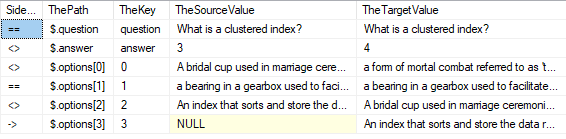
That side-indicator column is telling us things. A match is ‘==’, a difference is ‘<>’, a missing property in the source is ‘->’ and a missing property in the target is ‘<-‘
The ‘path’ column can be used to get the value of a property or to modify it. It uses the same convention as the SQL Server JSON functions.
There is also a parent column that is useful for doing more detailed comparison, or doing it at a particular level. Here, you can eliminate all values that are the same and still see what question had a different answer to it
|
1 2 3 4 |
SELECT ThePath, TheKey, TheSourceValue, TheTargetValue, Json_Value(@SourceJSON, TheParent + '.question') AS TheQuestion FROM dbo.Compare_JsonObject(@SourceJSON, @TargetJSON) WHERE SideIndicator = '<>'; |

The Compare_JsonObject function
Now we ought to introduce the actual routine. It is a table-valued function. If it returns nothing, one or other of the JSON documents is badly formed.
|
1 2 3 4 5 6 7 8 9 10 11 12 13 14 15 16 17 18 19 20 21 22 23 24 25 26 27 28 29 30 31 32 33 34 35 36 37 38 39 40 41 42 43 44 45 46 47 48 49 50 51 52 53 54 55 56 57 58 59 60 61 62 63 64 65 66 67 68 69 70 71 72 73 74 75 |
CREATE OR ALTER FUNCTION dbo.Compare_JsonObject (@SourceJSON NVARCHAR(MAX), @TargetJSON NVARCHAR(MAX)) /** Summary: > This function 'diffs' a source JSON document with a target JSON document and produces an analysis of which properties are missing in either the source or target, or the values of these properties that are different. It reports on the properties and values for both source and target as well as the path that references that scalar value. The path reference to the object's parent is exposed in the result to enable a query to reference the value of any other object in the parent that is needed. Author: Phil Factor Date: 06/07/2020 Revised: - mod: Added the parent reference to the difference report - Date: 09/07/2020 Database: PhilsRoutines Examples: - SELECT * FROM dbo.Compare_JsonObject(@TheSourceJSON, @TheTargetJSON) WHERE SideIndicator <> '=='; - SELECT *, Json_Value(@TheSourceJSON,TheParent+'.name') FROM dbo.Compare_JsonObject(@TheSourceJSON, @TheTargetJSON) WHERE SideIndicator <> '=='; Returns: > SideIndicator: ( == equal, <- not in target, -> not in source, <> not equal ThePath: the JSON path used by the SQL JSON functions TheKey: the key field without the path TheSourceValue: the value IN the SOURCE JSON document TheTargetValue: the value IN the TARGET JSON document **/ RETURNS @returntable TABLE ( SideIndicator CHAR(2), -- == means equal, <- means not in target, -> means not in source, <> means not equal TheParent NVARCHAR(2000), --the parent object ThePath NVARCHAR(2000), -- the JSON path used by the SQL JSON functions TheKey NVARCHAR(200), --the key field without the path TheSourceValue NVARCHAR(200), -- the value IN the SOURCE JSON document TheTargetValue NVARCHAR(200) -- the value IN the TARGET JSON document ) AS BEGIN IF (IsJson(@SourceJSON) = 1 AND IsJson(@TargetJSON) = 1) --don't try anything if either json is invalid BEGIN DECLARE @map TABLE --these contain all properties or array elements with scalar values ( iteration INT, --the number of times that more arrays or objects were found SourceOrTarget CHAR(1), --is this the source 's' OR the target 't' TheParent NVARCHAR(80), --the parent object ThePath NVARCHAR(80), -- the JSON path to the key/value pair or array element TheKey NVARCHAR(2000), --the key to the property TheValue NVARCHAR(MAX),-- the value TheType INT --the type of value it is ); DECLARE @objects TABLE --this contains all the properties with arrays and objects ( iteration INT, SourceOrTarget CHAR(1), TheParent NVARCHAR(80), ThePath NVARCHAR(80), TheKey NVARCHAR(2000), TheValue NVARCHAR(MAX), TheType INT ); DECLARE @depth INT = 1; --we start in shallow water DECLARE @HowManyObjectsNext INT = 1, @SourceType INT, @TargetType INT; SELECT --firstly, we try to work out if the source is an array or object @SourceType = CASE IsNumeric((SELECT TOP 1 [key] FROM OpenJson(@SourceJSON))) WHEN 1 THEN 4 ELSE 5 END, @TargetType= --and if the target is an array or object CASE IsNumeric((SELECT TOP 1 [key] FROM OpenJson(@TargetJSON))) WHEN 1 THEN 4 ELSE 5 END --now we insert the base objects or arrays into the object table INSERT INTO @objects (iteration, SourceOrTarget, TheParent, ThePath, TheKey, TheValue, TheType) SELECT 0, 's' AS SourceOrTarget,'' AS parent, ' |
Now, this is all I need but it isn’t the end to it. What if you just want to test part of a JSON document against another? That is a feature that isn’t too complicated to add. What if you didn’t follow the JSON standard that the order of array elements is significant? The way this routine works is to assume that every element of these two json documents are different.
|
1 2 3 4 5 6 7 8 9 10 11 12 13 14 15 16 |
--source [ "Monday", "Tuesday", "Wednesday", "Thursday", "Friday" ] --target [ "Tuesday", "Wednesday", "Thursday", "Friday", "Monday" ] |
You may want a ‘lax’ mode that matched elements in an array regardless of order. It sounds easy, but the references won’t match then so it would take quite a bit of restructuring then. What if you wanted to judge the similarity of objects based only on the values of certain properties? I’ve taken a literal approach here, and there is plenty of opportunity for making something more complex, based on similar principles. Fortunately, the problem of arrays doesn’t crop up so much in SQL Server, because the implementation of JSON can’t easily produce them, and this function is sufficient for my unit-testing needs.
You may also be interested in:
How to consume hierarchical JSON in SQL Server using OPENJSON
Conclusions
It is useful to be able to check in SQL Server that a JSON document is what you expect and hope it to be. Since you can represent any SQL result as a JSON document, you have a way, using a JSON diff function like this, a very convenient way of checking the result of any SQL statement that produces a result, whether it is using a procedure, function or batch. I’m beginning to wonder if we have a way of making automated database testing somewhat easier!
|
1 |
AS path, '', @SourceJSON, @SourceType; INSERT INTO @objects (iteration, SourceOrTarget,TheParent, ThePath, TheKey, TheValue, TheType) SELECT 0, 't' AS SourceOrTarget, '' AS parent, ' |
Now, this is all I need but it isn’t the end to it. What if you just want to test part of a JSON document against another? That is a feature that isn’t too complicated to add. What if you didn’t follow the JSON standard that the order of array elements is significant? The way this routine works is to assume that every element of these two json documents are different.
|
1 |
You may want a ‘lax’ mode that matched elements in an array regardless of order. It sounds easy, but the references won’t match then so it would take quite a bit of restructuring then. What if you wanted to judge the similarity of objects based only on the values of certain properties? I’ve taken a literal approach here, and there is plenty of opportunity for making something more complex, based on similar principles. Fortunately, the problem of arrays doesn’t crop up so much in SQL Server, because the implementation of JSON can’t easily produce them, and this function is sufficient for my unit-testing needs.
You may also be interested in:
How to produce JSON documents from SQL Server queries with FOR JSON
FAQs: SQL Server JSON Diff. Checking for differences between JSON documents.
1. How do I compare two JSON documents in SQL Server?
Use the Compare_JsonObject table-valued function described in this article. Pass two JSON strings as parameters and the function returns a result set where each row represents a property path with an indicator column showing the comparison result: == (match), <> (different values), -> (missing from source), or <- (missing from target). The function handles nested JSON hierarchies recursively.
2. Does SQL Server have a built-in JSON diff function?
No. SQL Server does not have a native function for comparing two JSON documents. You can compare individual JSON property values using JSON_VALUE() and OPENJSON(), but a full structural diff requires a custom implementation. The Compare_JsonObject function presented in this article provides that capability as a deployable table-valued function.
3. How do I validate JSON output from a stored procedure in SQL Server?
Use the Compare_JsonObject function to compare the procedure’s JSON output against a known-good reference document. Call the function with the expected JSON as one parameter and the actual output as the other. If the function returns no rows, the documents are structurally identical. Any rows returned indicate differences – use the indicator column to identify what changed.
4. Can I compare partial JSON objects in SQL Server?
Yes. You can pass a subset of a larger JSON document to Compare_JsonObject by first extracting the relevant path using JSON_QUERY(). This lets you validate specific sections of a large JSON response without comparing the entire document, which is useful when testing APIs or stored procedures that return large payloads.
This document contains proprietary information and is protected by copyright law.
Copyright © 2026 Red Gate Software Limited. All rights reserved







Load comments