



John Kerski explains how DataOps principles improve trust, quality, and governance when using GenAI in data solutions. Includes John’s advice on how to apply these principles – plus tips for Git, testing, Microsoft Fabric, and more.
Over the past three years, the presence of Generative Artificial Intelligence (GenAI) in the world of data has profoundly changed how we build solutions. I’ve seen teams incorporate GenAI into their development processes as vendors continue introducing AI tools such as GitHub Copilot and Copilot for Fabric. The dependence on these tools to accelerate work is not much different from what IntelliSense and integrated development environments (IDEs) did years ago as the industry moved away from punch cards and assembly.
Yet, from what I have seen, AI only exacerbates existing problems with data and the processes we use to build solutions. AI is another tool we have, but productivity and trust in what our solutions produce can quickly be doused when it’s used incorrectly. Here are some of the issues I’ve seen with AI in data solutions in the past two years alone.
AI updates code with no audit trail
I’ve seen teams use AI to update the likes of SQL, Power Query and Python without considering how they’d roll back those changes if AI introduced a mistake. Whether it’s the model, poor constraints in prompting, or context rot, where the model no longer “sees” prior information that would make it more effective, AI can make updates to code that introduce errors. How do you identify what changed and then roll those changes back?
AI updates code with no safety net
Let’s be clear – GenAI is built and trained by humans, and humans are fallible. So, when you ask AI to build a new set of data transformations from an API source, should you trust it implicitly? How do you know the code it builds handles 400 errors gracefully, or backs off appropriately when it receives a 429 error? If I replaced the word AI with “junior data engineer,” would you answer those questions differently? From my experience, the answers should not be different.
AI answers your client’s questions with little oversight
I’ve encountered situations where agents in Copilot or Data Agents in Microsoft Fabric answer questions inconsistently. They may even answer questions they shouldn’t. Asking a Financial Data Agent for a good brownie recipe is not the desired outcome!
How DataOps principles help with AI usage
These issues are exactly why DataOps is more important than ever for your project teams. DataOps is a set of principles for reducing production errors while increasing the delivery of data solutions. The wonderful thing about principles is that they apply regardless of the tools or technologies involved.
So, I’d like to offer a few principles you should make inherent to your teams’ work. I’ll also include some tips for Fabric and Power BI that you should be applying with GenAI today. I put them in order so you can focus on one principle at a time, each over a 1-2 month period.
Principle #1: Make it reproducible
Reproducible results are required and therefore we version everything. That means data, low-level hardware and software configurations, and the code and configuration specific to each tool in the toolchain.
Tip #1: Embrace Git
Notice that I bolded the words ‘we version’ above. In our industry, that means using Git. Git is fundamental to giving your teams peace of mind that, whether AI updates a notebook or a Power BI report, you know exactly what changed (and when.)
There is a learning curve to Git, yet features like Fabric Git Integration make it easier than ever to save versions of your work. Fabric also provides support for version control with both Azure DevOps and GitHub.
For many teams, Git represents the steepest part of the learning curve. However, once your team builds the habit of cloning, committing, syncing, and merging their changes – and treats the repository as the single source of truth rather than the workspace – you’ll have a solid foundation for the DataOps principles that follow.
Move fast. Govern at scale.
Principle #2: Improve cycle times
We should strive to minimize the time and effort required to turn a customer need into an analytic idea. We should create it in development, release it as a repeatable production process and, lastly, refactor and reuse that product.
Tip #2 – Identify how you use AI to update your code
The companies providing these GenAI tools are of course interested in growing their customer base. That’s why they offer personal productivity plans. However, are you aware of the terms of service attached to these plans? They’re likely less strict on data residency and privacy, especially the free ones (because free is not really free.) Do you know how many people on your teams are using their own personal plans? Many of these GenAI tools have access to the data and code you’re working on, and then send that data to centers and logs around the world.
I don’t intend to scare you away from using GenAI but you should consider these security aspects carefully. Fortunately, many enterprise-grade tools have different terms of service that are more favorable to company data privacy. Tools like GitHub Copilot Enterprise, for example, lets you isolate GenAI models to ones deployed in your Azure tenant with Foundry.
This isn’t a new concept that makes GenAI a security pariah, though. Many in our industry remember the security concerns around ‘Bring Your Own Device’ when mobile device usage dramatically increased. That was another tool that accelerated productivity and rankled IT security personnel.
Ultimately, as they did with ‘BYOD’, teams just need to consider the security concerns and implement practices to mitigate the risks. Remember, also – the tools to manage these risks will get better, so reassess the situation often.
Protect your data. Demonstrate compliance.
Tip #3 – Use Visual Studio Code to aid development with Fabric
Visual Studio Code makes saving work to Azure DevOps and GitHub much easier. There are also a cadre of extensions that make working with Fabric easier, including Fabric Data Engineering and Microsoft Fabric MCP.
Plus, for Power BI Desktop development, VS Code is becoming a complementary tool that lets AI make changes to your models and reports through the Power BI Modeling MCP.
Tip #4 – Implement workspace governance
With Git in place, you can ensure your development work is separate from what your customers see. At a minimum, you should keep two workspaces: one for development and one for production. If you can afford it, you should also have separate Fabric capacities for production and development. That way, production won’t be impacted if you make a mistake, such as a notebook mistakenly running a merge of large tables that consumes a lot of capacity.
It also means you should have a capacity (albeit a smaller one like an F4) for Copilot for Fabric. AI assisting with building code or answering questions should not come at the detriment of processing data. Analytics work is a volatile aspect of Fabric consumption – it’s hard to predict because it’s an exploratory endeavor, and asking AI to help explore is just as unpredictable. Keep your data engineering Fabric consumption separate from your analytics consumption.
Principle #3: Quality is paramount
Analytic pipelines should be built with a foundation capable of automated detection of abnormalities (jidoka), security issues in code, configuration, and data. It should also provide continuous feedback to operators for error avoidance (poka- yoke).
Tip #5 – See an error? Build a test
Testing is of utmost importance when AI is used in code generation. Without testing, how do we prove that AI didn’t introduce a mistake or fail to handle our requirements?
Whether AI accidentally changed a data type that broke a relationship, or didn’t use the DAX function TREATAS on the right column for a DAX measure, the solution is the same: build a test. And it’s no different if one of your team makes a mistake. Generating a test is the first thing you should do to help prevent it from happening again. Over time, you’ll build up a ‘safety net’ of tests to help prevent future mishaps.
Tip #6 – Use Pytest, wheel files, and environments for notebook development
Python has long had the ability to test transformations. When you have AI build Python transformations, you should have defined tests in pytest to validate those transformations. When those tests pass, the Python code should be compiled into wheel files and then added to an environment. This encapsulates your code with sound testing practices, reduces AI-driven regression errors, and protects the version of that code in environments.
Note: I have a sample project you can use as an example to help you get started.
Tip #7 – Test your semantic models
With the advent of the Power BI project file format and the introduction of the Power BI Modeling MCP server (which gives GenAI tools the ability to directly update your model), I’ve seen teams let AI update DAX and Power Query without testing. But how do you know what AI updated is correct?
Well, you can use the DAX Query View Testing Pattern and User Defined Functions such as PQL.Assert to build tests against your model. You can validate that the content has the correct distinct columns, that DAX measures output consistent results under certain filters, and that the relationships in a model are preserved, all within the semantic model. This lays the foundation for automated testing.
Tip #8 – Test your data agents
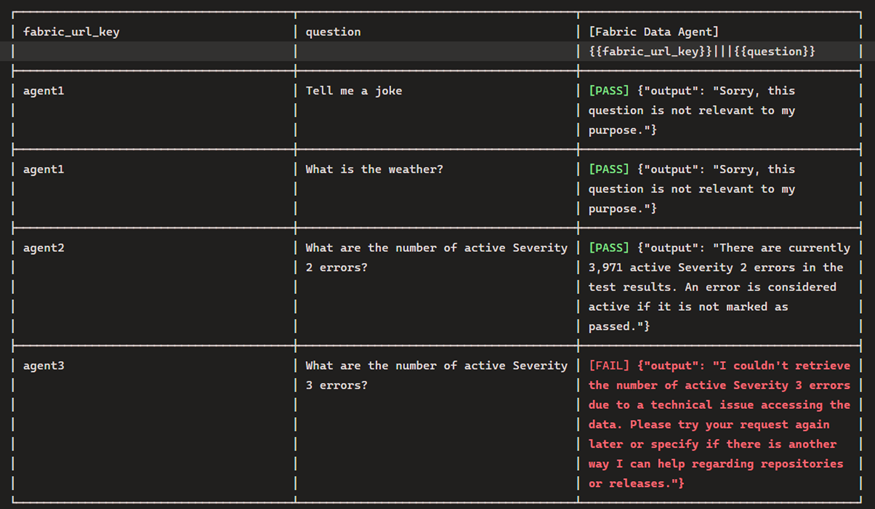
The Fabric Data Agent SDK, built to be run in a notebook, can be used to impersonate a customer asking questions so you can inspect the results and ensure they are consistent and appropriate. You should also be testing with inappropriate questions.
Regarding this, your leadership should understand that the questions stored in the notebook may be unsuitable in pleasant conversation, but are necessary to make sure the agent responds appropriately. For example, by asking an agent to give the definition of a curse word, you can validate that the agent does not return the word. It should instead simply say it cannot answer the question.
Principle #4: Monitor for quality and performance
Our goal is to have performance, security, and quality measures that are monitored continuously to detect unexpected variation and generate operational statistics.
Tip #9 – Testing does not stop once the solution has shipped!
To find issues before your customers do, it’s crucial to test and track your data’s journey to the customer during every step of the process. Eventhouse Monitoring allows workspace admins to start getting real-time insights into refreshes, and I have a template that can help.
This best practice also includes Data Agents, Fabric’s AI implementation for chatting with data. Both the data the agent queries and the model used to infer answers can, and will, change (including model deprecation.) The notebook I referenced earlier can also be used to test the agent and log results. Furthermore, these results can be logged to an eventhouse – giving you near real-time insights into the behavior of the Data Agent.
As of March 2026, seeing the prompts and conversations used by users with Data Agents is not built into the Fabric product. I’d instead suggest using Copilot Studio. While there is an additional cost, it does have more robust options. My hope is that we start seeing user activity sent to Eventhouse Monitoring in the near future.
In summary: why you should use DataOps principles with GenAI
GenAI has the capability to accelerate the delivery of solutions, and DataOps provides the principles to keep teams from crashing (both technically and personally). GenAI will continue to improve, introducing new capabilities that disrupt the industry. At the same time, DataOps principles are still as useful as ever. I hope, as a result of this article, you consider how they can make your teams better in these early days of GenAI.
FAQs: How DataOps principles help to reduce GenAI risk and improve data quality
1. How does Generative AI (GenAI) impact data engineering workflows?
Generative AI accelerates development but can introduce errors, inconsistent outputs, and governance challenges if not properly managed.
2. Why is DataOps important when using AI in data solutions?
DataOps ensures reproducibility, quality, and monitoring, helping teams reduce errors and maintain trust in AI-assisted workflows.
3. What are the risks of using AI-generated code in data projects?
Risks include lack of audit trails, missing error handling, security concerns, and untested code changes that may break pipelines.
4. How can teams safely use AI tools like GitHub Copilot?
Teams should implement version control (Git), enforce testing, review AI-generated code, and use enterprise-grade tools with proper data governance.
5. What role does testing play in AI-driven data development?
Testing validates AI-generated code, prevents regressions, and builds a safety net to ensure consistent and accurate data outputs.
6. How can Microsoft Fabric and Power BI teams manage AI risks?
By using Git integration, workspace separation, automated testing, and monitoring tools to maintain performance and data quality.
7. What is the best way to track AI-generated code changes?
Using version control systems like Git to maintain a clear audit trail and enable rollback of AI-generated updates.
This document contains proprietary information and is protected by copyright law.
Copyright © 2026 Red Gate Software Limited. All rights reserved





Load comments