


Getting started
The job of preparing to upgrade SQL Server is one that DBAs look forward to but also dread in equal measure; on the one hand there is the delighted anticipation of new shiny things to work with, on the other hand the dread of knowing what to do if everything breaks or making sure that everything is ready for the changes? The problem is that your databases may be using features that don’t work in the version of SQL Server you’re upgrading to. If so, then they’ve got to be altered to get everything to work. Only if you make sure that all the databases will work on the new version of SQL Server can you look forward to a stress-free upgrade.
SQL Server makes things as easy as possible for you with various tools and features that let you know what if anything will cause problems and therefore stop working if you upgrade, and they will also warn you what features are likely to be problems in a version or two. There is the upgrade advisor tool, a dedicated application that will analyse all the components of SQL Server that you have installed and produce reports for you to review to guide you through an upgrade. This isn’t what we are going to look at, but I wholly recommend that you take a look at the Upgrade Advisor for the SQL Server version you intend to install, even if you are not intending to upgrade yet, and review what might be a problem and what information you will get out of it. Just so that you are one step ahead when the upgrade *does* get started. The SQL Server Upgrade Advisor can be found here:- SQL Server 2005 http://www.microsoft.com/en-gb/download/details.aspx?id=14845
- SQL Server 2008 http://msdn.microsoft.com/en-GB/library/ms144256(v=sql.100).aspx
- SQL Server 2008 R2 http://msdn.microsoft.com/en-GB/library/ms144256(v=sql.105).aspx
- SQL Server 2012 http://msdn.microsoft.com/en-us/library/ms144256.aspx
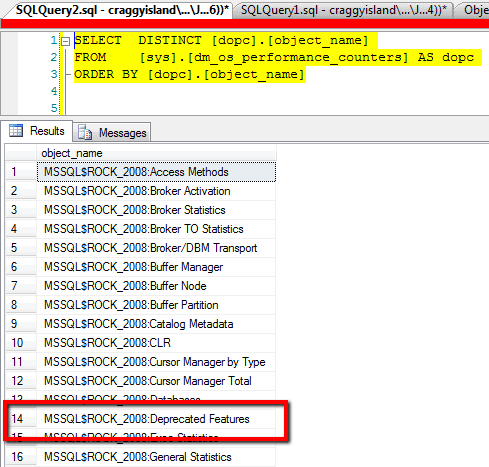 So we have here a convenient way to look at the activity going on within our SQL instance that is using features that are destined to be removed from SQL Server in future versions. Let’s see what sort of information it can give us;
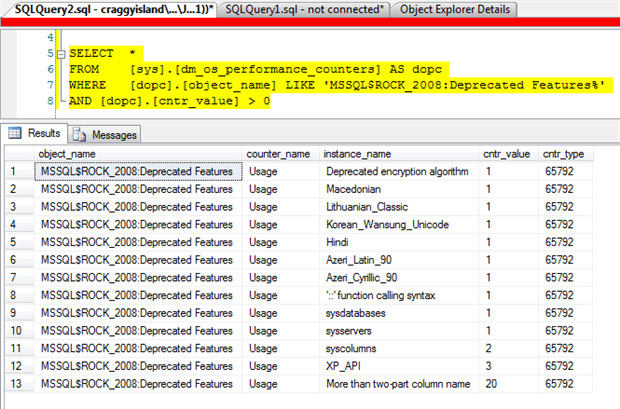 So, on my laptop instance we have a few different deprecated features being used. I’m not sure what the language-related items are so I might investigate those at another time. The deprecated features listed that would give me concern on a production system are Deprecated encryption algorithm , ‘::’ function calling syntax, sysdatabases , sysservers , syscolumns , XP_API and More than two-part column name. For a full list of deprecated features in SQL Server 2008 and their descriptions take a look at http://msdn.microsoft.com/en-gb/library/bb510662(v=sql.100).aspx. On our production servers we chose to review “More than two-part column name“ first. This feature is described as
“A query used a 3-part or 4-part name in the column list. Change the query to use the standard-compliant 2-part names. Occurs once per compilation.”
So we are seeing an application accessing our databases in some way that is using TSQL that will cause an error in a future version of SQL Server. It’s going to be useful to our development division to know about this as soon as possible so that they can work on refactoring the code in good time. As you can see though, the dm_os_performance_counters DMV only keeps a record of each time a feature is used, not where, when or how it was executed. We need some other way to collect executions.
Let’s take a look at creating an Extended Events(XE) session to capture the information we need. The events we are interested in are sqlserver.deprecation_announcement and sqlserver.deprecation_final_support. The distinction between these two events is that features in the former are due to be removed from SQL Server within 3 versions whereas those in the latter will not be available in the next version. Clearly features in deprecation_final_support are those that will demand your immediate attention and could potentially prevent an upgrade until the causes are resolved.
To create the XE session on SQL Server 2008 + SQL Server 2008 R2 we need to execute some TSQL;
|
1 2 3 4 5 6 7 8 9 10 11 12 13 14 15 16 17 18 |
CREATE EVENT SESSION [Deprecated_Events] ON SERVER ADD EVENT sqlserver.deprecation_announcement( ACTION(sqlos.task_time,sqlserver.client_app_name,sqlserver.client_hostname,sqlserver.client_pid,sqlserver.database_id,sqlserver.database_name,sqlserver.nt_username,sqlserver.session_id,sqlserver.sql_text)), ADD EVENT sqlserver.deprecation_final_support( ACTION(sqlos.task_time,sqlserver.client_app_name,sqlserver.client_hostname,sqlserver.client_pid,sqlserver.database_id,sqlserver.database_name,sqlserver.nt_username,sqlserver.session_id,sqlserver.sql_text)) /* pre SQL 2012 syntax */ ADD TARGET package0.asynchronous_file_target(SET filename=N'Y:\Logs\XE\Deprecated_Events.xel',max_file_size=(200)), ADD TARGET package0.ring_buffer WITH (MAX_MEMORY=4096 KB,EVENT_RETENTION_MODE=ALLOW_MULTIPLE_EVENT_LOSS,MAX_DISPATCH_LATENCY=30 SECONDS,MAX_EVENT_SIZE=0 KB,MEMORY_PARTITION_MODE=NONE,TRACK_CAUSALITY=OFF,STARTUP_STATE=ON) GO ALTER EVENT SESSION [Deprecated_Events] ON SERVER state = start |
|
1 2 |
ADD TARGET package0.event_file(SET filename= N'Y:\Logs\XE\Deprecated_Events.xel',max_file_size=(200)), |
- CREATE SESSION – well this creates the session! Give it a name (your choice) and scope (Server or Database)
- ADD EVENT – the events that you want to capture need to be added to the session. Not sure which ones to use? Check out the results from
|
1 2 3 4 5 6 7 |
SELECT [dxp].[name] , [dxo].[name] FROM [sys].[dm_xe_objects] AS dxo INNER JOIN [sys].dm_xe_packages dxp ON [dxp].[guid] = [dxo].[package_guid] WHERE [dxo].[object_type] = 'event' ORDER BY [dxp].[name] , [dxo].[name] |
- ACTION – What information should be collected when the event gets fired. Not sure what information you can collect? Check out the results from
|
1 2 3 4 5 6 7 |
SELECT [dxp].[name] , [dxo].[name] FROM [sys].[dm_xe_objects] AS dxo INNER JOIN [sys].dm_xe_packages dxp ON [dxp].[guid] = [dxo].[package_guid] WHERE [dxo].[object_type] = 'action' ORDER BY [dxp].[name] , [dxo].[name] |
- ADD TARGET – Where do you want the information to be collected for reference? Some are persistent; others will be zeroed if the instance is stopped or restarted. If you pick a file target then make sure there is room for the storage and if you are tracking events that are performance related don’t use storage that will skew your analysis.
- All details on CREATE EVENT can be found at: http://msdn.microsoft.com/en-us/library/bb677289(SQL.100).aspx (2008) http://msdn.microsoft.com/en-us/library/bb677289(SQL.105).aspx (2008 R2) http://msdn.microsoft.com/en-us/library/bb677289 (2012)
[sys].[server_event_sessions], [sys].[dm_xe_sessions]and [sys].[dm_xe_session_targets] to access the data directly:
|
1 2 3 4 |
SELECT CAST([DXST].[target_data] as xml) FROM [sys].[server_event_sessions] AS EES INNER JOIN [sys].[dm_xe_sessions] AS DXS ON [EES].[name] = [DXS].[name] INNER JOIN [sys].[dm_xe_session_targets] AS DXST ON [DXS].[address] = [DXST].[event_session_address] |
|
1 2 3 4 5 6 7 |
SELECT object_name AS CapturedEvent, CONVERT(xml, event_data) AS xml_data FROM sys.fn_xe_file_target_read_file( 'C:\Temp\Logs\XE\Deprecated_Events _0_130144746161150000*.xel', 'C:\Temp\Logs\XE\Deprecated_Events _0_130144746161160000*.xem', NULL, NULL) |
|
1 2 3 4 5 6 7 8 9 10 11 12 13 14 15 16 17 18 19 20 21 22 23 24 |
SELECT CapturedEvent, xml_data.value('(/event[@name=''deprecation_announcement'']/@timestamp)[1]', 'datetime') AS EventTime, xml_data.value('(/event/data[@name=''feature'']/value)[1]', 'varchar(max)') AS Feature, xml_data.value('(/event/action[@name=''nt_username'']/value)[1]', 'varchar(max)') AS UserName, xml_data.value('(/event/action[@name=''client_app_name'']/value)[1]', 'varchar(max)') AS client_app_name, xml_data.value('(/event/action[@name=''client_hostname'']/value)[1]', 'varchar(max)') AS client_hostname, xml_data.value('(/event/action[@name=''database_id'']/value)[1]', 'int') AS database_id, xml_data.value('(/event/action[@name=''attach_activity_id'']/value)[1]', 'char(38)') AS ActivityID, xml_data.value('(/event/data[@name=''object_id'']/value)[1]', 'varchar(max)') AS ObjectID, xml_data.value('(/event/data[@name=''object_type'']/value)[1]', 'varchar(max)') AS ObjectType, xml_data.value('(/event/data[@name=''object_name'']/value)[1]', 'varchar(max)') AS ObjectName, xml_data.value('(/event/action[@name=''sql_text'']/value)[1]', 'varchar(max)') AS SQL_Text, [v].[xml_data] INTO XE_Deprecated_Events FROM (SELECT object_name AS CapturedEvent, CONVERT(xml, event_data) AS xml_data, [x].[module_guid], [x].[package_guid], [x].[event_data], [x].[file_name], [x].[file_offset] FROM sys.fn_xe_file_target_read_file( 'C:\Temp\Logs\XE\Deprecated_Events_TwoPartNames_0_130144746161150000*.xel', 'C:\Temp\Logs\XE\Deprecated_Events_TwoPartNames_0_130144746161160000*.xem', NULL, NULL)as [x]) v |
|
1 2 3 4 5 6 7 8 9 10 11 12 13 14 15 16 17 18 19 20 21 22 23 |
CREATE EVENT SESSION [Deprecated_Events_TwoPartNames] ON SERVER ADD EVENT sqlserver.module_end( ACTION sqlos.task_time, sqlserver.client_app_name, sqlserver.client_hostname, sqlserver.client_pid, sqlserver.database_id, sqlserver.nt_username, sqlserver.session_id, sqlserver.sql_text) WHERE (([sqlserver].[database_id](<>10)) AND ([sqlserver].[database_id]<>(4)))), ADD EVENT sqlserver.deprecation_announcement( ACTION(sqlos.task_time, sqlserver.client_app_name, sqlserver.client_hostname, sqlserver.client_pid, sqlserver.database_id, sqlserver.nt_username, sqlserver.session_id, sqlserver.sql_text) WHERE ([feature]=N'More than two-part column name' and ([sqlserver].[client_app_name]=N'AppNameHere' OR [sqlserver].[client_app_name]= N'AppNameHere'))), ADD EVENT sqlserver.deprecation_final_support( ACTION(sqlos.task_time, sqlserver.client_app_name, sqlserver.client_hostname, sqlserver.client_pid, sqlserver.database_id, sqlserver.nt_username, sqlserver.session_id, sqlserver.sql_text) WHERE ([feature]=N'More than two-part column name' and ([sqlserver].[client_app_name]= N'AppNameHere' OR [sqlserver].[client_app_name]= N'AppNameHere'))) ADD TARGET package0.asynchronous_file_target(SET filename=N'Y:\Logs\XE\Deprecated_Events.xel',max_file_size=(200)), ADD TARGET package0.ring_buffer WITH (EVENT_RETENTION_MODE = ALLOW_MULTIPLE_EVENT_LOSS, STARTUP_STATE=ON, TRACK_CAUSALITY=ON) GO |
TRACK_CAUSALITY=ON means that all events get an extra value in their data
|
1 2 3 |
<action id="attach_activity_id"" package="package0"> <value>F6E7C402-66E6-4AC8-B6F7-33CF3C6E8AC5-1</value> </action> |
|
1 2 3 4 5 6 7 8 9 10 11 12 13 14 15 16 17 18 19 20 21 22 23 24 25 |
SELECT CapturedEvent, xml_data.value('(/event[@name=''deprecation_announcement'']/@timestamp)[1]', 'datetime') AS EventTime, xml_data.value('(/event/data[@name=''feature'']/value)[1]', 'varchar(max)') AS Feature, xml_data.value('(/event/action[@name=''nt_username'']/value)[1]', 'varchar(max)') AS UserName, xml_data.value('(/event/action[@name=''client_app_name'']/value)[1]', 'varchar(max)') AS client_app_name, xml_data.value('(/event/action[@name=''client_hostname'']/value)[1]', 'varchar(max)') AS client_hostname, xml_data.value('(/event/action[@name=''database_id'']/value)[1]', 'int') AS database_id, xml_data.value('(/event/action[@name=''attach_activity_id'']/value)[1]', 'char(38)') AS ActivityID, xml_data.value('(/event/data[@name=''object_id'']/value)[1]', 'varchar(max)') AS ObjectID, xml_data.value('(/event/data[@name=''object_type'']/value)[1]', 'varchar(max)') AS ObjectType, xml_data.value('(/event/data[@name=''object_name'']/value)[1]', 'varchar(max)') AS ObjectName, xml_data.value('(/event/action[@name=''sql_text'']/value)[1]', 'varchar(max)') AS SQL_Text, [v].[xml_data] INTO XE_Deprecated_Events_TwoPartNames_02 FROM (SELECT object_name AS CapturedEvent, CONVERT(xml, event_data) AS xml_data, [x].[module_guid], [x].[package_guid], [x].[event_data], [x].[file_name], [x].[file_offset] FROM sys.fn_xe_file_target_read_file( 'C:\Temp\Logs\XE\Deprecated_Events_TwoPartNames*.xel', 'C:\Temp\Logs\XE\Deprecated_Events_TwoPartNames*.xem', NULL, NULL) as [x]) v |
 In order for us to link the events from both the deprecation events and the module_end events we need to link the data we have by the GUID part of the Activity_ID and then sort by the sequence number. To do this effectively over a large number of events I found it best to alter the table and create a column specifically for the GUID part of the Activity_ID and then create an index on it.
|
1 2 3 4 5 6 7 8 9 |
ALTER TABLE [dbo].[XE_Deprecated_Events_TwoPartNames_02] ADD ActivityID36 CHAR(36) UPDATE [dbo].[XE_Deprecated_Events_TwoPartNames_02] SET ActivityID36 = LEFT([dbo].[XE_Deprecated_Events_TwoPartNames_02].[ActivityID], 36) CREATE CLUSTERED INDEX IX_ActivityID36 ON [XE_Deprecated_Events_TwoPartNames_02] ([ActivityID36]) GO |
|
1 2 3 4 5 6 7 8 9 10 11 12 13 14 15 16 17 18 19 20 21 22 23 24 25 26 27 28 29 30 31 32 |
SELECT DISTINCT [XDETPN].[ActivityID36], [XDETPN].[ActivityID] INTO #ActivityID_DA FROM [dbo].[XE_Deprecated_Events_TwoPartNames_02] AS XDETPN WHERE [XDETPN].[CapturedEvent] = 'deprecation_announcement'; SELECT DISTINCT [XDETPN].[ActivityID36], [XDETPN].[ActivityID] INTO #ActivityID_ME FROM [dbo].[XE_Deprecated_Events_TwoPartNames_02] AS XDETPN WHERE [XDETPN].[CapturedEvent] = 'module_end'; SELECT DISTINCT [XDETPN].[ObjectID], [XDETPN].[ObjectName], CASE [XDETPN].[ObjectType] WHEN 'FN' THEN 'Function' WHEN 'P' THEN 'Stored Procedure' WHEN 'TR' THEN 'Trigger' WHEN 'TF' THEN 'Table Valued Function' WHEN 'X' THEN 'XP Procedure' ELSE [XDETPN].[ObjectType] + ' << Unknown ' END AS ObjectType --[XDETPN].[xml_data] FROM [dbo].[XE_Deprecated_Events_TwoPartNames_02] AS [XDETPN] INNER JOIN [#ActivityID_ME] AS AIM ON [XDETPN].[ActivityID36] = [AIM].[ActivityID36] INNER JOIN [#ActivityID_DA] AS AID ON [XDETPN].[ActivityID36] = [AID].[ActivityID36] ORDER BY [XDETPN].[ActivityID] desc |
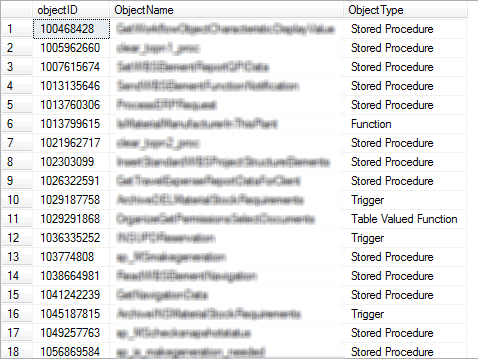 Now all we need do is take the results and break the news gently to the developers. Giving them a detailed list of database objects to focus on is a much better way for them to tackle this sort of problem rather than watching them review every object in the database trying to hunt down code issues. It will also let them prioritise both the order that work is done and the resources that are put on the work when they see how big the list of changes is.
Wish me luck!
FAQs
1. How do I prepare to upgrade SQL Server?
Five-stage approach. (1) Run the Database Migration Assistant (DMA) against each database – it statically analyses schemas and scripts for compatibility issues with the target version and produces an assessment report. For Azure migrations, Azure Migrate: Database Migration is the equivalent. (2) Identify deprecated features actually in use at runtime (DMA catches compile-time issues but not every runtime path): query sys.dm_os_performance_counters for deprecation counters, and capture sqlserver.deprecation_announcement and sqlserver.deprecation_final_support events with Extended Events to see which specific queries and applications trigger them. (3) Remediate: rewrite queries, update application code, or plan workarounds for features that can’t be easily replaced. (4) Test on a non-production environment running the target SQL Server version with a workload replay. (5) Plan the upgrade itself (in-place vs side-by-side, backup and rollback strategy, downtime window, post-upgrade validation checklist). This article focuses on stage 2 – the runtime-detection piece that complements DMA’s static analysis.
2. What is sys.dm_os_performance_counters used for in SQL Server upgrade planning?
sys.dm_os_performance_counters is a DMV that exposes the internal SQL Server performance counters – the same counters visible in Windows Performance Monitor. For upgrade planning, the ‘SQLServer:Deprecated Features’ counter object tracks each deprecated feature’s usage count since SQL Server started. Query: SELECT object_name, counter_name, cntr_value FROM sys.dm_os_performance_counters WHERE counter_name LIKE ‘%deprecated%’ ORDER BY cntr_value DESC. High cntr_value indicates the deprecated feature is being used frequently on this instance; zero indicates it’s either not used or the instance was recently restarted. This gives you the WHICH (which features are in use) but not the WHERE (which applications or queries use them) – for that, Extended Events capture is needed.
3. What is the difference between deprecation_announcement and deprecation_final_support in SQL Server?
These are two Extended Events raised when queries use deprecated features, with different urgency levels. deprecation_announcement fires for features that Microsoft has announced will be removed but will remain available for at least the next three SQL Server versions – these are advance warnings for forward planning. deprecation_final_support fires for features that will be removed in the next version – these are urgent: queries using them will fail after the upgrade. An Extended Events session capturing both gives you the full picture, with priority routing based on event name: deprecation_final_support events need immediate remediation, deprecation_announcement events can be scheduled as part of broader refactoring work.
4. How do I capture deprecated feature usage with Extended Events in SQL Server?
Create an XE session that captures both deprecation events along with the SQL text and client identification. Example: CREATE EVENT SESSION [DeprecatedFeatureTracking] ON SERVER ADD EVENT sqlserver.deprecation_announcement (ACTION (sqlserver.sql_text, sqlserver.session_id, sqlserver.client_app_name, sqlserver.database_name)), ADD EVENT sqlserver.deprecation_final_support (ACTION (sqlserver.sql_text, sqlserver.session_id, sqlserver.client_app_name, sqlserver.database_name)) ADD TARGET package0.event_file (SET filename = ‘C:\XE\Deprecated.xel’) WITH (STARTUP_STATE = ON). Start the session, let it run for a representative period (typically several days to capture monthly, weekly, and daily workloads), then read the captured data with sys.fn_xe_file_target_read_file to see exactly which SQL statements and which applications are triggering each deprecation event. Correlate with the Extended Events tutorial earlier in this change pack for XE session management details.
This document contains proprietary information and is protected by copyright law.
Copyright © 2026 Red Gate Software Limited. All rights reserved

Load comments