
Detecting Data Masking Gaps in a CI Pipeline
If you use Redgate Test Data Manager to anonymize production-derived test data and Flyway to manage schema changes, you need a way to keep masking rules aligned with schema evolution. The most reliable approach is to validate masking coverage in CI: run a masking drift check as part of the Flyway pipeline and fail the build if schema changes introduce sensitive columns that aren’t yet covered by the masking configuration. This article shows how the check works, what it validates, and where it can fit into a typical delivery workflow.
When the schema changes but masking does not
A database migration can run without incident but quietly create a compliance problem. How?
- Schema changes in development – a migration introduces a new sensitive column, in this case, a phone number column:
|
1 |
ALTER TABLE Customers ADD Phone NVARCHAR(20); |
- Change approved and deployed – the schema change moves through the normal pipeline successfully, to production.
- Scheduled ‘refresh’ of development and test environments – production-derived data is protected using the existing masking configuration and then copies are provisioned downstream.
- Data protection compromised– real customer phone numbers quietly leak into non-production environments because the masking configuration didn’t include the new column.
What’s missing is a step that detects that the data masking coverage needed to be updated to reflect the schema changes. This is ‘masking drift’ and it can happen in any process where schema evolution and masking configuration are maintained separately.
Detecting masking drift before it causes compliance problems.
In many organizations, the operations team owns the anonymization process that prevents PII from leaking into non-production environments. Tools such as Redgate Test Data Manager use classification to identify sensitive columns, and masking rules (in JSON/YAML) to enforce data protection, before refreshed copies are distributed to development and test.
Developers then own and manage subsequent schema changes, using a tool such as Flyway, where changes are applied in a series of versioned SQL migrations. Those changes may sometimes add or alter columns that are or should be classified and masked. If the protection rules fail to stay in sync, the next ‘refresh’ of downstream environments can introduce a compliance gap.
The fix is to treat masking coverage as a validation check: compare what the classification process detects in the current schema with what the masking configuration currently protects, and stop the process if there are gaps:
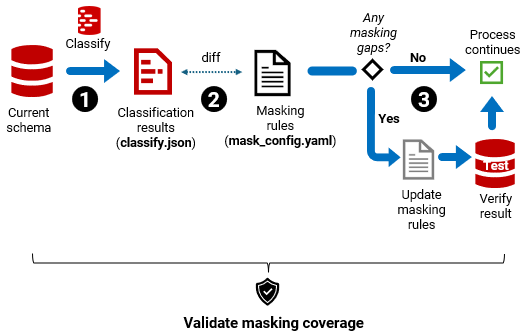
- Step 1– Classify the schema for PII (
rganonymize classify→ classify.json) - Step 2 – Diff against current masking rules → PASS/FAIL + list of gaps.
- Step 3 – Enforce the result. Proceed if PASS; if FAIL, update rules, verify outcome
Where should masking validation run?
There are two sensible places to incorporate this masking validation check. They will catch masking drift at different points in the process, and so put the responsibility (and any associated pain) on different teams:
- Data treatment workflow – prevents unsafe data from being distributed. Managed by the operations team
- CI workflow – a build validation check that blocks any ‘unsafe’ migration. Managed by the development team.
Validate masking coverage in the data treatment workflow
In a typical refresh of downstream environments, the operations team restores a recent production backup in a secure environment, applies the current data-treatment rules (subset and masking), and publishes a compliant base copy that’s then used to provision development and test databases.
To detect masking drift, we insert our masking coverage validation step as a pre-flight gate, before masking is applied:
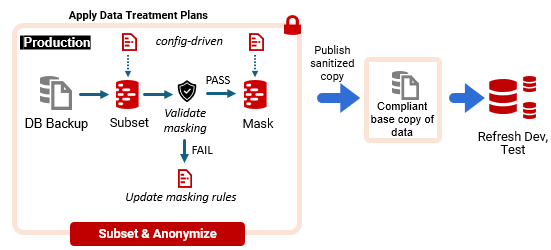
The drawback is timing. If the check runs at refresh time, the Ops team discover gaps exactly when the development team are waiting for fresh data, so the refresh is blocked until the rules are updated and the outcome is verified.
In practice, if fixing the gap involves manual work (catalog updates, mapping decisions, config edits, review/verification), it competes with other Ops priorities and can sit in a queue. The result is that developers work against a stale base copy in the meantime, which will reduce the quality of testing.
One way to reduce that bottleneck is to keep masking rules as simple and repeatable as possible. Five ways to simplify data masking has a useful set of approaches that make ongoing maintenance and review much easier.
Validate masking coverage in the CI workflow
SQL migrations are already validated in CI during pull request builds. Teams using Flyway migrations typically already check them using Flyway’s built-in policy checks. These are designed to catch changes that increase risk (e.g., security-sensitive changes) early, when they are easiest and cheapest to fix.
Similarly, masking drift increases the risk of PII leakage and ought to be detected and addressed as early as possible. In CI, we add our masking coverage validation as one more check in the pull request pipeline:
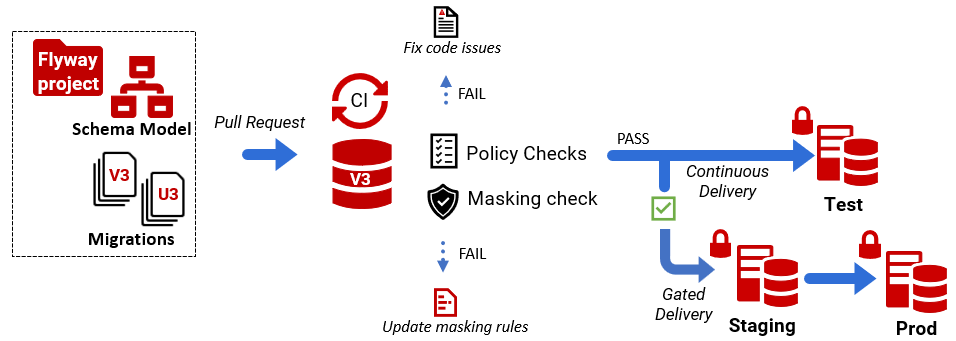
|
1 2 3 4 5 6 7 8 9 10 11 12 |
Pull Request │ ▼ CI Build │ ├─ Provision disposable build database ├─ Apply Flyway migrations to bring db schema to latest version ├─ Run PII classification ├─ Compare with current masking config │ ├─ PASS → PR can merge └─ FAIL → report masking gaps, block PR until coverage updated |
This approach ensures that masking coverage evolves alongside the schema: if a migration adds or changes a sensitive column, the pipeline flags it immediately, with a list of gaps.
How you handle a failure depends on ownership. In some teams, developers might update the masking configuration in the same PR so the check passes. In others, the PR produces a masking gaps report that is handed off to Ops, and the change remains blocked until the updated rules are ready and the outcome is verified.
Some organizations adopt a staged policy: CI raises a warning and generates the gaps report, but approval to merge is conditional on Ops sign-off, or on the refresh pipeline enforcing the check. Either way, the gap is detected at the point masking drift is introduced, giving teams time to resolve it before it becomes a ‘hard’ blocker to the next data refresh.
Example: Masking coverage validation in the CI pipeline
In this worked example, we provision a disposable CI build database and apply the pending Flyway migrations from the current branch to bring the schema up to the release candidate version. We then use Redgate Test Data Manager’s rganonymize CLI to classify sensitive columns and compare the classification output with the current masking configuration using a simple Python diff script. If any sensitive columns are missing coverage, the check fails the build and produces a masking gaps report. This runs as a standard validation step in the Flyway CI pipeline. At the start of the demo, the FlywayMaskingDemo project is stored in version control, and looks like this(you can download it from GitHub repo): 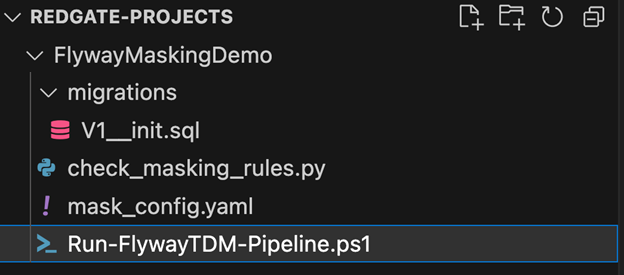
In this example, V1 represents the current baseline schema version. When we run flyway migrate against an empty database, Flyway applies V1__init.sql and creates a temporary build database at the same schema version. The mask_config.yaml file contains the masking configuration for this baseline schema. You can download this file with the demo, or recreate it yourself by running rganonimze classify followed by rganonymize map against the V1 database and saving the generated masking configuration back into the project. Next, we introduce a schema change by adding a second migration, V2__add_phone.sql:
|
1 |
ALTER TABLE Customers ADD Phone NVARCHAR(20); |
When we run flyway migrate again (as the CI build would), the database schema is updated to V2. The next step is to regenerate the classification output for the updated schema.
Automatically detect sensitive columns
Redgate Test Data Manager provides a command-line tool called rganonymize that can analyze a database schema and classify columns likely to contain personally identifiable information (PII).
Running rganonymize classify analyzes the database schema and produces a structured output file (for example, classify.json):
|
1 |
rganonymize classify --connection-string "...connection..." --output Json |
The result might look like this:
|
1 2 3 4 5 6 7 8 9 10 11 12 13 14 |
{ "tables": [ { "schema": "dbo", "name": "Customers", "columns": [ {"name": "FullName", "type": "FullNames"}, {"name": "Email", "type": "EmailAddresses"}, {"name": "Phone", "type": "PhoneNumbers"} ] } ] } } |
This provides a current inventory of columns that the classifier considers sensitive, based on recognition and profiling.
Comparing classification output with Masking Rules
Masking rules are typically maintained in a configuration file such as mask_config.yaml. For example:
|
1 2 3 4 5 6 7 8 |
tables: - schema: dbo name: Customers columns: - name: FullName dataset: FullNames - name: Email dataset: EmailAddresses |
In this example, the Phone column is missing from the masking configuration. To detect this masking drift, we compare the set of classified sensitive columns with the set of columns covered by masking rules, using a Python validation script. Any columns present in classification but absent from the masking config are treated as gaps. Note: This validation focuses on detecting newly introduced PII columns that are not yet covered by masking rules. It does not track other types of schema change, such as altering existing sensitive columns.
import yaml, json, sys
# Load masking rules from mask_config.yaml
with open('mask_config.yaml') as f:
   config = yaml.safe_load(f)
   mask_rules = set()
   for table in config.get('tables', []):
       tname = table['name']
       for col in table.get('columns', []):
           mask_rules.add((tname, col['name']))
# Load classified PII columns from classify.json
with open('classify.json') as f:
   data = json.load(f)
   pii_columns = set()
   for table in data.get('tables', []):
       tname = table['name']
       for col in table.get('columns', []):
           if col.get('type'):
               pii_columns.add((tname, col['name']))
# Compare sets
missing = pii_columns - mask_rules
# Print results
if missing:
   print("Missing masking rules for these PII columns:")
   for t, c in sorted(missing):
       print(f"  - {t}.{c}")
   sys.exit(1)
else:
   print("All PII columns are covered by masking rules.")
If any classified columns are missing from the masking configuration, the validation fails:
Missing masking rules:
  - Customers.Phone
A non-zero exit code fails the CI step, forcing the team to update the masking configuration (or explicitly handle/approve the exception) before the change proceeds.
Integrating the check into the pipeline
To make this check practical, you run it as a standard CI validation step. The script below provisions (or connects to) a disposable build database, applies the migrations to reach the latest schema version, runs a PII classification pass, and then uses the Python script to compare the classification output with the current masking configuration. If any sensitive columns are missing coverage, it writes a gaps report and fails the build; otherwise, it exits cleanly so the pipeline can continue.
|
1 2 3 4 5 6 7 8 9 10 11 12 13 14 15 16 17 18 19 20 21 22 23 24 25 26 27 28 29 30 31 32 33 34 35 36 37 38 39 40 41 42 43 44 45 46 47 48 |
# Fail fast $ErrorActionPreference = "Stop" # ----------------------------- # Default values (for local run) # ----------------------------- if (-not $env:DB_SERVER) { $env:DB_SERVER = "localhost" } if (-not $env:DB_NAME) { $env:DB_NAME = "FlywayCITest" } if (-not $env:MIGRATIONS_PATH) { $env:MIGRATIONS_PATH = ".\migrations" } if (-not $env:MASK_CONFIG_PATH) { $env:MASK_CONFIG_PATH = ".\mask_config.yaml" } if (-not $env:RGANONYMIZE_PATH) { $env:RGANONYMIZE_PATH = "C:\Program Files\Red Gate\Test Data Manager\rganonymize.exe" } $DbServer = $env:DB_SERVER $DbName = $env:DB_NAME $Migrations = $env:MIGRATIONS_PATH $MaskConfig = $env:MASK_CONFIG_PATH $RgPath = $env:RGANONYMIZE_PATH Write-Host "Running masking validation pipeline..." Write-Host "DB: $DbServer / $DbName" # ----------------------------- # Step 1 – Apply Flyway migrations # ----------------------------- flyway ` -url="jdbc:sqlserver://$DbServer;databaseName=$DbName;encrypt=true;integratedSecurity=true" ` -locations="filesystem:$Migrations" ` migrate # ----------------------------- # Step 2 – Classify schema # ----------------------------- & "$RgPath" classify ` --database-engine SqlServer ` --connection-string "Server=$DbServer;Database=$DbName;Integrated Security=True;Encrypt=True" ` --classification-file classify.json ` --output Json --output-all-columns # ----------------------------- # Step 3 – Validate masking # ----------------------------- python check_masking_rules.py ` --classify classify.json ` --mask $MaskConfig ` --report masking_gaps.txt # ----------------------------- # Step 4 – Enforce result # ----------------------------- if ($LASTEXITCODE -ne 0) { Write-Host "FAIL: masking gaps detected. See masking_gaps.txt" exit 1 } Write-Host "PASS: masking coverage validated." exit 0 |
Resolving the masking drift
The final task is resolving the masking drift, which means updating the masking configuration to cover the newly classified columns, then re-running masking and verifying the result. This might mean running simple metadata checks against the masked database, confirming that all tables and columns are classified and masked as required, and that masked data remains usable, with relationships intact, and all queries behave as expected.
Conclusion
Masking classifications and rules need to keep pace with schema change. When a release adds or changes a column that should be treated as sensitive, the masking configuration must change too. If it doesn’t, the next refresh can push real data into places it doesn’t belong.
In this article, we treat masking coverage as a CI validation check that runs alongside your existing Flyway checks. Build a disposable database from the migrations in the current branch, classify the resulting schema, and compare the classification output to the current masking configuration. If anything is missing, fail the build and produce a gaps report.
That turns masking drift from a late discovery during an Ops refresh into a continuous and enforceable part of the database delivery process; every update to the masking configuration is directly linked to the Flyway change that introduced it.
Tools in this post
You may also like
-

Article
Working with Flyway And Entity Framework Code First: An Overview
This article presents an approach to database development and deployment that combines the strengths of Entry Framework Code First for .NET-driven development with the control and database versioning provided by Flyway's SQL migrations. It allows every database change to be reviewed and tested for integrity, performance, and stability in the same way as any application change. It should make a Database CI process much easier to sustain.
-

Article
Simple Reporting with Flyway and Database Models
If you can generate a file-based (JSON) model for each new version of a database, produced by a Flyway migration, then you have an easy way to run simple reports to help you search, list, and understand the structure of these databases. I'll show how to produce the models using PowerShell and then run some queries against them to generate the reports.
-

Live training session
Bare Bones of DevOps in AWS
In this session Grant Fritchey introduces the absolute baseline needed to start your database DevOps journey within the AWS ecosystem. He starts with how you can get your database into source control and ends with the start of a Continuous Integration (CI) process. These are the fundamentals of any extended DevOps process including CI and Continuous Delivery (CD). With the fundamentals in place, building more advanced processes is simply a matter of the labor to build on that foundation.
-

Article
Scripting with Flyway Teams and PowerShell
During the development cycle, the mechanics of reliable delivery must not be allowed to dominate the design work. With script callbacks in Flyway Teams, many of the development tasks required during a database migration can happen automatically, producing reports, build scripts, code reviews, or documentation.
-
Article
How to Write and Debug a PowerShell Callback for Flyway Migrations
We can use callbacks in Flyway to plug into any part of the Flyway lifecycle and run various database tasks before or after a particular event takes place. In this article I've tried to assemble a 'best practice' guide for writing callbacks to ensure that the scripts always behave predictably, and so that when things go awry the cause is easy to spot, without hours of painful scrolling through Flyway output.
-
Article
Flyway Branching Walkthrough
We'll step through the process of using Flyway Teams to support database branching and merging, where the team split the development effort into isolated, task-based branches, and each branch has its own development database.


