





In this article, the latest in the MySQL vs PostgreSQL series, we’ll compare how they each handle JSON (JavaScript Object Notation) data, how they store, query, and manage it, and which offers more flexibility or better performance depending on your needs.
MySQL and PostgreSQL are two of the most popular relational database systems in the world. Both are open-source, widely used in web and enterprise applications, and support structured data in tables.
Modern applications, however, often work with semi-structured data that doesn’t always neatly fit into tables with rows and columns. This type of data gets its name because it still has some organization but doesn’t follow a strict format.
JSON (JavaScript Object Notation) is a popular way to store and share this kind of data. It’s a text format easy for both people and computers to understand.
Because of its simplicity, JSON is widely used in web applications, APIs, and databases to store and transfer data efficiently. Here’s an example of what JSON data typically looks like:
|
1 2 3 4 5 6 7 8 9 |
{ "name": "Aisha", "age": 10, "email": "aisha@simpletalk.com" } |
JSON Support in Databases
Modern web and mobile apps often share data using JSON through APIs. Storing JSON in a database makes it easier to handle flexible and changing data and, unlike regular tables, it can store nested information, which is useful for complex data.
It’s also great for data that changes often or has unpredictable fields. Instead of changing the database structure, developers can just update the JSON data, making development faster and more flexible.
As applications grow more dynamic, especially with APIs, web services and mobile apps, the need to store and process JSON data inside a database has become increasingly important.
JSON Support in MySQL, Explained
MySQL introduced support for the JSON data type in version 5.7. Before this, JSON had to be stored as plain text, which made it harder to query or validate. The native support of the JSON data type allows developers to store structured JSON data in a column and work with it more easily and efficiently.
When you insert JSON into a JSON column, MySQL stores it in a special binary format, not as plain text. This format allows for faster access and better performance when querying specific parts of the JSON document.
MySQL also allows you to create indexes on virtual columns derived from JSON values, but you can’t directly index the entire JSON object.
When you store JSON in MySQL, the engine uses a compact binary format under the hood, but the overall disk usage ends up being very close to what you’d need if you saved the same text as LONGTEXT. Here’s what to expect:
- Base Size ≃ Text Length: MySQL reserves roughly as many bytes as the UTF-8 text of your JSON document. In other words, if your JSON text is 1 KB, you’ll see about 1 KB of storage use before overhead.
- Binary Overhead: On top of that, MySQL adds small bookkeeping structures – things like metadata tags and lookup dictionaries that let it navigate and modify JSON quickly. For a simple string element, this overhead is typically 4–10 extra bytes, depending on how big the string is and where it lives in your JSON object or array.
- Maximum Document Size: A single JSON value can be as large as your
max_allowed_packetsetting (often several megabytes by default), so you’re only limited by that network/packet size, not by the JSON type itself. - Measuring Storage Use with JSON_STORAGE_SIZE(): MySQL provides the
JSON_STORAGE_SIZE()function to see exactly how many bytes a JSON value consumes in its binary form. You can use this to monitor exactly how much space your JSON data requires and adjust your schema or storage strategy accordingly.
If you’re storing lots of very small JSON snippets, the per-element overhead can add up. In that case, consider whether some of the data could live in traditional columns or if you can consolidate multiple small JSON values into a single document.
Otherwise, for most real-world payloads, the approximately ~5–10% overhead is a fair trade-off for faster parsing and richer query support.
JSON Functions in MySQL
MySQL has a set of built-in JSON functions that let you build JSON documents, extract values, update or remove elements, and even validate or pretty-print your data. Here are some common JSON functions and how to use them:
How To Create JSON Documents
MySQL allows you to create JSON documents using the following functions:
i. JSON_OBJECT(key, value): The JSON_OBJECT() function creates a JSON object based on the keys and values you provide. Here’s an example on how to use this:
|
1 2 3 4 5 |
SELECT JSON_OBJECT( 'id', 101, 'name', 'banana', 'price', 1.25 ) AS product; |
This query returns a JSON object created from the key and values provided:
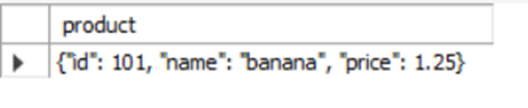
ii. JSON_ARRAY(): The JSON_ARRAY() function allows you to build a JSON array from a list of values.
|
1 |
SELECT JSON_ARRAY('apple', 'banana', 'cherry') AS fruits; |
This query should return a JSON array containing the values we listed above:
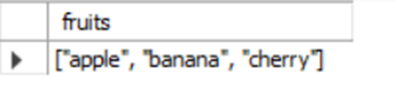
The JSON_ARRAY() function also allows you to nest elements within the array.
iii. JSON_QUOTE(): The JSON_QUOTE() function takes a plain text string and turns it into a JSON-safe string. It wraps the string in double quotes and escapes any special characters like quotes or backslashes inside the string.
Suppose you have a user comment stored in a string, and you want to convert it into a JSON-safe format, here’s how you can do this using the JSON_QUOTE() function:
|
1 |
SELECT JSON_QUOTE('Hi there! It\'s a great day :)'); |
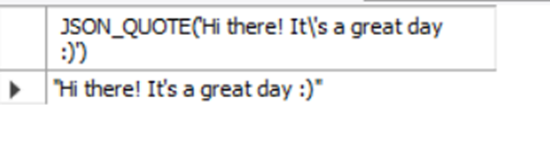
MySQL automatically wraps the string in double quotes and escapes any necessary characters (like the apostrophe ‘ or backslashes).
Aggregate functions such as the JSON_ARRAYAGG() and JSON_OBJECTAGG() are also available in MySQL. To learn more about how to use the aggregate function, please visit the official documentation.
How To Search JSON Documents
MySQL offers a handy set of functions that allows you to search and extract data from your JSON documents. Here are some of the available functions::
i. JSON_EXTRACT(json_doc, path): The JSON_EXTRACT() function fetches data from a JSON document using a “path” expression. Here’s a typical example on how to use this function:
|
1 2 |
SET @doc = '{"user": {"name": "Alice","age": 25}}'; SELECT JSON_EXTRACT(@doc, '$.user.name') AS user_name; |
This returns the username (Alice) which was the requested path:
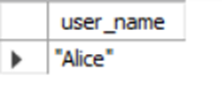
ii. JSON_UNQUOTE(): You can use the JSON_UNQUOTE() function to remove surrounding quotes from a JSON string. Let’s try an example where we remove the surrounding quotes from the username “Alice” that we extracted earlier:
|
1 |
SELECT JSON_UNQUOTE(JSON_EXTRACT(@doc, '$.user.name')) AS user_name; |
Here is the expected result:
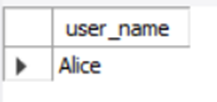
iii. JSON_CONTAINS(target, candidate[, path]): The JSON_CONTAINS() function checks whether a JSON document contains a candidate value (optionally at a path):
|
1 2 |
SET @colors = '["red","green","blue"]'; SELECT JSON_CONTAINS(@colors, '"green"') AS has_green; |
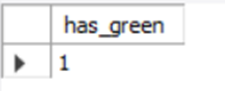
The expected result is 1, which represents a Boolean true, confirming that the document contains the color green.
iv. JSON_KEYS(json_doc[, path]): The JSON_KEYS() function returns a list of keys at the top level (or at a given path). Here’s an example on how this function works:
|
1 |
SELECT JSON_KEYS('{"a":1, "b":2, "c":3}') AS list_of_keys; |
This is the expected result:
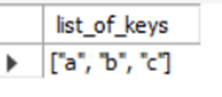
There are many more JSON functions available in MySQL for advanced searching and manipulation. You can explore the full list in the official documentation.
How To Modify JSON Documents
MySQL has a pretty neat list of some in-built functions that make it easy to add, update, or remove values within your JSON documents. Below are some of the commonly used functions you can take advantage of:
i. JSON_INSERT(json_doc, path, val): The JSON_INSERT() function adds a new key/value to the JSON document only if the key doesn’t already exist. Here’s an example on how to use this function:
|
1 |
SELECT JSON_INSERT('{"name": "Alice"}', '$.age', 25); |
The output:
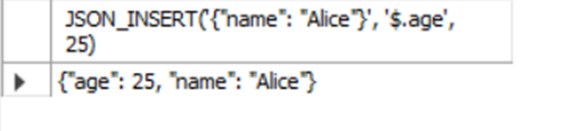
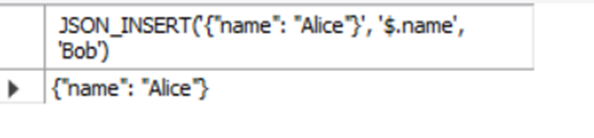
If you try to insert at a path that already exists, it won’t change the value.
|
1 |
SELECT JSON_INSERT('{"name": "Alice"}', '$.name', 'Bob'); |
ii. JSON_ARRAY_INSERT(json_doc, path, val): The JSON_ARRAY_INSERT() function inserts a value into a JSON array at the specified position. The path must point to a valid array index.
|
1 |
SELECT JSON_ARRAY_INSERT('[10, 20, 30]', '$[1]', 15); |
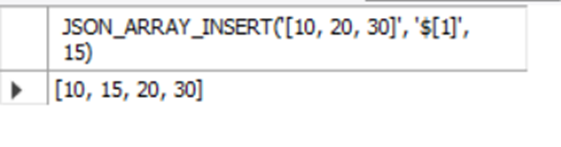
Here, 15 is inserted at index 1.
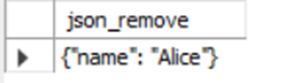
iii. JSON_REMOVE(json_doc, path): The JSON_REMOVE() function removes a value from the JSON document at the specified path. Here is an example on how you can use the JSON_REMOVE() function:
|
1 |
SELECT JSON_REMOVE('{"name": "Alice", "age": 25}', '$.age') AS json_remove; |
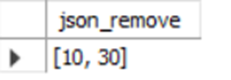
You can also remove elements from arrays too:
|
1 |
SELECT JSON_REMOVE('[10, 20, 30]', '$[1]'); |
iv. JSON_REPLACE(json_doc, path, val): The JSON_REPLACE() function replaces the value only if the key or path exists. If it doesn’t, nothing changes. Here’s an example:
|
1 |
SELECT JSON_REPLACE('{"name": "Alice", "age": 25}', '$.age', 26) AS JSON_REPLACE; |
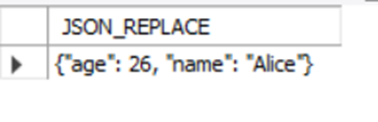
Let’s now try to replace a non-existing key:
|
1 |
SELECT JSON_REPLACE('{"name": "Alice"}', '$.age', 30) AS JSON_REPLACE; |
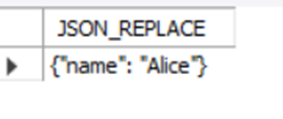
As expected, the output doesn’t change because there is no key called “age”. MySQL offers a wide range of built-in functions to extract, modify, and work with JSON data, many of which haven’t been covered in this article. For a complete list and more advanced use cases, be sure to check out the official MySQL documentation.
JSON Path Expressions in MySQL
In MySQL, JSON path expressions are utilized to pinpoint specific elements within a JSON document. These expressions are integral to various JSON functions, such as JSON_EXTRACT(), JSON_SET() and JSON_CONTAINS(), allowing precise data retrieval and modification.
BASIC SYNTAX
$: Denotes the root of the JSON document.
.: Accesses a member of a JSON object.
[]: Accesses elements within a JSON array by index.
*: Wildcard to match all members or elements.
Here are some examples:
$.name: Accesses the name key at the root level.
$.address.city: Accesses the city key within the address object.
$[0]: Accesses the first element in a JSON array.
$[*]: Accesses all elements in a JSON array.
You might have noticed the use of path expressions in our earlier examples. Below are a few common examples that explain what these JSON path expressions actually mean when used.
Assume we have a table called ‘users’ with a ‘details’ column of type JSON:
|
1 2 3 4 5 6 7 8 |
CREATE TABLE users ( id INT AUTO_INCREMENT PRIMARY KEY, name VARCHAR(50), details JSON ); INSERT INTO users (name, details) VALUES ('Alice', '{"age": 25, "skills": ["Python", "SQL", "HTML"]}'), ('Bob', '{"age": 30, "skills": ["Java", "C++", "JavaScript"]}'); |
1. Extracting data from a member of a JSON document
|
1 |
SELECT JSON_EXTRACT(details, '$.age') AS age FROM users; |
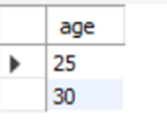
This query retrieves the age from each ‘details’ JSON object.
2. Accessing an element by array index []
|
1 |
SELECT JSON_EXTRACT(details, '$.skills[0]') AS first_skill FROM users; |
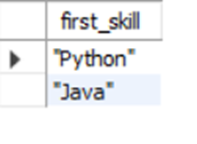
This query retrieves the first skill from the skills array.
3. Using Wildcards *
|
1 |
SELECT JSON_EXTRACT(details, '$.skills[*]') AS all_skills FROM users; |
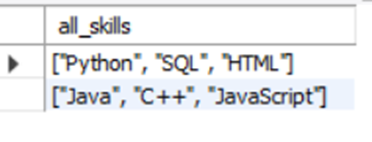
The wildcard * retrieves all elements in the skills array as a JSON array.
Limitations of JSON in MySQL
While MySQL does support working with JSON data, there are a few notable limitations, such as:
1. Indexing Limitations: MySQL does not natively index JSON fields like a traditional column. You can only index virtual columns that extract part of a JSON document. There’s also no built-in GIN-style indexing like in PostgreSQL that speeds up searches inside large JSON data.
2. No Support for JSONB (Binary + Index-Friendly Format): Unlike PostgreSQL’s JSONB, which is optimized for both storage and querying, MySQL stores JSON in a binary format internally but doesn’t expose the same level of indexing and flexibility. Although MySQL’s binary format is efficient for storage and parsing, it doesn’t offer the same indexing or performance gains during search.
JSON Support in PostgreSQL, Explained
PostgreSQL is widely recognized for its advanced support for JSON data, making it a favorite for applications that work heavily with APIs, user-defined data, or flexible schemas. PostgreSQL provides two types for storing JSON data:
i. JSON: It stores the data as plain text (just like the original input).
ii. JSONB (Binary JSON): It stores JSON in a decomposed binary format that is faster to process and easier to query.
How PostgreSQL Stores JSON and JSONB Data
When you use the JSON data type in PostgreSQL, the data is stored exactly as you enter it, as a plain text string. It keeps the formatting, spacing, and even the order of keys. It’s like saving a block of text that just happens to be in JSON format.
It’s good if you just want to store and retrieve JSON as-is, but is slower for searching or modifying values inside the JSON and uses more disk space than JSONB (due to formatting).
JSONB stands for JSON Binary. It stores the same kind of data but converts it into a compact binary format. This means PostgreSQL reorders the keys, removes unnecessary whitespace, and stores the data in a way that’s faster to search and manipulate.
It’s faster for querying and indexing, and is more space-efficient due to compression. It also supports advanced indexing with GIN (Generalized Inverted Indexes). However, it’s slightly slower to insert because of the conversion to binary.
Let’s take a look at some of the key differences between JSON and JSONB using an example. First, let’s create a table to test both:
|
1 2 3 4 5 6 7 8 9 10 11 12 13 14 15 16 17 18 19 20 21 22 23 |
CREATE TABLE json_test ( id SERIAL PRIMARY KEY, data_json JSON, data_jsonb JSONB ); Now, let's insert a JSON object with an extra whitespace, a specific key order, and duplicate keys: INSERT INTO json_test (data_json, data_jsonb) VALUES ( '{ "name": "Laptop", "price": 1000, "in_stock": true, "price": 1200 }', '{ "name": "Laptop", "price": 1000, "in_stock": true, "price": 1200 }' ); SELECT * FROM json_test; |
In the output, you’ll notice that data_json preserves formatting such as spaces, line breaks and even duplicate keys – for example, multiple “price” entries. However, accessing duplicate keys can lead to unpredictable results.
On the other hand, data_jsonb automatically removes extra whitespace, reorders the keys, and keeps only the last occurrence of any duplicate key, ensuring more consistent behavior for querying and indexing.
This makes jsonb much more efficient for lookups and indexing, while json is better suited if you need to preserve the exact input format (like logging raw API responses).
Notably, jsonb in PostgreSQL enforces stricter rules for numeric values, and will reject numbers that fall outside the range supported by PostgreSQL’s numeric type.
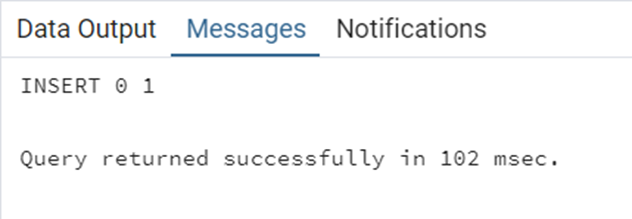
In contrast, the plain json type does not perform this validation – it stores the number as text, even if it’s extremely large or not valid for computation. Let’s try this out in an example:
|
1 2 |
INSERT INTO json_test (data_json) VALUES ('{"large_number": 1e1000000}'); |
|
1 2 |
INSERT INTO json_test (data_jsonb) VALUES ('{"large_number": 1e1000000}'); |
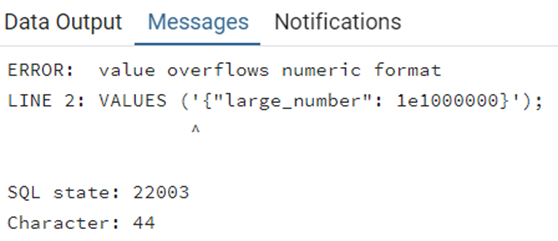
The JSON type stored the number conveniently, while the JSONB type rejected the number because it falls outside the numeric range.
JSON Functions and Operators in PostgreSQL
In PostgreSQL, JSON path expressions are used to navigate and extract values from JSON or JSONB documents. They help you point to specific keys, nested values or array elements inside your JSON data.
PostgreSQL provides two main ways to work with JSON paths:
i. Operators: such as ->, ->>, #>, #>>
ii. Functions: such as jsonb_path_query(), jsonb_set()
Here are some built-in operators and functions to access and manipulate JSON or JSONB (binary JSON) data directly:
| Operator | Index type | What It Does | Example | Output |
| -> | text | Returns the JSON value for a given key, still in JSON format | SELECT ‘{“name”: “Aisha”, “age”: 30}’::json->’name’ | “Aisha” (as JSON) |
| ->> | text | Gets the value as plain text (not JSON) | SELECT ‘{“city”: “Lagos”, “country”: “Nigeria”}’::json->>’country’ | Nigeria |
| -> | int | Gets the JSON value at a specific array index, still in JSON format | SELECT ‘[“blue”, “green”, “red”]’::json->1 | “green” (as JSON) |
| ->> | int | Gets the array item at the given index as plain text | SELECT ‘[“pen”, “book”, “bag”]’::json->>0 | pen |
| #> | text[] (path) | Retrieves a nested JSON object using a path array | SELECT ‘{“user”: {“info”: {“email”: “me@example.com”}}}’::json#>'{user,info}’; | {“email”: “me@example.com”} |
| #>> | text[] (path) | Retrieves a nested value as plain text | SELECT ‘{“user”: {“tags”: [“dev”, “writer”]}}’::json#>>'{user,tags,1}’ | writer |
There are several powerful operators available only for JSONB in PostgreSQL, such as @>, <@, ?, ?|, and more. For a full list of these operators and how they work, check out the official PostgreSQL documentation.
PostgreSQL also provides a rich set of JSON functions that help you create, query, and manipulate both JSON and jSONB data types. Below are some commonly used functions that you may find helpful:
| Function | What It does | Example | Output |
| jsonb_insert() | Inserts a value at a specified location in a JSONB array or object | SELECT jsonb_insert(‘[10, 20, 30]’::jsonb, ‘{1}’, ’15’); | [10, 15, 20, 30] |
| jsonb_set() | Replaces or adds a value at a specified path in a JSONB document | SELECT jsonb_set(‘{“a”:1}’::jsonb, ‘{a}’, ‘100’); | {“a”:100} |
| jsonb_path_query() | Queries JSONB using a JSONPath expression | SELECT jsonb_path_query(‘{“tags”:[“sql”,”pg”]}’::jsonb, ‘$.tags[*]’); | “sql” “pg” |
| json_extract_path(json, VARIADIC path) | Gets a nested value by specifying a path | SELECT json_extract_path(‘{“a”:{“b”:10}}’, ‘a’, ‘b’); | 10 |
| json_typeof(json) | Returns the type of the value at the top level (object, array, etc.) | SELECT json_typeof(‘{“a”: 1}’); | “object” |
There are other useful functions which were not included in this article. For a full list of the JSON functions and its properties, check out the official PostgreSQL guide.
Indexing JSON Data with GIN in PostgreSQL
When working with JSONB data in PostgreSQL, you can make your queries much faster by creating a GIN (Generalized Inverted Index). This index is especially useful for searching inside JSON documents using keys and values. Without indexing, PostgreSQL scans every row to find matches inside your JSON.
A GIN index allows PostgreSQL to jump straight to the rows that contain matching keys or values – just like an index in a book.
Let’s start by creating a table and inserting some data:
|
1 2 3 4 5 6 7 |
CREATE TABLE products ( id SERIAL PRIMARY KEY, details JSONB ); INSERT INTO products (details) VALUES ('{"name": "Laptop", "brand": "Dell", "in_stock": true}'), ('{"name": "Phone", "brand": "Apple", "in_stock": false}'); |
Let’s check out the table and take note of the processing time:
|
1 |
SELECT * FROM products WHERE details @> '{"brand": "Apple"}'; |
Now, let’s create a GIN index:
|
1 |
CREATE INDEX idx_products_details ON products USING GIN (details); |
Let’s run the SELECT statement again and compare the query time:
|
1 |
SELECT * FROM products WHERE details @> '{"brand": "Apple"}'; |
Notice how the GIN Index is faster? This is useful when you have large datasets. The only drawback is that GIN indexes only work on JSONB, not JSON.
JSON(MySQL) vs. JSON (PostgreSQL)
MySQL stores JSON data in a binary format, while PostgreSQL stores JSON data in a text format. One key difference is how each handles formatting – MySQL’s JSON strips away whitespace and formatting for storage efficiency, while PostgreSQL’s JSON type preserves the original formatting, including spaces and line breaks.
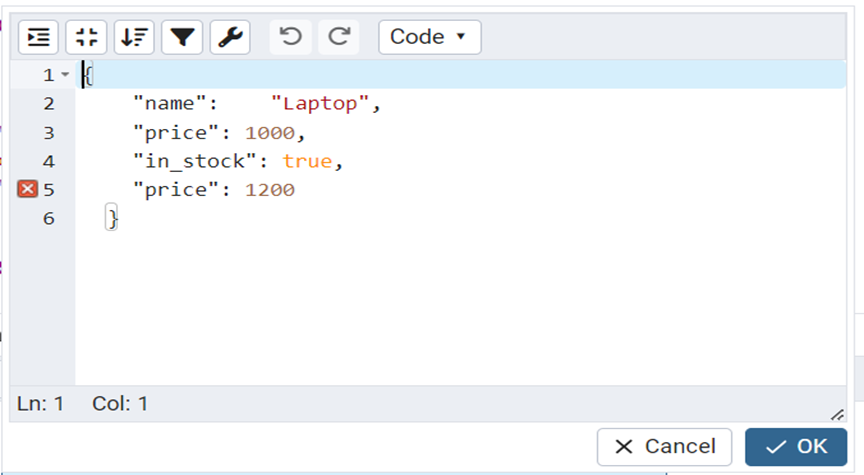
Another important distinction is how they handle duplicate keys in a JSON object. MySQL enforces strict JSON rules and does not allow duplicate keys. If you try to insert a JSON document with duplicate keys, MySQL will throw an error and reject it, and only one unique key per object is allowed.
In contrast, PostgreSQL’s json type does allow duplicate keys and stores them exactly as provided. However, keep in mind that querying such documents may yield unpredictable results since key order and duplication can affect which value gets returned. Let’s explore this in an example:
|
1 2 3 4 5 6 7 8 9 10 11 12 13 14 |
CREATE TABLE json_test ( id SERIAL PRIMARY KEY, data_json JSON ); INSERT INTO json_test (data_json) VALUES ( '{ "name": "Laptop", "price": 1000, "in_stock": true, "price": 1200 }' ); SELECT * FROM json_test; |
MySQL’s Result:

PostgreSQL’s Result:
MySQL vs PostgreSQL: Comparison of JSON Data Type
As modern applications increasingly rely on semi-structured data formats like JSON for storing user preferences, settings, and API responses, both MySQL and PostgreSQL have adapted to support JSON storage and manipulation.
While both databases offer JSON functionality, they do so in very different ways. MySQL provides a simpler, more lightweight approach suitable for basic use cases, while PostgreSQL offers advanced tools, rich querying capabilities, and better performance for complex JSON operations – especially when using JSONB.
Below is a detailed comparison table highlighting how each database handles JSON data across storage, querying, indexing, and performance. This will help you understand the strengths and trade-offs of each, and decide which is best suited for your application’s needs.
| Category | MySQL | PostgreSQL |
| JSON Type Introduced | Version 5.7 | Version 9.2 (JSON), 9.4 (JSONB) |
| Available Data Types | Only JSON | JSON and JSONB |
| Storage Format | JSON is stored in a binary format internally | JSON: Stores exact text as input JSONB: Stores as binary, parsed and optimized |
| Formatting Preservation | Does not preserve formatting and whitespaces. | JSON: Preserves formatting and whitespaces JSONB: Strips whitespace and formatting. |
| Duplicate Key Handling | Does not preserve duplicate keys. Keeps only the last value of duplicate keys. | JSON: Preserves duplicate keys JSONB: Removes duplicate keys and keeps only the last value of duplicate keys |
| Maximum Size Limit | 1GB | 1GB for both JSON and JSONB |
| Indexing Support | No direct indexing on JSON Can create virtual columns and index them | It has a powerful GIN indexing on JSONB fields |
While JSON is incredibly flexible, it does come with a few limitations, one of them being its limited support for certain data types like dates and timestamps. This can make working with time-related data a bit tricky.
If you haven’t explored our Date and Time data type series yet, now’s a great time to check it out! It’ll help you understand how to handle those types of data more effectively.
JSON Support in MySQL and PostgreSQL: Which is Best?
If you’re working with simple JSON documents and your use case doesn’t involve deep querying or advanced indexing, MySQL is a solid and easy-to-use option. It offers native JSON support, a good set of functions, and performs well for lightweight tasks. It’s great if you’re already invested in the MySQL ecosystem and your JSON needs are basic.
However, if your application requires advanced querying (like deep nested searches), flexible indexing (such as full-text and key/value searches), or needs to store large or complex JSON documents efficiently, then PostgreSQL, particularly with its JSONB type, is the better choice. It offers superior indexing with GIN and better performance for querying semi-structured data.
FAQs: JSON Support in MySQL and PostgreSQL
1. Does MySQL support JSON data types?
Yes. MySQL introduced native JSON support in version 5.7. It allows you to store JSON documents and use built-in functions like JSON_OBJECT and JSON_EXTRACT for querying and manipulation.
2. What is the difference between PostgreSQL json and jsonb?
PostgreSQL offers two JSON types:
- json stores data as plain text.
- jsonb stores data in a binary format, enabling faster indexing and advanced operations. For most use cases, jsonb is recommended.
3. Which database is better for JSON performance: MySQL or PostgreSQL?
PostgreSQL generally outperforms MySQL for complex JSON queries due to its jsonb type and support for GIN indexes. MySQL is simpler for basic JSON storage but lacks advanced indexing options.
4. Can you index JSON fields in MySQL and PostgreSQL?
- MySQL: You can create virtual columns from JSON fields and index them.
- PostgreSQL: Supports GIN and BTREE indexes on jsonb fields, making queries much faster.
5. When should I use JSON in a relational database?
Use JSON for semi-structured data or when schema flexibility is needed. However, avoid overusing JSON for highly relational data, as it can impact performance and complicate queries.
6. What are common JSON functions in MySQL and PostgreSQL?
- MySQL:
JSON_OBJECT,JSON_ARRAY,JSON_EXTRACT,JSON_TABLE - PostgreSQL:
jsonb_each,jsonb_array_elements,jsonb_set,jsonb_path_query
7. Is jsonb always better than json in PostgreSQL?
Yes, in most cases. jsonb offers better performance, indexing, and supports advanced operators. Use json only if you need to preserve exact formatting.
Subscribe to the Simple Talk newsletter
This document contains proprietary information and is protected by copyright law.
Copyright © 2026 Red Gate Software Limited. All rights reserved





Load comments