
A Practical Guide to Refactoring Production Databases with Redgate Data Modeler
Refactoring a production database is rarely just a schema cleanup exercise. Once a system is live, even sensible improvements can have consequences for existing data and for the applications, reports, and integrations that depend on the current design. This article shows how Redgate Data Modeler can help teams redesign more safely by making those changes visible, documented, and easier to plan.
Why technical debt accumulates
On almost every project I’ve joined, I’ve seen the same pattern. The application was already live, the database already full of data, and most of it worked. But there were always parts of the schema that clearly had problems: awkward table structures, confusing relationships, recurring bugs, and often performance issues waiting to get worse.
Poor database design decisions are most often the result of time pressure, limited experience, changing requirements, or decisions made when the system was much smaller and simpler. Once those decisions reach production, they tend to stay there, and technical debt steadily accumulates, for a couple of reasons:
- DDL refactoring can be high risk – once applications, queries, reports, and integrations depend on the current structure, even minor changes can risk disruption, downtime, and in the worst cases, data loss
- Refactoring is harder to prioritize – New features are easier to justify to management, and most developers would rather work on new functionality than improve what is already there. Even when the underlying problems are obvious, the value of refactoring is harder to ‘sell’.
Over time, though, this accumulated database design debt becomes a more serious problem. The whole system becomes more fragile, harder to understand, and harder to change safely. Scaling hardware is a short-term fix rather than a sustainable solution. Eventually, the database becomes a blocker not only to further development, but also to business modernization efforts such as cloud migration.
At that point, database refactoring stops being optional.
The risks of refactoring production databases
“That doesn’t look so bad… Oh wait, yes it does.” – Futurama
The goal of database refactoring is to improve the performance, security, stability, or maintainability of an existing database without changing the external system behavior. This might require a data access layer or compatibility views that temporarily ‘shield’ the application from internal schema changes. This does not remove the need for careful refactoring, but it can reduce disruption and make phased rollouts easier to manage.
The what and why of database refactoring
The YouTube video What is Refactoring, and why is it so important? gives a good overview of what database refactoring means in practice and why it’s needed, and the article The 9 Most Common Database Design Errors explains some of the most common design mistakes I see.
Some changes are obviously high risk because they directly affect existing data. If an overloaded table needs to be split, for example, the migration must not only change the schema but also transform and preserve the data correctly. It also needs to account for what happens if deployment fails partway through, and how the change can be rolled back safely.
Other types of schema changes, to datatypes or constraints, for example, might look harmless but often cause trouble by breaking hidden assumptions in queries, procedures, reports, or application code. If a VARCHAR(5) column is expanded to VARCHAR(10), application code that still expects a five-character value may start truncating data or behaving unexpectedly. Changing whether a column can contain NULLs can also cause problems ranging from obvious failures to subtle bugs, where queries return unexpected results, but only under certain conditions.
For these reasons, production database refactoring requires a disciplined, well-documented approach rather than ad-hoc changes.
How a data modeler lowers the risk
Before making any of these changes, we need a clear picture of the current schema and the proposed new design. We also need to document the likely impact of the changes. This is where a data modeling tool becomes invaluable: it helps you capture the current state, make dependencies visible, document the intended changes, and plan refactoring work in a more controlled and predictable way.
With a data modeler, teams can see more clearly which parts of the application need careful regression testing for assumptions that the redesign may have rendered invalid. It also helps them plan any special deployment requirements, such as compatibility views or a transitional schema using an Expand-Contract pattern. This, in turn, makes it easier to coordinate the necessary application changes and define a safe rollout and rollback plan.
A workflow for safer refactoring in Redgate Data Modeler
“All we have to decide is what to do with the time that is given to us.” – The Lord of the Rings: The Fellowship of the Ring
The process starts in the Redgate Data Modeler, where the team can capture the current schema, redesign it safely, and document each step of the change before anything is applied to production. In the remainder of this article, I’ll show a simple workflow in Data Modeler that allows the team to:
- Reverse-engineer the existing database into a model
- Import the database into a model
- Save the model with a new version number and commit it to version control
- Implement and document the proposed design changes
- Export the model as a SQL build script
- Stage the new model, plan, and test the migration
As teams progress through the workflow, Data Modeler helps them inspect the existing schema, redesign it safely, with continuous validation of the new structure, and clearly document the changes.
This gives the team a clearer basis for understanding the impact of each refactoring, identifying where careful regression testing will be needed, and planning how the change can be rolled out with minimal disruption, especially where existing data or dependent applications are affected.
1. Reverse-engineer the existing schema into a data model
By reverse-engineering the database into a model, teams can clearly see tables, relationships, constraints, and naming inconsistencies. This exposes dependencies and structural complexity before any changes are made.
The first step is to import our database into Data Modeler, in this case, from a SQL script with CREATE statements, as follows:
-
- Create a new document (model)
- Create a model from an existing database
- MySQL (in this case)
- SQL Upload
- Choose File and give a name to the model
- Make a copy of the original model and save it to version control
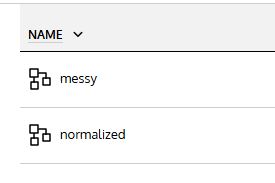
In my case, I saved the original model as messy and saved the copy as normalized. Renaming is a good practice because you can continue working on the normalized model, while preserving the legacy model for reference.
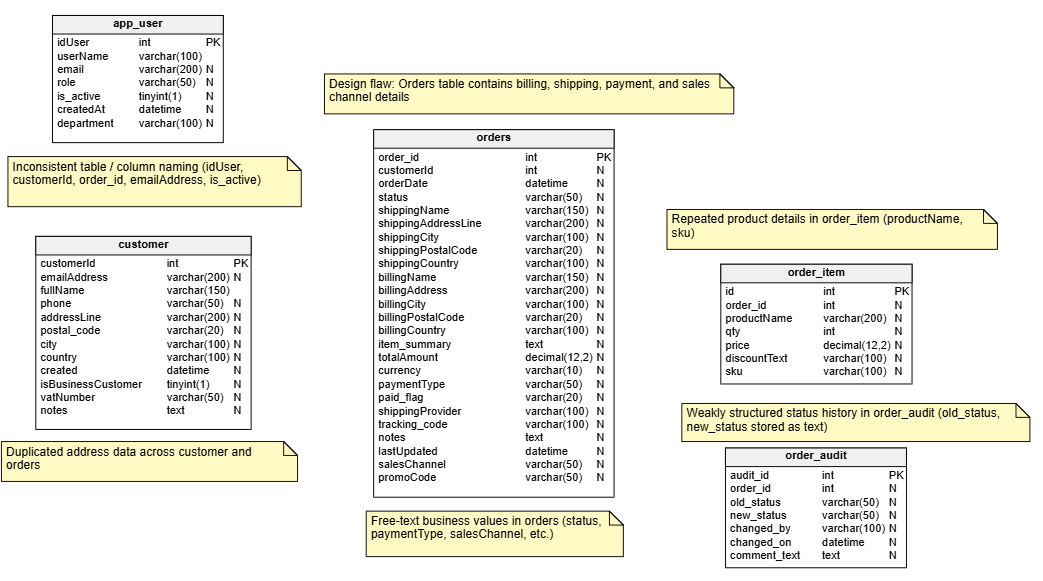
Here is the model for my deliberately messy MySQL training database, which contains several common design problems:
2. Implement and document the proposed design changes
Now we start working through the desired design changes in the data modeler. As we do so, it’s a good practice to add comments and notes explaining the purpose of each change. In some cases, these can also capture rollout-related considerations, such as migration order, compatibility requirements, or areas that may need careful regression testing. This approach provides built-in versioning and clear documentation of what has changed and why.
Model validation
As you refactor the database in the data modeler, Live Model Validation will immediately highlight any errors you may introduce with a recommendation on how to fix them, so you don’t have to worry about damaging the data model’s integrity.
The following table summarizes the normalization issues and other structural problems that we’ll fix in Data Modeler:
| Design flaw in the original model | Refactoring fix in the new model |
|---|---|
Orders table contains billing, shipping, payment, and sales channel details |
Keep only core order data in sales_order; move other attributes to related tables |
Duplicated address data across customer and orders |
Move address data into customer_address and sales_order_address |
Free-text business values in orders (status, paymentType, salesChannel, etc.) |
Replace with lookup/reference tables such as order_status, payment_type, and sales_channel |
Repeated product details in order_item (productName, sku) |
Create product table and link sales_order_item rows to it |
Weakly structured status history in order_audit (old_status, new_status stored as text) |
Replace with normalized sales_order_status_history linked to sales_order, order_status, and app_user |
Inconsistent table / column naming (idUser, customerId, order_id, emailAddress, is_active) |
Apply one consistent naming convention across tables, keys, and attributes |
This is what our final, “normalized” data model looks like after implementing these changes:
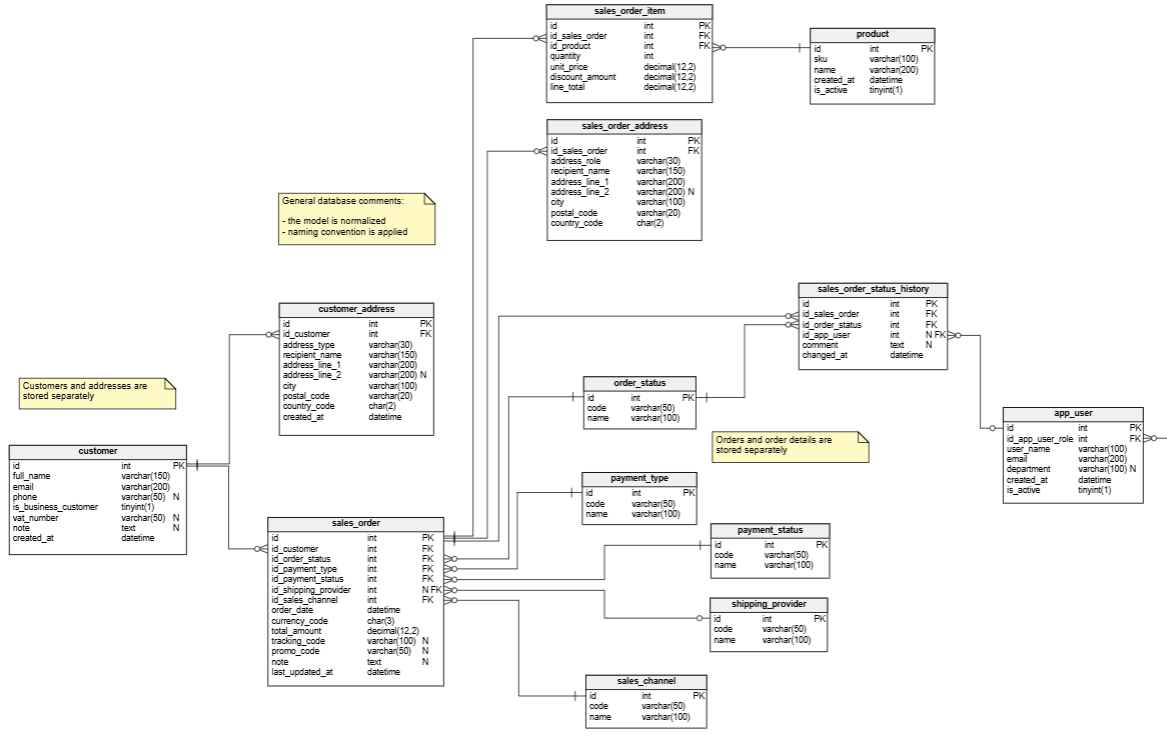
Now that we have a clear picture of the starting point and the proposed redesign, it becomes much easier to plan the schema changes and any required data migration, so they can be applied safely in production (see step 4).
3. Export the new model as a build script
We can now export our data model as an SQL script by clicking “SQL” (Generate SQL Script) in the main toolbar.
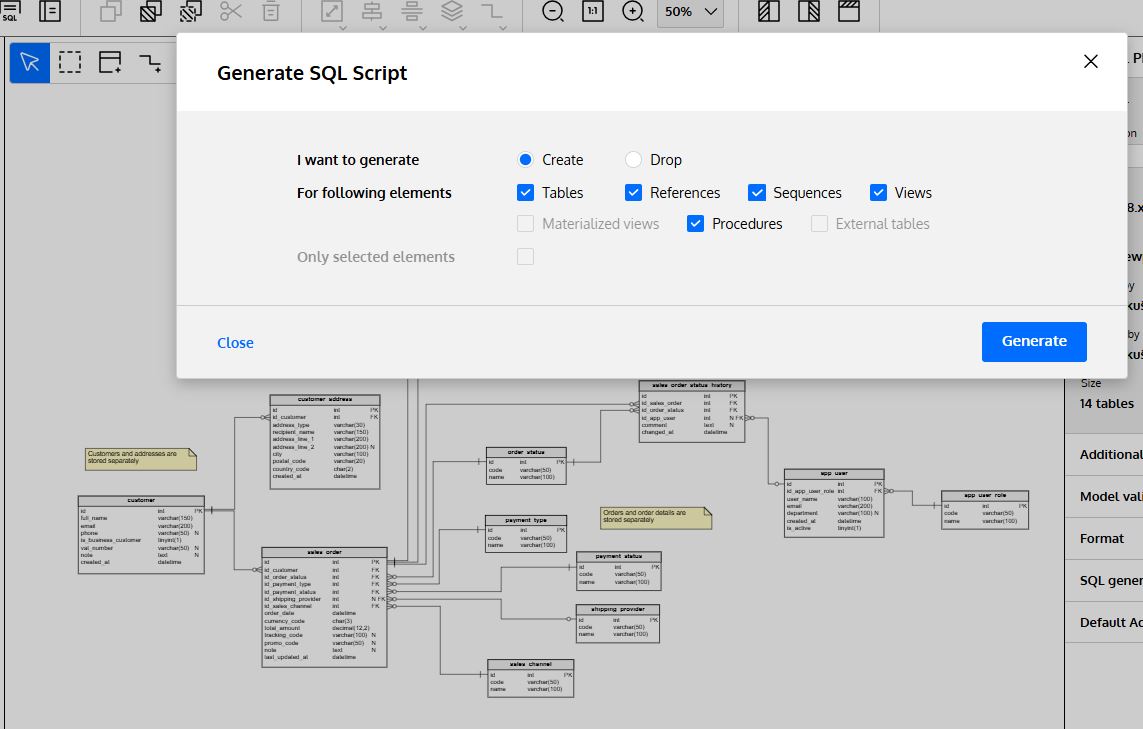
The data modeler generates a downloadable and executable SQL script based on the parameters we selected.
4. Stage the new model, plan and test the migration
You’ve completed the redesign and generated the build script for the new model. The next step is to plan how to apply those changes safely to the production database, and how to recover if anything goes wrong. In a live system, with existing data and many dependencies, changes like these can risk disruption, downtime, and data loss unless they are carefully staged and tested.
Planning schema and data migration
Many of the changes covered in this article require both schema changes and data migration. For example, splitting address data out of the overloaded orders table leads to a much cleaner and more efficient design, but it also means the rollout strategy must account for migrating the existing billing and shipping data safely into the new tables.
If you have Data Modeler as part of SQL Toolbelt Essentials, you can use SQL Compare and SQL Data Compare to help implement the schema and data migrations. A data model designed using Redgate Data Modeler can be used as the source or target for a schema comparison:
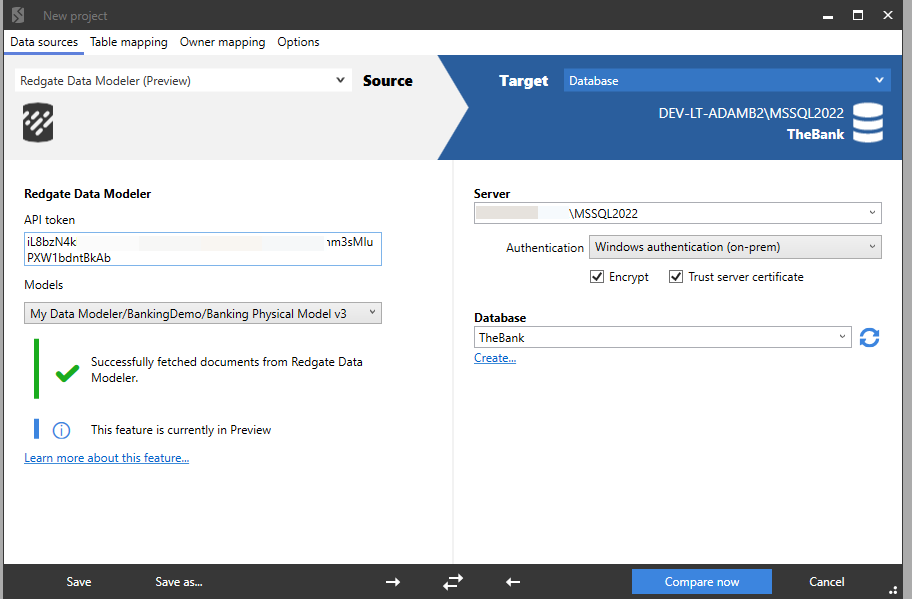
SQL Compare will compare that refactored database with the existing “messy” one and generate a migration script that applies the required schema changes in the correct dependency order. You can then use SQL Data Compare to help plan and test the movement of the existing data into the new structure.
Handling dependencies
The other issue is the applications, reports, or integrations that still depend on the old structure. In the original design, for example, status values were stored as text fields. In the refactored model, they are standardized and tracked relationally. This improves consistency, reporting, and maintainability, but there may still be application code that expects the old text status values or reports that filter on exact status strings.
Changes like this need careful regression testing and, in many cases, a staged rollout in which old and new structures coexist for a period. Approaches such as Expand-Contract or compatibility views can help reduce disruption while dependent code and reporting are updated. I’ve discussed several of these rollout strategies in Pros and Cons of Modeling a Legacy Database.
Best practices, pitfalls, and lessons learned from production refactors
“I’ve learned something today.” – South Park
Production database refactoring needs a disciplined approach, because even small schema changes can have repercussions both for the data and for the applications that depend on it. The most important lesson is not to treat the redesign itself as the whole task. The other half of the challenge is using the model to help you plan how to migrate the schema and existing data, and roll the changes out safely.
The simplest and most important piece of advice I can give is to allow enough time, not just to improve the model, but also to test assumptions, plan the rollout, and prepare for rollback if needed. Clear communication with business users, developers, and other stakeholders is essential because they often provide the context needed to understand how the data is really being used.
A data modeling tool helps by giving the team a clear view of the current schema, the proposed redesign, and the reasoning behind each change. Used in this way, it becomes more than a diagramming tool: it provides a structured basis not just for redesign but also for migration planning and safer delivery. That discipline pays off through better performance, greater clarity, and a database that is easier to maintain and evolve.
Tools in this post
SQL Toolbelt Essentials
10 simple tools for fast, reliable and consistent SQL Server development.
You may also like
-

Article
Top 8 Database Schema Design Tools
Here are the top 8 database modelers to help you ease the database creation process. Choose your favorite one and design your database!
-
Article
Database Design for Audit Logging
There is no one-size-fits-all solution when it comes to database audit logging. So, let’s learn when to use each alternative.
-
Article
Creating a Data Model for Carpooling
Nowadays, carpooling is accepted and promoted by people around the globe. It certainly reduces one’s personal carbon footprint, and it can be more cost-effective than renting or buying a car.
-

Article
Tip #1 - How to move column up or down
Have you ever changed your mind about the order of columns in your table? You probably have! Fortunately, changing the order of columns in Redgate Data Modeler is as easy as pie.
-
Article
How to Automatically Generate Primary Key Values Using Redgate Data Modeler’s Auto-Generation Features
Designing Auto-Generation Features in Redgate Data Modeler
-
Article
What a Concept! Is Logical Data Modeling Obsolete?
When databases were sized in megabytes rather than petabytes, their design was a well-defined discipline of data analysis and implementation. A progression of modeling steps – from conceptual and logical through relational and/or physical – promised successful deployment.