
Two Small Steps to Measurable Flyway Value
Flyway helps you regain control of complex legacy databases where even small changes can carry high risk. This article describes two small steps that deliver measurable improvements in control, code quality, and deployment reliability, without disrupting how the development team works.
In long-lived legacy systems, particularly monoliths, technical debt and complex dependencies accumulate quietly over time. Eventually, even small database changes run a high risk of breaking some other part of the system.
In such systems, database changes are difficult to track consistently, and so environments tend to drift out of sync over time. Testing becomes unreliable, code quality erodes, and bug regressions are frequent. When failures occur, teams invest long hours trying to roll back changes cleanly and return the system to a stable state. As confidence in the release process erodes, both within delivery teams and across the wider organization, delivery cycles stall.
These problems are well recognized. The harder question is how to address them without further destabilizing teams and systems that are already fragile.
Introducing Flyway without disrupting existing workflows
In this environment, even introducing a tool like Flyway can feel difficult, especially if it’s assumed to require a wholesale overhaul of existing processes before any value is delivered. In fact, Flyway is designed to integrate simply and securely into various points in an existing workflow, allowing teams to extend their existing practices rather than replace them.
Flyway’s built-in schema comparision engine understands databases directly. It determines the schema, and the structure of its individual objects, by inspecting the database itself, which makes the database a natural integration point for Flyway within any existing workflow. For example, if the initial goal is to use Flyway to stabilize unreliable deployments, without interfering with local development processes, then a recommended integration pattern is to introduce one additional development copy of the database, a Dev-Integration database.
The Dev-Integration database starts at a known schema version, typically matching the production schema, immediately after the last deployment. Teams can provision it from a restored production backup (with masked or obfuscated data if required) or from a schema-only backup that includes necessary static data.
Developers continue applying database changes using their existing tools, frameworks, and automation, whether that’s SSMS, VS Code, SQL scripts, an ER modelling tool, or an ORM such as Entity Framework. That same approach is simply extended to the Dev-Integration database so that it receives all development changes that are not yet delivered.
From this starting point, Flyway can deliver immediate value in two small, low-disruption steps, each producing a measurable improvement in control and risk reduction, and laying the path to more frequent and reliable online deployments. The example below assumes use of Redgate Flyway Enterprise, which provides the schema models, migration generation, and automated code reviews required for the workflow described:
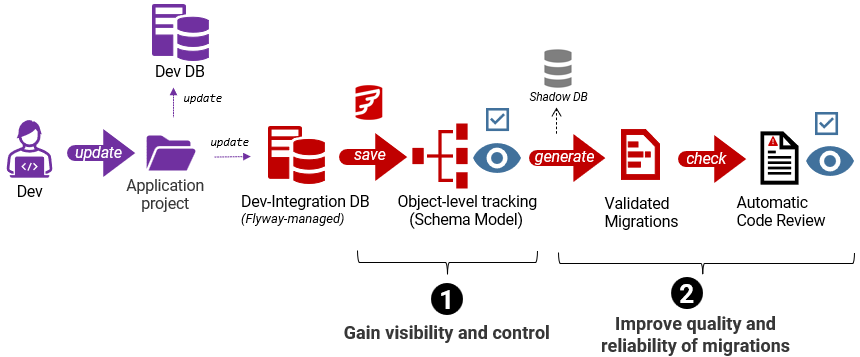
- Step 1 – Gain visibility and control of database changes
Establish the object-level state of the database (the schema model), in version control, providing clear visibility and auditability of modifications. - Step 2 – Improve quality and reliability of SQL migration code
Generate versioned and validated migrations that are immediately checked for any high-risk issues, such as schema changes that may cause data loss or introduce security problems.
Step 1 – Gain visibility and control of database changes
In Step 1, Flyway makes database changes visible and traceable, while making it easier for teams to work on the database with minimal conflict.
When the application code for a new release is checked in, often the accompanying database changes are handled in a more ad-hoc fashion. Maybe a script is submitted, or simply a list of required changes. Alternatively, the database changes might be an artifact of changes to the application model, such as with Object-relational mapping tools.
In either case, the planned database changes are abstracted, or only understandable by scanning through an ordered list of changes or a long migration script. This creates two related problems:
- Lack of visibility – no easy way to see which database objects are being refactored, how they are changing, or what impact those changes might have.
- Change order is already ‘locked in’ – The database changes arrive in a prescribed order, which makes reconciling overlapping changes (merge conflicts) much harder.
Flyway addresses both these issues by introducing object-level change tracking via the schema model. It establishes a simple representation of the current database structure that allows object changes to be captured, compared, and tracked over time, before any execution order is fixed. This makes the schema model the safest and most effective place to review differences and reconcile parallel development work.
Capturing the schema model for object-level change tracking
Having established the Dev-Integration database, teams now follow a simple workflow using either Flyway Desktop or the Flyway CLI. They create a Flyway project, linked to version control, and connect it to the Dev-Integration database.
Once connected, Flyway tracks the structure of each database object as changes are applied. It uses schema comparison to extract the CREATE definitions for every object and save them as individual files in version control, organized by object type. Together, these object-level DDL files form the schema model, a precise and reviewable record of how each object changes with each new database version, which is then committed to version control.

When teams can extend the automated process they already use for database updates to the Dev-Integration database, then Flyway’s object-level change tracking comes almost “for free” and delivers immediate value.
What teams gain
The schema model captures, as a set of independent scripts, what each database object looks like in the new version of a database. Instead of reviewing long migration scripts in isolation, the schema model gives teams a single place to track how individual database objects have changed across versions. This makes it much easier to understand when and why a change was introduced and reduces the time spent interpreting and cross-checking database updates.
The following diagram shows object change tracking in GitHub:
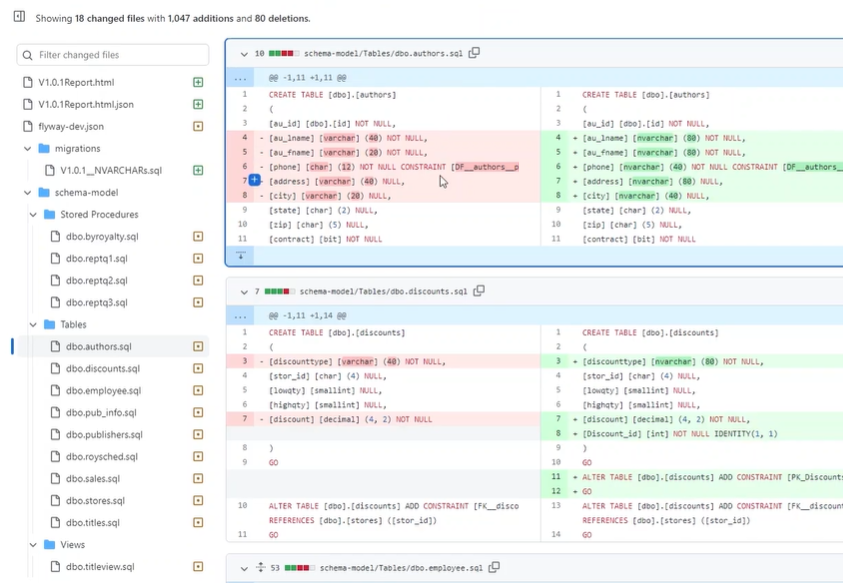
Although the schema model captures the current state of the database, it is stateless in the same way application code is stateless: it describes the result, not the history or execution order that produced it. This allows teams to reconcile the inevitable “messiness” of real-world development, safely resolving conflicts and merging changes, before they are turned into ordered migration scripts for downstream environments.
As a result, teams can:
- Trace historical datatype or column changes whose impact only became apparent later, through performance issues or changes in application behavior
- Identify index changes or additions that might aid performance
- More easily reconcile conflicting or overlapping changes early by checking which objects are affected by recent commits
Once changes move beyond the schema model and into versioned migration scripts, in the next step, execution order starts to matter, which is why reconciling differences early, before order is fixed, is so important.
Step 2: Improve the Quality and Reliability of SQL Migrations
In Step 2, Flyway turns database changes into reliable, versioned migrations and automatically surfaces high-risk SQL early, reducing uncertainty and deployment risk.
In many teams, SQL migration scripts are written by hand or generated indirectly through modelling tools or ORMs. As databases grow in size and complexity, these approaches become higher-risk. Even small oversights can result in missed dependencies, changes applied in the wrong order, or operations that have unintended side effects on performance, data integrity, or security. Without consistent validation, these issues tend to surface late in testing or during deployment, when they are hardest to diagnose and fix.
Large teams need systems where these small mistakes are caught early, before they affect code quality or slow down delivery. The same safeguards also make it easier for developers with different levels of experience to contribute safely and effectively, without increasing risk or review overhead.
Flyway can bring structure and reliability to how database changes are turned into SQL migrations, so that they can be deployed safely. Changes are treated as explicit, versioned transitions between known database states, and potential risks are surfaced early, reducing uncertainty around how a change will behave when deployed, without requiring major changes to how developers work.
Generate migrations between two known versions
With the latest development changes reconciled and saved in the schema model (Step 1), teams move to using versioned migrations as the source of truth for how those changes are deployed.
Flyway turns each set of changes into an ordered, versioned set of migrations for deployment. To do this, it uses a built-in schema comparison engine to determine what changed between the latest development state and the current releasable version of the database, represented by the migrations folder, to capture the new development changes for release:
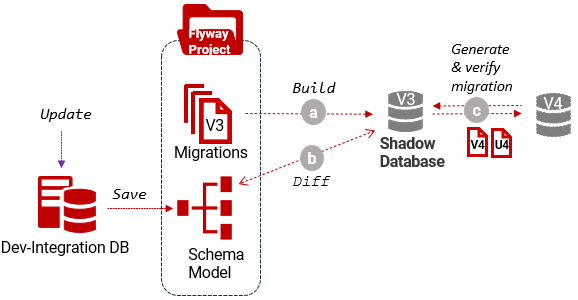
- Build the current releasable version in the shadow database
- Compare it with the schema model to get a list of object-level differences
- Generate and verify the required migration (V) and undo (U) scripts, containing the exact changes needed to move forward to the next version or safely revert to the previous one.
Setting up the shadow
You can follow the simple, ‘guided shadow’ setup in Flyway. If you already have a script that recreates the current production schema, as a ‘baseline’ for ongoing development work, the shadow can start empty. If the database has complex dependencies or invalid objects that make such a script difficult to produce, as is common with monoliths, the simplest option is to provision the shadow from a schema-only backup of the production database.
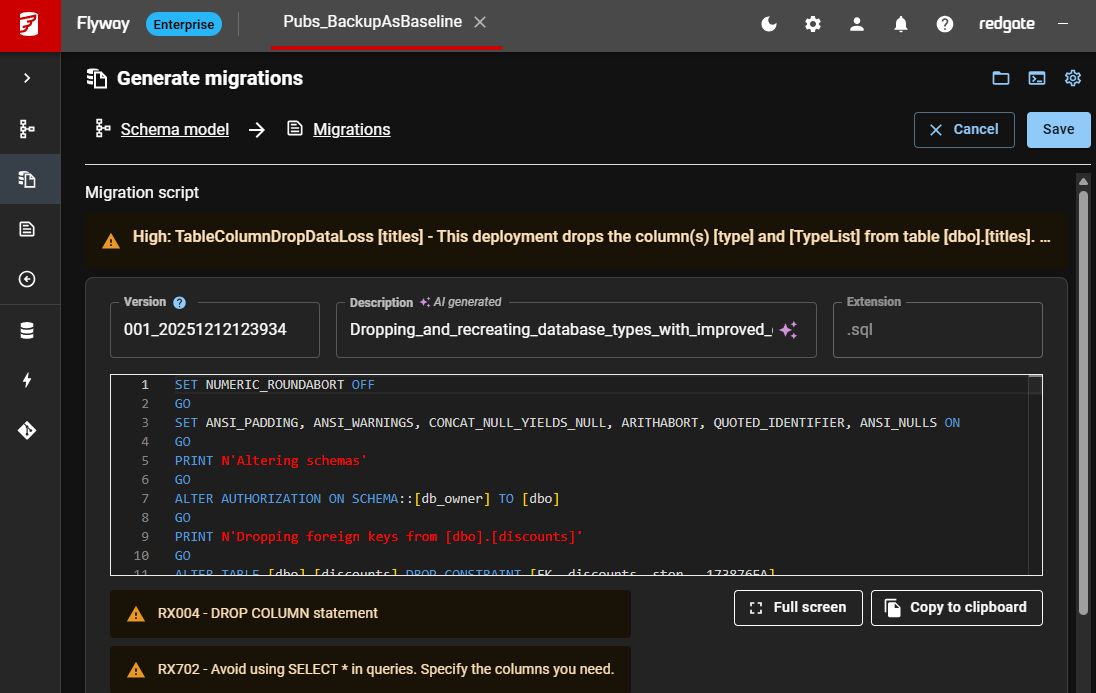
Flyway’s schema comparison engine discovers all object-level differences and accounts for missing dependencies when generating the script. So, if you change a table and forget to update a dependent function, Flyway will notify you that it automatically included the function and amended it as required. It also warns of changes that may result in data loss.
The following example shows a warning raised in Flyway Desktop, caused by columns being dropped. You can automate the same workflow using the CLI. Either way, teams can review and address them before the change reaches testing or deployment.
Run automated code reviews
Flyway can automatically analyze pending SQL migration scripts and alert teams to any faults in the code before those scripts are used in testing or deployment. The aim is not to block change, but to ensure that risky or questionable SQL is identified early, when it is easiest to review and fix.
Flyway’s check -code command combines structural, parser-based analysis (SQLFluff) with pattern-based rules (regexes). Its built-in Enterprise rules library places a deliberate emphasis on catching high-risk changes that are easy to overlook during manual review but can cause serious problems if deployed. For example:
- Destructive changes that risk data loss, including dropped tables or columns and unsafe datatype modifications
- Security-sensitive changes, such as overly broad permissions or unexpected modifications to roles or users.
- Structural or design problems, such as finding tables with no Primary key or that lack documentation. These may not cause immediate failures, but can degrade performance or maintainability over time
The code reviews run automatically during migration generation, providing immediate feedback, and can also be integrated into an automated workflow, such as running on every pull request, using code like this:
flyway check -code -failOnError=true
Teams can easily add custom regex rules to enforce and maintain their own standards and coding practices.
What teams gain
Instead of ad-hoc scripts, tool-generated artefacts, or abstracted changes, the impact of which is hard to gauge, teams now have a set of tested, verified migration scripts designed to upgrade a target database from one known version to the next.
Deployments that follow a known, validated path between versions become more predictable and easier to test efficiently. Automated code reviews surface risky changes immediately, allowing teams to focus testing effort where it matters most. Regressions also become less frequent, as developers are far less likely to accidentally overwrite or remove changes made by others during merges.
Teams can measure this value directly using standard DORA metrics and other common indicators of code quality and delivery efficiency, such as:
- Higher test coverage — tests can be targeted at a clearly defined set of database changes
- Lower change failure rate — fewer escaped defects leading to late-stage fixes or rollbacks
- Shorter lead time for changes — less rework and faster review cycles for database changes
- Lower regression frequency — fewer unintended changes that cause existing database behavior to break
- Increased deployment frequency — predictable upgrades lower the risk of releasing changes more often
Next steps – Controlled Deployment with Drift Checks
With versioned migrations, automated code checks, and object-level visibility in place, teams now have the foundations for more stable and predictable online deployments. At this point, the remaining source of risk is often not the migration itself, but differences that have accumulated between database environments over time.
Each time Flyway successfully migrates a database to a new version, it can capture the resulting schema as an immutable, lightweight snapshot, providing a stable reference for what the database should look like at that version. By comparing this reference with the schemas in other environments, Flyway can identify and help reconcile unintended differences before they cause problems. Addressing these discrepancies early removes one of the most common causes of deployment failures: environments that are assumed to be equivalent but are not.
Flyway integrates simply with all common CI/CD platforms, so these checks can be automated and applied consistently as part of an existing release process, without introducing new tooling or custom scripts. Datafaction (an affiliate of City National Bank), for example, was running monthly releases and deployment issues were routine rather than exceptional. They used similar drift detection and environment reconciliation techniques to reduce the failure rate to almost zero.
Teams typically also find that release cycles shorten and the required deployment window shrinks, because deployments move from being cautious, manual events to predictable, validated migrations between known states
Summary
Introducing Flyway does not require a wholesale change to existing development practices. Instead, it allows teams to improve the reliability and consistency of database deployments incrementally, often addressing long-standing operational pain points without disrupting how developers work, day to day.
By integrating Flyway in a small number of incremental steps, teams working with complex or legacy databases can begin to regain control, reduce risk, and see measurable improvements quickly.
Starting with object-level visibility and traceable change history, then moving to validated migrations and automated code checks, teams establish a reliable foundation for better testing and safer, more predictable deployments.
Take the first step today. Whether you’re starting a trial or already evaluating Flyway Enterprise, these two steps can deliver measurable improvements in deployment reliability within days, not months: Start Your Free Trial | Talk to Us.
Tools in this post
You may also like
-

Article
Using Git Hooks with Flyway
When you’re on your own developing a simple application, managing your migration scripts is not a demanding task; each time you add a script, it gets the next version number in whatever sequence you’ve decided on using. When your application takes off and you find you have a team working on migrations simultaneously, sharing code
-
Article
Getting Data In and Out of SQL Server Flyway Builds
This article provides SQL "bulk copy" routines to extract data from and load it into a SQL Server database, rapidly, and demonstrates a way to automatically bulk insert the test data in a Flyway build, using a SQL callback.
-

Webinar
Database DevOps: Increased Velocity, Quality, and Security with Flyway and Redgate Test Data Manager
Successfully managing database changes within a fast-moving development organization is challenging under the best of circumstances, and nearly impossible when you don’t have the right tools for the job. To effectively increase the velocity, quality, and security of database changes, developers need quick access to production-like data that’s sized correctly, and DevSecOps needs assurances that
-

Article
Bulk Loading Data via a PowerShell Script in Flyway
The test data management strategy for any RDBMS needs to include a fast, automated way of allowing developers to "build-and-fill" multiple copies of any version of the database, for ad-hoc or automated testing. The technique presented in this article uses a baseline migration script to create the empty database at the required version, which then triggers a PowerShell callback script that bulk loads in the right version of the data.
-
Article
The Flyway Migrate Command Explained Simply
The 'Migrate' command automates the process of applying the database schema changes that are defined in migration scripts, while Flyway tracks the version of every copy of the database. This makes it much easier to maintain consistency across different database environments, and so facilitates continuous integration, continuous deployment, and database version control practices.
-

Webinar
From Bottleneck to Breakthrough: Gain Control and Confidence in Your Monolithic Database Changes
Monolithic systems sit at the core of many mission‑critical platforms, especially in industries such as finance, but they often become a bottleneck when change feels risky. In practice, most organizations don’t fix monolithic databases or break them apart all at once. Instead, they work with them: stabilizing the core, managing dependencies, and making controlled, incremental


