






Simple Workflows for Flyway and Entity Framework Code First
Entity Framework Code First is a productive tool for the development team, but it can cause problems at deployment time due in part to a lack of visibility into database changes and the difficulty of automating deployments reliably at scale. The abstraction that makes it fast and convenient for development can, if not handled carefully, contribute to deployment delays, unreliable releases that require live troubleshooting, and downtime. Over time, it can also lead to deeper issues around database performance, integrity, and reliability.
The industry-wide standard for controlled, automated database deployments that you can roll back safely is a dedicated SQL migrations tool, such as Flyway, where database changes are explicit, versioned, and repeatable.
This article assesses three hybrid approaches to database development and deployment that combine the strengths of Entry Framework Code First for .NET-driven development with the versioning, control and automated deployments provided by Flyway. The goal is to increase visibility and control over deployments without disrupting existing development practices. When every database change is versioned and traceable, it can be reviewed and tested for integrity, performance, and stability in the same way as any application change. This makes the Database CI process much easier to sustain.
The Good and Bad of EF Code First
With Entity Framework (EF) Core Code First, .NET developers design and update the data model in C# classes, using Visual Studio, and then generate migration files in C# that describe schema changes. EF Core then autogenerates and applies the required SQL to update the database schema.
For development work, the EF Core Code First workflow is attractive because teams can spin up a database directly from the code model, eliminating the need to write and maintain SQL scripts. It also simplifies collaboration during development, as everyone can just spin up the latest database version from the code model. See my previous article for more details on this workflow.
However, when EF translates data model changes into SQL, there is limited visibility or control over how those changes affect individual database objects and their dependencies, and therefore how changes to one object can impact others. It is also hard to track database changes across environments and identify unintended differences (drift). That lack of visibility and control can result in unreliable deployments and often downtime, because destructive or unsafe changes slip through unnoticed and only surface once they hit production. As deployment risks grow, delivery slows. Teams hesitate to modify an increasingly fragile production system, and the time it takes to bring new functionality to users and customers increases.
These problems are amplified when dealing with large, complex, or legacy database systems such as monoliths. If you’re using a tool like Entity Framework and simply bundling in 'abstracted' database changes with the application updates, you’ll quickly hit a ceiling. This approach doesn't scale for monolithic systems with deep interdependencies, where any failure can cascade. Your deployments will almost always require downtime to be performed safely.
Deployment issues, downtime, and stalled delivery cycles are symptoms of the same underlying issue: a lack of control and transparency in the database change management process. The first step to solving that problem is to move from an 'abstract' process of EF-generated database updates to an explicit, migration-based approach.
Introducing Flyway into an EF Code First development workflow
While EF can automatically apply database changes during development, it isn’t the right way to manage production deployments. Complex data model updates will affect multiple database objects and their data. Will EF's Code First model always reliably translate these changes into safe, efficient SQL? Even the Microsoft documentation itself advocates a more robust approach using SQL migrations.
This is where Flyway fits in. It is a lightweight, database-independent SQL migration tool for generating, tracking, managing and deploying database changes. It makes every change explicit, versioned, and reviewable, so developers and DBAs can see exactly how the database schema is changing and why, and assess the impact, before those changes get anywhere near production.
Over the following sections, we'll introduce three EF-Flyway hybrid workflows that balance the development convenience and productivity of EF Core with the versioning, control and automation of a Flyway-driven deployment:
- Simple "EF Dev–FW Deploy" hybrid – Flyway controls how and when EF-generated SQL migrations are applied to staging and production.
- Simple hybrid with schema change tracking – adds object-level visibility to show how each release changes the database structure.
- EF-FW hybrid with Flyway-generated migrations – Flyway generates and validates the SQL migrations directly, with immediate checks for risky or destructive changes
In each case, teams can incorporate Flyway without requiring developers to abandon EF Code First for data modelling and development. It will introduce a level of control and transparency to the database change process that EF alone can’t provide.
The second two workflows require Redgate Flyway Enterprise Edition, whereas the first will also work with the Community Edition. The workflows can be implemented using the development GUI (Flyway Desktop) or command line (Flyway CLI). Each provides the same functionality.
Simple hybrid Ef-FW workflow for safer deployments
EF still defines schema changes, but Flyway takes control of how and when they are deployed.
In the simplest hybrid workflow, developers continue to use "Code First" for updating the database in development and test environments, but for Staging and Production deployments, we use EF Core CLI tools to export EF-generated migrations to SQL files, convert them to Flyway format and then deploy them using the Flyway CLI.
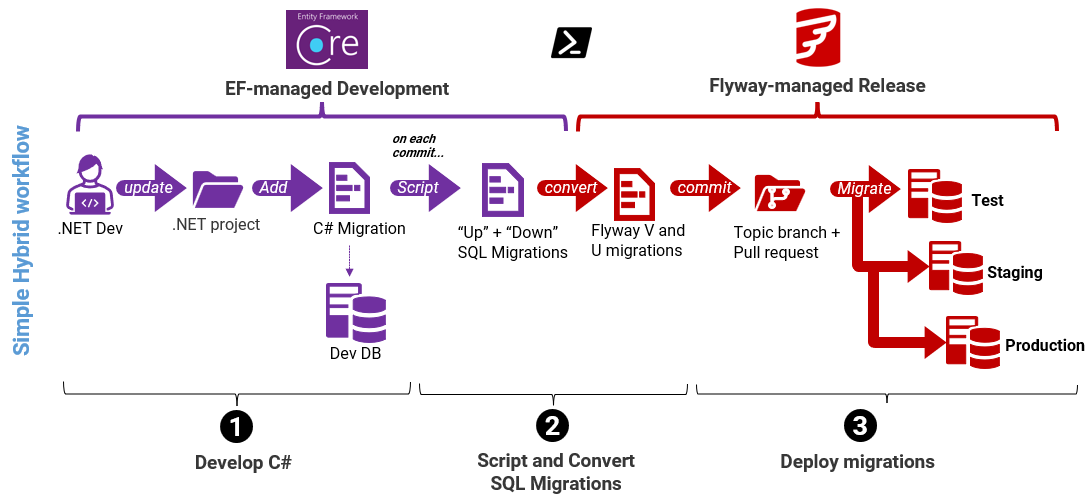
- Develop C# classes and migrations. Each time the developers complete changes to the entity data model, they use the EF Core CLI (dotnet ef migrations add <Name>) to create a C# migration file capturing the schema change and use it to update their development database.
- Generate and convert the SQL migrations. On each commit of a new C# migration
- An automated step exports the C# migration to SQL, using the EF Core CLI migrations script command to generate both an “Up” and “Down” SQL migration
- A PowerShell script converts the EF Up and Down methods into Flyway SQL scripts: the Up code becomes a versioned migration (V003__….sql) and the Down code becomes a versioned undo script (U003__….sql).
- Deploy migrations with Flyway.
- Make a Pull Request so DBAs can review the changes. If the SQL needs tuning, the team can adjust the Flyway script and iterate.
- Use Flyway to apply the converted migration scripts to test, staging and production databases.
- A Flyway callback inserts the version number into the EF migration history table so that both histories stay in sync
This workflow is intentionally simple. Developers continue to use EF Code First to update and validate the data model and by letting Flyway control how migrations are applied, teams gain a safer, more predictable deployment process. It improves deployment reliability, but not visibility into why the schema changed or how it evolved between versions.
Strengths of the simple hybrid model
This and all the hybrid models benefit from Flyway's improved migration control and traceability. Flyway applies changes as a series of versioned migrations, and records which ones have been applied to each database in its schema history table, so you can see exactly how it reached its current version. It also runs migrations within a transaction (where supported), preventing partially applied changes.
Teams also get simpler deployment automation with better safeguards and checks. Flyway CLI integrates directly into CI/CD pipelines (GitHub Actions, Azure DevOps, etc.) using YAML-based workflows, to which teams can add automated test and checks, such as drift detection and automated code review.
Weaknesses
DBAs have no overview of what database objects changed or why, from one database version to the next. All they can do is inspect the Flyway SQL migration chain.
If developers focus on getting the application model right and only deliver the database changes at deployment time, any SQL issues will be discovered later, when they're harder and most disruptive to fix.
In practice, teams get the most benefit when the EF-to-Flyway conversion is part of an automated process where the team commit changes frequently, and each model update results in a discrete, versioned Flyway migration. This makes deployment issues much easier to trace back to their source.
Simple EF-FW hybrid with schema tracking
By adding an object-level schema model and a review stage, DBAs get more visibility and influence before changes reach staging and production.
The previous Simple Hybrid workflow reduces deployment risk by standardizing how changes are applied, but it still provides little visibility into how the database evolves between versions.
In this next variation of the workflow, we add a step that auto-generates the schema model, describing what the metadata ('state') looks like for each new version of the database:
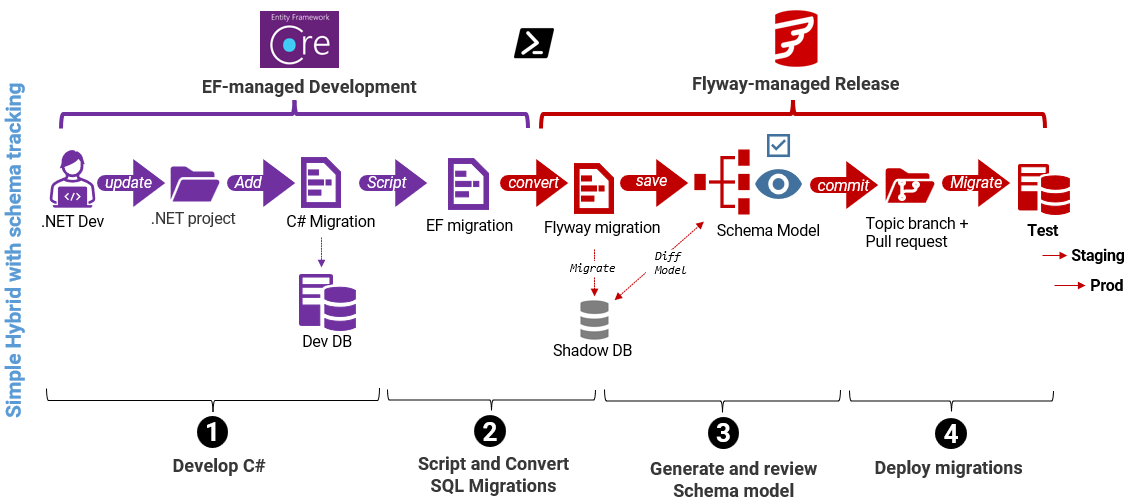
- Develop C# classes and migrations. As per the simple hybrid.
- Generate and convert the SQL migrations. As per the simple hybrid
- Generate the schema model.
- Flyway builds the latest version of the database schema – by running the converted SQL migration on its 'shadow' configuration database.
- Flyway save the database schema model – uses the diff and model commands to construct the schema model and save it to the Flyway project
- DBA review stage – using both the new versioned migration script and the object‑level differences between the previous version and the new one.
- Deploy migrations with Flyway. As per the simple hybrid.
This script demonstrates the new step 3, where Flyway recreates the current version of the database by running converted migrations on the shadow database, and then uses schema comparison to save latest CREATE definitions of each object and store them as individual files on disk (the schema model). This is an 'inverted' form of the standard Flyway development workflow, where we save development changes in the schema model first, and then capture them in a migration.
Committed to version control, the schema model can be included in the pull request and will allow users to track changes to individual database objects and their relationships, as the database moves from version to version. Each release now has a known database version and state, giving teams a stable baseline for review, testing, and rollback planning.
Additional strengths of simple hybrid with schema tracking
We now have a workflow where the database moves from one known version to another using a series of discrete, tested migrations, with full "database object level" traceability of every change. The result is a more predictable, testable, and traceable evolution of the database that DBAs can inspect, review, and optimize. It also makes testing simpler and more reliable.
Teams can see not just the SQL changes, but how they affect the existing database structure, what new indexes might be required to support performance, and so on. This shared visibility encourages earlier and more effective collaboration between developers and DBAs, which will spot and fix design mistakes and performance issues much earlier.
Weaknesses
This model still relies on Entity Framework to translate data model changes into efficient and reliable SQL changes. For data models that have grown complex over time, or for difficult changes that affect many database objects, it becomes less reliable. If it doesn't manage dependencies correctly, it can cause delays to the release or failed deployments.
EF-FW hybrid with Flyway-generated migrations
Flyway now becomes responsible for generating and validating the SQL itself, allowing teams to test, review, and optimize database changes at the point the SQL is generated, not just when it is deployed.
At this stage, visibility and traceability are already in place; what changes here is that SQL generation is no longer delegated to EF.
In this final iteration of the EF-FW workflow, we 'shift left' the involvement of Flyway so that it becomes responsible for generating and checking the SQL migration script, rather than just using the converted EF-generated script.
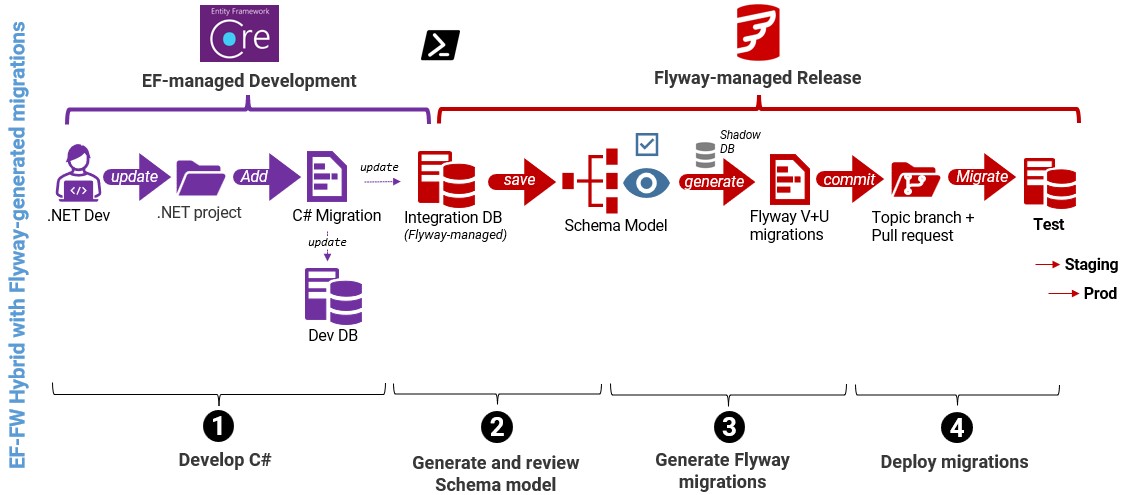
- Develop C# classes and migrations. As per the simple hybrid.
- Generate the latest schema model directly from the EF migration
- Apply the latest EF migration to a Flyway "dev" database (e.g. an Integration database) – using the dotnet CLI
- Save the schema model – using the Flyway CLI, with flyway diff "-diff.source=integration" "-diff.target=schemaModel" followed by flyway model to capture object‑level differences between the integration database and the schema model folder.
- Generate versioned migrations from the schema model
- Fly runs a
diffcommand, with the schema model as the source and the migrations folder (materialised in the shadow database) as the target, to capture development changes in a Flyway versioned migration.. It validates the generated script by running it on the shadow and then saves it. - Commit both the schema model changes and the new versioned migration script to version control
- Fly runs a
- Deploy migrations with Flyway. As per the simple hybrid.
This PowerShell script demonstrates the new workflow, which is essentially running the standard, full Flyway Desktop workflow automatically.
Backup as a baseline
Flyway can use a recent schema-only production backup as the baseline for its shadow database. This provides a known, stable starting state, even for legacy systems with complex dependencies or missing references. Flyway then validates each new migration as it’s applied to the integration database, continuously verifying that the new release remains in a working state.
In this final workflow, SQL migrations now rely on Flyway's mature schema comparison engine, which understands the database as a system of interdependent objects and data, rather than a set of changes implied by a code model. It will correctly discover every type of object change and fully account for all dependencies in building a reliable deployment script. It will 'flag' any risky or destructive changes at the point the SQL is generated, rather than being discovered later during deployment or testing.
Additional strengths of EF-FW hybrid with Flyway-generated migrations
Reliable, versioned migration scripts and full object‑level visibility for every change, at the point the change is generated. DBAs and developers can review schema changes early, and the process integrates neatly into the normal Flyway Desktop Workflow.
Weaknesses
This hybrid workflow is the first in which Flyway SQL migrations are derived directly from a single EF Core migration. Identifying which C# model change led to a particular database change will typically rely on pull requests, commit history, or agreed conventions rather than an automatic mapping.
Comparing the workflows
With three different hybrid workflows on the table, it helps to see them lined up next to each other. Each hybrid workflow addresses a different class of risk. The right choice depends on where your main pain points lie today: deployment reliability, visibility into schema change, or early validation of complex database updates. Teams often start with the simpler models and introduce deeper controls as systems and data models grow.
Here's a quick side-by-side comparison of the workflows:
| Workflow | Strengths | Weaknesses |
|---|---|---|
| EF Core Code First | Fastest developer feedback loop; minimal tooling; easy to spin up environments from code | No controlled promotion to staging/production; limited visibility into SQL changes; rising deployment risk as complexity grows |
| Simple EF–Flyway Hybrid | Predictable, repeatable deployments; safer execution of schema changes; minimal disruption to existing EF workflows | Limited visibility into what changed between versions; EF still controls how model changes are translated into SQL |
| Hybrid with Schema Tracking | Known database version and state at each release; object-level visibility enables review, testing, and rollback planning | Two-step workflow requires coordinating schema models and migration scripts within the release process; SQL generation still derived from EF migrations |
| Hybrid with Flyway-generated migrations | Earliest possible detection of risky or destructive changes; SQL generated with full awareness of dependencies and data safety; clean, optimizable migrations | Requires earlier review and ownership of database changes; EF migration no longer the authoritative source of change |
In all hybrid approaches, SQL migrations are the source of truth for how the database changes are deployed. Any manual edits to those scripts, whether for performance, security, or compatibility, must be ported back into the EF model. In disciplined EF teams, emergency SQL fixes are retrospectively reflected in the EF model by creating follow-up migrations, but this relies on careful coordination.
This challenge exists regardless of how the SQL was generated. What the later hybrid models improve is when and how clearly these differences are exposed. By detecting and reviewing discrepancies earlier, teams can resolve them deliberately, rather than discovering them during deployment or at runtime.
Automating hybrid workflows with the Flyway CLI
Having chosen the hybrid workflow that works best for your team, the next step is to chain the scripts together into a pipeline. That's why, in the follow-up article, I'll use Azure DevOps pipelines and GitHub Actions to:
- Export and normalize EF migrations so they map cleanly to Flyway's versioned/undo conventions.
- Apply changes to a shadow database to validate the current state before anything touches shared environments.
- Capture object-level changes by diffing the development database against the schema model and saving the results.
- Generate and validate migration scripts from the model (with the shadow DB in the loop), ready for review.
- Commit and promote with lightweight checks, PR reviews, and drift detection, all from the CLI and CI.
Can't wait? As the attentive reader may have noticed, I've already published working examples of all the workflows in my GitHub repository, including pipeline YAMLs: EFCore2FlywayDesktop, and the pipeline can be seen in action on this open Azure DevOps project.
Conclusion
EF Core Code First is powerful but often opaque: migrations are hidden in C#, and this abstraction can obscure how database changes are applied, often surprising DBAs at deployment time. Flyway brings discipline to database migrations by making changes explicit, versioned, and reviewable, while still fitting naturally into a model-first EF workflow.
By adopting a hybrid workflow, teams can retain the development convenience of Code First while introducing progressively stronger controls around how database changes are reviewed, validated, and promoted between environments.
Simple conversions make EF migrations deployable through Flyway, schema tracking adds object-level visibility and a stable database state for review and testing, and Flyway-generated migrations surface risk at the point SQL is created, so problems are caught earlier, when they are easier and less costly to fix.
In this article, the focus was on the why and the what of hybrid workflows that combine Entity Framework Core and Flyway. In the follow-up article, we’ll dive into the how: breaking down the automation scripts and showing how to integrate these workflows into CI/CD pipelines using tools like Azure DevOps or GitHub Actions.
That’s where these workflows come together, turning what is often a fragile, manual process into a fully automated pipeline that is faster for developers, safer for DBAs, and more predictable for everyone involved.
This document contains proprietary information and is protected by copyright law.
Copyright © 2026 Red Gate Software Limited. All rights reserved
Tools in this post
You may also like

Article
Flyway at Redgate - meet the team
So Flyway has joined the Redgate stable… A quick word of introduction – I’m Julia Hayward, I’ve been a software engineer for 26 years, four of those at Redgate, and I’ll be looking after Flyway. This is my first blog on flywaydb.org, and after a week of learning my way around the whole of Flyway’s code, I’m realising just what a hard act Axel will be to follow. I first came across Flyway at a hackathon week a few years ago and recall being impressed by how easy it was to get up and running, and how many databases it worked

Webinar
From Bottleneck to Breakthrough: Gain Control and Confidence in Your Monolithic Database Changes
Monolithic systems sit at the core of many mission‑critical platforms, especially in industries such as finance, but they often become a bottleneck when change feels risky. In practice, most organizations don’t fix monolithic databases or break them apart all at once. Instead, they work with them: stabilizing the core, managing dependencies, and making controlled, incremental changes that reduce risk while enabling progress. In this session, we’ll explore how development teams accelerate database change in monolithic environments without compromising stability, uptime, or compliance. We’ll look at how consistent control, visibility, and governance help organizations move faster, even as legacy systems remain
Article
Managing Credentials Securely with Flyway Resolvers
One of the problems that creeps up on you as a Flyway project grows is how to manage securely the different credentials Flyway needs to access all the databases it needs to migrate. It's easy enough to get started by storing them in the TOML config files, but that approach isn't viable once you're dealing with sensitive data, multiple environments, or stricter security requirements. Fortunately, Flyway's Property Resolvers give us several ways to pull credentials, connection information and other config details from secure stores, such as secrets managers, at runtime.

Article
Safer Database Deployment: The Role of Test Data Management
Any organization that aims for reliable, online deployment of database changes needs a Test Data Management (TDM) strategy that allows developers to test the database early, thoroughly, and repeatedly, with the right test data. The benefits include more resilient database deployments, fewer bugs, and shorter lead time for changes.
Article
New in Flyway: Pre and post deployment scripts for state-based deployments via callbacks
Flyway provides a lot of flexibility for releasing database changes in a safe and repeatable manner. Earlier this year, we added the ability to automate state-based deployments. This means the structure of the database is defined in version control and Flyway handles updating a target database to match it. The Flyway comparison engine does all the hard work of identifying what’s different and creating a script that will run on the target database to alter it so it matches the latest state. This is also referred to as a declarative approach, “make the target look like this.” The Flyway comparison
Article
Flyway's Validate Command Explained Simply
The Validate command aims to ensure that Flyway can reliably reproduce an existing version of a database from the source migration scripts by warning you if files are retrospectively added, removed or altered that would prevent it from doing so. Validation errors are Flyway's warning that "the source for this version has changed".
Loading comments...