


Web applications typically include multiple JavaScript files – jQuery, application code, plugins, vendor libraries – and loading each as a separate HTTP request is wasteful. ASP.NET MVC 4 introduced bundling and minification via the System.Web.Optimization namespace: combine multiple script files into a single bundle request (fewer HTTP round-trips) and minify the combined content (remove whitespace and comments for smaller payload).
The ScriptBundle class is the specific type for JavaScript bundles (StyleBundle exists for CSS). Workflow: (1) define bundles in App_Start/BundleConfig.cs – each bundle specifies a virtual path and the source files it combines; (2) register the bundles in Application_Start of Global.asax; (3) reference bundles in Razor views using @Scripts.Render(‘~/bundles/bundlename’); (4) in debug mode, bundling is bypassed (individual files served for debugging); in release mode, bundles are combined and minified automatically.
Update May 2026: This article covers ASP.NET MVC 4-5 bundling using System.Web.Optimization – applicable to ASP.NET Framework applications. ASP.NET Core (.NET Core 3.1+, .NET 5+) uses different tooling: either WebOptimizer (NuGet package providing similar patterns), bundler/minifier Visual Studio extension, or modern JavaScript build tools (Webpack, Vite, esbuild) integrated via BuildBundlerMinifier or npm scripts. Concepts transfer; APIs differ.
Introduction
MVC 4 introduced request bundling and minification techniques to reduce request load time. Bundling allows us to request a collection of static files from the server in one HTTP request.
Bundling
The technique of bundling is shown in the diagram below:
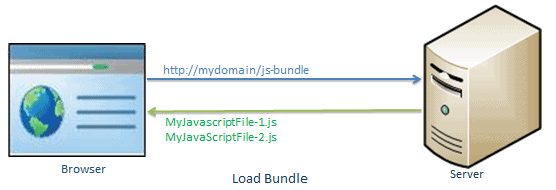
Source – Loading script files in separate requests
In the namespace System.web.Optimization, MVC 5 has the following bundle classes:
The browser sends two distinct requests to load two different JavaScript files, MyJavaScriptFile-1.js and MyJavaScriptFile-2.js, in the figure above.
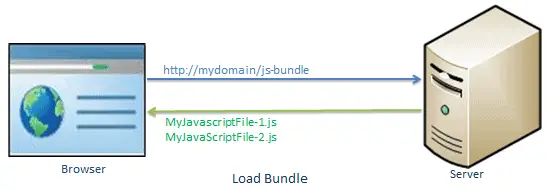
As illustrated below, the bundling technique in ASP.NET MVC allows us to load two JavaScript files, MyJavaScriptFile-1.js and MyJavaScriptFile-2.js, in a single request.
What Bundling Does?
- Bundling is among the new features of Asp.net MVC that combines the files into a single file per bundle.
- A bundle may include multiple files, but regardless of the number of files in it, a single request returns the whole bundle.
- By removing superfluous spaces commented texts, and shortening the names of scoped variables, the entire file’s content has been reduced in size.
- It is easier for developers to refer to a group of files through a single file,
- Stylesheet bundles and JavaScript bundles are not the same.
Minification
The minification technique reduces the size of a script or CSS file by deleting extraneous white space and comments, as well as shortening variable names to one character.
Example
|
1 2 3 4 5 6 7 8 9 10 |
var MINI = require('minified'); var $ = MINI.$, $ = MINI.$, EE = MINI.EE; $(function () { $('#moveButton').onClick(function () { $('#block').animate({ $left: Math.random() * 150 + 'px', $top: Math.random() * 150 + 'px' }, 500); }); $('#resetButton').onClick(function () { $('#block').set({ $left: '10px', $top: '10px' }); }); }); |
Minification will reduce the number of characters in a Javascript file by removing extraneous white spaces, comments, and reducing variable names. Consider the javascript function below as an example. The above JavaScript will be condensed into the snippet below.
Simple Talk is brought to you by Redgate Software
Example
|
1 |
var MINI = require("minified"), $ = MINI.$, $ = MINI.$, EE = MINI.EE; $(function () { $("#moveButton").onClick(function () { $("#block").animate({ $left: 150 * Math.random() + "px", $top: 150 * Math.random() + "px" }, 500) }), $("#resetButton").onClick(function () { $("#block").set({ $left: "10px", $top: "10px" }) }) }); |
Bundling and minification have an impact on the page’s loading time.
Bundle Types
ScriptBundle:
JavaScript minification of single or multiple script files is handled by ScriptBundle.
StyleBundle:
CSS minification for single or multiple style sheet files is handled by StyleBundle.
DynamicFolderBundle:
ASP.NET creates a Bundle object from a folder containing files of the same kind.
The JavaScript minification of single or many script files is handled by ScriptBundle.
Now, in this article, you’ll learn how to use ASP.NET MVC to combine many JavaScript files into a script bundle that can be returned in a single HTTP request.
The ScriptBundle class represents a bundle that minifies and bundles JavaScript code. In an ASP.NET MVC project, the BundleConfig class in the App Start folder can be used to generate style or script bundles. This method has a parameter bundle, which is of the type BundleCollection. At the start of the program, all of the bundles created are added to this bundle parameter. (Instead of using BundleConfig, you can develop your own custom class, but it’s best to stick to standard practice.)
This file contains the RegisterBundles() function, which is called by the global.asax.cs file at the Application Start() event.
The following example shows how to make a script bundle.
Example
|
1 2 3 4 5 6 7 8 9 10 11 12 13 |
using System.Web; using System.Web.Optimization; public class BundleConfig { public static void RegisterBundles(BundleCollection bundles) { bundles.Add(new ScriptBundle("~/bundles/bs-jq-bundle").Include( "~/Scripts/bootstrap.js", "~/Scripts/jquery-3.3.1.js")); //the following creates bundles in debug mode; //BundleTable.EnableOptimizations = true; } } |
We created a new bundle in the above example by making an instance of the ScriptBundle class and passed the virtual path and bundle name into the constructor.
The /bundles/ is a virtual path, and bs-jq-bundle is the name of a bundle. Then, in this bundle, we included two js files, bootstrap.js and jquery-3.3.1.js. After that, we included two js files in this bundle: bootstrap.js and jquery-3.3.1.js. You can use the bundles.Add() method to add the new bundles to the BundleCollection. As mentioned above the bs-jq-bundle will be created in release mode by default. Use BundleTable.EnableOptimizations = true if you want to observe bundles in debug mode.
Use the Scripts.Render() method in the layout view to include the aforementioned bs-jq-bundle in your webpage.
Example
|
1 2 3 4 5 6 7 8 9 10 11 12 |
<!DOCTYPE html> <html> <head> <meta charset="utf-8" /> <meta name="viewport" content="width=device-width, initial-scale=1.0"> <title>@ViewBag.Title</title> @Scripts.Render("~/bundles/bootstrap") </head> <body> @*html code removed for clarity *@ </body> </html> |
In a similar manner, we can use these bundles references in any of our views.
When you run the application in release mode, you’ll notice that the bundle is now generated and loaded in a single request.
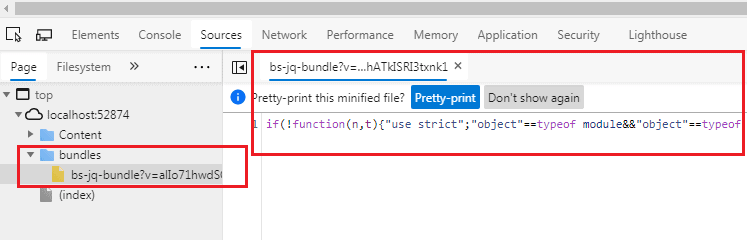
Source – Generate the bs-jq-bundle
Include a Directory in Bundle
To add all the files inside a specific directory to a bundle, use the IncludeDirectory method as shown below.
Example
|
1 2 3 4 5 |
public static void RegisterBundles(BundleCollection bundles) { bundles.Add(new ScriptBundle("~/bundles/scripts") .IncludeDirectory("~/Scripts/", "*.js", true)); } |
Using Wildcards
The name of the script file in most third-party JavaScript files includes a version. For example, the version of jQuery is included in the file name. The wildcard {version} will automatically pick up a version file that is accessible.
Example
|
1 2 3 4 5 6 7 8 |
public class BundleConfig { public static void RegisterBundles(BundleCollection bundles) { bundles.Add(new ScriptBundle("~/bundles/jquery") .Include("~/Scripts/jquery-{version}.js")); } } |
This selector tells the system to choose all files whose names begin with the text ‘jquery’
Using CDN
As demonstrated below, you may also use the Content Delivery Network (CDN) to generate a bundle of files.
Example
|
1 2 3 4 5 6 7 8 9 |
public class BundleConfig { public static void RegisterBundles(BundleCollection bundles) { var cdnPath = "http://ajax.aspnetcdn.com/ajax/jQuery/jquery-1.7.1.min.js"; bundles.Add(new ScriptBundle("~/bundles/jquery", cdnPath) .Include("~/Scripts/jquery-{version}.js")); } } |
Note
From the Application Start event in the Global.asax.cs file, the ASP.NET MVC framework executes BundleConfig.RegisterBundle().As a result, when an application starts, all bundles are added to the BundleCollection.
Conclusion
In this blog, we have learned about how to combine ScriptFiles using ScriptBundle in ASP.NET MVC using directory in bundle, wildcards, CDN with example. This will help you to improve your skills and grip over Asp.net MVC.
Subscribe to the Simple Talk newsletter
This document contains proprietary information and is protected by copyright law.
Copyright © 2026 Red Gate Software Limited. All rights reserved


Load comments