Security and compliance
Ensure data security and compliance with monitoring and change traceability
Ensure data security and compliance with monitoring and change traceability
Monitor and understand your databases with full visibility into performance and change
Build, test, and deploy database changes with confidence
Simplify and speed up database development workflows
Prepare reliable data foundations for AI initiatives
Simplify and secure database modernization across platforms
Control costs and boost efficiency in database operations
Simplify and speed up cloud database transformation
A workflow-led solution for SQL Server development teams, covering database design, AI-assisted coding, version control, testing, and safe deployment. Everything your team needs to deliver faster, with less risk.
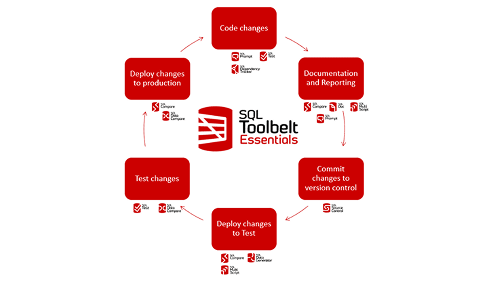
SQL Toolbelt Essentials is an AI-augmented, workflow-led solution for SQL Server database teams, covering schema design, coding, version control, testing, and deployment. One solution. Every stage of database development.
Works with SQL Server on-premises and in the cloud. No complex setup, and your team can start seeing results from day one.
What’s more, it’s easy to get started and see impact quickly, for less than the price of a daily coffee per user*.
Download free trial1 Year Subscription
Equivalent to $117.50/user/mo
Considering a longer-term contract?
Ask us about available discounts on SQL Toolbelt Essentials
When every developer works differently, inconsistency compounds: mismatched code styles, environment drift, review bottlenecks. SQL Toolbelt Essentials gives your team a shared workflow, from design to deployment.

Issues caught late cost more, in time, reputation, and recovery effort. SQL Toolbelt Essentials builds risk reduction into the workflow: test before deployment, compare schemas across environments, deploy with dependency-aware scripts. Problems get caught by the developer who introduced them, not escalated later.

Every database change is versioned and auditable, as a byproduct of how your team works, not a separate exercise. Meet compliance requirements without manual logging, diagnose incidents faster, and protect institutional knowledge as your team evolves.

New
Available with Prompt v11 or later (In preview)
Redgate Assistant lives in a dockable chat panel inside SSMS and builds on the capabilities of SQL Prompt. It's aware of your connected database and what's in your query editor, so the answers you get back are relevant to what you're working on.


Write better SQL, faster. AI that understands your schema completes multi-line queries, catches issues, and fixes them, without leaving SSMS. Less time on formatting and debugging. More time on the work that matters.

One standardized way of working, from design to deployment. Fewer review cycles, less rework, and releases that are predictable. Any developer can contribute database changes safely, not just your most trusted few.

Less downtime. Faster delivery. Lower risk. Every database change is auditable as a byproduct of how your team works, meeting compliance requirements without manual overhead. One investment, measurable outcomes.
No complex setup. Your team works in SSMS today, SQL Toolbelt Essentials fits straight in. Start seeing results from day one.
SQL Toolbelt Essentials includes 11 tools covering every stage of SQL Server development. No complex setup, your team can start seeing results from day one.
No complex setup. Your team works in SSMS today, SQL Toolbelt Essentials fits straight in. Start seeing results from day one.
Whether you want more details about SQL Toolbelt Essentials, a demo or information on best practices – get in touch with us.

Redgate has specialized in database software for over 25 years. Our products are used by 92% of the Fortune 100. 200,000 customers rely on Redgate worldwide.
Redgate offers comprehensive documentation and a friendly, helpful support team. An average 87% of customers rate our support 'Excellent'.
*SQL Toolbelt Essentials costs $4.88 per user, per working day when 10 licenses are purchased.
The cost of a short flat white in Starbucks is $6.37 (as of 27.10.2025).
SQL Toolbelt Essentials includes 11 tools covering every stage of SQL Server development. No complex setup, your team can start seeing results from day one.
Design, update, and manage database schemas collaboratively, before a line of code is written. Browser-based with real-time collaboration, built-in versioning, and automated SQL generation. No installation required.
Save time and effort writing, formatting and debugging SQL code from day one. SQL Prompt works alongside you in SSMS to automatically complete, analyze and fix your code, as well as taking care of formatting, refactoring, and saving query history. It also includes optional AI-powered features, including access to Redgate Assistant (in preview), to help you to write, understand and optimize your code with ease.
Keep teams aligned and every change accounted for. With SQL Source Control, you can connect your database to your version control system directly from SSMS — no context switching required. It automatically scripts every database object into versioned files, making it easy to track changes, collaborate across teams, and maintain a complete history of your database development.
Generate realistic test data in seconds. With SQL Data Generator, you can quickly create large volumes of test data right inside SSMS. It automatically suggests generators based on your table and column names, data types, field lengths, and constraints — all of which you can customize to suit your testing needs. So, you get meaningful, production-like data with just a few clicks.
Avoid deployment errors and rework by catching code issues early. SQL Test helps you to release reliable database changes by making sure your code works as expected, before it reaches production. Write unit tests in T-SQL directly within SSMS, using built-in examples to get started quickly. You’ll also benefit from SQL Cop tests that flag common issues like fragmented indexes, poorly sized data types, and missing keys.
Save yourself the time and hassle of trawling through lines of code. With SQL Search, you can quickly find the SQL you need across multiple SQL Server databases and object types, right within SSMS.
Get the control and clarity you need to manage database schema changes safely and efficiently. SQL Compare reduces risk, maintains environment consistency, and keeps you in command of every change. Instantly see what’s different across development, test, and production, generate reliable deployment scripts that handle dependencies automatically, and highlight risks like data loss before you deploy — so issues can be identified and resolved quickly.
Only available as part of SQL Toolbelt Essentials: SQL Compare Pro extends SQL Compare with additional capabilities, including running deployments from the command line*, deploying a live database from a set of SQL object scripts, and restoring database objects from a backup file.
To use Redgate's command line tools as part of a Redgate Pipeline (an automated database change delivery process) a Redgate Flyway Enterprise or SQL Toolbelt license is required.
Keep your environments in sync and your data accurate. SQL Data Compare identifies and synchronizes data differences across SQL Server databases quickly and safely. Whether you’re refreshing test data, recovering from data drift, or verifying production fixes, it saves time, reduces risk, and ensures consistency where it matters most — in the data your business depends on.
Only available as part of SQL Toolbelt Essentials: SQL Data Compare Pro extends SQL Data Compare with additional capabilities, including comparing data from backup files, restoring individual rows without restoring a full database, and automating data comparisons and synchronizations from the command line.
To use Redgate's command line tools as part of a Redgate Pipeline (an automated database change delivery process) a Redgate Flyway Enterprise or SQL Toolbelt license is required.
Make understanding your databases effortless. SQL Doc automatically generates comprehensive, up-to-date documentation for your SQL Server databases — including tables, procedures, relationships, and dependencies. With customizable output and scheduled updates, your documentation stays accurate and accessible, improving collaboration, reducing knowledge silos, and helping teams make changes confidently.
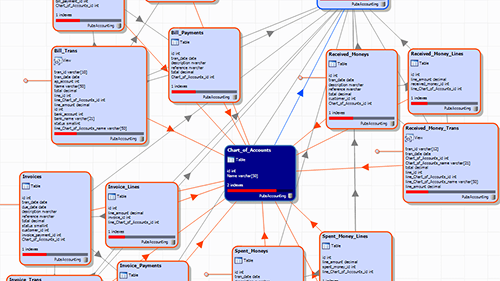
See the full picture before making a change. SQL Dependency Tracker visualizes object dependencies across your SQL Server databases, so you can assess impact, prevent breaking changes, and plan updates safely. By providing clear, interactive diagrams, it improves communication between developers and DBAs and reduces the risk of costly deployment errors.
Save hours on routine database administration. SQL Multi Script enables you to execute T-SQL scripts across multiple servers and databases simultaneously, with results returned in a single, easy-to-review interface. Whether you’re applying updates, running reports, or checking configurations, it streamlines repetitive tasks and ensures consistency across large or distributed SQL Server estates.
SQL Toolbelt Essentials works in the following environments:
SQL Toolbelt Essentials is licensed per user as an annual subscription, with volume discounts available. Contact us at sales@red-gate.com for more information.